
Table of Contents
Table of Contents
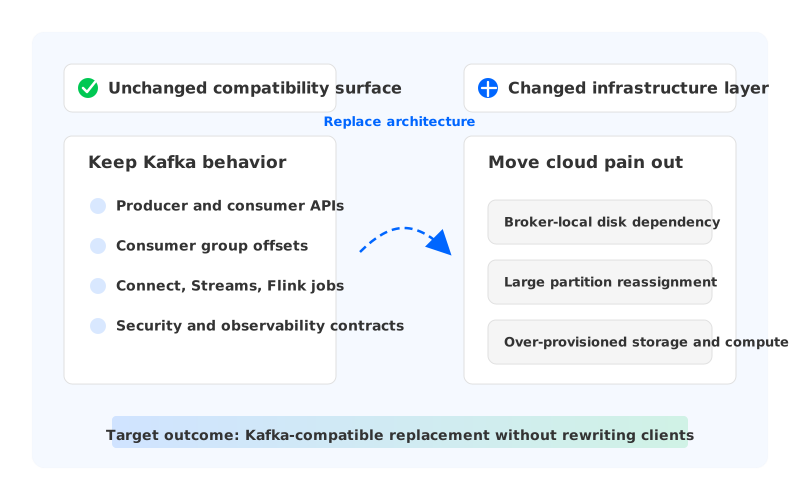
Most teams searching for a GCP Kafka replacement are not trying to abandon Kafka. They are trying to get out of the parts of Kafka that became painful in the cloud: broker-local disks, capacity planning around partitions, slow reassignment, cross-zone replication, and operations that turn every scaling event into a storage event. The Kafka API is rarely the enemy; the infrastructure shape around it usually is.
That distinction matters because "replacement" can mean two different things. One path replaces Kafka as an application contract, which means changing producers, consumers, stream processors, connectors, and sometimes the event model itself. The other path replaces the traditional Kafka infrastructure while keeping Kafka clients and operational semantics close enough that applications keep speaking Kafka.
On Google Cloud, the replacement conversation usually starts with self-managed Kafka on GKE or Compute Engine, Google Cloud Managed Service for Apache Kafka, and non-Kafka services such as Pub/Sub. Each can be right in a different context. The mistake is evaluating them as if they preserve the same compatibility surface.
1What Should And Should Not Change In A Kafka Replacement
A good Kafka replacement plan starts by separating the application contract from the infrastructure implementation. Producers care about bootstrap endpoints, authentication, topic names, partitioning behavior, acknowledgments, retries, idempotence settings, and delivery expectations. Consumers care about group membership, offsets, lag behavior, assignment strategy, and reprocessing behavior.
The infrastructure team cares about where logs are stored, how brokers recover, how partitions move, how capacity is added, how zone failure behaves, and how security boundaries map to VPCs and service accounts. These concerns are connected, but they are not the same. Rewriting the first list is expensive because it touches application teams. Changing the second list is the opportunity.
That is the boundary a replacement project should protect:
| Surface | Should stay familiar | May change |
|---|---|---|
| Client contract | Kafka producer, consumer, and admin APIs | Bootstrap address, credentials, TLS/SASL details |
| Data position | Topic partitions and consumer offsets where supported | Migration tooling and validation process |
| Ecosystem | Kafka Connect, Kafka Streams, Flink Kafka connectors, monitoring patterns | Deployment model and managed operational workflows |
| Infrastructure | None of the application teams should depend on broker disks | Storage layer, broker elasticity, reassignment model |
| Cloud operations | VPC-level control and IAM review remain required | Who manages brokers, how storage is provisioned, how scaling works |
This table also explains why Pub/Sub is not a drop-in Kafka replacement when the requirement is preserving Kafka clients. Pub/Sub is a powerful Google Cloud messaging service with its own topics, subscriptions, delivery model, client libraries, and IAM patterns. It can replace Kafka in applications that are ready to move to Pub/Sub semantics, but that is not the same thing as keeping Kafka APIs.
Google Cloud Managed Service for Apache Kafka sits closer to the Kafka-compatible side because it is built for Apache Kafka clusters as a managed service. Self-managed Kafka on GKE or Compute Engine preserves Kafka semantics too, but leaves more of the operational burden with your team. AutoMQ enters this discussion as another Kafka-compatible path: it keeps the Kafka protocol and client ecosystem as the application-facing contract, while replacing the traditional broker-local disk architecture with cloud-native shared storage and stateless broker design.
2Compatibility Checklist
Compatibility is not a single yes-or-no claim. It is a set of contracts that need to be tested. A team can say "our Java producers work" and still break a Flink job because offset handling or topic configuration changed in a way the job depends on.
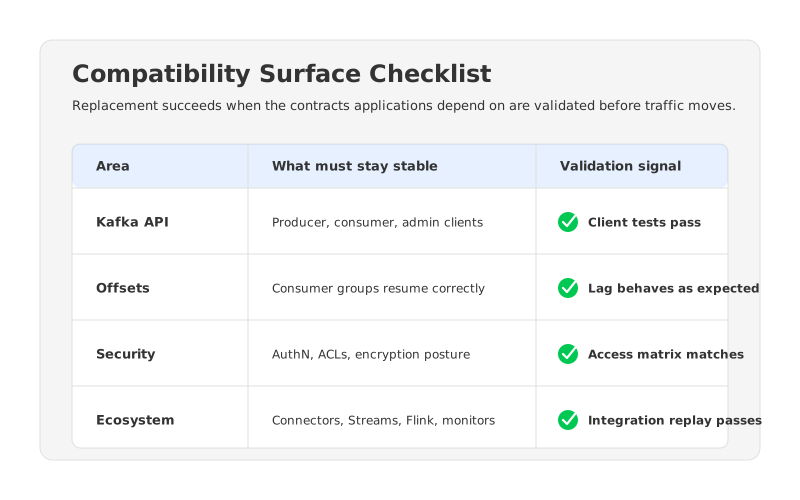
The practical checklist is short enough to run, but wide enough to catch surprises:
- Client APIs and versions. Inventory producer, consumer, admin, Connect, and Streams clients, then verify supported versions and configuration compatibility against the target platform.
- Offsets and consumer groups. Validate whether consumer group progress can be preserved, synchronized, or intentionally reset. This is especially important for Flink, Kafka Streams, and services with replay-sensitive side effects.
- Security model. Map SASL, TLS, mTLS, ACLs, service accounts, and network access rules before moving data. On Google Cloud, check VPC, subnet, firewall, Private Service Connect, and IAM assumptions.
- Topic and broker configuration. Compare retention, compaction, partition count, replication assumptions, max message size, min in-sync replicas, quotas, and transactional settings.
- Ecosystem dependencies. Kafka Connect workers, Schema Registry usage, Flink jobs, observability agents, and incident runbooks should be tested as first-class migration subjects.
- Operational behavior. Measure lag, produce latency, fetch latency, error rates, rebalance frequency, and recovery behavior under the workload that matters. A replacement that passes a hello-world test has not yet passed production validation.
Many migration plans become too optimistic here. They focus on the broker endpoint and forget that Kafka has become a platform dependency. The real work is proving that the target can carry the same application contracts while improving the infrastructure model that made replacement necessary.
3Replacement Architecture On GCP
There are four common architecture patterns for replacing Kafka on Google Cloud. The right choice depends on whether you are replacing operations, infrastructure, or semantics.
Self-managed Kafka on Compute Engine gives maximum control over VM shape, disk choice, network topology, Kafka version, and custom tooling. It also keeps the most operational responsibility: broker sizing, disk expansion, partition balancing, upgrades, failure handling, and cost control. This is reasonable when your team needs deep customization, but less compelling when the main goal is reducing Kafka operations.
Kafka on GKE can improve deployment consistency and integrate with Kubernetes workflows, but it does not automatically remove the hard part of Kafka. Stateful workloads still need persistent storage, careful scheduling, disruption budgets, and recovery planning. Kubernetes makes orchestration more uniform; it does not make broker-local disks disappear.
Google Cloud Managed Service for Apache Kafka reduces broker management while keeping teams in the Apache Kafka world. For teams that want managed Kafka on Google Cloud, this is an obvious candidate to evaluate. The evaluation should still include networking, quota, cluster sizing, region availability, feature support, and how the service maps to existing security and observability practices.
Pub/Sub is a different category. It is a managed messaging service designed around Google Cloud's Pub/Sub model rather than the Kafka protocol. It may be a strong replacement when the application can adopt Pub/Sub topics, subscriptions, client libraries, and delivery semantics.
AutoMQ belongs in the Kafka-compatible replacement category, but with a different architectural emphasis from traditional Kafka. Instead of binding durable log storage to broker-local disks, AutoMQ separates compute from storage and uses object storage as the durable storage layer. Brokers become more stateless, so scaling and recovery are less tied to moving large amounts of partition data between broker disks. In a GCP deployment, you still validate VPC, subnets, IAM, GCS access, client connectivity, and capacity. The difference is that the storage and broker lifecycle are no longer shaped like traditional Kafka.
4Migration And Cutover Plan
The safest replacement plans are boring in the right way. They do not start with a dramatic cluster-wide switch. They start with an inventory, a target environment, a replication path, validation gates, and a rollback path that is still credible when the first production traffic moves.
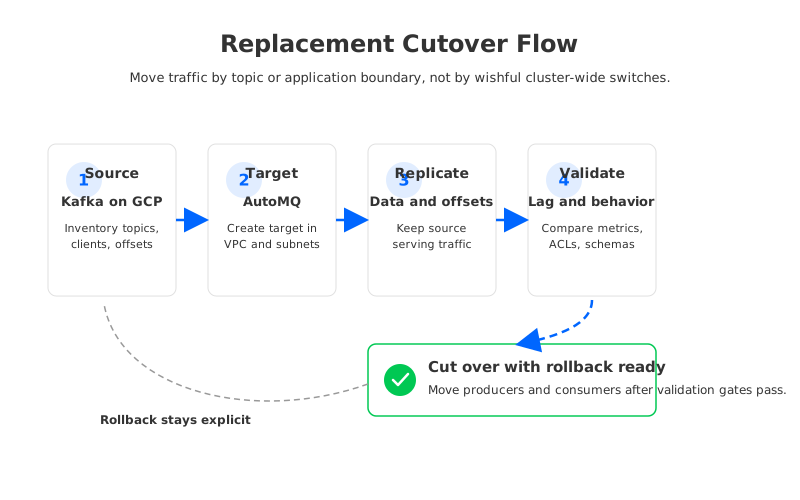
Begin with a source inventory. Record topics, partitions, retention, compaction, producers, consumers, consumer groups, ACLs, credentials, connectors, stream processors, peak throughput, and lag-sensitive workloads. This is how you discover that one "small" topic feeds a billing job, or that one consumer group cannot tolerate replay.
Create the target environment side by side. On Google Cloud, the replacement cluster should be placed where applications can reach it without awkward network paths. Check VPC routing, firewall rules, DNS, service account permissions, private access to Google APIs where needed, and monitoring export paths. If the target is AutoMQ BYOC on GKE, the AutoMQ documentation calls out GKE cluster preparation, node pool authorization, GCS bucket configuration, subnet planning, and private network access as part of the deployment work.
Next, replicate and validate before moving clients. The exact migration mechanism depends on the source and target. MirrorMaker 2 is a common Kafka ecosystem option, while AutoMQ Cloud documents Kafka Linking for migrations to AutoMQ, including data synchronization, producer migration support, and consumer progress handling. The key is proving that data position, write behavior, and read behavior are acceptable before broad cutover.
Validation should be specific enough to stop a bad migration:
- Producers can write with expected acknowledgments, idempotence settings, retries, and error handling.
- Consumers can resume from expected offsets or from an intentional reset point.
- Connectors and stream processors can run without hidden plugin, credential, or offset-store surprises.
- Security rules match the intended access matrix, including deny cases.
- Monitoring shows comparable throughput, latency, lag, broker health, and application error rates.
- Rollback remains possible because the source is still serving or can be resumed.
Then move traffic by business boundary. A topic group, application group, or domain boundary is easier to reason about than a random list of topics. Start with low-risk workloads, then move higher-risk workloads after the validation process has proven itself.
5Why AutoMQ Is A Kafka-Compatible Replacement Path
AutoMQ is most relevant when the team wants to keep Kafka as the application protocol but replace the traditional Kafka architecture that makes cloud operations expensive and slow. That is a narrower and more useful claim than saying "replace Kafka." Some teams want Kafka compatibility without continuing to design the platform around broker-local disks.
The architecture shift matters because traditional Kafka stores log data on broker disks and relies on replication between brokers for durability and availability. In cloud environments, that often forces operators to think about disk capacity, partition placement, inter-zone data movement, and reassignment as coupled problems. When traffic grows, storage grows with it. When a broker fails, recovery is tied to where partition data lives.
AutoMQ changes that coupling by moving durable log storage into object storage and making brokers more stateless. Broker scaling, balancing, and recovery become less dependent on copying large log segments from one broker disk to another. For GCP teams, that direction pairs naturally with GKE, GCS, private networking, and BYOC-style control, but it still requires production validation.
This is why AutoMQ should be evaluated against the right alternatives. Against Pub/Sub, the question is whether the organization wants to preserve Kafka APIs or adopt Pub/Sub semantics. Against Google Cloud Managed Service for Apache Kafka, the question is whether managed traditional Kafka is enough, or whether the team wants shared-storage Kafka with stateless brokers. Against self-managed Kafka, the question is whether control is worth the ongoing operational cost.
6Replacement Readiness Checklist
Before you call the project a Kafka replacement, make the readiness decision explicit. A replacement is ready when the target has passed application, platform, and rollback checks under realistic conditions.
Use this as a final gate:
| Readiness area | Pass condition |
|---|---|
| Client compatibility | Representative producer, consumer, admin, and stream processing clients pass integration tests |
| Data position | Offset preservation, sync, or reset behavior is documented for each consumer group |
| Security | Authentication, authorization, encryption, and network access match the intended policy |
| Operations | Dashboards, alerts, runbooks, and incident ownership are updated before traffic moves |
| Performance | Peak and failure-mode tests meet workload requirements, not only average traffic |
| Rollback | Source cluster, replication state, DNS/bootstrap changes, and ownership are clear enough to reverse |
The best GCP Kafka replacement strategy is usually not a single product decision. It is a boundary decision. Keep the Kafka contracts that applications rely on. Replace the infrastructure assumptions that make Kafka hard to operate in the cloud. When that boundary is clear, the evaluation becomes honest: Pub/Sub for teams ready to adopt Pub/Sub semantics, Google Cloud Managed Service for Apache Kafka for managed Kafka operations, self-managed Kafka for teams that need full control, and AutoMQ for teams that want Kafka compatibility with a cloud-native shared-storage architecture.
If your Kafka deployment on GCP is becoming a storage, reassignment, or scaling project every quarter, map your compatibility surface and migration batches before choosing a target. AutoMQ's GKE and migration documentation can help frame that evaluation for teams that want to preserve Kafka clients while changing the architecture underneath.
7References
- Google Cloud Managed Service for Apache Kafka overview
- Google Cloud Managed Service for Apache Kafka networking
- Google Cloud Pub/Sub overview
- Apache Kafka documentation
- Apache Kafka Streams documentation
- AutoMQ deployment on Google Cloud GKE
- AutoMQ client SDK guide
- AutoMQ migration overview
- AutoMQ compatibility with Apache Kafka
8FAQ
8.1Is Pub/Sub a drop-in replacement for Kafka on GCP?
No. Pub/Sub can replace Kafka in applications that are ready to adopt Pub/Sub's client libraries, topics, subscriptions, IAM model, and delivery semantics. If the requirement is to keep Kafka producers, consumers, offsets, and Kafka ecosystem integrations, evaluate Kafka-compatible options instead.
8.2Can I replace Kafka without changing any application code?
Sometimes the application code can stay largely unchanged, but "no changes" is too broad to promise. Bootstrap endpoints, credentials, TLS/SASL settings, client versions, topic configuration, and operational assumptions may still need updates. Treat compatibility as something to validate, not a slogan.
8.3What is the biggest risk in a Kafka replacement project?
The biggest risk is usually consumer position, not producer connectivity. A producer test can pass while consumers, Flink jobs, Kafka Streams applications, or connectors still depend on offset behavior that was not migrated or validated correctly.
8.4How is AutoMQ different from traditional Kafka on GCP?
Traditional Kafka binds durable log data to broker-local disks. AutoMQ is Kafka-compatible but separates storage and compute, using object storage as the durable storage layer and making brokers more stateless. The goal is to preserve Kafka-facing behavior while reducing the operational coupling between brokers, disks, and partition movement.
8.5Should I choose Google Cloud Managed Service for Apache Kafka or AutoMQ?
Choose based on the problem you are solving. If you want managed Apache Kafka operations on Google Cloud, Google's managed Kafka service is a natural candidate. If your main issue is the traditional Kafka storage and scaling model, evaluate AutoMQ as a Kafka-compatible shared-storage alternative.


