
Table of Contents
Table of Contents
A schema registry can reject an incompatible producer change before it reaches a topic. That does not prove that a consumer reading retained records months later can still decode them. Registry policy governs which versions may be registered; Kafka retention determines which encoded records remain in circulation. A production review has to connect the two.
The practical question is not whether a schema is marked backward-compatible. It is whether every consumer that may replay the retained log can obtain the right schema, read the bytes, and resume at the intended position. On Google Cloud, that means reviewing the managed registry boundary, the Kafka log, client identities, and the replay workload together. Compatibility is a deployment gate; replay is the evidence that the gate protects the real data path.
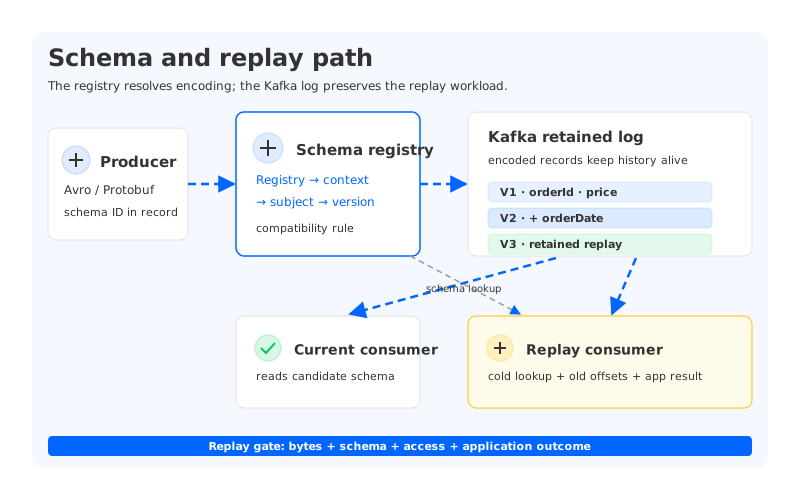
1A registry protects encoding, not history
Kafka records are byte strings. A producer serializes a value with a schema and usually carries a schema identifier that lets a consumer retrieve the matching definition. The registry can make that lookup consistent, but the record and the schema are still separate state. A registry outage, an incomplete export, or a subject that was renamed can leave a replay consumer with perfectly valid bytes and no way to interpret them.
That separation matters when retention outlives the application that produced the data. An online consumer may be upgraded with a producer, while a backfill job starts from an older offset using a library version that has not been exercised since the original release. The replay job follows the log, not the deployment calendar. Its contract must include the subject, schema version, format, registry endpoint, credentials, and behavior when a lookup fails.
Google Cloud's schema registry overview describes the registry as a repository shared by applications. The same page documents Avro and Protocol Buffers support and states that JSON is not supported by the registry API. Treat those facts as part of the workload inventory rather than assumptions hidden in a client configuration. If a topic carries JSON today, changing the registry policy will not make those existing records registry-backed.
2Map the GCP boundary before choosing a policy
The managed service organizes schemas under a registry, context, subject, and version. A registry-level compatibility setting can provide a default, while a subject-level setting can override it. That hierarchy lets a team tighten policy for an event family without changing every subject in the project. It also creates an audit question: which setting was effective when a version was registered?
At the time of writing, Google Cloud labels the integrated schema registry feature Pre-GA. Confirm the launch stage, client behavior, and regional availability for your configuration before making it a production dependency. Record the documented boundary and a fallback path if the API or client behavior changes.
| Boundary | Review question | Evidence to keep |
|---|---|---|
| Registry | Which compatibility default and schema mode apply? | Exported configuration and change history |
| Subject | Does this subject inherit or override the registry setting? | Subject-level response and owner approval |
| Client | Which endpoint, identity, format, and library perform lookups? | Client configuration, IAM binding, and test log |
| Log | How long can records reference older schema versions? | Topic retention policy and replay inventory |
| Recovery | Can the registry and its access path be restored with the Kafka data? | Restore test, credentials check, and endpoint record |
The table is wider than the registry API. A successful registration call proves that a definition passed a rule at one point. It does not prove that a recovery environment can reach the registry or that a historical subject still resolves.
3Compatibility level is a rollout policy
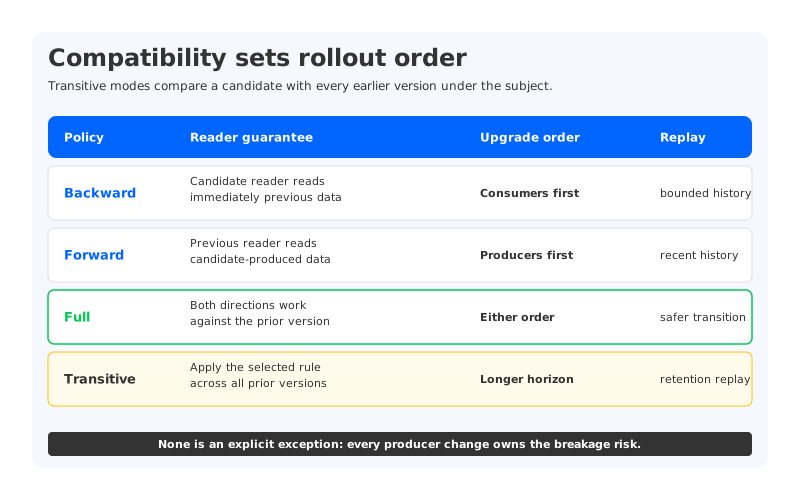
Compatibility modes encode an order of operations. Google Cloud's lifecycle documentation describes registry defaults, subject overrides, and transitive variants that compare a candidate against all earlier versions. The names are familiar to Kafka teams, but the operational consequence is often missed: a mode tells you which side of the producer and consumer upgrade has to move first.
| Policy | What the candidate must preserve | Upgrade implication |
|---|---|---|
Backward | A consumer using the candidate can read data written with the immediately previous schema | Upgrade consumers before producers |
Backward_transitive | The candidate can read data written with every earlier version in the subject | Useful when old records remain replayable for the full retention window |
Forward | A consumer using the previous schema can read data written with the candidate | Upgrade producers before consumers |
Forward_transitive | The previous schema can read candidate data across all earlier versions | Requires a longer compatibility horizon |
Full | The candidate works in both backward and forward directions against the immediately previous version | Producer and consumer order can be less constrained |
Full_transitive | Both directions hold against every earlier version | Strongest protection for long-lived replay, with tighter change rules |
None allows any change and therefore moves the safety decision into every producer deployment. It can be appropriate for an isolated subject with an explicit migration plan, but it should be a deliberate exception with an owner and an expiry. The default documented by Google Cloud is Backward; do not infer that a registry-wide default is the right policy for every topic.
The schema rule also needs a field-level policy. Adding a field can be safe when the reader has a default or treats the field as optional. Removing a field, changing a type, or changing an enum can affect older consumers in a different direction. Keep the proposed schema diff beside the compatibility result. “Registration succeeded” is too small an artifact to explain why a rollout was accepted. For a deeper Avro contract review, see Schema Registry Without the Lock-In.
4Replay is the real compatibility test
Replay tests expose the gap between an online deployment and the history it serves. Pick records from an older schema version, start a consumer with the candidate reader, and verify decoding and application behavior. A decoded record is not enough if a missing field changes a warehouse mapping or a default value triggers a different business action.
The replay harness should record the following for each subject under test:
- The topic, partition, starting offset or timestamp, and the schema version expected at that point.
- The registry endpoint and identity used by the consumer, including the failure behavior for an unavailable lookup.
- Producer-generated event IDs and application outcomes, so duplicates and missing records are visible.
- The candidate reader version, compatibility result, and any fallback deserializer used during the run.
Run the same sample after a registry restore or endpoint change. This checks whether the registry reference remains resolvable when the Kafka data path is healthy but the control path has moved. If the replay job uses a cached schema, record the cache lifetime and test a cold start. A separate serialization failure review covers the consumer-side signals when bytes and deserializers disagree.
5Put rollout gates in the release path
A schema change is safer when each decision leaves evidence that another operator can inspect. Use gates that match the actual failure modes:
- Ownership gate. Name the subject owner, the producer and consumer teams, the retention window, and the replay use case. A subject without an owner has no accountable compatibility decision.
- Format gate. Confirm that the topic uses a supported format, such as Avro or Protobuf for the managed registry, and document how existing records were serialized. Do not assume a JSON payload has a registry ID.
- Compatibility gate. Evaluate the candidate against the effective registry or subject policy. For long retention, run a transitive check or an equivalent test against the versions that a replay job can encounter.
- Replay gate. Read a bounded sample with the candidate consumer, exercise a cold registry lookup, and compare event IDs and application results with the source set.
- Canary gate. Deploy the producer or consumer change to a small traffic slice, watch lookup errors and decode failures, and retain the registration response with the deployment record.
- Rollback gate. Keep the prior schema, client image, and endpoint configuration available. A rollback is incomplete if the old consumer cannot read records produced during the canary window.
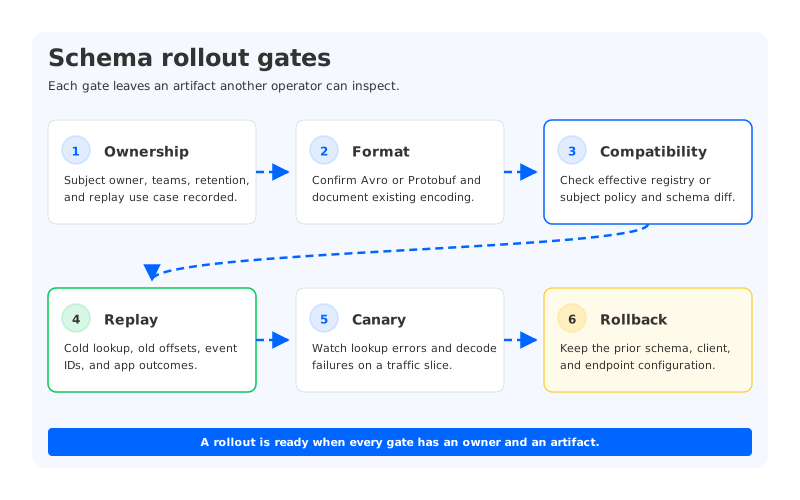
These gates turn schema evolution into a reversible operation. They also make incidents diagnosable: a failed lookup points to the registry path, a decode error points to format or schema selection, and a correct decode with a wrong business result points to application defaults or replay logic.
6Where a shared durable stream changes the review
The registry contract remains the same whether Kafka runs on a managed service, Kubernetes, or customer-owned infrastructure. Storage architecture changes which broker events can interrupt a replay. In a broker-local design, replacing a broker can involve local data placement, replica movement, and a catch-up period before it serves partitions. A steady-cluster replay test may fail during that transition if the client, registry, and retained log do not recover together.
AutoMQ is a Kafka-compatible cloud-native streaming platform built on a Shared Storage architecture. Its S3Stream storage layer places durable stream data in object storage and uses a WAL (Write-Ahead Log) layer for write and recovery behavior. That changes the storage question in a schema review: a broker replacement can be evaluated separately from the durable stream, while the registry and its access policy remain explicit dependencies. It does not remove the need to test schema lookup, subject policy, offsets, or application outcomes.
For an AutoMQ evaluation, keep the same replay fixture and gates. Run the producer and consumer with the chosen format, replace or isolate a broker according to the deployment runbook, and repeat the cold-start registry lookup. Compare record IDs, decode results, and application outcomes before claiming recovery. The useful result is a traceable boundary between Kafka-compatible client behavior, durable stream recovery, and the registry service you selected.
7FAQ
7.1Does a compatible schema guarantee that old Kafka records can be replayed?
No. Compatibility rules govern registration and schema evolution. Replay also requires the historical schema, subject identity, registry endpoint, credentials, serialization format, and application behavior to remain available.
7.2Which Google Cloud schema formats are supported?
The Managed Service for Apache Kafka schema registry documentation lists Apache Avro and Protocol Buffers. It states that JSON is not supported by the schema registry API. Verify the current service status and client path before using those formats in a production dependency.
7.3Should every subject use Full_transitive?
No. The correct policy depends on who must read retained data and how upgrades are sequenced. Full_transitive provides a stricter contract across all earlier versions, but it can reject changes that a bounded, owner-approved migration could handle. Record the decision against the replay window and consumers.
7.4What is the minimum replay test for a schema rollout?
Read a bounded sample from an older schema version with the candidate client, force a cold registry lookup, and compare producer IDs and application outcomes. Repeat the test through the recovery endpoint or registry restore path used by the workload.
Accept a schema version because its readers and writers were tested against records that still matter, not because a registration endpoint returned success. Keep the subject policy, replay artifact, and rollback configuration together. To run the same Kafka-compatible checks on a shared-storage deployment, start with AutoMQ Open Source.


