
Table of Contents
Table of Contents
The dangerous way to reduce Kafka cost on Google Cloud is to start by cutting brokers. It can work for a week, then a broker failure, partition reassignment, or retention spike exposes why that capacity existed in the first place. Kafka cost optimization is less about finding the smallest cluster that runs today and more about finding which parts of the architecture force you to pay for the same byte again and again.
That distinction matters on GCP because Kafka rarely maps to one billable item. A self-managed deployment can turn into Compute Engine or GKE nodes, Persistent Disk, cross-zone traffic, observability, snapshots, and SRE labor. Google Cloud Managed Service for Apache Kafka reduces operational work, but the workload still has to be sized around capacity, storage, retention, and networking. The first cost question is not "How many brokers can we remove?" It is "Which Kafka behaviors are creating durable cost, and which are temporary symptoms?"
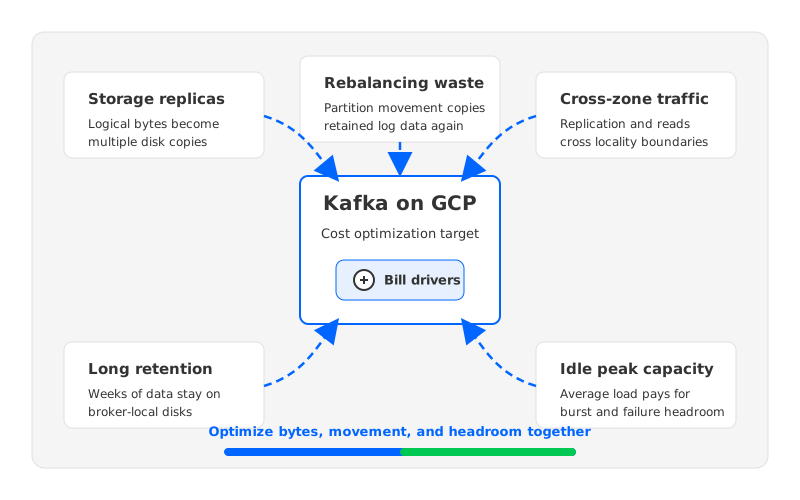
1Where Kafka Cost Grows on GCP
Traditional Kafka stores log segments on broker-local disks. That design is proven, but it has a specific economic shape: compute and storage are tied together, replicas multiply disk footprint, and partition movement moves real data. In the cloud, each dimension becomes a line in the bill or a hidden capacity reserve.
Most GCP Kafka cost waste comes from five places:
- Storage replication: Apache Kafka topics commonly use
replication.factor=3for production durability. That means retained logical data can become multiple broker-local copies before free-space headroom is added. - Long retention on expensive disks: Topics used for audit, CDC replay, fraud analysis, or recovery can retain data for weeks or months. When all retained data lives on broker disks, storage becomes a capacity planning problem instead of only a data lifecycle problem.
- Cross-zone traffic: Multi-zone deployment improves availability, but producers, leaders, followers, and consumers can sit in different zones. Google Cloud network pricing should be checked for the exact zone, region, and direction because internal traffic paths are not all equivalent.
- Idle peak capacity: Kafka clusters are usually sized for peak traffic, broker failure, and maintenance. The spare capacity is rational, but it becomes waste when average load is far below the peak.
- Rebalancing and recovery movement: Broker replacement, partition reassignment, storage expansion, and cluster reshaping can move large volumes of log data. The cost is part infrastructure, part operational risk.
These are not independent problems. Long retention makes rebalancing heavier, replicas increase disk footprint and replication traffic, and multi-zone placement makes locality harder.
2A Cost Model Before a Cost Cut
Start with a worksheet, not a broker count. The minimum inputs are average write throughput, peak write throughput, read fanout, retention period, replication factor, compression ratio, partition count, zone layout, and expected growth. These numbers convert Kafka behavior into GCP resources.
The storage formula is simple enough to be useful:
logical retained data = write throughput x retention time x compression factor
broker disk footprint = logical retained data x replication factor x headroom
For example, a cluster writing 50 MiB/s for 7 days retains roughly 29.5 TiB before compression, replication, and headroom. With replication factor 3, that becomes about 88.6 TiB of broker-local replicas before extra free space for segment rolling, reassignments, and failure recovery. Those figures are not a GCP quote; they are inputs for the official pricing pages.
Network needs a similar model. Producer ingress is only one path. Kafka replication copies data from leaders to followers, consumers may read from a different zone than the leader, and maintenance can create temporary data movement. If the cluster runs on GKE or Google Cloud Managed Service for Apache Kafka, verify the relevant official pricing pages instead of reusing an old estimate.
The worksheet prevents false optimization. Cutting retention helps if storage dominates, but it does little if the real issue is cross-zone consumer fanout. Shrinking brokers helps if CPU and memory are overprovisioned, but it is risky if the cluster is disk-bound or depends on spare broker capacity to survive failures.
3Quick Wins for Existing Kafka Clusters
Short-term optimization should reduce waste without weakening durability. Start with configuration hygiene and workload classification before changing cluster architecture. The fastest wins usually come from topics whose retention, partition count, or compression settings no longer match reality.
Review retention by topic class rather than applying one global policy. A payments audit topic, a transient metrics topic, and a CDC topic have different replay requirements. Apache Kafka exposes retention controls such as retention.ms and retention.bytes; use them deliberately.
Compression can reduce broker storage and network transfer, especially for verbose JSON or repetitive payloads. The tradeoff is CPU, so test with production-like data. Partition hygiene also pays back: too few partitions cap throughput, while too many increase metadata and recovery work.
Use this sequence when the cluster already exists:
| Optimization area | What to check | Cost effect | Risk if done carelessly |
|---|---|---|---|
| Retention | Topic-level retention.ms and retention.bytes | Reduces retained disk footprint | Losing replay or audit windows |
| Compression | Producer compression type and CPU headroom | Reduces storage and network bytes | Higher CPU under peak load |
| Partition count | Hot partitions, unused partitions, consumer parallelism | Improves utilization and recovery behavior | Reassignment churn or consumer disruption |
| Capacity headroom | Broker CPU, memory, disk, and network by peak hour | Finds idle reserve that can be reduced | Lower failure tolerance |
| Data locality | Producer, leader, follower, and consumer zone placement | Reduces avoidable cross-zone paths | Uneven load if locality overrides balance |
The table is intentionally conservative. A cost optimization that creates a reliability incident is deferred cost with worse timing.
4Storage and Retention Optimization
Storage is where Kafka on GCP often becomes expensive because retained data is multiplied by durability. In a traditional deployment, each replica is a full copy stored on broker-local disks. Logical topic data is not the same as provisioned broker storage.
Tiered storage can help by moving older log segments away from local broker disks, while keeping Kafka semantics available for consumers that need replay. Apache Kafka documents tiered storage as a way to separate local storage from remote log storage for supported deployments. This changes the question from "How much disk can the broker hold?" to "Which data must remain hot?"
Tiered storage still leaves brokers responsible for serving Kafka traffic, managing local hot data, and coordinating log metadata. It can reduce local disk pressure, but it does not automatically make brokers stateless.
For existing clusters, classify topics into three storage profiles:
- Hot operational topics need short retention and fast local access.
- Replay topics need longer retention but are read unevenly.
- Archive-like topics exist for compliance, audit, or rare recovery.
This classification makes chargeback cleaner because a team asking for 90-day retention can see the cost directly.
5Cross-Zone Traffic and Replication Cost
Kafka availability planning usually pushes teams toward multi-zone deployment. That is sensible: a production Kafka cluster should tolerate infrastructure failure. The cost trap appears when the architecture treats every data path as local while the cloud bill treats some paths differently.
Google Cloud's network pricing documentation should be checked for the specific region, zone, traffic type, and destination. Kafka operators should then map producer, leader, follower, consumer, and failover paths on top of that pricing model.
Rack awareness and client placement can reduce avoidable traffic, but locality, balance, and failover are in tension. Rebalancing deserves its own line because moving partitions can consume disk, network, and human attention at the same time.
6Architecture-Level Optimization with AutoMQ
At some point, the spreadsheet reveals that the biggest cost drivers are consequences of the storage architecture. If durable data is bound to broker-local disks, retained bytes, replicas, broker replacement, and partition movement all pull on the same rope.
This is where Kafka-compatible shared storage enters the evaluation. AutoMQ is a Kafka-compatible cloud-native streaming system that keeps Kafka clients and ecosystem tools relevant while separating durable storage from broker-local disks. Instead of treating brokers as the permanent owners of retained log data, AutoMQ uses object storage as the durable storage foundation and lets brokers behave more like stateless compute and cache nodes.
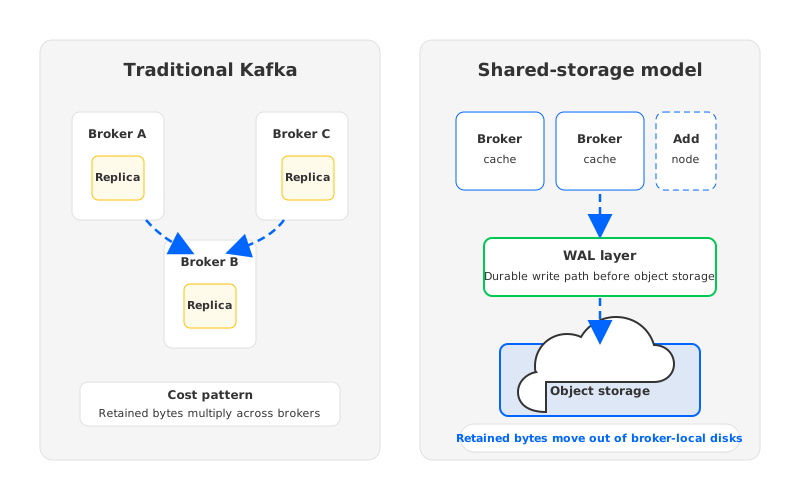
The cost implication is straightforward. Long-term retained data can be modeled against object storage rather than multiplied across full broker-local replicas. Broker scaling becomes less coupled to moving retained log segments, so expansion and recovery focus more on compute and traffic.
AutoMQ is most relevant when the workload has one or more of these traits:
- Retention is measured in weeks or months, and most old data is rarely read.
- Traffic has large peak-to-average swings, so broker capacity sits idle outside peak windows.
- Partition reassignment or broker replacement is operationally painful because local logs are large.
- The team wants Kafka protocol compatibility without accepting every traditional Kafka storage tradeoff.
- Data control matters, so the deployment model must fit the team's Google Cloud environment and governance process.
Cost optimization cannot ignore control boundaries. Some teams prefer a managed service; others need BYOC or self-managed deployment because data plane control, network topology, or compliance requirements are non-negotiable.
7Optimization Priority Matrix
Not every cost lever deserves the same attention. The right sequence depends on savings potential, implementation effort, and reliability risk. Start with visibility and obvious waste, then evaluate architecture changes when the retained-data model itself is the problem.
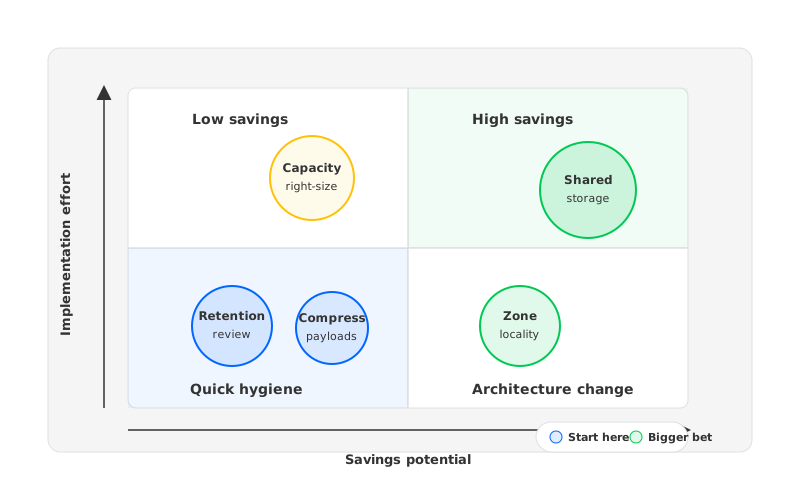
Use this practical ordering guide:
| Priority | Action | When it is worth doing | Why it matters |
|---|---|---|---|
| 1 | Build a workload cost worksheet | Always | Separates real drivers from guesses |
| 2 | Review topic retention and compression | Existing clusters with growing disks | Reduces bytes before changing infrastructure |
| 3 | Fix partition and capacity hygiene | Clusters with hot partitions or idle brokers | Improves utilization and recovery behavior |
| 4 | Map zone-level traffic paths | Multi-zone GCP deployments | Finds replication and consumer locality waste |
| 5 | Evaluate tiered or shared storage | Long retention, replay-heavy data, painful rebalancing | Changes the storage cost model |
| 6 | Compare managed Kafka, self-managed Kafka, and AutoMQ | Before renewal, migration, or major growth | Aligns cost, operations, and data control |
Revisit the list after every workload shift. A cluster that was CPU-bound last quarter can become storage-bound after a new CDC pipeline, and a new consumer group can multiply read fanout. Kafka cost optimization is a recurring operating practice, not a one-time procurement event.
8Cost Optimization Checklist
Before changing infrastructure, make the current cost shape visible. Collect throughput, retention, replication factor, partition count, broker utilization, disk growth, consumer fanout, zone placement, and reassignment history. Tag each driver as configuration waste, workload growth, availability requirement, or architecture constraint.
For self-managed Kafka on GCP, verify the official pricing pages for Compute Engine, Persistent Disk, network transfer, Cloud Storage if tiering is used, and GKE if Kubernetes is involved. For Google Cloud Managed Service for Apache Kafka, use the official managed Kafka pricing page rather than an old estimate. For AutoMQ, compare the Google Cloud infrastructure inputs required for the deployment and the way retained data moves into object storage.
The strongest cost plan has two horizons. The first removes waste from the cluster you already run. The second asks whether the storage model still fits the workload.
If your GCP Kafka bill is rising because storage, replication, and rebalancing keep compounding, the next useful step is to model your workload against both traditional Kafka and a shared-storage Kafka-compatible design. AutoMQ's documentation for deployment on Google Cloud GKE and architecture overview can help you evaluate that path without rewriting Kafka clients.
9References
- Google Cloud Managed Service for Apache Kafka documentation
- Google Cloud Managed Service for Apache Kafka pricing
- Google Cloud Persistent Disk pricing
- Google Cloud network pricing
- Google Cloud Storage pricing
- Apache Kafka documentation
- AutoMQ architecture overview
- AutoMQ stateless broker documentation
- Deploy AutoMQ on Google Cloud GKE
10FAQ
10.1What is the fastest way to reduce Kafka cost on GCP?
Start with topic retention, compression, partition hygiene, and capacity review. These changes often reduce waste without changing the deployment model. Avoid cutting broker count first unless you have verified CPU, memory, disk, network, and failure headroom.
10.2Why does Kafka storage cost grow so quickly on Google Cloud?
Traditional Kafka stores full log replicas on broker-local disks. With production replication, long retention, and operational headroom, logical topic data can become several times larger as provisioned broker storage. The exact cost depends on disk type, region, retention, replication factor, and workload growth.
10.3Does Google Cloud Managed Service for Apache Kafka remove Kafka cost optimization work?
It reduces operational responsibility, but it does not remove workload economics. You still need to understand throughput, retention, storage growth, network paths, and consumer fanout. Managed Kafka changes the responsibility boundary; it does not make workload shape irrelevant.
10.4Can tiered storage solve Kafka cost problems?
Tiered storage can reduce local disk pressure by moving older log segments to remote storage in supported deployments. It is useful for retention-heavy workloads, but it is not the same as making brokers fully stateless. Teams should compare tiered storage with shared-storage architectures when rebalancing and broker-local data ownership are major pain points.
10.5When should a team evaluate AutoMQ for GCP Kafka cost optimization?
Evaluate AutoMQ when retained data, cross-zone replication, idle peak capacity, or rebalancing data movement dominate the cost and operations profile. It is especially relevant when the team wants Kafka compatibility while moving durable storage toward object storage and stateless broker design.


