
Table of Contents
Table of Contents
The risky part of Google Cloud managed Kafka pricing is not that the official pricing page is hard to find. The risky part is assuming that a pricing page can answer the budget question by itself. Kafka cost is shaped by write throughput, retention, read fanout, zone placement, private connectivity, and operational scope. If those inputs are fuzzy, a clean-looking monthly estimate can be off in the exact places that matter to a platform budget.
Managed Service for Apache Kafka on Google Cloud gives teams a native managed Kafka path, and that changes the operating model compared with running brokers on Compute Engine or GKE. It does not make workload economics disappear. A cluster that keeps three days of data for internal services and a cluster that keeps 90 days for replay-heavy analytics may both be "Kafka on GCP," but they turn into very different bills.
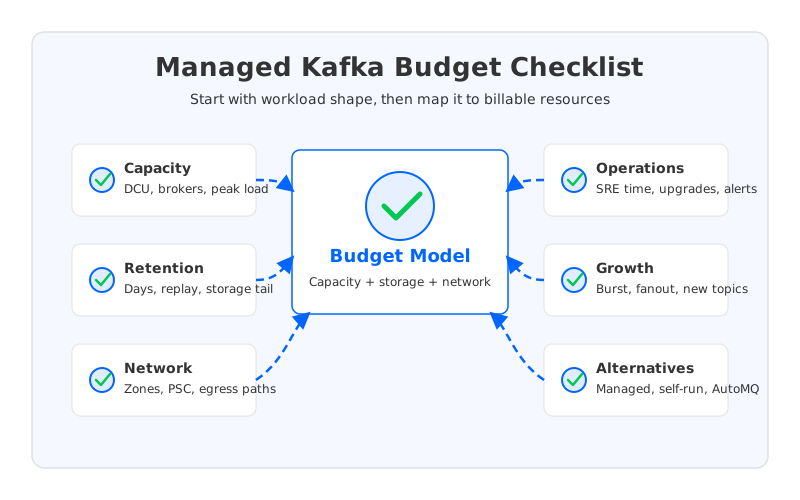
The practical budgeting question is therefore narrower and more useful: which workload assumptions become billable resources, and which architecture gives your team the right trade-off between cost, control, and operations?
1Start With Official Pricing, But Do Not Stop There
Use the official Google Cloud Managed Service for Apache Kafka pricing page as the source of truth for current rates. As of June 2, 2026, the page describes pricing around provisioned capacity through Data Capacity Units, broker storage, inter-zone data transfer, and Private Service Connect interface charges. The exact values can vary by region and can change over time, so a serious estimate should link back to the page and record the date of the pricing pull.
That is only the first step. Pricing dimensions are not the same as workload dimensions. A data platform team usually thinks in MiB/s, topics, partitions, retention windows, replicas, consumer groups, and recovery objectives. A cloud pricing page thinks in billable units, storage, network paths, and service-specific charges. The budget exercise is the translation layer between those two languages.
For Google Cloud managed Kafka, keep these checks separate:
- Capacity: What steady-state and peak throughput must the cluster absorb, and how does that map to provisioned capacity?
- Storage: How much retained data will exist after retention windows, topic growth, and operational headroom?
- Network: Which paths cross zones, regions, VPC boundaries, or Private Service Connect interfaces?
- Operations: Which tasks move to Google, and which remain with your team, such as topic design, client tuning, incident response, and cost governance?
- Growth: What happens when traffic doubles, retention expands, or analytics teams add high-fanout consumers?
A useful budget memo should show those assumptions before it shows a total. That makes the estimate auditable when the bill later changes.
2Workload Inputs That Change Your Bill
The most important managed Kafka pricing input is not a SKU name. It is the shape of the stream. Kafka workloads amplify cost because one byte written by a producer can be stored, replicated, read by several consumer groups, retained for days, and moved again during maintenance or failover.
Start with write throughput and retention because they define the storage tail. The formula is simple enough to keep in the budget file: logical retained data equals write throughput multiplied by retention time. A workload writing 50 MiB/s for seven days retains about 29.5 TiB of logical data before compression effects, replication, and headroom. That number is not a Google Cloud quote. It is the workload input you need before you compare managed Kafka, self-managed Kafka, and storage-decoupled alternatives.
Read fanout deserves the same treatment. A single consumer group can be modest; five independent consumer groups reading the same topic can materially change broker load and network paths. Kafka lets organizations reuse the same event stream across services, analytics, and replay workflows, which is exactly why it is valuable. That reuse also means read patterns belong in the pricing model, not in a footnote.
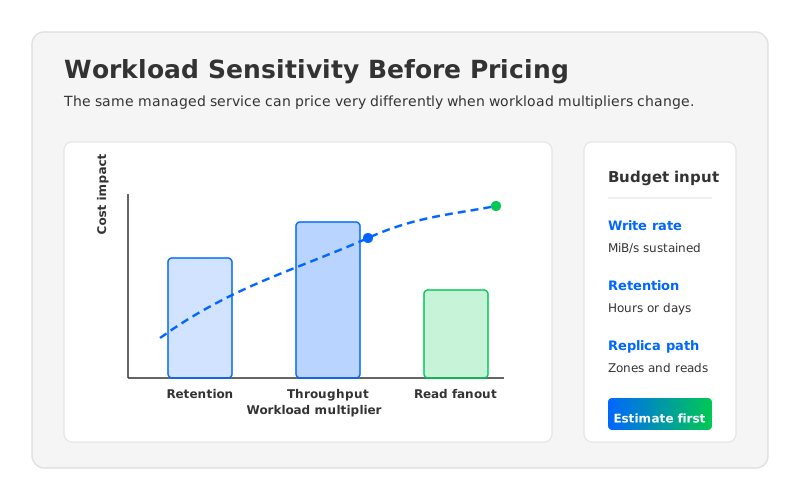
Peak-to-average ratio is the quiet budget killer. A retail event stream, CDC pipeline, or operational telemetry feed may have a stable daily average and sharp bursts during deployments, incidents, campaigns, or batch backfills. Managed services generally need enough provisioned capacity to handle the workload you ask them to handle, so a low average does not guarantee a low bill. The budget should state whether you are sizing for average load, p95, p99, or a named business event.
3Storage, Retention, and Network Factors
Storage is where many Kafka estimates undercount. In traditional Kafka, retained data lives on broker-local disks and is multiplied by replication factor. In managed Kafka, storage is still a billable dimension, even though the provider hides much of the broker lifecycle. Retention growth is especially dangerous because it feels like a configuration change until it shows up as a persistent monthly cost.
A clean storage estimate should include:
- Logical retained data from write rate and retention.
- Replication and durability model for the chosen Kafka architecture.
- Compression assumptions and free-space headroom.
- Backup, export, or connector storage if data is copied downstream.
Network is harder because the answer depends on topology. Google Cloud's broader networking documentation and pricing pages separate different kinds of data movement, including region, zone, external egress, and service-specific paths. Managed Kafka also introduces Private Service Connect considerations. The important budgeting habit is to draw the data path, then price the path, rather than assuming that all traffic inside a cloud provider is equivalent.
Multi-zone Kafka makes this concrete. Kafka replication is an application-level durability mechanism. If leaders and followers sit in different zones, replication traffic may cross zones. If consumers sit in another zone, reads may add another cross-zone path. Rack awareness and client locality can reduce surprises, but only when the architecture team models where producers, brokers, and consumers actually run.
For some teams, Pub/Sub enters the conversation here. Google Cloud Pub/Sub pricing uses a different model because Pub/Sub is not Kafka; it is a managed messaging service with its own throughput, storage, and message delivery semantics. Pub/Sub may fit some event distribution cases, while Kafka remains attractive when teams need Kafka protocol compatibility, Kafka Streams, Kafka Connect, partition ordering semantics, or existing tooling. Treat Pub/Sub as a separate architecture option, not as a line-for-line Kafka price substitute.
4Managed Kafka vs Self-Managed Kafka vs AutoMQ Cost Models
Managed Kafka, self-managed Kafka, and AutoMQ expose different cost levers. The difference is not only who operates the brokers. It is where durable data lives, how scaling works, and which costs grow with storage versus compute.
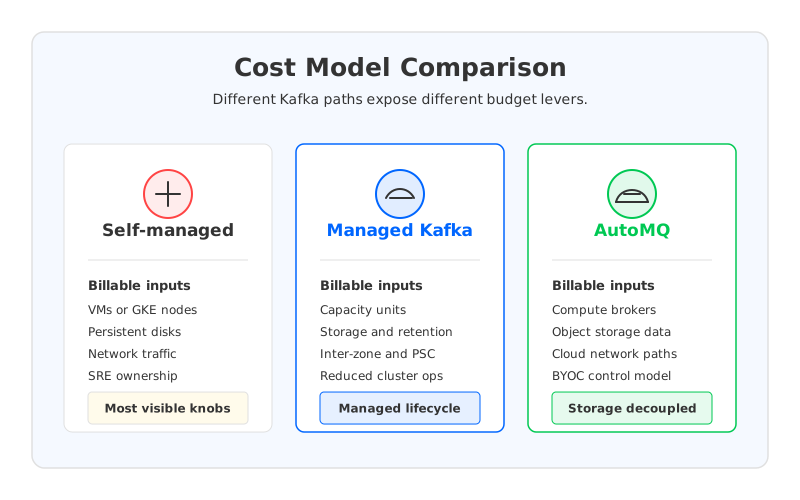
Self-managed Kafka on Compute Engine or GKE gives the team the most direct control. You choose VM families, disk types, Kubernetes node pools, operators, monitoring, upgrade windows, security posture, and disaster recovery patterns. That control is useful for teams with deep Kafka expertise or specialized requirements, but it means the budget must include the infrastructure and the people who maintain it. Google Cloud's Compute Engine pricing, GKE pricing, and Cloud Storage pricing can all become relevant depending on the deployment.
Google Cloud Managed Service for Apache Kafka shifts broker lifecycle management to a managed service while preserving the Apache Kafka interface. That can reduce operational burden and standardize cluster management, especially for teams that want a Google Cloud-native service. The budget still depends on capacity, storage, zone layout, private connectivity, and workload growth. The service can simplify operations, but it does not make retention-heavy or fanout-heavy workloads cost-neutral.
AutoMQ changes the comparison by separating compute from durable storage while staying Kafka-compatible. In the AutoMQ documentation, AutoMQ is described as a cloud-native Kafka-compatible streaming platform built on object storage. On GCP, that architecture can be evaluated as a different cost model: brokers act more like an elastic compute layer, while durable data is placed in object storage rather than tied to broker-local disks. That matters most when retention, rebalancing, and elastic scaling are major cost drivers.
Each option makes a different promise:
| Option | Budget Strength | Budget Risk | Best Fit |
|---|---|---|---|
| Self-managed Kafka | Maximum infrastructure control | SRE labor, disk sizing, upgrade burden, reassignment work | Teams with strong Kafka operators and custom requirements |
| Google Cloud managed Kafka | Managed broker lifecycle with Kafka compatibility | Capacity, storage, network, and private connectivity still need modeling | Teams standardizing on native Google Cloud managed services |
| AutoMQ | Kafka-compatible architecture with object-storage-backed durable data | Requires evaluation of a different storage and deployment model | Teams with long retention, elastic scaling, or cost-sensitive cloud Kafka workloads |
For a FinOps review, avoid debating labels like "managed" or "cloud-native" in the abstract. Ask which model makes the largest cost driver more predictable for your workload.
5Budget Checklist
Before you ask procurement to approve a Google Cloud managed Kafka budget, capture the assumptions in a short worksheet. It does not need to be elaborate. It needs to be explicit enough that another architect can rerun the estimate when traffic or pricing changes.
Use this checklist:
- Workload profile: sustained write throughput, peak write throughput, read throughput, number of consumer groups, and expected compression ratio.
- Retention profile: default topic retention, high-retention topics, replay requirements, and whether data is also exported downstream.
- Availability profile: region, zone count, replication assumptions, recovery objectives, and client placement across zones.
- Network profile: producer paths, consumer paths, inter-zone movement, Private Service Connect, external egress, and downstream services.
- Capacity profile: provisioned capacity, headroom, burst assumptions, partition count, and expected growth over the next 6 to 12 months.
- Operations profile: who owns topic governance, incident response, client tuning, upgrades, observability, and cost reviews.
- Alternatives profile: what the same workload would look like on self-managed Kafka, Pub/Sub, Confluent Cloud, or AutoMQ.
Then write down the non-goals. A budget for production audit-log retention is not the same as a budget for low-latency service events, and a small internal platform is not the same as a multi-tenant streaming service. The estimate becomes more credible when it says what it is not trying to cover.
6Questions to Ask Before You Commit
The strongest pricing review is a design review with numbers attached. Ask the provider, vendor, or internal platform team questions that expose the billable mechanics instead of only asking for a discount.
Start with capacity. What happens when peak throughput grows by 50 percent? Can capacity be adjusted without a long migration? How quickly do changes take effect? A managed service should reduce the burden, but the team still needs to understand the boundary between service automation and application responsibility.
Move next to retention and storage. Which topics drive the retained footprint? Are there high-retention topics that should be archived, compacted, or moved to a different architecture? Does the service charge separately for storage?
Finally, challenge the network path. Where do producers and consumers run? Which traffic crosses zones or regions? Does Private Service Connect add interface-level charges? Are downstream systems rereading the same stream when a local or batched pattern would work?
These questions are not procurement theater. They are how teams avoid buying a managed service and then rediscovering Kafka's workload multipliers in the invoice.
7When AutoMQ Belongs in the Budget Conversation
AutoMQ belongs in the conversation when the painful part of the budget is not "Kafka exists" but "Kafka stores and moves durable data in a way that makes cloud costs hard to control." Traditional Kafka couples broker compute and persistent storage tightly. That coupling makes sense in many environments, but it can make retention, broker replacement, and elastic scaling expensive in the cloud because data movement becomes part of routine operations.
An object-storage-backed Kafka-compatible architecture changes that shape. Durable data can live in cloud object storage, while brokers focus more on serving the Kafka protocol, handling clients, and managing active workloads. For retention-heavy streams, this can make the cost model easier to reason about because storage growth does not require the same broker-local disk expansion logic. For elastic workloads, it can reduce the amount of data movement associated with scaling compute up or down.
Teams should still test latency expectations, failure behavior, client compatibility, deployment model, security controls, and day-2 operations in their own environment. AutoMQ is not a spreadsheet trick; it is an architectural choice. That is why it belongs in the same review as managed Kafka and self-managed Kafka, rather than being bolted on after the budget is already approved.
If your Google Cloud managed Kafka estimate is driven mostly by operational convenience, managed Kafka may be the right answer. If it is driven mostly by retention, storage growth, rebalancing, and elastic capacity, it is worth running the same workload through an AutoMQ-style cost model before you commit. The right next step is a workload-based estimate, not a generic vendor comparison.
8References
- Google Cloud Managed Service for Apache Kafka pricing
- Google Cloud Managed Service for Apache Kafka overview
- Google Cloud Pub/Sub pricing
- Google Cloud Compute Engine pricing
- Google Kubernetes Engine pricing
- Google Cloud Storage pricing
- Apache Kafka documentation
- AutoMQ documentation: What is AutoMQ?
- AutoMQ BYOC for Kafka data streaming
9FAQ
9.1Is Google Cloud managed Kafka priced the same way as self-managed Kafka on GKE?
No. Self-managed Kafka on GKE is built from Kubernetes clusters, worker nodes, disks, networking, observability, and operations. Google Cloud Managed Service for Apache Kafka uses its own managed-service pricing dimensions. The two models can support similar Kafka workloads, but the budget inputs are packaged differently.
9.2What is the first number I should collect for a managed Kafka estimate?
Start with sustained write throughput and retention. Together they define the logical retained data footprint, which then influences storage, capacity, and operational planning. Add read fanout and peak throughput next.
9.3Does managed Kafka remove Kafka operations cost?
It reduces broker lifecycle work, but it does not remove all Kafka operations. Teams still own application design, topic governance, client configuration, security integration, observability, incident response, and cost reviews.
9.4Should I compare Pub/Sub with managed Kafka on GCP?
Yes, but compare it as a different architecture, not as a direct Kafka SKU. Pub/Sub has different semantics and pricing dimensions. It can be a good fit for some event distribution patterns, while Kafka is often chosen for protocol compatibility, partitioned ordering, Kafka Connect, Kafka Streams, and existing ecosystem tooling.
9.5When should AutoMQ be evaluated against Google Cloud managed Kafka?
Evaluate AutoMQ when retention, storage growth, elastic scaling, or broker data movement are important budget drivers. Its Kafka-compatible, object-storage-backed architecture changes the cost model, so it is most useful to compare with real workload assumptions rather than generic monthly labels.


