
Table of Contents
Table of Contents
Kafka benchmarks often turn into arguments because the chart looks precise while the test underneath is vague. One team measures peak producer throughput with relaxed durability. Another measures end-to-end latency with acks=all, replication, consumers, and a warm cluster. Both charts end up in the same buyer deck as if they answer the same question.
That is how a kafka benchmark becomes misleading without anyone falsifying data. Kafka performance is workload-shaped. Change the storage device, partition count, producer batching, consumer position, replication factor, or warm-up period, and the result can move enough to reverse the conclusion. Fair comparison starts by making those variables explicit.
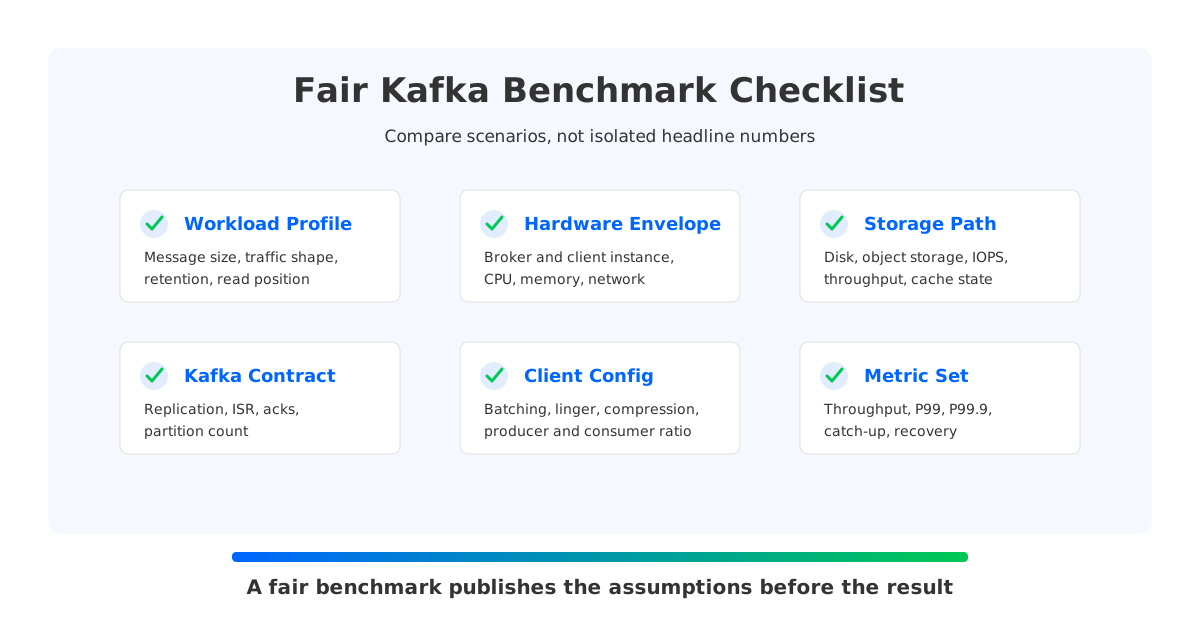
The goal is not to create one universal benchmark. There is no such thing for Kafka. The goal is to create a test that matches the decision: whether a platform can handle your write path, replay behavior, failure recovery, and operating budget under reproducible conditions.
1Workload Before Product Names
The first question in a kafka performance test is not "Which system is faster?" It is "Which workload are we testing?" Log ingestion with large compressed batches has a different bottleneck from payment events with small messages and strict tail-latency targets. Replay-heavy analytics stresses storage reads in a way that a tail-read microbenchmark never sees.
A useful workload profile should name at least these inputs:
- Message shape. Record size, key distribution, compression type, and batch behavior change broker load and network efficiency.
- Traffic shape. Constant write rate, burst pattern, producer fan-in, consumer fan-out, and read-after-write timing decide whether the test measures steady state or shock absorption.
- Retention and read position. Tail reads mostly exercise hot data paths. Catch-up reads exercise older data, page cache pressure, object storage access, or remote-tier behavior.
- Durability contract. Replication factor,
min.insync.replicas, and produceracksdefine what "written" means. The Apache Kafka producer documentation is explicit thatackscontrols how many acknowledgments the producer requires before a request is complete.
This profile should be written before any numbers appear. If the profile is missing, the benchmark is incomplete. The reader has to guess whether the test reflects their cluster, and guessing is where performance marketing gets slippery.
2Normalize the Hardware, Then Normalize the Limits
Hardware normalization is more than counting brokers. Two clusters with the same broker count can have very different ceilings if one uses faster disks, higher network bandwidth, more client machines, or storage that moves reads away from broker-local disks. A fair kafka throughput benchmark names the resource envelope and explains why it is comparable.
For cloud deployments, record instance type, CPU architecture, memory, network bandwidth, disk type, disk throughput, disk IOPS, storage size, availability-zone placement, and client placement. State whether the test uses local NVMe, EBS-like block storage, network file storage, or object storage. Storage is often the bottleneck the benchmark is trying to expose.
The second step is limit normalization. If one cluster is capped by disk throughput and another is capped by client CPU, the result says more about the test harness than the platform. Run a preflight test that proves the clients and network can exceed the target load, then record the first saturated resource.
| Variable | What to publish | Why it changes the result |
|---|---|---|
| Hardware | Broker and client instance types, CPU, memory, network | Defines the compute and network ceiling |
| Storage | Medium, throughput, IOPS, retention size | Controls write durability and replay behavior |
| Kafka contract | Replication factor, ISR settings, acks | Changes latency, durability, and write fan-out |
| Client config | Batch size, linger, compression, producers, consumers | Can trade latency for throughput |
| Data model | Partitions, keys, message size, compression ratio | Controls parallelism and broker distribution |
| Test phase | Warm-up, measurement window, cooldown | Separates startup artifacts from steady state |
The Apache Kafka producer configuration docs call out the batching trade-off directly: batch.size groups records into fewer requests, while linger.ms can add a bounded delay to accumulate records. A benchmark that raises batching to maximize throughput is not measuring the same thing as a low-linger latency test.
3Make the Variables Hard to Miss
Once the workload and hardware are fixed, the comparison still needs guardrails. Kafka has many configuration knobs, and a benchmark can become unfair by tuning one side aggressively while leaving the other near defaults. Every externally visible contract should match, and every platform-specific optimization should be disclosed.
Use this rule of thumb: if a setting changes durability, ordering, client behavior, resource isolation, or failure semantics, it belongs in the benchmark report. acks=1 versus acks=all, replication factor, producer and consumer counts, partition count, warm-up duration, cache priming, compaction status, and background maintenance all belong there.
A fair comparison should avoid measuring only a happy path. Kafka clusters usually hurt during transitions: consumer rewind, broker loss, partition reassignment, traffic spike, or storage pressure. If the business workload includes those transitions, the benchmark has to include them too.
4Latency Is a Stack, Not One Number
Average latency is convenient to publish and weak for operating Kafka. Users feel tail latency. SLOs usually break at the percentile edge. A kafka latency benchmark that reports average latency without P95, P99, and P99.9 hides the shape of the distribution.
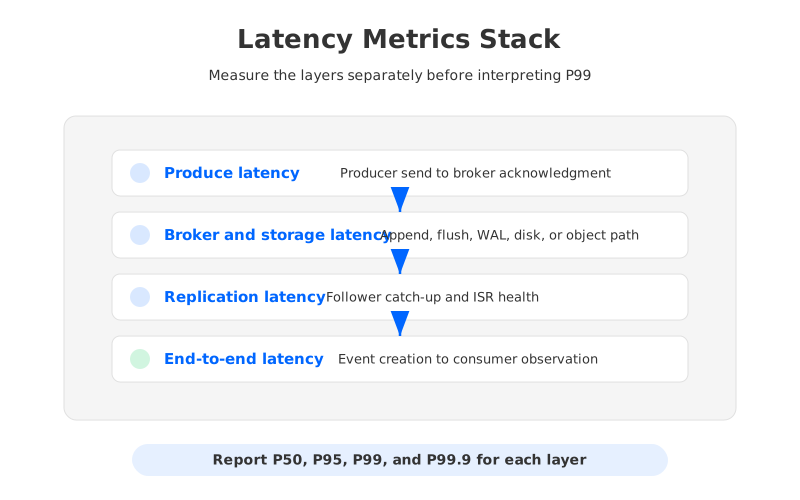
Latency also has layers. Produce latency measures the producer's request path. Broker append latency measures the broker and storage path. Replication latency shows how quickly followers catch up. End-to-end latency measures event creation to consumer observation. These values can move independently, so collapsing them into one number erases the diagnostic signal.
The reporting pattern should separate:
- Produce latency. Time from
send()to acknowledgment under the declaredacksand batching settings. - End-to-end latency. Time from event creation or producer timestamp to consumer receipt, including broker, storage, replication, fetch, and client scheduling.
- Tail percentiles. P50, P95, P99, and P99.9 over the same measurement window, with outlier handling described.
- Latency under interference. Produce and consume latency while catch-up reads, broker failure, or reassignment are happening.
The last item matters because Kafka rarely fails politely. A cluster can look healthy in a steady-state write test and show very different latency when a consumer rewinds into old data. Without interference scenarios, the benchmark cannot show whether the platform isolates production traffic from replay traffic.
5Throughput Needs a Companion Metric
Throughput is legible, but teams often overread it. A chart that says "1 GiB/s" is incomplete until it says at what replication factor, partition count, message size, compression setting, durability level, client count, CPU usage, disk usage, and latency percentile. Peak throughput at unacceptable tail latency is not capacity; it is overload wearing a nice label.
Use throughput in pairs. Report produce throughput alongside produce latency. Report consume throughput alongside lag and end-to-end latency. Report catch-up read throughput alongside write-path impact. For cloud deployments, report throughput per cost unit or normalized resource unit when the decision is about operating efficiency.
This is where catch-up read deserves its own row in the benchmark. Tail consumers read data that is already hot in broker memory or cache. Catch-up consumers often read older data that competes for disk bandwidth, page cache, or remote storage. A platform with read-write isolation may show its advantage only when catch-up traffic is present.
6Failure Recovery Is Part of Performance
Many Kafka benchmarks stop before the first failure. Production does not. Broker restart, broker loss, availability-zone impairment, controller failover, partition reassignment, and consumer rewind all create performance events. Treat recovery behavior as part of the benchmark, not an operations appendix.
The recovery section should measure time to restore healthy replication, write availability, consumer lag growth, tail latency, and manual intervention. For traditional Kafka, partition movement can dominate recovery and scaling tests because ownership is tied to broker-local log data. For diskless or shared-storage designs, the question changes: how much of the recovery is metadata movement, WAL replay, cache refill, or remote storage pressure?
Neither architecture gets a free pass. The test should stress the real failure mode of the design being evaluated. Broker-local Kafka must show replica catch-up and reassignment impact. Shared-storage Kafka-compatible systems must show control-plane behavior, storage dependency behavior, and isolation during older-data reads.
7A Benchmark Result Template That Engineers Can Audit
A benchmark report should make the reader less dependent on the author's interpretation. A template forces every number to carry its assumptions.
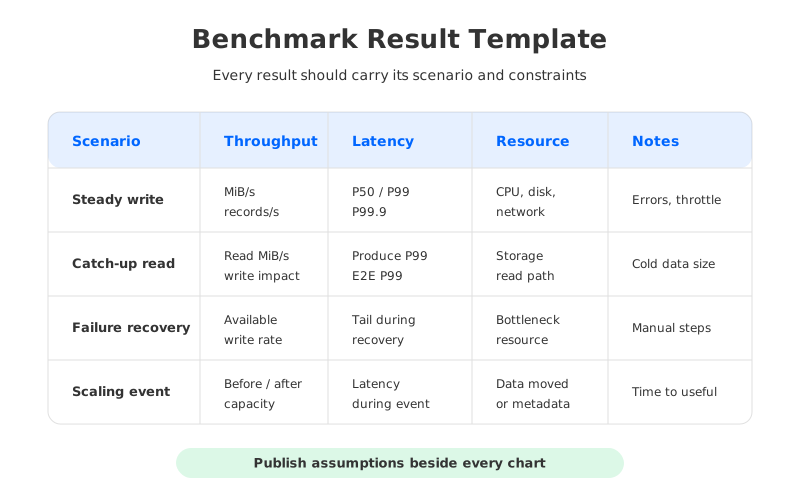
At minimum, each scenario should include:
| Scenario | Required fields |
|---|---|
| Steady write | Throughput, P50/P99/P99.9 produce latency, CPU, disk, network, error rate |
| Tail read | Consumer throughput, end-to-end latency, lag, fetch errors |
| Catch-up read | Historical data size, catch-up throughput, write throughput impact, write latency impact |
| Failure recovery | Failure injected, recovery time, unavailable partitions, manual steps |
| Scaling event | Added or removed capacity, time to useful capacity, data moved, latency impact |
This template changes the conversation. Instead of asking whether a vendor number is impressive, the team can ask whether the scenario matches their workload and whether the assumptions are reproducible.
8Where AutoMQ's Public Benchmark Fits
AutoMQ's public benchmark material is useful here for one reason: it gives a concrete example of scenario-based reporting rather than a single vanity number. The AutoMQ performance benchmark describes cluster size, partition count, traffic rate, storage configuration, and catch-up read behavior for comparisons with Apache Kafka.
That context is essential. A headline such as P99 send latency under 20 ms or catch-up read throughput up to 5x higher should sit next to the workload definition, not float alone. AutoMQ's benchmark context frames those results around cloud-native storage separation and catch-up reads; the related 5x catch-up read efficiency page explains the claim.
This is the right way for a product benchmark to enter a methodology discussion. The number is not the proof by itself. The proof is the chain: workload, resource envelope, configuration, measurement window, result, and replay behavior. If another team can reproduce the setup and challenge the assumptions, the benchmark is doing its job.
9A Practical Runbook for Your Next Kafka Benchmark
Before running the test, write a one-page benchmark contract. It should define the user question, workload profile, success criteria, excluded scenarios, and comparison target. If the question is "Can this platform support 800 MiB/s with replay isolation?" then a pure producer throughput test is a distraction. If the question is "Can we reduce tail latency for small transactional events?" then a large-batch throughput race is equally beside the point.
During the run, collect platform metrics and client metrics at the same time. Client-observed latency is what the application feels, but broker metrics explain why it happened. Capture CPU, disk, network, request queue time, produce latency, fetch latency, under-replicated partitions, ISR changes, consumer lag, and storage service metrics where available.
After the run, publish the misses with the wins. If one configuration produced higher throughput but worse P99.9, say that. If catch-up reads improved but consumed more network, say that. If a failure test required manual cleanup, say that too. Engineers trust benchmark reports that admit trade-offs because real systems always have them.
The next Kafka benchmark dispute will probably start with a chart. The fair response is not to argue with the chart first. Ask for the workload, variables, metrics, and recovery behavior behind it. Once those are visible, the comparison becomes an engineering decision instead of a slide contest.


