
Table of Contents
Table of Contents
"How many brokers do we need next quarter?" sounds like a resource request, but it is really a workload-modeling question. A Kafka cluster that looks healthy today can become expensive or fragile when one hidden assumption changes: producer throughput doubles, consumer fanout grows, retention moves from three days to fourteen, or a broker failure has to be absorbed during the same week as a product launch.
Good Kafka capacity planning turns those assumptions into numbers that can be reviewed before the purchase order, instance reservation, or expansion ticket. The goal is not to find one universal broker count. The goal is to make the plan explicit enough that platform engineers, cloud architects, application teams, and finance teams can agree on what is being sized.
1Start With The Inputs, Not The Broker Count
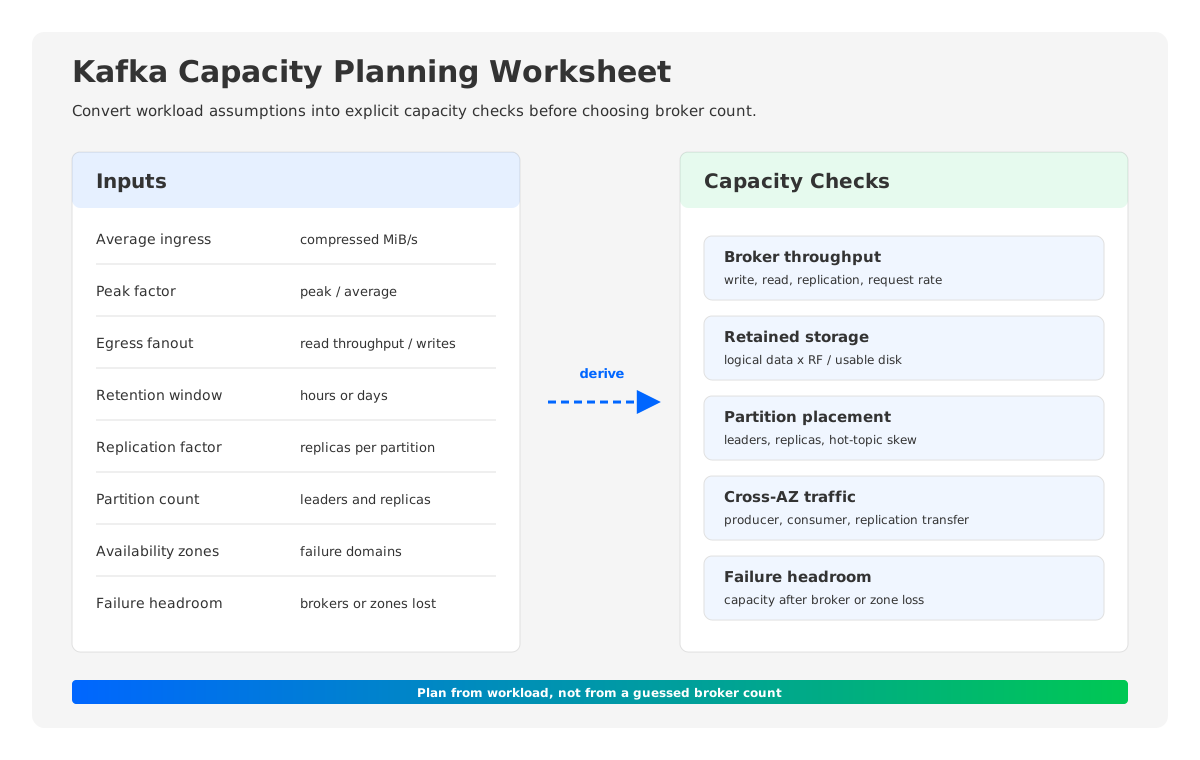
A broker count chosen first tends to become a constraint that every later decision has to defend. Start with workload inputs instead. The most useful worksheet has two kinds of values: traffic values that come from producers and consumers, and policy values that come from durability, availability, and retention requirements.
The core inputs are:
| Input | What It Means | Why It Matters |
|---|---|---|
| Average ingress | Compressed write throughput into Kafka | Drives storage growth and broker write load |
| Peak ingress factor | Peak write traffic divided by average write traffic | Prevents sizing only for calm hours |
| Egress fanout | Total read throughput divided by ingress throughput | Captures consumer groups, replay, and analytics reads |
| Average message size | Compressed record size after producer compression | Affects request rate, batching, and partition pressure |
| Retention window | How long Kafka must keep data | Converts throughput into stored data |
| Replication factor | Number of copies per partition | Multiplies broker disk and replication traffic |
| Partition count | Parallelism and placement unit | Affects broker metadata, file handles, recovery, and balancing |
| Availability zones | Failure domains for the cluster | Shapes replica placement and cross-AZ traffic |
| Failure headroom | Capacity left after losing brokers or zones | Determines whether failure is graceful or a second incident |
The worksheet should distinguish compressed data volume from uncompressed application payload. Kafka capacity plans usually care about compressed bytes on the wire and on disk because producer compression changes both network and storage demand. Message count still matters, especially for request rate and broker CPU, but storage planning starts with bytes.
2Parameterized Formulas For A First Pass
Use formulas as guardrails, not as recommendations. The same formula can produce very different results depending on compression ratio, broker instance family, disk type, network limits, and workload shape.
For a first pass, define:
avg_ingress_mib_s       = average compressed write throughput
peak_factor             = peak ingress / average ingress
egress_fanout           = total read throughput / ingress throughput
retention_hours         = retention window in hours
replication_factor      = number of replicas per partition
usable_disk_fraction    = target disk utilization, such as 0.50 or 0.60
failure_brokers         = broker failures to tolerate without throttling
broker_write_limit_mib_s = measured safe write throughput per broker
broker_read_limit_mib_s  = measured safe read throughput per broker
Then derive:
peak_ingress_mib_s = avg_ingress_mib_s * peak_factor
peak_egress_mib_s  = peak_ingress_mib_s * egress_fanout

logical_retained_gib =
  avg_ingress_mib_s * retention_hours * 3600 / 1024

replicated_retained_gib =
  logical_retained_gib * replication_factor

required_raw_disk_gib =
  replicated_retained_gib / usable_disk_fraction
For broker count, calculate independent lower bounds and then take the largest result:
brokers_for_write =
  ceil((peak_ingress_mib_s * replication_factor) / broker_write_limit_mib_s)

brokers_for_read =
  ceil(peak_egress_mib_s / broker_read_limit_mib_s)

brokers_for_disk =
  ceil(required_raw_disk_gib / disk_per_broker_gib)

minimum_brokers_before_failure_headroom =
  max(brokers_for_write, brokers_for_read, brokers_for_disk, brokers_for_partition_count)

planned_brokers =
  minimum_brokers_before_failure_headroom + failure_brokers
This is intentionally conservative. Traditional Kafka brokers are not only compute workers. They also own local partitions, local log segments, replica placement, recovery work, and disk watermarks. When a broker carries durable state, the capacity plan must satisfy the most demanding dimension even if the other dimensions are underused.
3Broker, Partition, And Throughput Sizing
Kafka broker scaling starts with the work each broker performs during normal operation and during failure. A leader broker handles producer writes for its leader partitions. Followers replicate those writes. Consumers read from leaders by default unless the deployment intentionally uses follower fetching in supported topologies. The cluster has to handle client traffic, replication traffic, background log work, controller metadata work, and reassignment work.
Partition count adds another layer. Partitions are Kafka's unit of parallelism and placement, but they are not free. More partitions can increase concurrency and spread traffic, yet they also increase metadata, open files, leader elections, recovery work, and operational complexity. The right partition count depends on target throughput per partition, consumer parallelism, future growth, and the operational cost the team can tolerate.
A practical partition check looks like this:
partitions_for_write_parallelism =
  ceil(peak_ingress_mib_s / target_write_mib_s_per_partition)

partitions_for_consumer_parallelism =
  max_expected_consumers_in_one_group

planned_partitions =
  max(partitions_for_write_parallelism, partitions_for_consumer_parallelism, minimum_operational_parallelism)
After that, test placement:
leader_partitions_per_broker =
  planned_partitions / planned_brokers

replica_partitions_per_broker =
  planned_partitions * replication_factor / planned_brokers
These are not pass-or-fail by themselves. They are prompts for load testing and operational review. If a cluster has a small number of very hot partitions, average partitions per broker will hide the risk. If it has many low-throughput topics, partition metadata and recovery time may matter more than throughput.
4Storage, Retention, And Replication Sizing
Storage planning is where many Kafka capacity plans become unexpectedly large. Retention is multiplied by ingress. Replication factor multiplies retained bytes again. Disk utilization targets reduce usable capacity because Kafka clusters need space for compaction, segment rolling, operational buffers, and emergency recovery.
The important distinction is logical retained data versus broker-local provisioned storage:
logical_retained_data =
  compressed_ingress_rate * retention_window

broker_local_replicated_data =
  logical_retained_data * replication_factor

provisioned_broker_storage =
  broker_local_replicated_data / target_usable_disk_fraction
For example, a team should not say "we retain seven days" without saying "at which average compressed ingress rate, with which replication factor, and at what disk utilization target." The storage answer changes when any one of those variables changes.
Compacted topics need a separate line in the worksheet. Their retained footprint depends less on time and more on key cardinality, value size, tombstones, and compaction lag. A capacity plan that mixes delete-retention topics and compacted topics into one average can understate disk pressure or overstate it in the wrong place.
Cloud pricing adds another layer. Broker storage can involve block storage capacity, provisioned IOPS, snapshots, and backup policies. Multi-AZ Kafka also creates network traffic between failure domains. On AWS, for example, EC2 data transfer pricing documents region and Availability Zone transfer rules, while S3 pricing separates storage, request, retrieval, and data transfer dimensions. The exact numbers vary by region and service configuration, so the worksheet should treat cloud unit prices as inputs rather than constants.
5Failure Headroom And Multi-AZ Planning
Capacity planning that only works when every broker is healthy is not a production plan. Kafka is usually deployed with replicas across brokers and, in cloud deployments, across Availability Zones. That improves availability, but it also means a broker or zone failure changes both capacity and traffic distribution.
Define the failure target explicitly:
remaining_brokers_after_failure =
  planned_brokers - tolerated_failed_brokers

effective_write_capacity_after_failure =
  remaining_brokers_after_failure * broker_write_limit_mib_s / replication_factor

effective_read_capacity_after_failure =
  remaining_brokers_after_failure * broker_read_limit_mib_s
Then compare those values with peak ingress and peak egress. If the cluster only survives failure by consuming all headroom, it may still be too tight. During an incident, the system may also be handling leader movement, client retries, catch-up replication, page cache misses, and monitoring load.
Multi-AZ placement also deserves a cost line. With replication factor three across three zones, broker replication often crosses zones. Producer and consumer placement can add more cross-AZ traffic if clients are not aligned with broker leaders or if consumers read across zones. The capacity plan should show the traffic model as a formula:
estimated_cross_az_gib_month =
  monthly_ingress_gib * replication_cross_az_multiplier
  + monthly_producer_cross_az_gib
  + monthly_consumer_cross_az_gib
The multiplier depends on replica placement, client placement, fetch behavior, and cloud networking rules. Do not hide it in a single "network" row. Cross-AZ traffic is often the cost line that surprises teams after the cluster is already running.
6Why Traditional Kafka Plans Over-Provision
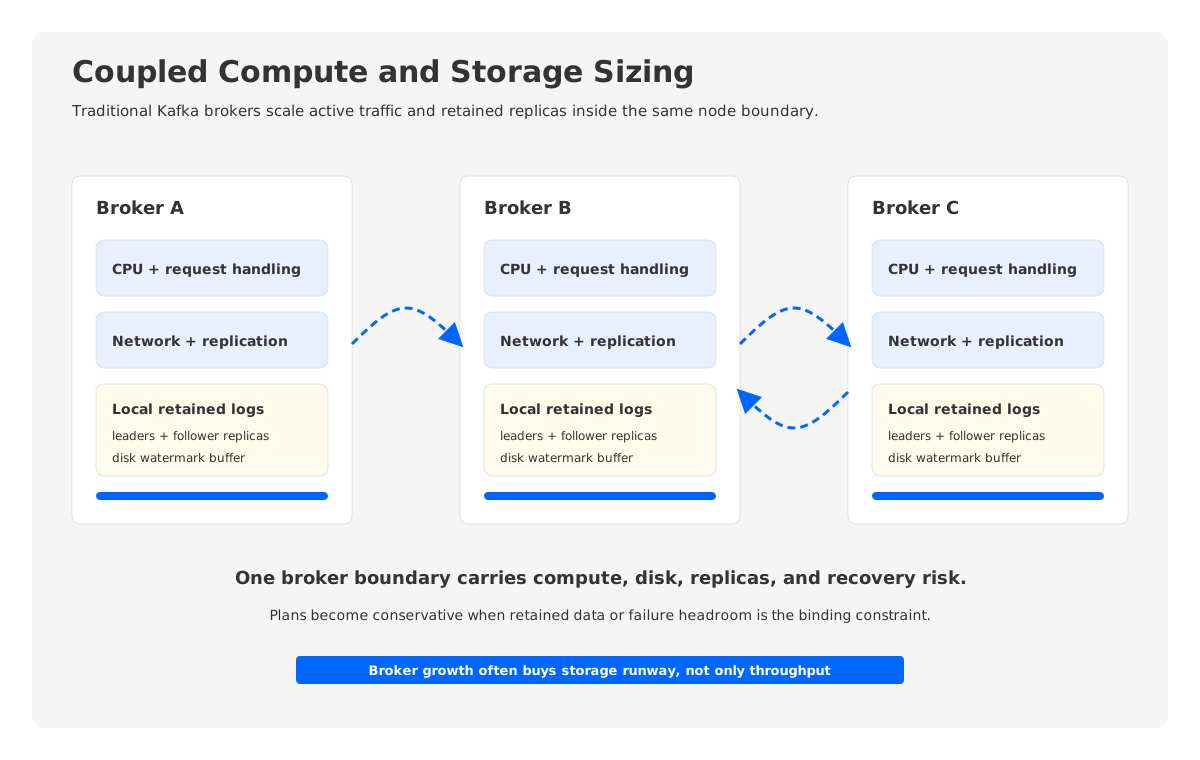
Traditional Kafka capacity planning is conservative because brokers couple several roles that scale differently. CPU and network are driven by active traffic. Disk is driven by retained data and replication factor. Partition metadata is driven by topic design. Failure recovery is driven by how much state has to move and how fast followers can catch up.
That coupling creates common planning mistakes:
| Mistake | What Goes Wrong | Better Check |
|---|---|---|
| Sizing from average traffic only | Peaks trigger throttling or consumer lag | Apply peak factor and replay scenarios |
| Treating retention as a policy only | Disk grows faster than expected | Convert retention into GiB with RF and utilization |
| Ignoring egress fanout | Consumer reads dominate broker network | Model each consumer group and replay workload |
| Counting brokers before partitions | Hot partitions overload a subset of brokers | Check leaders, replicas, and hot-topic skew |
| Forgetting failure headroom | A broker loss becomes a capacity incident | Recalculate capacity after N broker failures |
| Hiding cross-AZ traffic | Cloud bill rises without a visible owner | Separate replication, producer, and consumer transfer |
The deeper issue is that adding capacity is not only adding a broker. In a local-disk Kafka architecture, durable data has placement. Scaling out may require partition reassignment. Scaling down requires moving state away from brokers. Expanding disk may require larger instances, more volumes, or operational work that is coupled to the broker lifecycle. This is why teams often buy more broker capacity than current traffic needs: they are buying storage runway, reassignment safety, and failure margin at the same time.
That tradeoff is rational. It is also expensive. When compute, storage, and failure recovery all share the same broker boundary, the safest plan tends to be the largest plan.
7How AutoMQ Changes The Capacity Model
If the root planning problem is broker coupling, the architectural alternative is to separate durable retained data from broker instances. AutoMQ is a Kafka-compatible cloud-native streaming system that keeps Kafka APIs and ecosystem compatibility while moving the durable storage layer to object storage. Brokers become much closer to stateless compute nodes, with WAL and cache used for write acceleration and recovery while object storage holds retained data.
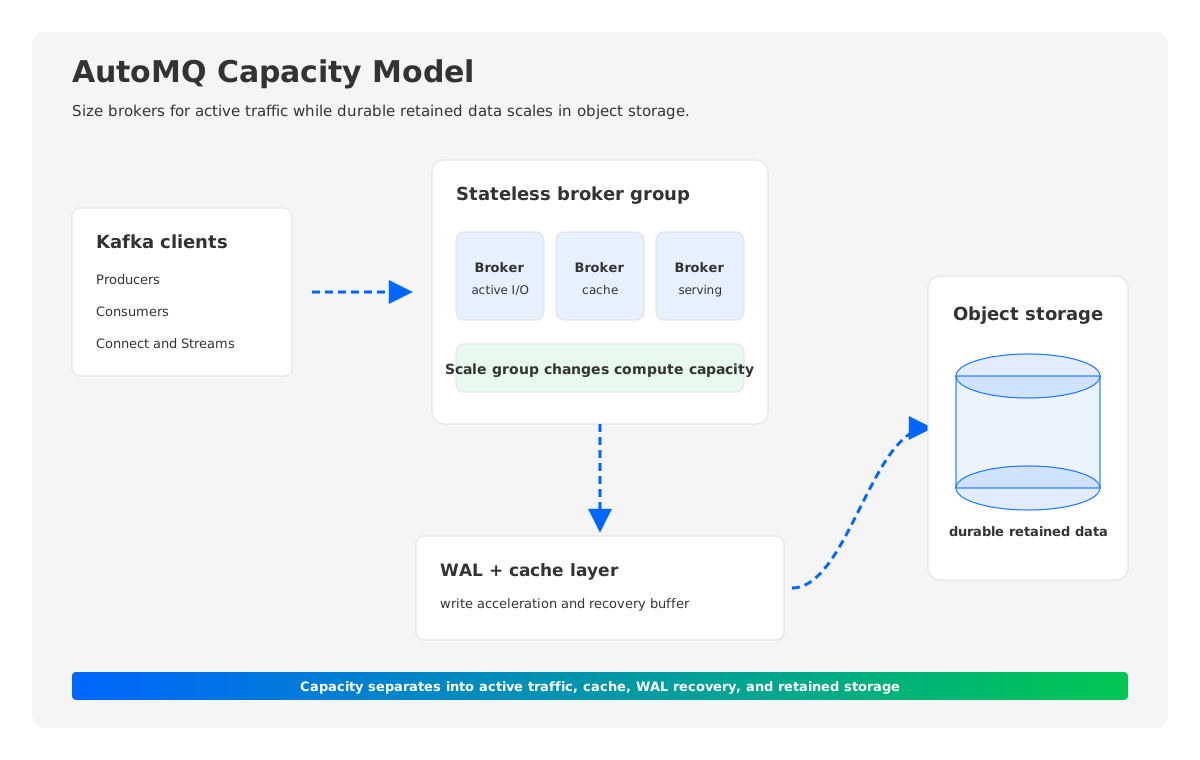
This changes the worksheet. In a traditional Kafka plan, retained data usually pushes up broker-local disk and can indirectly push up broker count. In an AutoMQ-style shared-storage model, retained data is planned primarily against object storage capacity and request patterns, while brokers are sized more directly around active write throughput, read throughput, cache needs, and partition serving.
The revised mental model is:
broker_capacity =
  active_traffic + cache_working_set + partition_serving + failure_headroom

durable_storage_capacity =
  retained_logical_data + storage_service_replication/durability model
This does not remove capacity planning. It makes the dimensions cleaner. Platform teams still need to estimate ingress, egress, partitions, peak factor, retention, and failure headroom. They still need to validate latency and throughput under representative workloads. The difference is that growth in retained data no longer has to force the same broker-local disk expansion pattern.
For teams preparing a next-quarter Kafka plan, that distinction matters. If the forecast says traffic will grow by 30 percent but retention will grow by 300 percent, a coupled architecture and a decoupled architecture will produce very different infrastructure plans. One may require larger brokers or more broker-local storage. The other may shift most of that growth into object storage while scaling brokers for the active workload.
8A Practical Planning Workflow
Use the capacity plan as a living worksheet, not a one-time spreadsheet. The first version should be simple enough for application teams to review and strict enough that each assumption has an owner.
- List current average and peak compressed ingress by topic group.
- List consumer groups, replay patterns, and expected egress fanout.
- Convert retention policies into logical retained GiB.
- Multiply by replication factor and disk utilization target for broker-local Kafka plans.
- Check broker limits independently for write, read, disk, partition count, and failure headroom.
- Estimate cross-AZ traffic as separate producer, consumer, and replication lines.
- Run a load test or replay test against the proposed instance, disk, and network profile.
- Recalculate the worksheet for next-quarter growth, not only current usage.
- Compare coupled and decoupled storage models if retention or operational elasticity dominates the plan.
The worksheet should end with a decision, not with a single computed number. A useful conclusion looks like: "For the current architecture, the binding constraint is replicated retained storage, not CPU. At the forecasted retention window, we either add brokers mainly for disk runway or evaluate a shared-storage Kafka-compatible architecture where durable storage scales separately."
That is a much better conversation than "we need eight more brokers."
9References
- Apache Kafka Documentation: Operations
- Apache Kafka Documentation: Topic Configs
- Apache Kafka Documentation: Replication
- AWS EC2 On-Demand Pricing: Data Transfer
- AWS S3 Pricing
- AutoMQ Documentation: Stateless Broker
- AutoMQ Documentation: S3 Storage
- AutoMQ Pricing Calculator
10FAQ
10.1What is the most important metric for Kafka capacity planning?
There is no single most important metric. Start with compressed ingress, egress fanout, retention, replication factor, partition count, and peak factor. The binding constraint may be broker network, disk capacity, partition placement, or failure headroom depending on the workload.
10.2How do I estimate Kafka storage cost?
Convert average compressed ingress into retained GiB, multiply by retention time, multiply by replication factor, and divide by your target usable disk fraction. Then apply your cloud storage unit prices, including block storage, IOPS, snapshots, and any related data transfer. For shared-storage architectures, model retained data against object storage dimensions instead of broker-local disk alone.
10.3How much failure headroom should a Kafka cluster keep?
Define the failure scenario first. Many production plans test at least one broker failure, and multi-AZ clusters often need to reason about zone-level impact. The important check is whether remaining brokers can handle peak write and read traffic while recovery work is happening.
10.4When should I add brokers versus add partitions?
Add partitions when you need more parallelism or consumer concurrency and have validated the operational overhead. Add brokers when the cluster needs more aggregate CPU, network, storage, or failure-domain capacity. The two decisions interact because partitions must be placed across brokers.
10.5How does AutoMQ affect Kafka capacity planning?
AutoMQ changes the sizing model by separating durable retained data from broker-local storage. Brokers can be planned more around active traffic, cache, and serving work, while object storage handles retained data. That can reduce the need to over-provision broker instances for storage runway alone.


