
Table of Contents
Table of Contents
Kafka Connect on Azure is often framed as a connector question: can a team point Kafka Connect at Azure Event Hubs, run source or sink connectors, and move data between operational systems and analytics services? That framing is too small. Kafka Connect is a distributed runtime with workers, connector plugins, task assignment, internal state topics, schema handling, error handling, monitoring, and network dependencies.
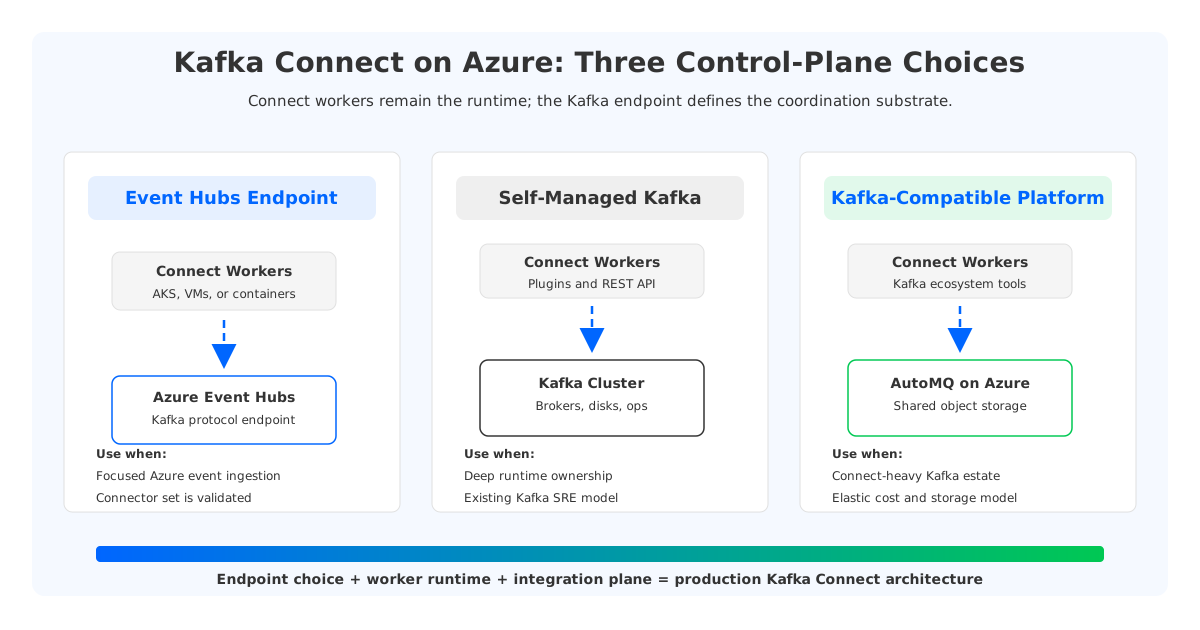
That distinction matters because Azure gives teams several valid paths. Event Hubs provides an Apache Kafka endpoint and Microsoft documents a Kafka Connect walkthrough where Event Hubs acts as the broker endpoint. Teams can also run self-managed Kafka Connect on AKS, Azure VMs, or another compute substrate against a Kafka cluster. A third option is to use a Kafka-compatible platform that keeps the Kafka ecosystem surface area while changing the underlying storage and operations model.
The right answer depends less on whether a test connector can move records and more on what the integration platform must guarantee: connector ownership, offsets, schemas, DLQ, private networking, identity, observability, and cost.
1Why Kafka Connect Changes the Azure Kafka Decision
A simple producer or consumer can be migrated by validating authentication, topic mapping, serialization, and offset behavior. Kafka Connect has a larger blast radius because it turns Kafka into the coordination plane for data integration. In distributed mode, Connect workers coordinate connector configuration, source offsets, and task status through Kafka topics while hosting plugins, transformations, converters, REST APIs, and error policies.
That makes the broker endpoint a platform dependency. If the endpoint is Event Hubs, the worker still has to run somewhere, authenticate, reach every source and sink, protect its REST API, store state, and surface operational signals. If the endpoint is Kafka, the team still owns worker images, plugins, upgrades, scheduling, and incident response.
For data integration teams, the practical question is not "Does Azure support Kafka Connect?" A better question is:
Which Azure architecture gives Connect workers a stable Kafka-compatible control plane, predictable network access to every data system, and enough operational ownership for the connector estate we are building?
That question separates three concerns that are often mixed together:
| Layer | What you decide | Why it affects Connect |
|---|---|---|
| Kafka endpoint | Event Hubs Kafka endpoint, Apache Kafka, or Kafka-compatible platform | Determines protocol behavior, internal topic handling, offsets, and ecosystem assumptions. |
| Connect runtime | Local worker, AKS, VM scale set, container app, or managed service | Determines plugin packaging, worker scaling, REST access, and failure recovery. |
| Integration plane | Databases, object stores, warehouses, SaaS APIs, monitoring, schema registry | Determines network rules, identity, schemas, DLQ, and connector-specific operations. |
Treating these layers independently helps architects avoid two common mistakes: assuming Event Hubs is a complete Kafka platform because Kafka clients can connect to it, or assuming self-managed Connect is reliable because workers are deployed. Connect becomes reliable only when the runtime, endpoint, internal topics, dependencies, and observability model are designed together.
2Using Event Hubs with Kafka Connect
Microsoft's Kafka Connect tutorial demonstrates a clear path: configure Connect to use the Event Hubs Kafka endpoint, set bootstrap.servers to the Event Hubs FQDN on port 9093, configure SASL_SSL, and define internal topics such as config.storage.topic, offset.storage.topic, and status.storage.topic. It then starts a distributed worker and shows basic FileStream source and sink connectors.
That is useful evidence, but it should be read carefully. The tutorial proves that Kafka Connect can communicate with Event Hubs as a Kafka endpoint for a basic scenario. It does not remove the need to validate production connectors, task failures, source offset semantics, schema registry integration, monitoring, and compaction requirements for Connect internal topics.
Event Hubs is a managed Azure streaming service, not an operated Apache Kafka broker cluster. Microsoft describes the Kafka endpoint as a way for Kafka applications to stream into Event Hubs by changing configuration, often without code changes. It also documents architectural differences: Event Hubs uses a namespace endpoint rather than broker-level network access and scales through throughput units or processing units depending on tier.
For Kafka Connect, those differences create a checklist:
- Internal state topics. Connect uses Kafka topics for worker configuration, offsets, and status. Validate creation, compaction, retention, partitioning, and cleanup policy requirements before relying on them in production.
- Connector behavior. A connector that works against Apache Kafka may rely on broker APIs, topic configuration behavior, record headers, transactions, schema tooling, or error routing patterns that need explicit testing with Event Hubs.
- Authentication. Event Hubs supports Kafka clients through
SASL_SSL, with options such as SAS and Microsoft Entra ID based OAuth depending on the scenario. Platform teams need secret rotation and least-privilege access patterns for workers. - Network topology. A single namespace endpoint can simplify firewall design compared with broker-by-broker access, but private endpoints, DNS, outbound access from workers, and target-system connectivity still need design.
- Operations. Event Hubs can remove broker management, yet Connect workers remain your runtime unless a separate managed Connect service is used.
Event Hubs is a strong fit when the integration goal is Azure-native event ingestion, the connector set is narrow, and the team prefers a managed event service over Kafka cluster ownership. It becomes harder when Connect is the central integration platform with many plugins, systems, schema rules, and Kafka-native assumptions.
3Running Self-Managed Connect Workers on Azure
Self-managed Kafka Connect on Azure gives teams the most control over the worker runtime. You can run Connect on AKS, VMs, or containers; package connector versions; add transforms; tune JVM settings; and integrate with observability. This path is common for teams that already operate Kafka.
The tradeoff is that Connect becomes a service you operate. A worker deployment needs more than replicas and a container image. It needs protected REST access, rolling upgrades, plugin tests, secret management, meaningful health checks, and a capacity model for task parallelism.
Self-managed Connect also forces a storage decision. Connect internal topics are the coordination backbone of distributed mode. If the endpoint is self-managed Kafka, Event Hubs, or a Kafka-compatible platform, those topics live in that endpoint's topic layer. In each case, verify compaction, topic naming, durability, and retention.
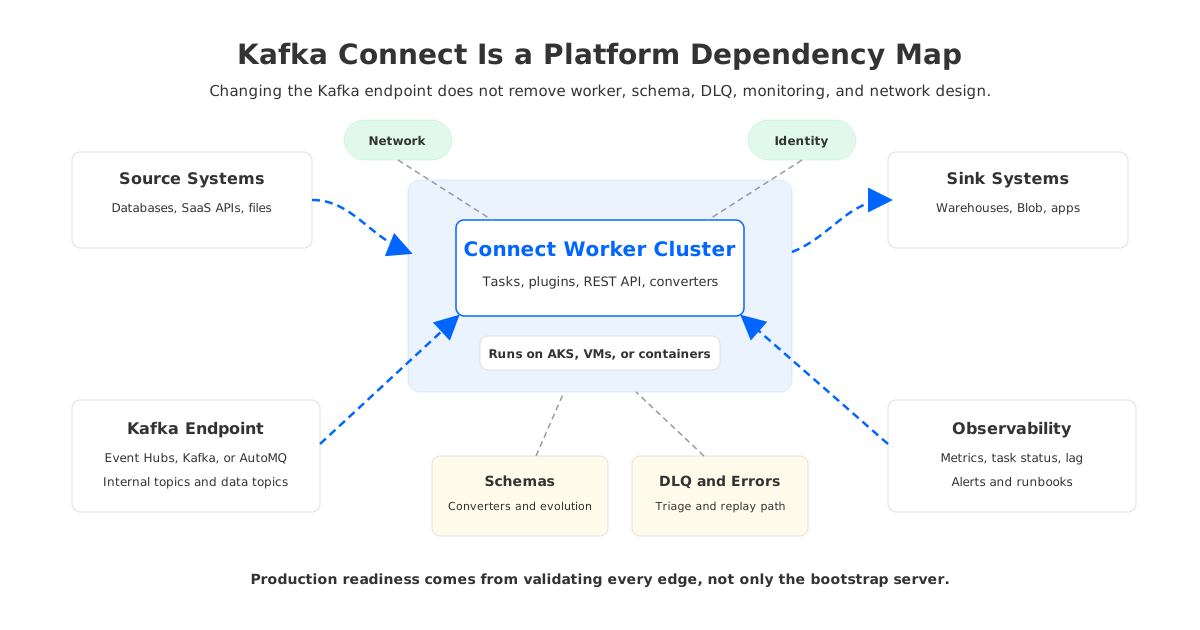
For SREs, the most important design work usually falls into five areas:
- Worker placement. Place workers close to the Kafka endpoint and high-volume systems using AKS node pools, VNet peering, Private Link, and controlled egress.
- Plugin supply chain. Build worker images with pinned connector versions, scanned artifacts, and a staging-to-production promotion process.
- Connector isolation. Separate high-risk or high-throughput connectors when failures, backpressure, or plugin dependencies could affect unrelated pipelines.
- Observability. Export worker metrics, task status, lag, error rates, DLQ volume, and target latency. The REST API is not a monitoring model.
- Failure drills. Test worker restarts, rebalances, source outages, sink throttling, schema incompatibility, poison records, and DLQ replay.
Self-managed Connect is a good choice when integration teams need deep connector control and have the operational maturity to run it as a platform. It is a poor fit when the team expects connector behavior to become managed simply because the Kafka endpoint is managed.
4Offset, Schema, and DLQ Decisions
Kafka Connect has several state surfaces, and each one needs a design decision. Source connectors track source offsets. Sink connectors consume Kafka offsets. Workers track configuration and task status. Converters serialize records. Error handling can route problematic records to a dead-letter queue. Schema registry usage depends on the converter and ecosystem.
The broker endpoint is not the only source of truth. A Debezium source connector has database log positions, Kafka output topics, schema evolution, and recovery behavior. A cloud storage sink has object naming rules, flush intervals, retries, and target throttling. Those details are connector behavior, not generic Azure behavior.
A production design should answer these questions before traffic moves:
- Where are Connect internal topics stored, and are they configured for the required cleanup and durability behavior?
- Which connectors are certified by their vendors or maintainers for the chosen endpoint, and which ones require lab validation?
- How are schemas represented: Avro, JSON Schema, Protobuf, raw JSON, or custom converters?
- Where do bad records go, who monitors the DLQ, and how are records replayed after correction?
- What happens if the sink throttles, the source fails over, or a task crashes repeatedly?
- Which identities can create topics, write internal state, read source topics, write sink topics, and administer connectors?
These questions may look operational, but they are architectural. Weak DLQ ownership can lose business context, a schema strategy with no compatibility gate can break consumers, and shared workers can turn one bad plugin into a platform outage.
5Networking and Security on Azure
Azure networking is often the hidden cost of Kafka Connect projects. Connect workers need outbound access to source systems, sink systems, schema registries, the Kafka endpoint, secret stores, and monitoring endpoints. Some sit in private VNets, some behind Private Link, some in SaaS networks, and some outside Azure.
Event Hubs can simplify the Kafka side because clients connect to a namespace endpoint instead of a broker list. Microsoft also documents TLS requirements and SASL authentication, including SAS and Microsoft Entra ID scenarios. That reduces some broker-network complexity, but it does not solve connector reachability. A worker that cannot reach an on-premises database, private Azure SQL instance, or restricted storage account cannot move data.
For self-managed Kafka or a Kafka-compatible platform, network design can be more explicit. Workers may run in the same VNet as the endpoint, use private listeners, and connect through internal DNS. That can make traffic boundaries easier to audit, but the platform team may own listener configuration, certificates, and firewall rules.
Security design should include:
- Identity model. Prefer workload identities or short-lived credentials. Avoid long-lived secrets in connector configs.
- Secret handling. Use a secret provider or externalized configuration rather than storing raw passwords in connector JSON.
- Network boundaries. Define which connectors may reach which VNets, databases, SaaS endpoints, and storage accounts.
- Topic authorization. Limit Connect workers to the internal topics and data topics they require.
- Auditability. Track connector changes, plugin deployments, credential rotation, and access to the Connect REST API.
The REST API deserves special attention. Kafka Connect exposes connector creation, config updates, pause, resume, task restarts, and status inspection through REST. In production, treat it as a privileged control plane.
6Where AutoMQ Fits for Connect-Heavy Workloads
AutoMQ enters the Azure Kafka Connect discussion when the team wants Kafka ecosystem compatibility without carrying the full operational and cost profile of broker-local storage. It is a Kafka-compatible streaming platform that separates compute from shared object storage and keeps Kafka clients and ecosystem tools relevant. AutoMQ documentation includes managed Kafka Connect capabilities, plugin management, Kafka-compatible client support, Azure deployment guidance, and object-storage-backed architecture.
That combination matters for Connect-heavy workloads.
First, Connect works best when the Kafka endpoint behaves like a Kafka platform, not a narrow protocol adapter. Internal topics, task behavior, client tooling, consumer groups, and monitoring all benefit from a Kafka-compatible substrate.
Second, Connect-heavy workloads often create uneven traffic. Source connectors spike during snapshots, sink connectors back up during warehouse throttling, and replay jobs increase read load. A platform that separates broker compute from durable shared storage can make scaling and recovery less tied to local-disk movement.
Third, cost is not limited to the connector runtime. A Connect estate drives Kafka storage, replay windows, cross-zone traffic, internal topics, and over-provisioning. AutoMQ's shared storage architecture shifts durable stream storage away from broker-local disks and toward cloud object storage, changing the economics of retained data and scaling. The point is not that every Connect deployment should move to AutoMQ; teams should compare full platform cost, not only endpoint fees or worker VMs.
7Decision Framework: Which Path Should You Choose?
The cleanest way to decide is to classify your Connect workload by dependency depth.
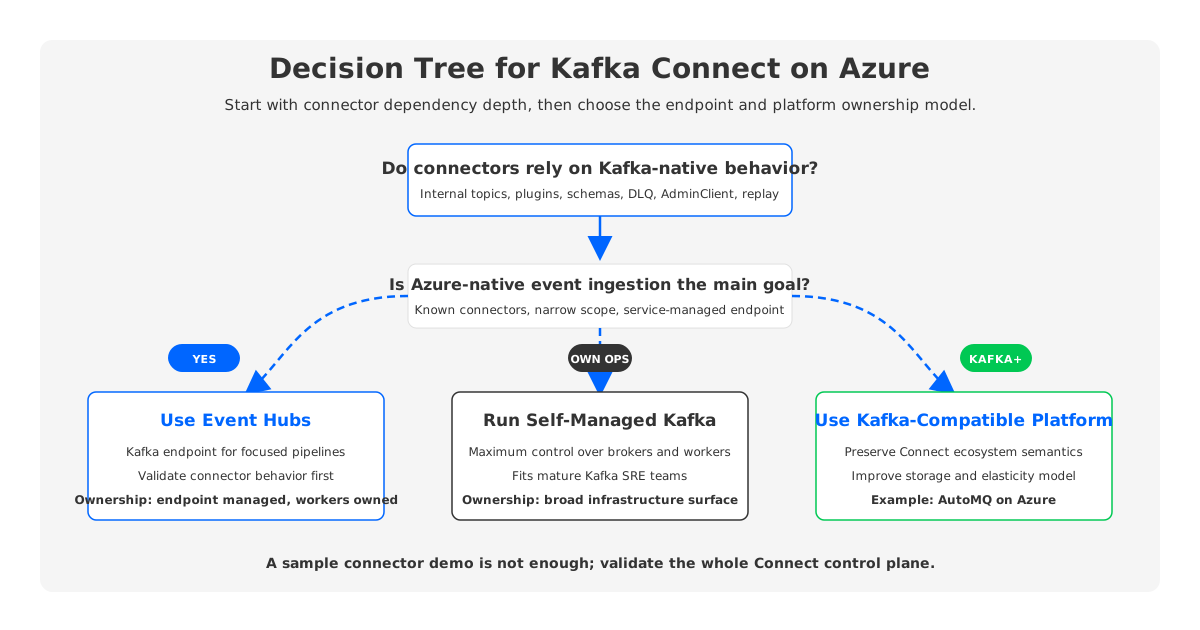
Choose Event Hubs with Kafka Connect when your goal is Azure-native event ingestion, your connector set is known and validated, and your Connect deployment can tolerate the Event Hubs service model.
Choose self-managed Connect with Apache Kafka when your team already owns Kafka operations, needs deep plugin control, and is comfortable managing both brokers and workers.
Choose a Kafka-compatible platform when you need Kafka ecosystem behavior for Connect, Streams, clients, and tooling, but want a cloud-native storage and scaling model. AutoMQ belongs in this category: not as a connector replacement, but as the Kafka substrate that Connect depends on.
Before committing, run a proof of architecture rather than a proof of concept. A proof of concept asks whether one connector can move sample data. A proof of architecture asks harder questions:
- Can the worker cluster survive rolling upgrades without connector instability?
- Can internal topics preserve state through failures and restarts?
- Can schemas evolve without breaking downstream consumers?
- Can DLQ records be monitored, triaged, and replayed?
- Can the platform isolate noisy connectors?
- Can the network design support private connectivity to every source and sink?
- Can FinOps model retained data, replay, worker compute, and cross-zone traffic?
Kafka Connect on Azure succeeds when it is treated as an integration platform. Event Hubs, self-managed Kafka, and Kafka-compatible platforms can all be reasonable choices, but they optimize for different ownership models. Durable decisions validate the full Connect control plane, not only the Kafka bootstrap string.
8References
- Microsoft Learn: Integrate Apache Kafka Connect support on Azure Event Hubs
- Microsoft Learn: What is Azure Event Hubs for Apache Kafka?
- Apache Kafka Documentation: Kafka Connect
- AutoMQ Docs: Managed Kafka Connect overview
- AutoMQ Docs: Manage Kafka Connect plugins
- AutoMQ Docs: Deploy to Azure AKS
- AutoMQ Docs: Native compatible with Apache Kafka
- AutoMQ Docs: S3Stream shared streaming storage
9FAQ
9.1Can Kafka Connect run with Azure Event Hubs?
Yes. Microsoft documents a Kafka Connect tutorial that configures Connect workers to use the Event Hubs Kafka endpoint and demonstrates basic source and sink connectors. Production use still requires connector-specific validation, internal topic checks, security design, and monitoring.
9.2Is Event Hubs a full replacement for a Kafka cluster for Connect workloads?
It depends on the workload. Event Hubs provides Kafka protocol support through a managed Azure service, but Kafka Connect also depends on worker runtime behavior, internal topics, connector plugins, schemas, DLQ handling, and operational tooling. Validate those areas before treating it as a full platform replacement.
9.3Where should Kafka Connect workers run on Azure?
Common choices include AKS, Azure VMs, and other container platforms. Pick the runtime based on plugin packaging, network reachability, worker scaling, REST API protection, observability, and operational ownership.
9.4What should be tested before moving production connectors?
Test internal topic behavior, source offsets, sink backpressure, schema evolution, DLQ routing, task restarts, worker rolling upgrades, private networking, authentication, connector metrics, and rollback procedures.
9.5How does AutoMQ relate to Kafka Connect on Azure?
AutoMQ is not a connector plugin. It is a Kafka-compatible streaming platform that can act as the Kafka substrate for Connect-heavy workloads while using shared object storage and a more elastic broker architecture. It is relevant when teams want Kafka ecosystem compatibility with a different cost and scaling model on Azure.


