
Table of Contents
Table of Contents
Teams search for kafka connect production when a connector estate has moved beyond the demo phase. A source connector that once copied a few tables now carries customer events into analytics. A sink connector that looked harmless now controls whether warehouse dashboards, fraud models, or lakehouse tables stay fresh. The connector is still "just" a Kafka client in one sense, but operationally it has become part of the data platform.
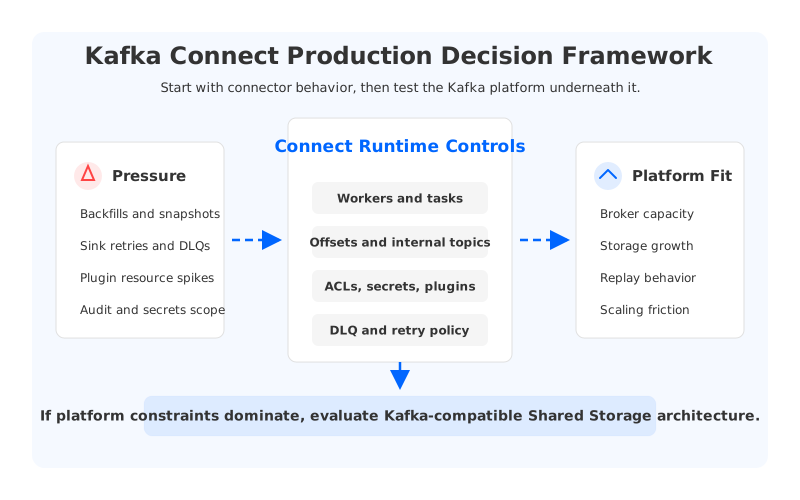
That shift changes the questions. The issue is no longer whether a connector can be configured. It is whether the platform can scale tasks, isolate failures, protect credentials, preserve offsets, handle outages, and keep capacity available for backfills or retries. Connect provides the runtime; reliability depends on the surrounding architecture.
Connect also reveals platform problems underneath it. A connector can be well written and still hurt if the cluster is tightly coupled to broker-local storage, fragile capacity headroom, or slow rebalancing. Evaluate both layers: the Connect worker layer and the Kafka-compatible platform that absorbs its traffic.
1Why Kafka Connect Production Is a Platform Question
Apache Kafka Connect moves data between Kafka and external systems through connectors, workers, and tasks. A connector defines the integration, while tasks perform the parallel work. In distributed mode, workers coordinate as a group, store configuration and offsets in Kafka topics, and rebalance task ownership as workers join or leave. That model turns many integrations into repeatable runtime units.
The same model concentrates risk. A Connect cluster may touch databases, object storage, SaaS APIs, warehouses, search indexes, queues, and internal Kafka topics. Each dependency has its own authentication model, throughput ceiling, retry behavior, and maintenance window. Production architecture has to expose those differences instead of hiding them behind a single status.
A useful review starts with four boundaries:
- Runtime boundary. Which workers run which plugins, how are tasks placed, and how much capacity can each connector consume before it hurts other work?
- State boundary. Where are offsets, configurations, status topics, schema dependencies, and dead-letter queue records stored and protected?
- Security boundary. Which identities can read or write topics, call external systems, access secrets, and observe logs?
- Failure boundary. What happens when a worker dies, a plugin leaks memory, a sink throttles, a source emits bad records, or Kafka is under pressure?
These boundaries become architectural constraints. CDC snapshots create write bursts, sink outages create replay pressure, and replication-style connectors multiply traffic. If the Kafka platform cannot absorb those bursts, Connect becomes the first place operators see the pain.
2Scaling Workers Is Not the Same as Scaling the System
Connect scaling has two levels. At the worker layer, teams tune worker count, task parallelism, JVM resources, plugin isolation, and placement policy. At the Kafka layer, they need partition capacity, broker throughput, retained storage, internal topic durability, and consumer group stability. Scaling one layer without the other creates misleading success.
Increasing tasks.max can help when the connector has independent work units and the source or sink can handle parallelism. It does not help when the bottleneck is a single table scan, an API rate limit, a compacted topic with too few partitions, or a Kafka cluster close to disk and network limits. More tasks can make recovery harder by increasing retry volume and lag churn.
The same caution applies to worker count. Adding workers improves placement options and fault tolerance, but it can trigger task rebalances.
| Scaling signal | Connect-layer question | Kafka-platform question |
|---|---|---|
| Source snapshot or backfill | Can tasks split work without duplicate extraction? | Can Kafka absorb the write burst without hot partitions or storage pressure? |
| Sink lag growth | Are workers CPU-bound, blocked on sink acknowledgments, or retrying failures? | Is consumer lag caused by broker fetch throughput, network paths, or downstream limits? |
| Worker failure | Do tasks restart cleanly with preserved offsets? | Can the platform handle replay without extended recovery work? |
| Plugin resource spike | Is the plugin isolated from unrelated connectors? | Can the cluster absorb uneven ingress while balancing traffic? |
The table is why "add more workers" is not a production strategy by itself. Connect parallelism should be paired with topic design, partition counts, internal topic replication, DLQ policy, throughput budgets, and broker capacity planning.
3Security Starts with Least Privilege, Then Follows the Data Path
Kafka Connect security is often treated as a checklist: enable TLS, configure SASL, hide secrets, and add ACLs. Those controls matter, but every connector also sits at the intersection of Kafka permissions, external permissions, plugin supply chain, network reachability, logs, and operational access.
Trace one record and one secret through the system. A source connector may authenticate to a database, read sensitive columns, write to Kafka topics, emit metrics, and log errors. A sink connector may read from a topic, call an API, write failed records to a DLQ, and store offsets. Each step is a chance to over-grant permissions or leak data.
Make these controls explicit:
- Kafka ACLs by connector role. A source connector usually needs write access to target topics and internal Connect topics. A sink connector usually needs read access to source topics and consumer group permissions.
- Secret handling by runtime. Connector properties can contain passwords, tokens, and private keys. Use a controlled secret provider and verify that configs, logs, metrics labels, and errors do not expose credentials.
- Plugin provenance. Connect plugins are executable code. Pin versions, scan artifacts, control who can upload custom plugins, and isolate high-risk plugins from shared worker pools.
- Network segmentation. Workers should reach Kafka and approved external systems through private paths where possible. A worker that can reach every subnet is hard to audit.
- DLQ and error-topic governance. Failed records can contain sensitive fields. Treat DLQs as production data stores, not debugging scratch space.
Managed connector workflows can reduce friction without changing the security question. AutoMQ BYOC provides Managed Connector capability with workers deployed inside the customer's VPC, connector tasks managed through the control plane, ACL credentials for cluster access, Kubernetes placement controls, and Prometheus metrics export. Runtime, network, and ownership boundaries can be made explicit while data movement stays inside the customer's environment.
4Failure Handling Is a Design Choice, Not a Connector Setting
Connector failures rarely arrive in tidy categories. A task can fail because the source changed schema, a sink can throttle for hours, a converter can reject records, or a worker can lose network reachability. Kafka can be healthy while the external dependency is down, and the reverse can also be true. The failure plan should name which component owns each symptom.
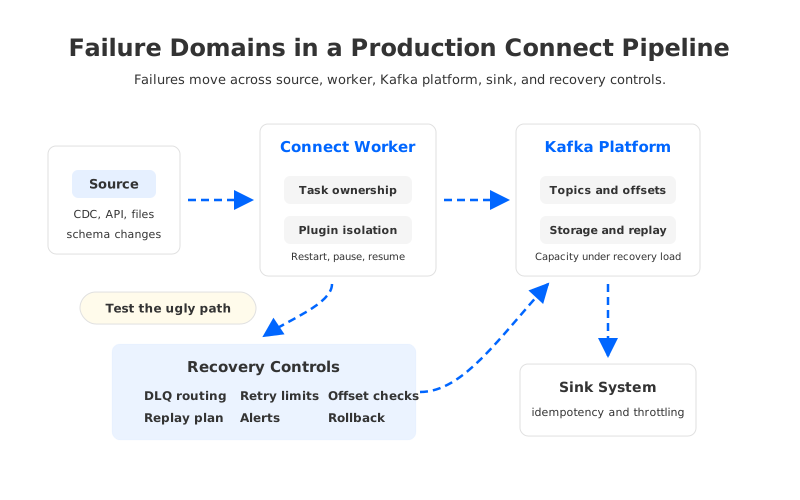
Three decisions shape most outcomes. The first is whether the connector should fail fast or continue with error tolerance and DLQ routing. Fail-fast behavior fits workloads where incorrect processing is worse than downtime. DLQ routing is useful when the pipeline can quarantine malformed records and continue moving valid data.
The second decision is replay. Connect stores offsets, but offset continuity is not business idempotency. A sink connector may reprocess records after a restart, so the sink must tolerate duplicates or use deterministic keys and upsert semantics. A source connector may resume from a stored position, but snapshots, CDC logs, and schema changes can still create duplicate or missing business events.
The third decision is recovery capacity. Backfills, retries, and DLQ reprocessing often happen when the platform is already stressed. Traditional Kafka clusters can make this harder because retained data, broker capacity, and partition ownership are tied together. If replay requires moving partitions first, the failure window becomes a storage operation.
5How Kafka Architecture Changes the Connect Operating Model
A neutral evaluation should separate Connect runtime design from Kafka storage architecture. Connect needs workers, tasks, plugin controls, observability, and ownership on any Kafka-compatible platform. The platform underneath decides how painful it is to absorb connector bursts, replays, retention growth, and broker lifecycle events.
Traditional Kafka uses a Shared Nothing architecture: each broker owns local partition data, and durability is maintained through replicas across brokers. Scaling and replacing brokers are therefore tied to data placement. Connect-heavy workloads amplify that coupling through backfills, fan-out, sink retries, and long retention for replayable integration data.
Tiered Storage changes part of the equation by offloading older segments to object storage. It can help when historical retention is the pressure point, but it does not fully remove the active local storage tier or turn brokers into stateless compute units. It is not the same architecture as separating compute from durable stream storage.
AutoMQ enters the evaluation when the bottleneck is the operating model rather than a single connector. AutoMQ is a Kafka-compatible streaming platform that keeps Kafka protocol and ecosystem semantics while replacing broker-local log storage with S3Stream, WAL storage, and S3-compatible object storage. Durable stream data lives in shared storage.
For Connect production work, that changes the questions:
- Can connector backfills be absorbed without turning every scale event into a retained-data movement project?
- Can broker replacement and scaling be handled with less coupling to partition storage?
- Can consumer replay and Catch-up Read patterns be evaluated against a storage layer designed for shared object storage?
- Can customer-controlled BYOC deployment keep Connect workers, Kafka data plane, credentials, and network paths inside the customer's environment?
This does not remove the need to test the connector estate. It narrows the migration question: can the team keep connectors, topics, offsets, ACLs, monitoring concepts, and runbooks while changing the storage model that makes the platform heavy?
6A Production Readiness Checklist for Kafka Connect
The useful readiness checklist is not a generic "healthy" dashboard. It is a set of gates proving the connector can run, fail, recover, and be audited under real load.
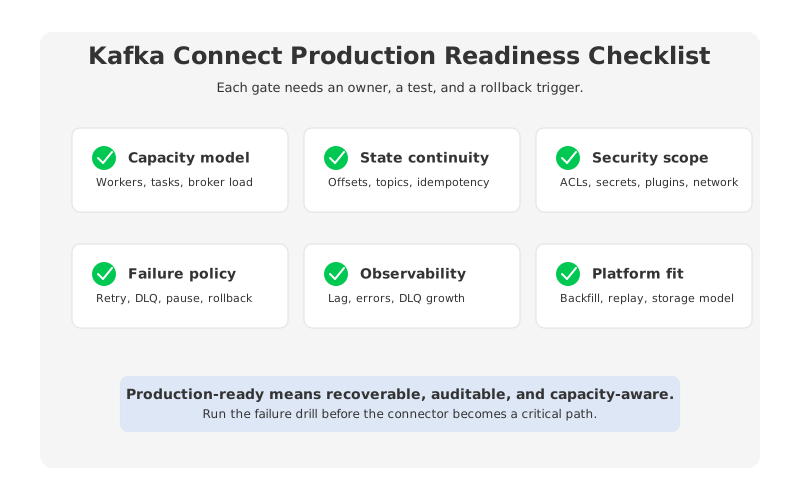
| Gate | What to prove | Evidence |
|---|---|---|
| Capacity model | Worker resources, task parallelism, topic partitions, and broker capacity match expected steady state and recovery load. | Load test with snapshot, retry, and replay scenarios. |
| Offset and state continuity | Connector offsets, internal topics, DLQ records, and sink-side idempotency behave as expected after restart. | Restart test, worker loss test, and duplicate-processing review. |
| Security and secrets | Kafka ACLs, external credentials, plugin artifacts, network paths, logs, and DLQs follow least privilege. | ACL export, secret scan, network test, and plugin approval record. |
| Failure policy | Fail-fast, retry, DLQ, pause, resume, and restart behavior are documented by connector. | Inject malformed records and dependency outages. |
| Observability | Operators can distinguish source lag, sink throttling, worker errors, broker pressure, and DLQ growth. | Dashboard drill-down and alert routing test. |
| Platform fit | The Kafka-compatible platform can handle connector growth without recurring storage, scaling, and rebalancing friction. | Backfill capacity test and broker lifecycle drill. |
If failures are mostly plugin bugs and missing DLQ policy, fix the runtime first. If failures repeatedly involve broker capacity, retained storage, or slow scaling, the platform is part of the problem.
7Decision Table for Platform Teams
Choose Kafka Connect architecture by workload facts. A few predictable connectors can run well on a compact setup. A large estate with CDC snapshots, many sinks, strict security boundaries, and frequent replay needs a stronger operating model.
| Situation | Better next step | Why |
|---|---|---|
| Few connectors, low throughput, clear ownership | Harden the existing Connect cluster | The fastest improvement is better ACLs, DLQ policy, monitoring, and restart discipline. |
| Many connectors share workers and interfere with each other | Isolate worker pools and plugin runtimes | Resource isolation reduces blast radius before changing the Kafka platform. |
| Security reviews block connector deployment | Standardize secret, plugin, network, and DLQ governance | Connect needs a published security contract, not ad hoc approvals. |
| Backfills and retries repeatedly stress Kafka capacity | Evaluate the Kafka storage and scaling model | The problem may be broker-local durable state and capacity coupling. |
| Teams want managed Connect while keeping data in their VPC | Evaluate AutoMQ BYOC Managed Connector | It keeps worker execution in the customer environment while reducing operation work. |
| The organization wants Kafka compatibility with lower operational friction | Evaluate AutoMQ Shared Storage architecture | It preserves Kafka-facing contracts while reducing the weight of broker-local storage. |
The order matters. First make the current system observable and accountable. If evidence shows connector growth is constrained by the Kafka operating model, a Kafka-compatible Shared Storage architecture becomes practical to evaluate.
8From Connector Projects to a Streaming Platform
Kafka Connect standardizes integration work that would otherwise become one-off applications. Preserve that advantage, but do not expect the framework alone to solve capacity, security, recovery, and platform lifecycle problems.
If your Connect estate is becoming the busiest part of your Kafka platform, treat it as an architecture signal. Prove worker isolation, offset behavior, ACL design, DLQ governance, and recovery. Then ask whether the Kafka platform underneath is making routine integration work too heavy.
AutoMQ is worth evaluating when the evidence points to broker-local storage, slow scaling, and recurring data movement rather than a single connector defect. Begin with your hardest connector: a source snapshot, a sink outage, a replay window, or a worker failure drill. The useful proof is whether the platform handles recovery while keeping Kafka compatibility intact. Start from the AutoMQ documentation.
9References
- Apache Kafka documentation: Kafka Connect overview
- Apache Kafka documentation: Kafka Connect configuration reference
- Apache Kafka documentation: Kafka security overview
- AutoMQ documentation: Managed Connector overview
- AutoMQ documentation: Manage Connectors
- AutoMQ documentation: Architecture overview
10FAQ
10.1What is the difference between a demo and production architecture?
A demo proves that a connector can move records. Production architecture proves that it can scale, restart, preserve offsets, protect credentials, route failures, and recover from dependency outages.
10.2How should teams scale Connect workers?
Scale workers and tasks based on the actual bottleneck. Check source parallelism, sink rate limits, worker resources, topic partitioning, broker throughput, and retry behavior before increasing tasks.max.
10.3Are DLQs enough for failure handling?
No. DLQs help quarantine malformed records, but they do not replace idempotent sink design, offset validation, retry limits, alerting, or reprocessing plans.
10.4What security controls matter most?
Start with least-privilege ACLs, controlled secret handling, plugin governance, private network paths, and DLQ data protection. Verify that logs, metrics, and rendered configs do not expose sensitive values.
10.5Where does AutoMQ fit in Kafka Connect production planning?
AutoMQ fits when Connect growth exposes slow scaling, broker-local storage pressure, replay-heavy recovery, or recurring data movement. It preserves Kafka compatibility while moving durable stream storage to a Shared Storage architecture, and AutoMQ BYOC can run managed connector workers inside the customer's VPC.


