
Table of Contents
Table of Contents
The alert looks simple: consumer lag is rising. The first reaction is usually simple too. Add consumers if the group is behind, add brokers if the cluster looks hot, and wait for the line to bend down. Sometimes it works. At scale, it often does not, because consumer lag is the visible gap between where producers are writing and where a consumer group has committed progress. That gap can be created by the application, the topic layout, the broker data path, the network, or a replay workload that looks nothing like normal traffic.
That is why a lag alert can survive several rounds of scaling. A team adds consumers, but the group has fewer hot partitions than consumer instances. A team adds brokers, but the slow partitions are still served from cold broker-local disks. A team moves the topic, but the real issue is a historical catch-up job evicting page cache and slowing fetches for everyone else. The metric is telling the truth; it is incomplete.
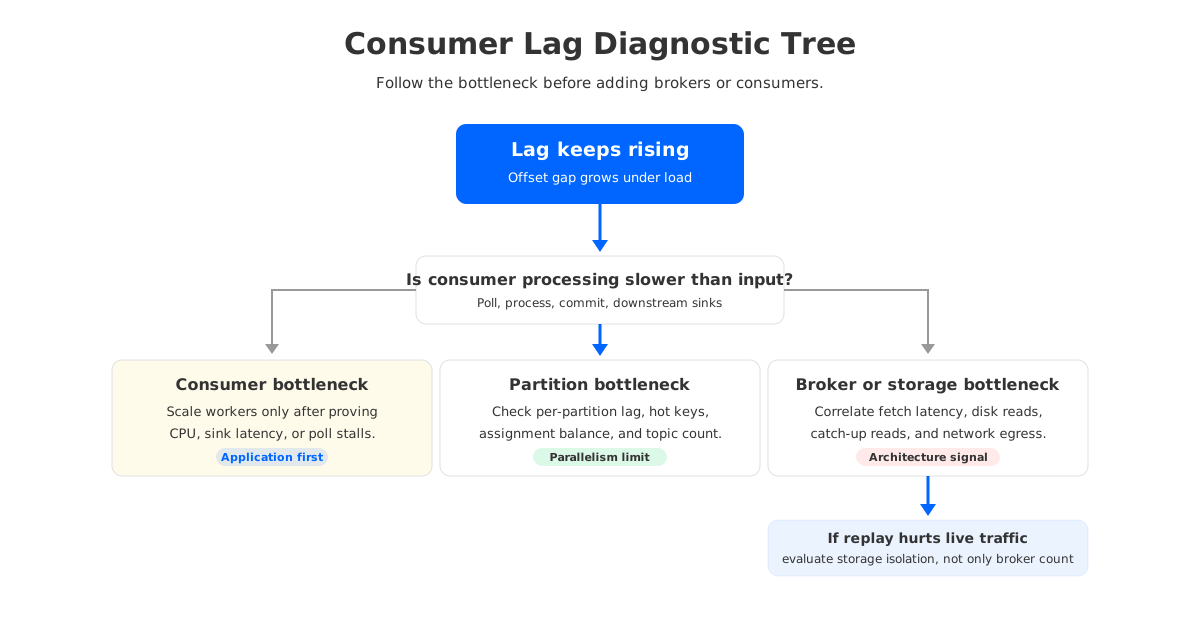
The useful diagnostic question is not "How do we reduce lag?" It is "Which part of the system cannot turn produced records into committed consumer progress at the required rate?" Once you frame the problem that way, adding capacity becomes one possible response, not the default response.
1Why Consumer Lag Is Not One Problem
Kafka lag monitoring usually starts with offsets. Amazon MSK describes consumer lag metrics as the difference between the latest data written to topics and the data read by applications, and Kafka exposes client-side fetch metrics such as records-lag-max, fetch-latency-avg, fetch-latency-max, bytes-consumed-rate, and records-consumed-rate. Those metrics show whether the consumer side is keeping up, but they are not a diagnosis by themselves.
Two consumer groups can show the same lag number and have completely different problems. One group may be CPU-bound because deserialization, enrichment, or downstream writes are slow. Another may be I/O-bound because it is replaying older segments from disk. A third may be balanced on paper but effectively limited by one hot partition. The number "10 million records behind" is a symptom; the shape of the lag tells you where to look.
The first split is between accumulation and recovery. Accumulation means the group cannot keep up with the current produce rate. Recovery means the group is draining backlog but not quickly enough for the business objective. The second split is between logical lag and physical pressure. Logical lag lives in partitions, consumer groups, and commits; physical pressure lives in fetch latency, broker disk reads, page cache behavior, network saturation, and request queues.
2Diagnose Consumers, Partitions, and Broker Storage
A good lag investigation narrows the blast radius before changing the cluster. Start with the consumer because it is the easiest place to prove or eliminate. Check whether records-consumed-rate is below the incoming rate, whether poll timing points to application stalls, and whether commits are delayed by downstream dependencies. If the consumer is slow because it is waiting on a database, adding Kafka brokers will not change the database.
Then look at partition distribution. Kafka can only parallelize a consumer group up to the number of assigned partitions, and real workloads are rarely distributed perfectly. One partition with a disproportionate share of traffic can dominate group lag even when aggregate cluster utilization looks reasonable. This is where partition-level lag matters more than group-level rollups, because a clean average can hide a stuck shard.
The storage layer comes next. Broker-side pressure tends to show up as fetch latency, disk read latency, request queue growth, network saturation, or noisy-neighbor effects between live consumers and replay consumers. The practical checklist is short, but it forces the investigation to cross the application/cluster boundary:
| Layer | Signals to inspect | What the signal means |
|---|---|---|
| Consumer application | Poll interval, processing time, commit latency, downstream errors | The group may be slow because user code or sinks cannot process records fast enough. |
| Partition layout | Per-partition lag, key skew, leader distribution, hot topics | More consumers may not help when the workload is limited by a few partitions. |
| Broker fetch path | Fetch latency, fetch request rate, bytes out, request queues | Consumers may be waiting on broker service time rather than application processing. |
| Storage and cache | Disk read latency, page cache pressure, cold segment reads | Historical reads can compete with tail reads on broker-local storage. |
| Network | Broker egress, cross-AZ paths, client throughput, packet loss | Lag can rise when data cannot move from brokers to consumers fast enough. |
This sequence also helps avoid a common mistake: blaming Kafka architecture too early. If lag began immediately after a code deploy, a schema change, a sink dependency change, or a producer burst, the architecture may be innocent. If one consumer instance is stuck in a rebalance loop, fix group stability first. If a topic has too few partitions for the required concurrency, redesigning storage will not create parallelism that the topic does not expose.
Architecture becomes the right suspect when the same pattern repeats after the obvious issues are removed: catch-up reads degrade live traffic, broker disk pressure appears during replay, rebalancing requires large data movement, or scaling brokers adds operational work without isolating the workload that caused lag.
3Catch-Up Reads and Historical Data Pressure
Catch-up reads are where consumer lag stops being a consumer-only problem. A catch-up workload reads older data after a consumer outage, a replay, a CDC resync, another analytics consumer, or a backfill. In traditional Kafka deployments, those reads often go through the same broker-local storage and OS page cache assumptions that serve tailing consumers. When the data has cooled, the read path can shift from memory-heavy to disk-heavy, and the cost is paid by the broker as well as the lagging consumer.
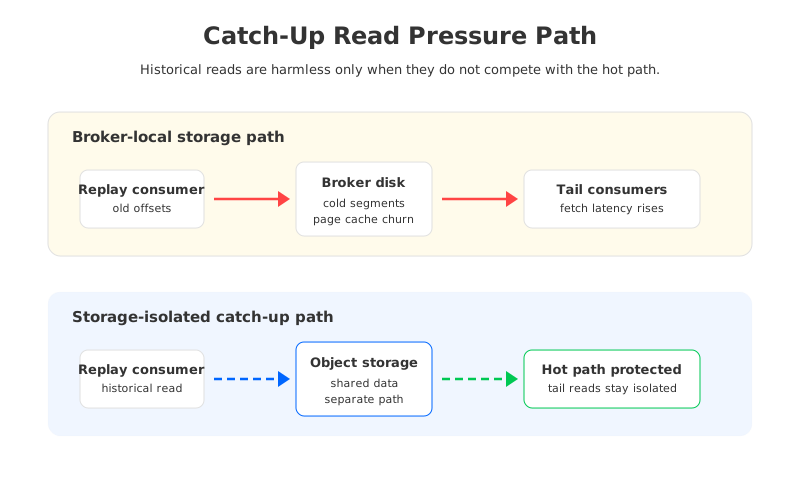
The well-known cold read issue behind KAFKA-7504 is a useful example of the failure mode. AutoMQ's official catch-up read benchmark page summarizes the Kafka side as a hot/cold interference problem: page cache does not separate hot and cold data, and disk-backed sendfile behavior can affect Kafka network threads during cold reads. The exact impact depends on hardware, workload, Kafka version, and configuration, so the lesson is not that every Kafka cluster will hit the same numbers. The lesson is that historical reads have a physical data path, and that path can interfere with live service.
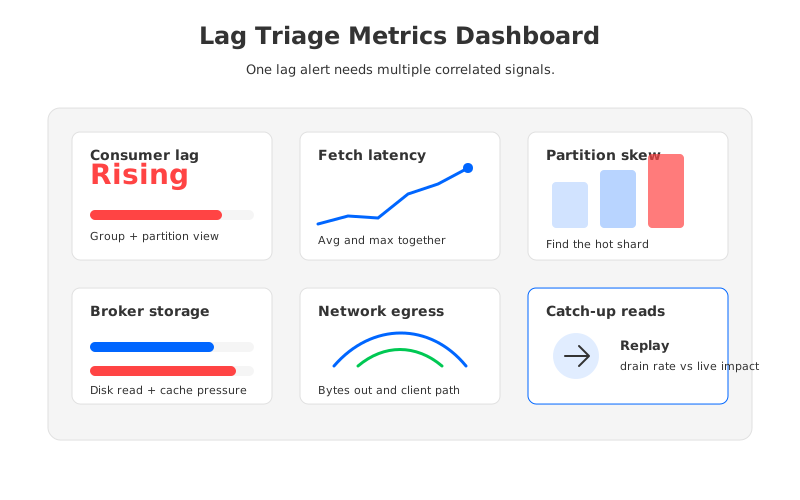
When a lag incident involves replay, measure recovery as a workload of its own:
- Backlog drain rate: how fast the group reduces lag after subtracting the current produce rate.
- Fetch service time: whether
fetch-latency-avgandfetch-latency-maxrise during replay. - Live traffic impact: whether producer latency, tail consumer latency, or broker request queues worsen while catch-up is running.
- Storage locality: whether the data is being served from cache, local disk, remote tiered storage, or object storage.
- Isolation boundary: whether replay consumers can be separated from latency-sensitive consumers at the storage and network layer.
If the catch-up job drains backlog but slows the rest of the cluster, the problem is workload isolation.
4Why Architecture Matters at Scale
Kafka's broker-local storage model was built around a powerful idea: keep partitions close to the brokers that serve them, write sequentially, and let the operating system page cache make hot reads fast. That model can be extremely effective for steady tail reads. It becomes harder to operate when the same brokers are expected to handle high write throughput, many live consumers, long retention, historical replay, elastic scaling, and failure recovery at the same time.
More brokers help when the bottleneck is aggregate compute, network, or storage bandwidth that can be evenly redistributed. They help less when the bottleneck is tied to hot partitions, local segment placement, or cold data reads that remain attached to specific brokers. A bigger cluster can even make the operational loop slower if every scaling or recovery action requires partition movement, replica catch-up, and careful rebalance windows.
This is where architecture changes the shape of the incident. In a broker-local design, brokers are compute and storage owners. In a shared-storage or diskless design, brokers can become closer to stateless compute nodes while durable data lives in object storage or cloud storage. That does not make consumer code faster, and it does not fix poor partition keys. It changes the cost of recovery, replay, and scaling because data ownership is not pinned to broker disks in the same way.
The trade-off should be stated plainly. A storage-architecture change is not the first answer to every lag alert. It is relevant when the incident pattern is driven by the storage path: cold reads interfering with hot reads, slow replay from historical data, expensive broker over-provisioning for rare catch-up events, or operational risk around broker scaling and partition movement.
5Where AutoMQ Fits
AutoMQ is Kafka-compatible at the protocol and ecosystem level, but it changes the storage architecture underneath the broker. Durable data is moved to shared object storage, and broker compute is designed to be more stateless. For consumer lag at scale, the point is not a generic "faster Kafka" claim. The point is isolation: catch-up reads, tail reads, writes, and scaling events should not all compete for the same broker-local disk assumptions.
AutoMQ's official documentation reports a catch-up read benchmark where, under the documented test conditions and machine types, reading 4 TiB of data took 42 minutes on AutoMQ versus 215 minutes on Apache Kafka, with the page describing this as a 5x cold read efficiency improvement. The same page reports lower send latency impact during cold reads for AutoMQ under that benchmark. Treat those numbers as benchmark results, not universal promises. They are useful because they identify the architectural lever: separating hot and cold paths so replay traffic does not damage live traffic in the same way.
For operators, the decision point is practical. If your lag incidents are mostly consumer bugs, downstream sink limits, bad keys, or too few partitions, fix those first. If lag keeps returning during catch-up reads, historical replay, broker disk pressure, and scaling events, evaluate whether a broker-local storage model is forcing you to buy and operate capacity for the worst moment rather than the normal workload.
A useful migration evaluation asks five questions:
- Compatibility: Can existing Kafka clients, consumer groups, Kafka Connect jobs, and observability tools continue to work with minimal change?
- Replay behavior: Can historical reads drain quickly without damaging producer latency and tail consumers?
- Elasticity: Can brokers scale without long partition movement windows?
- Isolation: Can catch-up workloads be isolated from hot reads and writes at the storage path, not only at the consumer group level?
- Control: Can the platform run in the deployment model your security and data teams require, including customer-controlled cloud environments where needed?
That framing keeps the conversation honest. AutoMQ is not a substitute for good lag monitoring, partition design, or consumer engineering. It is a platform option when the bottleneck has moved below those layers and into the storage architecture that serves Kafka traffic at scale.
6Sources
- Apache Kafka monitoring documentation for consumer and fetch metrics such as
records-lag-max,fetch-latency-avg,fetch-latency-max, and consumption rates. - Amazon MSK consumer lag documentation for managed lag metric definitions and caveats around group state and metric emission.
- AutoMQ 5x catch-up read efficiency documentation for the cited 4 TiB catch-up benchmark and hot/cold isolation explanation.
- AutoMQ Cloud performance benchmark appendix for the benchmark summary and documented test context.
7FAQ
What is Kafka consumer lag? Kafka consumer lag is the gap between the latest records written to a topic partition and the position committed or processed by a consumer group. It is usually measured in offsets or records.
Does high consumer lag always mean I need more consumers? No. More consumers help only when the topic has enough partitions, assignments are balanced, and the bottleneck is consumer-side processing capacity. They do not fix hot partitions, broker fetch latency, storage pressure, network limits, or downstream sink bottlenecks.
When should I add Kafka brokers to reduce lag? Add brokers when broker CPU, network, request handling, or storage bandwidth is the limiting factor and the workload can be redistributed across the cluster. If lag is concentrated in a few partitions or caused by historical reads from broker-local storage, more brokers may not solve the immediate issue.
What metrics should I monitor for Kafka lag troubleshooting? Track group and partition lag together with consumer fetch latency, records consumed rate, bytes consumed rate, poll interval, commit latency, broker request latency, disk read pressure, network throughput, and rebalance activity.
What is a Kafka catch-up read? A catch-up read happens when a consumer reads older data to recover from downtime, replay a stream, run a backfill, or bootstrap another downstream system. It can stress broker storage differently from normal tail reads because the data may not be hot in cache.
When should teams evaluate AutoMQ for consumer lag problems? Evaluate AutoMQ when lag incidents repeatedly involve catch-up reads, cold data access, broker storage pressure, long scaling windows, or replay workloads that interfere with live traffic. If the root cause is application code, partition key design, or a slow downstream database, fix those before changing the Kafka platform.


