
Table of Contents
Table of Contents
The alert says kafka consumer lag is rising, but it does not say why. That is the frustrating part. A consumer group can fall behind because the application is slow, because partition assignments are uneven, because one downstream database is throttling writes, because brokers are queueing fetches behind disk I/O, or because a replay workload is reading colder data through a storage path designed for tailing consumers. The metric is simple; the system behind it is not.
Most bad lag fixes come from treating the symptom as the cause. Adding consumers helps only when there are enough partitions and the application is the bottleneck. Adding brokers helps only when broker-side capacity is the bottleneck and the cluster can rebalance useful work onto the new nodes. Increasing fetch sizes helps only when the consumer is spending too much time on request overhead. In other cases, the same change can make the incident noisier by increasing traffic against the constrained layer.
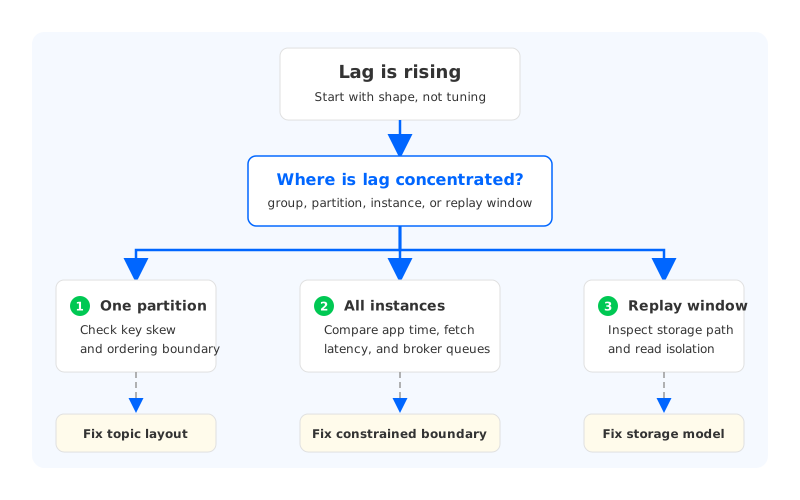
The useful question is not "How do we reduce lag?" It is "Which boundary is creating lag, and which fix changes that boundary without moving the problem somewhere else?" Consumer lag sits at the intersection of application design, topic layout, broker behavior, storage architecture, and cloud network placement.
1Consumer Lag Is A Symptom, Not A Root Cause
Kafka lag is usually described as the gap between the latest offset in a topic partition and the offset a consumer group has processed or committed. Amazon MSK's consumer lag documentation uses the same operational idea: lag compares data written to topics with data read by applications. Apache Kafka also exposes consumer metrics such as records lag, fetch latency, consumed record rate, and consumed byte rate, which are useful signals for narrowing the search.
The trap is that an offset gap does not tell you whether the consumer is late because it is doing too much work or because Kafka is slow to serve the data. A consumer can be perfectly healthy and still lag if its assigned partition receives a disproportionate share of traffic. A broker can be CPU-light and still delay fetches if storage I/O is saturated. A cluster can look calm during steady-state traffic and then fall apart when a failed service restarts and tries to replay hours of data.
The first fix, then, is diagnostic discipline:
- Separate event age from offset lag. Offset lag tells you how many records sit between the consumer and the head of the log. Event age tells you whether business freshness is actually violated.
- Break lag down by partition. Group-level averages hide hot partitions, bad assignment balance, and one consumer instance stuck behind a slow downstream call.
- Compare consumer metrics with broker metrics. If consumer processing time rises but broker fetch latency stays flat, the application path deserves attention. If broker request queues or storage latency rise at the same time, the cluster path is part of the incident.
- Mark replay and catch-up workloads separately. A consumer recovering from an outage behaves differently from a tailing consumer that reads data as it arrives.
This is why lag remediation should start with a decision tree, not a tuning checklist. Tuning is useful after the narrow point is known. Before that, tuning is guesswork with more YAML.
2The Fix Depends On The Bottleneck
Consumer lag fixes usually fall into five categories: application throughput, partition layout, consumer group behavior, broker serving capacity, and storage or network architecture. Separating them keeps the team from applying a local fix to a system-level problem.
| Likely bottleneck | What you usually see | Fixes that can work | Fixes that often disappoint |
|---|---|---|---|
| Application processing | High processing time, slow commits, downstream saturation | Batch writes, parallelize safe work, tune sink capacity, reduce per-record calls | More brokers, larger fetches |
| Partition layout | One or a few partitions dominate lag | Revisit keys, split hot topics, increase partitions with ordering review | More consumers than partitions |
| Consumer group behavior | Rebalances, assignment churn, stalled poll loop | Tune poll interval, session timeout, cooperative assignment, processing model | Blindly lowering timeouts |
| Broker data path | Fetch latency, request queueing, disk or network pressure | Add broker capacity, rebalance leaders, isolate replay traffic, tune fetch path | Only adding app workers |
| Storage and network path | Catch-up reads hurt live traffic, cold reads are slow, cross-zone traffic spikes | Revisit retention tier, cache, placement, and storage ownership | Treating all lag as consumer code |
Application bottlenecks are the easiest to reason about because the lagging component is close to the business logic. A fraud scoring consumer may call a model endpoint. A CDC sink may write to a database. A feature pipeline may perform joins before committing offsets. If downstream work takes longer than records arrive, lag grows. In that case, the right fix may be outside Kafka: batch the sink writes, reduce synchronous calls, split workloads by key, or add parallelism inside the application while preserving ordering where it matters.
Partition bottlenecks are more subtle. Kafka can assign only one consumer in a group to a given partition at a time. If a topic has 12 partitions, a 20-instance consumer group still has only 12 active assignments. If one partition receives 40% of traffic because a key is skewed, the group can lag while most instances are underused. Increasing partitions can help future distribution, but it changes ordering boundaries and requires producer-key review.
Consumer group instability creates a different pattern. Lag rises around rebalances, deployment waves, long garbage-collection pauses, or handlers that exceed the configured poll interval. Kafka consumer configuration gives teams controls such as max.poll.records, max.partition.fetch.bytes, fetch.max.bytes, and poll or session timing, but those settings need to match the processing model.
3Storage-Aware Diagnosis
The storage path becomes visible when lag is tied to catch-up reads, replay, long retention, or broker recovery. Traditional Kafka keeps partition replicas on broker-local storage. That design works well for a wide range of workloads, but it also means broker compute and durable data placement are coupled. When a consumer reads near the head of the log, the data may be hot in cache. When it catches up from older offsets, the broker may serve data from disk or remote storage depending on the deployment. The same consumer group metric now depends on a very different I/O path.
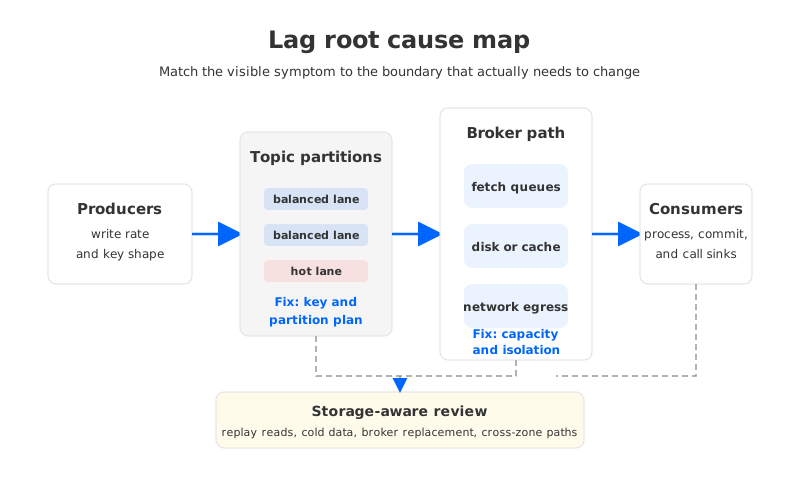
This is where "add consumers" can fail. More consumers can increase fetch concurrency against a broker that is already I/O-bound. More brokers can help only after partitions, leaders, and storage pressure are redistributed, and that redistribution itself may create background work. Larger fetches reduce request overhead but increase memory pressure and burst size. Smaller fetches smooth consumption but increase request rate.
A storage-aware lag review asks a few uncomfortable but useful questions:
- Is the lagging group tailing or replaying? Tailing consumers stress steady-state fetch latency. Replaying consumers stress historical reads, cache behavior, and storage throughput.
- Are lag spikes correlated with broker disk, request queue time, or remote-read latency? If yes, the consumer is only where the symptom appears.
- Does one topic's catch-up traffic interfere with unrelated live traffic? Shared broker-local resources can turn one replay into a wider platform incident.
- How does broker replacement affect lag? If replacing or scaling brokers involves large data movement, consumer recovery and infrastructure recovery can collide.
The answer may still be a normal Kafka operational fix: move leaders, tune fetch behavior, add broker capacity, adjust retention, or isolate heavy replay consumers. The storage-aware part is refusing to diagnose lag from the consumer group alone.
4A Practical Remediation Order
Lag incidents benefit from a fixed order of operations. The order prevents the team from making the cluster more dynamic while the root cause is still unknown.
- Confirm business impact. Compare offset lag with event age, SLOs, and downstream freshness. A batch workload may tolerate a large offset gap; a risk-decision pipeline may not.
- Find the shape of lag. Check whether lag is group-wide, partition-specific, tied to one consumer instance, or tied to a replay window.
- Check the application boundary. Measure handler time, commit behavior, downstream latency, error retries, and processing concurrency.
- Check the Kafka boundary. Compare fetch latency, bytes consumed rate, records consumed rate, request queueing, under-replicated partitions, and broker I/O.
- Check the storage and network boundary. Look for disk saturation, cold reads, remote reads, cache misses, cross-zone paths, and broker recovery work.
- Apply the smallest fix that changes the constrained boundary. Then watch lag slope, not only absolute lag, because a recovering group can still show a large backlog while the fix is working.
This order is deliberately boring. During an incident, boring is a feature. It keeps teams from changing partition count, consumer count, fetch size, and broker capacity at the same time.
5Where Architecture Changes The Operating Model
Some lag problems are workload bugs. Some are capacity problems. Some are symptoms of a platform architecture that makes catch-up reads, live reads, writes, and recovery compete for the same broker-local assumptions. That last category is where storage architecture becomes a strategic decision rather than an incident tweak.
Apache Kafka tiered storage can help when long retention puts too much pressure on broker-local disks. It moves eligible older log segments to remote storage while preserving Kafka's local tier for active data. That is useful, but it should not be confused with making brokers fully independent from durable data placement. The active log, leadership, hot reads, and broker-local resources still matter.
Kafka-compatible systems based on a Shared Storage architecture take a different path. In this model, durable stream data is externalized into a shared storage layer, while brokers focus more on protocol serving, caching, coordination, and compute. The benefit is not that storage latency disappears; it does not. The benefit is that broker replacement, scale-out, retention growth, and catch-up behavior can be designed around a durable storage layer that is not owned by one broker's local disk.
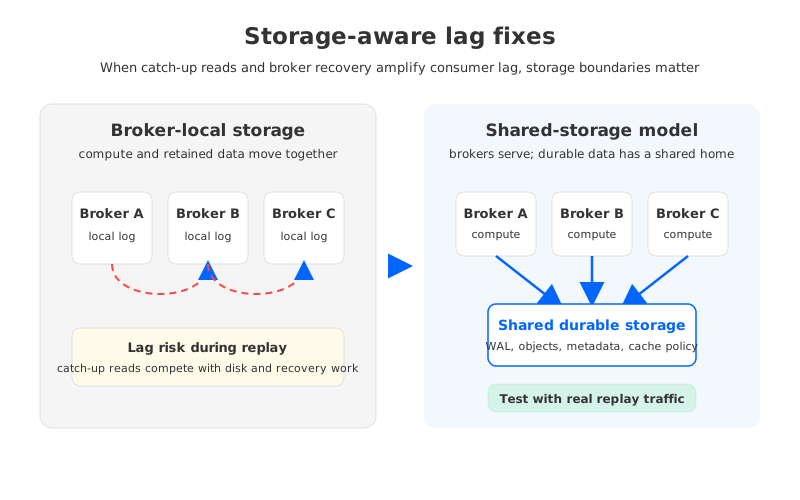
AutoMQ fits into this category as a Kafka-compatible, cloud-native streaming system built on a Shared Storage architecture and more stateless broker design. For teams evaluating consumer lag fixes, the relevant question is not whether AutoMQ makes every slow consumer fast. It will not fix a blocking database write or a bad partition key. The relevant question is whether the platform's storage model reduces the operational coupling that makes catch-up reads, broker recovery, and scaling events amplify lag incidents.
That distinction keeps the evaluation honest. If lag comes from application code, fix the application. If it comes from partition skew, fix the keying and topic layout. If it repeatedly appears during replay, broker replacement, long-retention reads, or cloud scaling events, evaluate whether the Kafka platform's storage boundary is part of the problem. AutoMQ's Shared Storage architecture is worth testing in that last category because it changes where durable data lives while preserving Kafka protocol compatibility.
6Production Checklist For Consumer Lag Fixes
A production-ready fix should survive the next deployment, the next replay, and the next traffic spike. That means the validation plan should look more like an SRE runbook than a one-time benchmark.
| Check | What to verify | Why it matters |
|---|---|---|
| Lag slope | Backlog drains at the required rate after the fix | Absolute lag can remain high during healthy recovery |
| Partition distribution | Lag and throughput are not concentrated on one partition | Consumer count cannot overcome key skew |
| Fetch path | Broker fetch latency and storage I/O stay inside the SLO | Consumer lag may be broker-served delay |
| Replay isolation | Catch-up reads do not damage live traffic | Backfills and restarts are normal production events |
| Rebalance behavior | Deployments do not create repeated assignment churn | Stability often matters more than raw throughput |
The best fix makes the cause more observable as well as less severe. A tuned consumer with no new dashboard is a future mystery. A storage architecture change without replay tests is an assumption. A partition-count change without key distribution review is a new shape of risk.
7References
- Apache Kafka Documentation for consumer configuration, monitoring, replication, and tiered storage concepts.
- Amazon MSK consumer lag documentation for managed Kafka lag metric definitions and operational caveats.
- AutoMQ Documentation for Kafka compatibility, Shared Storage architecture, and cloud-native deployment guidance.
8FAQ
What is Kafka consumer lag? Kafka consumer lag is the gap between the latest available records in a topic partition and the progress made by a consumer group. Teams usually measure it in offsets or records, then compare it with event age to understand business impact.
What is the fastest Kafka consumer lag fix? The fastest safe fix depends on the bottleneck. If the application is slow, add processing parallelism or reduce downstream latency. If one partition is hot, adding consumers will not help much. If broker fetch latency or storage I/O is the issue, application tuning may only add pressure.
Should I always add more consumers when lag rises? No. More consumers help only up to the number of partitions assigned to the group, and only when consumer-side processing capacity is the limiting factor. They do not fix partition skew, broker I/O saturation, cold replay reads, or slow downstream systems.
Which Kafka settings matter for consumer lag? Common settings include max.poll.records, max.partition.fetch.bytes, fetch.max.bytes, fetch.min.bytes, fetch.max.wait.ms, and poll or session timing. Treat them as workload-specific controls, not generic best-practice values.
When should storage architecture be part of a lag review? Include storage architecture when lag appears during replay, long-retention reads, broker replacement, scale-out, scale-in, or cloud network placement changes. Those patterns suggest the consumer group is exposing a deeper data-path constraint.
When should teams evaluate AutoMQ for lag-related problems? Evaluate AutoMQ when recurring lag incidents are tied to broker-local storage pressure, catch-up reads, recovery work, or elasticity limits rather than application code alone. The proof of concept should replay real traffic, measure lag slope, inspect storage metrics, and validate Kafka client compatibility.


