
Table of Contents
Table of Contents
Kafka consumer lag usually becomes visible after the business symptom has already started. A dashboard turns red, a fraud pipeline serves older decisions, a notification service falls behind, or a data freshness SLO quietly slips from minutes to hours. The first instinct is often to add consumers. Sometimes that works. More often, it starts a rebalance, adds pressure to a hot partition, or hides the real bottleneck for another incident cycle.
Lag is not a root cause. It is a backlog measurement at the boundary between producers, brokers, partitions, consumer groups, and downstream systems. A growing Kafka consumer lag graph can mean the application is processing too slowly, the consumer group has too little parallelism, one partition is overloaded, brokers are throttling fetches, storage is under pressure, or upstream traffic has changed faster than the cluster can absorb.
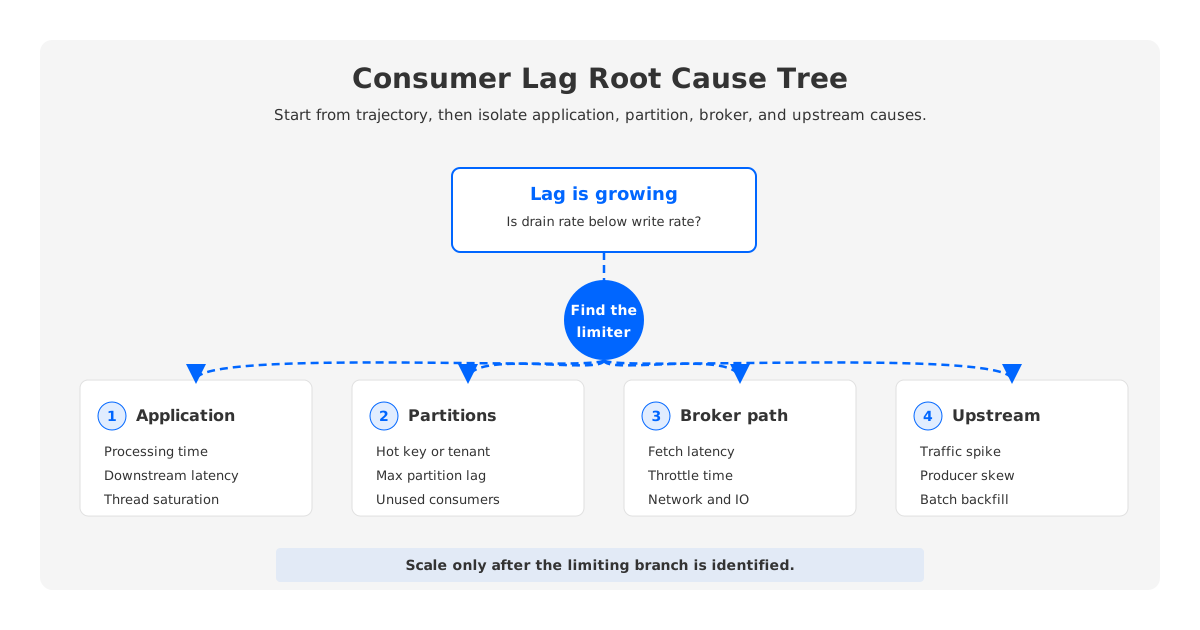
Good Kafka lag monitoring starts by separating those causes before scaling anything. The practical question is not "How much lag do we have?" but "Is the group falling behind because it cannot consume, because Kafka cannot serve fetches, because work is unevenly distributed, or because producers are adding work faster than the system was designed to drain?"
1What Kafka Consumer Lag Actually Measures
Kafka stores records in partitions, and each record has an offset within its partition. A consumer group makes progress by reading records and committing offsets that represent completed work. The broker also has an end offset for each partition, which represents the latest offset available in the log. Consumer lag is the distance between where the group has committed or is currently positioned and where the partition log has advanced.
That definition sounds simple, but it hides a detail that matters during incidents: position and commit are not the same thing. A consumer's position is the next offset the consumer will fetch. A committed offset is the last progress point the group has recorded for recovery. If the application fetches a batch, processes slowly, and commits only after processing finishes, the consumer position may advance while committed lag stays high. If the application commits too early, lag can look healthy while unfinished work is still at risk.
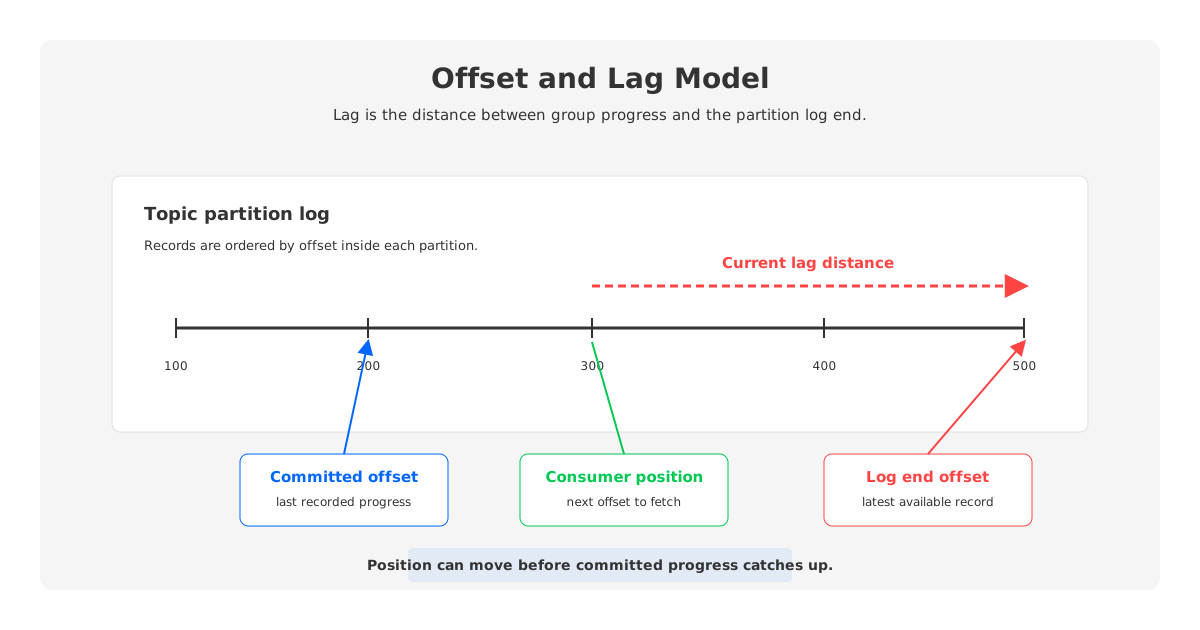
For monitoring, track lag at partition level before trusting group-level totals. A topic can show moderate total Kafka lag while one hot partition is hours behind. That hot partition determines freshness for keyed workloads because a single partition is consumed by only one member of a consumer group at a time.
The most useful lag view combines three measurements:
- Committed lag: the distance between committed offsets and log end offsets. This tells you how much completed progress the group has recorded.
- Current consumption lag: the distance between the consumer's current position and the log end offset. This helps distinguish fetched-but-uncommitted work from unread backlog.
- Lag drain rate: the rate at which lag is shrinking or growing after comparing incoming records with processed records. This tells you whether the system is recovering or still losing ground.
The last measurement is the one operators often miss. A lag value of 5 million records is not automatically an outage if the group is draining faster than producers are writing and the business freshness SLO can tolerate the recovery window. A lag value of 50,000 records can be dangerous if it grows every minute and the consumer group has no path to catch up.
2The Most Common Causes of Growing Lag
Growing Kafka consumer lag comes from a mismatch between arrival rate and effective processing rate. The mismatch can sit in the application, the group topology, the partition layout, the broker path, or the storage layer. Treating all lag as "slow consumers" makes the incident smaller than it really is.
Start with the application. Many consumer groups are bottlenecked after Kafka has already delivered the records: database writes, external API calls, synchronous enrichment, deserialization, decompression, validation, or thread pool saturation. In that case, fetch latency can be healthy while processing latency grows. Scaling the Kafka cluster will not help because Kafka is not the slow part of the path.
Then check whether the group has enough useful parallelism. A consumer group can process partitions in parallel only up to the number of partitions it owns. If the topic has 200 partitions and the group has 5 members, the group may need more consumers, but only if the bottleneck is CPU, processing threads, or downstream capacity that can scale with those members.
Partition skew is the next trap. A group can have enough consumers on paper and still fall behind because one key or tenant dominates one partition. The topic average will suggest that the group is almost keeping up, while the max partition lag keeps climbing. This is why records-lag-max and per-partition lag are more incident-friendly than a single group total.
Broker and cluster pressure can also create consumer lag. If fetch request latency rises, network threads are saturated, request queues are growing, storage is slow, quotas are throttling traffic, or the broker is busy with replication and recovery, consumers may wait longer before receiving records. The application might be ready to process, but the cluster cannot serve reads fast enough.
| Lag pattern | Likely direction | What to inspect first |
|---|---|---|
| All partitions grow evenly after traffic rises | Capacity or upstream spike | Producer rate, consumer processing rate, broker fetch latency |
| One partition grows much faster than others | Partition skew | Key distribution, tenant distribution, max partition lag |
| Lag grows while consumer CPU is high | Application bottleneck | Processing time, thread pools, downstream dependency latency |
| Lag grows while fetch latency rises | Broker or storage pressure | Fetch request metrics, network, disk IO, throttle time |
| Lag jumps after members restart | Rebalance or group instability | Rebalance rate, assignment changes, session behavior |
This table is intentionally directional. It is not a substitute for metrics, but it prevents the common failure mode where every lag incident becomes either "add consumers" or "add brokers" before the evidence supports either move.
3Metrics to Check Before Scaling Consumers
The first metric is not lag. It is incoming rate versus completed processing rate. If producers are writing faster than the group can complete work, lag grows by definition. If the group is completing work faster than producers are writing, the remaining question is whether the recovery time is acceptable.
After that, check the consumer metrics that explain why the group is or is not keeping up: records lag, max records lag, fetch rate, fetch latency, commit metrics, and rebalance metrics. Slice them by client ID, group, topic, and partition where possible because averages hide the partition hurting freshness.
Use this diagnosis order when the lag graph starts climbing:
- Compare producer write rate with consumer completed-processing rate. This tells you whether the backlog is caused by new traffic or reduced drain capacity.
- Check max partition lag, not only total group lag. A single hot partition changes the scaling answer.
- Compare poll/fetch behavior with processing time. Fast fetch plus slow processing points to the application path; slow fetch points back toward brokers or storage.
- Inspect rebalance frequency and duration. Frequent assignment changes can create consumption pauses even when steady-state capacity looks adequate.
- Check broker-side fetch latency, throttle time, network, disk IO, and request queues. Consumer lag can be a read-serving problem.
- Estimate time to drain. A fix that stops lag from growing is not done until the backlog returns inside the freshness SLO.
This order keeps the team from scaling consumers blindly. Scaling consumers is useful when more members increase useful parallelism and the downstream systems can absorb more concurrent work. It is risky when the real issue is partition skew, broker fetch pressure, or a downstream database that is already the limiting resource.
4Lag During Rebalances, Spikes, and Catch-Up Reads
Consumer lag often grows during events that are not steady-state failures. A deployment restarts many consumers. A group rebalance pauses partitions while ownership changes. An upstream batch job writes a traffic spike. A broker replacement changes leader distribution. A downstream dependency slows down for 20 minutes and then recovers. The lag graph looks the same in each case, but the operating response is different.
During rebalances, focus on group stability before adding members. A consumer group that repeatedly rebalances can pause work often enough to lose throughput even when each consumer is healthy. Static membership, cooperative assignment, session behavior, and deployment discipline can matter more than raw consumer count. The exact settings depend on client version and workload, so version-check before turning the incident into a config change.
Traffic spikes require a different view: burst size, steady-state rate, and catch-up rate. A short spike is acceptable if the group drains the backlog inside the freshness SLO. A spike becomes an outage when the catch-up rate is too low or when the catch-up read path creates more pressure on brokers and storage. Long retention can make this worse because consumers may need to read older data that is no longer in hot cache.
Broker pressure changes the diagnosis again. If lag grows while consumer processing is healthy and fetch latency rises, the group may be waiting on the cluster. In traditional Kafka, brokers own local partition data, serve client fetches, replicate data, and participate in recovery or reassignment work. When those jobs compete for the same network and storage resources, consumer lag can be a symptom of infrastructure contention rather than application slowness.
The safe operating posture is to describe lag with cause and trajectory, not only value. "Group A has 2 million records of lag" is less useful than "Group A is lagging on partition 7, fetch latency is normal, and processing time doubled after a downstream release." The second sentence tells you where to act.
5How AutoMQ Helps When Lag Is Caused by Scaling and Broker Pressure
AutoMQ belongs in the diagnosis when lag repeatedly comes from infrastructure elasticity limits rather than consumer code. It is a Kafka-compatible streaming system that keeps Kafka clients, consumer groups, and offsets familiar while replacing broker-local durable storage with a shared-storage architecture built around S3Stream, WAL storage, cache, and object storage.
That distinction matters for lag recovery. If brokers are stateful and own local partition data, scaling or reassignment can require data movement through the same cluster resources that consumers need for catch-up reads. If brokers are stateless and durable data is held in shared storage, capacity changes can rely more on metadata and traffic redistribution. AutoMQ documentation describes second-level partition reassignment and stateless broker behavior as architecture-level advantages for scaling and balancing.
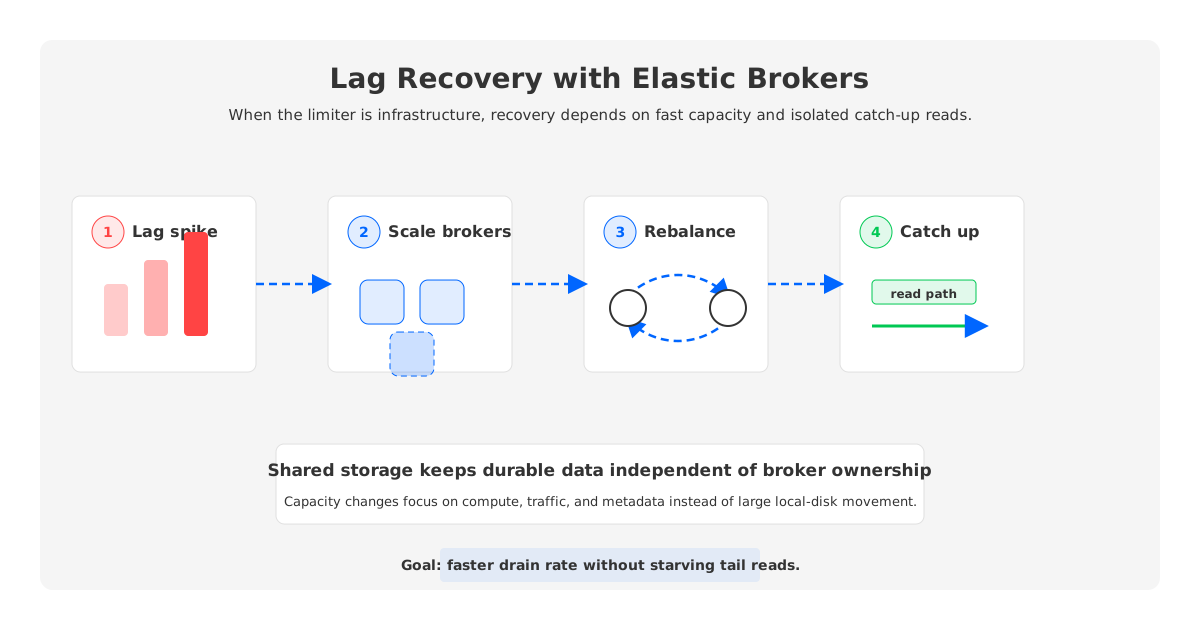
Catch-up reads are another place where architecture affects lag. AutoMQ documents a catch-up read design that uses read-ahead and traffic isolation so backlog reads are less likely to interfere with tailing traffic. This does not remove application bottlenecks. If a consumer spends most of its time waiting on a database, shared storage will not make the database faster. But when the bottleneck is broker pressure, cold or historical read behavior, or slow cluster scaling, architecture can change the recovery path.
For operators, the decision boundary is straightforward. Fix the consumer when processing time, thread saturation, or downstream latency is the bottleneck. Fix partitioning when skew keeps one partition behind. Add consumers when useful parallelism exists and downstream capacity can scale. Evaluate a Kafka-compatible shared-storage platform such as AutoMQ when lag incidents keep returning during scaling, reassignment, broker pressure, catch-up reads, or recovery operations.
6Build a Lag Monitoring Dashboard That Explains Cause
A useful Kafka lag monitoring dashboard should answer three questions before anyone opens a runbook: Is lag growing or shrinking? Is the bottleneck in consumer processing, partition distribution, broker serving, or upstream traffic? How long will recovery take at the current drain rate?
Keep the dashboard small enough for incidents. Show total group lag, max partition lag, worst-partition lag, incoming records per second, processed records per second, processing latency, fetch latency, rebalance activity, and broker-side fetch pressure. Add downstream dependency latency for the services the consumer calls; otherwise the dashboard will blame Kafka for a database queue it cannot see.
Alerting should combine lag with time and trajectory. A static lag threshold creates noisy alerts for high-volume topics and misses low-volume freshness failures. A better alert asks whether lag is growing, whether event age violates the SLO, and whether estimated drain time exceeds the recovery budget.
Kafka consumer lag is useful precisely because it is uncomfortable. It tells you the system is no longer keeping the promised distance between event creation and downstream action. The goal is not to make the lag graph pretty; it is to make the graph explain where the promise is breaking.
7References
- Apache Kafka consumer API documentation
- Apache Kafka consumer metrics reference
- Apache Kafka consumer configuration reference
- Apache Kafka documentation
- AutoMQ architecture overview
- AutoMQ S3Stream shared storage overview
- AutoMQ stateless broker documentation
- AutoMQ catch-up read efficiency documentation
8FAQ
8.1What is Kafka consumer lag?
Kafka consumer lag is the distance between a consumer group's progress and the latest offsets available in the topic partitions it consumes. Teams usually compare committed offsets, consumer position, end offsets, and per-partition lag.
8.2Why does Kafka consumer lag keep increasing?
Lag keeps increasing when producers add records faster than the consumer group completes work. The cause may be slow processing, too few useful consumers, partition skew, broker pressure, rebalances, storage IO, or an upstream spike.
8.3Is high Kafka lag always bad?
High lag is bad when it violates freshness SLOs or continues to grow. A temporary backlog can be acceptable if the group is draining faster than producers are writing and the estimated recovery time fits the business requirement.
8.4Will adding more consumers reduce Kafka lag?
Adding consumers helps only when the group has more partitions to assign, the bottleneck is consumer-side capacity, and downstream systems can handle more concurrency. It will not fix a hot partition, slow broker fetch path, frequent rebalances, or a downstream service that is already saturated.
8.5Which Kafka consumer metrics matter most for lag diagnosis?
Start with records lag, max records lag, fetch latency, fetch rate, commit latency, application processing latency, rebalance metrics, and per-partition lag. Pair them with broker metrics and downstream dependency latency.
8.6When should AutoMQ be considered for consumer lag problems?
Consider AutoMQ when consumer lag is repeatedly tied to broker pressure, slow scaling, partition reassignment, recovery work, or catch-up read behavior. It is not a replacement for fixing application processing bugs, but its Kafka-compatible shared-storage architecture can reduce infrastructure-driven lag recovery pain.


