
Table of Contents
Table of Contents
The awkward moment in a Kafka budget review rarely starts with a line item named "Kafka." It starts when compute, block storage, data transfer, monitoring, and engineering time all point back to the same streaming platform, but no single owner can explain the total. FinOps sees spend spread across cloud categories. Platform engineering sees cluster health and capacity headroom. Application teams see a reliable event backbone and assume the cost is somebody else's infrastructure problem.
That mismatch is why Kafka cost is hard to reason about from the bill alone. A broker instance is visible, but it is only the first layer. Kafka pricing in the cloud is shaped by how many bytes are written, how long they are retained, how many replicas are stored, where those replicas run, how often consumers read the data, and how much idle capacity the team keeps to survive peaks. The invoice shows categories; the architecture explains why those categories grow together.
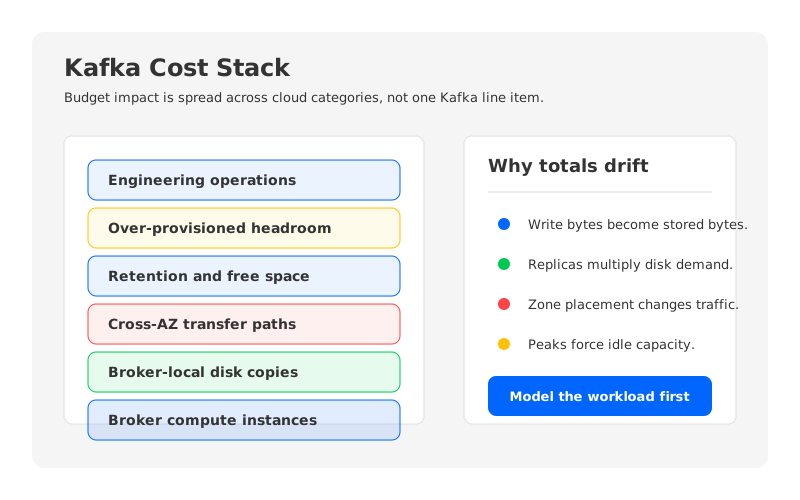
For a serious Kafka cloud cost review, the useful question is not "How much does Kafka cost?" The useful question is: which workload assumptions turn into compute, disk, replication, cross-AZ transfer, retention, over-provisioning, and operational overhead?
1Why Kafka Cost Is Hard to See in One Bill
Kafka was designed as a distributed log with broker-local storage. Each broker owns partitions, stores log segments on its local disks, replicates partition data to other brokers, and serves reads from consumers. That design is powerful because Kafka can deliver durable ordered streams with high throughput and a large ecosystem. It also means infrastructure cost is not confined to the servers running the broker process.
Cloud bills cut the world differently. A cloud provider separates instance hours, block storage, disk performance, network transfer, object storage, monitoring, support, and managed-service fees. Kafka cuts the world by topics, partitions, replicas, leaders, followers, retention, and consumer groups. The cost model is the translation layer between these two views.
The translation becomes messy once Kafka becomes shared infrastructure. A customer-events topic may serve a fraud model, a data lake pipeline, a notification service, and a BI replay workflow. Each consumer group is legitimate, each extra retention day has a business owner, and each replica supports durability. The accumulated spend still lands in the platform budget, where it can look like infrastructure waste unless the model explains the workload.
A clean review starts by separating six cost categories:
- Broker compute: VM or managed broker capacity, including CPU, memory, and network bandwidth for producers, consumers, replication, compression, and controller work.
- Broker-local storage: block disks attached to brokers, sized for retained data, replicas, free-space headroom, and disk performance.
- Replication: additional stored copies and network movement created by Kafka's durability model.
- Cross-AZ or inter-zone traffic: billable data paths when brokers, producers, consumers, or replicas sit in different availability zones.
- Retention and headroom: persistent capacity for replay, compliance, or downstream recovery, plus spare capacity for bursts and maintenance.
- Operations: on-call time, upgrades, partition reassignments, capacity planning, incident response, and cost governance.
Model those categories separately even when a managed Kafka service packages some of them into service-specific units. Managed does not mean unmetered; it means the operational boundary changes while the workload still determines how much infrastructure the provider allocates behind the scenes.
2Broker Compute Is Only the Visible Layer
Kafka broker cost is the easiest part to explain and the easiest part to overemphasize. Brokers need CPU for request handling, compression, TLS, quotas, replication, and metadata activity. They need memory for page cache and request buffers, plus network capacity for producer writes, consumer reads, and follower replication.
A broker may send replicated data to followers, receive replicated data when it is a follower, serve reads to multiple consumer groups, and handle recovery traffic when a broker fails or a partition moves. A workload that writes 100 MiB/s and has several active consumer groups can create much more broker-side network and disk activity than the logical write rate suggests.
This is where Kafka infrastructure cost diverges from a simple VM count. If the cluster is sized for steady-state producer writes, it may fall behind during replays, catch-up replication, or rebalancing. If it is sized for the worst moment, it may carry idle broker capacity most of the month. That trade-off follows from tying compute capacity, storage ownership, and data movement to the same broker fleet.
Broker compute should include:
| Input | Why It Matters |
|---|---|
| Sustained write throughput | Sets baseline broker ingress and storage creation. |
| Peak write throughput | Determines whether the cluster needs burst capacity or permanent headroom. |
| Read fanout | Multiple consumer groups can multiply egress from brokers. |
| Compression and encryption | CPU usage changes with codec, message shape, and TLS requirements. |
| Partition count | More partitions can improve parallelism but increase metadata and operational overhead. |
The point is to prevent the common mistake of equating Kafka cost with broker instance hours alone.
3Storage and Retention Change the Math
Kafka storage cost starts with a simple workload fact: retained data equals write rate multiplied by retention time. Compression may reduce the physical footprint, and compaction may change topic behavior, but the first-order model is still straightforward. If the business asks for longer retention, the storage tail gets longer. If producers write more data, that tail gets wider.
Traditional Kafka then multiplies retained data by the replication factor. The Apache Kafka documentation describes replication as the mechanism that keeps partition replicas across brokers so a partition can remain available when a broker fails. In production, teams commonly use more than one replica because a single local disk copy is not an availability strategy. The cost implication is direct: durable Kafka data is retained data plus replicas, placed on broker-local storage.
Disk sizing adds another layer. Operators keep free space for segment rolling, rebalancing, failure recovery, and unexpected growth. A disk that holds today's segments may still be operationally unsafe, so the budget needs a headroom assumption before the team picks a disk type.
logical_retained_data = write_rate x retention_window
physical_kafka_storage = logical_retained_data x replication_factor / compression_ratio
provisioned_storage = physical_kafka_storage x headroom_factor
This formula is intentionally generic. Once the workload team agrees on write rate, retention, replication, compression, and headroom, FinOps can map the result to the current official pricing page for the chosen cloud provider and region.
4Replication and Cross-AZ Traffic Are Connected
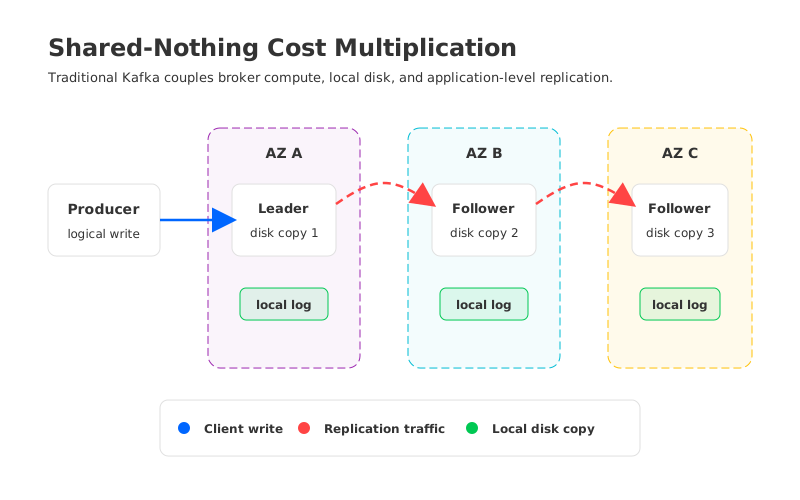
Replication is not only a storage multiplier. In a multi-AZ cloud deployment, it can also become a network multiplier. When a leader broker in one availability zone replicates data to followers in other zones, those bytes may cross billable zone boundaries. When consumers run in a different zone from the broker serving their partition, reads may create another path.
The exact charge depends on the cloud provider, region, service, and data path. Pricing pages can change, so the durable budgeting habit is to model the path, then apply the current price. Do not assume that "inside the same cloud" means "free" or that "managed service" means "network does not matter." The architecture still moves bytes.
Kafka's shared-nothing architecture makes this especially important. Each broker owns its local partitions, so durability is achieved by copying data to other brokers. In the cloud, that design can cause the platform to pay for cloud primitives in overlapping ways: broker instances for compute, block disks for local logs, and network paths for replicas and consumers.
The multiplication is easiest to see from one producer write:
- The producer sends the record to the leader broker.
- The leader appends the record to its local log.
- Followers fetch the record and append their own local log copies.
- Consumers read the record, sometimes from different zones or through different network paths.
- Retention keeps all required copies on disk until the topic policy removes or compacts them.
None of those steps is waste by itself. Together, they explain why Kafka cloud cost can rise even when the application team says, accurately, that the workload is "only writing one stream."
5The Hidden Cost of Over-Provisioning
Over-provisioning is often discussed as if it were a mistake. In Kafka, it is frequently a rational response to architectural coupling. If brokers own both compute work and persistent data, scaling decisions are constrained by the largest of several requirements. A broker may need to stay large because its disks hold retained data, even when CPU is underused.
Operations reinforce the pattern. Teams keep capacity for broker failure, rolling upgrades, partition reassignment, consumer replay, and unplanned traffic bursts. They avoid running disks or network close to the limit because recovery becomes harder exactly when the cluster is under stress. The idle capacity is not pretty in a spreadsheet, but the alternative may be a fragile streaming platform.
The budget review should distinguish careless waste from defensive headroom. Careless waste is an oversized cluster with no workload reason. Defensive headroom is capacity held because the architecture needs room to recover, rebalance, and absorb peaks. Long retention makes this sharper because larger local disks can pin broker count or instance shape.
6A Simple Kafka Cost Model
The fastest way to improve a Kafka budget conversation is to make the assumptions visible. A cost model does not need to predict every incident. It needs to show which variables drive the total and which assumptions the team is willing to defend.
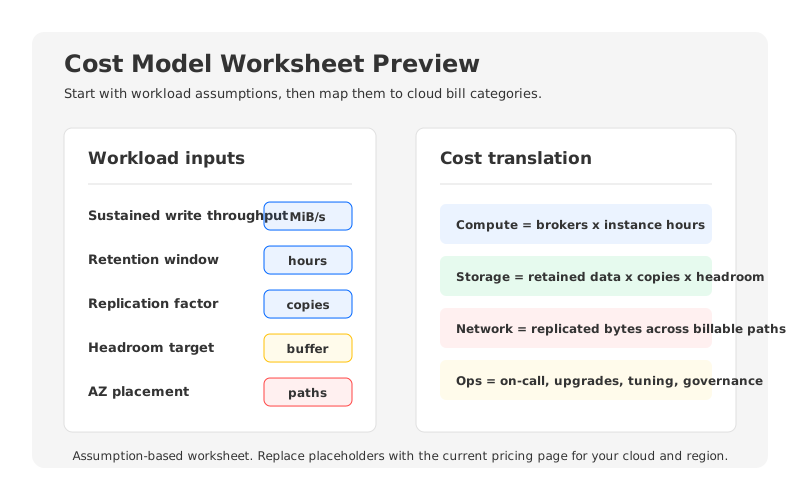
Use this worksheet structure:
| Layer | Inputs to Capture | Cost Category to Map |
|---|---|---|
| Workload | Write throughput, peak throughput, read fanout, compression ratio | Broker compute and network capacity |
| Retention | Topic retention, compacted topics, replay requirements, compliance windows | Broker-local storage or managed storage |
| Replication | Replication factor, min in-sync replicas, zone placement | Storage copies and replication traffic |
| Network | Producer zones, consumer zones, inter-region links, private connectivity | Cross-AZ, inter-zone, egress, or service networking |
| Headroom | Free disk percentage, peak buffer, failover capacity | Extra brokers, larger disks, idle capacity |
| Operations | Upgrade frequency, on-call burden, tuning work, reassignment work | Engineering time and operational risk |
After the worksheet is filled in, the cloud pricing page becomes useful. For AWS, for example, a self-managed Kafka estimate may need current EC2 instance pricing, EBS pricing, S3 pricing if backups or tiered storage are used, and EC2 data transfer pricing for the relevant paths. A managed Kafka estimate may use service-specific dimensions instead. The same workload assumptions should feed both estimates.
A practical model also needs sensitivity checks. Retention is a good first sensitivity because it is easy for product teams to request and expensive for platform teams to absorb. Replication factor, read fanout, and peak-to-average ratio deserve the same treatment because they determine whether elastic scaling matters or permanent headroom is unavoidable.
End the model with a short statement of assumptions, not a false universal conclusion: "This estimate assumes one region, three availability zones, replication factor 3, seven-day retention, no inter-region consumers, and current pricing as checked on June 2, 2026." That sentence tells the next reviewer exactly what to update.
7How AutoMQ Changes the Cost Structure
If the cost problem comes from coupling broker compute with broker-local persistent storage, then a different cost structure has to change that coupling. Rightsizing brokers, topic governance, rack-aware placement, and consumer locality can help. But those are optimizations inside the same model: brokers still own local log storage, and replication still creates multiple broker-local copies.
AutoMQ approaches the problem as a Kafka-compatible, object-storage-backed streaming system. Durable data moves to object storage, while brokers become more stateless compute nodes. The AutoMQ documentation describes this as a cloud-native Kafka-compatible design built around shared storage.
That matters for cost modeling because persistent data no longer has to be sized primarily around broker-local disks. In workloads where retention, rebalancing, and over-provisioned disk capacity dominate the budget, object storage can change which cloud category carries the durable data and how tightly storage growth forces broker growth.
This is not a claim that every Kafka workload has the same savings profile. A short-retention, CPU-heavy workload has different economics from a long-retention, replay-heavy workload. The useful way to evaluate AutoMQ is to run the same worksheet twice: once for a traditional broker-local Kafka architecture, and once for a storage-decoupled architecture where durable data sits in object storage.
For teams preparing a budget review, the next step is not to accept a vendor claim at face value. Build the workload model, apply current cloud pricing pages, and compare architectures under the same assumptions. AutoMQ's pricing page can be part of that comparison when you are ready to test whether object-storage-backed Kafka changes your own cost curve.
8References
- Apache Kafka Documentation
- Apache Kafka Replication
- Apache Kafka Topic Configuration: retention.ms
- AWS EC2 On-Demand Pricing
- AWS EBS Pricing
- AWS S3 Pricing
- AWS Data Transfer Pricing
- AutoMQ Overview
- AutoMQ Pricing
9FAQ
9.1What is the biggest Kafka cost driver?
It depends on the workload. Broker compute may dominate for high-throughput, low-retention clusters. Storage and replication often dominate for long-retention clusters. Cross-AZ traffic can become material when replicas, producers, or consumers regularly move data across billable zone boundaries.
9.2Is Kafka cost the same as broker cost?
No. Kafka broker cost is only one layer. A full Kafka infrastructure cost model should include compute, local disks, replicated storage, cross-AZ or inter-zone traffic, retention headroom, monitoring, and engineering operations.
9.3Why does replication increase Kafka cloud cost?
Replication creates additional copies of partition data and moves bytes between brokers. In a multi-AZ deployment, those copies may also cross zone boundaries, depending on placement and cloud pricing rules.
9.4Does managed Kafka remove these costs?
Managed Kafka can reduce operational burden and package infrastructure differently, but the workload still drives capacity, storage, retention, and network demand. Always map the same workload assumptions to the managed service's current pricing model.
9.5How can teams reduce Kafka cost without reducing reliability?
Start by modeling workload assumptions, cleaning up retention policies, reviewing topic and consumer ownership, improving zone-aware placement, and separating defensive headroom from unused capacity. For retention-heavy cloud workloads, also compare architectures that decouple durable storage from broker-local disks.


