
Table of Contents
Table of Contents
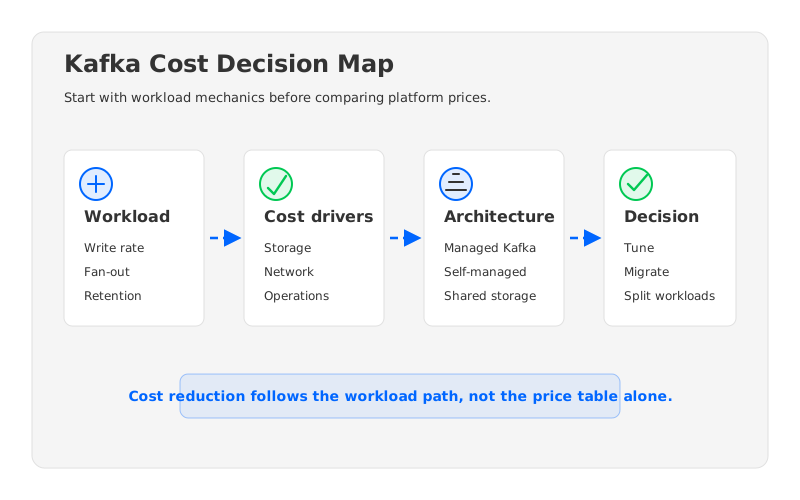
Teams usually search for kafka cost after the first optimization pass has already failed. They have rightsized brokers, adjusted retention, negotiated committed spend, and cleaned up old topics. The monthly bill still does not behave like a normal infrastructure line item. It moves with write volume, read fan-out, replication, retention, cross-zone traffic, incident recovery, and the operational labor required to keep brokers healthy. That is why a Kafka cost discussion cannot start with a price table. It has to start with the shape of the workload.
The uncomfortable part is that many Kafka bills are not expensive because a vendor is careless or because operators made one bad setting. Kafka was designed around a broker that owns both compute and durable local storage. That model works well when local disks are abundant, network transfer is hidden inside a data center budget, and capacity changes are planned in larger blocks. In cloud environments, the same model can make every durability and availability decision visible on the bill. A replatforming project should therefore ask a sharper question: which costs are implementation details, and which costs are consequences of the architecture?
1Why Kafka Cost Is Not One Number
The first trap in Kafka cost analysis is treating the cluster as a single monthly total. A Kafka platform is really a set of coupled systems: producers push data, brokers replicate it, consumers read it, disks retain it, controllers track metadata, and operators manage failure modes. A single total hides the mechanism. Once the mechanism is hidden, teams tend to optimize the easiest line item, not the biggest driver.
A useful cost model separates at least six inputs:
- Ingest throughput determines how much data must be accepted, acknowledged, replicated, cached, and eventually stored. Write throughput is the first multiplier because it feeds almost every other cost.
- Replication and availability policy decide how many copies move across brokers and zones. The same ingest workload can have very different cost behavior when replication crosses availability-zone boundaries.
- Consumer fan-out controls how often stored data is read back. A log analytics workload with many downstream consumers can spend more on read paths than a simple pipeline with one consumer group.
- Retention and replay expectations determine how much historical data remains queryable and how much broker storage pressure the platform must absorb.
- Operational change rate measures how often partitions, brokers, storage, and client traffic need to be moved. This is where infrastructure spend and engineering time meet.
- Failure recovery requirements decide how much spare capacity, network movement, and operational procedure the system needs when a broker, zone, or deployment fails.
None of these inputs is exotic. They are the basic facts an SRE or platform owner already knows about production Kafka. Broker prices matter, but they only become meaningful after you know whether the architecture forces brokers to carry durable storage, re-replicate large volumes during scaling, or move data across paid network boundaries.
2The Questions to Ask Before Replatforming
Replatforming is a heavy word. It can mean moving from self-managed Kafka to a managed service, replacing one managed option with another, adopting a Kafka-compatible engine, or changing the storage layer under the Kafka API. The risk profile is different in each path, but the evaluation questions are the same. If a proposal cannot answer them clearly, it is not ready to become a migration plan.
| Evaluation question | Why it changes Kafka cost | What to verify before migration |
|---|---|---|
| Where does durable data live? | Local broker disks couple storage growth to broker capacity. | Whether retention growth requires more brokers, larger disks, or independent storage expansion. |
| What traffic crosses zones? | Cloud data transfer is often metered separately from compute. | Replication traffic, client traffic, rebalancing traffic, and recovery traffic by zone. |
| How does scaling work? | Traditional scaling can trigger partition movement and operational risk. | Whether scaling compute also moves stored log segments. |
| What Kafka semantics are preserved? | Lower cost is not useful if client behavior changes. | Producer acknowledgments, consumer groups, transactions, ACLs, quotas, and client compatibility. |
| How does failure recovery behave? | Recovery can create bursty network and storage pressure. | Broker replacement, zone failure, controller recovery, and replay behavior. |
| Who owns operations? | Managed services reduce labor, but not every cost driver disappears. | Upgrade process, observability, incident response, capacity planning, and security controls. |
The table is intentionally architectural. Procurement teams may start with list prices, but platform teams live with the consequences of placement, replication, scaling, and recovery. A lower hourly rate can still lose if it requires overprovisioning for disk, creates high cross-zone traffic, or makes every scaling event a data movement event. The point is to prevent the cost model from ignoring the parts that actually move.
3Architecture Choices That Change the Cost Curve
Kafka cost reduction often gets framed as a tuning exercise: reduce retention, compress messages, resize instances, and delete unused topics. Those steps are worth doing, and Apache Kafka operators should absolutely understand settings such as replication factor, min.insync.replicas, producer acknowledgments, and topic retention. But tuning cannot fully overcome an architecture that binds compute, storage, and network movement together. Once the cluster grows, that binding becomes the cost curve.
There are three common architecture paths.
Self-managed Kafka gives the team maximum control. It also leaves the team responsible for broker sizing, disk behavior, rebalancing, upgrades, monitoring, security hardening, and incident response. This can be cost-effective for teams with deep Kafka experience and stable workloads. It becomes harder when retention growth forces capacity changes that are really storage changes, not compute changes.
Managed Kafka services shift much of the operational work to the provider. Amazon MSK, for example, documents separate pricing dimensions for cluster type, broker instances, storage, and other service usage, while AWS separately documents data transfer pricing. That separation matters because a managed control plane does not make all data movement free. Teams still need to model workload placement, producer and consumer traffic, retention, and the cost of multi-zone durability.
Kafka-compatible shared-storage systems take a different route. They keep the Kafka protocol surface that applications depend on, but move durable log storage away from broker-local disks and into shared storage such as object storage. The cost argument is not that object storage is magic. It is that decoupling changes what has to move when the system scales, recovers, or retains more data. If brokers become closer to stateless compute nodes, storage growth no longer has to imply the same broker growth pattern.
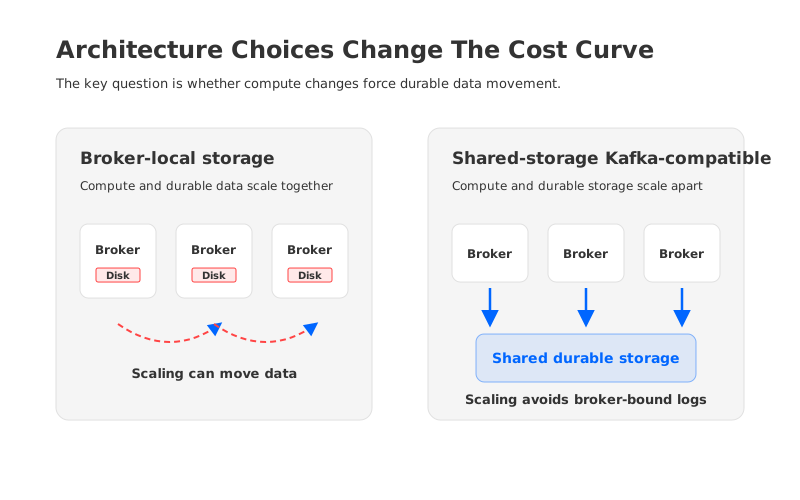
The practical difference shows up during change. In a traditional broker-local model, adding capacity can require partition reassignment and data movement. During a broker failure, recovery can mean rebuilding local replicas. In a shared-storage model, the design goal is to reduce the amount of durable data tied to an individual broker. That does not remove the need for careful engineering around latency, caching, and write-ahead logging, but it changes the levers available to the platform team.
Tiered storage is often part of this discussion, so it is worth drawing a boundary. Apache Kafka tiered storage moves older log segments to remote storage while brokers still serve the hot path and maintain local responsibilities. That can help with retention economics, especially for long-lived data. A diskless or shared-storage architecture goes further by designing the broker around remote durable storage from the start. The two ideas are related, but they are not the same cost model.
4The Hidden Cost Questions: Network, Recovery, And Change
The line item that surprises teams most often is network movement. In cloud infrastructure, availability-zone boundaries are billing boundaries as well as fault-isolation boundaries. If a Kafka design writes data to multiple brokers across zones, serves consumers across zones, and moves partitions during rebalancing, the bill can grow even when the application workload looks stable. AWS publishes separate pricing pages for data transfer, which is a reminder that network economics belong in the architecture review, not in a footnote after instance selection.
A production review should map traffic before comparing platforms. Draw the producer path, replication path, consumer path, rebalance path, recovery path, and observability path. Then mark which flows stay inside a zone, which cross zones, and which leave the region. A team that only compared broker sizes may discover that the biggest avoidable spend is repeated movement of the same bytes for durability, fan-out, or recovery.
Recovery is the second hidden cost. Kafka operators know that the expensive moment is not always steady state; it is the period after a broker dies, a disk fills, a partition becomes imbalanced, or a deployment rolls back. A platform that looks efficient during normal traffic can become costly during repair if it needs large replica rebuilds, slow partition moves, or manual intervention.
Change is the third cost. Kafka clusters rarely stay still. Teams add topics, adjust partitions, expand retention, onboard consumers, change schemas, and respond to compliance requirements. If every change forces careful broker-level planning, the platform becomes expensive even when raw infrastructure spend looks acceptable.
5How AutoMQ Fits The Evaluation
After the workload and architecture questions are clear, AutoMQ becomes relevant as one implementation of the shared-storage path. AutoMQ is a Kafka-compatible streaming system that separates broker compute from durable storage and uses object storage as the persistence layer. The evaluation should still be technical: does the architecture address your cost drivers without breaking the Kafka behaviors your applications depend on?
Three areas deserve close inspection.
First, verify compatibility at the client and semantic layer. A Kafka-compatible platform must preserve the operational contracts that matter to producers, consumers, stream processors, and security teams. That includes normal Kafka client behavior, consumer group coordination, ACL and authentication expectations, and the failure semantics your applications were designed around. Cost reduction that requires a broad application rewrite is rarely a clean win.
Second, examine the storage and write path. AutoMQ’s architecture documentation describes a design built around shared storage and a write-ahead log layer rather than broker-local durable disks. That is the part that matters for cost analysis: if durable log storage is no longer tied to the lifetime and size of individual brokers, compute and storage can be planned more independently. The benefit is strongest when workloads have high retention, bursty compute needs, or expensive recovery movement.
Third, model network boundaries. AutoMQ documents designs aimed at eliminating inter-zone traffic in relevant deployment patterns. For teams whose Kafka bills are dominated by cross-zone movement, this is not a small optimization. It changes the architecture question from “which broker is lower priced?” to “which design moves fewer paid bytes while preserving availability?”
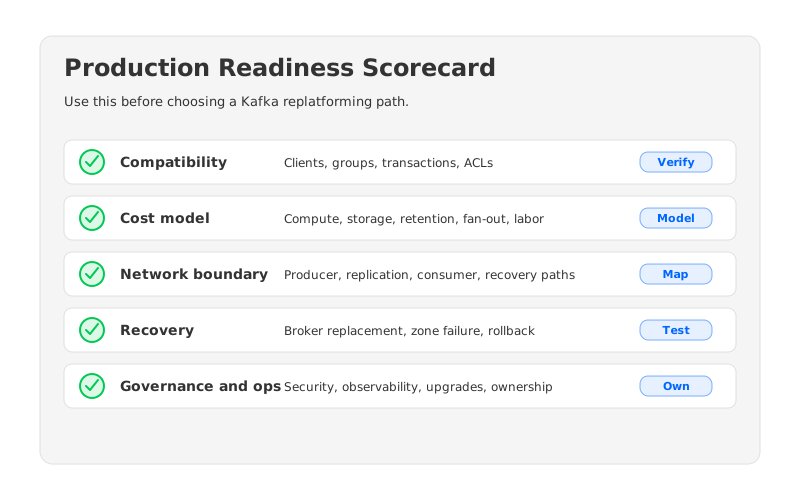
AutoMQ can be evaluated in BYOC and software deployment models, which matters for teams that want the data plane in their own cloud account or need more control over security and networking. That does not remove the need for a migration plan. It means the evaluation can focus on concrete questions: Can existing clients connect with minimal change? Which topics should move first? How will mirroring, rollback, observability, and access control be handled?
6A Practical Cost Reduction Worksheet
Before committing to any Kafka replatforming path, build a worksheet that separates workload facts from vendor claims. Keep it boring. Boring worksheets prevent expensive architecture mistakes.
Start with workload inputs: peak and average write throughput, read fan-out, retention by topic class, message size distribution, partition counts, availability requirements, and replay expectations. Then map the deployment topology: regions, zones, VPC boundaries, client placement, broker placement, storage placement, and observability sinks. Finally, list operational events: scaling, broker replacement, zone failure, version upgrade, partition expansion, access-control changes, and rollback.
The output should be a small set of decisions:
- Keep and tune when the workload is stable, the team has strong Kafka operations skills, and the main waste is configuration or overprovisioning.
- Move to managed Kafka when operational labor is the dominant cost and the managed service’s pricing model fits the traffic and retention profile.
- Evaluate shared storage when storage growth, cross-zone movement, recovery traffic, or scaling friction dominates the cost curve.
- Split workloads when one cluster is serving several cost profiles at once, such as low-latency transactional events and long-retention analytics logs.
The strongest Kafka cost reductions usually come from matching architecture to workload, not from finding one universal platform. A finance-grade event pipeline, an observability firehose, and a replay-heavy data lake ingestion path do not stress Kafka in the same way.
7Conclusion
The phrase kafka cost sounds like a search for a number, but it is really a search for a decision framework. Broker prices, storage rates, managed-service fees, and data-transfer charges all matter. They matter after you understand the workload path that creates them. The teams that get replatforming right are the ones that can explain which bytes move, where durable data lives, how recovery works, and what changes when the workload doubles.
If your Kafka cost review points toward a Kafka-compatible shared-storage architecture, evaluate AutoMQ with the same worksheet: compatibility first, workload fit second, cost model third, migration plan always. You can start with the AutoMQ BYOC overview here: Explore AutoMQ BYOC for Kafka-compatible streaming.
8References
- Apache Kafka Tiered Storage documentation
- Apache Kafka documentation
- AWS Amazon MSK pricing
- AWS EC2 on-demand and data transfer pricing
- AutoMQ architecture overview
- AutoMQ client SDK guide
- AutoMQ inter-zone traffic documentation
9FAQ
9.1What is the biggest driver of Kafka cost?
There is no universal driver. In many production clusters, the largest drivers are write throughput, replication, retention, read fan-out, cross-zone traffic, and operational recovery behavior. The right starting point is a workload model, not a vendor price table.
9.2Is managed Kafka always lower cost than self-managed Kafka?
No. Managed Kafka can reduce operational labor and improve standardization, but the infrastructure and data-movement model still matters. Self-managed Kafka can be efficient for stable workloads and experienced teams. Managed services are strongest when operational simplicity, governance, and predictable service operations are worth the premium.
9.3How is tiered storage different from shared-storage Kafka?
Tiered storage usually keeps recent data on brokers and moves older segments to remote storage. Shared-storage Kafka-compatible systems design durable storage around shared remote storage more fundamentally, so broker compute and durable log storage can scale more independently.
9.4When should a team evaluate AutoMQ?
Evaluate AutoMQ when Kafka cost is driven by retention growth, cross-zone traffic, recovery movement, or scaling friction, and when application teams need to preserve Kafka-compatible client behavior. It is most relevant after you have mapped the workload and know which architectural cost drivers you want to change.


