
Table of Contents
Table of Contents
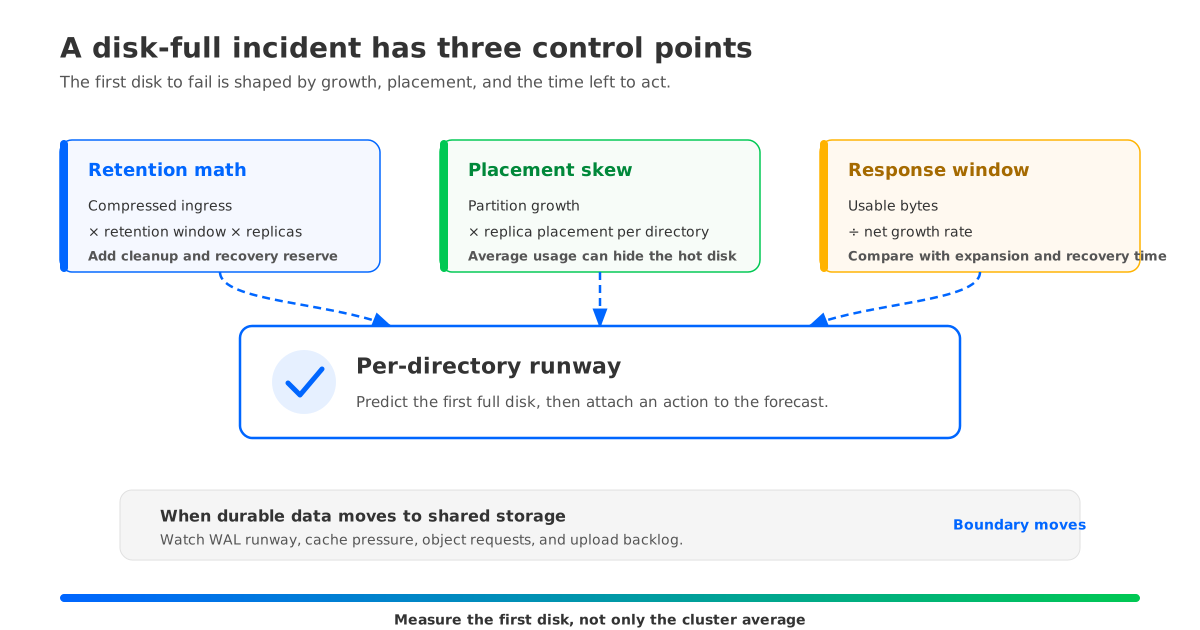
A Kafka disk-full alert can arrive before the whole cluster runs out of space. One log directory may reach its limit while the cluster dashboard still shows a comfortable average. A hot partition, uneven replica placement, delayed segment deletion, or a sudden change in compressed ingress can hide behind that average.
Ask how much physical data is growing, where it is landing, and how long the operator has before the safe response window closes. That turns disk-full prevention from a volume-sizing exercise into a control loop.
Three checks carry most of the work:
- Model retained bytes from measured compressed ingress, the retention window, and the replication factor.
- Compare log directories and partitions, because cluster averages hide the first disk to fail.
- Alert on time to full and connect each watermark to a bounded action.
The same reasoning still applies when Kafka data uses an object-storage-backed design. The boundary moves from broker-local retained logs to WAL capacity, cache pressure, object-storage requests, and upload or read backlogs.
1Start with time to full, not a disk percentage
A disk percentage is a state measurement. An incident is a rate problem with a deadline. A disk that is partway full but grows slowly may have a long response window. A less-full disk during a sustained burst may already be close to the point where the next action is late.
Begin with a physical growth model for the unit that can actually fill:
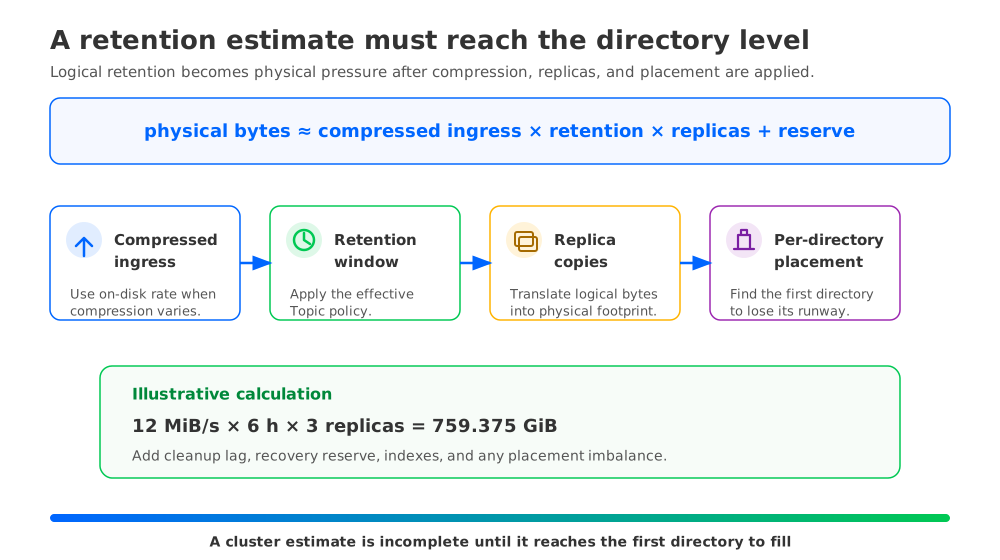
physical_bytes ≈ compressed_ingress_bytes_per_second × retention_window_seconds × replica_copies + cleanup_lag_bytes + recovery_reserve_bytes
This is a planning model, not a promise about exact disk usage. Index files, metadata, compaction work, segment boundaries, and filesystem behavior add terms that should be measured in the target deployment. This makes the large terms visible.
Consider an illustrative calculation for a cluster that receives 12 MiB/s of compressed record data and keeps it for 6 hours. The retained logical bytes are:
12 MiB/s × 6 × 3,600 s = 259,200 MiB = 253.125 GiB
With a replication factor of 3, the replica footprint is:
253.125 GiB × 3 = 759.375 GiB
That result describes the replica footprint before cleanup lag, recovery reserve, indexes, and placement imbalance. It is useful because each assumption can be replaced with a measured value. If compression changes, use the on-disk segment rate. If a topic has a different retention policy, calculate it separately. If a disk can be expanded only after an approval step, reserve capacity for that response time rather than adding an unexplained percentage.
Kafka exposes time and size retention controls through topic configuration. The Apache Kafka topic configuration reference documents retention.ms and retention.bytes; the latter is a per-partition size boundary, so a topic-level setting still becomes many separate physical decisions across partitions and replicas. A disk model that multiplies total topic ingress by one retention number can miss that distribution.
Retention also does not mean that every eligible record disappears at the exact instant its time limit is reached. Kafka removes log segments through its cleanup process, and the broker configuration reference for log.retention.check.interval.ms makes the check interval an explicit operational input. Segment rolling, cleanup delay, and compaction can all affect the gap between policy eligibility and observed disk reclamation. Measure that gap for representative topics and include it as cleanup_lag_bytes in the model.
A retention change should therefore create two records: the policy change and the capacity consequence. For each topic, keep the effective retention.ms, retention.bytes, cleanup.policy, partition count, replication factor, measured compressed ingress, and observed cleanup delay together. When a disk alert fires, that inventory lets the operator distinguish “more data is being retained” from “data that should have been deleted is still present.”
2The average hides the disk that will page
The cluster average is a useful capacity summary, but it is a weak protection signal. Kafka stores partition replicas on specific brokers and log directories. A single hot partition can grow faster than its neighbors. A reassignment can temporarily add a replica to a directory. A disk can also be full because its directory is carrying a skewed mix of large replicas even when the broker fleet looks balanced.
Separate three kinds of skew:
| Skew | What it means | What to inspect |
|---|---|---|
| Ingress skew | A partition or topic receives more compressed bytes than peers | Per-partition append rate, record size, key distribution |
| Placement skew | Replica bytes are unevenly assigned across brokers or log directories | Replica sizes, log-directory usage, reassignment state |
| Cleanup skew | Some directories reclaim data later than others | Oldest segment age, delete backlog, compaction activity |
The distinction changes the action. Ingress skew calls for a producer or partitioning investigation. Placement skew calls for a controlled reassignment or a placement policy change. Cleanup skew calls for a retention, segment, filesystem, or broker-health investigation. Adding storage before identifying the class can buy time, but it does not remove the cause.
A useful diagnostic view ranks the fullest log directory and the fastest-growing partitions together. For each directory, keep current used bytes, usable bytes, physical growth rate, and the partitions that contribute the most data. For each of those partitions, record leader and replica placement, retention settings, and whether a movement or compaction task is active. The Apache Kafka operations documentation describes the cluster expansion and partition reassignment workflows that operators need to account for when changing placement.
This view also prevents a common false fix: moving data away from a nearly full broker without checking the destination. Reassignment consumes space during the transition, and the destination must have enough runway for both its current workload and the incoming replica. If the plan is driven only by the source broker's free space, the operation can move the alert rather than remove it.
3Turn watermarks into a control loop
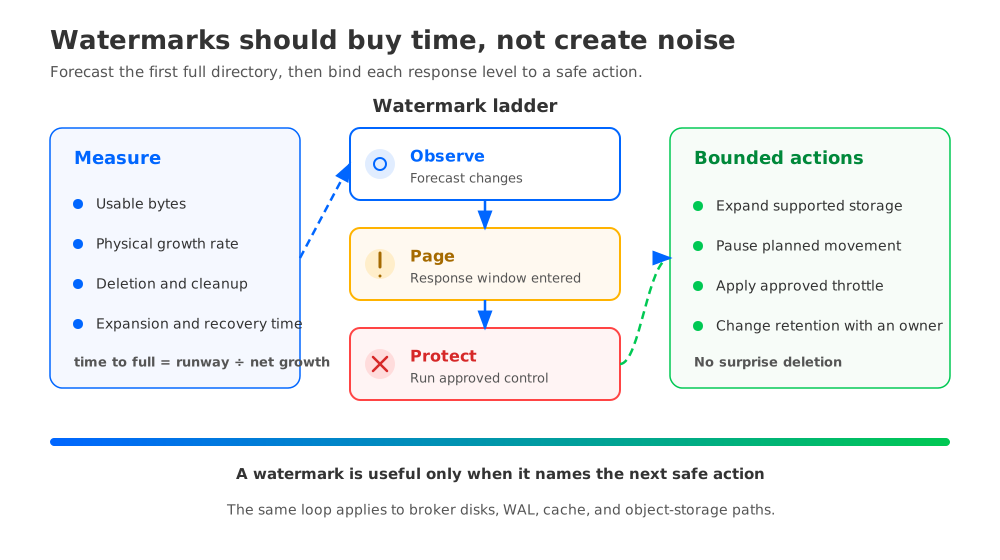
A watermark should answer two questions at once: how much capacity remains, and how long the platform has to act. A practical forecast is:
time_to_full ≈ (usable_bytes - reserved_bytes) ÷ net_growth_bytes_per_second
Here, net_growth is physical write growth minus physical deletion. If deletion is keeping up, the forecast is not a countdown to full. If the forecast is shorter than the time required to expand a volume, drain a broker, or complete a safe reassignment, the system is already inside its response window.
Do not begin with universal percentage thresholds. A percentage has no operational meaning until it is tied to ingress, cleanup, recovery, and the response path. Derive thresholds from the observed time to full for each disk or storage class, then review them when workload shape or automation latency changes.
A three-level ladder gives each signal a job:
| Level | Trigger | Bounded action |
|---|---|---|
| Observe | Growth rate or cleanup lag changes the forecast | Open a ticket, identify the top partitions, and record the policy or workload change |
| Page | Forecast enters the documented response window | Page the on-call owner, pause nonessential storage changes, and prepare the approved capacity action |
| Protect | Forecast reaches the point where recovery or expansion can no longer complete safely | Run the approved protection step, such as volume expansion, producer throttling, traffic shedding, or a retention change with data-owner approval |
The action at the Protect level should be deliberately narrow. A safe automation can expand a supported volume, create a ticket with the partitions causing growth, or apply a pre-approved producer quota. It should not delete data outside a documented retention policy because the disk is under pressure. Shortening retention can be valid, but it is a data-lifecycle change and needs an owner, an audit trail, and a rollback decision.
A runbook can make the sequence explicit:
- Confirm the signal at the log-directory level and check whether the forecast is driven by ingress, placement, or cleanup.
- Stop or throttle planned partition movements while the response path is being evaluated.
- Apply the reversible capacity action if the storage system supports it.
- Protect the remaining runway with a documented producer or client control.
- Change retention only when the data owner accepts the loss of older replay history.
- Verify that deletion, placement, and recovery metrics return to the expected state.
This order matters because emergency actions can interact. A reassignment started during disk pressure can need more temporary space. A retention change can lower future growth but still leave old segments waiting for cleanup. A producer throttle can protect the disk while increasing consumer lag. The operator needs a sequence that exposes those trade-offs instead of hiding them behind one alert.
4What changes when durable data leaves the broker disk
The prevention model changes when durable stream data is not tied to a broker-local log. With Kafka Tiered Storage, older data moves to a remote tier while the broker still has a local storage boundary and a local hot-data policy. With a Shared Storage architecture, durable stream data can live in shared object storage while brokers handle Kafka requests, coordination, caching, and the write path.
That distinction matters for disk-full prevention. A shared object store can remove retained topic bytes from the broker-local capacity calculation, but it does not remove capacity planning. The operator now needs to watch the storage layer that can block progress:
- WAL usable space and write latency.
- Data cache pressure and historical read behavior.
- Object-storage upload backlog, request errors, and request latency.
- Metadata growth and recovery progress.
- Local logs, temporary files, and any remaining broker-local state.
- Cloud network and request limits that affect the write or read path.
The correct watermark depends on the deployment. A local-disk Kafka cluster needs a per-log-directory forecast. A tiered design needs separate local-tier and remote-tier signals. An object-storage-first system needs a forecast for WAL and cache runway, plus a signal for whether durable data is being uploaded and fetched within the workload's service window.
Once the requirement is clear, AutoMQ is an example of a Kafka-compatible streaming platform using Shared Storage architecture. Its S3Stream documentation describes object storage as the durable stream layer, with WAL storage and data caching serving different parts of the write and read paths. That changes the prevention question from “How many retained log bytes can this broker disk hold?” to “Which local runway, object-storage capacity, request path, and cache behavior must stay healthy for this workload?”
The local boundary still depends on the chosen deployment and WAL type. AutoMQ's WAL storage documentation describes the available storage roles and their trade-offs. A team should size and alert on the actual WAL implementation it runs, then test a broker replacement and a historical read while observing the object-storage path. “No retained topic data on broker disks” is a useful architectural property, so continue watching every local resource.
5A runbook that prevents the next page
A prevention program is working when a disk page produces a diagnosis before it produces a purchase order. The minimum dashboard should let an operator answer these questions without stitching together unrelated screens:
- Which log directory has the least usable runway?
- Which partitions explain its growth?
- Is the change caused by ingress, placement, cleanup, or a policy update?
- What response window remains, and which action is safe within it?
- If the data is object-storage-backed, is the pressure in WAL, cache, object requests, metadata, or network?
Review those answers after every storage incident and after every retention change. If the same topic repeatedly appears as the fastest-growing partition, fix the key distribution or partition plan. If the same directories repeatedly carry the largest replicas, fix placement or the reassignment process. If deletion is late, investigate cleanup and segment behavior before purchasing more capacity.
The strongest operating model treats watermarks as a contract between measurement and action. A page without a response window is noise. An automated action without an owner and a rollback rule is a second incident waiting behind the first.
If your team is evaluating an object-storage-backed Kafka design, compare the same workload model across local disk, Tiered Storage, and Shared Storage. Start with measured ingress, retention, skew, cleanup, recovery, WAL, cache, and request behavior. Then explore AutoMQ in your cloud environment and run the disk-full control loop against a production-like workload.
The next disk alert should begin with “Which term changed, which directory is carrying it, and how much response time remains?” That question separates a one-time capacity action from a repeat incident.
6References
- Apache Kafka topic configuration reference
- Apache Kafka broker configuration reference
- Apache Kafka operations documentation
- Apache Kafka remote log storage documentation
- Apache Kafka monitoring documentation
- Amazon MSK troubleshooting
- Amazon MSK monitoring
- AutoMQ compatibility with Apache Kafka
- AutoMQ S3Stream Shared Storage architecture
- AutoMQ WAL storage
7FAQ
7.1Does Kafka retention guarantee that data disappears exactly at the configured time?
No. retention.ms defines a retention boundary, but cleanup operates on log segments and is checked periodically. Segment rolling, cleanup delay, compaction, and filesystem behavior can leave eligible data on disk for a while. Measure the observed cleanup delay and include it in capacity planning.
7.2Is a cluster-average disk percentage enough for a Kafka disk-full alert?
No. The first failure usually occurs at a log directory or broker that carries an uneven share of replicas or a fast-growing partition. Use per-directory usable space, growth rate, and time to full, then use the cluster average as a summary signal.
7.3Should automation shorten retention when a disk is almost full?
Only under an explicit policy. Shortening retention can delete replay history and may not reclaim space immediately because cleanup is segment-based. Prefer reversible capacity actions and bounded producer controls first, then use a data-owner-approved retention change when the loss is understood.
7.4How does partition skew cause a disk-full incident?
A partition can receive more data than its peers, or its replica can be placed on a directory that already carries large replicas. The cluster average hides both cases. Inspect per-partition ingress, replica sizes, placement, and movement state together.
7.5Does Shared Storage remove disk-full prevention work?
It changes the failure boundary. Retained topic data may no longer consume broker-local durable capacity, but WAL, cache, local files, object-storage requests, upload backlog, metadata, and network paths still need watermarks and response actions. The alert model moves with the storage responsibility.


