
Table of Contents
Table of Contents
When teams talk about Apache Kafka vendor lock-in, they often mean a vague fear: leaving might be expensive, disruptive, or impossible under pressure. A platform review needs a more concrete question: which parts of the workload can we move, who owns the move, and when did we last prove it?
The Kafka protocol is one part of that answer. A producer may be able to point at a different bootstrap server with few code changes, while the surrounding system still depends on a particular schema registry, connector runtime, private network, or export format. That is why Kafka portability is a system property, not a checkbox in a broker comparison.
An exit plan turns the feeling into a process. It names the interfaces that must remain open, assigns an owner to each one, defines a drill, and records what passed. The useful unit is a port: a boundary through which an application, a record, a schema, a connector, or a network path can leave one platform and enter another.
1Lock-in is a feeling until you test the exit
An exit plan does not mean that a team has to leave its Kafka platform. It means the team can answer what leaving would involve before a renewal, outage, cloud change, or architecture review makes the question urgent. Cover the live workload, retained data, consumer progress, security controls, operational dependencies, and the people who would execute the change.
The first useful exercise is to draw the workload without naming a vendor. Start with producers and consumers, then add five ports around the Kafka cluster:
- Protocol: client requests, authentication, authorization, transactions, consumer groups, and admin operations.
- Data: retained records, topic metadata, offsets, timestamps, compaction behavior, and replay requirements.
- Schema: subjects, compatibility rules, IDs, naming strategies, serializers, and historical versions.
- Connectors: source and sink plugins, task configuration, secrets, offsets, transforms, and runtime ownership.
- Network: DNS, private endpoints, firewall rules, routes, certificates, identity bindings, and egress controls.
This map changes the conversation. “We can use Kafka clients elsewhere” may be true and still leave four untested ports. Naming the ports makes the first work item visible.
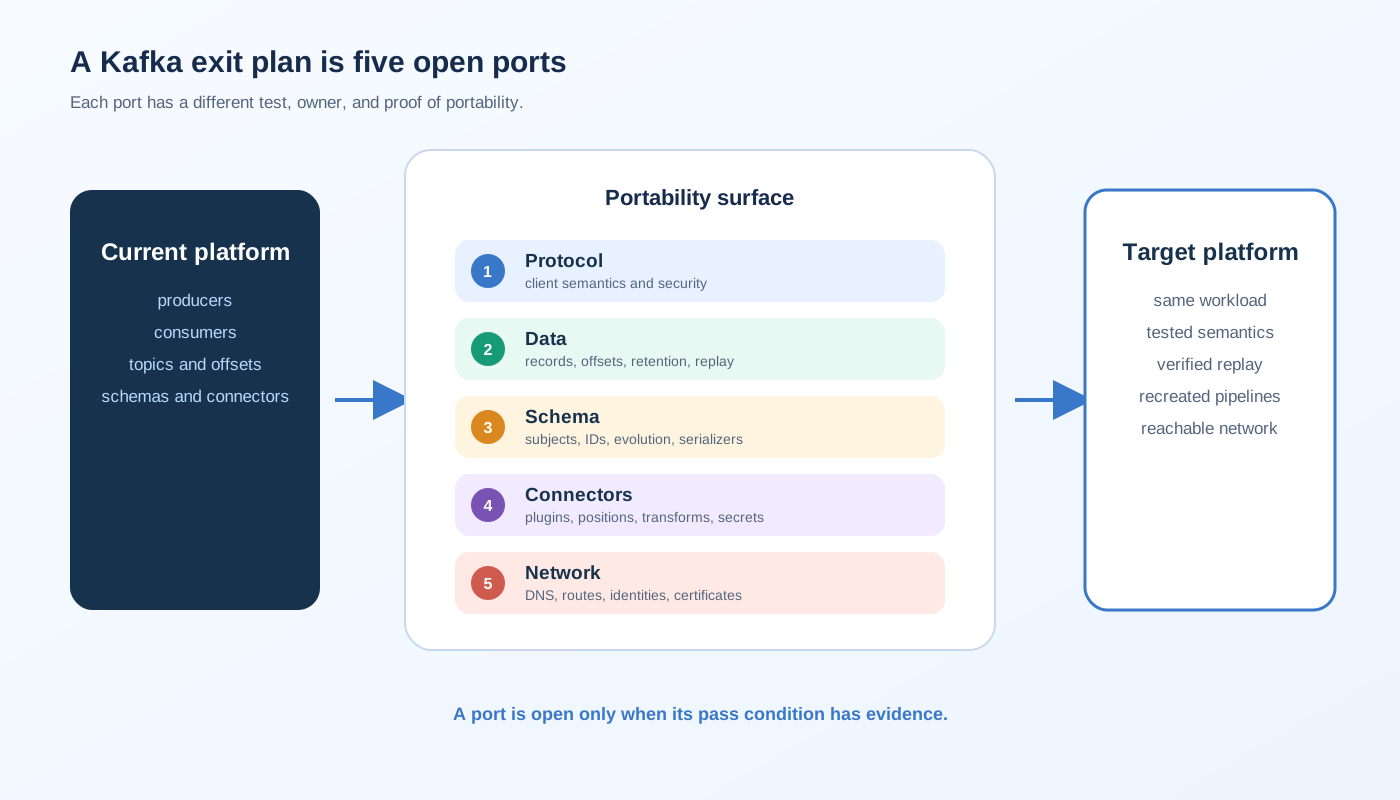
2Five ports that decide Kafka portability
Each port has a different failure mode. The protocol port fails when a client or semantic assumption is outside the target's support boundary. The data port fails when records can be copied but offsets, ordering, retention, or compaction cannot be reproduced. The other three ports fail in the systems that make a stream useful in production.
2.1Protocol: can the application still speak Kafka?
Protocol portability is the most visible port, and it is the one teams most often overestimate. Check the client APIs that the workload actually uses, including produce, fetch, group coordination, transactions, administrative calls, quotas, and security. A basic produce and consume test is not enough if the application relies on idempotence, exactly-once behavior, incremental rebalancing, or a particular error response.
Record the client library and version, configuration surface, authentication method, and Kafka semantics that are part of the application contract. Run the same compatibility test against a target cluster or local target environment. The pass condition is an application-level test with the required semantics, not a claim that two products share a familiar API name.
Quarterly drill: deploy a small copy of one producer and one consumer against the target, exercise the APIs the workload depends on, and save the test result with the client configuration. Delete the target afterward if it is only a test environment, but keep the evidence.
2.2Data: can you export what the business needs?
Kafka data export is more than copying bytes from one topic to another. Define the retention window, partitions and timestamps that matter, replay behavior, and consumer groups that must resume without starting from the wrong point. Include compacted topics, tombstones, headers, keys, and records still inside the retention window.
Separate three cases in the runbook: a live replication path, a historical backfill path, and a rollback path. A MirrorMaker 2 deployment, a connector, or another replication method may cover one case without covering the others. The export should also capture topic configuration and access controls, because a target with the records but the wrong retention or authorization model is not ready for production.
Quarterly drill: select a representative topic set, copy it to a target, compare record counts and key samples, verify timestamps and headers, and start a test consumer from a documented offset. For compacted topics, verify the resulting state rather than relying only on byte counts.
2.3Schema: can a record keep its meaning?
Schemas are where a technically successful data copy can become an application failure. Inventory the formats in use, the registry endpoint, subject naming strategy, compatibility mode, serializer settings, and the versions that active consumers still read. Export the schema definitions and their references in a form that a target registry can import or that an application can validate independently.
Do not treat schema IDs as globally portable identifiers. A target registry may assign different IDs even when the schema text is identical. Define how producers and consumers resolve schemas during the transition, how old versions remain readable, and how rollback handles records written after cutover.
Quarterly drill: restore a sample of schema history into a nonproduction registry, produce records with the real serializers, and consume them with the real deserializers. Include one compatible evolution and one rejected evolution. A successful drill proves the rules are understood, not that every historical subject is perfect.
2.4Connectors: can the pipeline be rebuilt?
Connectors are executable infrastructure. A connector export needs more than a name and a list of properties. Capture the plugin version, worker settings, task count, transforms, converters, credentials, source positions or sink behavior, error handling, and the topics used for connector configuration, offsets, and status. Keep secrets in the approved secret store, but make the secret references reproducible.
The exit test should use the same source and sink classes that carry business traffic. A connector that starts is not necessarily a connector that resumes correctly. Check duplicate handling, delete events, schema evolution, task restarts, dead-letter behavior, and the source position after cutover. The connector migration gates are a useful companion checklist.
Quarterly drill: rebuild one source connector and one sink connector from version-controlled definitions in an isolated target. Move a controlled batch of records through them, stop and restart the workers, and verify the downstream result. Keep the plugin artifact or an approved way to obtain the exact version.
2.5Network: can traffic reach the target safely?
Network dependencies are easy to miss because they live outside the Kafka API. Write down the DNS names clients resolve, private endpoints, routes, firewall rules, certificate issuers, service identities, allowlists, NAT paths, and observability destinations. Record which team owns each object and which cloud account or VPC contains it.
The target may be in the same cloud and still require a different private connectivity design. A route that exists only in a console, a certificate trusted by one client image, or an allowlist tied to the old service address can turn a clean data migration into an outage. The network port also includes operator access. If the migration team cannot inspect the target and its logs, the runbook has a blind spot. Review the BYOC network boundary questions alongside the drill.
Quarterly drill: create the target network path in a controlled environment, resolve the target from the same client subnets, authenticate with the production identity pattern, and verify both data traffic and administrative access. Record the teardown steps so the test does not leave an unmanaged path behind.
3A quarterly drill makes the exit measurable
Five ports are a useful map, but the map has no operational value until the team repeats the tests. Quarterly drills catch ordinary drift: client upgrades, connector changes, expired certificates, registry policy edits, cloud network changes, and undocumented ownership transfers.
Run the drills in sequence when the ports depend on one another. Validate protocol access before data replication, schemas before application consumers, connectors after their plugins are available, and network controls before any live cutover test. The point is not to perform a theatrical migration. It is to find the first broken assumption while the source platform is still healthy.
| Port | Quarterly drill | Evidence to keep | Pass condition |
|---|---|---|---|
| Protocol | Run the compatibility test with a target cluster | Client versions, configs, test output | Required Kafka semantics pass |
| Data | Replicate and validate representative topics | Counts, samples, offsets, topic configs | Records and replay behavior match the contract |
| Schema | Restore history and test evolution | Schema export, registry result, serializer logs | Producers and consumers resolve the expected versions |
| Connectors | Rebuild source and sink pipelines | Versioned configs, plugin versions, downstream checks | Tasks resume and data effects are understood |
| Network | Recreate private paths and identity access | DNS, routes, rules, certificate and access logs | Clients and operators reach the target safely |
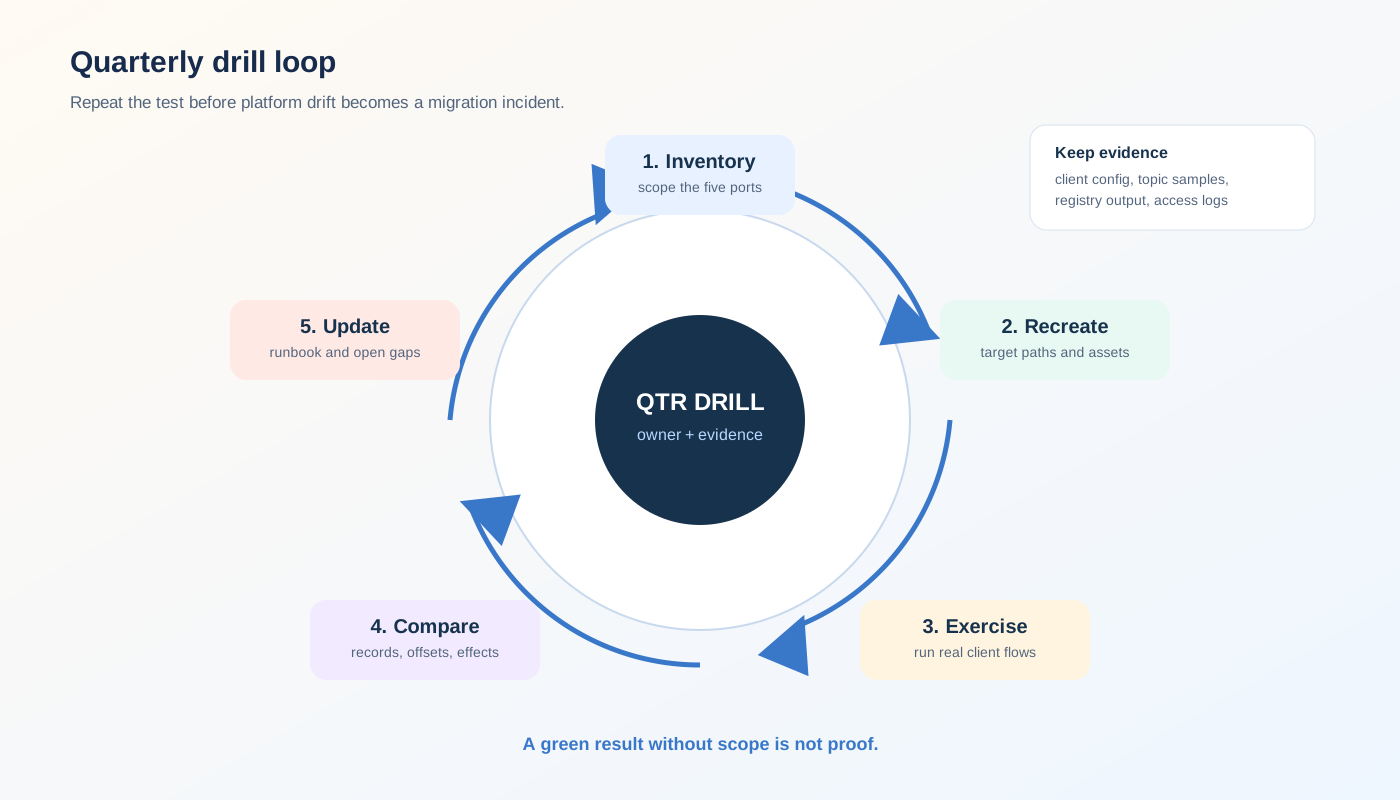
The evidence should be short enough to review and precise enough to repeat. A green dashboard is weak evidence if nobody can tell which client, topic, schema, or network path it covered. A test record with exact inputs and a pass condition is more useful.
4An exit plan you have not rehearsed is a wish
The best time to discover a missing export is before the export is urgent. A renewal calendar, a cloud-region change, or an incident can provide the trigger, but it should not provide the first rehearsal. Teams that test only the final cutover create a false binary: either stay forever or accept a risky change window. Quarterly drills expose the work while rollback is still easy.
This is also where architecture can reduce the number of unknowns. A Kafka-compatible platform preserves an important part of the protocol port when its supported semantics match the application. A deployment model that keeps the control plane and data plane in the customer's cloud account can make the data and network ownership boundary easier to inspect. It still does not export schemas, connectors, or private routes for you.
AutoMQ is one example of this architecture category. Its Kafka compatibility is designed to let Kafka clients and ecosystem tools remain part of the workload, while its Shared Storage architecture moves durable stream storage into object storage through S3Stream. AutoMQ BYOC places the control plane and data plane in the customer's cloud environment. Those properties can reduce uncertainty around the protocol and data ports for teams evaluating a Kafka-compatible exit path.
They do not remove the need for the other tests. Schema subjects still need an export and restore procedure. Connector plugins and offsets still need a rebuild test. DNS, routes, identities, and certificates still belong in the network drill. The right claim is narrower and more useful: architecture can lower the risk at specific ports, while an exit plan proves the whole system.
5The template that keeps the door open
Keep the plan in the same repository or system where the platform team stores deployment and recovery runbooks. Every entry should have an owner, a last-tested date, a target, and a pass condition. “Supported” is not a test result.
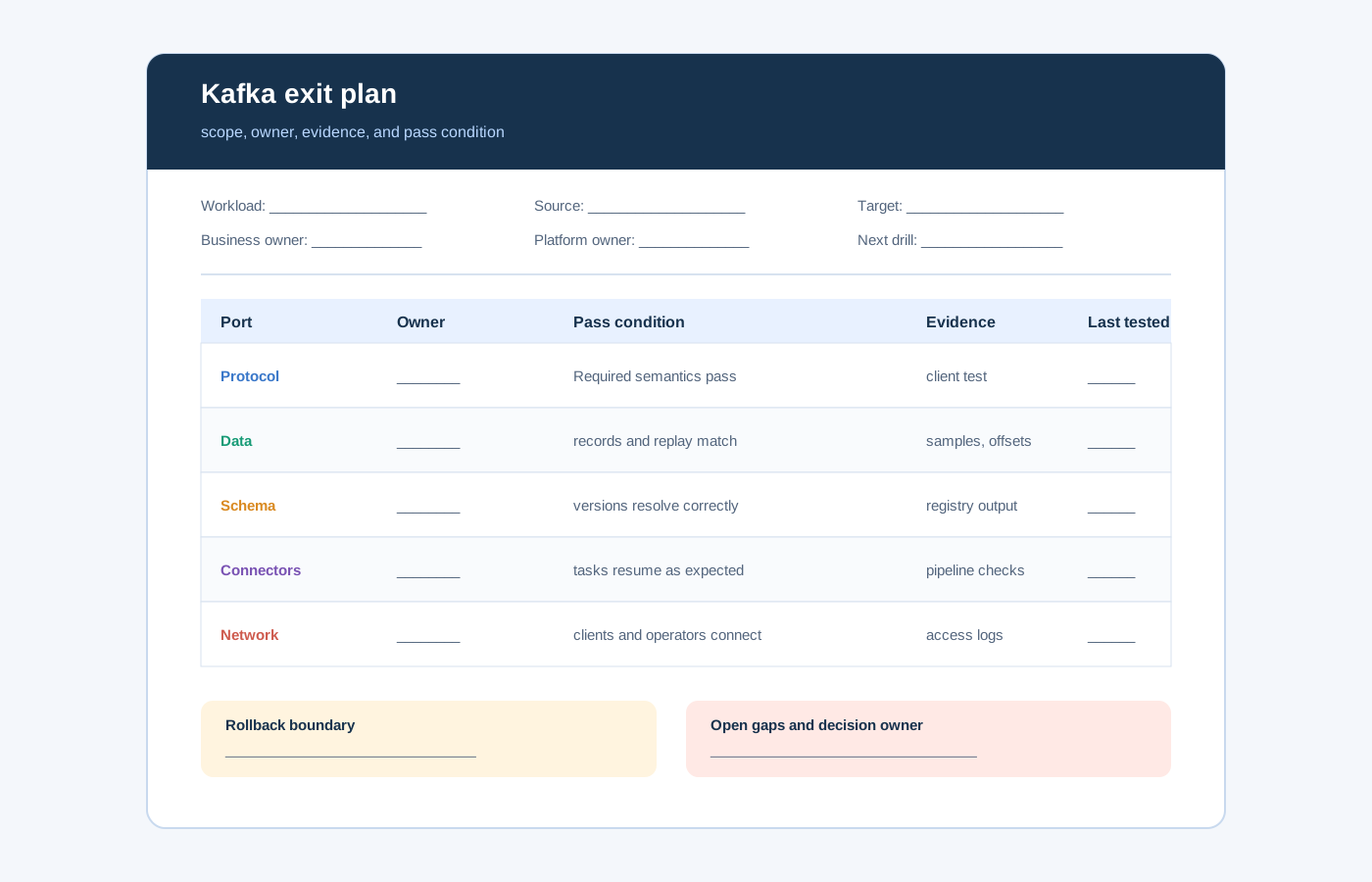
Use this template as a starting point:
Workload:
Business owner:
Platform owner:
Source platform and version:
Candidate target and version:
Required retention and replay window:
Cutover boundary:
Rollback boundary:

Port: protocol
  Owner:
  Required client semantics:
  Test target:
  Pass condition:
  Evidence:
  Last tested:

Port: data
  Owner:
  Topics and retention to preserve:
  Replication and backfill method:
  Offset and replay contract:
  Pass condition:
  Evidence:
  Last tested:

Port: schema
  Owner:
  Formats, subjects, and compatibility rules:
  Export and restore method:
  Pass condition:
  Evidence:
  Last tested:

Port: connectors
  Owner:
  Plugins, transforms, and source or sink positions:
  Rebuild method:
  Pass condition:
  Evidence:
  Last tested:

Port: network
  Owner:
  DNS, routes, identities, certificates, and private paths:
  Recreate method:
  Pass condition:
  Evidence:
  Last tested:

Open gaps:
Decision date:
Approver:
Next drill:
The template is intentionally plain. It forces the team to state what “portable” means for one workload and to expose gaps without hiding them behind a platform score. If a port has no owner or no evidence, mark it as untested and fund the work before the exit is needed.
The word lock-in can stay in the risk register. The engineering response should be more specific: five ports, five owners, five drills, and a record of what passed. That is how a Kafka exit plan becomes a choice the team can exercise instead of a promise it hopes it will never have to test.
6FAQ
6.1Does Kafka protocol compatibility eliminate vendor lock-in?
No. It can reduce application migration work at the protocol layer when the target supports the semantics the workload uses. Data, schemas, connectors, networking, contracts, and operating procedures still need their own exit paths.
6.2What belongs in a Kafka data export strategy?
Include retained records, topic configuration, partition and timestamp requirements, keys, headers, tombstones, compaction behavior, consumer offsets, replay expectations, access controls, a live replication path, a historical backfill path, and rollback boundaries.
6.3How often should a Kafka exit plan be tested?
Run a quarterly drill for each port, then run a full cutover rehearsal when a major client, connector, schema, network, cloud, or platform change affects the workload. Record the exact test scope and result each time.
6.4Does BYOC remove Kafka lock-in?
BYOC can make cloud account, network, and data ownership clearer, but it does not automatically make a workload portable. Review the control plane, storage format, schemas, connectors, identity model, and migration tooling together.
6.5When should a team evaluate AutoMQ?
Evaluate AutoMQ when Kafka client and ecosystem compatibility matter, while broker-local storage, data ownership, or cloud deployment boundaries are part of the exit concern. Start with a representative workload and run the protocol and data drills before making a broader platform decision. Review an AutoMQ BYOC architecture.
7References
- Apache Kafka, Protocol
- Apache Kafka, Replication
- Apache Kafka, Topic configuration
- Apache Kafka, Kafka Connect
- Apache Kafka, MirrorMaker 2
- Apache Avro, Specification
- AutoMQ, Kafka compatibility
- AutoMQ, S3Stream shared streaming storage
- AutoMQ, AutoMQ BYOC environment overview


