
Table of Contents
Table of Contents
The incident usually starts outside Kafka. Checkout requests slow down, a fraud score arrives late, a feature pipeline misses its freshness SLO, or a notification service begins to deliver stale events. Someone opens the trace view, sees a publish or consume span near the hot path, and Kafka becomes the first suspect. That suspicion is reasonable, but it is not yet evidence.
Kafka latency is not one delay. It is a chain of producer batching, network transit, broker request queuing, leader append, replication acknowledgment, fetch behavior, consumer scheduling, processing, and backlog recovery. A single "Kafka is slow" label hides too many control surfaces.
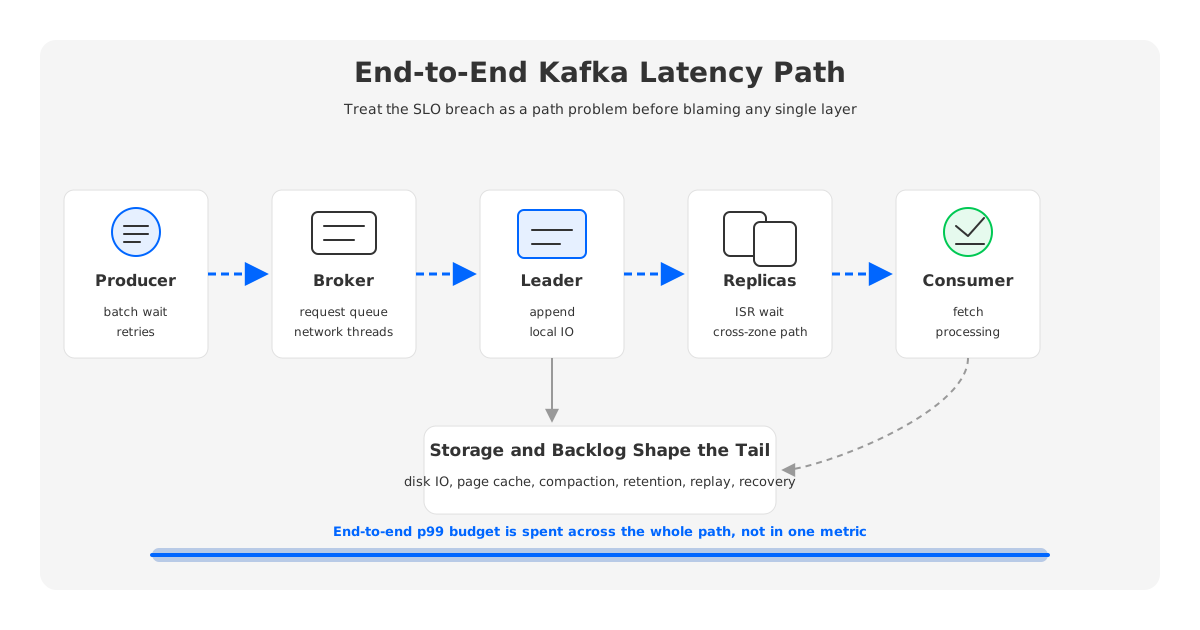
The practical question is not whether Kafka can be low latency in the abstract. It is which part of your current request path is spending the p99 budget, and whether that delay is caused by client behavior, broker saturation, storage pressure, replication, consumer backlog, or the architecture of the storage layer itself.
1Define the Latency You Are Measuring
Before changing configs, name the clock. Producer latency measures the time a producer spends before a send is acknowledged. Broker request latency measures how long a broker spends receiving, queuing, handling, and responding to a request. End-to-end event latency measures the time from an event being created or produced until the downstream service observes and finishes processing it.
Those clocks answer different questions. A producer can see healthy send latency while a consumer is hours behind. A consumer can poll quickly while application processing is slow. Broker request latency can rise because request handler threads are saturated, even when disk latency is normal. Consumer lag can be high because traffic spiked earlier, not because new records are slow to append now.
During an SLO breach, separate three timelines:
- Append path: event creation, producer batching, produce request, leader append, replica acknowledgment, producer response.
- Fetch path: consumer fetch request, broker response, client deserialization, application processing, offset commit.
- Backlog path: produced offset, consumed offset, group commit offset, catch-up rate, and time to drain accumulated lag.
The first timeline explains fresh-write latency. The second explains how quickly new records reach consumers. The third explains whether users are seeing old work from a previous bottleneck.
2Producer-Side Latency Checks
Producer settings are often the cleanest first check because they can add intentional delay before Kafka even sees a request. linger.ms allows the producer to wait briefly for more records so batches become larger. batch.size controls the buffer size available for batching per partition. acks changes when the broker can acknowledge a produce request, with stronger durability requiring the leader to coordinate with replicas before responding.
None of those settings is good or bad by itself. A low-latency pipeline may accept smaller batches to reduce waiting time. A throughput-oriented pipeline may prefer larger batches and compression. A critical event stream may keep stronger acknowledgment semantics and spend latency budget on durability. The mistake is to treat "Kafka latency" as a broker problem before checking whether the client is deliberately batching.
Start with producer metrics and traces:
- Compare event creation time with the producer API call. If the event waits upstream, Kafka is downstream of the real problem.
- Track producer request latency, batch size, compression ratio, retry rate, timeout rate, and record error rate by topic and client ID.
- Look for uneven partitioning. A hot key can make one partition p99 dominate while the topic-level average looks healthy.
- Check broker throttle time if quotas are enabled. A throttled producer may look like a Kafka latency problem, but the delay is policy-driven backpressure.
Producer retries deserve special attention. A small retrying slice can create a large p99 tail because the successful path and retry path share the same application-facing SLO. If retries rise with request errors, leader changes, timeouts, or network drops, diagnose failed attempts before tuning batching.
3Broker, Disk, and Replication Latency Checks
Once a produce request reaches the cluster, the broker path decides how much latency is spent in queues, request handling, append, replication, and response. Kafka exposes broker request metrics such as total request time, request queue time, local processing time, remote time, response queue time, and throttle time. These are more useful than a single broker CPU chart because they show where the request is waiting.
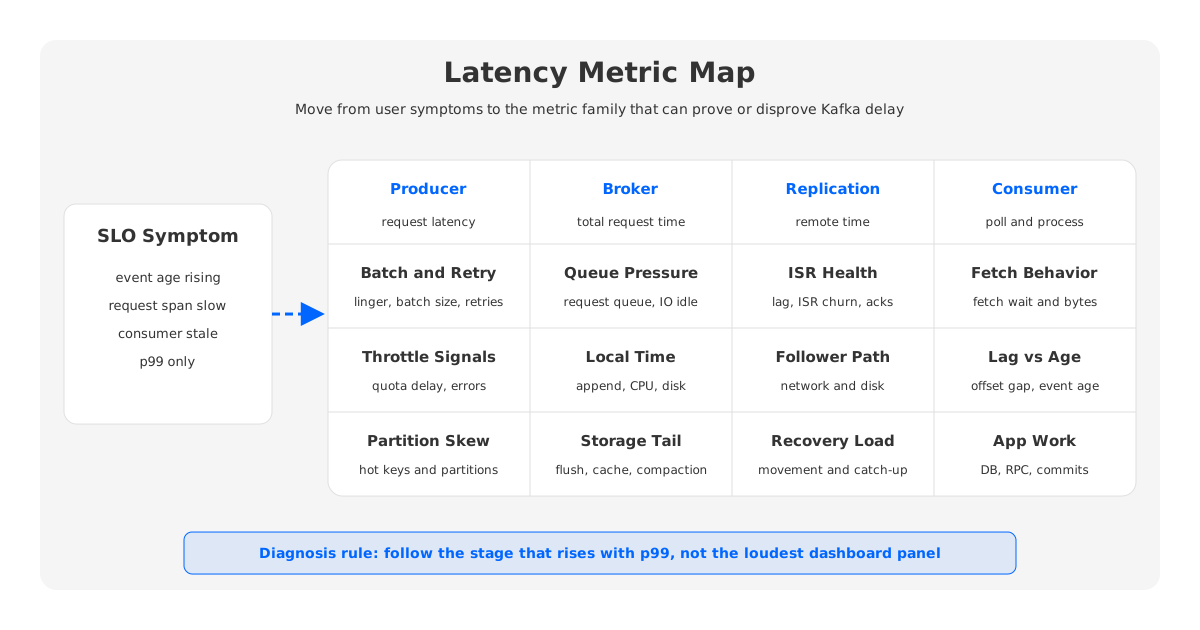
Read the broker metrics in order rather than as a flat dashboard. If request queue time rises, request handler capacity or downstream work is saturated. If local processing time rises, inspect append, disk, page cache, garbage collection, and broker-side work. If remote time rises for produce requests, replication acknowledgment is in the critical path. If response queue time rises, network threads or response handling are under pressure.
Replication changes the latency profile because a produce acknowledgment can depend on more than the leader append. With stronger acknowledgments and an in-sync replica requirement, the leader must wait for followers before responding. That wait is a durability feature, but follower health, inter-broker network, disk behavior, and ISR stability can all show up as producer p99.
Use this broker checklist when the SLO breach points toward Kafka:
| Symptom | Likely layer | What to inspect |
|---|---|---|
| Produce p99 rises with request queue time | Broker request handling | IO thread idle rate, request queue size, request handler idle time, CPU saturation |
| Produce p99 rises with remote time | Replication | ISR changes, follower lag, inter-broker network, replica fetch behavior |
| Fetch p99 rises while produce is normal | Read path | fetch request metrics, page cache hit behavior, disk reads, consumer fetch settings |
| All request types rise together | Shared resource | network threads, CPU, JVM pauses, noisy neighbor workload, cloud instance limits |
| Latency rises during scaling or movement | Storage and replication | reassignment traffic, recovery, disk IO, cross-zone replication, leader movement |
Disk is easy to underweight because Kafka's append path is sequential and often benefits from the operating system page cache. Storage still matters. Tail latency can appear when disks saturate, flush behavior changes, compaction or retention competes for IO, recovery copies large partitions, or reassignment moves data across brokers.
4Consumer Lag Is Not the Same as End-to-End Latency
Consumer lag is a backlog measurement. It compares how far a consumer group has progressed with how far the log has advanced. It is essential for operations, but it is not identical to end-to-end latency. A consumer may have low lag while each record spends too long inside application processing. A consumer may have high lag while fresh records would be processed quickly if the backlog were empty.
When an application SLO is failing, measure both offset lag and event age. Offset lag tells you how much work remains. Event age tells you how stale the data is when the application sees it. The two diverge when record sizes vary, processing cost varies by event type, or a few partitions carry most traffic.
Consumer-side checks should cover:
- Fetch settings such as minimum bytes, maximum wait, max partition fetch size, and max poll records.
- Application processing time per record or batch, including database calls, downstream RPCs, serialization, and schema validation.
- Consumer group stability, including rebalances, heartbeat failures, session timeouts, and long processing intervals between polls.
- Partition-to-consumer parallelism. Adding consumers beyond the number of active partitions will not increase parallelism for that topic.
- Offset commit behavior. Delayed commits can make lag look worse than processing reality, while premature commits can hide failed work.
The useful incident question is, "Can this consumer drain faster than producers are adding work?" If not, lag will keep growing after broker latency improves. If yes, the user-facing problem may persist until the backlog drains, so the plan needs both a root-cause fix and a catch-up estimate.
5When Storage Architecture Affects Kafka Latency
Many Kafka latency problems are config or workload problems. Some are architecture problems. The difference appears when p99 repeatedly worsens during broker replacement, partition reassignment, storage expansion, retention growth, or traffic bursts that require rapid scaling. In these cases, the cluster is paying for the coupling between broker compute and broker-local durable data.
Traditional Kafka stores partition logs on broker-local disks and uses replication across brokers for durability. This design is proven, but scaling and recovery can involve moving partition data through the same brokers that serve production traffic. When large partitions move, background copy consumes network and disk bandwidth. When retention grows, storage pressure becomes a broker sizing problem.
These storage effects usually show up at p99 before they show up in averages. Average latency can stay acceptable while a few hot partitions, cold reads, recovering replicas, or busy brokers create a long tail. For latency-sensitive pipelines, that tail is the SLO.
Treat storage architecture as part of the diagnosis when these conditions keep recurring:
- Latency incidents cluster around broker maintenance, partition reassignment, or disk expansion.
- Replication traffic competes with client produce and fetch traffic during recovery.
- Adding brokers does not quickly relieve hot storage because partitions must be moved.
- Longer retention forces larger broker disks and slower operational recovery.
- Read latency depends heavily on whether data is hot in cache or fetched from slower storage paths.
The decision boundary is important. If one producer uses an excessive linger.ms, fix the producer. If one consumer blocks on a downstream database, fix the consumer. If every capacity change becomes a latency event because storage and compute are locked together, review the architecture.
6How AutoMQ Approaches Latency and Recovery Paths
AutoMQ enters the discussion at that architecture boundary. It is a Kafka-compatible streaming system that keeps the Kafka protocol and ecosystem surface while moving the storage layer toward shared object storage with a write-ahead log and cache in front of it. The goal is to remove recurring latency contributors caused by broker-local storage ownership, data movement, and slow recovery paths.
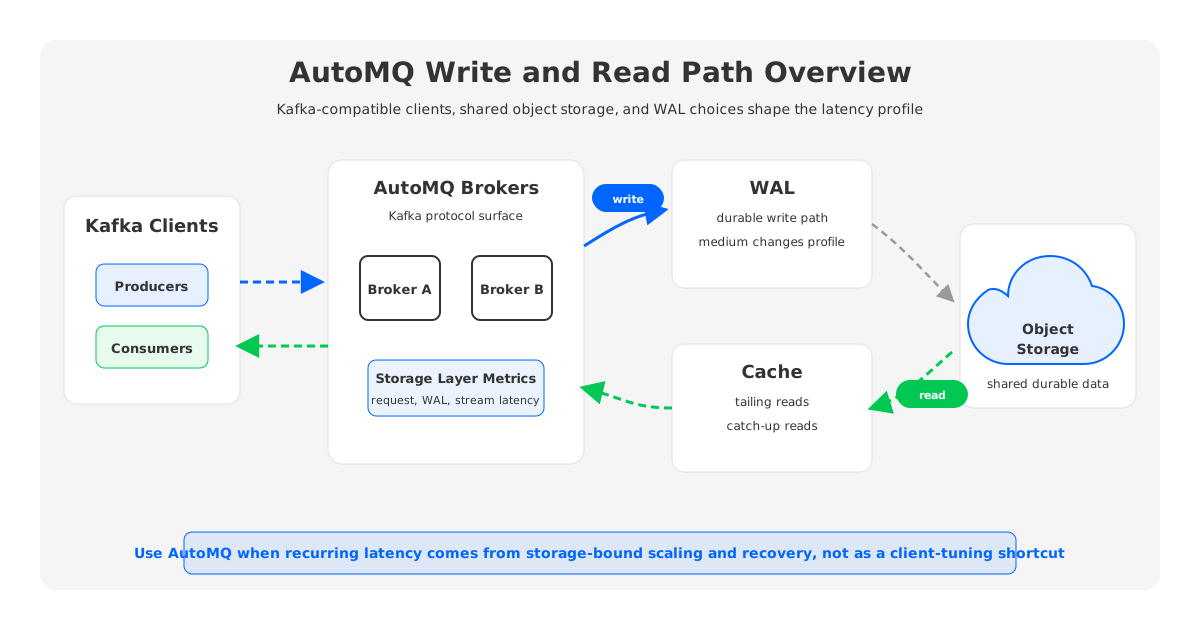
In AutoMQ's S3Stream architecture, data is written to WAL first and then uploaded to object storage. The WAL is the low-latency persistence path, while object storage provides the durable shared storage layer. A cache helps serve tailing reads and catch-up reads efficiently, so the read path can treat hot and historical data differently.
The WAL medium matters. AutoMQ documentation describes multiple WAL options with different latency profiles: block storage, object storage, and file storage can serve different workload needs. AutoMQ Open Source relies on S3-compatible storage as the WAL option, which fits many latency-insensitive scenarios. Commercial deployments can use other WAL choices on various cloud providers when the workload requires a lower-latency persistence profile.
The operational advantage is clearest when latency pain is tied to scaling or recovery. If durable data is in shared storage rather than bound to broker-local disks, broker replacement and scaling can rely more on ownership and metadata changes and less on large data-copy operations through production brokers. For teams that repeatedly see p99 spikes during storage-heavy operations, that shift can be more valuable than another round of client tuning.
AutoMQ also exposes Kafka-compatible and S3Stream-specific metrics in Prometheus format. Teams can keep familiar Kafka request views while adding storage-layer signals such as WAL flush time, stream operation latency, object storage upload and download throughput, and limiter queue time for cold reads or compaction-related traffic.
7A Practical Diagnostic Sequence
The fastest way to waste an incident is to start with a favorite theory. Use a sequence that narrows the blast radius first.
- Confirm the user-facing SLO breach with event age, not only request duration. If events are stale before Kafka receives them, the root cause is upstream.
- Split producer send latency from broker request latency. Producer batching, retries, throttling, and partition skew are client-side suspects.
- Break broker latency into queue time, local time, remote time, response queue time, and throttle time. Each stage points to a different resource.
- Compare produce and fetch behavior. If only fetch is slow, focus on consumer settings, cache, read path, and application processing.
- Separate offset lag from processing latency. Lag tells you the size of the backlog; processing latency tells you whether the consumer can keep up.
- Check whether the incident coincides with recovery, reassignment, compaction, retention pressure, or broker scaling. This is where storage architecture becomes relevant.
For dashboards, keep the map compact. Track p50 and p99 for client send, broker produce, broker fetch, consumer processing, event age, and lag. Then add resource context: network throughput, disk utilization, request queue size, ISR state, under-replicated partitions, consumer group state, and storage-layer metrics if available.
8References
- Apache Kafka producer configuration documentation
- Apache Kafka consumer configuration documentation
- Apache Kafka monitoring documentation
- Apache Kafka replicated log design
- AutoMQ S3Stream shared streaming storage overview
- AutoMQ WAL storage documentation
- AutoMQ broker and controller configuration
- AutoMQ Prometheus metrics documentation
9FAQ
9.1What is the most common cause of Kafka latency?
There is no single most common cause across all clusters. In incidents, the usual suspects are producer batching or retries, broker request queues, replication wait, disk or network saturation, consumer processing, and accumulated lag. The right first move is to split the path into producer, broker, storage, replication, fetch, and consumer stages.
9.2How do I tell whether Kafka latency is a broker problem or a consumer problem?
Compare broker produce and fetch request latency with consumer lag and event age. If broker metrics are healthy but event age grows, the consumer application or downstream dependency may be the bottleneck. If broker request queue time, remote time, or local processing time rises with the incident, the cluster path deserves deeper inspection.
9.3Does lowering linger.ms always improve Kafka low latency?
Lowering linger.ms can reduce intentional producer wait, but it can also reduce batching efficiency and increase request rate. For latency-sensitive workloads, test it with real traffic shape, record size, compression, partitions, and acknowledgment settings rather than treating it as a universal fix.
9.4Why does Kafka p99 latency rise during broker maintenance?
Broker maintenance can trigger leader movement, replica catch-up, reassignment traffic, cache changes, or recovery work. In traditional Kafka, partition data is tied to broker-local disks, so operational changes may move data through the same network and storage resources used by client traffic.
9.5When should we evaluate AutoMQ for Kafka latency problems?
Evaluate AutoMQ when latency incidents repeatedly come from storage-bound scaling, broker replacement, partition movement, long recovery paths, or retention-driven broker sizing. If the problem is a single client config or slow downstream service, fix that first. If the pattern is structural, a Kafka-compatible shared-storage architecture may be the more durable change.


