
Table of Contents
Table of Contents
Kafka incidents often start as a quiet mismatch between what dashboards show and what operators need to decide. A Grafana board may have hundreds of Kafka metrics: broker throughput, consumer lag, request latency, ISR counts, JVM memory, disk utilization, network traffic, topic-level rates, and exporter health. Yet the first clear signal may still come from a user saying a real-time dashboard is stale or a payment event is delayed.
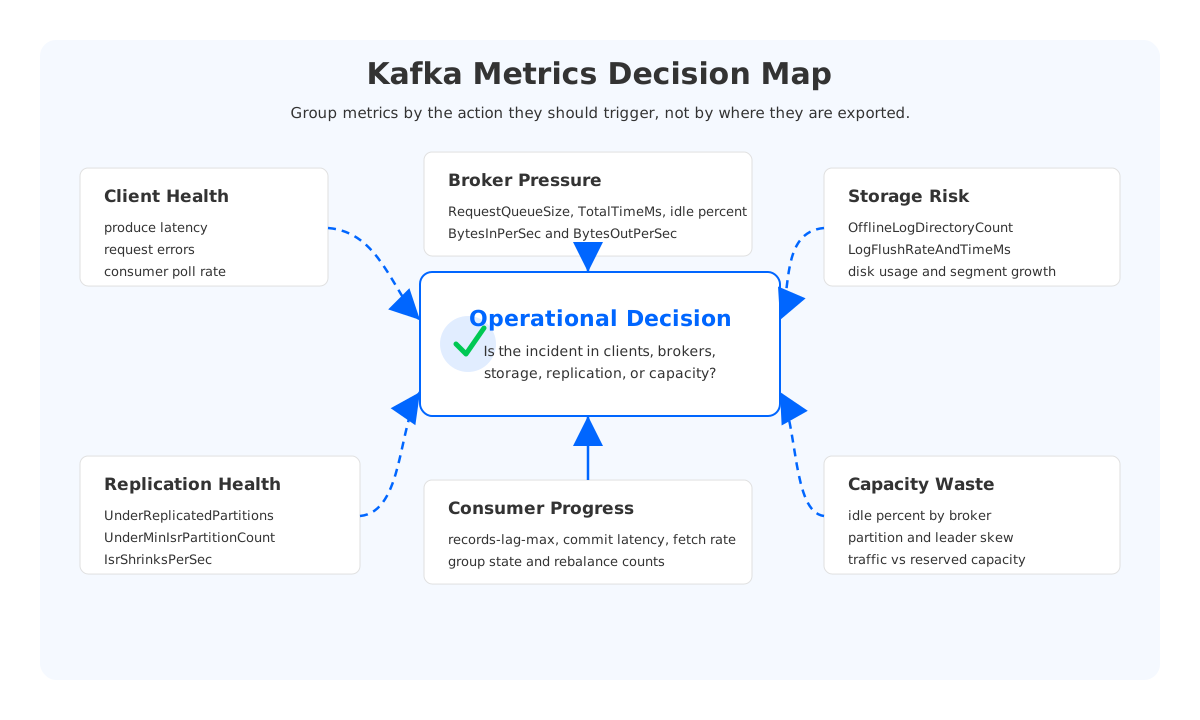
That does not mean the team had too few metrics. More often, Kafka monitoring is organized around metric sources instead of operational questions. Broker metrics live on one page, client metrics on another, disk charts on a third page, and consumer lag on a noisy panel with every group in the cluster. During an incident, the operator must translate those panels into a decision: is the consumer slow, is the broker saturated, is replication unhealthy, is storage the bottleneck, or is the cluster carrying too much idle capacity in the wrong place?
Good Kafka monitoring makes that translation explicit. It separates symptoms from root causes, groups Kafka metrics by the action they should trigger, and uses alerts to page humans only when a condition has impact and persistence.
1Why Kafka Monitoring Needs Decision-Oriented Dashboards
Apache Kafka exposes server and client metrics through JMX, and Prometheus deployments commonly collect those MBeans through the Prometheus JMX Exporter. That stack is practical, but it creates one trap: once every MBean can become a time series, teams are tempted to graph everything.
A decision-oriented dashboard starts from the question an on-call engineer must answer. For example, "why is consumer lag rising?" is not the same question as "which consumer group has the largest lag?" The first question needs producer rate, consumer processing rate, broker request queue time, fetch latency, rebalance state, and possibly storage latency. The second question needs a sortable table. Both are useful, but only one explains the incident.
The same pattern applies to cost. Kafka broker metrics can show low CPU and request handler utilization while disk remains heavily provisioned for retention. A traditional dashboard may show a healthy cluster; a platform owner sees capacity reserved for peaks, retention, or replica movement rather than current traffic.
Build the first page around seven decisions:
- Client health: are producers and consumers behaving normally?
- Broker pressure: are request queues, network processors, or request handlers saturated?
- Storage risk: is disk or log flush behavior threatening availability?
- Replication health: are partitions still protected by enough in-sync replicas?
- Consumer progress: are applications processing at the rate the business expects?
- Balancing: are partitions, leaders, and consumer groups distributed sanely?
- Capacity waste: is the cluster over-provisioned, skewed, or expensive to operate?
Once dashboards follow those questions, Kafka metrics become evidence rather than noise.
2Client Metrics: Catch Lag Before Users Do
Consumer lag is the metric most teams associate with kafka monitoring, but it is also easy to misuse. The Kafka consumer exposes records-lag-max through kafka.consumer:type=consumer-fetch-manager-metrics,client-id={client-id}. It tells you the maximum record lag for the consumer, as observed by the consumer process. That makes it valuable, but not complete. If the consumer process is down, misconfigured, or blocked before exporting metrics, you may need broker-side group offset metrics or an external lag exporter to see the absence.
Lag should be paired with progress metrics. A group that is behind but catching up may not need a page. A group whose lag is rising while its fetch rate drops probably does. Track consumer fetch rate, records consumed rate, commit latency, commit failure rate, and rebalance state. For Kafka Connect sinks, sink-record-lag-max and task status metrics can help distinguish Kafka-side lag from sink-system backpressure.
Producer monitoring should focus on write SLO and retry behavior. Watch request latency, record send rate, batch size, compression ratio, retry rate, error rate, and buffer exhaustion. When producer latency increases, correlate it with broker TotalTimeMs for Produce, request queue time, replication health, and RemoteTimeMs.
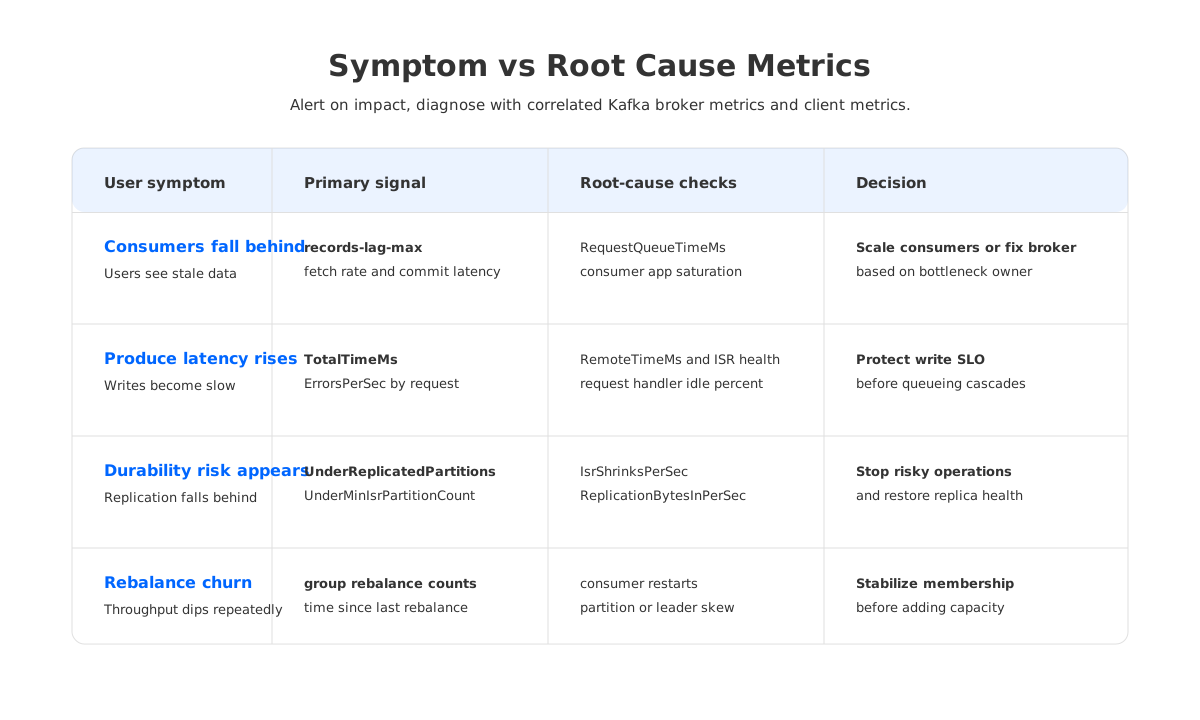
The practical rule is simple: alert on user-impacting symptoms, then diagnose with causal signals. Individual low-level metrics are better as annotations and drill-down panels unless they directly represent risk.
3Kafka Broker Metrics: Pressure, Queues, and Request Latency
Kafka broker metrics tell you whether the cluster is receiving more work than it can process. Start with traffic and request rate: kafka.server:type=BrokerTopicMetrics,name=BytesInPerSec, BytesOutPerSec, MessagesInPerSec, TotalProduceRequestsPerSec, and TotalFetchRequestsPerSec. These are the basic demand curves. They explain whether a lag spike is caused by a traffic surge or by a capacity regression under normal traffic.
Then look at broker pressure. The key request path metrics are kafka.network:type=RequestMetrics,name=TotalTimeMs,request={Produce|FetchConsumer|FetchFollower}, RequestQueueTimeMs, LocalTimeMs, RemoteTimeMs, ResponseQueueTimeMs, and ResponseSendTimeMs. Kafka documents TotalTimeMs as total request time broken into queue, local, remote, and response send time, which points to different owners.
If RequestQueueTimeMs rises, brokers are not picking up requests quickly enough. Check kafka.network:type=RequestChannel,name=RequestQueueSize, kafka.server:type=KafkaRequestHandlerPool,name=RequestHandlerAvgIdlePercent, and kafka.network:type=SocketServer,name=NetworkProcessorAvgIdlePercent. Low idle percent plus rising queue time points toward broker saturation. Rising RemoteTimeMs for produce requests often means the leader is waiting for follower replicas, so replication health belongs in the same view.
Broker dashboards should also include error rates by request type. kafka.network:type=RequestMetrics,name=ErrorsPerSec,request=...,error=... lets you distinguish transient client behavior from broker-side failure modes. A spike in ErrorsPerSec with error=NOT_ENOUGH_REPLICAS means something very different from a spike in authentication or authorization errors.
4Storage and Disk Metrics: Healthy Brokers Can Still Be One Disk Away From Failure
Traditional Kafka binds durable log storage to broker-local disks. That makes disk monitoring a first-class reliability concern, not a background infrastructure chart. Disk utilization, disk IO saturation, filesystem errors, and segment growth determine whether a cluster can absorb traffic bursts, retain data, and recover safely after broker failure.
Kafka exposes kafka.log:type=LogManager,name=OfflineLogDirectoryCount, with a normal value of zero. Treat any non-zero value as serious because it means a broker has lost access to one or more log directories. Track kafka.log:type=LogFlushStats,name=LogFlushRateAndTimeMs as a storage latency signal, but interpret it in context. Depending on Kafka configuration and operating system behavior, log flush timing may not be the only view of durable write latency. Pair it with broker request latency, disk IO wait, and replication signals.
Storage risk is not only about running out of disk. If retention growth forces larger disks, broker replacement and partition reassignment usually take longer. For cost-aware Kafka monitoring, track the ratio between retained data, broker-local disk allocation, traffic, and actual compute utilization.
5Replication, ISR, and Controller Health
Replication metrics tell you whether Kafka can keep its durability promises under pressure. Start with kafka.server:type=ReplicaManager,name=UnderReplicatedPartitions. Kafka documents the normal value as zero. When it rises, at least one partition has fewer in-sync replicas than its full replica set. Then check UnderMinIsrPartitionCount, AtMinIsrPartitionCount, OfflineReplicaCount, IsrShrinksPerSec, and IsrExpandsPerSec.
The important distinction is between warning and write risk. Under-replicated partitions indicate reduced redundancy. Under-min-ISR partitions indicate that writes configured with strong acknowledgments may fail or stall. An alert that treats both signals equally will either be too noisy or too late.
Controller metrics belong next to replication. kafka.controller:type=KafkaController,name=ActiveControllerCount should show exactly one active controller in the cluster. LeaderElectionRateAndTimeMs is expected to be non-zero during broker failures, while UncleanLeaderElectionsPerSec should remain zero in normal operation. Unclean leader election is a risk signal because it can imply data loss depending on configuration and failure state.
Replication metrics are also root-cause checks for producer latency. If produce TotalTimeMs rises and RemoteTimeMs rises at the same time, producers may be waiting for follower replicas. If IsrShrinksPerSec rises during the same window, the incident is not a generic producer latency problem. It is a replication health problem that happens to be visible through producer latency.
6Rebalancing and Consumer Group Stability
Rebalancing is one of the most under-explained sources of Kafka pain. Teams often notice it indirectly: throughput dips, lag rises, some consumers stop processing, and application logs show group membership changes. If dashboards do not show consumer group state, an operator may add consumers or brokers when the real problem is unstable membership.
For consumers, track time spent in rebalances, failed commits, commit latency, assigned partitions, and member churn. For broker-reported group state in AutoMQ's Prometheus metrics, group-oriented metrics such as Kafka_group_preparing_rebalance_count, Kafka_group_completing_rebalance_count, Kafka_group_stable_count, Kafka_group_empty_count, and Kafka_group_dead_count can make group health visible at the platform level. In standard Kafka environments, equivalent visibility may come from client metrics, broker group coordinator metrics, admin APIs, or a lag exporter.
Rebalancing metrics should be read together with deployment events. A rolling deploy, short session timeout, slow consumer poll loop, or bad autoscaler policy can produce recurring rebalances. The symptom is lag; the root cause may be membership instability.
The dashboard should answer three questions: which groups are rebalancing, how often, and whether rebalances coincide with lag growth or throughput loss. That is enough to decide whether to tune consumer configuration, investigate application restarts, rebalance partitions, or fix broker pressure.
7Capacity and Cost Signals
Kafka capacity monitoring usually focuses on avoiding saturation, but the opposite state is also important. A cluster can be reliable and still wasteful. Broker-local disks may be sized for retention rather than traffic. Brokers may be kept online to hold replicas rather than to serve current compute demand. Partition and leader distribution may be uneven enough that one broker is hot while others are idle.
Track capacity by resource and by ownership:
| Decision | Kafka metrics to inspect | What it tells you |
|---|---|---|
| Add broker capacity? | request queue time, request handler idle percent, network processor idle percent | Whether brokers are saturated under current traffic |
| Rebalance leaders? | LeaderCount, bytes in/out by broker, request rate by broker | Whether load is unevenly distributed |
| Reassign partitions? | PartitionCount, disk usage by broker, replica lag | Whether partition placement creates risk or skew |
| Reduce waste? | retained data, allocated disk, idle percent, traffic trend | Whether capacity is reserved for storage rather than active work |
Capacity alerts should rarely page unless they threaten an SLO. High disk utilization with rapid growth deserves urgent action; low request handler utilization with oversized disks deserves a capacity review. Both are Kafka monitoring outcomes, but they do not belong in the same notification channel.
8Alert Design Principles for Kafka Metrics
Kafka alerts fail when they treat every metric threshold as a page. A better design starts with impact, persistence, correlation, and ownership.
Prometheus alerting rules support a for clause, which waits for a condition to remain active before firing, and keep_firing_for, which can reduce flapping after the condition clears. Use those mechanics deliberately. Consumer lag that spikes for one scrape interval may be normal. Consumer lag that grows for several minutes while throughput is flat may be user impact. Under-replicated partitions during a broker restart may be expected; under-min-ISR partitions during production writes deserve a stronger response.
Use alert names and annotations that encode the decision. "KafkaConsumerLagHigh" is less useful than "KafkaConsumerGroupNotCatchingUp" with labels for group, topic, environment, owner, and a runbook.
Keep these principles close:
- Alert on impact or imminent risk, not on every interesting metric.
- Use different severity for symptoms and root causes.
- Require persistence for noisy signals.
- Attach ownership labels so the right team receives the page.
- Include correlated metrics in annotations or dashboard links.
- Keep capacity waste out of paging channels unless it threatens availability.
The best Kafka monitoring setup makes an alert feel like the start of a diagnosis, not the start of a search.
9What AutoMQ Adds to Kafka Observability
Standard Kafka metrics are necessary, but they do not always explain storage-layer behavior well enough for cloud-native operations. If brokers own local durable disks, many storage questions are inferred from broker symptoms: request latency, disk utilization, log flush timing, and replication lag. That can be enough for classic clusters, but it leaves operators stitching together cause and effect during storage-heavy incidents.
AutoMQ, a Kafka-compatible cloud-native streaming platform, keeps Kafka protocol compatibility while moving durable stream storage into an object-storage-backed architecture. In observability terms, that means teams can keep Kafka-oriented dashboards while adding metrics for the storage layer that traditional broker-local designs often hide.
AutoMQ's Prometheus metrics include Kafka-compatible broker and group metrics such as request queue size, request latency percentiles, log end offset, log size, and consumer group offset. They also expose object-storage and S3Stream-oriented signals for upload/download traffic, available bandwidth, limiter queue time, cold reads, compaction.
That extra layer changes the diagnosis path. If a consumer sees higher fetch latency, the dashboard can show whether the issue is broker queueing, cold-read pressure, object storage latency, cache behavior, compaction traffic, or storage bandwidth. If a cluster is over-provisioned, self-balancing and autoscaling signals can connect capacity headroom to platform action.
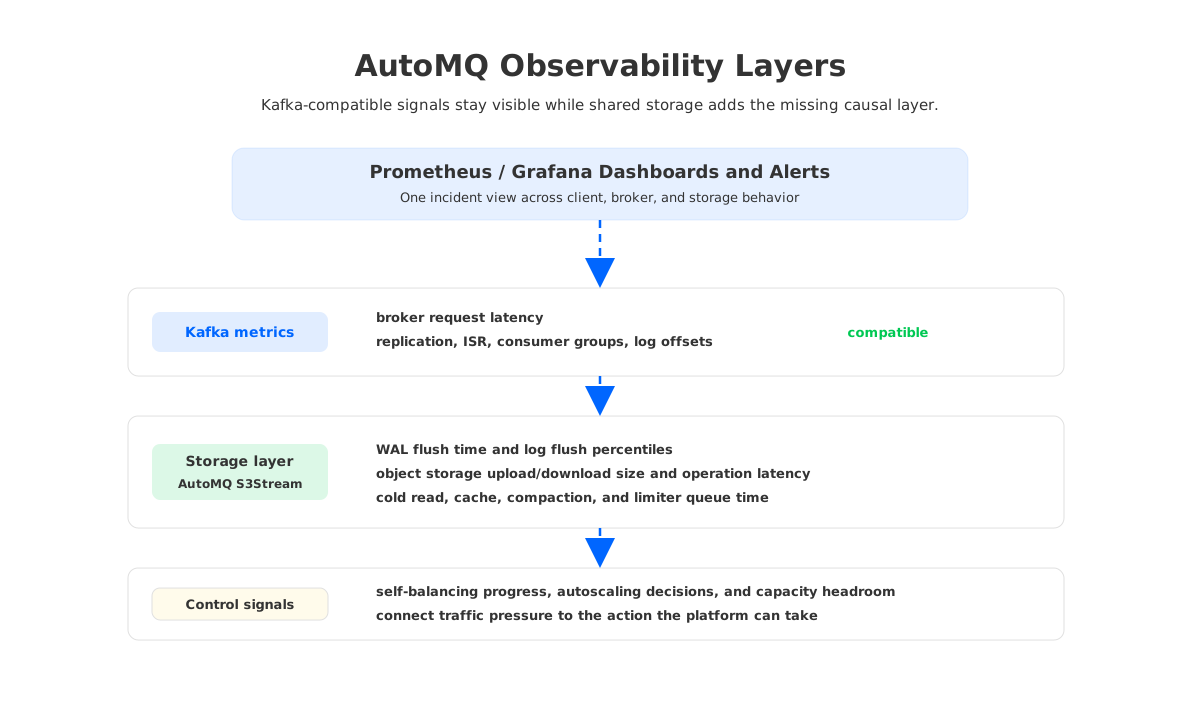
This is not a reason to replace every existing Kafka panel. It is a reason to make the monitoring model match the architecture. For Kafka-compatible systems that separate compute from storage, the most useful dashboards show both the Kafka surface and the storage substrate underneath it.
10References
- Apache Kafka 4.3 Operations: Monitoring
- Prometheus JMX Exporter
- Prometheus Alerting Rules
- AutoMQ Documentation: Prometheus Metrics
11FAQ
11.1What are the most important Kafka monitoring metrics?
Start with consumer progress, producer request latency and errors, broker request queue time, request handler idle percent, network processor idle percent, disk health, under-replicated partitions, under-min-ISR partitions, ISR shrink rate, leader and partition skew, and capacity utilization. The exact alert thresholds should be based on workload SLOs rather than copied from another cluster.
11.2Are Kafka JMX metrics and Kafka Prometheus metrics the same thing?
Kafka exposes many metrics through JMX. Prometheus usually collects them through a JMX exporter or a platform-specific integration, which translates MBean names into Prometheus time series names. The concept is the same signal, but the metric name, label names, and aggregation behavior depend on the exporter configuration.
11.3Should I alert on consumer lag?
Yes, but not on raw lag alone. Alert when lag is sustained, growing, and tied to a production consumer group where delay matters. Add fetch rate, processing rate, commit health, rebalance state, and broker latency to the same dashboard so the alert explains whether the consumer, broker, or downstream system is responsible.
11.4How do I avoid noisy Kafka alerts?
Use persistence windows, severity levels, ownership labels, and symptom-root-cause separation. Prometheus for clauses help avoid firing on brief spikes, while annotations should point to dashboards or runbooks that show correlated metrics.
11.5What extra metrics matter in AutoMQ?
Alongside Kafka-compatible broker and group metrics, AutoMQ adds storage-layer visibility for WAL and log flush behavior, S3Stream operation latency, object storage upload and download traffic, cache and cold-read pressure, compaction-related limiter queue time, self-balancing, and autoscaling. Those signals help explain storage and capacity issues before they appear only as lag or broker latency.


