
Table of Contents
Table of Contents
Consumer lag is the alarm everyone understands. A dashboard turns red, downstream services read stale data, and the incident channel fills with screenshots of offsets, partitions, and consumer groups. The uncomfortable part is that consumer lag is often not the first failure. It is the symptom that becomes visible after producers, brokers, storage, network paths, or stream processors have already drifted away from normal.
That is why kafka monitoring consumer lag is a high-intent search. Teams are not looking for a prettier line chart. They are trying to stop a Kafka-compatible streaming platform from surprising product systems, analytics jobs, fraud models, AI features, and customer-facing applications that depend on fresh events. Good monitoring still tracks lag, but treats it as one layer in a causal chain.
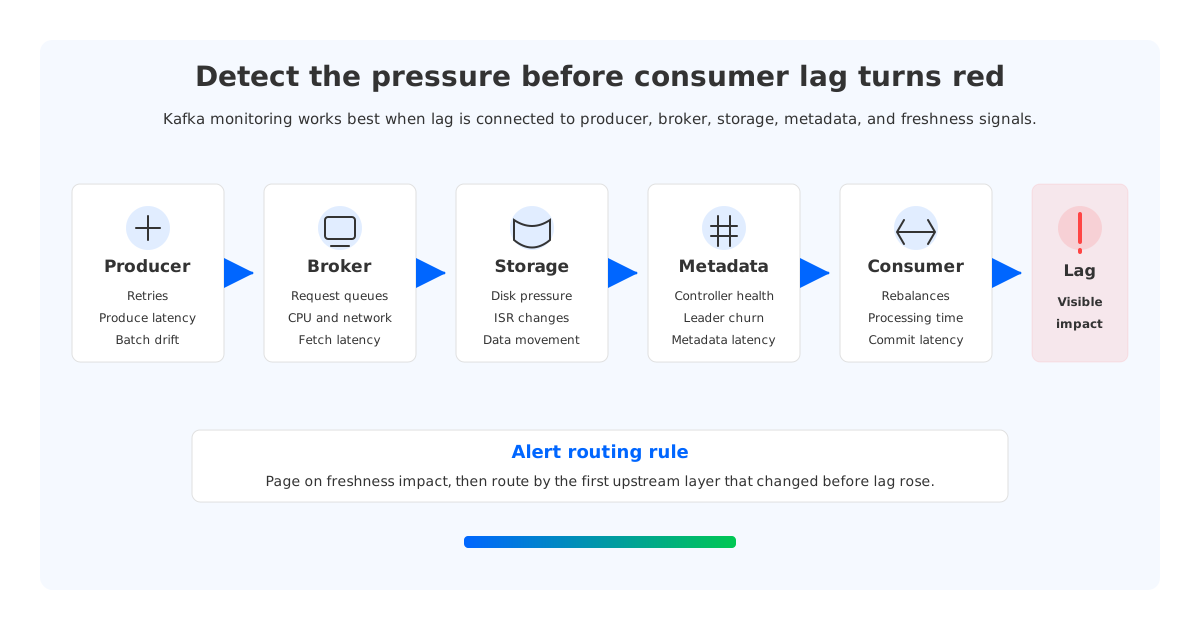
The shift changes the operating model. Instead of asking, "Which consumer group is behind?", the platform team asks, "Which upstream pressure made this group unable to keep up, and who can act before freshness is breached?" That framing turns a late signal into an early-warning system.
1Consumer Lag Is a Symptom, Not the System
Kafka consumer lag measures the distance between what has been produced and what a consumer group has committed. A larger gap means consumers are further behind the head of the log. Apache Kafka's documentation makes the moving parts clear: topics, partitions, offsets, consumer groups, broker request handling, replication, and controller behavior.
Lag becomes dangerous when teams compress too many meanings into one number. A rising lag line can mean consumers are under-provisioned, producers are bursting, brokers are saturated, fetch latency has increased, a rebalance is interrupting work, a downstream database is throttling writes, or storage is forcing recovery. Those are different incidents with different owners.
Lag is attractive because it is easy to explain, route, and page on. But a lag-only alert quietly transfers platform problems to consumer owners. The consumer team receives the page because their group is behind, even when the root cause is broker disk pressure, ISR shrinkage, controller instability, or cross-AZ network saturation.
A stronger model keeps consumer lag, then surrounds it with leading indicators:
- Producer health: throughput, batch size, produce latency, retry rate, record errors, and compression changes. Producer behavior often explains today's backlog.
- Broker saturation: request queue time, CPU, heap pressure, network utilization, and produce/fetch latency. These signals show whether Kafka can accept and serve traffic.
- Storage and replication pressure: disk or remote storage latency, under-replicated partitions, offline partitions, ISR churn, and data movement. This layer is where many "consumer" incidents actually begin.
- Consumer execution: records consumed per second, fetch latency, commit latency, rebalance rate, assignment skew, processing time, and downstream sink latency. This layer distinguishes slow application code from platform-side headwind.
- Freshness and business impact: event-time delay, stream processing watermark delay, SLA or SLO burn rate, and the downstream datasets or APIs affected by stale events.
This taxonomy forces a useful discipline: every alert should say what changed, which dependency is implicated, who owns the next action, and which runbook applies.
2Build a Signal Taxonomy Around Causality
The cleanest Kafka monitoring designs organize signals by the path an event takes, not by the team that created the dashboard. A record is produced, accepted by a broker, persisted, fetched by consumers, processed, and reflected in downstream state. Each stage can add delay that lag reveals later.
Start with an event journey and map the indicators that should move before lag breaches:
| Stage | Leading indicators | Typical owner | Question the alert should answer |
|---|---|---|---|
| Producer | Produce latency, retry rate, error rate, batch efficiency | Service team | Is traffic malformed, bursty, or being retried before it reaches Kafka? |
| Broker front door | Request queue time, produce/fetch request latency, network saturation | Platform/SRE | Can brokers accept and serve the current rate? |
| Durability path | Disk pressure, storage latency, ISR changes, remote storage latency | Platform/SRE | Is persistence slowing the log before consumers see it? |
| Metadata plane | Controller health, partition leadership churn, metadata request latency | Platform/SRE | Is the cluster control plane stable enough for clients? |
| Consumer group | Rebalance rate, assignment skew, poll/process/commit timing | Application/data team | Is the group making steady progress without coordination churn? |
| Stream freshness | Watermark delay, end-to-end event-time age, sink latency | Data platform | Is the business output fresh enough, even when offsets look acceptable? |
| Cost shape | Cross-zone traffic, storage growth, idle capacity, burst cost | Platform/FinOps | Is cost drift indicating inefficient placement or over-provisioning? |
The last row is often missing because cost is treated as a monthly finance concern. That is a mistake in Kafka operations. Unexpected cross-zone traffic can point to poor placement, consumer fan-out, or replication movement; storage growth can reveal retention drift; idle broker capacity can show sizing for yesterday's spike.
The taxonomy should distinguish alerts from diagnostics. A page should fire when freshness is at risk or when a platform invariant is broken. Diagnostic panels can hold detailed metrics. Teams that page on every high-cardinality metric train responders to ignore the system; teams that page on lag alone start too late.
3Why Broker-Local Storage Makes Lag Harder to Predict
Traditional Kafka brokers own local log segments. This design is proven, but it couples serving traffic with durable state. When a broker is hot, out of disk, recovering, or being drained, the cluster must account for partition leadership, replica placement, local disks, ISR health, and data movement.
That coupling matters because storage pressure often turns into consumer lag indirectly. A disk fills or slows down, produce latency rises, ISR changes, leaders move, request queues grow, and consumers eventually fall behind because fetches are slower or the cluster is busy moving data. If the first page is a lag page, responders arrive after several earlier signals have been missed.
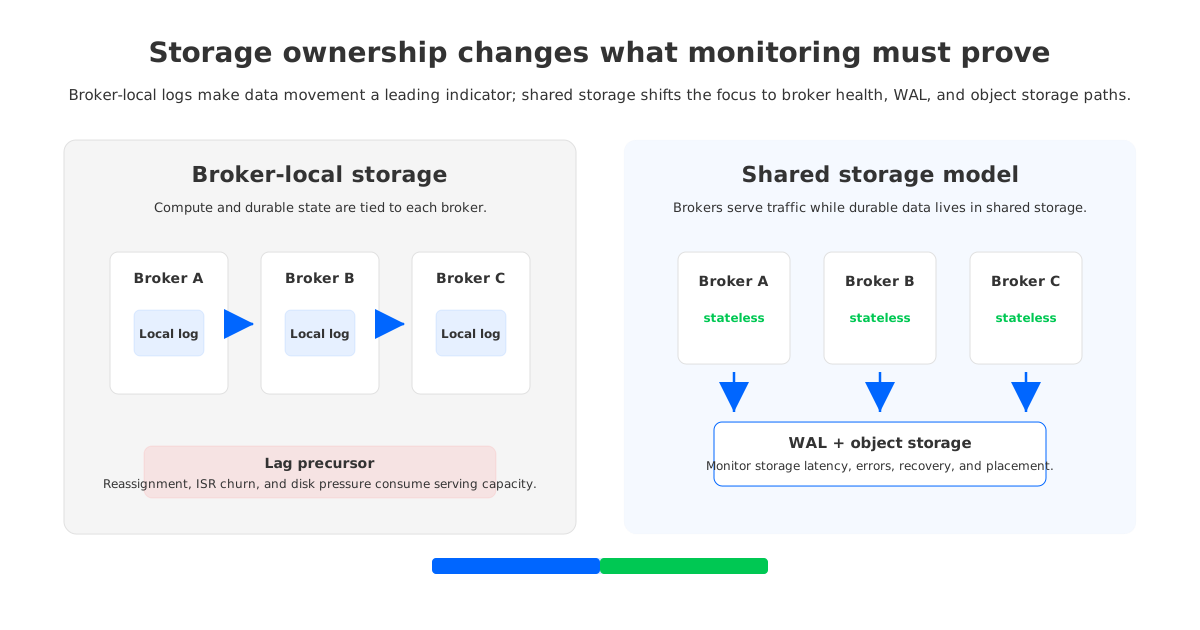
The difference is visible during rebalancing and scaling. Adding capacity to a stateful broker fleet is not finished when a new instance passes health checks. Partitions move, replicas catch up, and IO is spent on relocation. During that period, monitoring must ask whether the cluster is serving user traffic or spending too much budget on internal movement. That is why under-replicated partitions, offline partitions, request latency, log directory health, and network throughput belong near the top of the lag investigation path.
Tiered storage changes part of the retention story by moving older log data to remote storage, but it does not automatically make active brokers stateless. The active write and read path can still depend on broker-local storage and partition ownership. Monitoring should separate "remote retention is configured" from "storage ownership has been removed from broker operations."
4The Alert Routing Model: Page on Impact, Route on Cause
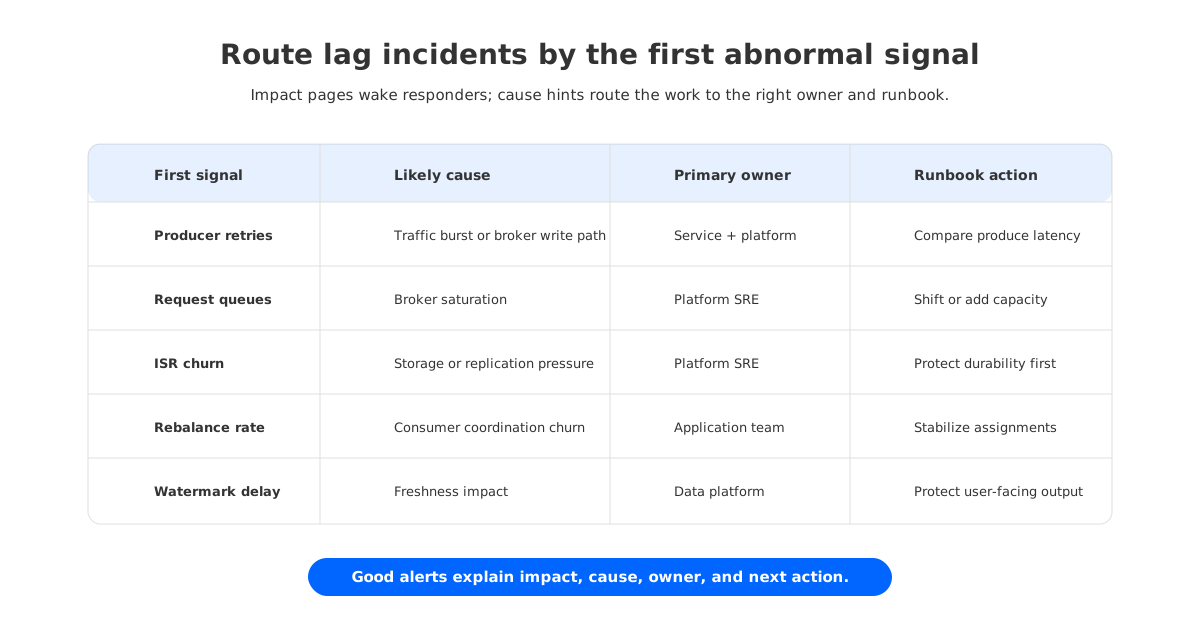
Platform teams get the most leverage when alerts carry routing information. "Consumer group X is behind" is incomplete. A better alert says "consumer group X will breach freshness soon, while broker queue time and fetch latency are elevated in the same partitions." It still points to lag, but tells the responder where to look.
One practical pattern is to split alerts into three classes:
- Impact alerts: freshness SLO burn, event-time delay, user-facing API staleness, or stream processing output age. These alerts wake people up because the business output is at risk.
- Platform invariant alerts: under-replicated partitions, offline partitions, controller instability, unavailable brokers, storage durability risk, sustained request latency, and network saturation. These alerts wake the platform team because Kafka itself is losing safety margin.
- Cause hints: producer retries, rebalance churn, downstream sink throttling, skewed partition assignment, cost anomalies, or storage growth. These signals enrich the incident and route work, but they should not all become separate pages.
This model also makes ownership less political. Consumer teams own application processing speed, downstream backpressure, and poll-loop behavior. Platform teams own broker health, durability path, metadata stability, and cluster capacity. FinOps or platform architecture owns recurring cost anomalies. The alert should encode that split before the incident starts.
The runbook can be short, but it needs to be explicit:
- Check whether freshness is burning faster than the recovery window.
- Identify whether lag is partition-wide, group-wide, topic-wide, or cluster-wide.
- Compare lag movement with produce rate, fetch latency, broker request latency, and storage pressure.
- Check rebalance churn and assignment skew before scaling consumers.
- Check downstream sink latency before blaming Kafka.
- Escalate based on the first layer that changed before lag rose.
The last step is the core method: the first metric to turn abnormal is often closer to the cause than the metric with the loudest impact.
5Monitoring Shared-Storage Kafka-Compatible Platforms
A shared-storage Kafka-compatible architecture changes the monitoring questions. If durable data is placed in shared object storage and brokers operate more like stateless compute, the platform no longer treats partition data movement as the default scaling tax. Broker replacement, scale-out, and hot partition mitigation become less tied to copying local log segments from one machine to another.
This is where AutoMQ fits into the discussion, after the neutral framework is already in place. AutoMQ is a Kafka-compatible streaming platform that uses shared storage, stateless brokers, and object storage as the durable layer. For teams evaluating Kafka operations in their own cloud environment, the question is whether the architecture reduces the upstream conditions that make lag harder to predict.
That does not remove the need for monitoring. It changes what should be validated:
- Kafka compatibility signals: existing producers, consumers, connectors, and monitoring tools should keep observing familiar Kafka concepts.
- Broker statelessness signals: scale-out, broker replacement, and leadership changes should be tested for user-facing latency and data movement.
- Shared storage signals: object storage latency, request errors, write-ahead log behavior, and recovery paths become first-class platform metrics.
- Network placement signals: cross-zone traffic, client placement, and broker-to-storage paths should be monitored as reliability and cost signals.
- Control-plane signals: controller quorum, metadata propagation, and broker membership still matter because Kafka clients depend on stable metadata.
The architecture is attractive when it reduces incidents where storage ownership and data relocation become the hidden cause behind lag. The monitoring program should prove that in the team's own workload: burst tests, broker replacement drills, consumer fan-out tests, retention changes, and failure injection are more useful than a feature checklist.
6From Dashboard to Operating Contract
Kafka monitoring becomes durable when it is tied to an operating contract. The contract should define what "healthy" means for producers, brokers, storage, consumers, stream processors, and cost. It should also separate leading indicators from impact indicators before a page fires.
A useful contract has a small set of promises: fresh data, stable ingestion, durable logs, predictable scaling, and controlled cost. Each promise needs a signal family. Fresh data depends on consumer lag, watermark delay, and sink latency. Stable ingestion depends on produce latency, retry rate, and broker queue time. Durable logs depend on ISR health, offline partitions, and storage errors.
Mature teams rehearse this contract. They run a producer burst and confirm that producer and broker indicators move before freshness burns. They trigger a consumer rebalance and check whether lag alerts include rebalance context. They replace a broker and watch whether storage, metadata, and request latency stay within expected boundaries.
7Decision Checklist for Platform Teams
Use the checklist below when tuning an existing Kafka deployment or evaluating a Kafka-compatible alternative.
| Decision area | Keep optimizing current Kafka when... | Revisit architecture when... |
|---|---|---|
| Consumer lag | Lag maps cleanly to consumer processing limits | Lag repeatedly starts after broker, storage, or network pressure |
| Scaling | Adding brokers predictably improves throughput | Scaling requires long reassignment windows or risky manual work |
| Storage | Disk pressure is rare and easy to remediate | Retention, recovery, or local data movement dominate incidents |
| Network | Cross-zone traffic is understood and acceptable | Traffic cost or placement surprises appear in incident reviews |
| Freshness | Offset lag tracks business freshness well | Watermark delay or sink freshness diverges from offset lag |
| Migration | Tooling and ownership are stable | The team needs staged movement with rollback and compatibility checks |
The right answer is not always a platform change. Many teams can get a long way by fixing alert routing, adding leading indicators, separating impact alerts from diagnostics, and writing better runbooks. But when storage pressure keeps turning into lag, scaling keeps turning into data movement, and cost anomalies reveal inefficient traffic paths, the monitoring program is telling you something architectural.
Consumer lag is still worth watching. It is the smoke alarm. The goal is to stop treating it as the fire investigator, building inspector, and repair crew at the same time. To compare how shared-storage Kafka-compatible architecture changes the operating model, review the AutoMQ architecture documentation and test the same leading indicators against your workload.
8References
- Apache Kafka Documentation: Monitoring
- Apache Kafka Documentation: Consumer Groups and Offsets
- AWS MSK Developer Guide: Consumer Lag
- AWS MSK Developer Guide: Monitoring Metrics
- AutoMQ Documentation: Architecture
9FAQ
9.1What is the most important Kafka monitoring metric for consumer lag?
Consumer lag is important, but it should not stand alone. Pair it with produce rate, fetch latency, broker request latency, rebalance rate, storage pressure, ISR health, and downstream sink latency. The useful question is which earlier signal explains why lag started.
9.2Should consumer lag alerts page the consumer team or the platform team?
Route by cause and page by impact. If freshness is about to breach, someone should respond. The alert should include enough context to show whether the likely owner is the consumer application, downstream sink, broker capacity, storage durability path, metadata stability, or network placement.
9.3How does broker-local storage affect consumer lag?
Broker-local storage couples compute capacity with durable state. When brokers fill disks, recover replicas, move partitions, or spend IO on reassignment, consumers can see slower fetches or unstable progress even when the consumer code has not changed.
9.4Does shared storage eliminate Kafka monitoring work?
No. Shared storage changes the operating model, but it does not remove the need for observability. Teams still need to monitor Kafka concepts, broker health, storage latency, controller metadata, network placement, and stream freshness.
9.5How should SREs test a Kafka monitoring strategy?
Use controlled drills. Send a producer burst, throttle a downstream sink, trigger a consumer rebalance, replace a broker, and change retention on a non-critical topic. A good strategy shows the leading indicator before the lag breach and routes the alert to the right owner.


