
Table of Contents
Table of Contents
"Kafka on Azure Blob Storage" sounds like one architecture, but it usually hides several different designs. One team may mean Kafka backups written to Blob. Another may mean tiered storage for older log segments. A third may be evaluating a Kafka-compatible system where Blob is the durable storage layer rather than a cold archive. These designs all use object storage, but they change Kafka in very different ways.
That distinction matters on Azure because the default Kafka mental model is still broker-centric. Brokers own partitions, local disks carry active log data, and replication multiplies the amount of storage and network movement required for durability. Azure Blob Storage changes the economics of retained data, but it does not automatically make brokers stateless. The architectural question is more precise: which Kafka bytes move to Blob, and which broker responsibilities remain local?
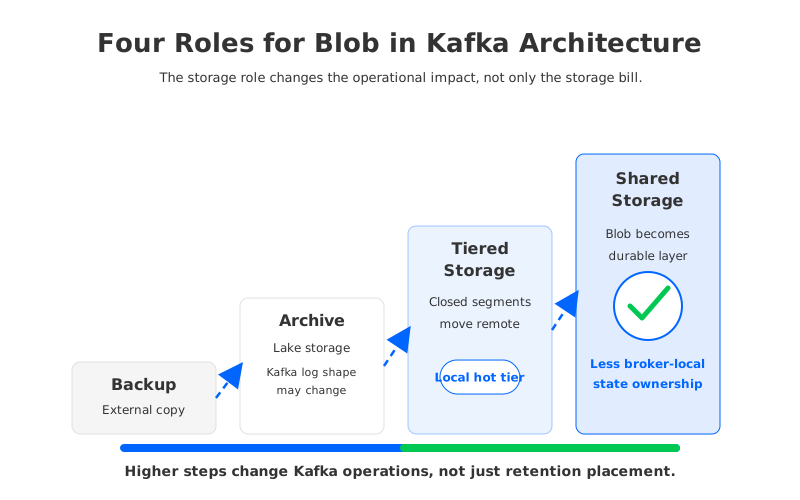
The answer determines whether Blob is a useful retention tier, a backup target, or the foundation of a diskless streaming architecture.
1Four Meanings of Kafka on Blob Storage
The first meaning is the simplest: Blob as a backup or export target. Kafka Connect, MirrorMaker-style pipelines, custom consumers, or lakehouse ingestion jobs can copy events from Kafka topics into Blob containers. This is operationally familiar because Kafka itself does not change. Blob becomes a downstream sink for analytics, audit retention, or disaster-recovery copies.
The second meaning is archive storage. In this pattern, Blob stores event data after it has left the hot streaming path. The archive may be parquet files, JSON records, compacted exports, or some other format designed for batch and analytical reads. This can be excellent for data lake workflows, but it does not preserve the full Kafka log abstraction for consumers that expect offsets and topic partitions.
The third meaning is Kafka tiered storage. Apache Kafka tiered storage separates local and remote tiers: brokers keep local log segments for the active working set, while older completed segments can move to remote storage. On Azure, an implementation may use Blob or an object-storage-compatible layer as the remote tier. The Kafka API can still expose older data, but the broker-local tier remains part of the design.
The fourth meaning is diskless or shared-storage Kafka. Here, object storage is not an afterthought for cold segments. It is the durable storage foundation, and brokers become closer to stateless compute. AutoMQ follows this shared-storage direction by redesigning Kafka-compatible storage around S3Stream, WAL acceleration, and object storage. In AutoMQ BYOC deployments, the object-storage configuration supports Azure Blob Storage; for AutoMQ Open Source, S3-compatible storage is the documented path, so Azure Blob requires an S3-compatible bridge if used outside BYOC.
| Pattern | What Blob stores | Kafka broker impact | Best fit |
|---|---|---|---|
| Backup/export | A copy of selected topic data | Kafka storage model is unchanged | Data lake ingestion, audit copies, disaster-recovery exports |
| Archive | Historical data in an external format | Kafka may no longer serve the archived data as a log | Batch analytics and long-term retention |
| Tiered storage | Older completed Kafka log segments | Brokers still own active local log data | Retention-heavy topics with occasional replay |
| Diskless shared storage | Durable streaming data | Brokers become less tied to persistent local disks | Elastic streaming, fast replacement, storage-compute separation |
Once those meanings are separated, Blob stops being a vague storage buzzword. It becomes a design choice with a clear blast radius.
2Cost Model: Managed Disks vs Blob
Traditional Kafka cost on Azure often starts with virtual machines and managed disks. Brokers need enough compute, network, and disk capacity to handle writes, hot reads, replication, retention, and failure recovery. With a replication factor of 3, every retained byte can become three broker-local copies before you account for filesystem overhead, headroom, rebalancing, and consumer fan-out. That model is familiar, but it makes storage growth a broker-sizing problem.
Azure Blob Storage changes the retained-data side of that model. Microsoft positions Blob as object storage with access tiers and redundancy options such as locally redundant, zone-redundant, geo-redundant, and geo-zone-redundant storage. Pricing depends on region, redundancy, access tier, operations, data transfer, and retrieval behavior, so a serious estimate should use the current Azure pricing page for the target region rather than copied numbers from an article.
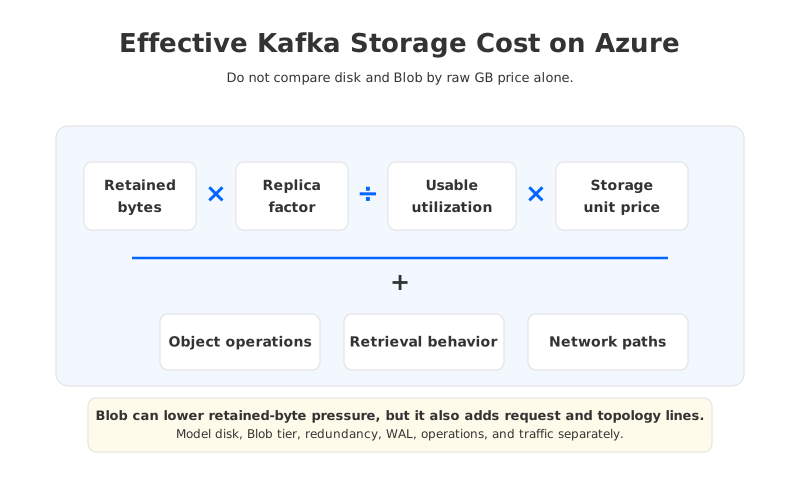
A useful model separates raw retained data from effective cost:
| Cost driver | Local-disk Kafka on Azure | Kafka with Blob tiering | Diskless Kafka on Blob |
|---|---|---|---|
| Durable copies | Replicas live on broker-local disks | Active data remains local; older segments move remote | Durable data is designed around shared storage |
| Utilization | Brokers need free headroom for spikes and recovery | Local tier can be smaller for retention-heavy topics | Compute and storage can be planned more independently |
| Retention growth | Often increases broker disk size or broker count | Mainly increases remote object storage footprint | Mainly increases shared object storage footprint |
| Scaling events | Partition movement can copy broker-owned data | Historical segments may move less, but active ownership remains | Broker replacement is less of a storage-copy event |
| Hidden lines | Replication traffic, over-provisioning, operations | Remote reads, object operations, local tier tuning | WAL storage, object operations, metadata, network topology |
The point is not that Blob is always lower cost. Object storage introduces its own request, retrieval, redundancy, and network considerations. The point is that Blob lets teams stop treating every retained byte as if it must live on broker-local managed disks forever. How much value that creates depends on whether the architecture uses Blob only for cold data or for the durable streaming layer itself.
3Tiered Storage vs Diskless Shared Storage
Tiered storage is often the right first step for retention pressure. Kafka's tiered storage design keeps a local tier on brokers and adds a remote tier for completed log segments. That means the hot path still runs through broker-local state: active segments, leadership, replication behavior, ISR health, client traffic, and partition placement all remain operationally important.
This is why tiered storage can reduce retention cost without eliminating broker statefulness. It helps when the main pain is "we keep too many old bytes on expensive broker disks." It helps less when the main pain is "scaling brokers still requires moving ownership, balancing hot partitions, and waiting for local state to converge." Both problems are real, but they are not the same problem.
Diskless shared storage changes a deeper assumption. Instead of asking when an old segment can leave the broker, it asks why durable log data should be bound to broker-local disks in the first place. In this model, object storage becomes the durable repository and a write-ahead log layer handles low-latency writes and recovery. Brokers can then focus more on serving Kafka protocol traffic and less on being the long-term home of the log.
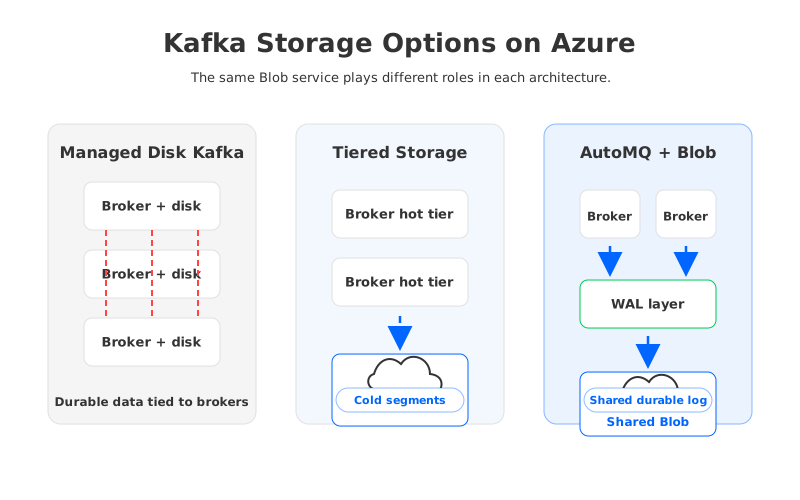
The operational differences show up during routine events:
- Scale-out: Tiered storage may avoid moving historical segments, but partition leadership and active traffic still need balancing. In a shared-storage design, adding compute can be less tied to copying durable log data.
- Scale-in: Traditional Kafka teams often avoid removing brokers because data movement is slow and risky. Stateless or near-stateless brokers make scale-in a more practical cost-control lever.
- Broker replacement: A broker with local persistent state is not interchangeable with an empty node. A broker whose durable data lives in shared storage is easier to replace, reschedule, or automate.
- Cold replay: Tiered storage can serve older data through Kafka semantics, but remote reads may have different latency. A diskless design must also validate read behavior, but the storage model is built around object storage from the beginning.
For Azure teams, this distinction prevents a common mistake: treating "we use Blob" as a complete architecture review. The storage role matters more than the storage brand.
4How AutoMQ Uses Object Storage
AutoMQ is relevant to the Blob discussion because it treats object storage as the core storage layer for Kafka-compatible streaming, not only as a place to spill old segments. The architecture separates compute from storage, uses a WAL layer for write acceleration and recovery, and persists data into object storage through S3Stream. Applications continue to use Kafka-compatible clients and ecosystem tools while the broker storage model changes underneath.
On Azure, the deployment boundary needs to be stated carefully. AutoMQ's BYOC object-storage configuration includes Azure Blob Storage as a supported object-storage backend, which fits teams that want a Kafka-compatible streaming platform deployed in their own cloud environment. AutoMQ Open Source documentation focuses on S3-compatible object storage, so a direct "open source AutoMQ on native Azure Blob" claim would be too broad without an S3-compatible bridge or product-specific confirmation.
That boundary is not a footnote. It is the difference between an architecture principle and an available deployment model. If your team is evaluating AutoMQ for Azure, the checklist should include:
- Which AutoMQ edition or deployment model is being evaluated: BYOC, self-managed enterprise, or open source?
- Whether the target object storage is native Azure Blob or an S3-compatible endpoint.
- Where WAL storage lives, how it is replicated, and what latency envelope it provides in the chosen Azure region.
- Which Kafka APIs, security settings, connectors, monitoring signals, and operational workflows must be validated before migration.
- How network paths are arranged so object-storage traffic, client traffic, and cross-zone traffic do not create unexpected cost or latency.
The technical value is still the same: object storage becomes the durable foundation, and brokers are no longer sized primarily as long-lived owners of local log data. The deployment detail decides how that value is realized on Azure.
5Azure Workload Fit Guide
Blob-backed Kafka architecture is most attractive when storage growth and compute growth are no longer aligned. A stable Kafka cluster with modest retention may not need a redesign. A cluster that keeps months of events, absorbs burst traffic, and spends too much operational time on broker storage, reassignment, or recovery deserves a harder look.
Use workload shape before vendor preference:
- Retention-heavy topics: Start with tiered storage if the main problem is old data. Evaluate diskless shared storage if retained data and broker operations are both creating pressure.
- Burst traffic: Object storage can help with retained bytes, but burst handling still depends on compute, WAL behavior, network paths, and client backpressure. Test peak write and read behavior, not average traffic.
- Multi-cluster consolidation: Shared storage can make consolidation more attractive because storage and compute are less tightly coupled. The hard part is still governance: quotas, topic ownership, access control, and blast-radius design.
- Latency-sensitive services: Keep the proof of concept honest. Measure p95 and p99 produce latency, consumer lag, rebalance behavior, failure recovery, and cold replay in the same Azure region and redundancy configuration you expect to use.
- FinOps-driven migrations: Model managed disks, Blob tier and redundancy, object operations, WAL storage, data transfer, vendor fees, migration overlap, and operational labor as separate lines. A single "Blob lowers cost" line is not a cost model.
The clean decision rule is this: use Blob as a tier when old data is the problem; use Blob as the durable streaming layer when broker-local ownership is the problem. Many Azure Kafka estates have both problems, but separating them makes the architecture discussion much more useful.
6Sources
- Azure Blob Storage pricing
- Azure Storage redundancy
- Apache Kafka tiered storage documentation
- Apache Kafka tiered storage configs
- AutoMQ object storage configuration
- AutoMQ architecture overview
- AutoMQ stateless broker
7FAQ
7.1Can Kafka use Azure Blob Storage directly?
Apache Kafka itself is built around brokers, partitions, local log segments, and replication. Azure Blob can be used around Kafka as a sink, archive, backup target, or remote tier depending on the tooling and distribution. A diskless Kafka-compatible system goes further by using object storage as the durable storage layer rather than only an external destination.
7.2Is Kafka tiered storage the same as Kafka on Blob?
No. Tiered storage is one meaning of Kafka on Blob, but not the only one. It moves eligible completed log segments to remote storage while keeping the active local tier on brokers. Backup pipelines, archive exports, and diskless shared-storage Kafka are different designs.
7.3Does Azure Blob Storage make Kafka brokers stateless?
Not by itself. Brokers become less stateful only if the Kafka-compatible architecture is designed around shared storage. Tiered storage reduces the amount of older data held locally, but brokers still own active log data, leadership, replication behavior, and client traffic.
7.4When should I use tiered storage instead of diskless Kafka on Azure?
Tiered storage is a good fit when the main problem is long retention and old data is read occasionally. Diskless Kafka is worth evaluating when the problem is broader: slow scaling, difficult scale-in, broker replacement, over-provisioned capacity, or repeated data movement during operations.
7.5Does AutoMQ support Azure Blob Storage?
AutoMQ BYOC documentation includes Azure Blob Storage as an object-storage backend. AutoMQ Open Source focuses on S3-compatible object storage, so using native Azure Blob outside BYOC requires careful validation and may require an S3-compatible bridge. Check the current AutoMQ documentation before final deployment.
7.6What should I benchmark before moving Kafka storage to Blob?
Benchmark produce latency, p99 behavior, consumer lag, cold replay, broker replacement, scale-out, scale-in, object-storage request volume, network paths, and failure recovery. Also validate Kafka client compatibility, security settings, observability, and rollback before treating the migration as a storage-only change.


