
Table of Contents
Table of Contents
Kafka on Azure Blob Storage sounds like one architecture, but it can mean several different systems: archived Kafka events in Blob containers, older Kafka log segments moved into a remote tier, or Kafka-compatible brokers using object storage as durable storage so compute can scale separately from retained data.
Those meanings should not be collapsed into one design. Azure Blob Storage has redundancy options, access tiers, request billing, network placement choices, and latency characteristics that differ from broker-attached disks. The architecture question is which responsibility Blob Storage is being asked to carry.
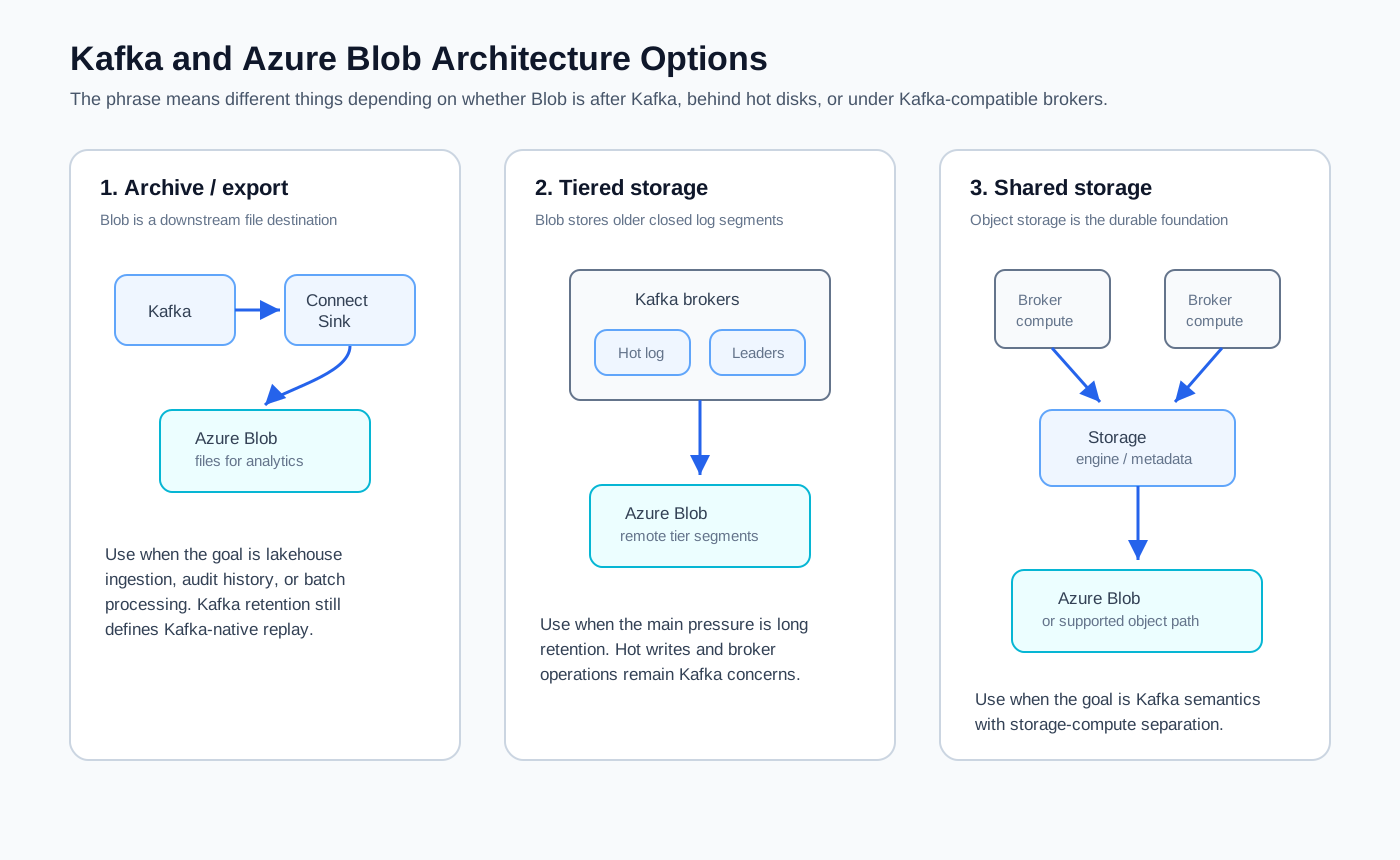
The distinction matters because Azure already offers multiple streaming paths. Azure Event Hubs exposes a Kafka-compatible endpoint. Self-managed Apache Kafka can run on VMs or Kubernetes while exporting data to Blob Storage. Tiered Storage can place older segments in remote object storage. Kafka-compatible shared-storage systems use object storage more deeply, changing the relationship between brokers and durable data.
1What "Kafka on Azure Blob" Can Mean
The safest first step is to name the data path. If Blob Storage sits after Kafka, it is an archive or export target. If Blob Storage sits behind Kafka as a cold tier, it changes retention economics but leaves the active write path largely broker-local. If Blob Storage sits under a Kafka-compatible storage engine, it becomes part of the primary durability model.
These patterns solve different problems:
| Pattern | Blob Storage role | Kafka behavior | Best fit |
|---|---|---|---|
| Archive or export | Downstream object store | Kafka remains broker-local | Lakehouse ingestion, audit history, batch analytics |
| Tiered storage | Remote tier for older segments | Hot data stays on broker disks | Longer retention without sizing all disks for history |
| Shared storage | Durable storage foundation | Brokers become less tied to local persistent data | Elastic Kafka-compatible streaming with storage-compute separation |
Archive/export is the most common interpretation. Kafka Connect, custom consumers, or managed integration services read records from topics and write files into Azure Blob Storage or Azure Data Lake Storage Gen2. Kafka still owns the streaming log, while Blob Storage owns a downstream file representation for analytics.
The limitation is semantic: the Blob copy is not the Kafka log. Consumer groups do not resume from the Blob objects as Kafka consumers. Per-partition ordering may be transformed by the export process. Replay through Kafka still depends on the topic retention available in the Kafka cluster. If applications need Kafka offsets and consumer group semantics for historical replay, an export pipeline alone is not enough.
Tiered storage moves the boundary closer to Kafka. In this model, brokers keep recent active segments on local storage and offload older closed segments to remote object storage. The Kafka API can still expose a longer log to consumers, while the cluster avoids keeping every retained byte on premium broker disks. For workloads with long retention and relatively infrequent historical reads, this can be a strong economic fit.
Tiered storage is not the same as fully stateless brokers. The active write path, leader replication, local segment rolling, metadata, and hot reads still depend on the broker and its local tier. Support boundaries also matter: not every Kafka service supports the same remote storage back end or operational tooling.
Shared storage is the more structural option. A Kafka-compatible shared-storage architecture treats object storage as the durable storage layer rather than a downstream sink or older-segment tier. Brokers still handle protocol traffic, partition ownership, caching, and coordination, but retained data is no longer permanently bound to a broker's local disk.
That shift is not automatic. Azure Blob Storage provides durable object operations; it does not provide Kafka append semantics, offset management, fetch behavior, or broker coordination by itself. A storage engine has to bridge that gap with write staging, metadata management, object layout, caching, compaction, and failure recovery.
2Azure Blob Design Factors That Shape Kafka Architecture
Blob Storage design choices often look like storage administration details until they appear in Kafka latency, availability, and cost. A Kafka architecture can issue frequent writes, reads, metadata operations, and network transfers. The storage account configuration, region topology, and access pattern determine whether Blob Storage behaves like a cost-effective retention layer or an accidental bottleneck.
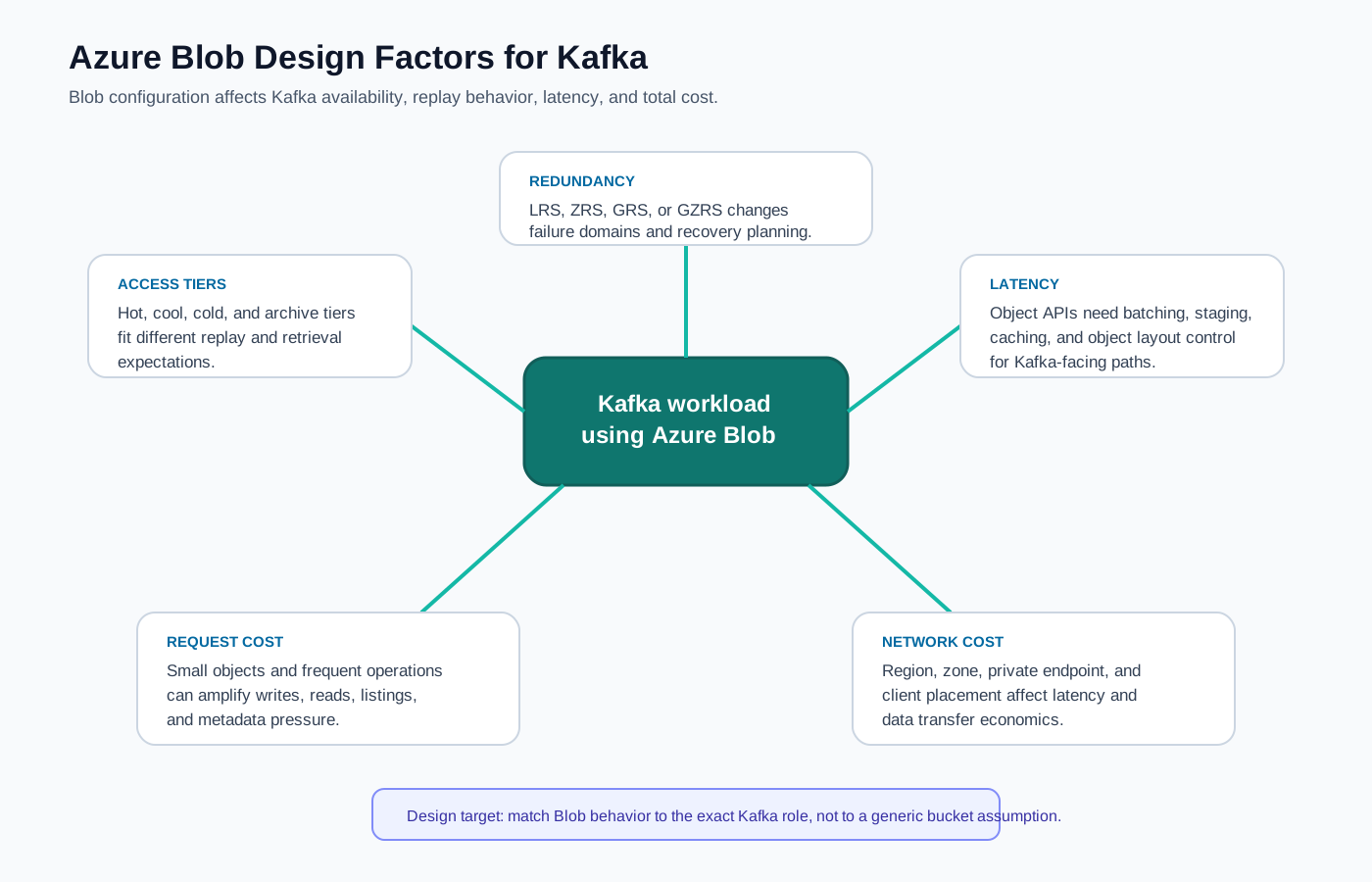
Redundancy is the first factor. Azure Storage offers locally redundant, zone-redundant, geo-redundant, and geo-zone-redundant options, depending on account type and region support. For Kafka-related designs, the key question is where writes are acknowledged and what failure domains are covered. Geo-redundant options help disaster recovery objectives, but they do not automatically make Kafka active-active across regions.
Access tier is the second factor. Hot, cool, cold, and archive tiers have different cost and retrieval profiles. A cooler tier may fit archive/export, but tiered storage can still serve backfills, audits, or incident recovery. Kafka-readable segments should not land in a tier optimized for rare retrieval unless slow historical fetches are acceptable.
Latency is the third factor. Kafka producers are sensitive to acknowledgment latency, and consumers are sensitive to fetch latency during backfill. Blob Storage is an object service, not a local block device. Well-designed systems batch, stage, cache, and compact writes so object storage is used in efficient units while preserving Kafka semantics.
Request cost is the fourth factor. Object storage pricing separates stored capacity, write operations, read operations, retrieval, and transfer. Kafka workloads can generate many small operations if the storage layer is naive. The practical question is how many object operations one MiB of produced Kafka data creates, and how many more appear during replay.
Network cost is the fifth factor. Kafka clusters on Azure often span availability zones, and replication may move records across zones. If Blob Storage is reached through the wrong zone, region, virtual network path, or private endpoint, the network path can shape latency and bill impact.
3Option 1: Azure Event Hubs Kafka Endpoint
Azure Event Hubs is a managed event streaming service that supports a Kafka-compatible protocol endpoint for many client use cases. It belongs in the decision set when managed Azure-native streaming matters more than broker-level Kafka control. It is not "Kafka on Blob Storage" in the self-managed architecture sense; Blob Storage may appear through Event Hubs Capture as an export destination.
The tradeoff is compatibility boundary. Kafka protocol compatibility does not always mean every Kafka feature, broker configuration, admin operation, ecosystem assumption, or storage-level behavior is identical to Apache Kafka. Teams should test the exact clients, security mechanisms, serializers, consumer group patterns, and connector integrations they rely on.
4Option 2: Self-Managed Kafka with Blob Archive or Tiering
Self-managed Kafka on Azure gives operators the most control. Brokers can run on Azure VMs, Azure Kubernetes Service, or another managed infrastructure platform. Blob Storage usually appears either to move analytical history out of Kafka or to keep longer Kafka retention without expanding local disks in direct proportion to history.
For archive/export, the main design work is file production: object naming, partitioning, schema evolution, compaction, retry semantics, duplicate handling, encryption, and downstream table format integration. Kafka remains the operational streaming log.
For tiered storage, the main design work is support validation. Teams should verify whether their Kafka version, vendor distribution, or managed service supports Azure Blob Storage as the remote tier, how segment deletion works, how backfill reads are throttled, what happens during broker failure, and which metrics indicate remote read pressure.
The operational advantage is control; the operational cost is ownership. Blob Storage can reduce part of the storage pressure, but it does not remove Kafka's broker-local hot path.
5Option 3: Kafka-Compatible Shared Storage on Azure
Shared storage changes the problem from "how do I offload older Kafka data?" to "how do I keep Kafka semantics while moving durable storage away from broker disks?" In this model, the broker is less of a long-lived storage owner and more of a compute node that handles protocol requests, caching, leadership, and coordination. Durable data is organized in object storage through a Kafka-compatible storage layer.
This is where AutoMQ naturally enters the architecture discussion. AutoMQ is a Kafka-compatible cloud-native streaming system that keeps Kafka protocol and semantic compatibility while using shared object storage as the durable storage foundation. In an Azure design, that category is relevant when the desired outcome is not merely exporting data to Blob Storage, but reducing the coupling between broker lifecycle and retained Kafka data.
The main caution is support boundary. Azure Blob Storage is not the same API as Amazon S3, even though many cloud-native storage discussions use "S3-compatible" as a shorthand for object storage. A Kafka-compatible shared-storage system must explicitly support the object storage API, authentication model, consistency behavior, network path, and failure modes used in the target Azure environment. Architects should verify official support for Azure Blob Storage or for any S3-compatible gateway placed in front of it, and they should test latency and recovery behavior under production-like load.
This category also needs a clear performance model: how writes are acknowledged, how objects are compacted, how many object operations are generated, how hot reads are cached, and how catch-up reads are throttled.
6Cost and Latency Tradeoffs
The largest mistake in cost modeling is to count only stored GiB. Kafka on object storage introduces compute, active local or write-ahead storage, object capacity, object requests, and network transfer. Archive/export adds Blob cost for retained files. Tiered storage can reduce local disk relative to total retention but still needs hot storage. Shared storage can reduce broker-local storage requirements, but it must control request amplification and network paths. The right comparison is total cost for the complete Kafka service: brokers, storage, traffic, operations, recovery time, and retained data growth.
7Azure Decision Checklist
A useful architecture review should force the team to separate use case, support boundary, and operational ownership. The checklist below is intentionally practical because the same phrase can describe three separate systems.
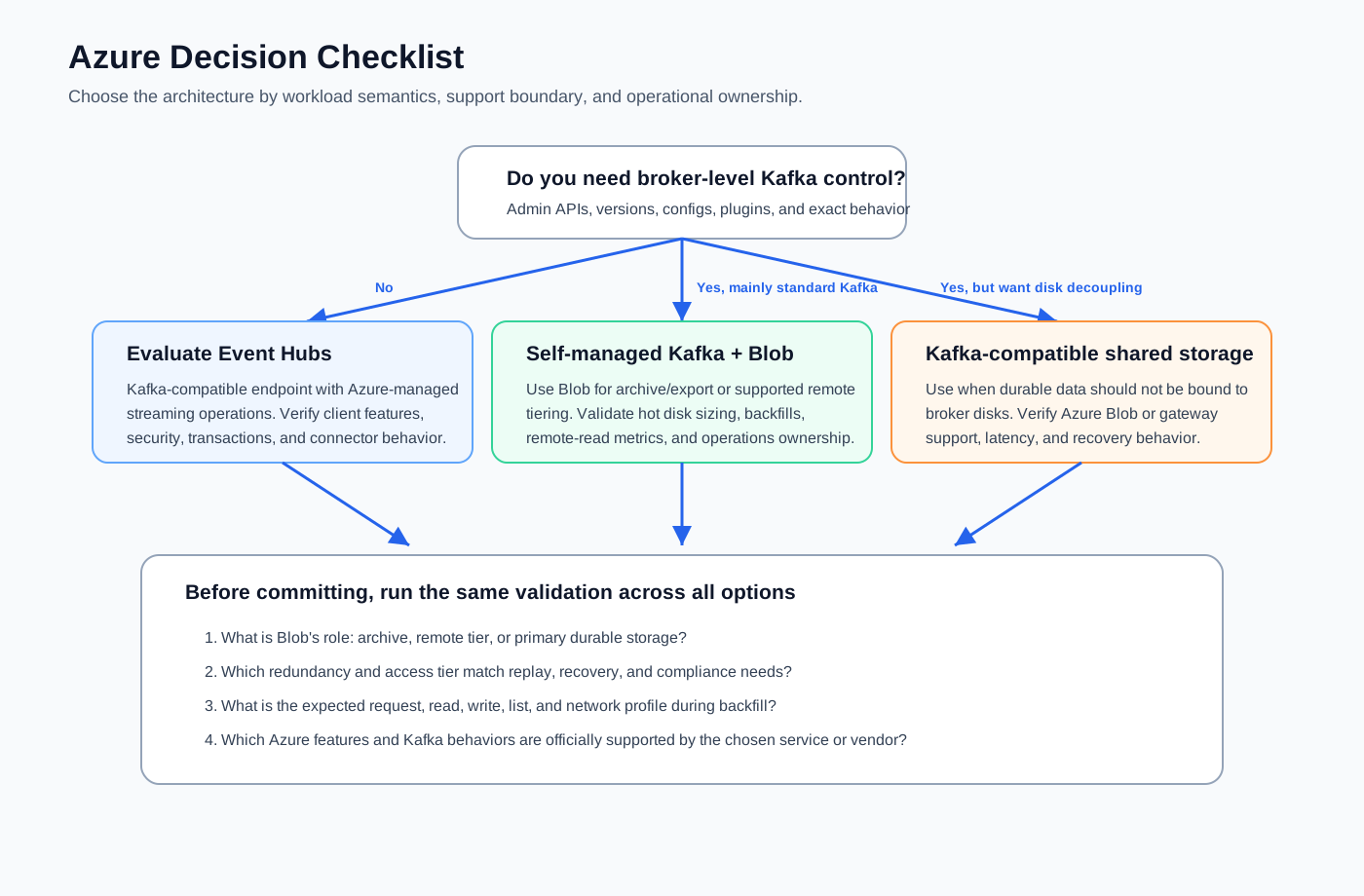
Start with the workload: do applications need Kafka offsets and consumer group replay for the full retention window, what pain dominates, how often consumers rewind, and what latency targets apply? Then test the Azure storage design: redundancy, access tier, private endpoint placement, object operation rates, and lifecycle policy interaction with Kafka retention. Finally, verify official boundaries for Event Hubs compatibility, tiered storage support, shared-storage backend support, and failure scenarios such as broker loss, zone loss, storage throttling, credential rotation, private endpoint outage, and large rewind.
This review often reveals that there is no universal winner. Event Hubs fits managed Azure-native streaming, Blob export fits lakehouse archive, tiered storage fits longer Kafka retention, and Kafka-compatible shared storage fits Kafka semantics with storage-compute separation.
8Practical Architecture Guidance
Keep the word "Kafka" attached to semantics, not only to clients. A Blob archive may preserve records, but not Kafka's replay contract. A remote tier may extend retention, but not remove every broker-local concern. If the goal is shared storage, validate the full Kafka-facing storage engine: write path, cache, metadata, object compaction, recovery, and official Azure support.
AutoMQ belongs in the third conversation. Its shared-storage architecture is built for teams that want Kafka compatibility while separating compute from durable storage. Azure-specific validation remains necessary: confirm the object storage capability, redundancy setting, network path, and latency envelope required by the workload.
9References
- Azure Storage redundancy
- Azure Blob Storage access tiers
- Scalability and performance targets for Blob Storage
- Azure Event Hubs for Apache Kafka
- Apache Kafka Tiered Storage
- AutoMQ architecture overview
10FAQ
10.1Can Apache Kafka store its log directly in Azure Blob Storage?
Standard Apache Kafka is designed around broker-managed log storage, usually on local or attached disks. Kafka can export data to Blob Storage, and some Kafka distributions support remote tiering for older log segments. Using Blob Storage as the primary durable storage layer requires a Kafka-compatible storage engine designed for that architecture.
10.2Is Azure Event Hubs the same as running Kafka on Azure Blob Storage?
No. Event Hubs is a managed Azure event streaming service with a Kafka-compatible endpoint. It can be a strong option for Kafka client compatibility without broker operations, but it is not a self-managed Kafka cluster whose logs are stored in Blob Storage.
10.3When is Blob archive enough?
Blob archive is enough when downstream analytics, audit retention, or batch processing is the main goal and applications do not need to replay the full history through Kafka consumer groups. If applications need Kafka offsets and ordering for historical replay, keep enough Kafka retention or evaluate tiered or shared-storage designs.
10.4What should teams verify before using Azure Blob as a Kafka remote tier?
Verify official support in the exact Kafka distribution or managed service, including metadata handling, deletion behavior, remote-read throttling, metrics, security, and failure recovery. Also test backfill latency and request cost with production-like segment sizes and consumer rewind patterns.
10.5Where does AutoMQ fit in an Azure Kafka architecture?
AutoMQ fits when the requirement is Kafka-compatible streaming with storage-compute separation. Its shared-storage architecture is different from a Blob export pipeline or ordinary tiered storage, so teams should evaluate it as a Kafka-compatible shared-storage system and confirm Azure object storage support boundaries for the target deployment.


