
Table of Contents
Table of Contents
Searching for Kafka on Azure usually starts with a product question, but the first architectural decision is a responsibility boundary. Do you want a managed ingestion service that accepts Kafka clients, a managed Apache Kafka cluster, a Kafka cluster your team owns end to end, or a Kafka-compatible platform that changes the storage model while keeping the data plane in your Azure environment? Those options can all satisfy a search for "apache kafka on azure," yet they create very different operating models.
The confusion comes from the word Kafka doing too much work. Sometimes it means the Kafka protocol for producers and consumers. Sometimes it means the Apache Kafka broker, topic, partition, offset, group coordination, and admin model. Sometimes it means the broader ecosystem: Kafka Connect, Kafka Streams, schema tooling, observability agents, and operational runbooks. A platform can be Kafka-compatible in one layer and still not be a full replacement for another layer.
That distinction matters because Azure gives you several credible paths. Azure Event Hubs exposes a Kafka endpoint. Azure HDInsight includes Apache Kafka as a managed open-source analytics cluster type. Self-managed Kafka on Azure VMs or AKS gives you maximum control and maximum ownership. AutoMQ is a Kafka-compatible, object-storage-backed option that can run as a BYOC data plane in the customer's Azure environment, using Azure Blob/object storage as the durable storage layer rather than broker-local disks.
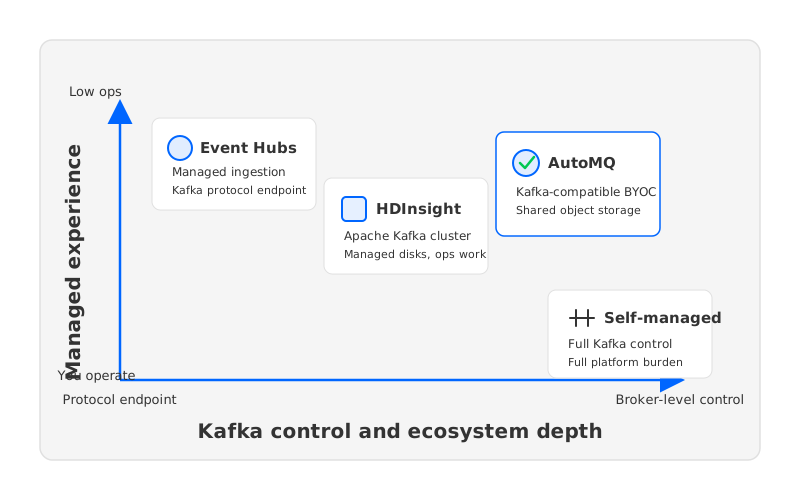
1Start With the Responsibility Boundary
The cleanest comparison is not "managed versus unmanaged." Event Hubs is a managed Azure streaming service with Kafka protocol support. HDInsight is managed infrastructure around open-source analytics clusters, including Kafka. Self-managed Kafka is Apache Kafka operated by your own team. AutoMQ is Kafka-compatible infrastructure with cloud-native shared storage and a BYOC deployment model.
For platform engineers, the responsibility boundary decides where failure modes land:
- Protocol compatibility asks whether existing Kafka producers and consumers can connect with limited configuration changes.
- Administrative control asks whether your team can manage topics, partitions, broker configs, quotas, upgrades, and ecosystem components in the way current runbooks expect.
- Storage ownership asks whether durable log data lives on broker-attached disks, in a managed service abstraction, or in shared object storage such as Azure Blob.
- Failure recovery asks what happens when a broker, disk, zone, or namespace has a problem.
- Cost shape asks whether the bill is dominated by provisioned service units, cluster nodes, managed disks, cross-zone traffic, object storage, or operational labor.
These dimensions force the team to name the work it is willing to own. A platform team that needs deep Kafka semantics may accept more responsibility than an analytics team that mainly wants ingestion into Azure services. A FinOps team may prefer a model where retention scales independently from broker compute.
2Event Hubs Kafka Endpoint: Managed Ingestion With Kafka Protocol
Event Hubs is the easiest Azure-native answer when the workload is event ingestion and the team does not need to operate Kafka brokers. Microsoft describes Event Hubs for Apache Kafka as a Kafka endpoint on an event hub. The service maps Kafka concepts to Event Hubs concepts: a Kafka cluster maps to a namespace, a topic maps to an event hub, and partitions and consumer groups map naturally.
That simplicity is the point. There are no Kafka brokers to patch, rebalance, or monitor. Capacity planning moves into Event Hubs service units and tiers; Microsoft documents Kafka support in Standard, Premium, and Dedicated. For teams already using Azure Stream Analytics, Azure Functions, Fabric, Databricks, or Synapse patterns, Event Hubs also fits the surrounding Azure ecosystem.
The tradeoff is that Event Hubs is not Apache Kafka software with a different logo. It implements the Kafka protocol for client traffic, while the managed service owns the broker abstraction underneath. It becomes a constraint when your workload depends on broker behavior, advanced admin control, custom plugins, or Kafka management APIs.
Use Event Hubs when the platform goal is straightforward:
- Producers and consumers use Kafka clients, but the workload is mainly append-and-read event ingestion.
- The team wants Azure-native scaling and service ownership more than broker-level control.
- Data lands in the Azure analytics ecosystem, and the operational model should stay close to other managed Azure services.
- Migration risk is acceptable after validating client libraries, security settings, stream processing, and admin behavior against the current Event Hubs tier.
The migration test should be concrete. Take the top producer libraries, consumer groups, connectors, schema interactions, and retry patterns from production, then run them against Event Hubs before treating "Kafka endpoint" as a complete replacement.
3HDInsight And Self-Managed Kafka: Real Kafka With Operational Ownership
HDInsight sits closer to traditional Apache Kafka than Event Hubs does. Azure positions HDInsight as a managed open-source analytics service for frameworks including Apache Kafka, Spark, Hive, HBase, and Hadoop. For teams that want Kafka as part of an open-source big-data environment on Azure, that can be attractive: the cluster is in Azure, it can integrate with VNet and security patterns, and the Kafka software model is familiar.
The important word is cluster. With a Kafka cluster, your architecture again has brokers, partitions, storage, replication, capacity planning, and lifecycle decisions. Azure can simplify parts of the infrastructure, but broker sizing, retention, disk throughput, consumer lag, controller health, upgrades, and incident response remain real concerns.
Self-managed Kafka on Azure VMs or AKS pushes that boundary further toward your team. You choose VM families, managed disks, availability zones, Kubernetes operators, ingress, TLS, authentication, observability, and upgrade cadence. This can be right when the workload requires full Apache Kafka behavior and the organization can operate it.
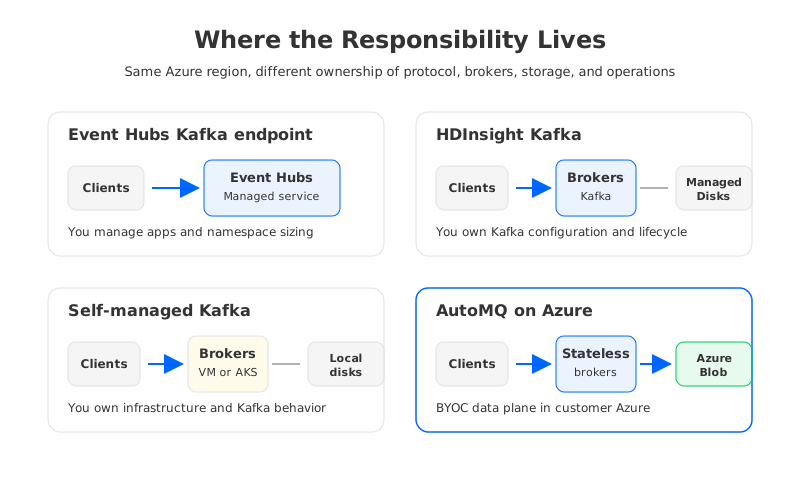
The cost model of traditional Kafka on Azure is tied to broker-local storage and replication. Azure Managed Disks are durable infrastructure, but Kafka still adds application-level replication because the log is partitioned and owned by brokers. In a zone-resilient design, you need to reason about VM placement, disk placement, inter-zone traffic, replica placement, and recovery after broker loss.
This is where "running Kafka" becomes different from "using Kafka." A small cluster can look manageable until it hits one of Kafka's sensitive workload patterns:
- Long retention increases local disk footprint and slows down operational changes that require data movement.
- High partition counts increase metadata, controller, and balancing pressure.
- Zone-aware replication improves availability but makes network and placement costs part of the streaming architecture.
- Bursty workloads force over-provisioning when compute and storage scale together.
- Broker replacement or scale-in can become a data-rebalancing project rather than a normal infrastructure event.
HDInsight and self-managed Kafka are strongest when full Kafka control is non-negotiable. They are weaker when the team mainly wants Kafka-compatible streaming with lower operational drag.
4AutoMQ: Kafka-Compatible Shared Storage In Your Azure Environment
The architectural turning point is storage. Traditional Kafka assumes brokers own durable log segments on local or attached disks, so scaling and recovery become data-movement problems. A shared-storage Kafka-compatible design changes that assumption: brokers handle compute and protocol work, while durable stream data is persisted in object storage.
AutoMQ fits this category. It is a Kafka-compatible streaming platform that separates compute from storage, uses stateless brokers, and persists durable data through shared object storage. For Azure deployments, AutoMQ BYOC supports Azure Blob Storage as an object-storage backend, and the Azure installation flow places the BYOC environment in the user's Virtual Network. The practical implication is a different responsibility boundary: the customer keeps the data plane in their Azure environment while broker-local disks stop being the center of durability.
This difference is especially relevant for teams migrating from Apache Kafka rather than teams starting with a blank ingestion pipeline. Existing Kafka clients, topic semantics, consumer groups, and ecosystem tooling still matter. At the same time, the platform team may be trying to escape the pattern where every retention or scaling decision multiplies broker, disk, and replica work.
Evaluate AutoMQ when these conditions appear together:
- The workload needs Kafka compatibility beyond a basic protocol endpoint.
- The organization wants the data plane deployed in its own Azure environment.
- Retention, broker replacement, or elastic scaling is painful because durable data is tied to broker-local disks.
- FinOps pressure is coming from over-provisioned brokers, managed disks, replication traffic, or peak-sized capacity.
- The team wants Kafka semantics but is open to a storage architecture designed around shared object storage.
There are still questions to validate. Which Azure regions and storage redundancy modes are allowed by policy? What latency envelope does the workload require? How will private networking, identity, encryption, monitoring, and incident handoff work? A good AutoMQ evaluation starts from those questions, not from an assumption that every Kafka workload should move.
5Decision Table By Workload Type
No platform wins every workload. The right Azure Kafka alternative depends on what the stream is doing, how much Kafka behavior applications require, and who owns the failure modes.
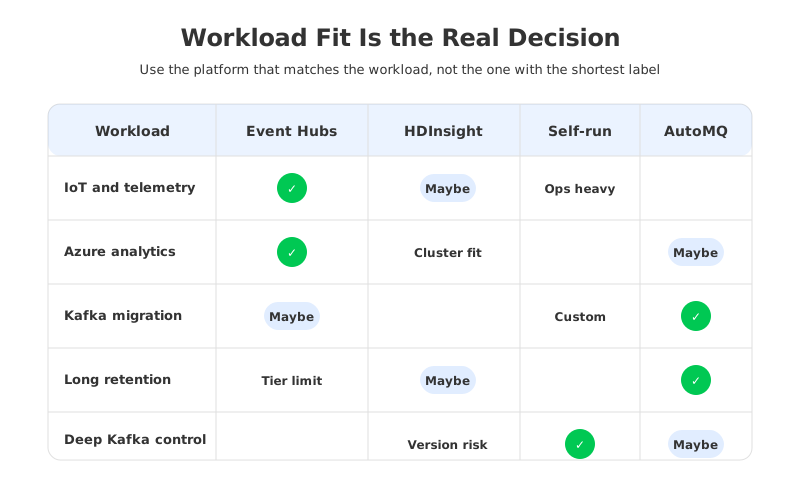
| Workload profile | Strong fit | Why it fits | Watch carefully |
|---|---|---|---|
| IoT telemetry and service events flowing into Azure analytics | Event Hubs | Managed ingestion, Kafka client endpoint, Azure ecosystem integration | Kafka feature assumptions, tier limits, namespace sizing |
| Open-source analytics environment already centered on HDInsight | HDInsight Kafka | Real Kafka cluster in an Azure managed analytics context | Cluster lifecycle, component versions, storage and scaling |
| Lift-and-shift from an existing Kafka cluster with strict broker behavior | Self-managed Kafka or AutoMQ | Both preserve deeper Kafka expectations than a protocol endpoint | Operational burden for self-managed; compatibility validation for AutoMQ |
| Long retention, frequent scaling, or high replay volume | AutoMQ | Shared object storage can decouple durable data from broker-local disks | Latency envelope, Blob configuration, migration plan |
| Specialized Kafka platform with custom configs or plugins | Self-managed Kafka | Maximum control over software and infrastructure | Staffing, upgrades, security, recovery, cost |
| Azure-native app integration with limited Kafka administration needs | Event Hubs | Service ownership shifts to Azure, applications keep Kafka-style client access | Do not assume every Kafka admin or ecosystem feature applies |
This table is not a shortcut around testing. It is a way to pick the first serious candidate. If your team mainly needs managed Azure event ingestion, Event Hubs is often the cleanest place to start. If your team needs full Apache Kafka control, HDInsight or self-managed Kafka is more direct. If the pain is tied to local-disk storage, broker state, and data movement, AutoMQ deserves a closer look.
6Migration And Cost Questions To Ask Early
Migration risk hides in the gap between "my client can connect" and "my workload behaves correctly." Before choosing a Kafka on Azure architecture, build a test plan around the workloads that hurt production when they fail. Validate producers, consumers, schema behavior, connectors, rebalances, offset commits, identity mappings, and observability. Define rollback before the first cutover window.
Cost should be modeled by workload behavior, not service names. Event Hubs cost follows tier and capacity-unit choices. HDInsight and self-managed Kafka costs include nodes, disks, network, operations, and supporting services. Traditional Kafka designs also carry the cost of replication and broker-local retention.
Ask these questions before the decision hardens:
- What percentage of topic data is actively read, and what percentage exists mainly for retention or replay?
- How often do brokers need to be replaced, resized, upgraded, or rebalanced?
- Are consumers mostly Azure analytics services, or does the workload depend on Kafka ecosystem tools?
- Does the security model require the data plane to remain inside a customer-controlled VNet and subscription?
- Is the main pain operations, Kafka compatibility, storage cost, cross-zone traffic, or procurement?
- Can the team run a representative benchmark with production client libraries, realistic partition counts, and failure injection?
The answer to "Kafka on Azure" is not a single service. It is a boundary decision. Start by deciding which responsibilities your team should own, then choose the architecture that makes those responsibilities explicit. If your current Kafka platform is constrained by broker-local storage and data movement, review AutoMQ's Azure BYOC and object-storage documentation as part of the evaluation.
7References
- What is Azure Event Hubs for Apache Kafka?
- Compare Azure Event Hubs tiers
- Azure HDInsight documentation
- What is Azure HDInsight?
- Overview of Azure Managed Disks
- Azure Storage redundancy
- Azure bandwidth pricing
- AutoMQ on Azure installation guide
- AutoMQ object storage configuration
8FAQ
8.1Is Azure Event Hubs the same as Apache Kafka?
No. Event Hubs provides an Apache Kafka endpoint that Kafka clients can use, but it is an Azure managed streaming service rather than Apache Kafka brokers operated by your team.
8.2Can I run Apache Kafka directly on Azure?
Yes. You can run Kafka through HDInsight, on Azure VMs, or on AKS with an operator or custom deployment. The tradeoff is operational ownership.
8.3When should I choose Event Hubs instead of Kafka on Azure VMs?
Choose Event Hubs when the workload mainly needs Kafka-style connectivity into a managed Azure streaming service. Choose Kafka on VMs when you need full control over Apache Kafka behavior.
8.4Where does AutoMQ fit in Azure Kafka architecture?
AutoMQ fits when teams need Kafka compatibility but want a cloud-native storage model. In Azure BYOC deployments, the data plane can run in the customer's Azure environment and use Azure Blob/object storage as shared durable storage.
8.5Is Kafka-compatible enough for migration?
Not by itself. Kafka-compatible is a starting point, not a migration guarantee. Validate client versions, security, admin APIs, offset behavior, connectors, monitoring, and rollback.
8.6What is the biggest cost mistake in Kafka on Azure planning?
The biggest mistake is pricing the service label and ignoring the workload shape. Retention, partitions, replication, disk throughput, cross-zone traffic, peak capacity, and operations all affect total cost.


