
Table of Contents
Table of Contents
Azure teams usually arrive at this decision from two directions. One team already runs Apache Kafka elsewhere and wants the same broker-level control on Azure. Another wants to avoid Kafka operations and asks whether Azure Event Hubs with its Kafka endpoint can absorb the workload. Both instincts are reasonable, but they optimize for different failure modes.
Event Hubs is attractive when the priority is managed ingestion, Azure-native operations, and fast onboarding. Kafka on Azure VMs is attractive when teams need broker control, Kafka-native behavior, custom configuration, ecosystem tools, or strict control over upgrades and network topology. The hard part is that cost and risk do not sit on one line item. A self-managed VM cluster pays for compute, disks, replication, data movement, buffers, and SRE attention. Event Hubs reduces that burden but moves choices into a managed service boundary.
The decision is not only "managed or self-managed." It is a question of which layer you must control: protocol access, broker internals, durable storage, cloud boundary, or operations.
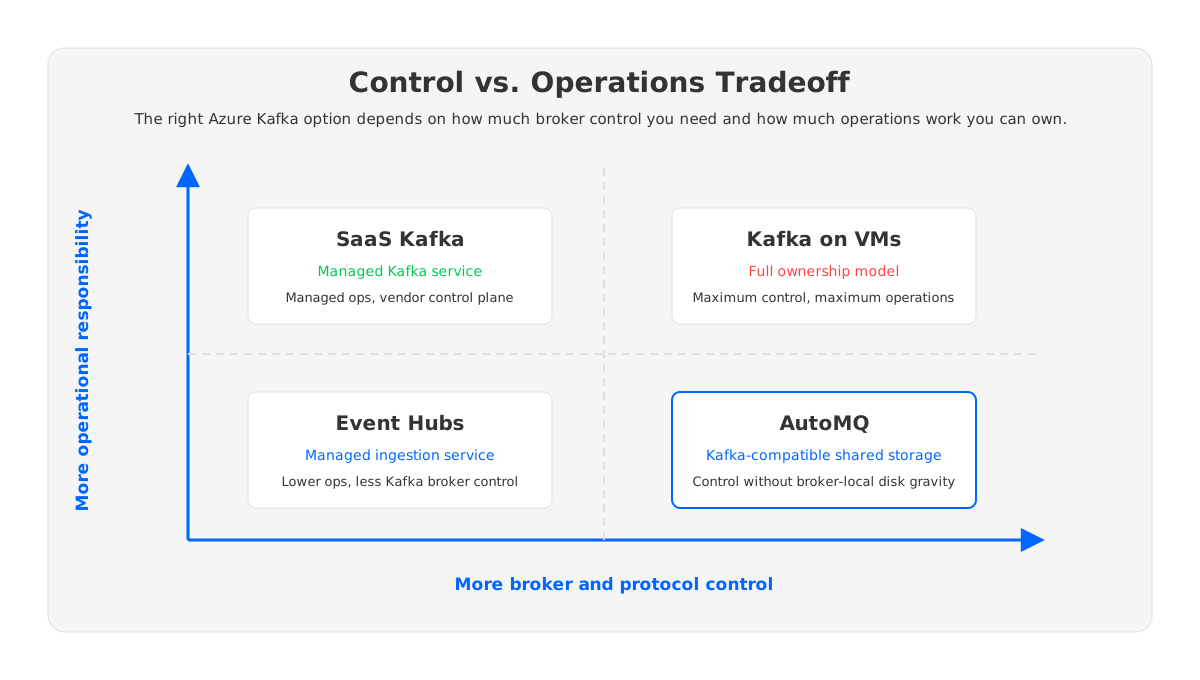
1Quick Answer by Workload
Choose Event Hubs when the workload is primarily Azure event ingestion, the application fits Event Hubs Kafka endpoint semantics, and the team values a managed service more than broker customization. Microsoft describes Event Hubs for Apache Kafka as a way to use Kafka protocol clients without setting up a Kafka cluster.
Choose Kafka on Azure VMs when the workload depends on Kafka-specific broker behavior, ecosystem compatibility, custom controls, or direct ownership of topology. This is the path for teams that need to tune brokers, control partition placement, run Kafka-native tooling, or preserve an existing operating model.
Use a third option when the team wants Kafka-compatible control but not the classic broker-local storage burden. AutoMQ fits this category: it keeps Kafka protocol compatibility while using stateless brokers and object storage as the durable log foundation. In Azure, Kafka applications can remain inside the customer's environment while the storage cost model shifts away from every broker owning local retained data.
The following table is a practical starting point:
| Requirement | Event Hubs Kafka endpoint | Kafka on Azure VMs | AutoMQ-style shared-storage Kafka |
|---|---|---|---|
| Minimal broker operations | Strong fit | Weak fit | Stronger than traditional Kafka |
| Full Kafka broker control | Limited | Strong fit | Strong fit for Kafka-compatible operations |
| Kafka ecosystem depth | Depends on feature needs | Strong fit | Strong fit for Kafka clients and tooling |
| Long retention at scale | Managed but tier-bound | Costly if disk-heavy | Designed around object storage |
| Fast elastic scaling | Service-managed | Data movement often required | Compute can scale more independently |
| Customer cloud boundary | Azure service boundary | Customer VMs | Customer Azure environment / BYOC model |
2What You Gain With Event Hubs
Event Hubs removes a large amount of operational surface. You are not choosing VM sizes, formatting disks, balancing brokers, replacing failed nodes, or running controller upgrades. You provision an Event Hubs namespace and event hubs, configure clients to use the Kafka endpoint, and let Azure operate the underlying service. For teams already standardized on Azure Monitor, Azure networking, IAM patterns, and enterprise governance, this can be a clean path.
The important phrase is "Kafka endpoint," not "Kafka broker." Event Hubs maps Kafka concepts to Event Hubs concepts, and Microsoft documents this mapping explicitly. That is useful for producers and consumers that use the Kafka protocol, especially when a team wants to avoid introducing a self-managed Kafka estate into Azure. It is less useful when the workload assumes direct access to Kafka internals.
Event Hubs is strongest for:
- Azure-native event ingestion from applications, telemetry, or integration workloads.
- Teams that prioritize managed service reliability over broker-level tuning.
- Applications that can validate compatibility with the supported Kafka protocol surface.
- Workloads where namespace, tier, quota, partition, retention, and throughput limits fit the design.
The risk is a false equivalence. A Kafka client connecting successfully does not prove that every Kafka operational assumption carries over. Kafka Streams, transactional behavior, admin operations, quota behavior, retention semantics, consumer group behavior, and tooling expectations should be tested against the exact tier. Microsoft documents different Event Hubs limits across Basic, Standard, Premium, and Dedicated tiers. Those limits are architecture inputs, not afterthoughts.
3What You Gain With Kafka on Azure VMs
Kafka on Azure VMs gives you the familiar Apache Kafka shape: brokers, controllers, partitions, replicas, local log segments, advertised listeners, and operational tools under your control. For organizations that already run Kafka elsewhere, this path can reduce migration risk because the broker remains Apache Kafka rather than an Azure event ingestion service with Kafka protocol support.
Control shows up in concrete places. You can choose Kafka version, broker configuration, authentication, topic defaults, rack-awareness strategy, observability, upgrade schedule, JVM tuning, disk type, and network layout. You can run Kafka Connect, MirrorMaker, schema registry, Cruise Control, exporters, and runbooks with fewer semantic surprises.
That control matters for:
- Low-latency pipelines where broker tuning and disk behavior are part of the performance envelope.
- Multi-cloud or hybrid architectures where Kafka semantics must stay consistent across locations.
- Existing Kafka estates that depend on ecosystem tools or custom automation.
- Regulated environments where cluster placement, encryption, logging, and network paths need direct ownership.
- Teams that need to preserve Kafka-native mental models for SREs and application developers.
The tradeoff is that Azure will not operate Kafka for you. Azure provides VMs, disks, availability zones, networking, identity, monitoring primitives, and pricing meters. The Kafka cluster is still yours. Apache Kafka operations documentation covers core operational concerns such as topic management, replication, monitoring, quotas, security, and upgrades; running on Azure VMs simply moves those concerns into an Azure infrastructure envelope.
4The Hidden Cost of Self-Managed Kafka on Azure
The obvious cost of Kafka on Azure VMs is easy to list: VM instances, managed disks, snapshots, backup, and network transfer. The hidden cost is that Kafka is a data-moving system. Every replication factor, zone choice, rebalance, reassignment, disk expansion, broker replacement, and upgrade window can move or reserve more capacity than steady-state traffic suggests.
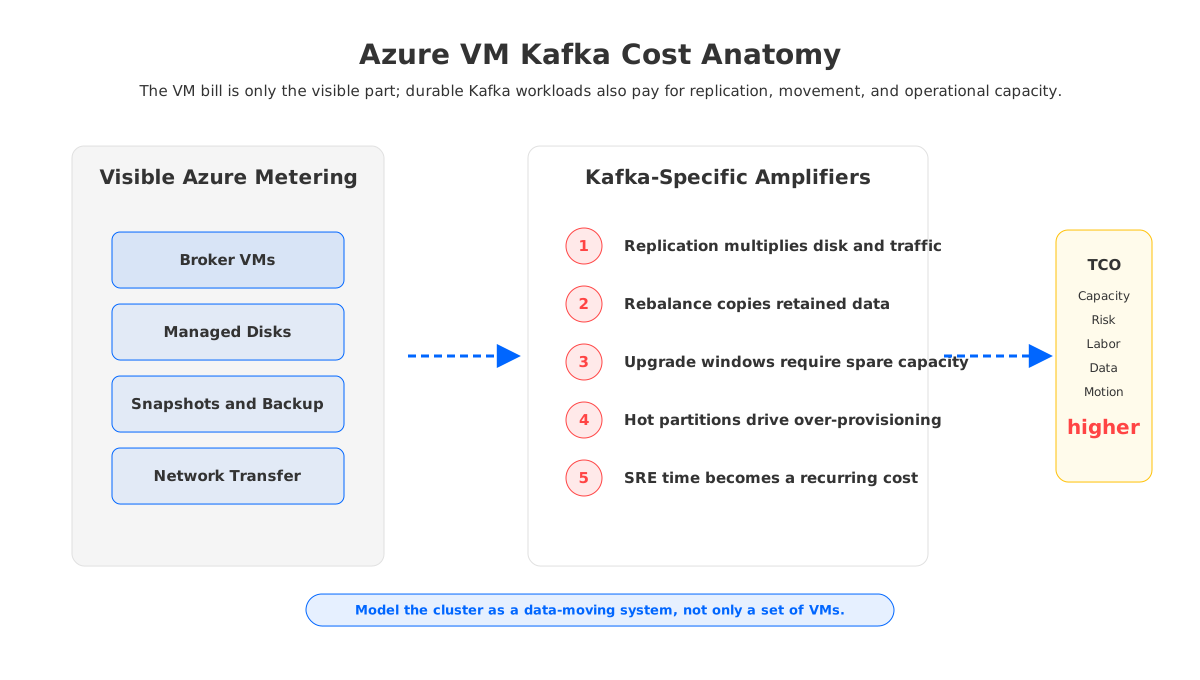
A cost model should include at least seven dimensions:
- Broker compute. VM size is driven by CPU, memory, network, and disk throughput, not only average produce traffic.
- Managed disks. Disk type and size affect capacity and performance. Kafka workloads often provision for peak write rate, retention, and recovery headroom.
- Replication. A replication factor multiplies stored bytes and network paths. Cross-zone placement can improve resilience but changes traffic assumptions.
- Rebalance and reassignment. Adding brokers is not instantly useful if partitions and retained data must move before capacity is balanced.
- Upgrade safety margin. Rolling upgrades, controller changes, and node maintenance require enough headroom for unavailable brokers and replica catch-up.
- Operational labor. SRE time for monitoring, incident response, tuning, disk pressure, and capacity planning is part of the TCO.
- Failure recovery. The cost of slow recovery is not only infrastructure spend; it is delayed delivery, lag growth, and operational risk.
Azure Managed Disks pricing is structured around disk options rather than Kafka partitions. Azure bandwidth pricing is structured around data transfer categories rather than broker replication intent. Kafka turns those meters into architecture consequences. A three-zone Kafka design may be the right availability pattern, but the FinOps model must include the replication and movement behavior that the application creates.
This is where self-managed Kafka cost surprises many teams. The monthly bill may look acceptable before the cluster starts scaling. Then a hot topic grows, a retention requirement changes, a team adds consumers, or an upgrade requires extra safety capacity. The cluster is still "working," but its economics become tied to spare disks, rebalance time, and manual operations.
5Availability and Networking Are Different Problems
Event Hubs and Kafka on VMs approach availability differently. Event Hubs exposes a managed service with tier-specific limits and service-level design choices. Kafka on VMs requires the team to design broker placement, replica placement, controller quorum, listeners, failure domains, and recovery processes.
On Azure VMs, availability zones matter because Kafka replicas are useful only if their placement matches actual failure boundaries. Microsoft describes availability zones as physically separate groups of datacenters within an Azure region. That separation can help a Kafka cluster survive localized failures, but it does not automatically produce a resilient Kafka design. You still need rack awareness, replica distribution, min in-sync replica settings, leader election expectations, and monitoring for under-replicated partitions.
Networking also diverges. Event Hubs clients connect to a managed endpoint. Kafka on VMs requires advertised listeners that work for every client location: same subnet, different VNet, private endpoint, VPN, ExpressRoute, or cross-region consumer. Misconfigured listeners are a classic Kafka migration failure because clients receive broker addresses they cannot reach.
For SREs, the operational question is precise: when a zone, VM, disk, or network path fails, who diagnoses it and who owns remediation? In Event Hubs, much of the broker-level layer is abstracted. In VM Kafka, the team owns the full runbook. That runbook should include replica health, disk saturation, controller quorum, broker replacement, topic expansion, partition reassignment, and rollback procedures before production traffic arrives.
6Where AutoMQ Fits as a Third Option
The binary framing between Event Hubs and Kafka on VMs leaves out an important architectural choice: keep Kafka-compatible control, but remove the assumption that each broker must own durable local log storage. AutoMQ is one example of this shared-storage Kafka category. It uses stateless brokers and object storage for durable data, changing the operational shape of scaling and recovery.
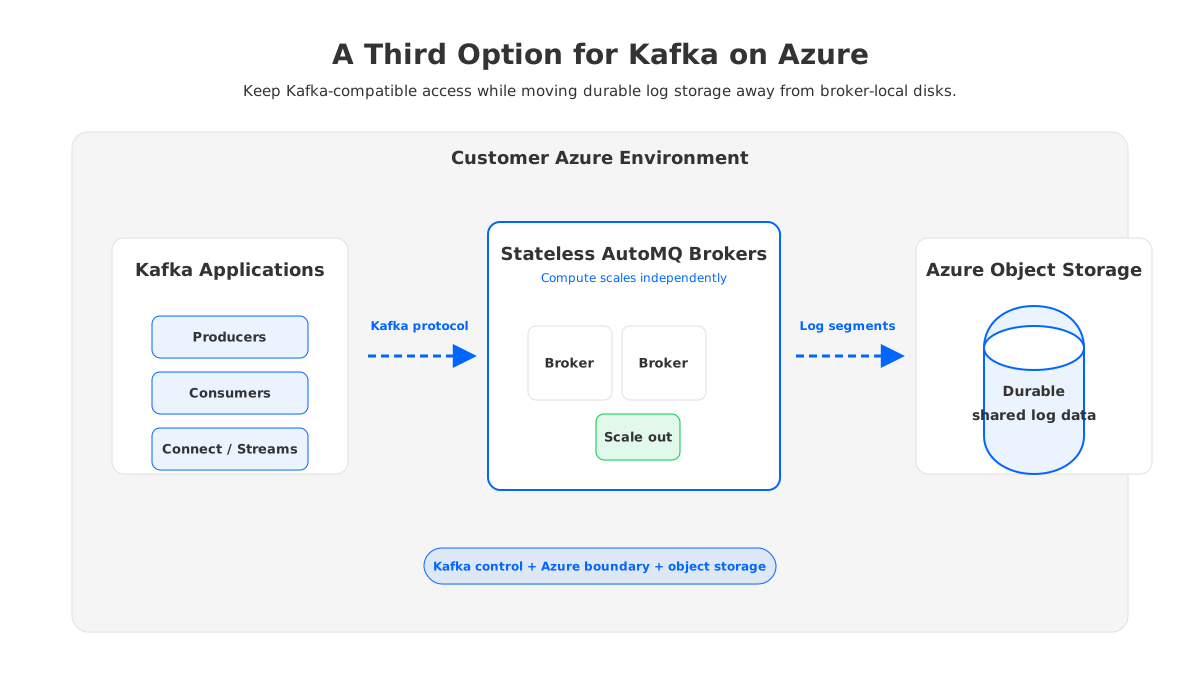
For Azure teams, the appeal is a different separation of responsibilities. Applications continue to use Kafka-compatible clients and ecosystem patterns. Brokers handle compute and protocol work. Durable log data sits in object storage, which aligns better with cloud capacity economics than sizing every broker disk for retained data plus recovery headroom.
This can matter in four situations:
- A team wants Kafka semantics but does not want every scale event to become a partition data movement project.
- A platform team wants the data plane to remain inside its own Azure environment instead of moving everything to an external SaaS boundary.
- FinOps wants retention and burst capacity to follow object-storage economics rather than broker-local disk over-provisioning.
- SREs need faster recovery and stateless scaling characteristics while preserving Kafka client compatibility.
AutoMQ should not be treated as a drop-in answer to every Event Hubs workload. If an application is already Azure-native, fits Event Hubs quotas, and does not require Kafka-native operations, Event Hubs may be the cleaner choice. AutoMQ becomes more relevant when the team is choosing Kafka because Kafka semantics, ecosystem continuity, or cloud-boundary control are non-negotiable, but traditional VM Kafka operations feel too heavy.
7Decision Checklist
Before committing to Event Hubs or Kafka on Azure VMs, ask these questions in order. They expose whether the decision is about protocol access, operational ownership, or architecture.
| Question | If yes, lean toward |
|---|---|
| Do you only need Kafka protocol clients to publish and consume events into an Azure-managed service? | Event Hubs |
| Do you need direct broker configuration, Kafka-native admin tooling, or strict version control? | Kafka on VMs or AutoMQ |
| Is long retention a major cost driver? | AutoMQ or a carefully modeled Kafka VM design |
| Can your SRE team own upgrades, rebalances, disk pressure, and recovery drills? | Kafka on VMs |
| Do you need the data plane inside your own Azure environment? | Kafka on VMs or AutoMQ BYOC |
| Is operational simplicity more important than preserving every Kafka assumption? | Event Hubs |
The strongest teams do not make this decision from a feature checklist alone. They run a workload-shaped proof of concept: real producer rate, consumer fan-out, retention, partition count, network path, failure drill, and cost assumptions. For Event Hubs, validate tier limits and Kafka endpoint behavior. For VM Kafka, validate recovery and rebalance time. For AutoMQ, validate Kafka compatibility and stateless brokers with object storage.
8Recommended Patterns
For greenfield Azure ingestion, start with Event Hubs if the event model and quotas fit. You get a managed service, Azure-native governance, and a smaller operating surface. Do not assume full Kafka equivalence; test the client libraries, admin actions, and streaming frameworks you actually use.
For Kafka platform standardization, self-managed Kafka on Azure VMs can be appropriate when the organization already has Kafka SRE maturity. Treat it as an infrastructure product, not a one-time deployment. Build capacity models, upgrade runbooks, monitoring, quota policy, topic lifecycle controls, and failure drills from day one.
For Kafka-compatible platforms under cloud cost pressure, evaluate shared-storage Kafka. The key question is whether your pain comes from broker-local disk gravity: retention expanding disks, rebalances delaying scaling, broker recovery moving too much data, and capacity buffers growing faster than traffic. If that is the problem, the architecture needs to decouple compute from durable storage rather than merely switch VM sizes.
The final decision should feel less like "Event Hubs vs Kafka" and more like a boundary choice. Event Hubs moves more responsibility to Azure. Kafka on VMs keeps responsibility with your team. AutoMQ keeps Kafka-compatible control while changing where durable data lives and how brokers scale. The right answer is the one whose responsibility boundary matches your workload, your SRE capacity, and your cost model.
9References
- What is Azure Event Hubs for Apache Kafka?
- Azure Event Hubs quotas and limits
- Azure Event Hubs pricing
- Azure Managed Disks pricing
- Azure bandwidth pricing
- What are Azure availability zones?
- Apache Kafka operations documentation
- AutoMQ documentation
10FAQ
10.1Is Azure Event Hubs the same as Apache Kafka?
No. Event Hubs provides an Apache Kafka endpoint that lets Kafka protocol clients connect to Event Hubs. That is different from operating Apache Kafka brokers. The distinction matters when applications depend on broker configuration, Kafka-native admin operations, or ecosystem tools.
10.2Is Kafka on Azure VMs less expensive than Event Hubs?
Not automatically. VM Kafka can look cost-effective at low scale, but the full model includes managed disks, replication, network transfer, spare capacity, rebalancing, upgrades, monitoring, and SRE labor. Event Hubs pricing is service-tier based, so the better comparison uses a real workload model rather than instance prices alone.
10.3When should I run Kafka on Azure VMs?
Run Kafka on Azure VMs when you need direct broker control, Kafka-native operational semantics, custom tuning, strict version ownership, or deep ecosystem compatibility. It is a strong option only if the team can own Kafka operations as a production platform.
10.4When is AutoMQ relevant in this decision?
AutoMQ is relevant when the team wants Kafka-compatible control in its own cloud environment but wants to avoid the operational weight of broker-local storage. Its stateless broker and object-storage architecture can reduce the data movement and over-provisioning patterns that make traditional VM Kafka expensive to operate.
10.5What should I test before migrating from Kafka to Event Hubs?
Test the exact client libraries, authentication model, producer throughput, consumer fan-out, retention needs, partition count, admin operations, streaming frameworks, and failure behavior. The goal is to verify your workload against Event Hubs' Kafka endpoint and tier limits, not only confirm that a sample producer can connect.


