
Table of Contents
Table of Contents
Searching for Kafka on GCP is rarely about installing one more distributed system. Most teams already know Kafka can run on virtual machines or Kubernetes. The harder question is whether Google Cloud should become a familiar place to run Kafka, a reason to move toward Pub/Sub, or an opportunity to change the storage architecture while keeping the API surface intact.
That distinction matters because Kafka is not only a broker. It is an API contract, an ordering model, a replay model, an operations model, and an ecosystem of clients, connectors, stream processors, and monitoring habits. Moving to Google Cloud without naming which parts you need to preserve can turn a platform decision into a long chain of small rewrites.
1What People Mean by Kafka on GCP
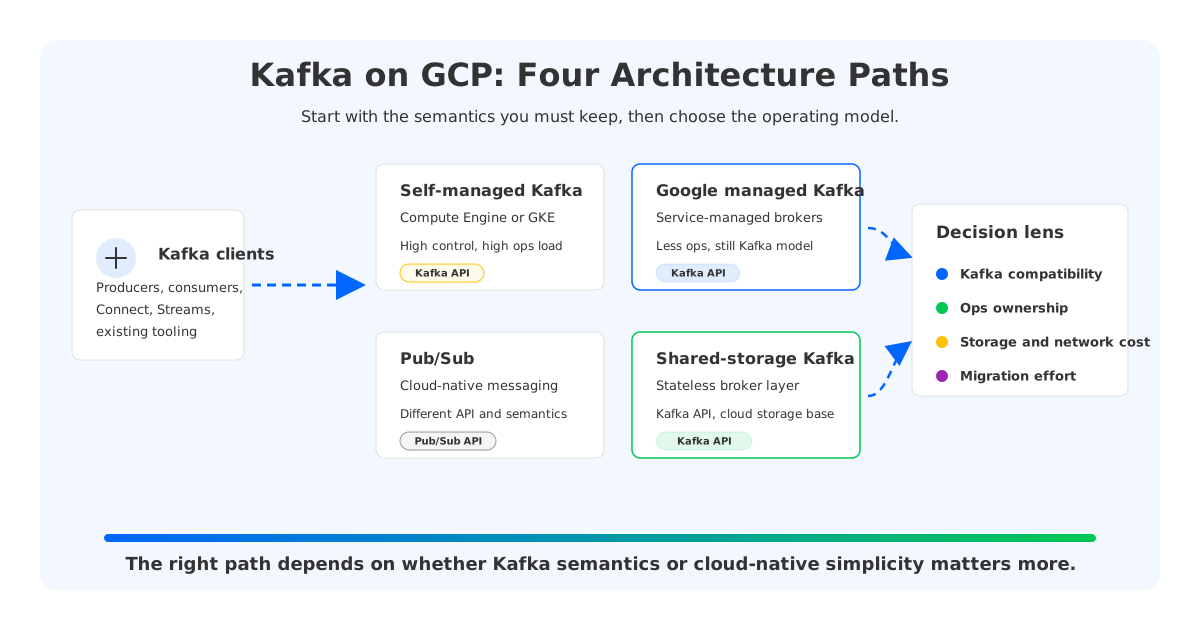
There are four common meanings behind the phrase "Kafka on GCP." One team means self-managed Apache Kafka on Compute Engine or Google Kubernetes Engine. Another means Google's Managed Service for Apache Kafka, where Google operates the service layer around open-source Kafka. A third team is asking whether Pub/Sub can replace the need for Kafka entirely. A fourth group wants Kafka compatibility, but not the traditional coupling between brokers and local persistent disks.
These options overlap, but they are architecturally different. Apache Kafka's core abstraction is a replicated commit log split into topics and partitions, with producers writing records and consumers reading by offset. Pub/Sub is a cloud messaging service with topics, subscriptions, delivery features, and a different operational contract. A Kafka-compatible shared-storage platform keeps Kafka clients and semantics at the edge, then changes where durable log data lives.
The first filter is API compatibility. If applications depend on Kafka producer and consumer APIs, Kafka Connect, Kafka Streams, transactions, offset-based replay, or specific client behavior, Pub/Sub is not a drop-in replacement. It may still be the right system, but it is a migration to a different messaging model. If API compatibility is mandatory, your comparison narrows to self-managed Kafka, managed Kafka, and Kafka-compatible architectures.
2Option 1: Self-Managed Kafka on Compute Engine or GKE
Self-managed Kafka on GCP gives you the most control. You choose broker instance families, disks, zones, Kafka versions, JVM settings, rack awareness, Cruise Control or equivalent balancing tools, backup strategy, and monitoring stack. This model fits teams that already operate Kafka deeply and need configuration control beyond what a managed service exposes.
The control is real, but so is the ownership. Kafka's storage model binds partition replicas to broker-local storage, whether that storage is zonal Persistent Disk, regional Persistent Disk, or another block device attached through your Kubernetes storage layer. On GKE, PersistentVolumes make stateful workloads possible, but they do not erase the operational problem: partitions are still placed on brokers, and rebalancing still has to move data or leadership across the cluster.
Self-managed Kafka is most defensible when the platform team has Kafka specialists, clear SLO ownership, and workloads that justify deep tuning. It is also attractive when compliance or platform constraints require a specific network, disk, encryption, or observability layout. The uncomfortable part is that many GCP cost and reliability decisions then become Kafka design decisions.
The budget conversation should include more than broker CPU. A production Kafka cluster on GCP usually needs to account for disk capacity and performance, inter-zone traffic, spare capacity, operational tooling, and partition reassignment. Google Cloud's pricing pages should be the source for actual numbers, because storage, network, and service pricing vary by region and usage pattern.
3Option 2: Managed Kafka on Google Cloud
Google Cloud's Managed Service for Apache Kafka changes the operating boundary. Instead of assembling and maintaining the broker fleet yourself, you use a managed Kafka service for Apache Kafka workloads on Google Cloud. For teams that want Kafka semantics without managing every broker lifecycle task, this is the most direct cloud-provider path.
Managed Kafka is useful when your application architecture is already built around Kafka and your team wants a narrower operational surface. You still need to design topics, partitions, client throughput, lag handling, retention, access paths, and observability. The service can reduce infrastructure work, but it does not make Kafka workload design disappear.
This is a good fit when the team values a Google-managed operating model and can live within the service's feature, region, version, and configuration boundaries. It is less natural when your Kafka estate spans multiple clouds, when you need unusual broker-level tuning, or when the main problem is traditional Kafka storage and replication cost.
4Option 3: Pub/Sub as a Cloud-Native Messaging Alternative
Pub/Sub deserves a serious look because it is native to Google Cloud and removes a large amount of broker management. It is designed as a scalable asynchronous messaging service with topics and subscriptions, and it offers features such as ordering keys and exactly-once delivery in documented scopes. For event-driven services that do not need Kafka's log and offset model, this can be the cleanest GCP-native answer.
The tradeoff is semantic rather than cosmetic. Kafka applications often rely on partition-level ordering, consumer-controlled offset replay, long retention, Kafka Connect integrations, and a large ecosystem of Kafka-native tools. Pub/Sub has its own vocabulary and strengths, but adopting it usually means changing application code, runbooks, and sometimes pipeline assumptions.
A practical way to evaluate Pub/Sub is to ask whether the team wants a messaging service or a Kafka estate. If the workload is service-to-service event delivery with GCP-first integration needs, Pub/Sub can reduce platform work. If the workload is a Kafka-centered data platform with CDC, stream processing, replay, and cross-cloud client consistency, Pub/Sub becomes a redesign rather than an infrastructure swap.
5Option 4: Kafka-Compatible Shared-Storage Architecture
The fourth path starts from a different observation: many Kafka-on-cloud problems come from the storage architecture, not from the Kafka API. Traditional Kafka was designed around brokers that own local log replicas. That model is durable and proven, but in a cloud environment it can amplify disk provisioning, inter-zone replication, recovery, and rebalancing work.
Kafka-compatible shared-storage systems keep the Kafka protocol and client ecosystem while moving durable log data away from broker-local disks. AutoMQ belongs to this category: it is a Kafka-compatible streaming platform that separates compute from storage, uses stateless brokers for the Kafka-facing layer, and persists data through shared storage backed by object storage. The point is not to ask every application to learn a different messaging API; it is to change the infrastructure layer that makes Kafka expensive to operate at scale.
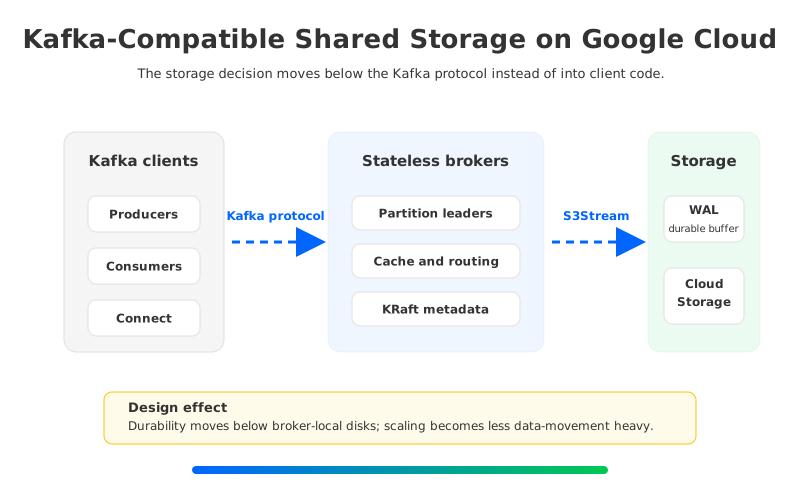
This architecture changes the failure and scaling conversation. If brokers no longer own the only durable copy of partition data, replacing a broker or shifting load can become more about metadata, leadership, cache, and compute capacity than copying large log segments between machines. A write-ahead log still matters for latency and recovery, and object storage still has its own performance profile. It is a different placement of durability, and that placement is what makes the model worth evaluating.
On GCP, this path is relevant for teams that want Kafka compatibility but are uneasy about disk-heavy Kafka clusters. It is also relevant for multi-cloud platforms, because Kafka clients and operational patterns can remain more consistent across clouds. The design question becomes whether shared storage aligns with your latency, retention, recovery, and governance requirements.
6Decision Matrix for GCP Teams
A useful GCP Kafka decision should not start with vendor names. It should start with the workload contract. If the contract says "Kafka clients and offset semantics must remain," then Pub/Sub moves into the alternative category rather than the replacement category. If the contract says "GCP-native messaging matters more than Kafka compatibility," Pub/Sub moves toward the center.
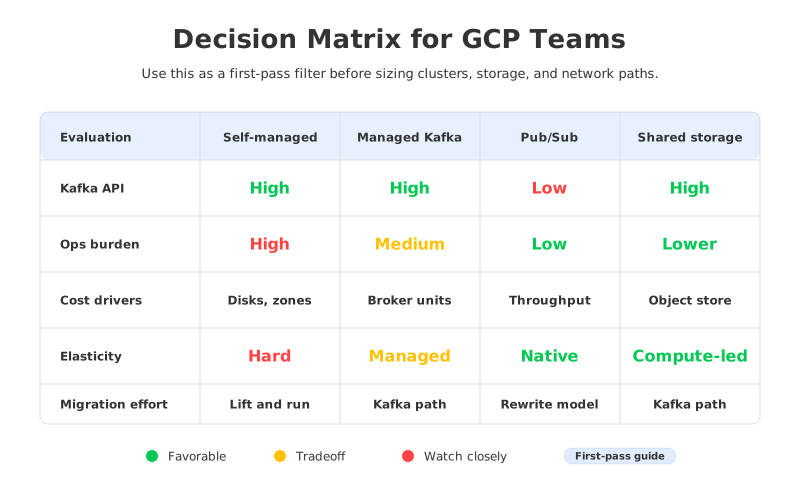
| Decision area | Self-managed Kafka on GCP | Google managed Kafka | Pub/Sub | Kafka-compatible shared storage |
|---|---|---|---|---|
| Kafka API compatibility | High | High | Low | High |
| Operations ownership | Highest | Lower than self-managed | Lowest for broker ops | Lower broker-state burden, still platform-owned |
| Main cost drivers | Compute, disks, replication, operations | Service units, storage, network, usage | Throughput, storage, delivery features | Compute, WAL/storage design, object storage, network |
| Elasticity model | Requires careful rebalancing and capacity planning | Service-managed within product limits | Cloud-native service scaling | Compute layer can scale with less broker-local data movement |
| Migration complexity | Low for Kafka apps, high for operations | Low to medium for Kafka apps | High when Kafka semantics are embedded | Low to medium for Kafka apps |
The table is not a scoring system. It prevents category errors. A team that picks Pub/Sub while expecting Kafka Connect behavior will spend the migration budget in application changes. A team that picks self-managed Kafka to avoid service limits may spend the budget in SRE time. A team that picks shared storage without testing latency and recovery assumptions will discover too late that architecture is still an engineering choice.
7How to Choose Without Overfitting the First Cluster
For a small internal pipeline, any of the four options can look reasonable. The differences show up when retention grows, consumer groups multiply, zones fail, traffic becomes uneven, or a platform team supports several business units. Kafka decisions age into platform decisions faster than most teams expect.
Start with five questions:
- Which Kafka semantics are contractual for the applications? Name the exact dependencies: partition ordering, replay by offset, transactions, Connect, Streams, or existing client libraries.
- Who owns the data plane during an incident? A managed service changes the boundary, but the application team still owns topic design, client behavior, and lag response.
- Which cost line grows with retention and replication? For Kafka, storage and inter-zone data movement can matter as much as CPU.
- How often will the cluster scale or rebalance? Workloads with spiky traffic or frequent tenant changes punish architectures that require heavy data movement.
- Is this a single-GCP decision or a multi-cloud platform decision? A GCP-native service may be excellent for one cloud, while Kafka compatibility may matter more across environments.
These questions keep the evaluation grounded. They also make AutoMQ's role easier to place. It is not a substitute for Pub/Sub when the team wants a GCP-native messaging service and accepts a different API. It is more relevant when the team wants Kafka compatibility while changing the storage and operations model that traditional Kafka brings to the cloud.
8Practical Architecture Guidance
If you run self-managed Kafka on Compute Engine, treat disks, zones, and network paths as first-class architecture. Use Google Cloud's disk documentation and regional Persistent Disk guidance to understand the storage layer you choose. Then map that layer back to Kafka's replication factor, rack awareness, and recovery strategy.
If you run Kafka on GKE, separate Kubernetes convenience from Kafka state management. StatefulSets, PersistentVolumes, storage classes, pod disruption budgets, and node pools help package the system, but Kafka still needs careful broker placement and partition planning. Kubernetes can restart pods; it does not decide the right number of partitions or remove the cost of moving log data.
If you choose managed Kafka, spend design time on service boundaries. Confirm regions, networking, authentication, version support, observability exports, scaling behavior, and pricing dimensions before migration. A managed service is strongest when its boundaries match your workload rather than when it is treated as a generic destination for every Kafka cluster.
If you choose Pub/Sub, design the migration as an application and data-model change. The upside can be substantial for GCP-native eventing, but the work is different from moving Kafka brokers. Pay special attention to ordering keys, delivery guarantees, retention requirements, replay workflows, and integrations that previously assumed Kafka offsets.
If you choose Kafka-compatible shared storage, test the architecture where Kafka usually hurts: broker replacement, partition movement, long retention, consumer catch-up, and uneven traffic. The goal is to prove that compute/storage separation improves the operational path for your workload, not to win an abstract architecture debate. AutoMQ's shared-storage architecture documentation is a practical next step: AutoMQ Architecture Overview.
9FAQ
9.1Can you run Apache Kafka on GCP?
Yes. You can run Apache Kafka yourself on Compute Engine or GKE, use Google Cloud's Managed Service for Apache Kafka, or evaluate Kafka-compatible platforms that run in a Google Cloud environment. The right answer depends on how much Kafka compatibility, operational control, and cloud-native service management you need.
9.2Is Pub/Sub a replacement for Kafka on GCP?
Pub/Sub can replace Kafka for some messaging workloads, especially when applications do not depend on Kafka APIs, offsets, Connect, Streams, or Kafka-specific operational patterns. It is not a drop-in Kafka replacement. Treat it as a different messaging model and evaluate the application changes honestly.
9.3When should a team use managed Kafka instead of self-managed Kafka?
Managed Kafka is attractive when the team wants Kafka semantics but does not want to own the full broker lifecycle. It is still important to validate service limits, region availability, networking, observability, and pricing. Managed infrastructure reduces operations work, but topic design and client behavior remain your responsibility.
9.4Where does AutoMQ fit in a GCP Kafka evaluation?
AutoMQ fits when a team wants Kafka compatibility but wants to change the traditional broker-local storage model. Its shared-storage architecture separates compute from storage and uses stateless brokers, which can reduce the operational impact of scaling, recovery, and data movement. It should be evaluated against your latency, retention, and data-plane ownership requirements.
9.5What is the biggest cost mistake in Kafka on GCP planning?
The common mistake is budgeting only for broker compute. Kafka cost is shaped by storage capacity and performance, replication, inter-zone traffic, retention, spare capacity, monitoring, and operational labor. Use Google Cloud's official pricing pages for the numeric estimate, then model the workload rather than relying on a generic cluster size.
10References
- Google Cloud Managed Service for Apache Kafka overview
- Google Cloud Managed Service for Apache Kafka pricing
- Google Cloud Pub/Sub overview
- Google Cloud Pub/Sub ordering documentation
- Google Cloud Pub/Sub exactly-once delivery documentation
- Google Cloud Pub/Sub pricing
- Google Cloud Compute Engine disk documentation
- Google Cloud regional Persistent Disk documentation
- Google Kubernetes Engine persistent volumes documentation
- Google Cloud Storage introduction
- Google Cloud Storage pricing
- Google Cloud VPC network pricing
- Apache Kafka official documentation
- AutoMQ Architecture Overview


