
Table of Contents
Table of Contents
Running Kafka on Google Cloud is not the same problem as running Kafka in a private data center with a different invoice. Kafka still gives you partitions, offsets, consumer groups, replication, and a large ecosystem. GCP adds zones, VPCs, managed identity, Cloud Monitoring, Persistent Disk, GKE, Pub/Sub, Cloud Storage, and managed Kafka services. Production design lives in the overlap, where a Kafka setting can change network cost and a storage choice can change broker recovery time.
The hard part is that many Kafka best practices are really local-disk Kafka best practices. Replication factor, rack awareness, partition reassignment, disk sizing, and broker replacement all assume that durable log data is bound to broker storage. That model still works, but it makes scaling and recovery feel like storage logistics. A strong GCP Kafka architecture separates practices that protect Kafka semantics from practices that exist only because the broker owns the disk.
1Design for Failure Domains First
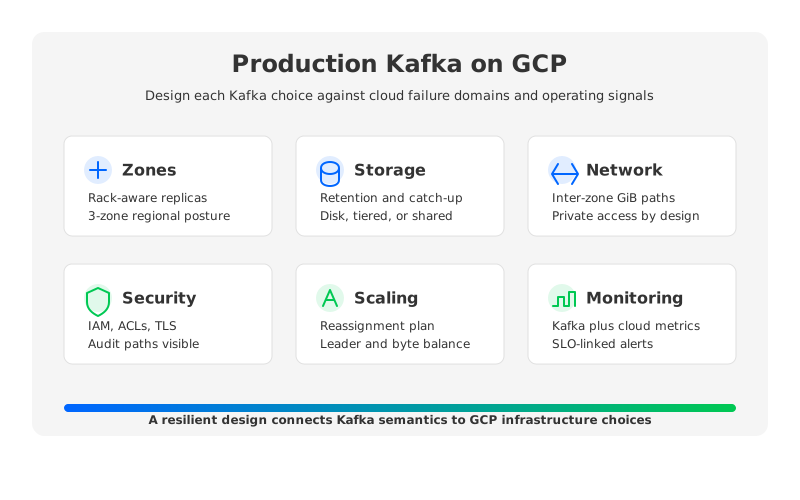
A production Kafka cluster on GCP should start with failure domains, not instance types. Kafka availability depends on keeping enough replicas in sync when a broker or zone fails, and GCP availability depends on placing compute, storage, network paths, and clients so one local failure does not remove the same dependency everywhere. The first design question is "What can disappear while the application keeps its write and read contract?"
For traditional Kafka, the baseline pattern is a regional deployment spread across 3 zones, with rack awareness mapping Kafka replicas to GCP zones. Google Cloud Managed Service for Apache Kafka follows this shape: clusters are distributed across 3 zones, use rack-aware placement, and default to at least 3 replicas with a minimum in-sync replica count of 2. Self-managed Kafka needs the same intent expressed through placement, storage, configuration, and topic defaults.
The production checklist usually looks like this:
- Zone-aware brokers. Place brokers across zones and configure Kafka rack awareness so partition replicas do not concentrate in one zone. A 3-zone region is the usual production starting point.
- Client locality by purpose. Keep producers, consumers, and stream processors in the same region as the cluster when possible. Cross-region Kafka traffic should be intentional.
- Topic defaults with guardrails. Set topic templates for replication factor,
min.insync.replicas, retention, segment size, and cleanup policy. Make exceptions visible through review and metrics. - Recovery drills. Test broker loss, zone loss, consumer lag recovery, and controller failover before the first traffic spike.
Multi-zone Kafka increases resilience by copying data and serving traffic across zones, but the same design can increase inter-zone traffic and operational complexity. Treat that cost as part of the availability budget.
2Choose Storage Intentionally
Storage is where Kafka on GCP becomes concrete. In broker-local Kafka, every broker is both a compute node and a durable storage owner. The disk has to absorb append-heavy writes, serve catch-up reads, and retain segments for the configured retention window. That makes storage sizing a reliability decision, not only a cost decision.
On GKE, Kafka usually runs as a StatefulSet with Persistent Volumes. Google Cloud documents GKE storage options across Persistent Disk, Hyperdisk, local SSD, file storage, and object storage integrations. For brokers, the practical split is durable block storage for logs versus ephemeral local SSD for workloads that can tolerate node-level data loss.
On Compute Engine, the same logic applies with fewer Kubernetes abstractions. Use disk types and sizes that match throughput, IOPS, and retention needs. Monitor disk utilization, latency, throttling, page cache behavior, and file descriptor pressure.
Managed Service for Apache Kafka changes part of this burden. Google says storage management is automated and that operators mainly set topic retention to control cost or policy. It also describes a tiered storage model where broker persistent disks buffer segment files and regional Cloud Storage backs persistent object storage after segments roll. Hot data still lives near brokers, and retention policy still drives cost.
| Storage decision | Traditional self-managed Kafka on GCP | Managed Service for Apache Kafka | Shared-storage Kafka pattern |
|---|---|---|---|
| Primary concern | Disk capacity, disk performance, broker replacement, replica catch-up | Cluster vCPU/RAM sizing and topic retention | Object storage, WAL, broker cache, metadata, and SLOs |
| Scaling friction | Partition reassignment can move substantial data | Service can automate broker provisioning and rebalance partitions | Broker compute can scale with much less broker-to-broker data movement |
| Retention planning | Retention consumes broker-attached storage unless tiered storage is added | Retention is topic-level policy with managed tiered storage | Retention is mainly object-storage-backed, with hot-path cache design |
This table is not a ranking. Storage architecture decides what the operations team spends time watching.
3Budget for Network and Replication
Kafka teams often discover GCP networking cost after the architecture is already correct from an availability perspective. Google Cloud's VPC pricing page lists VM-to-VM data transfer across zones in the same region at $0.01/GiB when using internal or external IP addresses within the same VPC network. For Kafka, replication and consumer reads can turn that line item into a design constraint.
Replication is the first multiplier. With a replication factor of 3 across zones, each produced record is written to the leader and copied to followers. Consumers are the second multiplier: a consumer group in another zone, a Dataflow job in another region, or a connector outside the cluster's local placement can add more transfer.
You do not need a complex model to avoid the worst surprises:
- Map producers and consumers by zone and region. The diagram should include network direction, not only application ownership. A cross-zone 3 TiB/day consumer path deserves the same attention as broker CPU.
- Keep internal Kafka traffic private. Prefer private connectivity, private DNS, and controlled VPC access. Managed Service for Apache Kafka uses Private Service Connect endpoints for secure VPC access.
- Separate availability traffic from accidental traffic. Replication and disaster recovery are intentional. A connector placed in the wrong region is accidental.
- Include network in capacity reviews. A partition balanced by byte rate may still be unbalanced by cross-zone destination. Broker metrics and VPC flow visibility should be reviewed together.
Network design also affects security. TLS, mTLS or SASL where applicable, Kafka ACLs, IAM, subnets, and audit logs should be designed with routing. Security added later often produces exception-heavy access paths.
4Monitor Kafka and Cloud Infrastructure Together
Kafka monitoring fails when it is split into two dashboards that never meet. The Kafka dashboard says consumer lag is rising. The cloud dashboard says disk write latency is rising. The application dashboard says checkout events are delayed. Together they explain whether the failure is broker saturation, storage latency, an uneven partition key, a slow sink, or a client retry storm.
Google's Managed Service for Apache Kafka exports metrics to Cloud Monitoring and broker logs to Cloud Logging. Its monitoring documentation groups metrics into cluster, topic, topic partition, and consumer group categories. Self-managed Kafka should follow the same logic even if the collector is JMX, OpenTelemetry, or Prometheus.
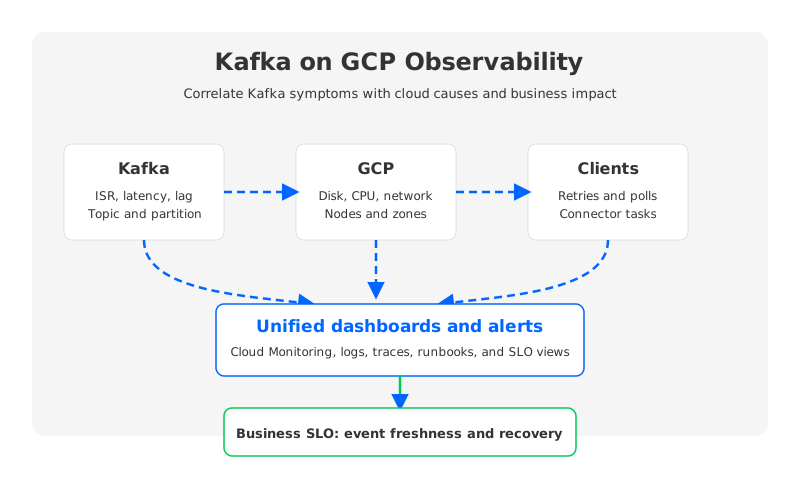
The most useful production view connects four layers:
- Kafka internals. Broker request latency, produce and fetch rates, under-replicated partitions, offline partitions, ISR events, controller events, and consumer group lag.
- Storage and compute. Disk utilization, disk latency, throttling, CPU saturation, network throughput, memory pressure, pod restarts, node health, and broker errors.
- Client behavior. Producer retry rate, delivery timeout, compression ratio, consumer poll latency, rebalance frequency, and connector errors.
- Business SLOs. End-to-end event delay, data freshness, ingestion backlog, and downstream sink health.
Alerting should avoid two extremes. Infrastructure-only alerts catch problems late because users feel lag before disks are full. Lag-only alerts catch too much because not every spike is an incident. Good alerts combine symptom and cause: lag plus no catch-up, ISR shrink plus broker error rate, or storage latency plus produce latency.
5Plan Scaling and Rebalancing Before Traffic Spikes
Kafka scaling is not one operation. It is three operations that share a dashboard: adding broker resources, moving partition leadership and replicas, and changing client traffic distribution. Traditional Kafka makes those operations storage-heavy because partitions live on brokers. Adding brokers without reassignment gives you idle capacity; moving leaders without checking traffic can look balanced by partition count but wrong by byte rate.
Managed Service for Apache Kafka reduces some work by sizing clusters through total vCPU and RAM and automating broker provisioning. Google also notes that automatic rebalancing can move partitions when new brokers are provisioned, while the algorithm is based on partition count rather than actual traffic served by each partition. Even partition counts can overload one broker when a few hot partitions carry most bytes.
For self-managed Kafka, define the scaling playbook before the incident:
- Partition strategy. Pick partition counts based on throughput, ordering needs, consumer parallelism, and future growth. Increasing partitions can change key distribution behavior.
- Reassignment controls. Use throttles, staged movement, and off-peak windows when moving data. Watch disk, network, ISR health, and client latency.
- Leader balance. Partition replicas and leaders are different load problems. A broker with many followers may look fine until leadership moves after a failure.
- Capacity buffers. Leave enough headroom for a broker or zone failure. A cluster sized only for normal traffic is under-sized for the day availability matters.
Scaling is also a migration concern. If you are moving from self-managed Kafka to Managed Service for Apache Kafka, from Pub/Sub to Kafka, or from local-disk Kafka to shared-storage Kafka, test the target system with production-shaped traffic. Synthetic throughput does not reveal hot keys, connector bottlenecks, or consumers that seek backward during recovery.
6When Shared-Storage Kafka Changes the Playbook
Some Kafka best practices are permanent because they protect Kafka semantics: topic design, producer durability settings, consumer lag management, schema discipline, and access control. Other practices are artifacts of broker-local storage. If every broker owns durable log segments on attached disks, broker replacement and scale-out are data movement operations.
That is where AutoMQ fits into the GCP conversation. AutoMQ is a Kafka-compatible cloud-native streaming platform that keeps Kafka protocol compatibility while replacing broker-local storage with shared object storage and a WAL-based hot path. Its documentation describes S3Stream as shared streaming storage that offloads Kafka log storage to cloud storage, while WAL is used for write acceleration and fault recovery. On GCP, the equivalent question is how the system uses cloud object storage, WAL, cache, and metadata so brokers can behave more like compute.
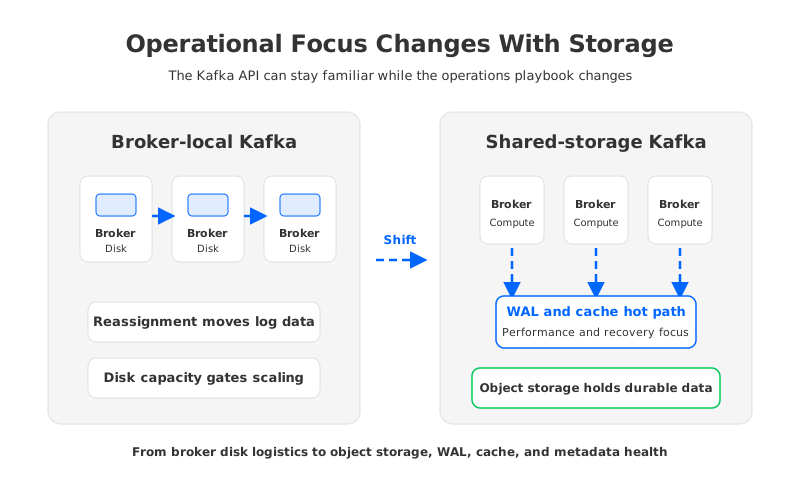
This does not remove operations. It moves them. Instead of asking only whether each broker has enough disk, you ask whether the object storage path, WAL layer, broker cache, metadata service, and latency SLO are healthy. Instead of treating scale-out as a large copy plan, you separate hot-path performance from long-retention storage economics.
The decision rule is practical: use managed Kafka when you want Google Cloud to automate the familiar Kafka operating model; use self-managed Kafka when you need deep infrastructure control; evaluate shared-storage Kafka when broker-local storage blocks elasticity, cost control, or migration.
7Production Checklist for Kafka on GCP
A useful checklist is short enough to survive an architecture review and specific enough to catch real mistakes.
| Area | Production check | Why it matters |
|---|---|---|
| Failure domains | Brokers, replicas, clients, and storage are mapped to zones | Prevents hidden single-zone dependency |
| Storage | Disk or object storage design matches retention, catch-up, and recovery needs | Avoids treating capacity as the only storage metric |
| Networking | Replication, consumers, connectors, and DR paths are costed by GiB and region | Makes data transfer an intentional design choice |
| Security | IAM, Kafka ACLs, TLS, private access, and audit logging are designed together | Reduces exception-based paths |
| Observability | Kafka, cloud, clients, and business freshness are correlated | Turns symptoms into diagnosable incidents |
| Scaling | Reassignment, leader balance, partition growth, and capacity buffers have runbooks | Prevents emergency scaling from becoming emergency data movement |
| Migration | MirrorMaker, Kafka Connect, Dataflow, or Kafka-compatible cutover paths are rehearsed | Keeps rollback and replay under operator control |
The habit behind the checklist matters more than the checklist itself. Revisit it whenever traffic changes, retention grows, a new sink comes online, or a team adds a cross-region consumer.
For teams evaluating whether broker-local Kafka is still the right operating model on GCP, AutoMQ's architecture documentation makes the storage-compute separation tradeoff explicit without asking you to abandon Kafka clients or application semantics: AutoMQ Architecture Overview.
8References
- Google Cloud: Managed Service for Apache Kafka overview
- Google Cloud: Monitor a Managed Service for Apache Kafka cluster
- Google Cloud: Pub/Sub overview
- Google Cloud: GKE persistent volumes and provisioning
- Google Cloud: VPC network pricing
- Apache Kafka documentation
- AutoMQ Documentation: Architecture overview
- AutoMQ Documentation: S3Stream overview
- AutoMQ Documentation: S3 storage
9FAQ
9.1What is the most important Kafka on GCP best practice?
Start with failure domains. Broker count, disk type, and partition count should follow a clear answer to what happens when a broker, zone, network path, or client tier fails.
9.2Is Managed Service for Apache Kafka better than self-managed Kafka on GCP?
It depends on the operating model. Managed Service for Apache Kafka reduces provisioning, storage, monitoring, and patching work. Self-managed Kafka gives teams more infrastructure control. The decision should include operational ownership, not only feature compatibility.
9.3Should Kafka on GCP run on GKE or Compute Engine?
GKE fits teams that already operate Kubernetes and can manage StatefulSets, storage classes, node pools, and observability for stateful workloads. Compute Engine can be more direct when the Kafka team wants VM-level control. Both choices still require zone-aware design, durable storage planning, network cost review, and Kafka-specific runbooks.
9.4How does shared-storage Kafka affect GCP Kafka operations?
Shared-storage Kafka changes the focus from broker-attached log disks to object storage, WAL, cache, metadata, and stateless broker behavior. It can reduce data movement during scaling or broker replacement, but it still requires production monitoring and careful latency design.
9.5Can Pub/Sub replace Kafka on GCP?
Pub/Sub is strong for GCP-native messaging, streaming analytics, and service integration. Kafka is usually better when teams need Kafka protocol compatibility, topic retention, offsets, Kafka Connect, stream processing ecosystems, and multi-consumer replay. Many GCP architectures use both.


