
Table of Contents
Table of Contents
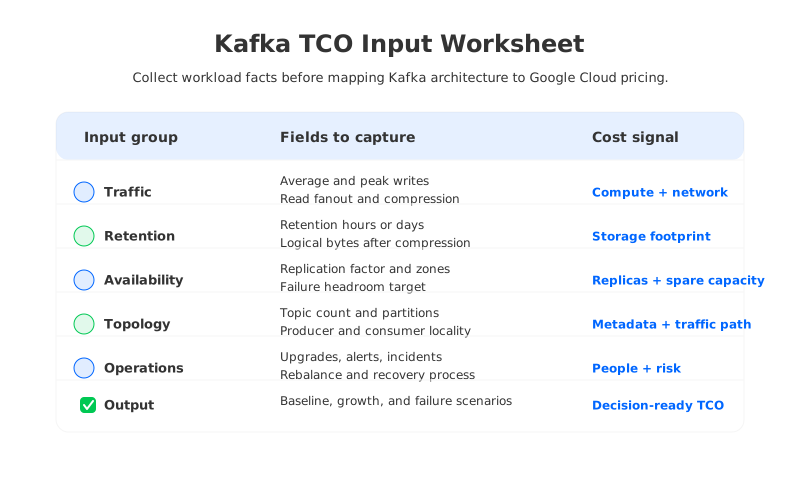
A Kafka cost calculator is only as useful as the inputs behind it. That sounds obvious until a spreadsheet treats "three brokers in GCP" as a cost model. Broker count is an output, not an input. The real inputs are workload shape, retention, replication, availability design, and network paths.
This distinction matters because Kafka turns one logical stream into several billable resource flows. A producer write becomes broker CPU, disk append, retained storage, replication traffic, consumer read traffic, monitoring data, and sometimes rebalancing traffic. Google Cloud then prices those flows through Compute Engine, GKE, Persistent Disk, Cloud Storage, networking, Private Service Connect, or Google Cloud Managed Service for Apache Kafka. The calculator can do arithmetic, but the architecture decides which arithmetic applies.
1Why Kafka TCO Estimates Are Often Wrong
Most wrong Kafka estimates are not wrong because someone used a bad formula. They are wrong because the formula started too late. If the estimate begins with instance type and disk size, it has already assumed a storage model, replication model, utilization target, and failure strategy. Those hidden assumptions are where the bill changes.
Consider a platform team estimating a GCP Kafka cluster for event ingestion. The first pass might ask for average write throughput and retention. That is useful, but incomplete. A production estimate also needs the peak-to-average ratio, consumer fanout, compression ratio, partition count, inter-zone placement, recovery headroom, and whether reads are local to the leader zone.
Google Cloud's pricing pages reinforce this point. Managed Service for Apache Kafka pricing depends on cluster capacity, storage, and networking. Compute Engine and GKE pricing depend on machine families, nodes, and operating mode. Cloud Storage and Persistent Disk pricing depend on region, storage class, and usage. A calculator should behave less like a quote form and more like a workload worksheet with pricing pages attached.
The useful mental model is simple: first collect workload facts, then map those facts to architecture, then map architecture to cloud SKUs. Reversing that order makes the estimate fragile.
2Workload Inputs to Collect
Before opening a pricing page, write down the workload in units that Kafka and GCP can both understand. MiB/s is better than vague traffic labels. Hours or days of retention are better than "short" or "long." A read fanout ratio is better than "several consumers."
| Input | Why it matters | Typical cost driver |
|---|---|---|
| Average write throughput | Baseline append, replication, and storage growth | Compute, disk, network |
| Peak write throughput | Capacity that must exist during bursts | Provisioned brokers or managed capacity |
| Read fanout | Consumer reads can exceed producer writes | Broker CPU and network |
| Retention window | Converts write rate into retained bytes | Persistent Disk or object storage |
| Replication factor | Multiplies broker-local copies in traditional Kafka | Storage and inter-zone traffic |
| Zone layout | Determines availability and traffic paths | Cross-zone network and spare capacity |
| Partition count | Drives metadata, file handles, broker load, and rebalance behavior | Compute and operations |
| Compression ratio | Changes retained bytes and network volume | Storage and CPU |
The table is intentionally mundane. That is the point. A Kafka cost calculator needs inputs that match how Kafka produces resource pressure. If your organization cannot answer every row with production data, label the unknowns explicitly and run low, expected, and high scenarios.
3Throughput and Read Fanout
Write throughput is the anchor input because it drives almost everything else. If a workload writes 50 MiB/s, it produces about 4.2 TiB of logical data per day before compression effects and metadata overhead. That is not a GCP bill; it is the conversion step that lets you estimate storage, replication, and traffic with a shared baseline.
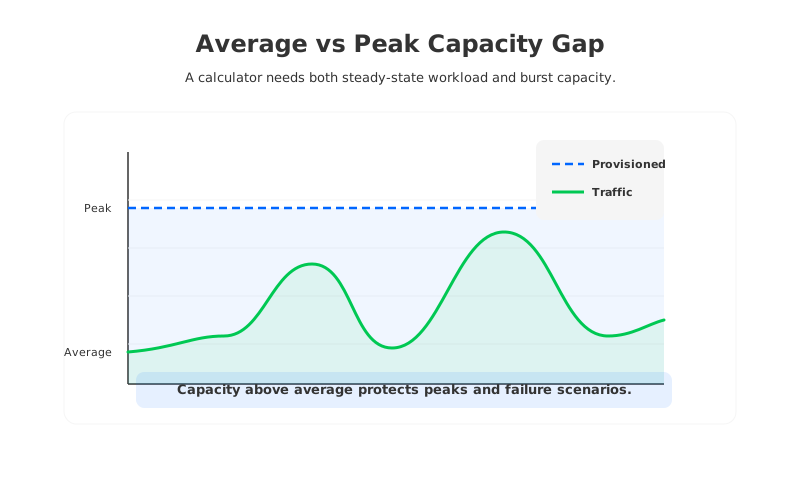
Peak throughput deserves its own field because Kafka clusters are usually provisioned for peaks, not averages. A cluster averaging 50 MiB/s but peaking at 200 MiB/s has a different capacity profile from a cluster that sits near 50 MiB/s all day. Using only average throughput understates headroom; using only peak throughput overstates steady-state cost.
Read fanout is the quiet multiplier. A topic written once may be consumed by fraud detection, analytics, observability, CDC sinks, search indexing, and replay jobs. Each consumer group can create additional broker read load and network egress. Follower fetching and rack-aware placement can reduce unnecessary cross-zone reads, but only when clients and deployment topology are designed around locality.
4Retention, Replication, and Storage
Retention turns throughput into storage. Apache Kafka topic configuration includes settings such as retention.ms and retention.bytes, which control how long or how much log data is retained. In self-managed Kafka with broker-local storage, retained logical data is then multiplied by replication factor. Replication factor 3 is common for production durability, so a logical byte can become three broker-local bytes before spare disk headroom.
That spare headroom is not decorative. Kafka needs free disk for segment rolling, compaction, leader movement, broker replacement, and operational mistakes. A disk that looks efficient at 90 percent utilization may be fragile, so use explicit disk utilization assumptions instead of letting provisioned storage equal retained bytes.
The storage input changes when the architecture changes. In traditional Kafka, hot and retained data both live on broker disks unless tiered storage is configured. In a shared-storage Kafka architecture, the durable data path moves to object storage while brokers hold compute, cache, and write-ahead-log responsibilities. That changes the estimate from "replicated broker disks sized for retention" to a mix of object storage, WAL, cache, broker compute, and read patterns.
AutoMQ fits into this category: it is a Kafka-compatible streaming system that separates broker compute from durable storage backed by object storage. For a GCP estimate, that means the calculator should stop treating broker-local disk replicas as the default way to price retention.
5Peak Capacity and Zones
Availability design is a cost input, not a checkbox. A single-zone cluster avoids some inter-zone complexity, but production Kafka often needs multi-zone resilience. Once brokers, replicas, producers, and consumers span zones, the calculator has to model where data moves. Producer traffic, replica traffic, consumer traffic, and failover traffic are not the same path.
Google Cloud network pricing should be checked for the exact region and direction, especially when traffic crosses zones, regions, VPC boundaries, or service attachment paths. Treat "inside GCP" as a location category, not a price category.
Peak capacity also interacts with failure headroom. If a three-zone cluster must survive the loss of one zone, the remaining zones need enough spare capacity to absorb leaders, traffic, and client reconnections. A calculator that prices only normal steady state will look attractive until the first maintenance event forces emergency scaling.
6GCP Infrastructure Inputs
After the worksheet is clear, map it into the GCP resources your architecture uses. Self-managed Kafka on Compute Engine has the most visible mapping: VM shape, boot disk, data disk, network, monitoring, and operational labor. Kafka on GKE adds node pools, Kubernetes control plane or Autopilot economics, persistent volumes, operator management, and upgrade windows.
Managed Service for Apache Kafka changes the mapping again. Instead of pricing every broker VM yourself, you evaluate the official managed-service pricing dimensions and utilization guidance. That can be the right trade-off when operational simplicity matters more than infrastructure-level control, but it still needs the same workload inputs. A managed service cannot infer your retention strategy, consumer fanout, or peak failure scenario from a topic name.
For a calculator, separate GCP inputs into four groups:
- Compute inputs: VM family or managed cluster capacity, CPU utilization target, memory requirements, and spare capacity for maintenance.
- Storage inputs: Persistent Disk or object storage class, retained bytes, replication factor, utilization target, cache sizing, and write-ahead-log design.
- Network inputs: producer ingress, replication traffic, consumer egress, inter-zone movement, Private Service Connect, and external egress.
- Operations inputs: monitoring, alerting, upgrades, security patching, backup process, incident response, and time spent on capacity planning.
These groups keep the estimate readable. They also prevent a common mistake: treating the lowest infrastructure SKU as the lowest TCO. Kafka is rarely constrained by one resource at a time. A lower-priced VM that forces lower utilization, more brokers, or more operational work may not be lower cost once the whole system is modeled.
7Traditional Kafka vs Shared-Storage Cost Inputs
Traditional Kafka and shared-storage Kafka can serve the same Kafka clients, but their cost calculators should not ask the same questions in the same order. Traditional Kafka starts from broker-local replicas: brokers, disk per broker, replica count, network traffic between replicas, and headroom for reassignment. Shared-storage Kafka starts from durable storage decoupled from broker identity: object storage, WAL, cache, broker compute, and how quickly compute can scale.
That difference becomes visible during growth. In traditional Kafka, adding retention can require more broker disks or more brokers. Replacing a broker can involve moving large amounts of data. In a shared-storage architecture, durable data is not tied to a broker's local disk in the same way, so scaling and recovery estimates shift toward compute elasticity, cache hit rate, object-storage operations, and network paths.
The comparison is not "one model has costs and the other does not." Both models have costs. The question is which model converts your workload into the least waste and the least operational risk. Retention-heavy workloads expose over-provisioning. Replay-heavy analytics exposes read-path and cache assumptions. Strict multi-zone workloads expose replication and network assumptions.
8A Three-Step TCO Method
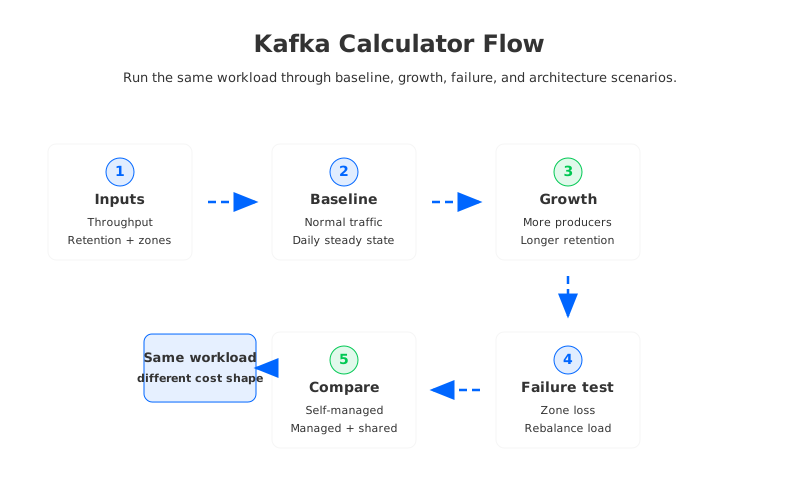
Once the inputs are collected, run the estimate in three passes. The first pass is the baseline: normal daily throughput, expected retention, current consumer fanout, and normal zone placement. This gives finance teams the steady-state number they expect.
The second pass is the growth scenario. Increase throughput, retention, partitions, and consumer fanout according to the growth you actually expect. Do not increase only one variable. Kafka workloads often grow in correlated ways: more producers create more topics, more data creates more downstream consumers, and longer retention creates more replay use cases.
The third pass is the failure or maintenance scenario. Remove a broker or a zone from the capacity model, then ask whether the remaining infrastructure can carry the load. Add temporary rebalancing traffic and operational work.
9Calculator Checklist
A practical Kafka on GCP cost calculator should leave you with a worksheet that an architect, SRE, and finance stakeholder can all read. If it cannot show which assumption drives which cost, it is hard to trust the output or improve it.
Use this checklist before you treat any estimate as decision-ready:
- Does the estimate separate average and peak throughput?
- Does it include read fanout, not only producer ingress?
- Does it convert retention into retained bytes before applying replication or storage architecture?
- Does it model multi-zone traffic and failure headroom?
- Does it distinguish broker-local, tiered, and shared object storage?
- Does it include operational work for self-managed Kafka?
- Does it use current official GCP pricing pages rather than copied unit rates?
- Does it show assumptions clearly enough for another team to challenge them?
A good calculator is not a black box that produces a number. It is a decision model that exposes which workload facts, architectural choices, and cloud pricing dimensions created that number.
10Where AutoMQ Fits in the Estimate
AutoMQ is useful to consider after the workload model exposes why the traditional estimate is high or operationally brittle. If the cost is dominated by replicated broker disks, over-provisioned peak capacity, long retention, or slow recovery after broker replacement, the storage architecture is part of the problem.
Because AutoMQ is Kafka-compatible, the evaluation can stay grounded in Kafka workload inputs rather than an application rewrite. Existing Kafka clients and ecosystem tools remain relevant, while the cost model shifts toward object storage, WAL, cache, broker compute, and cloud-network assumptions. That is why AutoMQ's pricing calculator asks for workload fields such as throughput, fanout, request rate, partitions, retention, availability zones, and architecture assumptions instead of starting from a fixed broker count.
For teams building a GCP Kafka business case, the natural next step is to run the same workload through more than one architecture model. Price self-managed Kafka, managed Kafka, and shared-storage Kafka with the same traffic and retention inputs. The comparison shows which architecture absorbs growth, peaks, and failure scenarios with less waste. Start from the AutoMQ pricing page or review the AutoMQ architecture overview to map the same inputs into a shared-storage Kafka model.
11References
- Google Cloud Managed Service for Apache Kafka pricing
- Google Cloud Pub/Sub pricing
- Google Cloud Compute Engine VM pricing
- Google Kubernetes Engine pricing
- Google Cloud Storage pricing
- Google Cloud network pricing
- Apache Kafka documentation
- AutoMQ pricing page
- AutoMQ architecture overview
12FAQ
12.1What is the most important input for a Kafka on GCP cost calculator?
Write throughput is the anchor input, but it is not enough by itself. A useful estimate also needs peak throughput, read fanout, retention, replication factor, compression, and zone layout.
12.2Should I use average throughput or peak throughput?
Use both. Average throughput helps estimate steady-state storage and utilization. Peak throughput helps estimate provisioned capacity, network headroom, and failure tolerance.
12.3How does replication factor affect Kafka cost on GCP?
In traditional Kafka, replication factor multiplies broker-local storage and can increase cross-zone replication traffic when replicas are spread across zones. Model it as a storage and network multiplier, not as a small configuration detail.
12.4Is managed Kafka on GCP always lower TCO than self-managed Kafka?
Not always. Managed Kafka can reduce operational work, but final TCO depends on workload shape, utilization, storage, networking, and the value your team places on managed operations.
12.5How is a shared-storage Kafka calculator different?
A shared-storage Kafka calculator should focus less on broker-local disk replicas and more on object storage, write-ahead log, cache, broker compute, network paths, and elasticity.
12.6Can Pub/Sub pricing replace a Kafka cost calculator?
No. Pub/Sub can be relevant in a broader GCP messaging evaluation, but it does not replace a Kafka TCO model because compatibility, retention behavior, client ecosystem, partitioning, and operational requirements differ.


