
Table of Contents
Table of Contents
Kafka on GCP cost is rarely a single line item. A production Kafka budget is a stack of compute, storage, replication, network paths, retention, consumer fan-out, operational labor, and migration overlap. That is why two teams can both say "100 MiB/s Kafka" and end up with very different Google Cloud bills.
Google's own Managed Service for Apache Kafka pricing page makes the point clearly. Its sample comparison for us-central1 estimates roughly \$0.9K/month for Apache Kafka on Compute Engine and \$1.1K/month for Managed Service for Apache Kafka at 10 MiB/s producer bandwidth, and roughly \$9.1K/month versus \$11K/month at 100 MiB/s. The assumptions matter as much as the numbers: three replicas across three zones, 24-hour storage, local follower reads to reduce cross-zone transfer, consumer bandwidth equal to producer bandwidth, N2 instances for self-managed Kafka, and 50% CPU and RAM utilization.
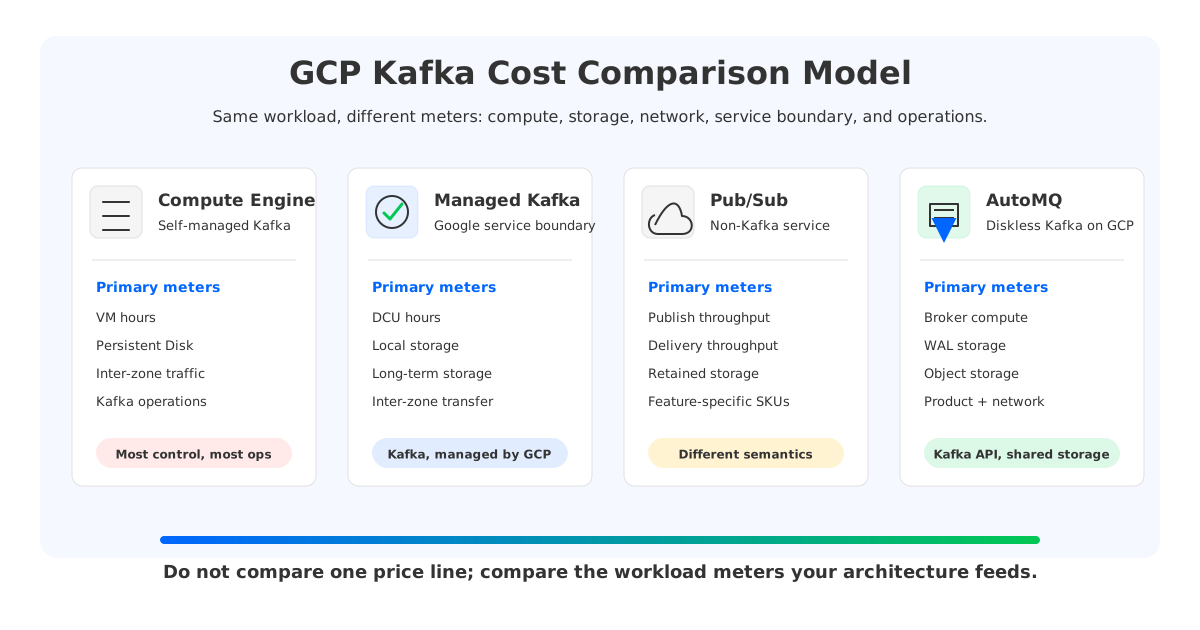
That estimate is useful because it is specific. It is also narrow. Change retention from 24 hours to 14 days, add three independent consumer groups, remove local follower reads, increase replication traffic, or run with lower utilization, and the cost shape changes. Pub/Sub changes the semantic model. Diskless Kafka changes the storage model. The right first question is not "which option has a lower bill?" It is "which meter does my workload naturally feed?"
1The Cost Components That Matter
Kafka cost on Google Cloud starts with six workload facts. Most pricing mistakes come from treating only one of them, usually producer throughput, as the whole model. Throughput is important, but it is only the entry point into a larger equation.
| Cost driver | Why it changes the bill | Where it shows up |
|---|---|---|
| Producer ingress | Drives broker CPU, network, write path, and storage growth | Compute Engine, Managed Kafka, Pub/Sub, AutoMQ |
| Consumer fan-out | Each independent read path can add delivery throughput, broker load, and network movement | All options, especially Pub/Sub billing and Kafka-heavy replay workloads |
| Retention | Determines how many bytes remain durable after the hot path | Persistent Disk, Managed Kafka storage, Pub/Sub retained storage, Cloud Storage-backed systems |
| Replication and availability | Multi-zone durability creates additional writes, replicas, and sometimes inter-zone transfer | Kafka on Compute Engine, Managed Kafka, diskless Kafka WAL/storage choices |
| Utilization and headroom | Kafka clusters are usually sized for peaks, failures, and rebalance safety, not average load | Compute and storage capacity planning |
| Operations | Upgrades, rebalancing, incident response, quota planning, and migration all have human cost | Highest for self-managed, reduced but not removed for managed options |
The uncomfortable part is that these drivers multiply. A topic written once, retained for 24 hours, and read by one nearby consumer is a different economic object from a compliance topic retained for a year and read by ten services during incident replay. Both may use Kafka APIs. They should not share the same cost assumption.
2Self-Managed Kafka on Compute Engine
Self-managed Kafka on Compute Engine gives teams maximum control and maximum responsibility. You choose machine families, disk types, zones, broker count, Kafka version, JVM settings, partition placement, security, monitoring, Cruise Control or an equivalent balancing strategy, backup strategy, and upgrade cadence. That control can be valuable when the team already has deep Kafka runbooks or needs a configuration that does not fit a managed service boundary.
The bill starts with Compute Engine VMs and attached storage, then grows through the Kafka storage model. Kafka stores topic partitions on broker-attached disks and uses replica copies for durability. A replication factor of three means the cluster stores three physical copies of retained data before considering filesystem overhead, disk utilization targets, compaction behavior, and operational headroom. In a multi-zone deployment, those replicas also create real network paths.
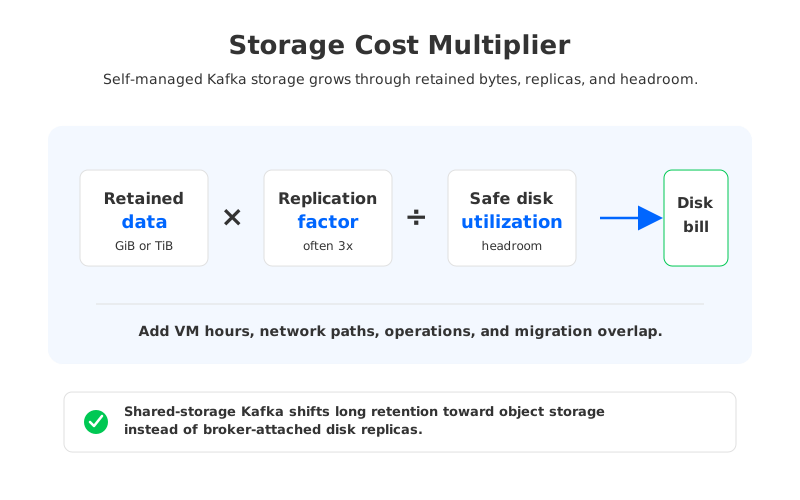
The storage worksheet should use retained bytes, not only daily ingest. A simplified model looks like this:
logical retained data
  x replication factor
  / safe disk utilization
  x storage price
  + compute, network, operations, and migration overlap
If a workload writes 10 TiB/day and keeps only one day, storage may not dominate. If it keeps 30 days, the same write rate becomes a storage architecture discussion. Persistent Disk capacity is provisioned and attached to VMs, so teams often carry spare capacity for broker failure, partition imbalance, and growth. That spare capacity is not waste in the operational sense; it is the safety margin that lets a stateful Kafka cluster survive real production events.
The operational line is harder to put in a spreadsheet, but ignoring it produces bad procurement decisions. Self-managed Kafka on GCP means your team owns broker replacement, ISR health, disk expansion, partition reassignment, rolling upgrades, client compatibility, certificate rotation, quota management, and incident drills. If the platform team is already doing that well, Compute Engine can be a rational choice. If the team is trying to reduce Kafka-specific operations, the low service price is only part of the story.
3Google Managed Service For Apache Kafka
Google Managed Service for Apache Kafka is the closest option when the requirement is "Apache Kafka, but managed by Google Cloud." It keeps the Kafka API and Kafka mental model while moving more cluster operations into a Google-managed service. The pricing model uses Data Compute Units for CPU and RAM, local storage, long-term storage, and inter-zone data transfer.
Google defines one Data Compute Unit as a simple abstraction where one vCPU with 4 GiB of RAM corresponds to one DCU. On the pricing page's us-central1 snapshot, the default CPU+RAM line is \$0.09/hour per DCU, local storage is priced per GiB-hour, long-term storage is priced per GiB-hour, and inter-zone data transfer is listed at \$0.01/GiB. Those are public price-page figures as of May 21, 2026; teams should recheck the live page before procurement because region, discounts, and packaging can change.
Managed Kafka reduces several operational burdens, but it does not erase workload physics. The same drivers still matter:
- Throughput and DCUs. Producer and consumer traffic need enough CPU and memory, and the service meter reflects that capacity.
- Retention. Short hot retention and long retained history land in different storage lines. Long retention should be modeled explicitly rather than assumed to be a rounding error.
- Inter-zone movement. Google's sample assumes local follower reads to minimize cross-zone data transfer. If consumers read across zones or topology is not aligned, the network line can move.
- Service limits and fit. Managed services simplify operations inside their supported envelope. They do not remove the need to validate quotas, Kafka version behavior, authentication, monitoring, and operational runbooks.
The main tradeoff is clear. Managed Kafka is often preferable to self-managed Compute Engine when the team wants Kafka semantics without owning every broker operation. It is not automatically the lowest-cost option, and it is not meant to be a generic event bus replacement for every GCP workload. It is managed Apache Kafka, so the evaluation should still start from Kafka workload facts.
4Pub/Sub As A Non-Kafka Alternative
Pub/Sub belongs in the comparison because many GCP teams ask whether they need Kafka at all. It is not Kafka. That distinction is not a footnote; it is the whole decision.
Pub/Sub pricing is built around usage-based service meters: message publishing and delivery throughput, data transfer when traffic crosses zone or region boundaries, and storage for retained messages. Google's Pub/Sub pricing page states that the first 10 GiB per billing account for the Message Delivery Basic SKU is free each calendar month, then throughput is priced at \$40/TiB in all Google Cloud regions. Pub/Sub also has message size accounting rules and feature-specific charges such as transforms, import topics, export subscriptions, filtered messages, and retained storage.
That model can be excellent when the application wants a cloud-native pub/sub service more than it wants Kafka compatibility. Pub/Sub removes broker management, partition planning, and many Kafka-specific operations. It also changes semantics and ecosystem assumptions. Kafka applications often depend on consumer group behavior, ordered partition logs, offset management, Kafka Connect, Kafka Streams, admin APIs, topic-level configuration, and a mature Kafka observability stack. Replacing that with Pub/Sub may be a product migration, not an infrastructure swap.
Use Pub/Sub as the first candidate when the application can accept Pub/Sub semantics and the goal is managed event delivery on Google Cloud. Keep Kafka or Kafka-compatible systems in the shortlist when the workload needs:
- Existing Kafka clients, connectors, or stream processors with limited rewrite appetite.
- Partitioned logs with explicit offset and replay behavior that applications already rely on.
- Kafka ecosystem compatibility across hybrid cloud, multi-cloud, or self-managed environments.
- Operational continuity during migration from an existing Kafka estate.
The cost comparison should respect that boundary. Comparing \$40/TiB Pub/Sub throughput directly against Kafka broker or storage prices can mislead both finance and engineering teams because the billing unit and the application contract are different.
5Diskless Kafka And AutoMQ On GCP
Diskless Kafka changes the cost model by changing where durable data lives. Traditional Kafka treats broker-local storage as the center of gravity. Tiered storage can move older segments to object storage, but the broker-local log remains part of the primary operating model. Diskless or shared-storage Kafka moves durable data into object storage and keeps brokers closer to stateless compute.
AutoMQ follows that shared-storage pattern. Its documentation describes a Kafka-compatible architecture where S3Stream replaces Kafka's local log storage, object storage is the primary durable repository, and WAL storage provides low-latency persistence and failure recovery before data is uploaded to object storage. AutoMQ deployment documentation also describes support for public clouds including GCP, with deployment on Kubernetes such as GKE.
On GCP, that means the worksheet shifts from "how much Persistent Disk do my brokers need for all retained replicas?" toward a split model:
| Layer | Cost question | Why it matters |
|---|---|---|
| Stateless broker compute | How much CPU, memory, and network capacity does the workload need at peak and during replay? | Compute can scale closer to workload demand when retained data is not bound to broker disks |
| WAL storage | What write latency, durability, and recovery profile does the deployment require? | WAL handles low-latency persistence and failure recovery for data not yet uploaded |
| Object storage | How much retained data lives in Cloud Storage or S3-compatible storage, and how often is it read? | Long retention can move toward object-storage economics instead of broker-attached disk economics |
| Network paths | Where are producers, brokers, object storage, and consumers placed? | Zone and region placement still affect cost and latency |
| Service or license fee | Which AutoMQ deployment and commercial model applies? | Product packaging must be included beside cloud infrastructure cost |
This is not a claim that diskless Kafka is always the lowest-cost answer. For very small clusters, short retention, and steady utilization, the operational simplicity of a managed service may matter more than storage architecture. For workloads with long retention, bursty traffic, frequent scaling, high replay demand, or painful broker rebalancing, the architectural difference becomes more important. When retained data is not owned by specific broker disks, scaling and replacement can avoid moving the full retained log between brokers.
The practical advantage is optionality. Teams that need Kafka compatibility can evaluate a shared-storage architecture without rewriting applications to Pub/Sub semantics. Teams that are already on GCP can model Compute Engine or GKE compute, WAL choices, object storage, and network placement separately instead of stuffing every cost into broker-local disk capacity.
6Cost Worksheet
Start with a dated region and write down the assumptions before comparing options. A useful first pass for GCP should fit on one page, but it must include enough dimensions to catch the hidden multipliers.
| Worksheet field | What to capture | Notes |
|---|---|---|
| Region and zones | Example: us-central1, three-zone deployment | Pricing and network paths are region-sensitive |
| Producer ingress | Average and peak MiB/s, compressed and uncompressed if available | Needed for compute, storage growth, and service meters |
| Consumer fan-out | Number of independent consumer groups and replay behavior | Pub/Sub delivery and Kafka broker load both depend on reads |
| Retention | Hot retention, long retention, compaction, compliance topics | The biggest swing factor for storage architecture |
| Replication and availability | Kafka replication factor, zone placement, follower-read strategy | Determines physical copies and inter-zone movement |
| Utilization target | CPU, memory, disk, and network headroom | Google's sample uses 50% CPU and RAM utilization |
| Operations boundary | Self-managed, Google-managed, Pub/Sub, AutoMQ BYOC or managed model | Determines who owns upgrades, incidents, and service limits |
| Migration overlap | Dual-running period, replication tooling, validation, rollback | Often missing from monthly steady-state estimates |
Then map the same workload into four cost shapes:
- Compute Engine Kafka: VM hours, Persistent Disk capacity and throughput, inter-zone traffic, load balancing, monitoring, backup, upgrades, and platform labor.
- Google Managed Kafka: DCUs, local storage, long-term storage, inter-zone data transfer, service limits, and Google-managed operating boundary.
- Pub/Sub: publish throughput, delivery throughput, retained storage, data transfer, transforms/import/export/filtering behavior, and application migration work.
- AutoMQ or diskless Kafka: broker compute, WAL storage, object storage, network paths, product fee, and migration validation for Kafka-compatible clients.
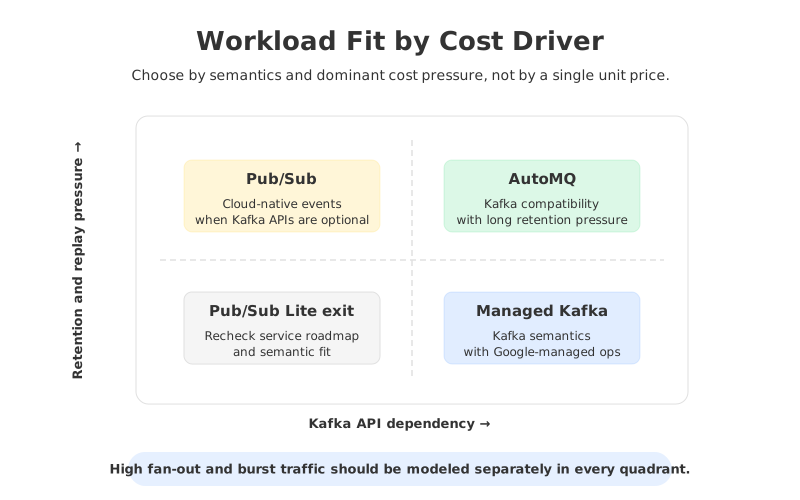
The most useful output is not a universal ranking. It is a workload-specific answer: "for this region, this retention, this fan-out, this SLO, and this migration constraint, this option has the cleanest cost-risk tradeoff." That answer is much more defensible than a vendor-by-vendor price table built from mismatched units.
7Sources
- Google Cloud Managed Service for Apache Kafka pricing
- Google Cloud Pub/Sub pricing
- Google Cloud Compute Engine resources and pricing references
- Google Cloud Storage pricing
- Google Cloud networking pricing
- AutoMQ deployment overview
- AutoMQ stateless broker
- AutoMQ WAL storage
- AutoMQ shared storage architecture overview
- AutoMQ pricing
8FAQ
8.1How much does Kafka on GCP cost?
It depends on throughput, retention, replication, consumer fan-out, region, utilization, and operating model. Google's Managed Service for Apache Kafka pricing page gives a useful us-central1 example: at 10 MiB/s producer bandwidth, it estimates about \$0.9K/month for Apache Kafka on Compute Engine and \$1.1K/month for Managed Kafka under specific assumptions. Treat that as a starting point, not a universal quote.
8.2Does Google Managed Service for Apache Kafka cost less than self-managed Kafka on Compute Engine?
Not always. Managed Kafka can reduce operational burden, but its direct service cost may be higher or lower depending on workload shape, discounts, utilization, storage, and network paths. A fair comparison should include both cloud resources and the cost of running Kafka safely.
8.3Is Pub/Sub a replacement for Kafka on GCP?
Pub/Sub can replace Kafka for applications that can accept Pub/Sub semantics. It is not a drop-in Kafka replacement for workloads that depend on Kafka clients, offsets, partitions, Kafka Connect, Kafka Streams, or Kafka-specific admin and monitoring behavior.
8.4Why does retention change Kafka cost so much?
Kafka stores retained logs as durable data, and traditional Kafka usually stores multiple replicas on broker-attached disks. Longer retention multiplies storage capacity, spare headroom, recovery work, and sometimes network movement. That is why a one-day operational topic and a one-year audit topic should be modeled separately.
8.5What is diskless Kafka?
Diskless Kafka usually refers to a Kafka-compatible architecture where durable data is not primarily bound to broker-local disks. AutoMQ uses object storage as the primary durable repository and WAL storage for low-latency persistence and recovery, making brokers closer to stateless compute.
8.6When should AutoMQ be considered for Kafka on GCP?
Consider AutoMQ when the workload needs Kafka compatibility but the cost pressure comes from long retention, bursty traffic, scaling, broker replacement, or data movement. It should be validated with the same rigor as any Kafka migration: client behavior, security, topic configuration, latency, replay, observability, and rollback.


