
Table of Contents
Table of Contents
Most searches for Kafka on S3 are not about copying a few topic records into a bucket. They come from teams that already trust Apache Kafka as an application contract, but no longer like the way broker disks behave in the cloud. Storage grows faster than compute, broker replacement turns into data movement, cross-AZ replication can shape the bill, and long retention makes every local-disk decision more permanent than expected.
The phrase is also overloaded. Kafka S3 can mean a Kafka Connect sink that exports events to a data lake, Tiered Storage that moves older log segments to remote storage, or a Kafka-compatible architecture where brokers use S3-compatible object storage as the durable storage foundation. Those are different designs with different failure modes.
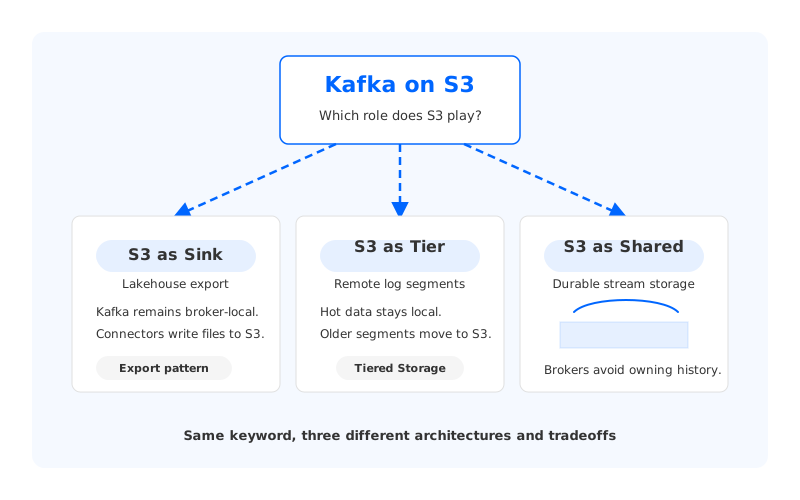
The useful question is not whether Kafka can touch S3. It clearly can, through connectors, remote log storage integrations, and S3-backed systems. The useful question is what role S3 plays in the architecture: downstream destination, cold tier, or primary shared storage.
1What "Kafka on S3" Can Mean
When an architect says "Kafka on S3," ask which data path they mean before choosing tools or estimating cost. Three patterns appear again and again.
1.1S3 as Sink or Lakehouse Export
In the first pattern, Kafka remains a broker-local streaming system. Producers write to Kafka topics, consumers read from Kafka, and a connector writes selected records into S3 as files. This is the common lakehouse export pattern for analytics, audit archives, machine learning feature pipelines, and downstream batch processing.
This pattern is valuable, but it does not make Kafka itself run on S3. The Kafka cluster still stores its log on broker-attached storage. If a broker fails, if a topic's retention grows, or if a partition needs reassignment, the operational work still belongs to Kafka's local storage model.
Use this pattern when the main goal is data movement:
- Land events in S3 for Athena, Spark, Trino, Snowflake, Databricks, Iceberg, or offline processing.
- Keep Kafka retention short while a lake or warehouse owns longer-term history.
- Decouple streaming ingestion from analytical file layout and compaction.
The tradeoff is semantic split-brain. Applications that need Kafka offsets, ordering per partition, consumer groups, and replay from the original topic still depend on Kafka retention. The S3 copy is a downstream representation, not the Kafka log.
1.2S3 as Tiered Storage
Tiered Storage is closer to what many people intend by kafka s3 storage. Apache Kafka's KIP-405 describes a local tier and a remote tier: recent segments stay on broker local storage, while older completed segments can move to systems such as S3. The goal is to reduce local storage pressure while preserving the Kafka log abstraction for longer retention.
This is an important architectural step. Retained history no longer has to occupy the same amount of primary broker disk as hot data, and backfill consumers can fetch older data through Kafka rather than through a separate export path.
Tiered Storage does not make brokers fully stateless. Brokers still manage local log segments, leader/follower replication, local retention, remote segment metadata, and the active write path. Recovery and scaling behavior improves for historical data, but the hot tier remains a broker-local Kafka system.
1.3S3 as Shared Storage for Kafka-Compatible Brokers
The third meaning is the most architecture-changing: S3-compatible object storage becomes the durable storage layer behind Kafka-compatible brokers. Instead of treating S3 as a downstream destination or an older-segment tier, the system uses shared storage as the source of durable stream data. Brokers focus on Kafka protocol handling, partition leadership, caching, write staging, and coordination.
This design is not a connector and not ordinary Tiered Storage. It asks a different question: what if the durable log is no longer permanently owned by a broker's local disk?
That question matters when teams want Kafka API compatibility but dislike the coupling between compute and storage. The design has to solve hard problems that ordinary object storage does not solve by itself: low-latency acknowledgments, ordered append, metadata consistency, cache behavior, catch-up reads, failure recovery, and object layout. S3 is durable object storage; it is not a Kafka log unless a storage engine makes it behave like one.
2Why Traditional Kafka Storage Is Hard in the Cloud
Traditional Kafka uses a Shared Nothing architecture. Each broker owns local log data for its assigned partitions. Durability comes from ISR (In-Sync Replicas), where followers copy data from partition leaders and remain eligible for failover when they stay caught up. This model is elegant for many workloads and has a long operational track record, but its storage assumptions become expensive to reason about in elastic cloud environments.
The pain usually appears in four places.
First, storage and compute scale together. If a cluster needs more retained bytes, the common answer is larger disks or more brokers. More brokers also bring more CPU, memory, networking, and operational surface, even if the dominant pressure is storage capacity.
Second, recovery is data movement. When a broker is replaced, replicas have to catch up. When partitions are redistributed, data has to move. The more local data each broker owns, the more operational time and network capacity the platform spends returning to a balanced state.
Third, multi-AZ resilience changes the bill. Kafka replication across Availability Zones is often the right reliability choice, but it also means traffic paths and storage replicas must be understood.
Fourth, retention changes from a topic setting into an infrastructure commitment. A 24-hour operational stream, a 30-day CDC replay buffer, and a 180-day audit topic may all be Kafka topics, but they should not force the same storage architecture. Long retention multiplies the impact of broker-local ownership.
The result is a familiar platform tension: application teams want Kafka's semantics and replay model, while infrastructure teams want cloud-native elasticity and a storage cost profile closer to object storage.
3Tiered Storage vs S3-Backed Shared Storage
Tiered Storage and S3-backed shared storage both use object storage, so they are easy to confuse. The distinction is where the durable truth of the log lives and how much broker-local state remains on the critical path.
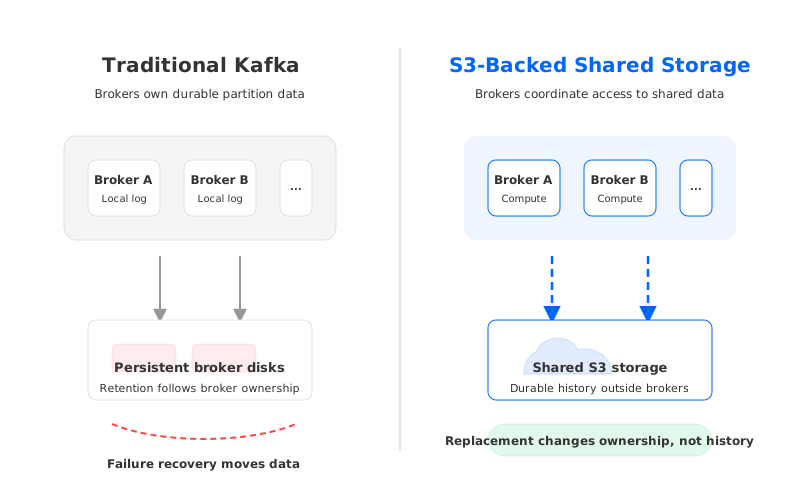
Tiered Storage begins with traditional Kafka and adds remote storage for older log segments. It is a storage hierarchy: hot data on local broker storage, historical data in remote storage. That can be the right answer when the main issue is long retention, and when the team is comfortable keeping broker-local storage as the active write and hot-read layer.
S3-backed shared storage begins from another premise. Durable stream data belongs in a shared storage layer, while brokers should be replaceable compute nodes. The broker may still use WAL storage, cache, memory, or local resources, but it is not supposed to be the long-term owner of partition history.
| Dimension | Tiered Storage | S3-backed shared storage |
|---|---|---|
| Primary design center | Extend Kafka retention beyond local disk | Separate durable storage from broker compute |
| Role of S3 | Remote tier for older segments | Durable shared storage foundation |
| Broker state | Still owns active local log data | Avoids permanent ownership of retained data |
| Scaling pressure | Hot tier and partition placement still matter | Compute can scale closer to active workload |
| Best fit | Long retention with familiar Kafka operations | Elastic Kafka-compatible workloads with large retained history |
Neither pattern removes the need for engineering discipline. Tiered Storage needs remote log metadata, local and remote retention policies, and fetch guardrails. Shared storage needs a purpose-built streaming storage layer, because object storage APIs alone do not provide Kafka's log semantics.
The wrong conclusion is "S3 is lower-cost, so Kafka should write directly to S3." The better conclusion is more precise: object storage can be the right durable layer when the system also handles append, acknowledgement, metadata, cache, and failure recovery with Kafka semantics in mind.
4When AutoMQ's Object-Storage-Backed Architecture Fits
AutoMQ fits into the third category: a Kafka-compatible cloud-native streaming system that replaces Kafka's local log storage with S3Stream, a shared streaming storage library built around object storage, WAL storage, and data caching. That makes it relevant when the design goal is not "export Kafka data to S3," but "keep Kafka APIs while removing broker-local persistent data as the center of the architecture."
The product should enter the evaluation only after the architecture problem is clear. If your current Kafka platform is healthy, retention is short, replay is rare, and broker replacement is uneventful, a traditional Kafka deployment may be entirely reasonable. If the pain comes from storage-bound scaling, long retention, multi-AZ data movement, or slow reassignment, then a shared-storage Kafka-compatible architecture deserves evaluation.
In AutoMQ's architecture, brokers remain compatible with Kafka clients and ecosystem tools, while S3Stream provides stream-oriented append, fetch, trim, and position management on top of object storage. WAL storage handles the immediate durability path before data is organized into S3 storage. Data caching helps serve Tailing Read and Catch-up Read patterns without assuming every read should hit object storage directly.
For cloud architects, the important boundary is this: S3 storage is the durable foundation, but WAL and cache are not optional implementation details. They are what make object storage usable for streaming workloads instead of treating it like a file dump.
This is also why "Kafka with S3 storage architecture" should be evaluated with real workload tests. Validate producer acknowledgments, consumer lag behavior, offset reset, connector compatibility, catch-up reads, broker replacement, and scaling events.
5Decision Checklist
Use this checklist to decide which meaning of Kafka on S3 matches your actual goal.
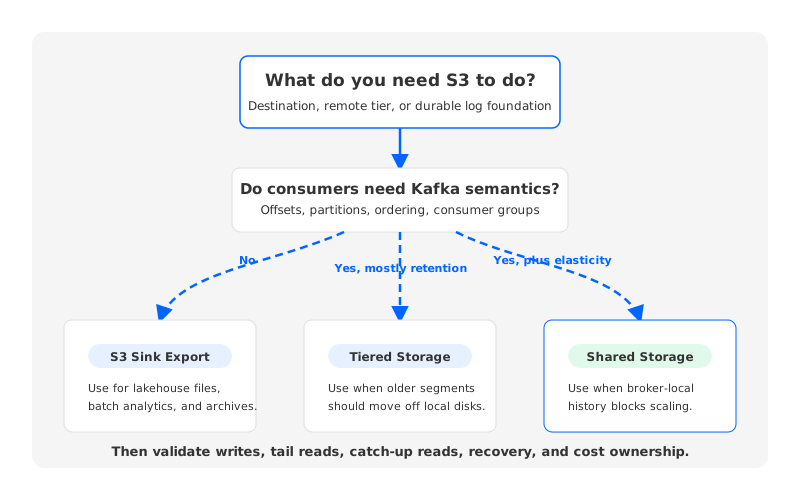
| Question | If yes | Likely pattern |
|---|---|---|
| Do you need analytics files in S3 while Kafka remains the real-time system? | Build or operate an S3 sink pipeline | Kafka Connect or sink export |
| Do you need longer Kafka replay without keeping all history on broker disks? | Evaluate remote log storage maturity and read behavior | Tiered Storage |
| Is broker-local persistent data the scaling or recovery bottleneck? | Evaluate Kafka-compatible shared storage | S3-backed shared storage |
| Do applications require Kafka protocol, offsets, partitions, and consumer groups? | Keep Kafka compatibility in the design | Tiered Storage or shared storage |
| Can downstream systems consume files instead of Kafka offsets? | S3 export may be enough | Sink/lakehouse pattern |
| Are writes latency-sensitive and high-volume? | Study WAL, cache, batching, and failure recovery | Shared storage requires purpose-built design |
A practical architecture review should also include cost ownership. The full bill includes compute, cache, API requests, cross-AZ or cross-region traffic, monitoring, operational labor, and replay patterns. The safest comparison uses the same workload inputs across all options: write throughput, compression, retention, replication, read fanout, backfill frequency, and failure assumptions.
6Common Anti-Patterns
Several designs look attractive at first and become difficult later.
- Treating S3 export as Kafka retention. Files in a bucket are useful, but they do not automatically preserve Kafka consumer semantics.
- Sending every record to object storage as an object. Object storage is not designed for tiny per-message writes; streaming storage engines need batching, layout, and metadata strategy.
- Ignoring catch-up reads. Long retention is often used during incidents, migrations, or backfills. Test historical reads before they are urgent.
- Evaluating only steady-state writes. Broker failure, scale-out, scale-in, and partition movement are where storage architecture becomes visible.
- Using object storage without a consistency and metadata plan. Remote log data and metadata must remain coherent under leader changes, deletion, retry, and recovery.
7Designing for When It Actually Works
Kafka on S3 works when the architecture matches the job. If the job is feeding a lakehouse, an S3 sink is direct and well understood. If the job is keeping months of Kafka replay while preserving the familiar broker model, Tiered Storage may fit. If the job is making Kafka-compatible compute elastic while moving persistent data out of broker-local disks, S3-backed shared storage is the pattern to study.
The decision should start with workload shape:
- Hot working set size versus retained history size.
- Expected tailing reads versus catch-up reads.
- Required Kafka compatibility for producers, consumers, connectors, and stream processors.
- Broker replacement and scaling frequency.
- Tolerance for operational complexity in remote storage, metadata, cache, and observability.
For teams exploring AutoMQ, the relevant test is not whether it uses S3. The relevant test is whether its Shared Storage architecture, S3Stream layer, WAL storage choices, and cache behavior match the operational problem your Kafka platform is trying to solve. That is a healthier evaluation than asking object storage to be a broker disk.
Kafka on S3 is therefore less a product checkbox than an architecture fork. The same bucket can be an export destination, a remote tier, or the durable foundation of a Kafka-compatible streaming system. Once that distinction is clear, the tradeoffs become concrete enough for architects, SREs, and FinOps teams to compare.
If your team is evaluating Kafka-compatible shared storage, review the AutoMQ architecture overview and test it against your own retention, replay, and scaling model.
8References
- Apache Kafka Documentation
- KIP-405: Kafka Tiered Storage
- Confluent Platform Tiered Storage Documentation
- Amazon S3 Strong Consistency
- Amazon S3 User Guide
- AutoMQ Architecture Overview
- AutoMQ S3Stream Shared Streaming Storage
9FAQ
9.1Can Kafka use S3 as storage?
Kafka can use S3 in several ways, but the meaning depends on the architecture. A connector can export Kafka records to S3, Tiered Storage can place older log segments in remote storage, and Kafka-compatible systems can use S3-compatible object storage as a shared durable storage layer. These are not interchangeable.
9.2Is Kafka Connect to S3 the same as Kafka on S3?
No. Kafka Connect to S3 writes data from Kafka into a bucket for downstream use. Kafka itself still stores topic data on broker storage unless you also use Tiered Storage or a shared-storage Kafka-compatible architecture.
9.3Is Tiered Storage the same as S3-backed shared storage?
No. Tiered Storage keeps a broker-local hot tier and moves older completed segments to remote storage. S3-backed shared storage uses object storage as the durable foundation and treats brokers more like replaceable compute nodes with WAL, cache, and metadata coordination.
9.4When does S3-backed Kafka architecture make sense?
It makes sense when broker-local persistent data is the main source of cost, scaling friction, long recovery time, or retention pressure, and when applications still need Kafka protocol compatibility. It should be validated with representative write, tail-read, catch-up-read, failure, and scaling tests.
9.5Where does AutoMQ fit in Kafka on S3 discussions?
AutoMQ fits the Kafka-compatible shared-storage category. It keeps Kafka client compatibility while using S3Stream, WAL storage, S3 storage, and data caching to move durable stream data away from broker-local persistent disks.


