
Table of Contents
Table of Contents
The Apache Kafka community has long wanted Shared Storage: if all data lived on a shared store like S3, brokers would need no local disks, replica replication would be eliminated, and cross-AZ (Availability Zone) traffic costs would vanish. Object-storage latency kept this idea in the "nice in theory" stage. AWS's S3 Files changes the premise—it adds an NFS (Network File System) file-system interface to S3 with sub-millisecond read latency for small files. An old question returns in a new form: can Kafka run directly on S3 Files?
At AutoMQ, we've been solving this problem since 2023—not by mounting Kafka on a shared file system, but by redesigning the storage engine so Kafka truly runs on a Shared Storage architecture. To our knowledge, we were the first team to explore shared file systems as a storage backend for Kafka, and we remain the only production-grade, low-latency diskless Kafka implementation. When S3 Files appeared, we naturally evaluated its potential—and its limits.
1What Is S3 Files?
To answer whether Kafka can run on S3 Files, you first need to understand what S3 Files does. It's an EFS (Elastic File System)-based file-system access layer on top of S3—you mount an S3 bucket on an EC2 instance via NFS and read or write it like a local file system, while S3 remains the source of truth.
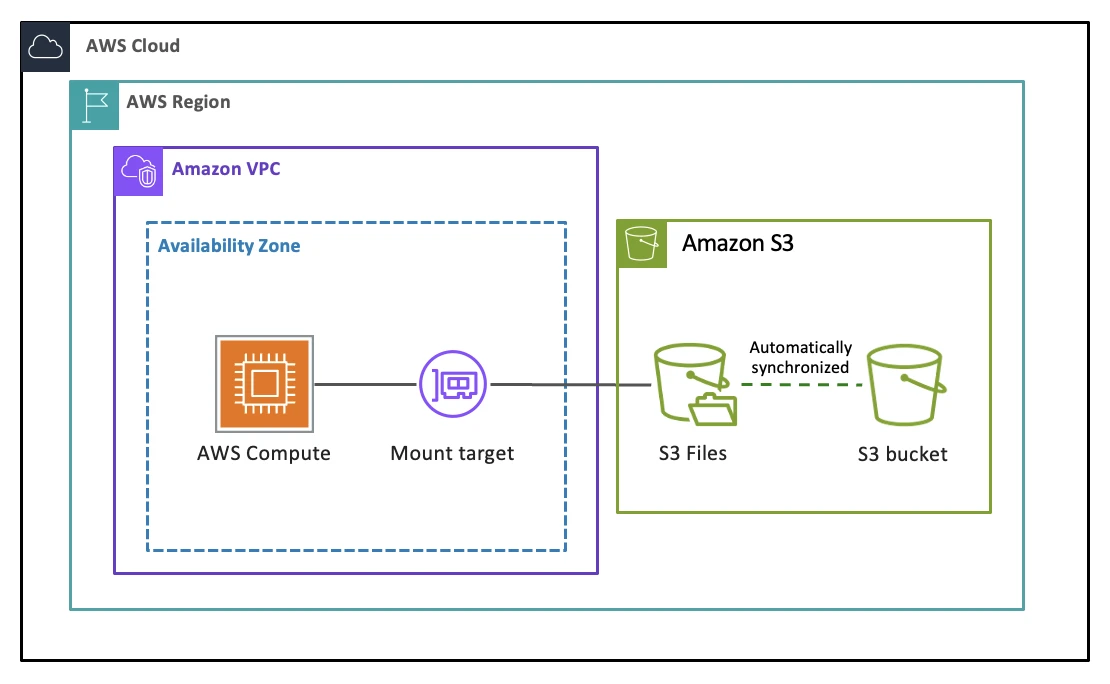
The design centers on a 128 KB threshold. Files smaller than 128 KB are imported into the EFS high-performance tier on first access, achieving sub-millisecond to single-digit-millisecond read latency. Files at or above 128 KB bypass EFS and stream directly from S3 through a local proxy. On the write side, all data lands on the EFS tier first and is asynchronously batch-synced back to S3. In other words, S3 Files optimizes for low-latency reads of small files—not for keeping all data resident in the high-performance tier.
The pricing model reinforces this positioning. Writes are charged at $0.06/GB with a minimum billable I/O of 6 KiB and no provisioned-capacity option. After data syncs to S3, it doesn't immediately evict from EFS—it stays for 30 days by default, during which you pay both the EFS high-performance tier storage fee ($0.30/GB-month) and S3 storage fees. For read-heavy, write-light workloads, this pricing makes sense. For sustained high-throughput writes, write costs and EFS residency fees accumulate fast.
2Why Shared Storage Appeals to Kafka
With S3 Files' capabilities and limits in mind, consider why people want to build Kafka on top of it. Traditional Kafka was designed for dedicated servers with local disks—an architecture that creates three compounding cost problems in the cloud.
The most direct is cross-AZ traffic from replica replication. Kafka uses ISR (In-Sync Replicas) to guarantee durability, replicating every message to two or three brokers. In a multi-AZ deployment, this replication generates massive cross-AZ network traffic—AWS charges $0.02/GB round-trip for cross-AZ data transfer. A cluster writing at 500 MB/s with a replication factor of three, two followers in different AZs, produces roughly 1 GB/s of cross-AZ replication traffic—over $50,000/month from this line item alone.
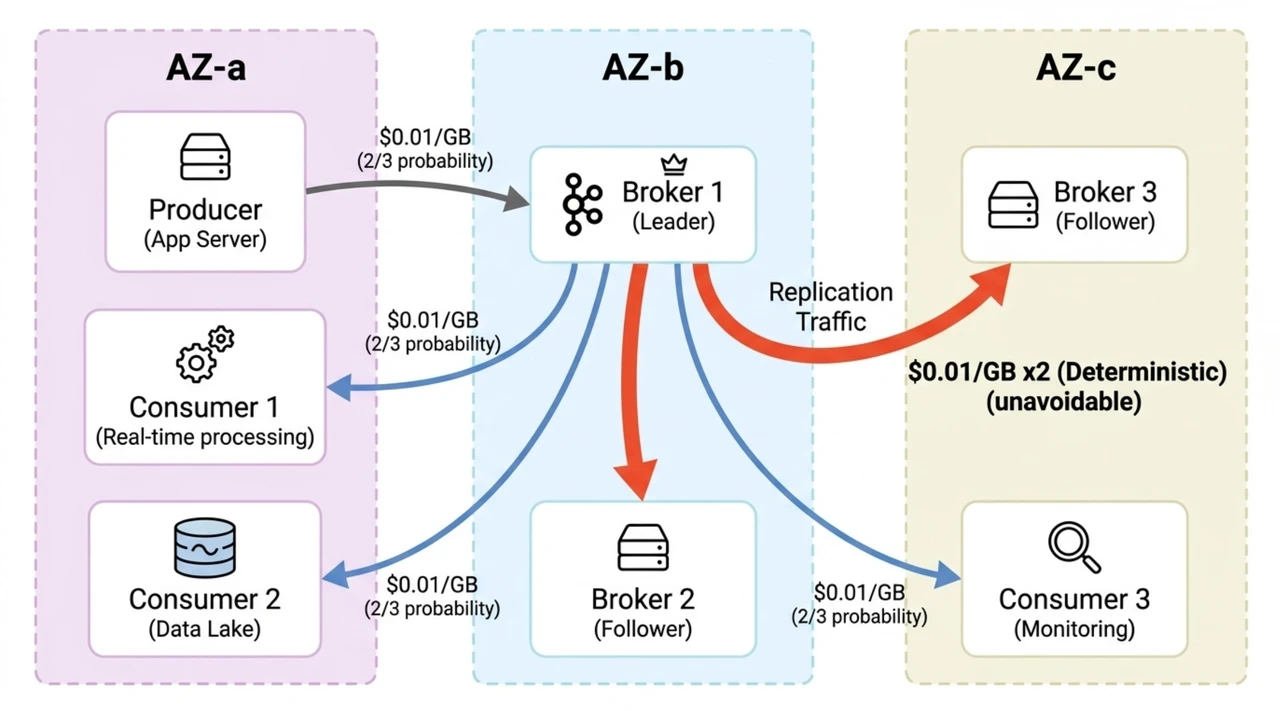
Replica replication also creates a second problem: coupled compute and storage. Each broker manages its own data replicas on local disk, so scaling storage means adding machines—even when you only need more disk space. You must provision for peak load plus failure headroom, paying for idle resources most of the time.
Coupled compute and storage further amplifies operational complexity. Partition reassignment requires physically moving data between brokers—large topics can take hours. Broker failures trigger lengthy recovery processes. Scaling down is harder than scaling up because you must drain data first.
If all data lived on Shared Storage like S3, these three problems would be solved at once: S3 provides 11 nines of durability with no replica replication needed, brokers become stateless compute nodes with seconds-level scaling, and cross-AZ traffic drops to near zero. S3 Files has an NFS interface and sub-millisecond latency—it looks like the bridge between Kafka and Shared Storage. But building that bridge reveals fundamental problems.
3The Challenges of Running Kafka Directly on S3 Files
3.1Durability Gap
The intuitive approach is to set the replication factor to one—since S3 Files provides shared durable storage, a single copy should suffice. The problem lies in Kafka's write mechanics.
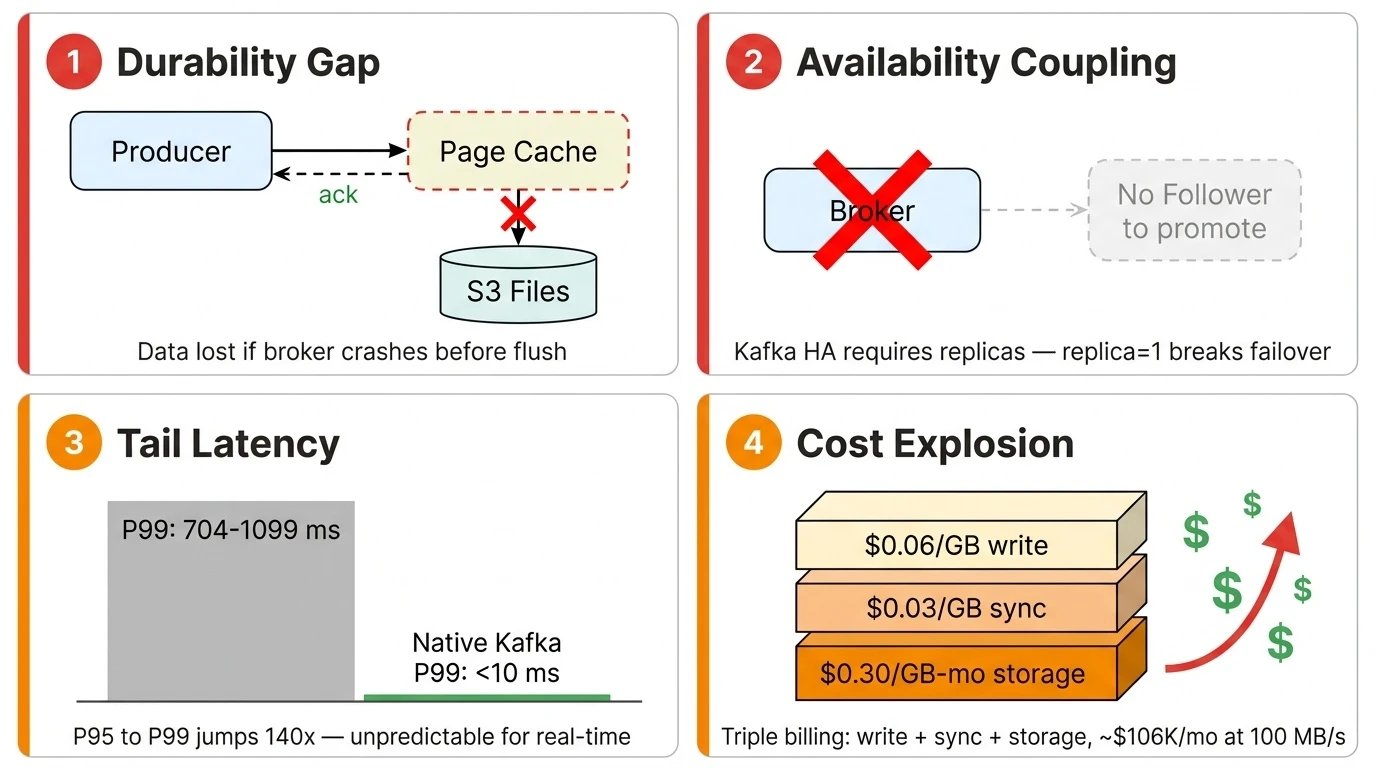
Kafka is an asynchronous I/O system. When a producer sends a message and receives an ack, the data is still in the OS page cache—not necessarily flushed to the underlying storage. This is the foundation of Kafka's high throughput: it assumes that even if a broker crashes before flushing, the data is safe on follower replicas. On S3 Files with replica=1, that safety net disappears. A broker crash means data still in the page cache is lost outright—S3 Files' 11 nines of durability can't help because the data never reached the storage layer.
Closing this gap requires changing Kafka's write path: every acknowledged message must be persisted before the ack returns. This isn't a configuration change—it's a storage-engine redesign.
3.2Availability Coupling
The durability problem is solvable by reworking the write path, but Kafka's high-availability mechanism introduces a deeper challenge.
Kafka's HA is tightly coupled to multi-replica design: when a broker fails, the controller promotes a follower replica to the new leader. This mechanism requires a follower to exist—and replica=1 means there is no follower to promote. You need an entirely different failover logic: a new broker reads directly from Shared Storage to take over partitions, without relying on local replicas. Kafka's existing HA design inherently prevents it from leveraging S3 Files' built-in availability guarantees.
This, too, requires an architectural redesign—not only the write path, but the entire failure-recovery and partition-ownership model.
3.3Latency Reality
Even with durability and availability solved, latency remains a hurdle. The sub-millisecond latency S3 Files advertises targets small-file reads on the EFS high-performance tier, while Kafka's core workload is sustained, high-throughput sequential writes—a fundamentally different I/O pattern.
Community benchmarks of Kafka on S3 Files tell the story:
| Metric | 1 KiB Max Throughput | 10 KiB Max Throughput | 10 KiB Tuned |
|---|---|---|---|
| Avg Latency | 31.86 ms | 21.86 ms | 21.38 ms |
| P50 | 0 ms | 1 ms | 1 ms |
| P95 | 12 ms | 5 ms | 13 ms |
| P99 | 1,099 ms | 704 ms | 801 ms |
| P99.9 | 3,173 ms | 2,959 ms | 2,051 ms |
| Max | 9,904 ms | 4,152 ms | 5,139 ms |
The median and P95 look reasonable—P95 at 5–13 ms is close to native Kafka. But from P95 to P99 there is a cliff: 5 ms jumps to 704 ms, a 140x increase. One in every 100 requests waits over a second. For real-time stream processing—fraud detection, live dashboards, event-driven microservices—this unpredictable tail latency is unacceptable. S3 Files doesn't fully solve the low-latency problem for Shared Storage. Compared to Kafka on local disk, there is still a significant latency penalty.
3.4Cost Structure
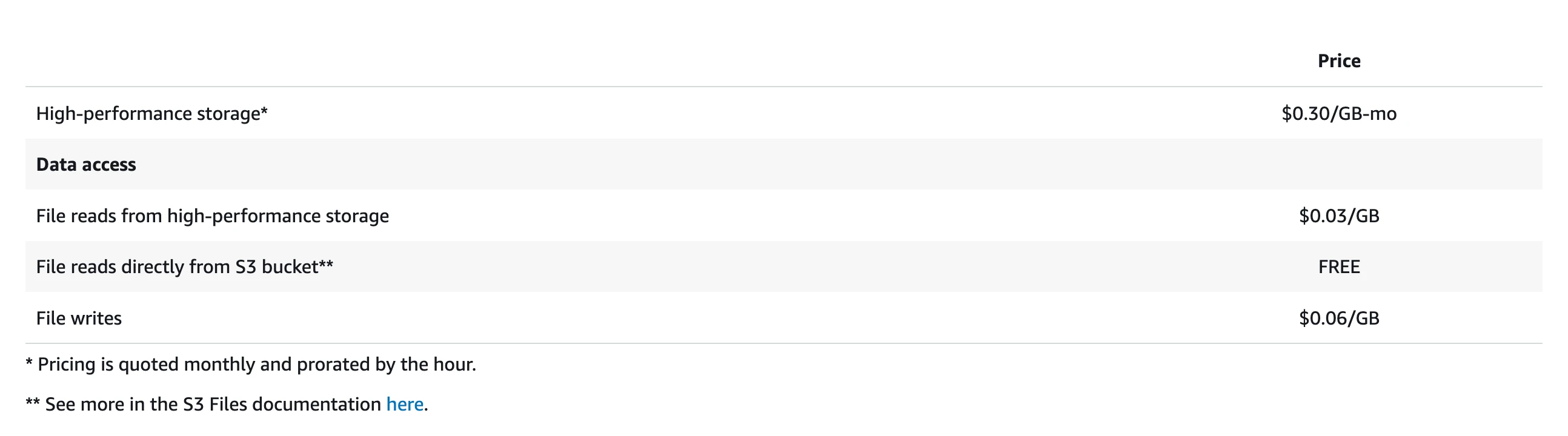
Beyond latency, the S3 Files pricing model is unfriendly to Kafka. S3 Files charges per-GB of throughput—$0.06/GB for writes, $0.03/GB for small-file reads—with no provisioned-capacity option. This is a fundamentally different model from S3's per-API-request pricing. Kafka's workload requires both writes and reads to traverse the high-performance tier: producers write data to the EFS tier, and consumers performing Tailing Read (consuming the latest data) also read from it. Both sides incur throughput-based charges, so costs scale linearly with volume. Writes incur a double traffic charge—data first lands on EFS ($0.06/GB), then syncs back to S3 ($0.03/GB)—and all Kafka data must sync to S3, so this fee is unavoidable. Less obvious is the EFS high-performance tier residency fee: $0.30/GB-month, 13× the cost of S3 Standard storage, with a default 30-day eviction window.
Consider a concrete example. A cluster writing at 100 MB/s with 1x fan-out (one consumer group) produces and consumes roughly 8,400 GB/day each (100 MB/s × 86,400 seconds):
| Cost Item | Calculation | Daily Cost |
|---|---|---|
| Write traffic | 8,400 GB × $0.06/GB | $504 |
| Write sync (export to S3) | 8,400 GB × $0.03/GB | $252 |
| Tailing Read traffic | 8,400 GB × $0.03/GB | $252 |
| Daily traffic subtotal | $1,008 | |
| EFS residency (30-day accumulation) | 252,000 GB × $0.30/GB-month | $75,600/month |
| Monthly total (traffic + residency) | $1,008 × 30 + $75,600 | ~$106,000/month |
This is a conservative 1x fan-out estimate. With multiple consumer groups—common in Kafka deployments—Tailing Read traffic costs multiply. At 2x fan-out, the monthly cost exceeds $113,000; at 3x, over $120,000. And this excludes S3 storage fees. The S3 Files pricing model targets read-heavy workloads with a small active working set—Kafka is the opposite: sustained high-throughput writes where all data is "active," with equally high-throughput reads.
3.5What These Challenges Mean Together
The durability gap demands a redesigned write path. Availability coupling demands a redesigned failover mechanism. The latency problem demands a high-performance write buffer in front of object storage. The cost problem demands batching small writes. Add all four together, and what you need is a new Kafka storage engine—exactly what AutoMQ has been building since 2023.
4AutoMQ: A Proven Shared Storage Architecture
AutoMQ's architecture has two layers. S3 is the primary storage layer—all data ultimately persists in S3. This is the fundamental difference from Tiered Storage. Tiered Storage keeps hot data on local disk and only offloads cold data to S3; AutoMQ makes S3 the single source of truth with no persistent state on brokers (for a detailed comparison, see this article).
Writing every message directly to S3 has two problems: S3 write latency is too high, and S3 API calls are billed per request—one PUT request per message would cause API costs to scale linearly with message count. This is why the WAL (Write-Ahead Log) layer exists.
The WAL is a fixed-size, high-performance storage buffer in front of S3. All produce requests first write to the WAL using Direct IO to bypass the page cache, guaranteeing persistence before the ack returns—directly closing the durability gap described earlier. Data in the WAL is then asynchronously compacted and batch-uploaded to S3. This batching is critical: instead of one S3 PUT request per message, thousands of messages upload in a single PUT request, reducing S3 API costs by one to two orders of magnitude.
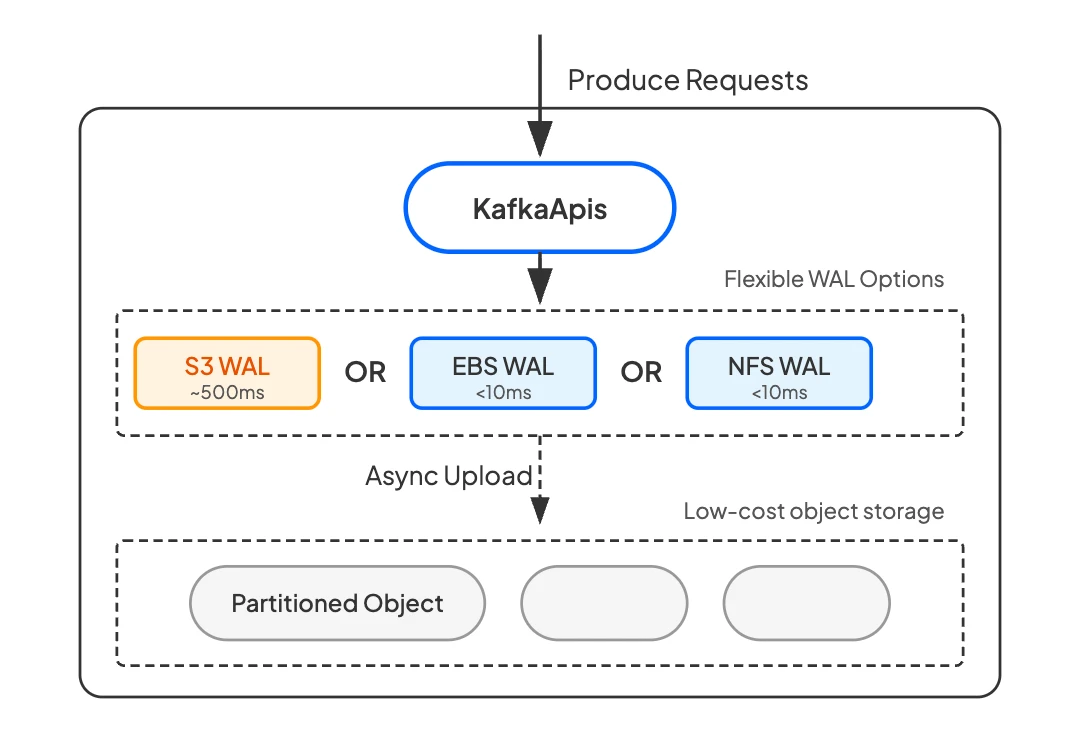
Another key benefit of the WAL is that it lets users trade off between latency and cost. The WAL layer is pluggable—different cloud storage backends offer different latency and cost profiles: EBS (Elastic Block Store) WAL and Regional EBS WAL deliver sub-millisecond latency, while NFS WAL (using FSx for NetApp ONTAP on AWS) delivers average 6 ms and P99 ~13 ms write latency. The producer experience is indistinguishable from native Kafka.
WAL costs are low. It requires only a small, fixed-size storage allocation—not full data storage, a circular write buffer. For most cloud storage pricing models, this is very favorable: a few dollars to a few tens of dollars per month in WAL spend buys low-latency persistence, S3 API cost optimization, and truly stateless brokers.
Because all persistent state resides in the WAL and S3, brokers are truly stateless. When a broker fails, another broker takes over the partition mapping within seconds—no data migration, zero RPO (Recovery Point Objective)—solving the availability coupling problem.
The net result is everything Kafka on S3 Files promises—zero cross-AZ traffic, no replica replication, elastic stateless brokers—without the durability gap, second-level tail latency, or steep traffic costs.
5S3 Files as WAL: Technically Feasible, Economically Premature
Since AutoMQ's WAL layer is pluggable, can S3 Files serve as another WAL backend? Architecturally, yes. S3 Files provides an NFS interface built on EFS, and AutoMQ's NFS WAL already supports EFS and FSx for NetApp ONTAP as implementations—the technical path is clear.
But the current pricing model makes the economics untenable. Kafka isn't a lightweight service—it's data-intensive infrastructure. AutoMQ production clusters sustain over 1 GiB/s of writes, 24/7. At that scale, S3 Files' pure pay-per-use model generates staggering costs.
Take a relatively moderate workload—100 MB/s write throughput, 4 KiB average message size:
| Dimension | EFS (as WAL) | S3 Files (as WAL) |
|---|---|---|
| Write pricing | EFS elastic throughput billing | $0.06/GB write + $0.03/GB sync to S3 |
| High-performance residency fee | Included in EFS pricing | $0.30/GB-month (30-day default residency) |
| Monthly cost estimate (100 MB/s) | ~$15,500 | ~$100,000 (traffic + residency) |
100 MB/s is a conservative figure. For a 1 GiB/s production cluster, S3 Files monthly costs would exceed one million dollars—both traffic fees and EFS residency fees scale linearly with throughput. The core issue is that S3 Files pricing targets read-heavy workloads with a small active working set, while Kafka is the opposite: sustained high-throughput writes where all data is active. S3 Files as a WAL costs far more than using EFS directly, with no latency advantage.
That said, cloud storage pricing evolves continuously. If AWS introduces a provisioned-throughput model for S3 Files or lowers the minimum billable I/O, the economics will shift. AutoMQ's architecture is already prepared for that day.
6One Architecture, Every Cloud Storage Option
The S3 Files story reveals a broader trend: cloud storage is diversifying rapidly. AWS has launched S3 Express One Zone (single-digit-millisecond S3 latency), S3 Files (NFS over S3), and continuous improvements to EFS and FSx for NetApp ONTAP in the past two years. GCP and Azure are following similar paths with their own storage services. Each service optimizes for different access patterns, cost models, and durability guarantees.
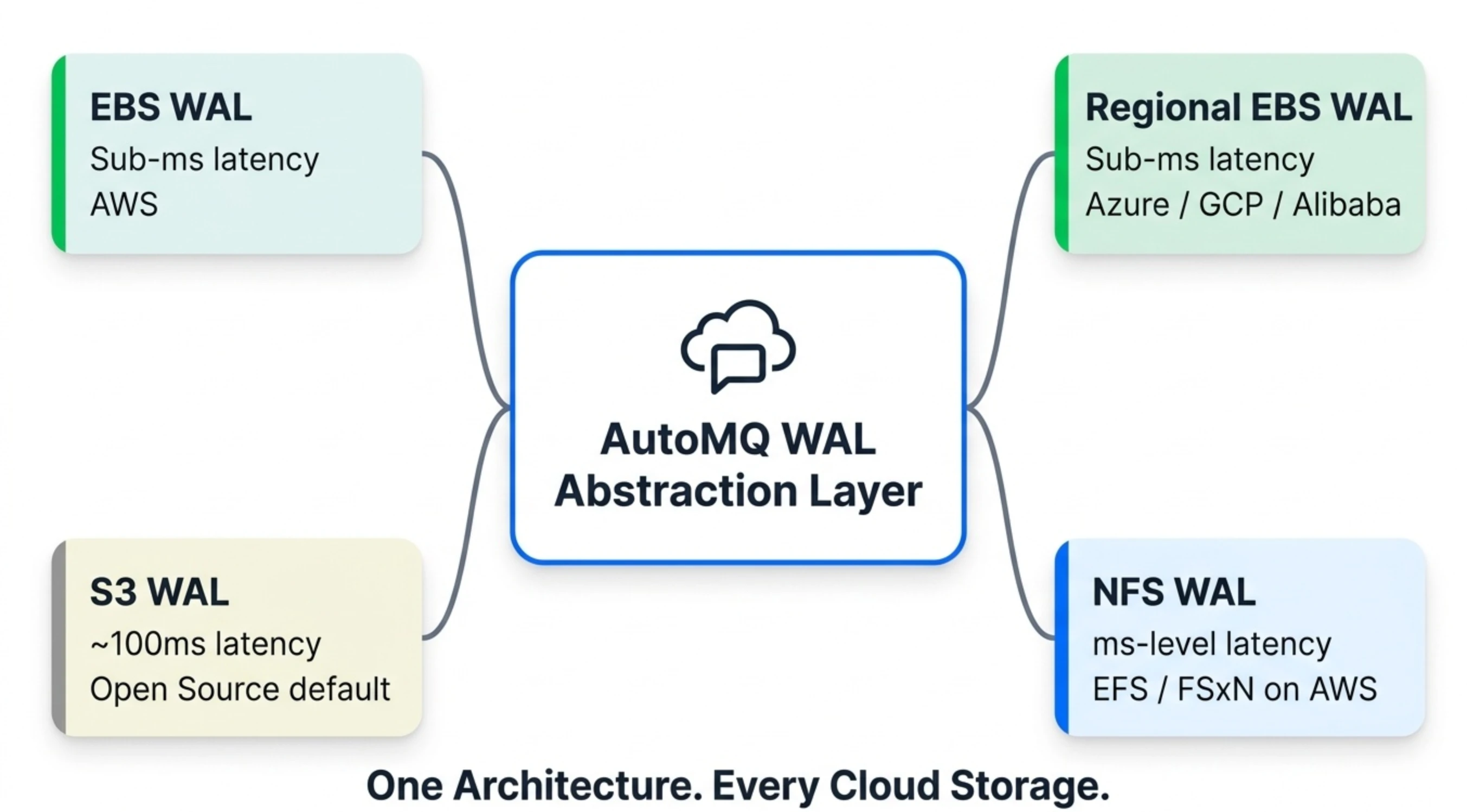
AutoMQ's pluggable WAL architecture means we don't need to bet on a single winner—every cloud storage innovation becomes a new option on the WAL backend menu:
| WAL Backend | Latency | Multi-AZ | Cost | Best For |
|---|---|---|---|---|
| EBS WAL | Sub-millisecond | Single AZ (multi-replica) | Low | All Kafka workloads on AWS |
| Regional EBS WAL | Sub-millisecond | Multi-AZ (multi-replica) | Low | Production on Azure / GCP / Alibaba Cloud (recommended) |
| S3 WAL | ~100 ms | Multi-AZ | Low | Latency-tolerant workloads (logging, monitoring); default for AutoMQ Open Source |
| NFS WAL (EFS / FSxN on AWS) | Millisecond-level | Multi-AZ | Moderate | Low-latency workloads on AWS (core transaction matching, etc.) |
Users aren't locked into a single storage option—they choose based on their latency requirements and cost budget, and switch as needs change or cloud pricing evolves. On AWS, NFS WAL supports both EFS and FSx for NetApp ONTAP as implementations. On Azure and GCP, Regional EBS WAL leverages each provider's multi-AZ block storage for sub-millisecond latency. The WAL abstraction layer that makes all of this possible has been designed this way from day one.
7Back to the Original Question
Is building Kafka on S3 Files a good idea? If that means mounting native Kafka directly on it—no. Kafka's asynchronous I/O, replica-based HA, and local-storage assumptions bring you back to square one: you still manage replicas, failover, and capacity planning. Shared Storage is right there, but Kafka's architecture can't use it.
The direction toward a Shared Storage architecture, however, is clear—the economics and operational benefits are too compelling. AutoMQ's WAL-based Shared Storage architecture already delivers on that promise, and every time cloud storage takes a step forward, the pluggable WAL layer turns that innovation into a new option for users. One architecture, every cloud storage option.


