
Table of Contents
Table of Contents
The Kafka bill usually looks strange after the utilization dashboard looks calm. Producer traffic has fallen back to its weekday baseline, consumer lag is stable, CPU is quiet, and broker network is nowhere near the limit. The cluster, however, is still the same size it was during the peak event that forced the last expansion. FinOps sees idle infrastructure. Platform engineering sees the capacity that keeps the next incident from becoming an outage.
That tension is the heart of Kafka over-provisioning cost. The waste is not always caused by careless sizing. Kafka clusters stay large because the broker fleet is asked to carry several different jobs at once: serve current traffic, store retained data, survive broker loss, keep replicas in sync, and leave room for partition movement. Average utilization only measures one slice of that responsibility.
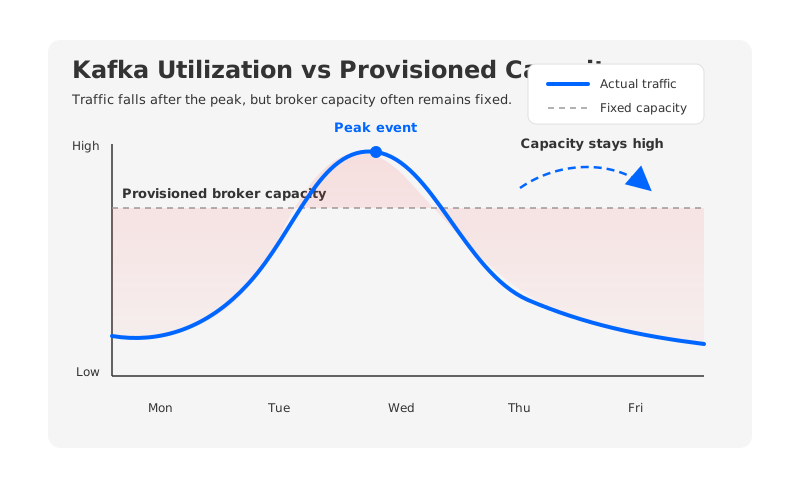
For platform teams and FinOps owners, the useful question is not whether idle Kafka brokers exist. They often do. The harder question is which idle capacity is healthy redundancy and which idle capacity is architectural drag. Cutting the wrong headroom can reduce the bill right up to the moment the cluster becomes fragile.
1Why Kafka Clusters Rarely Scale Down as Fast as Traffic
Many cloud workloads scale down when demand falls because compute is the main scarce resource. Kafka is different. In traditional Kafka, brokers are not merely stateless request handlers. They own partition replicas, keep log segments on local disks, participate in replication, and become part of the recovery path when something moves or fails.
This changes the economics of scale-in. Adding brokers can be operationally heavy, but removing brokers is often heavier because the data on those brokers must move somewhere else first. Kafka's operations documentation describes broker decommissioning as a process of cordoning a broker, reassigning all hosted partitions to the rest of the cluster, and then removing the broker. The same page notes that reassignment traffic can be throttled because these data movement operations can affect users.
That is why a Kafka cluster can look overbuilt and still be difficult to shrink. A broker with low CPU may hold retained partitions that cannot disappear. A cluster with spare network may need that spare network for recovery. A disk with free space may still be too full for safe reassignment if another broker fails. Utilization graphs show the present. Kafka operations also price in the next failure, the next replay, and the next traffic spike.
2The Five Drivers of Kafka Over-Provisioning
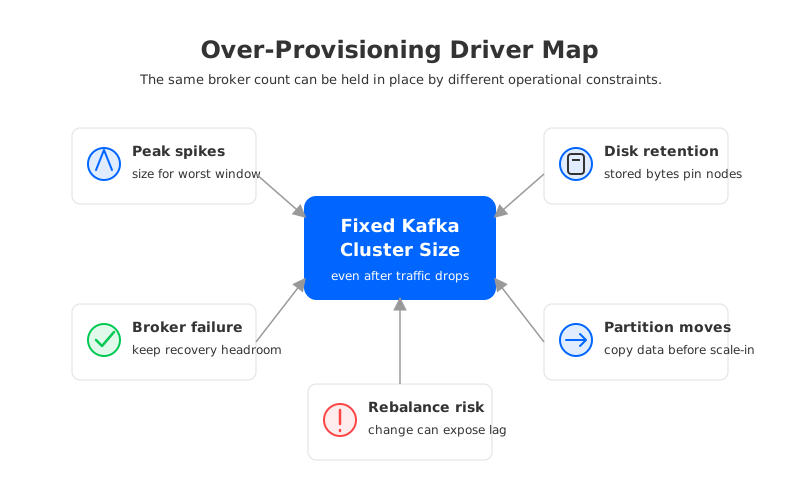
Over-provisioning becomes easier to manage when the drivers are named separately. A single broker count hides different reasons for keeping capacity online, and each reason needs a different review.
| Driver | Why It Keeps Clusters Large | What to Review |
|---|---|---|
| Peak traffic | Brokers are often sized for the highest write or read window, not the daily average. | Peak-to-average ratio, burst duration, and whether peaks are predictable. |
| Disk retention | Retained logs live on broker-local storage, so storage demand can pin broker size even when CPU is idle. | Topic retention, compaction, replay need, and per-broker free space. |
| Broker failure | Production clusters need enough capacity to absorb leadership and replica load when a broker is gone. | Failure-domain assumptions, replication factor, min ISR, and failover SLOs. |
| Partition movement | Reassignment consumes disk, network, and broker I/O while data is copied. | Reassignment windows, throttle settings, and operational tolerance for slow moves. |
| Rebalance risk | Consumer and partition rebalances can expose uneven load or lag during change. | Hot partitions, leader skew, consumer group behavior, and automation limits. |
The table matters because "reduce Kafka broker cost" can mean several different actions. If peak traffic is the problem, the answer may be burst handling or workload smoothing. If retention is the problem, topic policy and storage architecture matter more. If reassignment is the problem, the cost is not only the final broker count; it is the operational risk of getting from one count to another.
3Healthy Redundancy Is Not Waste
FinOps reviews can go wrong when every unused percentage point is treated as waste. Kafka is a durability and availability system, so production clusters need redundancy. Apache Kafka's docs describe replication factor as the number of servers that replicate each written message, and they recommend replication factors of 2 or 3 so machines can be bounced without interrupting consumption. Kafka rack awareness can also spread replicas across racks or cloud availability zones to reduce correlated failure risk.
Those mechanisms are not optional polish. A production Kafka cluster usually needs room for at least one broker failure, rolling maintenance, leader movement, consumer catch-up, and unexpected producer bursts. The exact amount depends on SLOs, workload shape, and failure-domain design, but the principle is steady: a cluster that runs perfectly only when every broker is healthy is already under-provisioned.
The problem begins when resilience headroom and fixed excess capacity become indistinguishable. A cluster may keep an extra broker because one workload has a monthly spike. It may keep large disks because one topic has long retention no one has reviewed. It may keep old partition assignments because moving them would create too much network load during business hours. Each decision can be rational by itself. Together, they can turn Kafka broker cost into a permanent tax.
A useful review separates capacity into three buckets:
- Required capacity: the compute, network, and storage needed for normal traffic under agreed SLOs.
- Resilience capacity: the buffer needed for broker loss, zone events, maintenance, and catch-up.
- Stranded capacity: resources kept online because the architecture or operating process makes scale-in too risky.
Only the third bucket is waste. The discipline is to avoid cutting the second bucket while pretending it was the third.
4A Capacity Review Checklist for Over-Provisioned Kafka
Start with the workload, not the bill. Cloud pricing pages for compute and disks are necessary, but they only become useful after the team agrees on what the Kafka cluster is being asked to do. Otherwise the conversation turns into a discount hunt while the real sizing assumptions stay hidden.
Use the following checklist during a Kafka cost optimization review:
| Review Area | Questions to Ask |
|---|---|
| Traffic shape | What are the sustained and peak write rates? How long do peaks last? Are they scheduled, seasonal, or random? |
| Read fanout | How many active consumer groups read the same data? Are replay workloads isolated from steady production reads? |
| Storage | Which topics drive retained bytes? Which retention windows are business requirements and which are defaults no one changed? |
| Placement | Are leaders, replicas, producers, and consumers aligned with failure domains and cloud zones? |
| Failure headroom | What happens to CPU, network, and disk free space after one broker or one zone is impaired? |
| Movement cost | How long does partition reassignment take today, and what throttle is needed to avoid hurting live traffic? |
| Ownership | Who can approve shorter retention, fewer topics, reduced read fanout, or a changed SLO? |
The output should not be a single "right" broker count. It should be a set of defendable assumptions. For example, a team may decide that long-retention topics are worth the storage cost, but monthly peak traffic should not force the entire cluster to run at peak size all month. Another team may decide that failover headroom is non-negotiable, but broker-local disk growth should be challenged because it prevents scale-in.
This is also where cloud cost modeling becomes concrete. Map broker compute to the current instance or managed-service pricing page. Map broker-local storage to the current disk pricing page. Map cross-zone movement to the relevant data transfer rules. Avoid copying static SKU prices into the model unless the date, region, and assumptions are attached; pricing changes, but the workload drivers are more durable.
5Why Broker-Local Storage Makes Scale-In Hard
Broker-local storage is the mechanism that turns a simple scale decision into an operational project. If a stateless service has too many instances, the platform can remove instances after traffic drops. If a Kafka broker has too little current traffic but owns many partition replicas, removing that broker means moving those replicas and verifying that availability remains intact.
That movement competes with production traffic. Reassignment reads data from existing brokers, writes data to target brokers, updates replica placement, and must be monitored until completion. Kafka provides throttles for this reason: administrators may need to limit bandwidth so migration does not harm users. The tradeoff is direct. Faster reassignment consumes more capacity while the cluster is already changing. Slower reassignment leaves the oversized cluster in place longer.
Disk retention makes the problem stickier. A broker can be CPU-idle because the current write rate is low, while its disks remain full of retained segments. In that case, reducing broker count is not a compute decision. It is a data placement decision. The team must prove that the remaining brokers have enough space, enough network, and enough recovery headroom after the move.
This is why Kafka cost optimization often stalls after easy cleanup. Retention defaults get fixed. Unused topics get deleted. A few consumer workloads move closer to brokers. Then the largest remaining cost is the always-on broker fleet, and the path to reducing it runs through the most sensitive part of Kafka operations: partition ownership and stored data.
6How Elastic Architecture Changes the Broker Cost Conversation
If the cost problem is caused by binding durable storage to broker-local disks, a more elastic architecture has to change that binding. Operational automation helps, but automation inside the same broker-local model still has to copy data before brokers can be removed safely. The architectural question is sharper: can brokers scale closer to compute demand while durable data remains available outside the broker fleet?
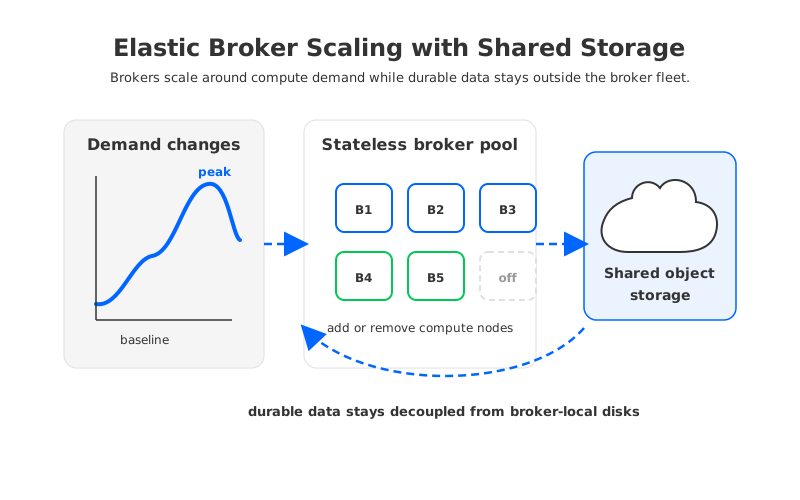
AutoMQ fits this evaluation as a Kafka-compatible streaming platform that separates compute from durable storage. Its documentation describes a shared storage architecture, stateless brokers, seconds-level partition reassignment, and continuous self-balancing. In that model, brokers still serve Kafka protocol traffic and carry runtime responsibility, but durable data is decoupled from long-lived broker-local disks.
That distinction changes what "elastic Kafka" can mean. In traditional Kafka, scaling down can require moving large local replicas away from the brokers being removed. In a shared-storage design, scaling decisions can focus more on leadership, cache warm-up, traffic placement, and SLO headroom because the durable log is not pinned to the departing broker's disk. There is still engineering work to validate compatibility, failure behavior, object storage dependency, and migration procedure. Elasticity is not magic. It is a different set of constraints.
For teams with low average utilization and stubbornly high Kafka cloud cost, the decision path is pragmatic. Keep the redundancy needed for production. Keep SLO headroom that has a clear failure scenario behind it. Challenge stranded capacity that exists only because broker-local storage makes scale-in painful. If that stranded capacity is material, compare the current Kafka architecture with a storage-decoupled option such as AutoMQ under the same workload assumptions.
The opening dashboard then becomes more useful. Low utilization is not proof that the cluster is wasteful, but it is proof that the current broker count deserves an explanation. When that explanation keeps returning to peak spikes, disk retention, broker failure, partition movement, and rebalance risk, the cost issue is no longer only a sizing problem. It is an architecture review.
7References
- Apache Kafka Basic Kafka Operations
- Apache Kafka Replication Design
- AWS EC2 On-Demand Pricing
- AWS EBS Pricing
- Azure Virtual Machines Pricing
- Azure Managed Disks Pricing
- AutoMQ Architecture Overview
- AutoMQ Stateless Broker
- AutoMQ Partition Reassignment in Seconds
- AutoMQ Continuous Self-Balancing
8FAQ
8.1What is Kafka over-provisioning cost?
Kafka over-provisioning cost is the spend created when a cluster stays larger than average traffic requires. Some of that capacity is necessary for SLOs, failover, and maintenance. The waste appears when brokers remain online mainly because peak sizing, disk retention, or reassignment risk makes scale-in too difficult.
8.2Why do Kafka brokers stay large after traffic drops?
Traditional Kafka brokers own partition replicas and local log storage. A broker with low CPU may still hold retained data that must be moved before the broker can be removed. That makes scale-in a storage and availability operation, not only a compute operation.
8.3Is low Kafka utilization always bad?
No. Production Kafka clusters need redundancy and headroom for broker failure, maintenance, replays, and bursts. Low utilization becomes a cost problem when the unused capacity cannot be tied to a specific SLO, failure scenario, or business requirement.
8.4How can platform teams reduce Kafka broker cost safely?
Start by reviewing traffic peaks, read fanout, retention, replica placement, failover assumptions, and reassignment time. Remove unused topics and stale retention first. Then separate required headroom from stranded capacity caused by broker-local storage and operational risk.
8.5How does AutoMQ help with Kafka scaling?
AutoMQ uses a Kafka-compatible shared storage architecture with stateless brokers. Because durable data is decoupled from broker-local disks, broker scaling can focus more on compute demand, leadership, cache, and traffic placement instead of large local replica movement.


