
Table of Contents
Table of Contents
Kafka performance incidents often begin with a tempting question: which setting should we change? A producer team asks whether linger.ms is too low. An SRE wonders whether num.io.threads should be doubled. A consumer owner points to fetch size. Every guess can be valid, but each one sees only one layer of the path.
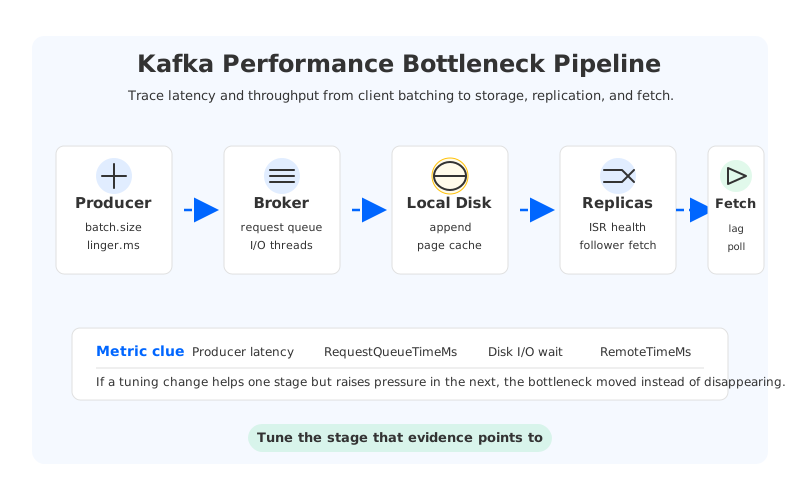
The hard part of Kafka performance tuning is that latency and throughput are not produced by one component. A record is batched by a producer, sent through client connections, received by broker network threads, queued for request handling, written to local log storage, replicated to followers, exposed to consumers, and processed by an application that may have its own bottleneck. Tune the wrong layer and a dashboard may change while the user-visible problem stays put.
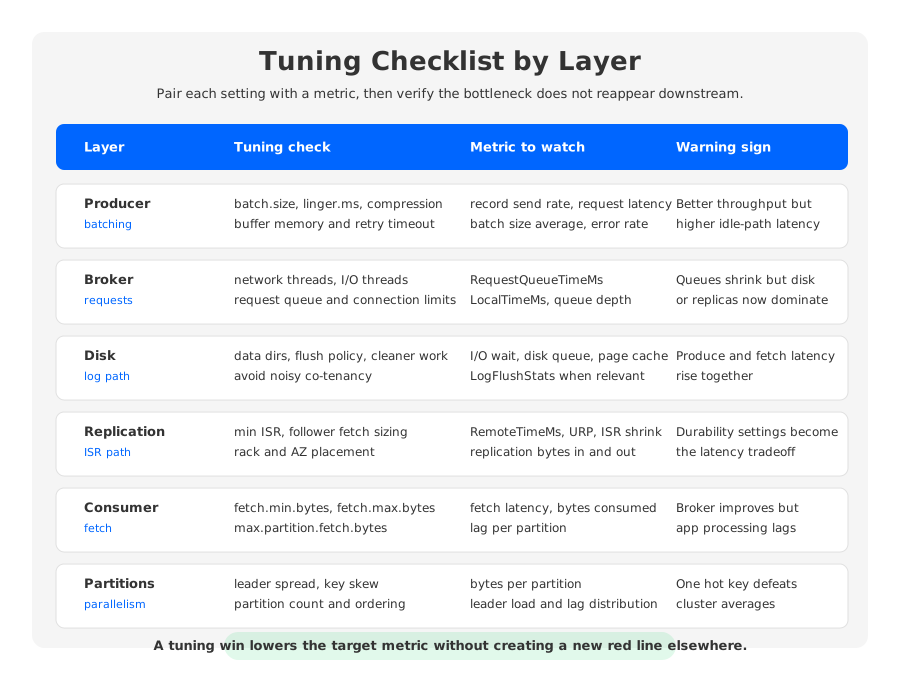
That is why a useful checklist should follow the data path. Start with symptoms, map them to the layer most likely to own the delay, change one thing at a time, and verify whether the bottleneck disappeared or merely moved.
1Start with symptoms, not settings
Before changing a parameter, write down the observed failure mode in operational terms. Is producer p99 latency high? Is throughput lower than expected during peak ingest? Are consumers falling behind only on one topic? Do under-replicated partitions appear during traffic spikes? Does broker CPU look calm while disk I/O wait climbs? Those symptoms lead to different tuning paths.
The first split is latency versus throughput. Low latency tuning usually reduces waiting and queueing, while throughput tuning often increases batching, compression efficiency, or fetch size. Those goals can conflict. Kafka producer documentation describes linger.ms as an upper bound on the delay used to allow more records to batch together; increasing it can reduce request count but adds waiting time when the producer is not already filling batches.
The second split is aggregate versus local pressure. Kafka clusters often look healthy in aggregate while one broker, topic, partition, disk, or consumer group is overloaded. Look for per-broker request latency, per-topic bytes in and out, per-partition consumer lag, leader distribution, and replication health before editing configuration.
Baseline these signals before and after every change:
- Producer-side metrics: request latency, record send rate, batch size average, compression rate, buffer exhaustion, retries, and errors.
- Broker-side metrics: request queue time, local processing time, total request time, bytes in and out, request queue size, and failed produce or fetch requests.
- Storage and host metrics: disk utilization, I/O wait, disk queue depth, page cache pressure, network throughput, packet drops, and CPU saturation.
- Replication metrics: under-replicated partitions, in-sync replica changes, follower fetch behavior, and replication bytes.
- Consumer metrics: records consumed rate, fetch latency, max lag, partition lag distribution, processing time, and rebalance frequency.
If a change improves one metric but worsens the next stage, you have moved the bottleneck. That can reveal the true limit, but it is not the same as fixing Kafka performance.
2Producer and client-side tuning checks
Producer tuning is the best first place to look when throughput is low but brokers have spare capacity. Kafka producers batch records by partition. The official producer configuration describes batch.size as the upper bound for the default record batch size, and linger.ms as the waiting window that allows records to join a batch before it is sent. Bigger batches can reduce request overhead, but they consume memory and can add latency for sparse traffic.
Start with batching and compression together. A producer that sends tiny requests may create avoidable overhead on both client and broker. Increasing batch.size, using a small positive linger.ms, and enabling an appropriate compression.type can reduce bytes on the wire and broker request pressure. Validate with workload-specific tests rather than copying a generic recipe.
Then check the safety settings around reliability. acks=all, retries, idempotence, and max.in.flight.requests.per.connection affect correctness as well as performance. Lowering acknowledgments can reduce wait time, but it changes durability semantics. If the application needs strong durability, tune around that requirement instead of tuning it away.
Producer tuning is working when the client sends fewer requests per MiB, broker produce request latency drops or remains stable, retries stay low, and end-to-end latency remains inside the application budget.
3Broker, disk, and network checks
Broker tuning begins with request handling. Kafka broker configuration exposes num.network.threads for receiving requests and sending responses, num.io.threads for processing requests that may include disk I/O, and queued.max.requests for the number of data-plane requests allowed before network threads stop reading more. These settings matter when request queues are the bottleneck; they do not create disk bandwidth.
Use Kafka request timing metrics to narrow the layer. Kafka monitoring documentation breaks total request time into queue, local, remote, and response-send components. High RequestQueueTimeMs points toward request handling pressure. High LocalTimeMs often points toward broker-side processing or storage. High RemoteTimeMs on produce requests with full acknowledgments indicates waiting for followers.
Disk tuning needs special care because Kafka relies heavily on local log storage and the operating system page cache. A broker can be CPU-light and still be unable to serve the workload if disks are saturated by appends, consumer reads, log cleaner work, replica fetches, and partition movement. If both produce and fetch latency rise together, storage is a stronger suspect than thread count.
Network checks should include client traffic, follower traffic, and rebalancing traffic. A broker serving leaders may send data to consumers and follower replicas at the same time. If bytes out to clients and bytes out to other brokers rise together, batching may help request overhead but will not remove a saturated link.
4Replication and durability checks
Replication is where performance tuning can accidentally become durability tuning. Kafka's replication model uses leaders and follower replicas, and producer acknowledgment settings determine when a write is considered successful. Kafka broker configuration explains that min.insync.replicas combined with producer acks can enforce stronger durability guarantees by requiring a minimum number of replicas to persist a write.
When produce latency rises under acks=all, do not immediately relax durability settings. First check whether followers are slow because of disk, network, or replica fetch sizing. If a follower cannot keep up, producer latency may reflect a real replication bottleneck rather than an over-conservative configuration.
Follower fetch settings such as replica.fetch.max.bytes, replica.fetch.response.max.bytes, and related wait settings can matter for large record batches or high-throughput topics. Evaluate them alongside message size limits and producer batch behavior, because rejected bytes, failed requests, and retries can distort the apparent performance problem.
Replication tuning is working when ISR stability improves, under-replicated partitions disappear, RemoteTimeMs falls for produce requests, and the same durability policy remains intact.
5Consumer and partition checks
Consumer lag is often blamed on brokers, but lag is a symptom rather than a diagnosis. A group can fall behind because broker fetches are slow, downstream processing is slow, active consumers are fewer than partitions, or a few hot partitions dominate the workload. Always inspect lag by partition before concluding that Kafka throughput is insufficient.
Consumer fetch tuning adjusts how much data a consumer asks the broker to return and how long it is willing to wait for efficient batches. Kafka consumer configuration defines max.partition.fetch.bytes as the maximum amount returned per partition and fetch.max.bytes as the maximum amount returned for a fetch request. Larger fetches can improve throughput, but they may increase memory pressure and processing latency.
Partition design is the other half of consumer performance. A consumer group can process a topic in parallel only up to the number of assigned partitions. Adding consumers beyond the partition count does not increase parallelism for that topic. Adding partitions can help, but it can also change key distribution, ordering boundaries, and operational load.
Check for key skew before changing partition count. If one key or key range dominates traffic, more partitions may help only if the partitioning strategy changes. Useful metrics include bytes in per partition, records in per partition, leader load by partition, and consumer lag per partition.
6Metrics that prove improvement
Good Kafka performance tuning has a before-and-after story: symptom, suspected layer, change, expected metric movement, and guardrail metrics that must not regress. Without guardrails, a tuning change can look successful while another team pays for it.
Use this pattern:
| Tuning goal | Primary metric | Guardrail metric | What success looks like |
|---|---|---|---|
| Increase producer throughput | Records or bytes sent per second | Producer p99 latency and errors | More throughput within the same latency budget |
| Reduce broker queueing | RequestQueueTimeMs | CPU, disk I/O, and failed requests | Queue time falls without moving pressure to disk |
| Improve fetch efficiency | Bytes consumed per fetch | Consumer processing time and memory | Larger fetches without growing application lag |
| Stabilize replication | Under-replicated partitions and ISR churn | Produce RemoteTimeMs | Followers keep up without weakening durability |
| Balance partition load | Bytes per leader and lag per partition | Reassignment traffic and controller work | Hot leaders cool down without a maintenance storm |
The most useful performance metrics are layered. Kafka's monitoring documentation recommends client-side message and byte rates, request rate, request size, request time, and consumer lag, while broker metrics expose request timing, request queue size, bytes in and out, replication bytes, and failed request rates. Pair those with host-level disk and network metrics.
Do not claim victory from averages alone. Kafka performance tuning is done when the workload behaves better under the same traffic pattern, not when a dashboard has one green panel.
7When tuning becomes an architecture question
Tuning helps when the bottleneck is a mismatch between configuration and workload. Some Kafka performance problems, however, come from deployment architecture rather than from a poorly chosen number.
The first architecture boundary is broker-local disk. In traditional Kafka, brokers serve compute and own persistent log data on local storage. When disks are the recurring limit, more thread counts or bigger producer batches may only push work toward the same saturated path.
The second boundary is replica traffic. Replication is necessary for durability, but it consumes broker, disk, and network resources. Tuning can reduce overhead, but it cannot remove the fact that replicated local logs create extra data paths.
The third boundary is partition skew and data movement. If hot partitions are tied to specific leaders, the cluster may need rebalancing. If the topic needs more partitions, the application may need a new ordering and keying strategy. If brokers are added or replaced, retained data may need to move before new capacity becomes useful.
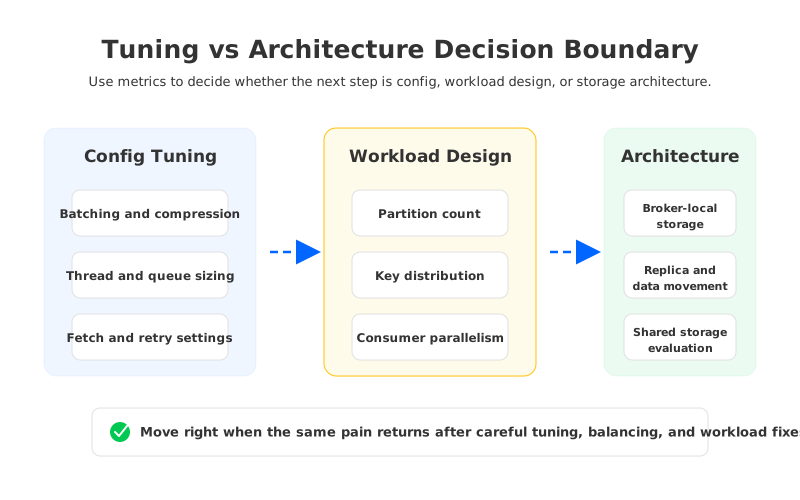
The decision boundary is practical: if careful tuning lowers one metric while another layer becomes saturated, keep following the bottleneck. If the chain repeatedly ends at local storage ownership, replica data movement, or scaling-time partition movement, evaluate the architecture.
8Where AutoMQ fits
AutoMQ becomes relevant at that architecture boundary, not at the beginning of a tuning checklist. It is a Kafka-compatible cloud-native streaming platform that keeps Kafka protocol semantics while replacing Kafka's broker-local log storage layer with the S3Stream shared storage model. AutoMQ documentation describes WAL storage for write efficiency and object storage as the primary data repository.
The performance implication is specific. When durable data is separated from broker-local disks, brokers can become more stateless, and scaling or reassignment can rely less on moving persistent log data between brokers. AutoMQ's S3Stream documentation also describes a data caching component for hot data and prefetched cold data. That does not make partition design or consumer behavior irrelevant; it changes the storage and scaling layer that traditional Kafka teams often hit after reasonable tuning.
For an engineering team, the evaluation should stay evidence-driven:
- Tune producers, brokers, replication, consumers, and partitions first when metrics point there.
- Preserve durability and correctness requirements while tuning.
- Track whether pain returns during broker scaling, partition reassignment, retention growth, or consumer catch-up.
- If local storage and data movement recur as limits, compare the current deployment with a Kafka-compatible shared storage architecture.
The opening temptation was to find one magic setting. The better answer is less dramatic: tune the layer that owns the symptom, measure whether the bottleneck moved, and recognize when repeated tuning is exposing an architecture limit.
9References
- Apache Kafka Producer Configurations
- Apache Kafka Broker Configurations
- Apache Kafka Consumer Configurations
- Apache Kafka Monitoring
- Apache Kafka Replication
- AutoMQ Documentation: Architecture Overview
- AutoMQ Documentation: S3Stream Shared Streaming Storage
10FAQ
10.1What is the first thing to tune for Kafka performance?
Start with the symptom and the layer that owns it. For low producer throughput with spare broker capacity, producer batching and compression are common first checks. For high broker latency, inspect request timing metrics before changing thread pools. For consumer lag, check lag by partition and application processing time before blaming broker capacity.
10.2How do I improve Kafka throughput without increasing latency too much?
Tune batching in small steps and measure both throughput and p99 latency. batch.size, linger.ms, compression, and fetch sizing can improve efficiency, but larger batches or longer waits may increase latency for sparse traffic. The right setting depends on the workload's event rate and latency budget.
10.3Which Kafka metrics matter most for performance tuning?
Useful metrics include producer request latency, record send rate, broker request queue time, total produce and fetch request time, local and remote request time, bytes in and out, under-replicated partitions, ISR changes, consumer fetch latency, and lag per partition. Pair Kafka metrics with host disk, CPU, memory, and network metrics.
10.4Can more partitions improve Kafka performance?
More partitions can improve parallelism when the current partition count limits producer or consumer throughput. They do not automatically fix key skew, slow consumers, storage saturation, or broker network limits. Review ordering requirements and traffic distribution before changing partition strategy.
10.5When is Kafka performance an architecture problem?
It becomes an architecture problem when tuning repeatedly ends at the same structural limits: broker-local disk saturation, replica traffic, hot partition ownership, large data movement during scaling, or unstable performance during reassignment. Those symptoms suggest that the storage and scaling model should be evaluated, not only individual Kafka settings.


