
Table of Contents
Table of Contents
Kafka and Pulsar are often compared as if they are two versions of the same idea: producers write events, consumers read events, and the cluster keeps the stream durable. That framing is useful for a first conversation, but it hides the part that matters in production. Kafka centers the system around partition logs owned by brokers. Pulsar splits serving, storage, and coordination into brokers, BookKeeper bookies, and metadata services.
That difference changes how operators think about scaling, failure recovery, retention, consumer progress, and cloud cost. A team moving from one system to the other is not only changing client libraries or deployment manifests. It is changing the mental model used to debug lag, plan capacity, read storage metrics, and decide what happens when a node disappears.
1Kafka Architecture in One Diagram
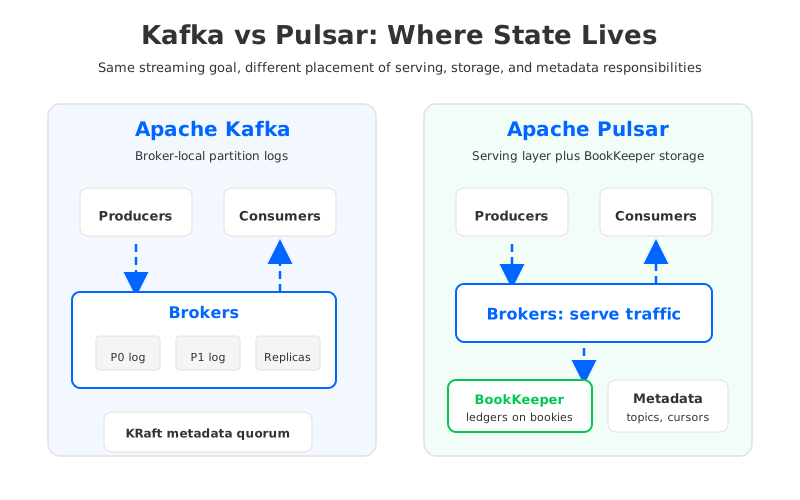
Kafka's core abstraction is the topic partition. Each partition is an ordered append-only log. Producers append records to partitions, consumers read records by offset, and brokers store replicas on local disks or attached volumes. A broker can host leaders and followers for many partitions, but primary data is still tied to broker-local storage in the classic architecture.
In a Kafka cluster, one replica for a partition is the leader. Producers write to the leader, followers replicate from it, and consumers normally fetch from the leader unless follower fetching is configured for a particular deployment. The controller coordinates metadata such as partition leadership, broker membership, and topic configuration. Since Kafka's KRaft mode removed the ZooKeeper dependency, that metadata is stored and replicated by Kafka's own quorum rather than a separate ZooKeeper ensemble.
This design is direct and powerful. A partition is both the unit of ordering and the unit of parallelism. If you need more throughput, you usually increase partition count, spread partitions across brokers, or add brokers and reassign partitions. The catch is that broker-local logs make reassignment a data movement problem, not only a metadata update.
| Kafka concept | Architectural role | Operational implication |
|---|---|---|
| Topic partition | Ordered log and parallelism unit | More partitions increase concurrency but also metadata, file, and scheduling overhead |
| Broker | Serves clients and stores partition replicas | Compute and primary storage capacity are coupled |
| Offset | Consumer position within a partition | Consumer progress maps cleanly to log position |
| KRaft quorum | Kafka metadata and controller state | Kafka can run without ZooKeeper in current versions |
Kafka's elegance comes from that tight mapping: partition, log, offset, replica. It is easy to reason about ordering, consumer group parallelism, and replication factor. The same tight mapping is also why large clusters spend real operational time on partition placement, disk balancing, broker replacement, and retention planning.
2Pulsar Architecture in One Diagram
Pulsar makes a different trade-off. Its broker is designed as a serving layer. Producers and consumers connect to brokers, but persistent message storage is handled by Apache BookKeeper. BookKeeper storage nodes, called bookies, store entries in ledgers, while Pulsar metadata services track topic metadata, schemas, broker load, ledger lists, cursor positions, and coordination state.
That separation gives Pulsar a layered architecture from the start. Brokers can be treated more like stateless traffic handlers than storage owners. Bookies carry the storage responsibility. Metadata services coordinate which broker serves which topic bundle and where ledgers live.
This often surprises Kafka operators. In Kafka, the partition log feels like the physical storage unit. In Pulsar, the topic and subscription model sits above a storage layer that uses ledgers, entries, ensembles, and cursors. The application still sees topics and messages, but the storage operator sees BookKeeper behavior: journal writes, ledger rollover, ensemble health, and cursor persistence.
| Pulsar concept | Architectural role | Operational implication |
|---|---|---|
| Broker | Serves producers and consumers | Serving capacity can scale separately from storage capacity |
| Bookie | Stores ledger entries | Storage operations focus on BookKeeper health and disk behavior |
| Managed ledger | Log abstraction for a topic | A topic can span multiple immutable ledgers |
| Cursor | Subscription position | Consumer progress is stored as part of Pulsar's managed ledger system |
| Metadata store | Coordination and cluster metadata | Adds an explicit coordination layer to operate and protect |
Pulsar's model is attractive when a team wants storage and serving concerns separated. It also introduces more moving parts: broker load balancing, BookKeeper durability, metadata store health, namespace behavior, and subscription cursors. That does not make Pulsar wrong; it means the architecture is optimized around a different decomposition.
3Storage and Metadata Differences
The fastest way to understand Kafka Pulsar architecture is to ask where durable data lives after an acknowledgment. In classic Kafka, the answer is the partition replicas on brokers. Kafka can use tiered storage in newer deployments, but the broker-local log remains central to leader behavior and reassignment.
In Pulsar, the broker accepts the client connection, but BookKeeper owns persistent storage. BookKeeper ledgers are append-only and replicated across bookies. When ledgers roll over or are sealed, Pulsar can offload older ledger data to long-term storage through tiered storage.
The practical distinction is not "Kafka has storage and Pulsar has storage." Both do. The distinction is whether storage ownership is embedded in the broker or delegated to a separate log storage service.
This difference shows up during failure recovery. A Kafka broker failure triggers leader election for affected partitions, and long-term rebalancing can involve reassignment and replica catch-up. A Pulsar broker failure is more about reconnecting clients and reassigning topic serving, because persisted data is already in BookKeeper. A bookie failure is a storage-layer event, with its own ensemble and recovery concerns.
Metadata has a similar split. Kafka metadata is now handled by KRaft in current Kafka, so the cluster no longer needs ZooKeeper. Pulsar still has an explicit metadata store layer, with supported backends depending on version and deployment. For teams choosing between the systems, the operational surface is not only "how many brokers?" It is "which components must be monitored, upgraded, secured, backed up, and capacity-planned?"
4Consumer Groups vs Pulsar Subscriptions
Kafka's consumer model is built around consumer groups. Within a group, partitions are assigned to consumers. A given partition is consumed by one member of the group at a time, preserving partition order for that group. Multiple consumer groups can read the same topic independently because each group maintains its own offsets.
Pulsar uses named subscriptions. A subscription determines how messages are delivered and acknowledged. The common types are Exclusive, Failover, Shared, and Key_Shared. That gives Pulsar a broader set of delivery patterns, especially for queue-like shared consumption or key-based ordering.
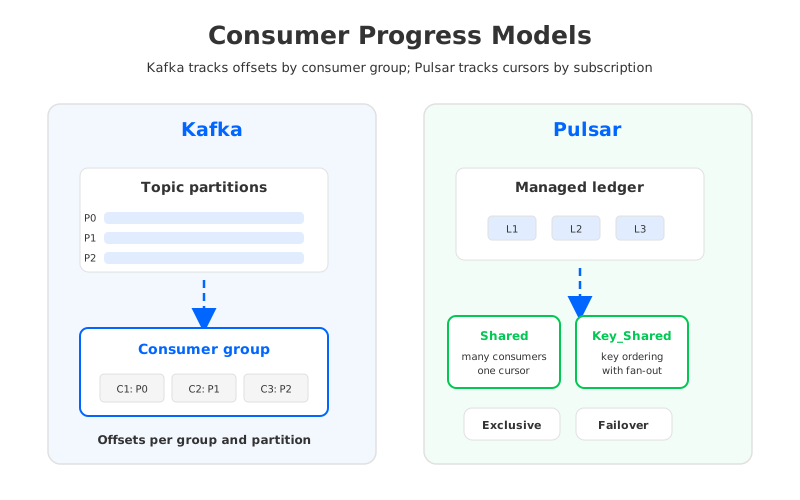
The two models can serve similar application needs, but they are not interchangeable vocabulary. A Kafka consumer group offset is a position in a partition log. A Pulsar cursor is a subscription position in the managed ledger. Kafka applications tend to think in partitions, assignments, rebalances, and committed offsets; Pulsar applications tend to think in subscriptions, acknowledgments, redelivery, cursors, and subscription type.
This matters during migration and incident response. If a Kafka team says "lag is high," the next questions usually involve consumer group offsets, partition assignment, and broker fetch behavior. In Pulsar, the investigation may include subscription backlog, unacknowledged messages, redelivery behavior, cursor state, and broker-to-bookie reads.
5Scaling and Cloud Operations
Kafka scaling starts with partitions. More partitions can increase parallelism, but partition count also affects metadata size, file handles, request routing, recovery behavior, and reassignment work. Adding brokers gives the cluster more CPU, network, and disk capacity, but the benefit is realized only after partition leadership and data placement are balanced. In cloud deployments, attached storage and cross-zone replication make that balancing a cost and operations question, not only a throughput question.
Pulsar scaling separates some of these concerns. Brokers can be scaled for serving traffic, while bookies can be scaled for storage throughput and capacity. Metadata services need their own reliability plan. That separation can be valuable when workloads are uneven, but a broker bottleneck and a bookie bottleneck look different, and the fix for one may not fix the other.
The cloud cost model follows the architecture. Kafka's classic replication stores multiple local replicas and moves data between brokers and zones. Pulsar's BookKeeper layer also replicates entries across bookies, and those bookies still run on infrastructure that must be sized, replaced, and monitored. Pulsar tiered storage can move older backlog data to object storage, but tiering is not the same as making the primary write path object-storage-native.
Here is a compact way to frame the decision:
- Choose Kafka's native model when your team values the Kafka ecosystem, mature protocol compatibility, simple log semantics, and direct partition-based reasoning.
- Choose Pulsar's native model when your team wants a broker/bookie split, built-in subscription variants, multi-tenant namespace concepts, and is ready to operate BookKeeper and metadata services well.
- Revisit the architecture when your main pain is not the event API, but cloud elasticity, storage coupling, partition reassignment, or the operational cost of broker-local data.
The last case is where many Kafka teams get stuck. They do not necessarily want Pulsar semantics. They want Kafka clients, Kafka Connect, Kafka Streams, and existing operational knowledge to remain useful, but they want the storage layer to behave less like broker-owned disks in a cloud environment.
6Where AutoMQ Fits in Kafka Architecture Evolution
There is a third architectural path that sits between "keep classic Kafka storage" and "move to Pulsar's broker/bookie model." AutoMQ is a Kafka-compatible cloud-native streaming system that keeps Kafka protocol and upper-layer semantics while replacing Kafka's local log storage with shared storage built on S3Stream, a write-ahead log layer, and object storage.
That distinction matters. AutoMQ is not trying to make Kafka applications adopt Pulsar subscriptions, Pulsar message IDs, or BookKeeper operations. It keeps the Kafka-facing model: topics, partitions, offsets, consumer groups, Kafka clients, and Kafka ecosystem tools. The architectural change is below that surface: durable stream data is persisted through a shared storage layer rather than being permanently bound to broker-local log replicas.
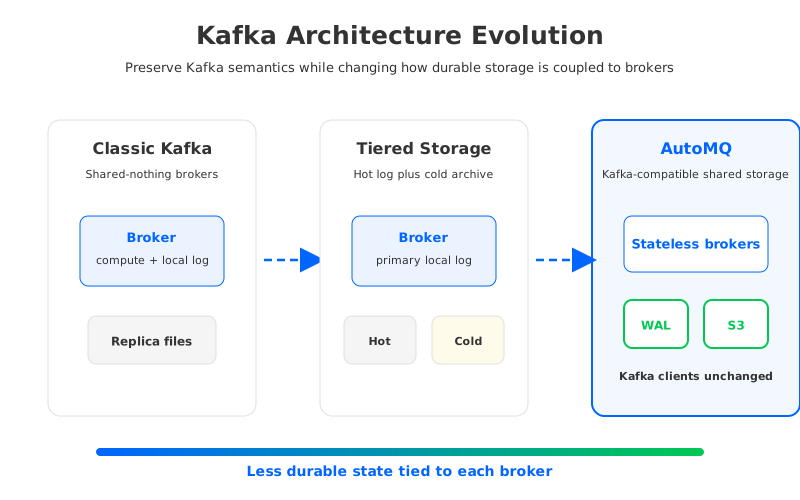
This does not make every Kafka Pulsar comparison disappear. Pulsar remains a serious architecture with its own strengths. The useful point is narrower: if your evaluation is driven by "Kafka brokers own too much storage state in the cloud," then Pulsar is not the sole possible answer. Kafka-compatible shared storage changes the storage coupling while preserving the application model many teams already run.
For architects, that creates a cleaner decision tree. If you want Pulsar's subscription model and broker/bookie separation, evaluate Pulsar on those terms. If you want Kafka semantics but need a different cloud storage architecture, evaluate Kafka-compatible shared storage. The point is to match the system to the failure modes you actually have, not to collect a new distributed system for sport.
7Decision Checklist for Architects
A serious Kafka Pulsar architecture review should be grounded in workload behavior. Start with ordering requirements, retention duration, consumer fan-out, replay frequency, and recovery objectives. Then map those requirements to the system's internal units: Kafka partitions and offsets, or Pulsar ledgers, cursors, and subscriptions.
Use these questions to keep the discussion concrete:
- Which application semantics are already deeply embedded: Kafka consumer groups and offsets, or Pulsar subscriptions and acknowledgments?
- Is the team prepared to operate one storage-serving system, or a serving layer plus BookKeeper plus metadata services?
- Does the workload need queue-like shared consumption, key-shared ordering, or mostly Kafka-style partitioned stream processing?
- Are cloud pain points caused by storage growth, broker replacement, cross-zone replication, partition reassignment, or long backlog reads?
- Would changing the storage architecture under Kafka solve the real problem with less application migration risk?
The answer will not be universal. Kafka made the partition log the center of the universe. Pulsar decomposed serving and storage into separate layers. AutoMQ follows another line of evolution: preserve Kafka semantics, but move durable stream storage into a cloud-native shared storage layer.
If your team is evaluating this path, start with the architecture rather than the brand name. Read the official docs, draw your own data path, and test the failure modes that matter to your workload. For Kafka-compatible shared storage, the AutoMQ architecture overview is a useful next step because it explains how S3Stream, WAL storage, and object storage fit under Kafka semantics.
8FAQ
8.1Is Pulsar basically Kafka with separate storage?
No. Pulsar's separation of brokers, BookKeeper bookies, and metadata services is a major architectural difference, but Pulsar also has a different subscription model, cursor model, namespace model, and message ID model. Treating it as "Kafka plus BookKeeper" misses the application-facing differences that appear during migration and operations.
8.2Is Kafka simpler than Pulsar?
Kafka has fewer core infrastructure roles in the classic deployment model, especially now that KRaft removes the ZooKeeper dependency. That can make the architecture easier to reason about for Kafka-native teams. Pulsar separates serving and storage more explicitly, which can be powerful but also gives operators more components to understand.
8.3Which is better for cloud storage: Kafka or Pulsar?
It depends on what you mean by cloud storage. Kafka and Pulsar both have tiered storage options for older data. Pulsar uses BookKeeper as its primary persistent storage layer. Classic Kafka uses broker-local partition logs as primary storage. Kafka-compatible shared-storage systems such as AutoMQ change Kafka's storage layer more directly by moving durable stream data to object storage while keeping Kafka semantics.
8.4Can Kafka consumers move to Pulsar without code changes?
Not as a general rule. Pulsar has protocol handlers and ecosystem integrations, but native Kafka applications rely on Kafka protocol behavior, consumer groups, offsets, and client assumptions. Any migration should test client compatibility, ordering, offset translation, connector behavior, observability, and rollback before production cutover.
8.5When should an architect consider AutoMQ instead of Pulsar?
Consider AutoMQ when the team wants to keep Kafka-facing semantics and ecosystem compatibility, but the operational pain comes from broker-local storage, slow reassignment, cloud storage cost, or elasticity limits. Consider Pulsar when the team specifically wants Pulsar's native subscription model, broker/bookie architecture, and platform features.


