
Table of Contents
Table of Contents
The Kafka replacement meeting usually does not start with a clean architecture question. It starts after the third incident review in a quarter, a cloud bill that no longer tracks traffic growth, and a capacity plan that depends on another broker expansion, another partition reassignment, and another weekend maintenance window. Nobody wants to say "replace Kafka" too early because Kafka is embedded in applications, connectors, dashboards, ACLs, and team muscle memory. But after a certain point, the same symptoms stop looking like isolated tuning problems.
That is the moment a Kafka replacement project becomes a business case rather than an engineering preference. The question is not whether Apache Kafka still works. Kafka remains a powerful protocol and ecosystem. The sharper question is whether the current Kafka architecture, service model, and operating burden still match the workload you are running today.
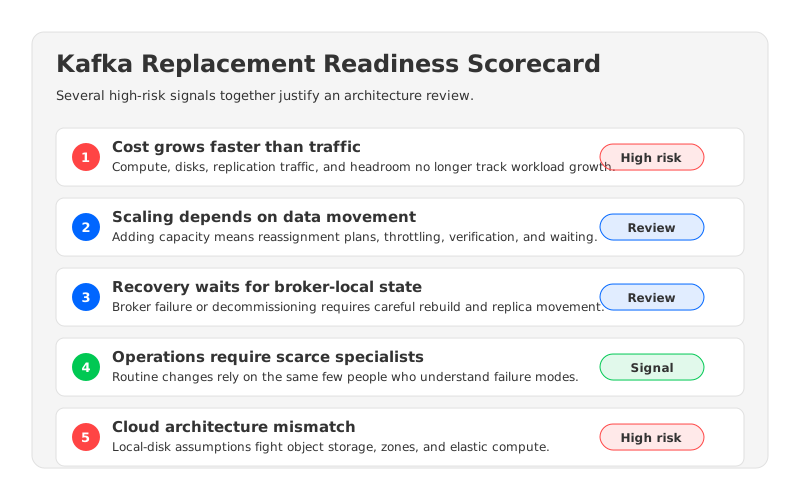
A useful replacement review separates normal optimization work from structural mismatch. If a team can fix the problem by changing retention, adding brokers, improving consumer code, or adjusting quotas, replacement is probably premature. If cost, scaling, recovery, and operational risk all point to the same architectural constraint, continuing to tune the current cluster can become the risky option.
1The Signals That Kafka Optimization Is No Longer Enough
Kafka pain is easy to misread because each symptom has a local fix. Storage pressure can be handled with larger disks. Broker imbalance can be handled with reassignment. Consumer lag can be handled by adding partitions or improving consumers. Rising cost can be handled by another sizing review. These fixes are rational when the problem is local; they are less persuasive when every fix increases the operating surface area.
The strongest signal is cost that scales faster than traffic. Traditional Kafka keeps durable data on broker-local disks and relies on replication across brokers for availability. In cloud deployments, that model can combine compute, disk, inter-zone traffic, over-provisioned headroom, and operational labor into one expanding bill. A bill that grows faster than ingest, retention, or read fan-out deserves a deeper architecture review.
The second signal is scaling that takes longer than the business can tolerate. Kafka documentation describes cluster expansion as adding brokers and then migrating existing data to those brokers. Under the covers, replicas are added, data is copied, and old replicas are removed after replication catches up. Capacity changes can become data movement projects when the business expects them in minutes or hours.
The third signal is recovery that depends on moving large amounts of data. Broker failure, disk replacement, decommissioning, and partition reassignment all touch the relationship between broker compute and broker-local log storage. Kafka has tools for these operations, but they still require operational judgment about partition placement, throttling, verification, and rollback. If recovery depends on specialist intervention and long replication windows, the architecture is asking people to be part of the availability model.
The fourth signal is a shrinking expert pool. Many Kafka estates run because a few senior engineers understand broker configs, partition behavior, consumer groups, Connect workers, security, and failure modes. That expertise is valuable, but it is also a concentration of risk. A replacement business case becomes easier to justify when every routine change needs the same small group of specialists.
| Replacement trigger | What it usually looks like | Why it matters |
|---|---|---|
| Cost drift | Infrastructure spend grows faster than traffic or retention | Tuning may reduce waste, but the cost model may still be wrong |
| Slow scaling | Broker additions require reassignment design and data copy | Capacity no longer follows workload change |
| Recovery drag | Failures require long rebuilds or careful throttling | Availability depends on operational choreography |
| Specialist operations | Routine changes need senior Kafka operators | The platform cannot scale with the organization |
| Cloud mismatch | Local-disk assumptions collide with object storage, zones, and elastic compute | The old deployment model is fighting the environment |
The table is not a mandate to move. One red flag means investigate. Several red flags, repeated across quarters, mean the organization is already paying for replacement in incidents, excess headroom, and delayed product work.
2Partition Limits Are a Symptom, Not the Whole Disease
Many replacement discussions begin with partitions because partitions are the unit that teams see in dashboards. A topic needs more parallelism, a consumer group needs more throughput, a broker has too many leaders, or another service wants a high-cardinality topic model. Kafka partitions are powerful, but they are not free. They affect metadata, file handles, leader distribution, recovery, rebalance behavior, and consumer parallelism.
Apache Kafka's own operations documentation calls out important side effects when increasing partitions. Key distribution can change when partition counts grow, consumers may need to discover new partitions, and Kafka does not redistribute existing data automatically when partitions are added. Those details matter because they turn "add more partitions" from a simple capacity move into an application behavior review.
Partition pressure by itself does not prove that Kafka should be replaced. It may prove that topic design, keying strategy, or consumer architecture needs attention. Replacement becomes credible when partition pressure combines with slow data movement, costly storage growth, and fragile operational workflows. In that situation, partitions are the visible surface of a deeper issue: the platform is asking broker-local state to absorb every change.
3What a Kafka Replacement Project Must Preserve
A risky replacement plan starts by comparing vendors. A safer plan starts by listing what must not break. Kafka is not only a cluster; it is a contract with every producer, consumer, connector, dashboard, and incident process that depends on it. If that contract is not explicit, the migration will discover it late.
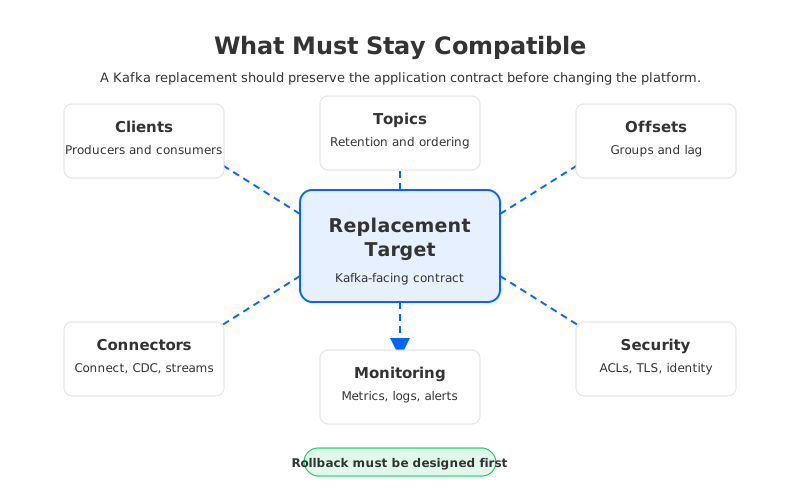
At minimum, preserve these surfaces:
- Clients and protocol behavior: Existing producer and consumer libraries, authentication settings, TLS behavior, retries, batching, compression, idempotence, and transactions if used.
- Topics and data semantics: Topic names, partition counts where required, retention, compaction, message size limits, ordering expectations, and replay windows.
- Consumer groups and offsets: Group IDs, committed offsets, lag visibility, reset policies, and the application owner's tolerance for replay or missed records.
- Connectors and stream processors: Kafka Connect tasks, internal topics, Schema Registry dependencies, Kafka Streams state, Flink jobs, CDC pipelines, and sink delivery behavior.
- Monitoring and operations: Metrics, logs, dashboards, alerts, runbooks, SLOs, cost reports, on-call ownership, and audit trails.
- Security and governance: ACLs, certificates, SASL or mTLS settings, identity providers, private networking, encryption, and data residency controls.
- Rollback path: Source retention, DNS restoration, offset policy, replication direction, and business approval triggers.
The rollback item deserves special attention because it is often written too late. A rollback plan must define what happens to writes that occurred after cutover, where consumers resume, how DNS or bootstrap servers move back, and how long the source retains enough data to support the plan. If rollback depends on data that has already expired, the plan is only a comfort document.
4Replacement Options: Service Change, Architecture Change, or API Change
There are three practical paths for Kafka replacements. They are often discussed as if they are interchangeable, but they solve different problems. A managed service changes the operating responsibility boundary. A Kafka-compatible platform changes the underlying architecture while preserving Kafka-facing behavior. A non-Kafka streaming system changes the API and application model.
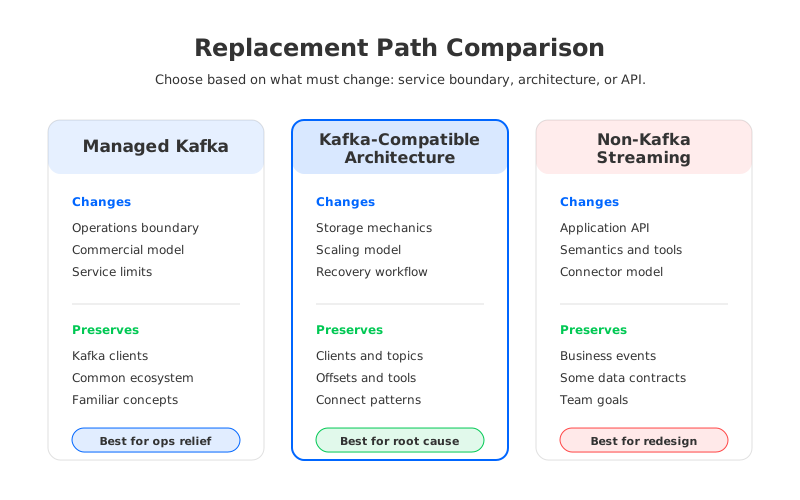
The right choice depends on what the review board is trying to remove from the current system.
| Replacement path | What changes | What can stay familiar | Main risk |
|---|---|---|---|
| Managed Kafka service | Vendor, control plane, operations model, commercial boundary | Kafka clients and much of the ecosystem | Service limits, network model, and cost surface may not match the workload |
| Kafka-compatible architecture replacement | Storage model, scaling mechanics, recovery model, operating model | Kafka clients, topics, tooling, connectors, and operational concepts after validation | Compatibility still needs workload-level testing |
| Non-Kafka streaming system | API, semantics, tools, operational model, application integrations | Some business event concepts and data contracts | Application rewrite, connector rewrite, and rollback complexity |
A managed Kafka service is attractive when the main pain is staffing and routine operations. It may reduce broker management work, but it does not automatically remove architectural constraints around retention, partition movement, cross-zone traffic, or service-specific limits. Review boards should ask whether the service changes the root cause or mainly transfers the work to a different boundary.
A non-Kafka streaming system can be correct when the business no longer wants Kafka semantics. That path should be treated as an application redesign program, not a Kafka migration. Producers, consumers, stream processors, connectors, schemas, observability, and rollback all need deeper redesign. It may be worth it, but it is rarely the lowest-risk answer for teams whose applications still depend on Kafka behavior.
A Kafka-compatible architecture replacement sits between those choices. It keeps Kafka protocol and ecosystem assumptions in scope while changing the mechanics behind storage, scaling, and recovery. This is where AutoMQ fits: as a Kafka-compatible streaming platform that uses object-storage-backed shared storage and stateless brokers, so teams can evaluate an architecture replacement without turning the project into an application rewrite. The point is not to skip validation. The point is to make validation focus on workload compatibility rather than wholesale application redesign.
5Build the Business Case Around Risk, Not Preference
Architecture review boards do not approve replacement because a platform team is tired of a tool. They approve it when the current path creates measurable risk. Start with incidents where recovery time was extended by broker rebuilds, data movement, partition imbalance, manual reassignment, or unclear ownership. Then map those events to spend: over-provisioned brokers, unused disk, cross-zone replication, emergency scaling, and engineer hours.
The case should include replacement cost as well. Parallel run, replication tooling, compatibility testing, migration windows, application-owner time, and rollback rehearsals all cost money. A strong case says: keeping the current platform has a cost, replacing it has a cost, and the replacement cost buys down a specific class of recurring risk.
6A Risk Checklist for Production Cutover
Cutover should happen only after the team can prove that source, target, and rollback are all observable. This is where vague phrases such as "seamless migration" and "zero downtime" need discipline. A low-disruption or no-downtime migration may be possible when replication, offset handling, client routing, source retention, and rollback are designed for it. It should never be promised as a default property of a replacement platform.
Use a cutover checklist that forces evidence:
- Inventory is approved for the migration wave, including topics, partitions, schemas, connectors, client versions, ACLs, and owners.
- Compatibility tests pass for producer, consumer, AdminClient, Connect, and stream-processing behavior used by the workload.
- Replication or dual-write design is tested with lag, ordering, duplicate handling, and data comparison metrics.
- Offset policy is approved per consumer group, including replay tolerance and reset behavior.
- Private connectivity, DNS, certificates, firewall rules, and authentication are tested before the migration window.
- Dashboards and alerts cover source, target, migration tooling, and business-level signals.
- Rollback is rehearsed, including bootstrap routing, offset position, source retention, and post-rollback data reconciliation.
This checklist avoids the false comfort of a single "go/no-go" meeting and forces each application owner to say what behavior matters. Some workloads tolerate replay; others cannot absorb even a small offset mistake. Kafka replacement is safest when the migration plan respects those differences.
7How AutoMQ Changes the Replacement Equation
The most useful Kafka replacement is often not a rejection of Kafka. It is a rejection of the parts of the deployment model that no longer fit cloud infrastructure. Traditional Kafka binds broker compute to local durable log storage. That coupling is why scaling, recovery, and rebalancing often involve data movement. It is also why storage growth and compute headroom can be difficult to optimize independently.
AutoMQ changes that equation by preserving Kafka compatibility while moving durable stream storage toward shared object storage and making brokers more stateless. In practical terms, a replacement review can ask a different question: can we keep Kafka clients, topics, consumer groups, Connect patterns, monitoring concepts, and security expectations while reducing the operational weight of broker-local storage? That is a narrower and safer question than "should we rewrite every application that uses Kafka?"
This does not make replacement automatic. Teams still need workload-level compatibility tests, migration design, cost modeling, and rollback design. AutoMQ's migration and architecture documentation are useful review inputs because they move the conversation from vendor preference to testable architecture claims.
The replacement meeting that started with incidents and budget pressure should end with a clear decision. Tune the current Kafka estate if the problems are local. Move to a managed service if the main issue is operational ownership and the service model fits. Choose a non-Kafka system if the application model is changing anyway. Consider a Kafka-compatible architecture replacement when the organization wants Kafka behavior to remain familiar but needs storage, scaling, and recovery to stop behaving like broker-local disk problems.
8References
- Apache Kafka Documentation: Basic Kafka Operations
- Apache Kafka Documentation: Replication design
- Apache Kafka Documentation: Kafka Connect overview
- AutoMQ Documentation: Compatibility with Apache Kafka
- AutoMQ Documentation: Shared Storage architecture overview
- AutoMQ Documentation: Migrating from Apache Kafka to AutoMQ
9FAQ
9.1What is the strongest signal that Kafka replacement is justified?
The strongest signal is recurring pain across cost, scaling, recovery, and operations. One overloaded cluster may need tuning. A pattern where every capacity or recovery event requires data movement, specialist intervention, and extra spend is a stronger replacement trigger.
9.2Can Kafka be replaced without rewriting applications?
Sometimes, if the target is Kafka-compatible and the workload passes compatibility testing. Producers, consumers, topics, offsets, connectors, security, monitoring, and rollback still need validation. Kafka-compatible does not mean migration planning is optional.
9.3Is a managed Kafka service the same as a Kafka replacement?
It can be one kind of replacement, but it mainly changes the service and operations boundary. Review whether it also changes the root cause of your pain, such as storage growth, partition movement, recovery time, network cost, or capacity elasticity.
9.4When should a team choose a non-Kafka streaming system?
Choose a non-Kafka system when the application model is changing and the organization is ready to redesign producers, consumers, connectors, schemas, processing jobs, observability, and rollback. Treat it as application redesign rather than a narrow Kafka migration.
9.5Where does AutoMQ fit in a Kafka replacement review?
AutoMQ fits when the team wants to preserve Kafka-facing behavior while evaluating a different storage and scaling architecture. It is best assessed as a Kafka-compatible architecture replacement: validate the workload, preserve the ecosystem surface, and test whether shared storage and stateless brokers reduce the operational problems that triggered the review.


