
Table of Contents
Table of Contents
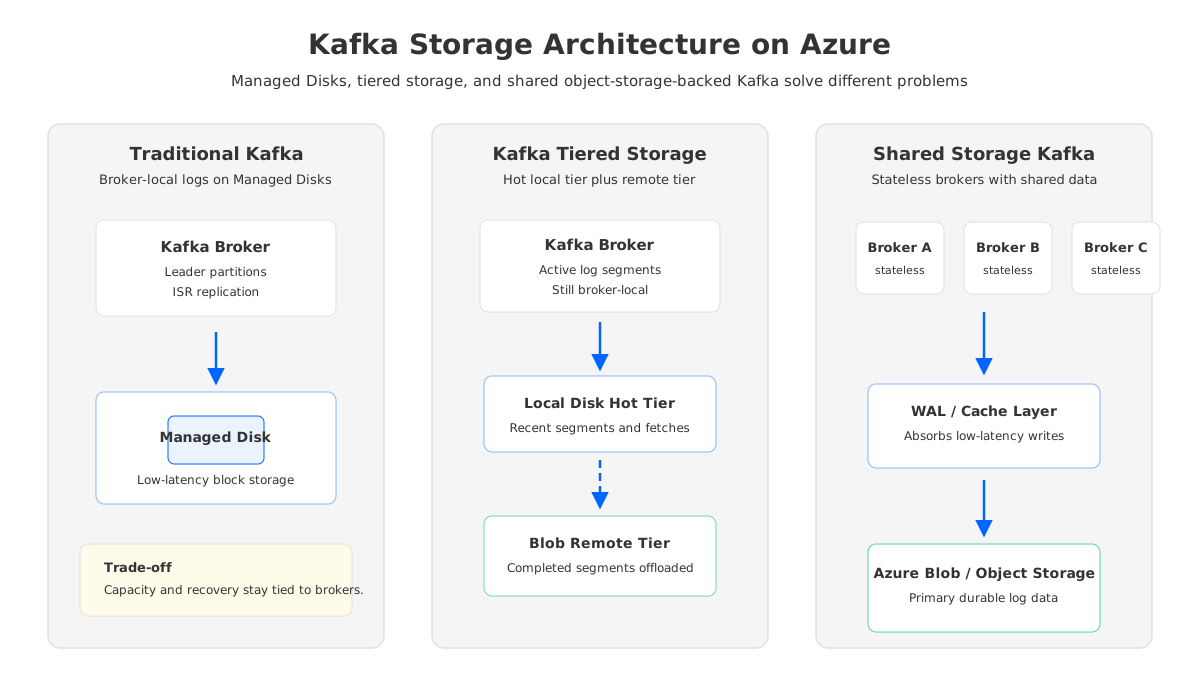
Kafka storage on Azure is rarely a pure storage question. It is a latency question, a recovery question, a retention question, and eventually a FinOps question. The bill shows Azure Managed Disks, Blob Storage, VM instances, and network traffic as separate line items, but Kafka turns them into one coupled system: every partition has a leader, every leader writes a log, every durable log needs replicas, and every broker failure turns storage placement into an operational event.
That coupling is why "Managed Disks vs Azure Blob Storage" is the wrong framing if it means choosing one service as a drop-in replacement for the other. Azure Managed Disks are block storage for virtual machines; they are a natural fit for traditional Kafka broker logs because Kafka expects low-latency local or attached storage. Azure Blob Storage is object storage; it is excellent for durable, scalable, lower-cost retention and cloud data lake integration, but it is not a direct substitute for a broker's hot log path unless the Kafka storage layer has been redesigned around object storage.
The practical decision is more precise: should your Azure Kafka workload stay on broker-local disks, add tiered storage for older log segments, or adopt a shared-storage Kafka architecture where object storage becomes the durable log backend and brokers become mostly stateless compute?
1Why Kafka Storage Architecture Matters on Azure
Kafka was designed around an append-only log, and that design is still one of its strongest features. Sequential writes, page cache, segment files, and partition leadership give Kafka excellent throughput when the storage layer behaves predictably. The trade-off is that Kafka's durability model is normally implemented above the cloud storage layer: brokers write local log segments, followers replicate those segments, and the cluster maintains in-sync replicas to survive broker or disk failure.
On Azure, that maps cleanly to VMs plus Managed Disks. Premium SSD, Premium SSD v2, and Ultra Disk can provide the low-latency block storage profile that production Kafka expects. Microsoft documents different disk types for different workloads, including Premium SSD v2 for performance-sensitive workloads and Ultra Disk for IO-intensive workloads, with provisioned performance knobs for IOPS and throughput. For a self-managed Kafka cluster, this is the most familiar path because it preserves the standard Kafka storage model.
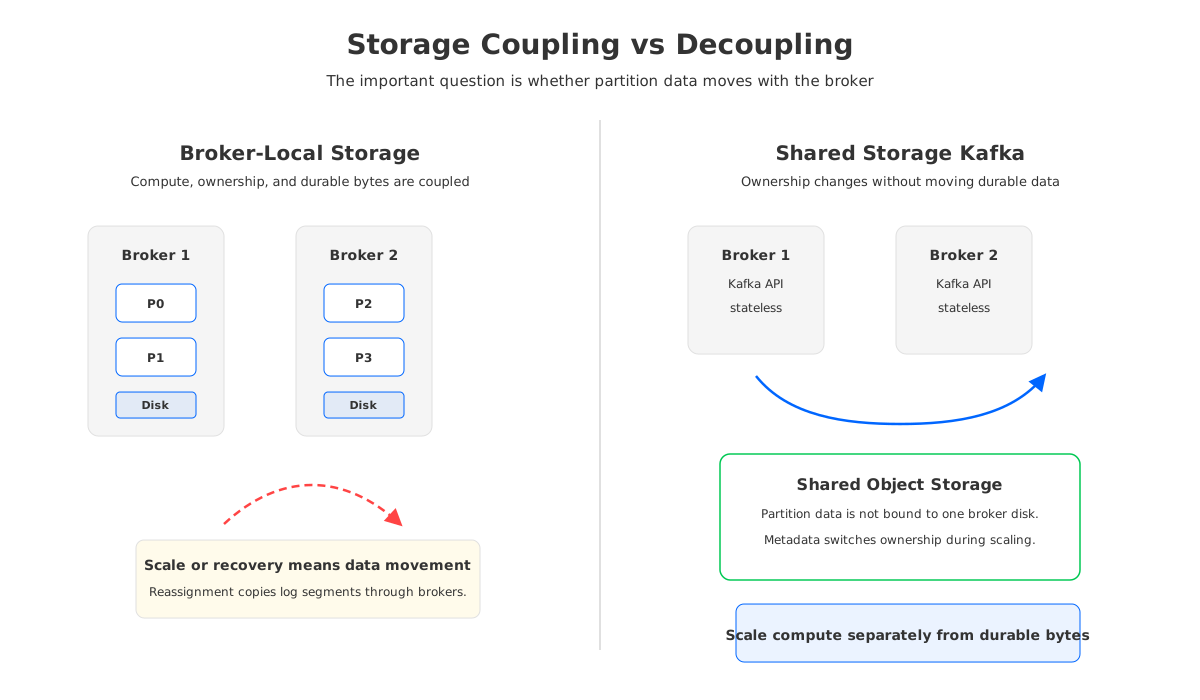
The cost problem appears when retention, replication, and scaling pressure grow together. A 3-replica Kafka topic does not store one copy of data; it stores three broker-local copies before any snapshots, backups, or remote retention are considered. If you keep 14 or 30 days of high-volume data on disks, the storage footprint grows with the replication factor and with the headroom required for rebalancing. If you add brokers, remove brokers, or change partition placement, the durable bytes have to move through the cluster.
Cloud object storage changes the economics because it separates durable capacity from VM-attached disks. Azure Blob Storage supports access tiers such as hot, cool, cold, and archive, plus redundancy choices such as locally redundant, zone-redundant, geo-redundant, and geo-zone-redundant storage. That makes it attractive for long retention and analytics integration. But Kafka cannot treat Blob Storage like a local file system without architectural consequences.
2Managed Disks for Traditional Kafka Brokers
Managed Disks are the default answer when the workload is conventional Kafka and the team wants predictable hot-path latency. The broker writes to an attached disk, the operating system and page cache participate in reads, and Kafka's replication protocol handles broker-level durability. This is the architecture most Kafka operators already understand, which matters when the team owns incident response.
The strengths are straightforward:
- Low-latency write path for active log segments, especially with Premium SSD v2 or Ultra Disk where performance can be provisioned for demanding workloads.
- Operational compatibility with standard Kafka assumptions around log directories, segment files, leader/follower replicas, and broker replacement.
- Clear isolation between broker instances when each broker owns its own data disks and disk metrics.
- Mature tooling for VM snapshots, backup workflows, disk resizing, and performance monitoring.
The limitation is equally concrete: disks belong to brokers. If a broker owns the bytes, scaling the cluster means reassigning partitions and copying bytes. If retention grows, broker disks grow. If a disk SKU is selected for peak IOPS but the workload mostly needs capacity, cost efficiency suffers. If storage is over-provisioned for rebalancing safety, the unused headroom still appears on the bill.
Azure's redundancy options improve disk durability, but they do not remove Kafka's broker-local ownership model. Zone-redundant managed disks can replicate data across zones for supported disk types and regions, while locally redundant storage keeps copies within a single region. A traditional Kafka cluster still has to reason about partition leadership, ISR, rack awareness, and recovery behavior at the Kafka layer.
For SREs, the important question is not whether Managed Disks are "good." They are often exactly right for latency-sensitive Kafka. The question is whether the workload's storage growth and operational churn justify keeping all durable log data attached to brokers.
3Blob Storage for Durable, Lower-Cost Retention
Azure Blob Storage is compelling because Kafka retention is often less about hot reads than about replay insurance. Teams keep data because downstream systems fail, compliance asks for replay windows, data scientists want historical streams, or CDC pipelines need time to recover from sink outages. Most of those reasons do not require every byte to remain on premium block storage forever.
Blob Storage is built for large-scale object storage, not for synchronous small random writes from a Kafka broker. Its access tiers explicitly trade storage cost, access cost, and retrieval behavior. Hot is optimized for frequently accessed data; cool and cold are for less frequently accessed data; archive is offline and intended for rarely accessed data with rehydration. For Kafka, that means Blob Storage is a strong fit for remote retention and historical replay, but a poor direct fit for the active broker log unless a storage engine absorbs the mismatch.
That distinction prevents a common design mistake. A team may look at Blob pricing and ask why Kafka does not write all log segments directly to Blob. The reason is not lack of imagination; it is the latency and operation pattern. Kafka producers expect acknowledgments after durable append. Consumers expect efficient tailing reads and catch-up reads. Object storage APIs are optimized around objects and ranges, not millions of tiny partition-level synchronous file appends.
Blob Storage becomes powerful when Kafka uses it through the right abstraction:
- As a remote tier, Blob can hold completed log segments after the local hot tier has served the latency-sensitive path.
- As a data lake landing zone, Blob can receive archived stream data through connectors or capture-style pipelines.
- As shared durable storage, Blob-compatible object storage can become the primary repository when the Kafka implementation redesigns the log layer around object APIs, caching, and a write-ahead log.
The third pattern is the most different: replace the broker-local persistent log with a storage layer that understands object storage.
4Tiered Storage vs Shared Storage
Kafka tiered storage and shared storage Kafka are often grouped together because both involve object storage, but they solve different parts of the problem. Apache Kafka tiered storage introduces a remote tier for completed log segments while the local tier remains responsible for active segments.
That makes tiered storage useful when the pain is long retention. If brokers are sized mostly because old segments consume disk, moving older segments to Blob-compatible storage can reduce local disk pressure and make longer replay windows practical. The cluster still has brokers, local disks, leaders, followers, and partition ownership. Recovery and scaling improve because there is less old data to copy, but the architecture is not fully decoupled.
Shared storage Kafka changes the premise. Durable log data is no longer fundamentally owned by a broker's local disk. Brokers serve the Kafka API and may keep cache or WAL state for performance, but the primary durable storage lives in shared object storage. Scaling is then closer to a metadata and ownership operation than a bulk data movement operation. When a broker fails, another broker can take over the partition's ownership by reading shared metadata and data rather than waiting for a large local log copy.
This is where AutoMQ naturally enters the conversation. AutoMQ is a Kafka-compatible streaming platform that replaces Apache Kafka's native broker-local log storage with S3Stream, a shared streaming storage layer built on object storage plus WAL acceleration. The point is to put a WAL/cache layer in front of object storage for low-latency writes and hot reads, while making object storage the durable backend that brokers do not individually own.
That design preserves the Kafka API and ecosystem compatibility path while changing the storage mechanics. Kafka clients, Kafka Connect, Kafka Streams, and common operational tooling can remain relevant, but broker scaling, reassignment, and failure recovery are no longer dominated by copying large local log directories. Blob is not a direct disk replacement, but object storage can become the durable Kafka storage layer when the system is built for it.
5Cost and Recovery Trade-Offs
Storage cost is not only price per GiB. Kafka turns storage into a multiplication problem: broker-local capacity, replication factor, spare capacity for rebalancing, and performance headroom. Long retention magnifies all of those. A disk can be resized, but a partition-heavy Kafka cluster does not become elastic merely because the disk SKU is adjustable.
Tiered storage changes the retention side of the equation. Older segments can move out of the local tier, so broker disk footprint can track the hot working set rather than the full retention window. It does, however, introduce remote storage concerns: remote log manager configuration, object storage access, historical fetch behavior, and lifecycle policies.
Shared storage changes the scaling and recovery side. When durable data is shared, adding or replacing brokers does not require the same volume of partition data copying. The trade-off moves into the storage engine: it must handle object layout, metadata, WAL durability, read caching, compaction, and object API efficiency.
The FinOps model should include at least five lines:
| Cost driver | Managed Disks Kafka | Tiered storage Kafka | Shared-storage Kafka |
|---|---|---|---|
| Hot write path | Broker-local disks | Broker-local disks | WAL/cache plus shared storage |
| Long retention | Multiplied by replicas | Offloaded after segment completion | Stored primarily in object storage |
| Scaling cost | Partition data movement | Less old data to move | Metadata/ownership switching |
| Recovery cost | Local disk and replica catch-up | Local hot tier plus remote reads | Shared data takeover path |
| Operational risk | Familiar but heavy | Hybrid local/remote tuning | New storage engine assumptions |
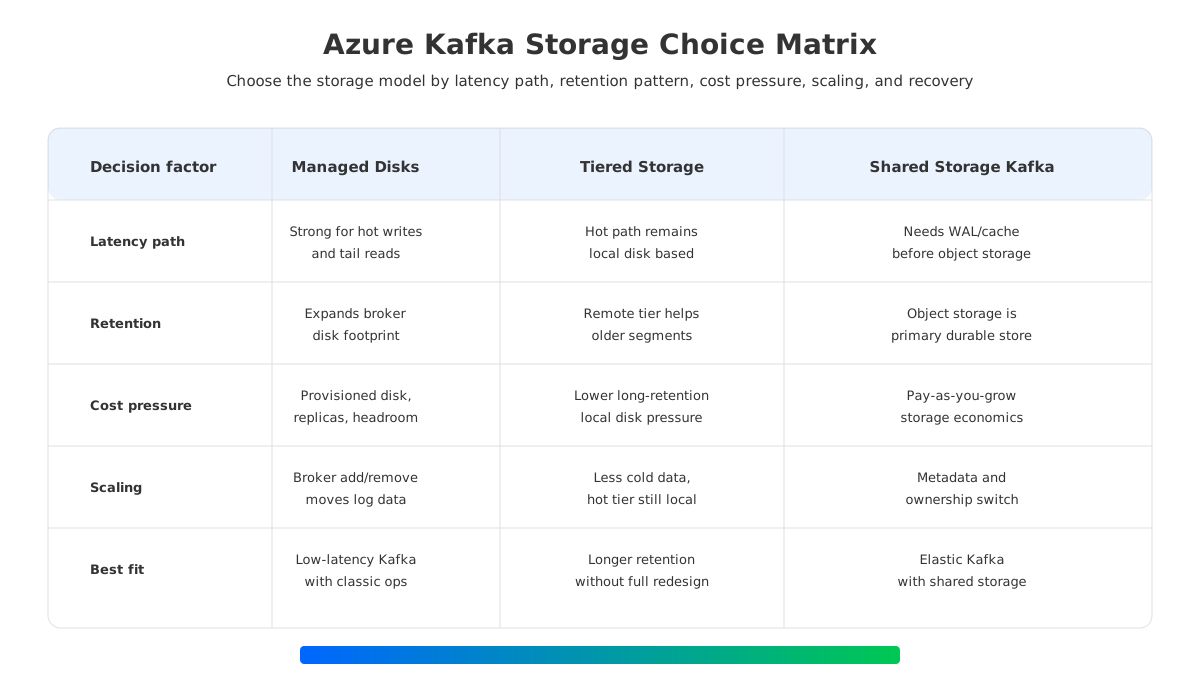
The right answer depends on where the bottleneck sits. If the workload has strict tail latency, modest retention, and a team comfortable with classic Kafka operations, Managed Disks are still a reasonable choice. If retention is the primary cost center and the team wants to preserve conventional Kafka, tiered storage deserves serious evaluation. If broker churn, partition reassignment, multi-AZ replication cost, and long retention all show up at once, shared storage becomes a more strategic option.
6How to Choose for an Azure Kafka Workload
Start with the hot path. Measure producer acknowledgment latency, tailing consumer reads, peak write throughput, partition count, and data read from the last few hours. If most reads are hot and latency-sensitive, treat Managed Disks as the baseline and be deliberate about disk type, VM size, and zone placement. Do not move the active log path to object storage because the storage line item looks attractive.
Then separate retention from ingestion. Many teams discover that only a small fraction of retained Kafka data is frequently read. That is the signal for tiered storage or shared storage evaluation. The more your retention window grows beyond the hot working set, the less sense it makes to keep every byte on premium broker-local disks.
Finally, model failure and scaling as normal events. Kafka storage architecture is tested during broker replacement, partition reassignment, consumer backfill, and downstream outage recovery. A design that looks cost-effective at steady state can become expensive when it must move terabytes across brokers to restore balance.
For most Azure platform teams, the decision can be summarized this way:
- Choose Managed Disks when you need the standard Kafka storage model, low-latency local persistence, and operational familiarity.
- Choose tiered storage when local disk growth is driven by older completed segments and you want to extend retention without redesigning the cluster.
- Choose shared-storage Kafka when you want Kafka compatibility but need broker compute to scale independently from durable log data.
The storage line in an Azure bill is only the visible part of the decision. The hidden part is data movement. Once you see whether durable bytes are tied to brokers or shared across brokers, the Managed Disks vs Blob Storage debate becomes much easier to reason about.
7References
- Azure managed disk types
- Azure Managed Disks pricing
- Azure managed disk redundancy options
- Azure Blob Storage access tiers
- Azure Blob Storage pricing
- Azure Storage redundancy
- Apache Kafka tiered storage
- AutoMQ architecture overview
- AutoMQ S3Stream overview
- AutoMQ WAL storage
8FAQ
8.1Can Azure Blob Storage replace Managed Disks for Kafka?
Not as a direct drop-in replacement for a traditional Kafka broker log. Kafka's active log path expects low-latency durable appends and efficient tail reads. Blob Storage is better used as a remote tier, archive destination, or the durable backend for a Kafka implementation that has redesigned the storage layer around object storage.
8.2When should Kafka on Azure use Managed Disks?
Use Managed Disks when you are running traditional Kafka brokers and need predictable hot-path latency, standard Kafka log directory behavior, and familiar operations. Premium SSD v2 or Ultra Disk can be appropriate for performance-sensitive workloads, while the final choice should be based on benchmarked throughput, IOPS, latency, and VM compatibility.
8.3What is the difference between Kafka tiered storage and shared storage Kafka?
Tiered storage keeps Kafka's local hot tier and moves completed segments to remote storage. Shared storage Kafka replaces the broker-local durable log as the primary storage model, using object storage plus WAL/cache mechanisms so brokers can be more stateless.
8.4Is Blob Storage always lower cost for Kafka retention?
Blob Storage can be more cost-effective for large retained datasets, but total cost depends on access tier, transactions, retrieval, redundancy, lifecycle policy, replay frequency, and the Kafka architecture that uses it. A workload with frequent historical reads may need a different tier or caching strategy than an archive-heavy workload.
8.5How does AutoMQ use object storage without making Kafka slow?
AutoMQ uses S3Stream shared storage with a WAL layer and caching so object storage is not treated like a synchronous local disk. The WAL absorbs low-latency persistence requirements, while object storage holds the durable data. That lets brokers remain Kafka-compatible while reducing the amount of durable data tied to each broker.


