
Table of Contents
Table of Contents
Kafka cost comparisons often start in the wrong place. A team looks at a broker instance type, multiplies it by the number of nodes, and calls that the monthly cost. That number is useful, but it is not TCO. The real bill includes storage, replication, cross-AZ traffic, retention, read fanout, operational labor, headroom for failures, and the cost of scaling slowly when the workload changes.
That is why many Kafka evaluations feel confusing. A managed service can look more expensive than self-managed Kafka until you include on-call time and upgrades. A self-managed cluster can look efficient until you include idle capacity and data transfer. A performance-oriented platform can look strong on benchmark charts while still carrying a local-storage cost model. You need one framework that forces every option through the same workload assumptions.
1Start with the workload, not the vendor
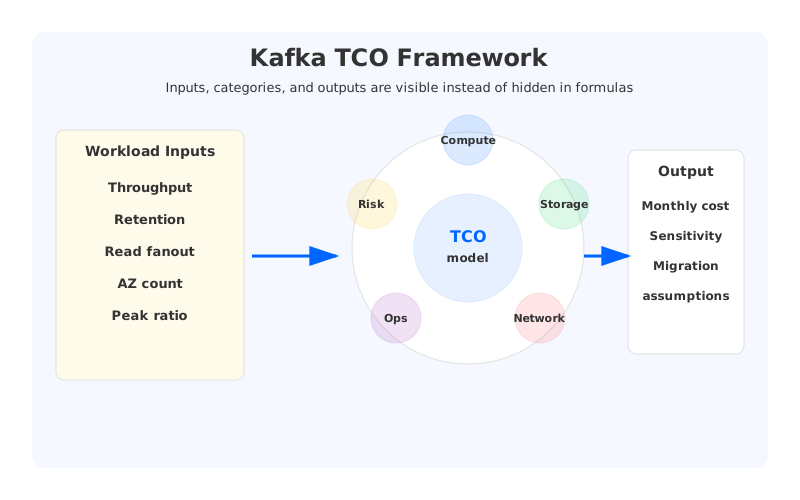
A TCO calculator should begin with workload facts. Vendor pricing pages are inputs, not the starting point. The starting point is the stream itself: how much data comes in, how long it stays, how many consumers read it, how bursty the traffic is, and how much availability the business requires. Those variables determine whether compute, storage, network, or operations will dominate the bill.
At minimum, collect these inputs before comparing platforms:
- Write throughput in MiB/s or MB/s, with the unit kept consistent.
- Read fanout, including catch-up reads and long-running batch consumers.
- Retention window and total logical data retained.
- Replication or durability model, including the number of AZs.
- Peak-to-average traffic ratio, because idle capacity is still paid capacity.
- Operational model: self-managed, cloud-managed, BYOC, or fully SaaS.
- Migration and risk assumptions, especially if downtime has direct business cost.
The point is not to create a perfect financial model. Perfect models do not survive contact with production. The point is to make the assumptions visible. Once the assumptions are visible, platform comparisons stop being arguments about slogans and become arguments about line items.
2The five cost buckets that matter
Most Kafka bills can be explained by five buckets. Compute is the most obvious one: brokers, controllers, client-side capacity, and sometimes separate Connect or stream-processing infrastructure. Storage is the second bucket, and it grows quickly when retention is long and replication factor is high. Network is the third, especially in AWS Multi-AZ deployments where broker-to-broker replication and consumer placement can create cross-AZ data transfer.
Operations is the bucket teams often omit because it does not arrive as a cloud invoice. It still costs money. Someone plans capacity, applies upgrades, monitors hotspots, handles rebalances, manages incidents, and explains why the cluster needs more disk. The final bucket is risk buffer: extra capacity for spikes, failure domains, slow recovery, and migration windows. Traditional Kafka teams often overprovision because underprovisioning is much more visible than waste.
| Cost bucket | What to include | Why it gets missed |
|---|---|---|
| Compute | Brokers, controllers, Connect, stream processors | Easy to count, but idle capacity is often hidden |
| Storage | Retention, replicas, snapshots, remote tiers | Logical data is not paid data when replication is involved |
| Network | Cross-AZ replication, egress, read fanout | It appears as a separate cloud line item later |
| Operations | On-call, upgrades, rebalance work, incident time | It lives in headcount and engineering focus |
| Risk buffer | Peak headroom, failure spare capacity, rollback room | Teams call it safety, finance sees it as utilization loss |
This table also explains why list-price comparisons are weak. If one platform changes only broker price, it affects one bucket. If another platform changes how storage and replication work, it can affect several buckets at once.
3Run every platform through one scenario
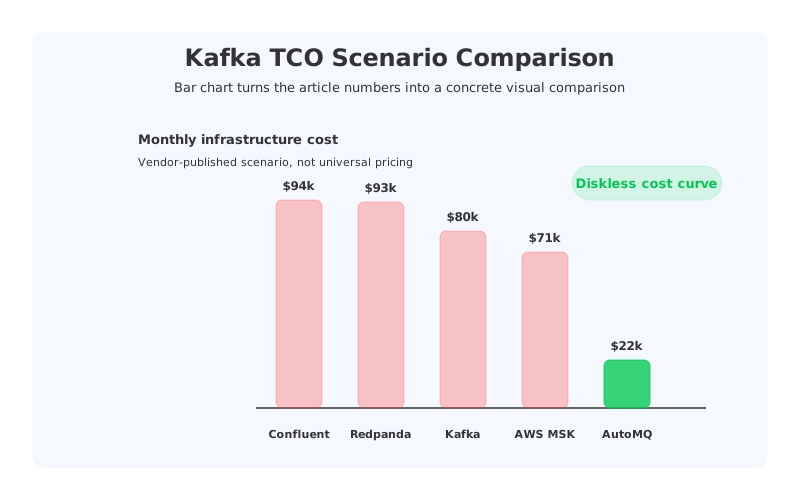
A fair comparison uses the same workload for every platform. For example, AutoMQ's public cost comparison uses a scenario with 300 MB/s throughput, 50 TB retention, and Multi-AZ deployment. The reported monthly infrastructure numbers in that scenario are Apache Kafka self-managed at $80,043/month, AWS MSK at $70,529/month, Confluent Cloud at $94,282/month, Redpanda at $93,065/month, and AutoMQ at $21,513/month. Those numbers should be treated as scenario-specific, not universal truth, but they are useful because the workload stays fixed.
The more important lesson is the shape of the cost. Traditional Kafka-style systems pay for broker-attached storage, replication, and data movement. Managed services reduce some operational work but may leave the disk-bound cost structure intact. Diskless systems such as AutoMQ change the storage and replication assumptions by moving the durable log to object storage and making brokers stateless compute.
When you build your own calculator, resist the temptation to hide assumptions in formulas. Put them next to the result. A finance stakeholder should be able to see the workload, region, storage price, replication model, and read fanout that produced the estimate. An engineer should be able to challenge whether those assumptions match production.
4How AutoMQ changes the TCO model
AutoMQ's cost argument is not that every individual resource is lower priced. The stronger argument is that the architecture removes or shrinks several expensive categories. Object storage changes the long-retention storage line. Stateless brokers reduce the need to bind compute capacity to stored bytes. Zone-aware design and shared storage can reduce broker-to-broker cross-AZ replication traffic. Faster scaling reduces the pressure to reserve capacity for rare peaks.
That does not mean the calculator should hand AutoMQ a free win. It should still include broker compute, WAL-related storage, object storage operations, monitoring, and the operational work of running or adopting a new platform. The difference is that those costs grow differently from a broker-local disk architecture. TCO is about growth curves, not a single month.
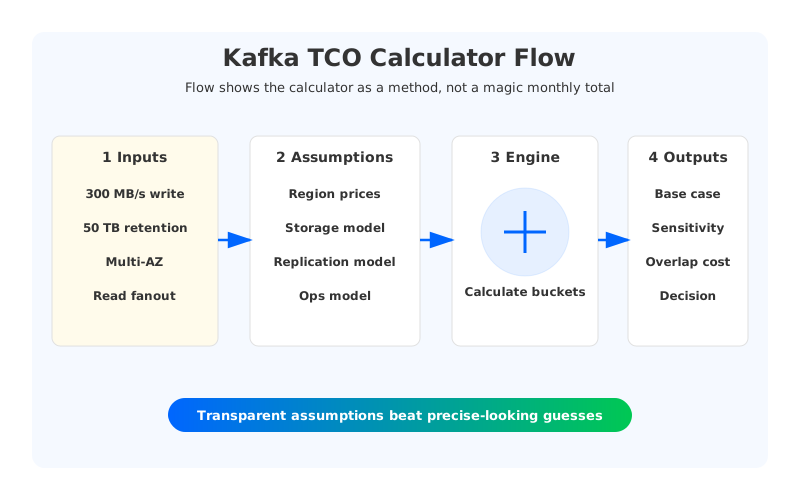
A practical calculator can be built as a spreadsheet or a simple internal tool. Start with the workload inputs, apply platform-specific assumptions, and produce a monthly estimate by category. Then run sensitivity checks: double retention, double read fanout, increase peak traffic, change AZ count, and extend the migration period. The platform that looks good in one static scenario may behave differently when the business changes.
5What to do before trusting the number
A TCO model is a decision aid, not a purchase order. Before using it to justify a migration, compare the model against an existing production bill. If your current Kafka cluster costs $50,000/month and the model says it should cost $20,000/month, either the model is missing a category or the cluster has a real optimization opportunity. Both outcomes are useful.
The best reviews involve finance, platform engineering, and application owners. Finance cares about spend predictability. Platform teams care about failure modes and operational load. Application owners care about migration risk and latency. A calculator that serves only one group will produce a number nobody else trusts.
Use the calculator to make the tradeoff visible:
- If a managed service reduces operational labor but increases usage-based fees, show both lines.
- If a diskless architecture reduces storage and cross-AZ costs, show the assumptions that make that true.
- If a high-performance local-disk system improves latency, show whether the workload actually needs that latency.
- If self-managed Kafka looks inexpensive, include the labor and risk buffer required to keep it healthy.
The useful question is not “which Kafka platform is lowest cost?” It is “which platform has the lowest sustainable cost for this workload and this team?” Once you ask the question that way, AutoMQ's diskless architecture becomes easier to evaluate. It changes the cost buckets that usually grow fastest in cloud Kafka: storage, replication traffic, idle capacity, and operational drag.
6Assumptions your calculator should expose
The most useful TCO calculators are almost boring. They show every assumption in plain sight and let engineers change one variable at a time. A calculator that hides the replication factor, AZ count, retention period, read fanout, or storage price will produce a number that looks precise but cannot be trusted. Precision without explainability is a trap, especially when the result is used to justify a platform migration.
Make the calculator show the baseline and the sensitivity cases side by side. What happens if retention doubles? What happens if a new analytics team creates a 4x read fanout? What happens if peak write throughput becomes the normal workload six months from now? Traditional Kafka cost often grows in step functions because teams add brokers and disks in chunks. Diskless architectures tend to separate storage growth from compute growth, so the sensitivity curve is different. Seeing that curve is more useful than staring at one monthly total.
Finally, include migration overlap. For a few weeks or months, the source and target clusters may run together while data is mirrored and consumers cut over. That temporary double-run cost is real. A good TCO model includes it, then compares it with the recurring monthly savings after the migration is complete.
A final review step is to compare the calculator against utilization. If a platform looks inexpensive only because it assumes 90% broker utilization, the model may be unrealistic for a team that runs with 40% headroom for incident safety. Utilization is not waste by itself; unexplained utilization is the problem.


