
Table of Contents
Table of Contents
A Kafka benchmark can look clean in a lab and still disappoint in production. The producer test reaches the target write rate. The broker dashboard stays green. The consumer test drains a synthetic topic. Then the same cluster meets a real workload with uneven keys, replication across failure domains, longer retention, background reassignment, and consumer applications that do more than count records.
That gap is where many Kafka throughput investigations go wrong. Teams look for one universal number: Kafka throughput per partition, broker throughput, disk throughput, or network throughput. Kafka does not behave like that; the pipeline moves only as fast as the slowest stage under the exact workload you run.
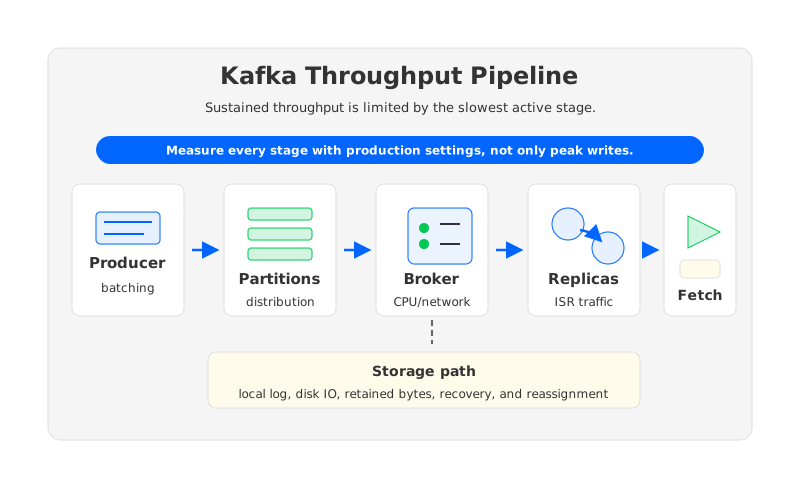
This is why kafka benchmark results are useful when the benchmark describes the whole path. Message size, batching, compression, acknowledgments, replication factor, partition count, broker CPU, disk behavior, network placement, and consumer fetch settings all change the answer.
1Why Kafka Throughput Numbers Vary So Much
Kafka is built around partitioned logs. Each partition has a leader, producers append records to leaders, followers replicate from leaders, and consumers fetch from partition leaders. That gives Kafka its scaling shape, but it also creates several ceilings. A producer may not batch enough records, a partition leader may become hot, a broker may run out of CPU before disk looks saturated, or consumers may fetch quickly and then stall on application logic.
The phrase "Kafka high throughput" needs a complete sentence around it:
| Question | Why It Changes the Result |
|---|---|
| Throughput of what? | Bytes per second, records per second, and end-to-end processed events can point to different bottlenecks. |
| At what message size? | Small records stress per-record overhead and batching. Large records stress bytes, compression, fetch size, and memory pressure. |
| With which durability settings? | acks, replication factor, and in-sync replica requirements affect how much work each acknowledged write creates. |
| Over which topology? | Single-AZ, multi-AZ, and cross-region designs have different network and replication costs. |
| For how long? | A short test can miss retention pressure, disk saturation, page cache changes, compaction, and background movement. |
The useful mental model is not "how much throughput can Kafka do?" It is "which stage in my workload becomes saturated first, and what happens when that stage is stressed for hours rather than minutes?"
2Producer-Side Bottlenecks
Producer throughput starts before Kafka sees a record. The producer has to serialize data, choose a partition, batch records, optionally compress them, send requests, wait for acknowledgments, and retry when needed. Kafka exposes many of those trade-offs through settings such as batch.size, linger.ms, compression.type, acks, and buffer.memory.
Batching is often the first lever. Larger batches amortize request overhead over more records, while linger.ms can allow the producer to wait briefly for better batches. Compression can reduce network and disk bytes, but it consumes CPU and depends heavily on record shape. Acknowledgment settings change the durability side of the same equation: production benchmarks should use the acks mode the application will actually run.
Three producer-side signals are worth checking before blaming the broker:
- Batch quality: small average batch sizes can leave throughput on the table even when producers are busy.
- Request waiting and retries: rising request latency, retry rates, or buffer pressure can indicate that the producer is waiting on Kafka or running out of local capacity.
- Partition distribution: a producer can have enough aggregate throughput while overloading a small set of partition leaders because keys are uneven.
This is the first reason Kafka throughput per partition is not universal. A partition receiving compressed, well-batched records with acks=all is not comparable to a partition receiving tiny records with poor batching.
3Partitions And Broker Bottlenecks
Partitions create the units of parallelism that producers, brokers, and consumers use. A topic with too few partitions can bottleneck on a small number of leaders. A topic with more partitions can spread traffic across more leaders and support more consumers in a group. That part is real, and it is why partition count is central to Kafka throughput design.
But partition count is not a magic multiplier. Increasing partitions helps when traffic can distribute across them and the rest of the cluster has capacity. Hot keys can keep one partition overloaded while many others remain quiet. Too many partitions add metadata, leadership, file, replica, and recovery overhead. Kafka's operations documentation is also clear that partition count cannot be reduced for an existing topic; changing course later usually means creating a replacement topic and migrating traffic.
Broker bottlenecks usually show up as a combination of CPU, network, disk, request queues, and page cache behavior. A broker under high produce load is not only accepting client traffic; it is also appending to local logs, serving follower fetches, serving consumer fetches, handling coordination, and sometimes performing background work such as log cleanup or replica catch-up. The diagnostic question is whether the broker is saturated by useful work or by work created by the platform design:
| Broker Surface | Throughput Symptom |
|---|---|
| CPU | Request handling, compression, TLS, and serialization overhead rise. |
| Network | Client, follower, and consumer traffic compete on the same links. |
| Disk IO | Appends, reads, flush behavior, and recovery work contend. |
| Request queues | Broker-side waiting grows before hardware graphs look fully maxed out. |
| Leader skew | A few brokers carry disproportionate leader traffic while aggregate utilization looks fine. |
Leader placement matters as much as broker count. Adding brokers does not automatically balance old hot partitions. Existing leaders and replicas may need reassignment, and in traditional Kafka that reassignment involves local data movement that competes with live traffic.
4Replication, Disk, And Network Bottlenecks
Replication is one of Kafka's strongest design choices, but it changes the throughput budget. A write acknowledged by the leader can also create follower fetch traffic, replica disk writes, and in-sync replica coordination. In a multi-AZ deployment, that work also becomes a network topology question because client writes, follower replication, and consumer fetches may cross different paths.
Storage is the bottleneck that often appears late. Short tests can benefit from warm page cache and clean disks. Long-running workloads have to deal with retained bytes, segment rolling, reads from older offsets, compaction if enabled, and replica catch-up. Disk throughput is a sustained-service question under mixed reads, writes, and recovery.
Benchmark replication and storage as a system:
- Use the same replication factor,
ackssetting, and in-sync replica requirement as production. - Include consumers, not only producers, because fetch traffic competes with replication and writes.
- Run long enough to observe retention, page cache, disk, and network behavior after the easy warm-up window.
- Test failure or maintenance scenarios if the workload has strict throughput expectations during broker replacement or reassignment.
A cluster that handles peak writes during normal operation may still fail a production requirement if throughput collapses during a broker event.
5Consumer-Side Throughput Limits
Consumers are often blamed too late. Kafka can accept writes at high speed while applications fall behind because consumer parallelism, fetch sizing, processing cost, or downstream systems cannot keep up. A topic with many partitions can still have one slow partition, one slow handler, or one external dependency that controls end-to-end throughput.
Consumer throughput has two layers. The first is fetching from Kafka; consumer settings such as fetch.min.bytes, fetch.max.bytes, and max.partition.fetch.bytes influence how much data a consumer receives per fetch. The second is application processing, where records are decoded, transformed, written to databases, sent to APIs, or joined with local state.
The most useful consumer checks are not complicated:
| Signal | What To Look For |
|---|---|
| Lag distribution | Whether lag is spread across partitions or concentrated on hot partitions. |
| Consumer assignment | Whether active consumers match partition count and group assignment. |
| Fetch behavior | Whether consumers fetch too little too often or wait for large batches. |
| Processing time | Whether handlers or downstream writes dominate after fetch. |
| Rebalance behavior | Whether group changes interrupt useful work during load or deployments. |
Consumer parallelism is capped by partition assignment within a consumer group. Adding partitions for consumers only helps when application work can scale horizontally and key distribution allows the work to spread.
6How To Design A Useful Kafka Benchmark
A useful Kafka performance benchmark is a workload description, not a command output. Kafka's performance tools are helpful for controlled tests, but a narrow test does not prove that a production topology will sustain the same rate.
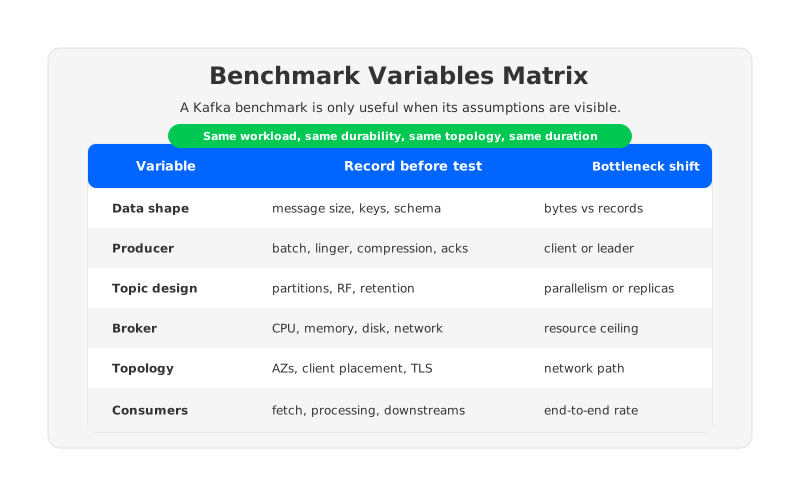
Start by writing down the assumptions before running the test. If the benchmark cannot describe the workload, the result cannot guide capacity design. The goal is to find the first ceiling and understand what changes when the workload becomes more realistic.
Use a benchmark template like this:
| Variable | Record It Before The Test |
|---|---|
| Data shape | Message size distribution, key distribution, schema, compression suitability. |
| Producer behavior | Producer count, batching, linger, compression, retries, acks, idempotence. |
| Topic design | Partition count, replication factor, retention, compaction, leader distribution. |
| Broker resources | Instance type, CPU, memory, disk type, disk bandwidth, network bandwidth. |
| Topology | AZ placement, client placement, cross-AZ paths, security settings such as TLS. |
| Consumer behavior | Consumer count, fetch settings, processing model, downstream dependency capacity. |
| Duration and events | Warm-up, steady state, failure test, reassignment test, scale-out or scale-in test. |
Run the benchmark in phases: isolate producers, add production replication settings, add consumers, extend duration, and introduce operational events such as broker replacement or partition movement if those events matter to the service-level objective. Each phase should answer one question, otherwise a failed test only tells you that something somewhere is saturated.
Avoid unsourced benchmark numbers in design reviews. If a vendor, blog post, or internal test claims a throughput result, ask what variables were used and whether the setup matches your workload. The same number can be impressive, irrelevant, or dangerous depending on message size, durability settings, and topology.
7How AutoMQ Changes Throughput Scaling Economics
If the throughput ceiling is producer batching, consumer processing, or hot keys, changing the storage architecture will not remove the need to tune those layers. The harder question is what happens when sustained throughput requires frequent scaling, long retention, multi-AZ durability, and operational changes while traffic continues.
Traditional Kafka couples broker compute with broker-local storage. Adding brokers can increase compute and network capacity, but retained partition data still lives on current brokers until reassignment moves it. Scaling, recovery, and hotspot mitigation can become data-movement projects.
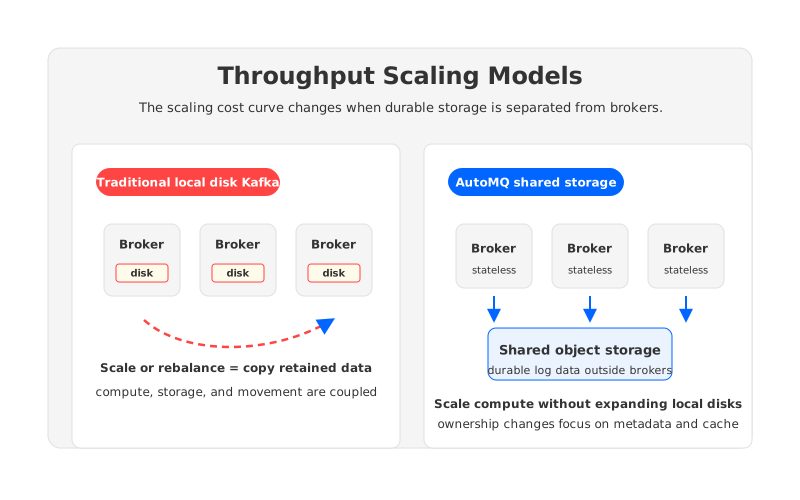
AutoMQ approaches the problem as a Kafka-compatible shared-storage system. Its architecture documentation describes replacing broker-local log storage with S3Stream and object storage, while stateless brokers serve Kafka protocol traffic and runtime work. In that model, durable data is not pinned to the long-term lifetime of a specific broker disk.
The practical throughput implication is not a magic per-partition number. It is a different cost curve for sustained throughput operations:
- Broker compute can be evaluated more directly as serving capacity because durable storage is separated from broker-local disks.
- Scaling events can focus more on metadata, ownership, and cache warm-up instead of copying retained partitions between brokers.
- Long retention does not force every broker sizing decision to carry the same local disk expansion logic.
- Balancing and reassignment become less tied to the volume of historical data retained by a topic.
For data platform teams, this changes the capacity conversation. Instead of asking only "how many brokers do we need for peak throughput?" the better question is "how much compute do we need for current traffic, how much durable storage do we need for retention, and how costly is it to change either one?" That separation is where AutoMQ can fit naturally for teams that want Kafka compatibility but are tired of treating every throughput increase as a broker, disk, and reassignment project at the same time.
8A Throughput Diagnosis Checklist
When a production cluster fails to match a benchmark, walk the pipeline in order. Start at the producer because poor batching or key skew can create broker symptoms. Move to partitions and leaders because aggregate utilization can hide hotspots. Then check replication, storage, network, and consumers.
A practical diagnosis sequence looks like this:
- Confirm the metric: bytes per second, records per second, or end-to-end processed events.
- Compare benchmark variables with production variables, especially message size,
acks, compression, replication factor, partitions, and topology. - Check producer batching, request latency, retries, and partition distribution.
- Check broker CPU, network, disk IO, request queues, and leader skew by broker.
- Check follower replication health, in-sync replica behavior, and cross-AZ network paths.
- Check consumer lag by partition, fetch behavior, processing time, and downstream capacity.
- Repeat the test for a sustained window and include maintenance or failure events if production must tolerate them.
The benchmark that looked good in isolation was a partial measurement. Once you know which part of the pipeline it measured, you can decide whether to tune producers, add partitions, rebalance leaders, change broker resources, adjust consumers, or revisit the storage and scaling model.
9References
- Apache Kafka Producer Configurations
- Apache Kafka Consumer Configurations
- Apache Kafka Basic Kafka Operations
- Apache Kafka Design: Replication
- AutoMQ Architecture Overview
- AutoMQ Stateless Broker
- AutoMQ Partition Reassignment in Seconds
- AutoMQ Continuous Self-Balancing
10FAQ
10.1What is Kafka throughput per partition?
Kafka throughput per partition is the amount of data a single partition can sustain under a specific workload. It is not a universal number. Message size, batching, compression, acknowledgments, replication, hardware, network, and consumer behavior all change the result.
10.2Do more Kafka partitions always increase throughput?
No. More partitions can help when partition count is the current ceiling and traffic distributes well. They may not help if the bottleneck is hot keys, producer batching, broker network, disk IO, replication, consumers, or downstream systems.
10.3How should I run a Kafka benchmark?
Define the workload first: message size, key distribution, producer settings, topic partitions, replication factor, broker resources, topology, consumers, duration, and failure events. Then run phased tests so each phase isolates a specific ceiling.
10.4Why does Kafka benchmark throughput differ from production throughput?
Benchmarks often isolate one part of the system. Production includes mixed traffic, replication, consumers, cross-AZ paths, retention, background maintenance, uneven keys, and downstream processing. Any one of those variables can move the bottleneck.
10.5How does AutoMQ affect Kafka throughput design?
AutoMQ does not remove producer, partition, or consumer tuning. It changes the storage and broker scaling model by using shared object storage and stateless brokers, which can reduce the operational cost of scaling, balancing, and reassignment for sustained high-throughput workloads.


