
Table of Contents
Table of Contents
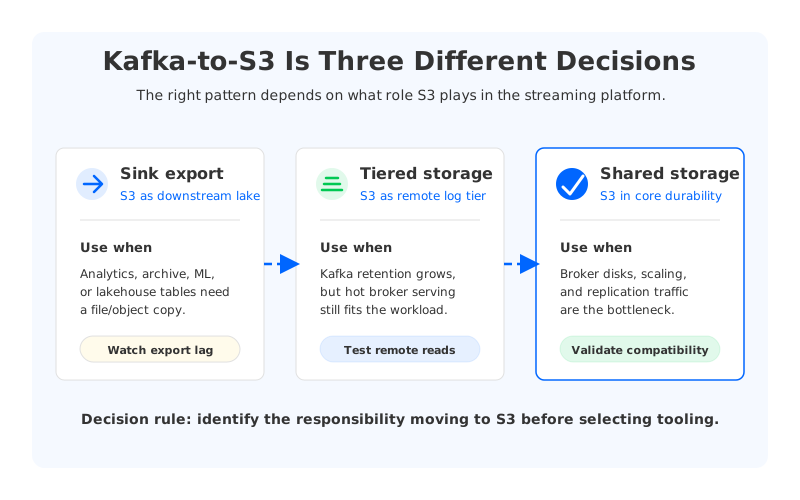
Teams usually search for “Kafka on S3” when a Kafka cluster has become too expensive, too operationally heavy, or too hard to use as a long-retention data source. The phrase sounds simple, but it hides several different architectural intents. One team may want to land events in Amazon S3 for analytics. Another may want to reduce broker disk pressure. A third may be evaluating whether Kafka itself can run with object storage as the durable storage layer. Those are not the same problem, and treating them as the same problem is how a quick export project becomes a production surprise.
The confusion is understandable. Kafka and S3 sit next to each other in many data platforms: Kafka carries operational events, while S3 becomes the durable lake for batch processing, replay, governance, and AI pipelines. The hard part is deciding whether S3 is merely a downstream sink or part of the streaming system’s core durability model. That distinction changes the failure modes, the cost model, the migration plan, and the operational ownership boundary.
1Why Kafka Teams Export to S3
The most common Kafka-to-S3 pattern is a sink pipeline. Data is produced into Kafka, retained for an operational window, and then exported to S3 in files that analytics engines can read. This is attractive because S3 is durable, inexpensive for large retained datasets compared with hot broker disks, and integrated with the broader cloud data ecosystem. It also gives teams a clean separation between real-time consumers and batch consumers.
That pattern works well when the goal is downstream availability rather than Kafka storage replacement. A connector or custom consumer reads records, writes objects, and often groups records by topic, partition, timestamp, tenant, schema, or business key. The object format may be JSON for simplicity, or Parquet/Avro when query efficiency and schema evolution matter. The pipeline then becomes a bridge from Kafka’s ordered log model to S3’s object and file model.
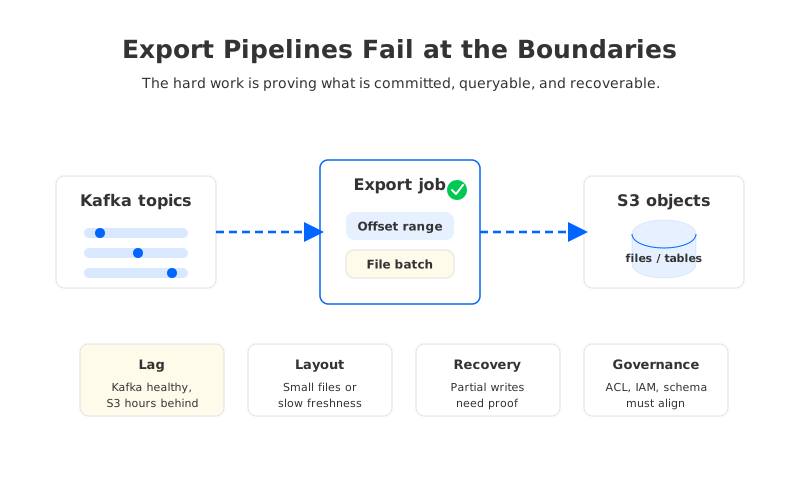
The bridge is useful, but it is not free. Export pipelines introduce their own delivery semantics, backpressure points, monitoring surfaces, and recovery workflows. A Kafka topic can be healthy while the S3 export is hours behind. S3 can contain files that are valid objects but incomplete from a business window perspective. A schema registry can evolve correctly for Kafka consumers while downstream readers still break because file partitions or table metadata were not updated in the same way.
For platform teams, the question is not “Can Kafka write to S3?” The practical question is: which responsibility should S3 take in the architecture?
| Pattern | What S3 stores | Kafka remains responsible for | Main operational risk |
|---|---|---|---|
| Sink export | Copies of topic data as files or objects | Hot log, ordering, consumer offsets, replay window | Export lag, duplicate files, schema/file layout drift |
| Tiered storage | Older Kafka log segments in remote storage | Broker serving path, topic semantics, metadata, hot data | Remote-read latency, rehydration behavior, feature maturity |
| Object-storage-backed Kafka | Primary durable stream data in shared object storage plus a write-ahead path | Kafka-compatible API, metadata, compute, cache, coordination | Architecture fit, migration validation, service ownership |
This table is the first filter. If the goal is analytics, a sink pipeline may be enough. If the goal is longer Kafka retention without expanding broker disks, tiered storage may be relevant. If the goal is to change Kafka’s cost and operations profile, then the storage architecture itself needs to be evaluated.
2The Export Pipeline Is a Data Product, Not a Side Job
A Kafka-to-S3 sink looks straightforward in a diagram: read from Kafka, write files to S3, let the lake consume them. In production, the difficult work is deciding what makes the export correct. Kafka records are ordered within partitions, while S3 objects are immutable files. Kafka consumers track offsets, while S3 readers often reason about directory partitions, table snapshots, or file manifests. The export pipeline has to translate between these models without making recovery ambiguous.
Three design choices determine whether the pipeline stays understandable:
- Commit boundary. The pipeline needs a clear point at which a range of Kafka offsets is considered safely represented in S3. Without that boundary, retries can create duplicate files or gaps that are hard to prove away.
- File layout. Partitioning by event time, ingestion time, topic, tenant, or schema version affects query cost and repair operations. A layout that is convenient for writers can be painful for readers.
- Replay behavior. Reprocessing from Kafka may overwrite, append, or create additional object paths. Each behavior has different implications for idempotency and downstream table correctness.
These decisions are often more important than connector choice. A managed connector, Kafka Connect sink, Flink job, or custom consumer can all move bytes. The real platform work is making the export observable, replayable, and boring during incidents.
3Where Sink Exports Hit Their Limits
The first limit is retention. A sink does not reduce the cost of the Kafka data that must remain available for operational replay. If the business requires seven days of low-latency replay from Kafka, exporting to S3 after ingestion does not remove the need to store and replicate those seven days inside the Kafka cluster. It may reduce pressure on analytics consumers, but it does not change the core broker storage model.
The second limit is latency consistency. S3 is excellent object storage, but file-oriented export adds batching. Larger files are more efficient for downstream query engines, yet larger files also increase the delay before records appear in S3. Smaller files reduce delay but create request overhead and small-file management problems. The export pipeline is always negotiating between freshness, object count, compression, table maintenance, and reader efficiency.
The third limit is failure recovery. When an exporter fails halfway through a file batch, the recovery path must reconcile Kafka offsets, object existence, and downstream catalog state. A naive retry may be acceptable for append-only raw zones, but it can create trouble when a table format expects atomic commits. This is why serious Kafka-to-S3 pipelines need runbooks for partial writes, duplicate detection, offset rewind, and downstream compaction.
The fourth limit is governance. Kafka ACLs, S3 IAM policies, table permissions, encryption settings, and schema controls live in different systems. Moving data from Kafka to S3 can widen the access surface if ownership is not explicit. The export may be technically correct and still fail a governance review because the retention policy or access model changed without the data owners noticing.
These are manageable problems. They become dangerous only when the export is treated as a thin utility instead of a production data product.
4Tiered Storage Changes the Question
Apache Kafka’s tiered storage work, described in KIP-405, moves the conversation from “export a copy” to “store older log segments remotely.” That is a different architecture. Instead of creating an external analytics copy, Kafka can keep hot data local and place older segments in remote storage. The Kafka API and consumer model remain the primary interface, while remote storage extends retention beyond what local broker disks can comfortably hold.
Tiered storage is valuable when teams want longer retention inside Kafka without scaling broker disks linearly. It can also help with operations such as broker replacement because historical data is no longer tied only to a local disk. However, it does not turn every broker into a stateless compute node. The serving path, metadata behavior, cache behavior, and feature maturity still matter. Reads that hit remote storage behave differently from reads served from the hot local path, especially during large replay or catch-up events.
That makes tiered storage a good fit for a specific class of workload: long retention where older data is read less frequently, and where the team accepts a different performance profile for historical reads. It is less convincing as a complete answer to cloud Kafka cost if the largest bill line is cross-AZ replication, overprovisioned compute, operational headcount, or frequent partition movement. In those cases, the storage tier helps, but the architecture still inherits much of traditional Kafka’s broker-centric operating model.
The distinction matters because “Kafka on S3” is sometimes used to describe both tiered storage and object-storage-backed Kafka-compatible systems. One extends Kafka’s log storage; the other redesigns the storage layer around shared object storage and a write-ahead path. They may both use S3, but they place S3 at different points in the write, read, and recovery path.
5A Production Evaluation Framework
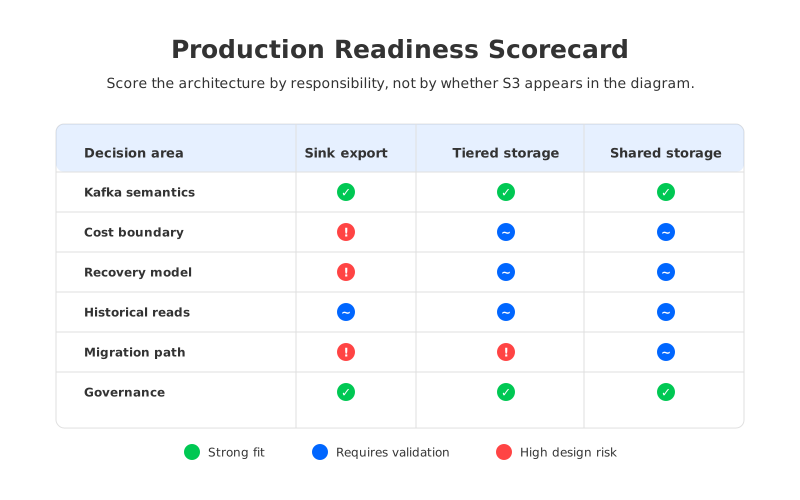
When a platform team evaluates Kafka-to-S3 architecture, the useful lens is not a feature checklist. It is a set of operational promises the platform must keep under load, failure, and change. The framework below works for sink exports, tiered storage, and shared-storage Kafka-compatible systems because it asks where the responsibility actually sits.
| Decision area | Questions to ask | Why it matters |
|---|---|---|
| Kafka semantics | Are ordering, offsets, consumer groups, transactions, and ACL expectations preserved where applications need them? | S3 files do not automatically preserve Kafka application semantics. |
| Cost boundary | Which costs move: broker disk, inter-AZ traffic, requests, storage, compute, or operations? | “Uses S3” does not guarantee lower total cost. |
| Recovery model | Can the team prove what data is committed after exporter, broker, AZ, or catalog failure? | Ambiguous recovery creates data gaps or duplicate processing. |
| Read path | Are historical reads served through Kafka, through S3/table engines, or through both? | Each path has different latency, authorization, and observability behavior. |
| Migration path | Can existing Kafka clients, tooling, ACLs, and operational processes move without application rewrites? | The largest risk is often compatibility, not storage. |
| Governance | Who owns retention, encryption, schema, and access after data lands in S3? | A storage change can become a compliance change. |
The strongest architectural choice is the one that makes these answers explicit. A sink export can be the right answer if S3 is a downstream lake and Kafka remains the operational log. Tiered storage can be the right answer if longer Kafka retention is the main problem. A Kafka-compatible shared-storage engine can be the right answer if the team wants Kafka semantics with a different cost and operations model.
6How AutoMQ Fits the Evaluation
Once the decision shifts from “export Kafka data to S3” to “use object storage as part of the streaming platform,” AutoMQ becomes relevant as a Kafka-compatible cloud-native streaming system designed around shared storage. AutoMQ keeps the Kafka protocol surface familiar to applications while moving durable stream storage to object storage with a write-ahead log and cache layer in the data path. The architectural intent is to separate compute from storage so brokers can be more stateless and capacity can scale with less data movement.
That matters most in the cost and operations parts of the framework. In traditional Kafka, brokers combine compute, local storage, and replication responsibilities. Scaling storage often means adding brokers, moving partitions, and paying for replication traffic across availability zones. In a shared-storage design, object storage becomes the durable data foundation, while brokers focus more on serving, caching, and protocol handling. AutoMQ also documents a zero cross-AZ traffic architecture for supported deployments, which is directly relevant for teams trying to reduce cloud networking charges in multi-AZ Kafka environments.
This does not make every Kafka-to-S3 sink unnecessary. Analytics exports still exist because query engines, lakehouse tables, and governance workflows may need data in file/table form. The point is narrower and more useful: if the underlying reason for exporting to S3 is that Kafka’s broker storage model has become the bottleneck, an export pipeline treats the symptom. A Kafka-compatible shared-storage architecture addresses the storage model itself.
For migration planning, the key validation work is client compatibility and operational behavior. Teams should test existing producers, consumers, schemas, ACL assumptions, monitoring, disaster recovery, and replay workloads before changing the platform. A good proof of concept should include historical catch-up, broker failure, workload spikes, and cost attribution, not only a happy-path produce/consume test. That is where the neutral framework above becomes useful: it turns “Kafka on S3” from a slogan into a controlled architecture decision.
If your team is comparing Kafka-to-S3 export, tiered storage, and Kafka-compatible shared storage, the next step is to test the workload boundary rather than debate labels. AutoMQ provides technical material and deployment paths for teams evaluating object-storage-backed Kafka-compatible streaming. You can start from the AutoMQ site and use the framework in this article as the checklist for a proof of concept.
7References
- Apache Kafka Documentation: https://kafka.apache.org/documentation/
- Apache Kafka KIP-405: Kafka Tiered Storage: https://cwiki.apache.org/confluence/display/KAFKA/KIP-405%3A+Kafka+Tiered+Storage
- Amazon Managed Streaming for Apache Kafka pricing: https://aws.amazon.com/msk/pricing/
- Amazon S3 pricing: https://aws.amazon.com/s3/pricing/
- AWS data transfer pricing: https://aws.amazon.com/ec2/pricing/on-demand/#Data_Transfer
- AutoMQ architecture overview: https://docs.automq.com/automq/architecture/overview?utm_source=blog&utm_medium=reference&utm_campaign=gs100-0043
- AutoMQ S3Stream shared storage: https://docs.automq.com/automq/architecture/s3stream-shared-streaming-storage/s3-storage?utm_source=blog&utm_medium=reference&utm_campaign=gs100-0043
- AutoMQ zero cross-AZ traffic overview: https://docs.automq.com/automq-cloud/eliminate-inter-zone-traffics/overview?utm_source=blog&utm_medium=reference&utm_campaign=gs100-0043
8FAQ
8.1Is Kafka-to-S3 export the same as Kafka tiered storage?
No. A Kafka-to-S3 export creates a downstream copy of Kafka data in S3, usually for analytics, lakehouse, or archival use cases. Tiered storage keeps Kafka as the access interface while moving older log segments to remote storage. Both can involve S3, but they solve different problems.
8.2Does exporting Kafka data to S3 reduce Kafka cluster cost?
It can reduce downstream analytics pressure, but it does not automatically reduce Kafka broker cost. If Kafka still needs the same retention, replication, and replay window, the cluster must still store and serve that data. Cost changes depend on which responsibility moves out of Kafka.
8.3When is a Kafka-to-S3 sink the right architecture?
A sink is a strong fit when S3 is the durable lake for batch analytics, ML features, audit archives, or table formats. It is less effective when the real problem is broker disk growth, cross-AZ replication cost, or slow Kafka scaling operations.
8.4What should I test before adopting object-storage-backed Kafka?
Test producer and consumer compatibility, offset behavior, transactions if used, ACL and security assumptions, failure recovery, historical replay, monitoring, and cost attribution. The test should include incident-style scenarios, not only a normal throughput benchmark.
8.5Where does AutoMQ fit in a Kafka on S3 evaluation?
AutoMQ fits the category of Kafka-compatible streaming systems that use object storage as part of the core storage architecture. It is most relevant when the team wants Kafka-compatible APIs while reducing the operational coupling between brokers, local disks, and long-lived durable storage.


