
Table of Contents
Table of Contents
A Kafka incident rarely starts with a clean root cause. It starts with consumer lag, producer retries, a stuck rebalance, a broker disk alert, a busy controller, or a bill that suddenly makes the platform team unpopular. A page of commands for each alert decays quickly because Kafka problems cross application, broker, storage, network, metadata, and cost boundaries. A useful Kafka troubleshooting runbook has to guide the operator through evidence, not only commands.
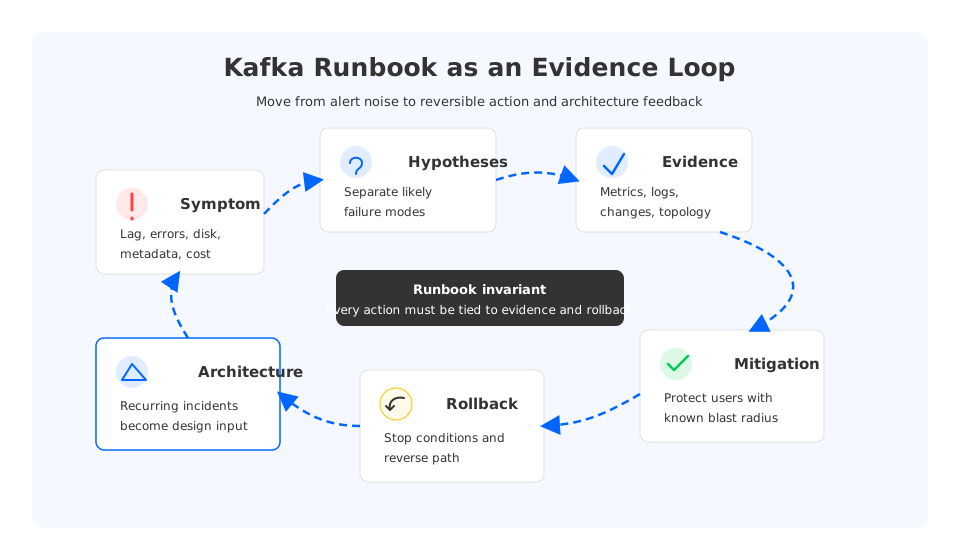
The better model is an operating contract: symptom -> hypothesis -> evidence -> mitigation -> rollback. That contract gives an on-call engineer structure to move quickly without improvising every incident. It also shows platform leads which incidents are local defects and which ones are architecture signals. If the same runbook keeps ending in broker replacement, partition reassignment, disk expansion, and cross-zone traffic review, the incident is feedback from the platform design.
1Runbooks Should Encode Decisions, Not Folklore
Most Kafka teams already have troubleshooting material: Grafana links, shell snippets, JMX metrics, kafka-consumer-groups.sh commands, and old incident threads. That toolbox still does not tell the next responder which evidence is trustworthy, or when a mitigation creates a worse second-order problem.
A production runbook needs five fields for every common symptom:
- Observable symptom. Name the user-visible or SLO-visible failure: lag, produce latency, collapsed fetch rate, delayed controller requests, storage pressure, or unexplained spend.
- Likely hypotheses. List competing explanations instead of the favorite one: slow consumer, rebalance loop, hot partition, throttling, storage read amplification, network loss, or downstream backpressure.
- Evidence to collect. Specify the metrics, logs, traces, state, and recent changes that separate one hypothesis from another.
- Mitigation and rollback. Explain the immediate action, its blast radius, and the condition that tells the team to stop or reverse.
This structure matters because Kafka incidents often look simpler than they are. A broker disk alert may be caused by retention, uneven placement, failed cleanup, a traffic spike, or an architecture that requires too much local headroom. A runbook that jumps from "disk high" to "expand disk" hides those distinctions.
2The Symptom Map Platform Teams Actually Need
The most useful runbooks are organized around failure modes responders can recognize quickly. Platform teams should start with high-value playbooks, then refine them after real incidents. The goal is to keep the first minutes from becoming a debate about where to look.
| Symptom | First hypotheses | Evidence that separates causes | Fast mitigation | Architecture signal |
|---|---|---|---|---|
| Consumer lag grows | Slow processing, hot partition, rebalance loop, storage read latency | Lag by partition, processing time, rebalance count, fetch latency, downstream queue depth | Pause low-priority consumers, increase processing capacity, isolate hot keys | Partitioning and storage read path may be limiting recovery |
| Producer errors rise | Broker saturation, request throttling, ISR pressure, network loss | Produce request latency, error type, broker CPU, network retransmits, ISR changes | Reduce batch pressure, route traffic, scale brokers if safe | Write path and replication model may be too tightly coupled |
| Broker storage pressure | Retention growth, uneven placement, failed cleanup, replay storm | Log dir usage by topic, partition skew, cleanup metrics, recent topic changes | Adjust retention, move partitions, expand capacity | Broker-local storage may be driving repeated emergency work |
| Metadata/controller pressure | Too many partitions, topic churn, controller failover, slow brokers | Controller queue time, metadata request rate, partition count, recent automation | Stop churn, reduce automation loops, stabilize controller quorum | Topic lifecycle governance is missing |
| Rebalance instability | Client churn, cooperative/eager mismatch, session settings, slow processing | Rebalance duration, group generation churn, client logs, heartbeat timing | Drain unstable members, tune client settings, reduce deploy churn | Deploy process and consumer design need ownership |
| Network or AZ failure | Cross-zone path, DNS, load balancer, inter-broker traffic, client placement | Zone-level latency, packet loss, broker rack, client rack, cloud network events | Shift clients, isolate zone, lower noncritical traffic | Data placement and network topology need redesign |
| Schema or serialization breakage | Bad producer rollout, incompatible schema, poison message | Error logs, schema version, topic offset, producer deployment timeline | Stop bad producer, quarantine offsets, replay after fix | Contract testing and rollout gates are weak |
| Stream processing backpressure | State store pressure, sink bottleneck, checkpoint delay, skew | Task-level lag, checkpoint duration, sink latency, input skew | Scale tasks, pause input, shed noncritical output | Kafka runbook must include downstream systems |
| Cost anomaly | Retention expansion, cross-zone traffic, cold reads, replication, consumer fan-out | Bill line items, topic growth, read/write path, zone placement | Cap retention, fix routing, separate heavy readers | Cost should be part of operational SLOs |
The architecture signal column prevents the runbook from becoming a loop of temporary fixes. If lag incidents consistently end with more brokers and reserved disk, the platform may be using capacity as a substitute for diagnosis. If every storage alert ends with partition movement, the team is paying a tax created by local broker storage.
3Consumer Lag Is a Workflow, Not a Metric
Consumer lag is the canonical Kafka troubleshooting example because it is easy to measure and easy to misunderstand. A lag graph says that consumers are behind. It does not say whether the consumer is slow, the partition is hot, the broker is serving reads slowly, the group is rebalancing, the sink is blocked, or deployment churn keeps destabilizing the group.
A strong consumer-lag runbook separates partition-level lag from group-level lag. If one partition is behind while the rest are healthy, suspect key skew, a poison record, or single-partition processing pressure. If every partition is behind, suspect shared processing capacity, broker-side read latency, downstream backpressure, network path, or a coordinated deploy. Then compare processing time against fetch latency, check rebalance frequency, inspect recent changes, and validate sink throughput.
The mitigation should match the evidence. Adding consumers will not fix a topic where one hot partition owns the backlog. Increasing max.poll.records may help a CPU-light consumer but hurt a saturated sink. Restarting a group may clear a stuck state, but it can also trigger another rebalance.
4Producer, Broker, and Controller Runbooks Need Different Evidence
Producer-side incidents require a different mental model. When a producer reports timeouts, the team needs to know whether records are failing before they reach the broker, waiting in the request queue, blocked by replication behavior, throttled by quota, or delayed by network path. Evidence should include client error type, request latency, request handler saturation, network metrics, and ISR or leader election changes. The rollback path might revert a batch configuration or pause a new deployment.
Broker incidents are more physical. Disk, page cache, CPU, network, and partition placement shape what is possible. In traditional Kafka, broker-local disks are where durable partitions live, so storage pressure is tied to placement, recovery, and data movement. Expanding disk may buy time, but it does not explain why the broker became a hotspot.
Controller and metadata incidents sit in another layer. Apache Kafka's KRaft mode removes the dependency on ZooKeeper, but metadata scale still matters: topic churn, partition counts, controller quorum health, broker registration, and metadata request rates. A controller runbook should favor stabilization: stop automation loops, freeze topic creation, and avoid broad tuning during the incident.
5Storage Architecture Changes the Runbook
Many Kafka troubleshooting runbooks assume a shared-nothing cluster where each broker owns local partition data and brokers replicate data to each other. That model is familiar and proven, but it shapes incident response: broker failure recovery involves leadership movement and replica catch-up, capacity changes involve partition reassignment, and retention growth consumes local disk.
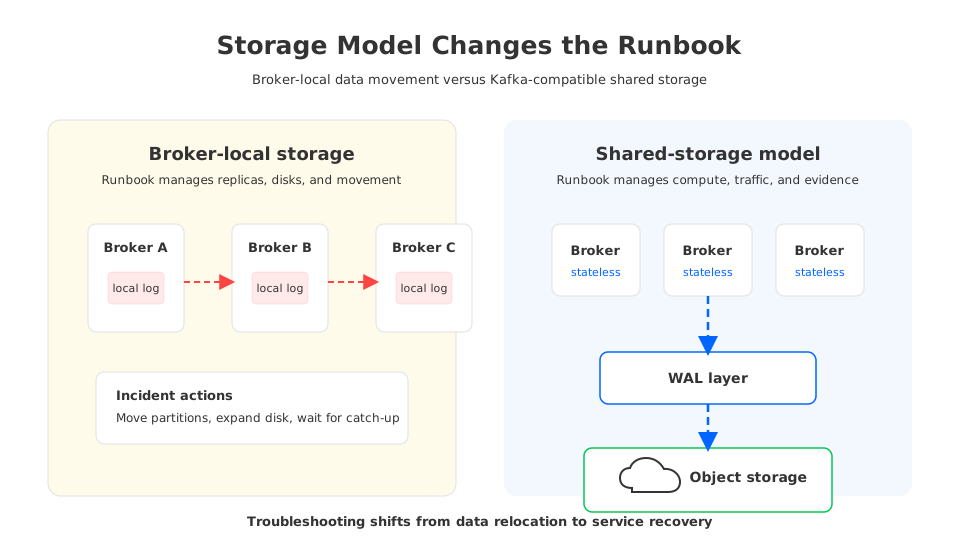
Tiered storage changes part of this story by placing older log segments in remote storage, but the hot write path and broker ownership model remain important. Shared-storage Kafka-compatible architectures go further by separating broker compute from durable data placement. Brokers can behave more like stateless compute nodes, while a write-ahead log layer and object storage provide durability. Teams still need observability, quotas, client discipline, and rollback, but a broker incident is less tied to emergency partition movement or recovery from broker-attached disks.
This is where AutoMQ fits naturally into the decision framework. AutoMQ is a Kafka-compatible streaming platform that redesigns Kafka storage around shared storage and stateless brokers while preserving Kafka protocol and ecosystem compatibility. In BYOC-style deployments, it can run inside the customer's cloud boundary. For troubleshooting, the question is whether the architecture removes recurring incident classes: broker-local disk pressure, slow data rebalancing, capacity over-reservation, and cross-zone paths that are hard to reason about under stress.
6Build Runbooks as Evidence Pipelines
Platform teams can make runbooks more reliable by treating them like evidence pipelines. Each step should reduce uncertainty: classify the symptom, define scope, list hypotheses, collect evidence, choose a reversible mitigation, and set the rollback trigger. Add one post-incident field: did the incident require data movement, reserved capacity, manual balancing, or cross-zone traffic that should be redesigned? That field turns operations into platform engineering.
7Governance Belongs in the Runbook
Kafka runbooks fail when they stop at brokers. Schema changes, topic creation, retention overrides, ACL changes, consumer group ownership, and stream processing deployments all create production risk. A platform team that owns Kafka as a service needs governance checks inside the troubleshooting process, not after it.
For schema and serialization incidents, the runbook should identify the producing application, schema version, deployment event, affected offsets, and consumer behavior. Mitigation may mean stopping the producer, quarantining records, deploying a compatibility fix, or replaying from a known offset. For stream processing backpressure, include the processor and sink; Kafka may be healthy while the state store, database, object store, or external API is the bottleneck.
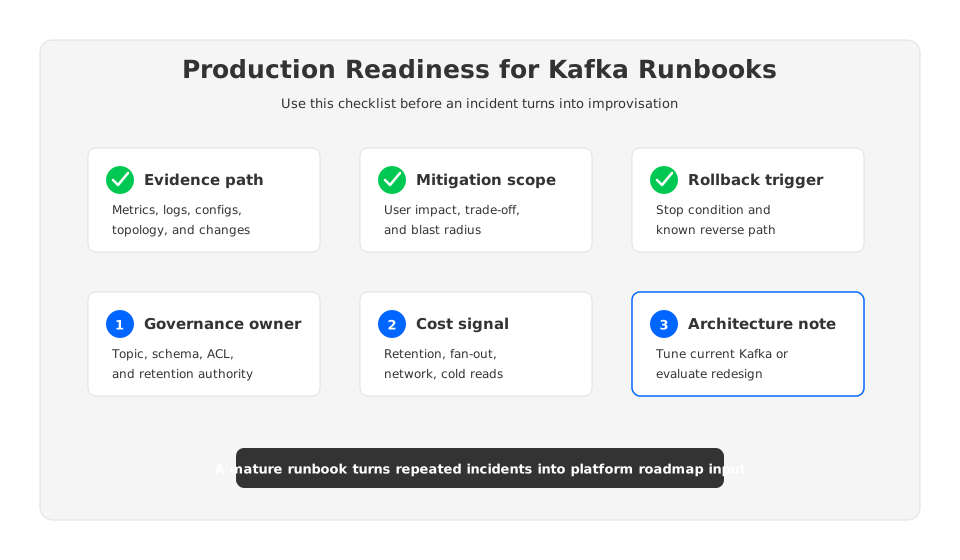
This is also where platform ownership becomes visible. A runbook should name who can pause a topic, change retention, approve a schema rollback, shift traffic across zones, and declare that a cluster has crossed from "tune it" to "redesign it."
8When to Tune, When to Redesign
Not every Kafka incident justifies a new architecture. Many problems are better solved by disciplined client configuration, better partition keys, clearer topic ownership, retention cleanup, deploy gates, or more precise alerts. A good runbook protects teams from overreacting and from normalizing pain.
Use the following decision table after repeated incidents:
| Pattern after multiple incidents | Tune the current platform | Redesign the operating model |
|---|---|---|
| One application causes lag after a deploy | Add deploy gates, canaries, and consumer ownership | Redesign only if many applications repeat the same pattern |
| One topic has hot partitions | Fix partition key, producer routing, or workload shape | Redesign if the workload cannot be partitioned cleanly and recovery windows are unacceptable |
| Storage alerts recur across brokers | Improve retention and balancing policy | Evaluate shared-storage architecture if local disk and data movement dominate incidents |
| Broker replacement takes too long | Improve automation and replacement procedure | Evaluate stateless brokers if recovery remains tied to local partition data |
| Cross-zone traffic is hard to explain | Audit rack awareness and client placement | Revisit architecture if durability or fan-out creates persistent zone traffic |
| Cost anomalies follow retention or fan-out growth | Add cost alerts and ownership tags | Revisit storage model if long retention and heavy reads are strategic requirements |
AutoMQ should be evaluated in the redesign column when the recurring pain is architectural rather than procedural. Its Kafka-compatible API keeps producers, consumers, and ecosystem tools on familiar interfaces. Its shared-storage design changes the broker failure and scaling model, while BYOC is relevant when the platform team wants customer-controlled cloud boundaries. None of that removes the need for runbooks. It changes what the runbooks spend their time doing.
9References
- Apache Kafka Documentation - official documentation for Kafka operations, configuration, consumer groups, and platform behavior.
- Apache Kafka Consumer Rebalance Protocol - official Kafka documentation on consumer group rebalance behavior.
- Apache Kafka Log Distribution - official Kafka implementation notes on partition logs and distribution.
- AutoMQ Architecture Overview - official AutoMQ documentation on shared storage architecture.
- AutoMQ Compatibility with Apache Kafka - official AutoMQ compatibility documentation.
- AutoMQ Cloud BYOC Overview - official AutoMQ documentation on BYOC deployment boundaries.
10FAQ
10.1What should a Kafka troubleshooting runbook include?
A production Kafka troubleshooting runbook should include the symptom, scope, competing hypotheses, evidence to collect, mitigation options, rollback trigger, and post-incident architecture note. The architecture note is important because repeated incidents often point to storage, scaling, governance, or network design problems.
10.2How do I troubleshoot Kafka consumer lag?
Start by separating group-wide lag from partition-level lag. Then compare consumer processing time, broker fetch latency, rebalance frequency, downstream sink health, and recent deployments. Avoid adding consumers until you know whether the bottleneck is parallelism, hot partitions, broker reads, or downstream backpressure.
10.3Why does broker-local storage make Kafka incidents harder?
Broker-local storage ties durable data to specific broker machines. During failures or capacity changes, teams often need replica catch-up, partition movement, disk expansion, or rebalancing. Those actions can consume network and storage bandwidth during the incident, which makes mitigation more complex.
10.4Does a shared-storage Kafka-compatible platform remove the need for runbooks?
No. Teams still need observability, client governance, schema controls, rollback procedures, and incident ownership. Shared storage changes the operating model by reducing the amount of incident response tied to broker-local data movement and disk capacity management.
10.5When should a team evaluate AutoMQ?
Evaluate AutoMQ when repeated Kafka incidents are caused by architecture constraints rather than isolated misconfiguration: broker-local disk pressure, slow broker replacement, expensive cross-zone replication paths, capacity over-reservation, or data movement during scaling. Start with the AutoMQ GitHub repository, then compare the architecture against your own incident history.


