
Table of Contents
Table of Contents
Kafka UI access usually becomes controversial after the first production incident that involves the UI. An application engineer resets a consumer group in the wrong environment. A developer copies a sample message that contains sensitive data into a ticket. A platform team disables write access so aggressively that every topic inspection turns into a support request. None of these failures are caused by the UI alone; they happen because Kafka exposes operational power through a surface that multiple teams naturally want to use.
The practical question is not whether a Kafka UI is good or bad. The useful question is which actions belong to which team, under what identity, with what audit trail, and against which cluster boundary. Platform teams need a control plane that protects production. Application teams need enough visibility to debug their own services without waiting for an operator to paste screenshots into Slack. SREs need the UI to agree with metrics, logs, and change management, or it becomes another source of conflicting truth.
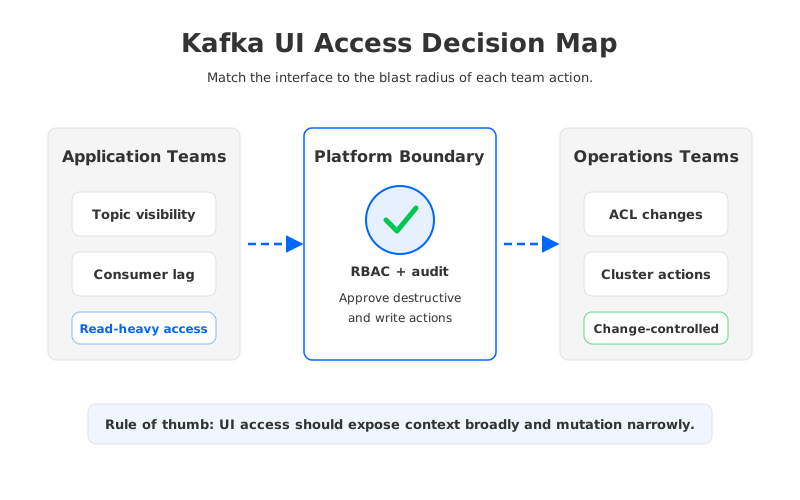
That is why kafka ui access patterns is a serious architecture topic, not a tooling preference. A UI sits at the intersection of identity, Kafka protocol compatibility, storage operations, cloud networking, and team ownership. The access model that works for a development cluster can become dangerous in production, and the production model that satisfies security can slow down incident response if it hides too much context.
1Why Kafka UI Access Patterns Matter
Kafka was designed as a distributed log with strong operational primitives: topics, partitions, consumer groups, offsets, producers, quotas, ACLs, and broker configuration. A UI collects those primitives into an interface that feels approachable. That approachability is useful because most teams do not want to run CLI commands for every offset lookup or partition inspection. It is also risky because the difference between "view topic metadata" and "delete topic" can be one permission checkbox.
Most organizations discover three kinds of users. Application teams want to inspect their own topics, check consumer lag, sample records in non-sensitive environments, and understand whether a deployment is falling behind. Platform teams want to create guardrails around topic naming, retention, ACLs, quotas, and environment boundaries. SREs want a fast path from a symptom, such as rising lag, to the underlying cause, such as a paused consumer, broker imbalance, network saturation, or retention misconfiguration.
These needs overlap, but they are not the same. A developer may need read access to production metadata, yet not need the ability to reset offsets in production. A platform engineer may need to change topic configuration, yet not need to browse message payloads that contain regulated fields. An SRE may need temporary elevated access during an incident, but that elevation should leave an audit trail and expire when the incident closes.
The access pattern should therefore start from actions rather than personas. "Developer", "operator", and "admin" are too coarse for Kafka. A better model separates visibility, diagnosis, mutation, and emergency control. Once the actions are separated, the UI can become a safer self-service layer instead of a shared admin console.
2The Production Constraint Behind the UI
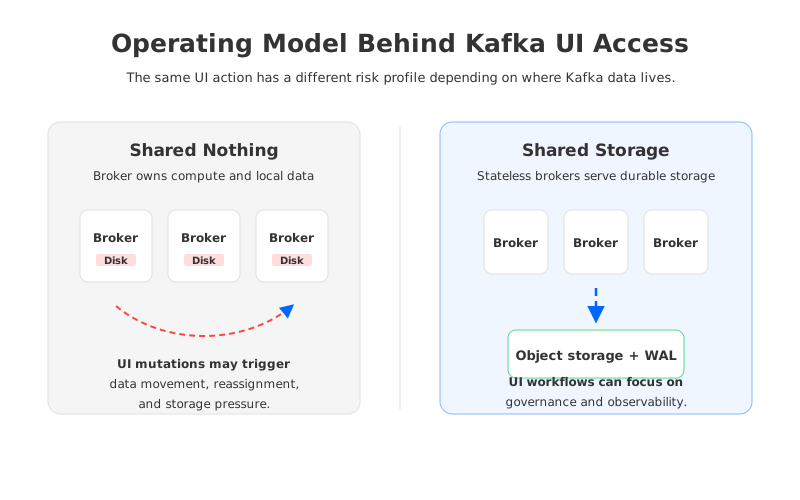
A Kafka UI looks like an interface problem, but the operational risk behind it is architectural. In a traditional shared-nothing Kafka deployment, each broker owns compute and local storage. Partitions are assigned to brokers, replicas live on broker-attached disks, and many operational actions create broker-local consequences. Retention changes affect storage pressure. Partition reassignment moves data across brokers. Broker failure recovery depends on replicas, local disks, network bandwidth, and controller decisions.
That background matters because UI access can make heavy operations feel lightweight. A topic configuration change may look like a form submission, but it can change disk growth, compaction behavior, or recovery time. A partition reassignment may look like a balancing action, but it can add network traffic and compete with producer and consumer workloads. An offset reset may look scoped to one consumer group, but the business effect can be reprocessing, data duplication, or missed downstream alerts.
The right UI access pattern acknowledges this gap between interface simplicity and system consequence. It does not assume every team needs the same permissions. It also does not force all diagnosis through the platform team, because that creates a queue during the exact moments when speed matters. The balance is to let many users observe and reason, while narrowing the set of users and workflows that can mutate production state.
| UI action class | Typical users | Production risk | Recommended control |
|---|---|---|---|
| View topic metadata | Application, platform, SRE | Low, unless names reveal sensitive context | Broad read access scoped by namespace |
| View message payloads | Application, data owners | Medium to high, depending on data class | Environment and data-class restrictions |
| Reset consumer offsets | Application, SRE | High business impact | Approval, audit, and rollback notes |
| Change retention or partitions | Platform, SRE | Storage and availability impact | Change ticket or policy automation |
| Delete topics or ACLs | Platform administrators | Critical | Break-glass workflow and explicit confirmation |
The table is deliberately action-based. Team names change, but Kafka actions keep their operational meaning. When a UI policy is built around actions, it becomes easier to review, automate, and explain during audits.
3Architecture Options and Trade-Offs
The first access pattern is the shared admin console. Everyone who needs Kafka visibility signs into one UI, and permissions are divided with role-based access control where the tool supports it. This pattern is fast to introduce and works well for early platform teams. It becomes fragile when the same console spans development, staging, and production, because users bring habits from low-risk environments into high-risk environments.
The second pattern is environment-separated UI access. Development and staging can allow broader inspection and controlled experimentation, while production exposes a smaller set of actions. This pattern maps well to how teams already think about deployment risk. Its weakness is operational drift: if each environment has a different UI configuration, role model, or authentication path, the platform team must maintain the access model as a product in its own right.
The third pattern is domain-scoped self-service. Application teams see the topics, consumer groups, connectors, and quotas that belong to their domain. Platform teams retain ownership of cluster-wide settings and destructive operations. This is usually the healthiest long-term model, but it depends on consistent naming, ownership metadata, identity integration, and a policy engine that can express more than "viewer" and "admin."
The fourth pattern is observability-first access. Teams use dashboards, metrics, logs, and traces for most operational questions, while the Kafka UI is reserved for cluster-specific inspection and controlled actions. This reduces the temptation to use the UI as the universal debugging tool. It also forces the platform team to keep Kafka metrics aligned with the UI, because application teams will stop trusting the model if the two surfaces disagree during incidents.
These patterns can be combined. A practical production setup often uses broad read-only metadata access, restricted payload inspection, domain-scoped consumer group visibility, ticketed mutation, and break-glass admin rights. The important part is to make the model explicit. Hidden conventions do not scale across teams, and UI permissions that depend on tribal knowledge tend to fail during staff turnover or incident pressure.
4Evaluation Checklist for Platform Teams
Start with identity. A Kafka UI should integrate with the organization's identity provider, support role assignment that maps to team ownership, and avoid shared admin accounts. Service accounts should be treated differently from human users because automation has different risk and audit requirements. A UI that cannot answer "who did this?" is not production-ready for mutation, even if it is acceptable for read-only inspection.
Then evaluate action boundaries. Read access, payload access, offset mutation, ACL mutation, topic mutation, connector operation, and cluster administration should be separable. If the UI exposes these as one broad administrator role, the platform team can still use it internally, but it is a poor self-service surface for application teams. The policy model should also handle emergency elevation, because incidents do not wait for a quarterly access review.
Next comes observability. Consumer lag in the UI should match the metrics used for alerting. Topic throughput should be explainable in the same units used by dashboards. If the UI reports healthy state while Prometheus, Datadog, or CloudWatch shows pressure, engineers will waste time reconciling tools instead of fixing the system. A good pattern treats the UI as one lens on Kafka state, not the sole source of operational truth.
Cost and capacity deserve the same attention. Retention, partition count, replication, cross-zone traffic, and catch-up reads can all turn a UI-driven change into a cloud bill or recovery problem. In cloud deployments, UI access policies should make cost-impacting actions visible and controlled. The user changing retention should understand whether the cluster has the storage model and elasticity to absorb the change.
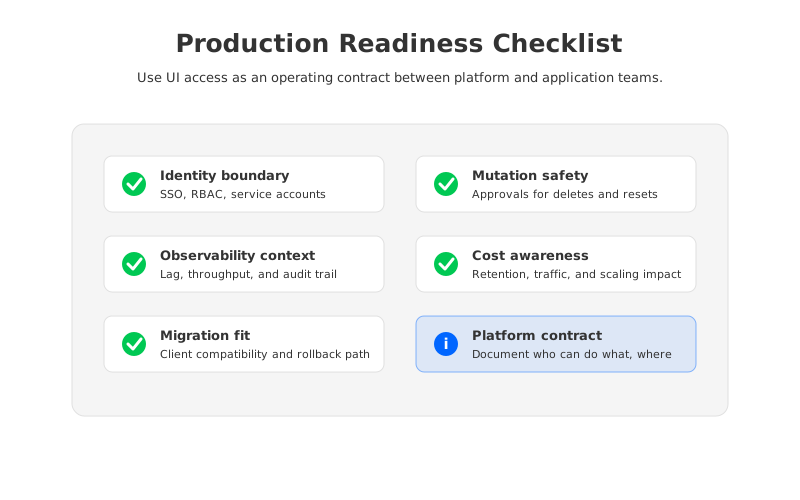
The checklist below is a compact way to review the access model before expanding UI availability:
- Identity is tied to SSO or an equivalent provider, with no shared human accounts for production mutation.
- Read-only metadata access is separated from payload inspection and write operations.
- Offset reset, topic deletion, ACL changes, and retention changes require stronger controls than browsing.
- Production permissions are scoped by environment, domain, and data sensitivity.
- UI actions produce audit events that can be reviewed alongside change tickets and incident timelines.
- Metrics, alerts, and UI state use consistent definitions for lag, throughput, health, and ownership.
- The platform team has a documented break-glass process with expiration and review.
A checklist is not bureaucracy when it prevents a production UI from becoming an accidental root shell. It is the contract that lets application teams move faster without asking the platform team to absorb every risk.
5How AutoMQ Changes the Operating Model
Once the access pattern is clear, the next question is whether the Kafka-compatible infrastructure underneath makes those patterns easier or harder to operate. Traditional Kafka couples broker compute with local persistent storage. That design is proven, but it means many operational actions are tied to data locality, broker disk pressure, and partition movement. UI governance can reduce risk, but it cannot remove the operational weight of the storage model.
AutoMQ approaches the problem as a Kafka-compatible streaming system built around shared storage and stateless brokers. The goal is not to replace the need for access control. The goal is to change the operational consequences that sit behind common platform actions. When durable data is placed in object storage and brokers become less stateful, scaling, recovery, and balancing can be handled with a different cost and risk profile than broker-local storage.
This matters for UI access in a concrete way. If an application team needs to inspect lag, understand topic behavior, or coordinate a migration, the platform team can design around Kafka-compatible semantics while relying on an infrastructure model that separates compute and storage. If an SRE needs to reason about recovery or capacity, the conversation shifts from "which broker owns the data?" to "which compute resources are serving the data, and how does shared storage protect durability?"
AutoMQ also supports the operating model around the UI rather than treating the UI as a standalone feature. Kafka compatibility keeps existing clients and many ecosystem tools in the picture. Shared storage changes how teams think about partition reassignment and broker state. Cross-zone traffic reduction, observability integrations, and documented Kafka UI integrations give platform teams building blocks for a production workflow instead of a separate island of tooling.
This is the point where AutoMQ fits naturally into the evaluation framework. If your organization wants Kafka-compatible APIs, application-team self-service, production-grade governance, and a lower operational burden around storage and scaling, then the UI access model and the storage architecture should be evaluated together. A polished UI on top of a fragile operating model still leaves the platform team carrying the risk. A strong operating model without clear access boundaries still leaves users guessing.
For teams evaluating Kafka UI access as part of a broader platform redesign, AutoMQ's documentation is a useful next stop: review the Kafka compatibility and shared-storage architecture, then map those properties back to your UI policy and production workflow. Start with the verified AutoMQ docs at AutoMQ overview and compare the architecture against the access checklist above.
6References
- Apache Kafka documentation
- Apache Kafka consumer configuration
- Apache Kafka security documentation
- AutoMQ architecture overview
- AutoMQ compatibility with Apache Kafka
- AutoMQ Kafdrop integration
- AutoMQ observability overview
- AutoMQ inter-zone traffic overview
7FAQ
7.1What is the safest Kafka UI access pattern for production?
The safest default is broad read-only metadata access, restricted payload access, tightly controlled mutation, and a documented break-glass path for incidents. This lets application teams diagnose common problems without giving every user the ability to reset offsets, delete topics, or change retention in production.
7.2Should application teams be allowed to view Kafka message payloads?
Only when the data classification and environment make it acceptable. Payload inspection is useful in development and controlled debugging workflows, but production payload access can expose regulated or customer-sensitive data. Treat payload access as a data governance decision, not a convenience setting.
7.3How should offset reset permissions be handled?
Offset resets should require stronger controls than ordinary viewing because they can trigger reprocessing, duplicate downstream side effects, or missed processing windows. Many teams allow application owners to request or execute resets only within their own consumer groups, with audit logging and a rollback note.
7.4Does a Kafka-compatible platform change the UI access model?
It does not remove the need for identity, RBAC, audit, and approval workflows. It can change the operational risk behind those workflows. A shared-storage, Kafka-compatible platform such as AutoMQ separates storage from broker compute, which can reduce the amount of broker-local state the platform team must manage while preserving Kafka client semantics.
7.5Which tools should be used with a Kafka UI?
A Kafka UI should sit beside metrics, logs, traces, alerting, and change management. It should not replace them. In production, engineers need the UI to explain Kafka state, while observability systems provide trend, history, correlation, and alert context.


