
Table of Contents
Table of Contents
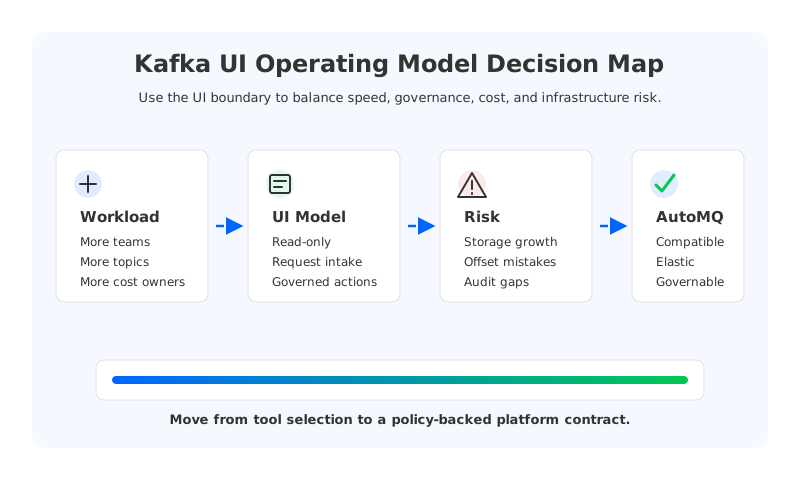
A Kafka UI looks like a convenience layer until the cluster becomes shared infrastructure. The first team wants self-service topic creation, the second wants consumer lag visibility, the third wants connector debugging, and the platform team still owns retention, ACLs, quota policy, upgrade risk, and the cloud bill. At that point, the real question is no longer "Which Kafka UI should we install?" It is "Which operating model keeps Kafka usable without turning the UI into an uncontrolled production console?"
That is why searches for kafka ui operating model usually come from teams that already run Kafka. They are not looking for a basic explanation of topics and partitions. They are trying to draw a boundary between platform ownership and application autonomy, especially when Kafka-compatible infrastructure spans multiple environments, regions, teams, and cost centers. A good UI model should reduce ticket load, but it must not bypass the controls that make a streaming platform reliable.
1Why Kafka UI Becomes an Operating Model Problem
The UI is where hidden platform decisions become visible. If application teams can create topics, they need naming conventions, retention limits, partition guardrails, ownership metadata, and a way to request exceptions. If they can inspect messages, the organization needs rules for sensitive data exposure. If they can reset offsets, someone must define which consumer groups are safe for self-service and which jobs require change control. The UI does not create these issues, but it makes them harder to ignore.
The common failure mode is treating the Kafka UI as a read-only dashboard at first, then adding write permissions one exception at a time. A developer asks to create a temporary topic. A data team asks to pause a connector. An incident responder asks to reset a consumer group during an outage. Each exception feels reasonable, but the platform slowly accumulates a second control plane with unclear auditability.
There are usually three operating models in play:
- Platform-only console. The platform team owns all Kafka changes through UI, CLI, Terraform, or internal automation. This is controlled, but it creates ticket queues for routine work.
- Read-only self-service. Application teams can inspect topics, schemas, consumer lag, and connector status, while mutations stay behind platform workflows. This is often the right first step for regulated environments.
- Governed self-service. Application teams can perform selected actions within policy, such as creating topics from approved templates or resetting offsets for owned consumer groups. This requires identity, ownership metadata, audit logs, and automated rollback paths.
The right model depends less on the UI product and more on the maturity of the platform beneath it. A UI can expose permissions, but it cannot compensate for ambiguous ownership, manual provisioning, missing cost attribution, or a Kafka architecture that turns every capacity change into a storage migration.
2The Production Constraint Behind the UI
Kafka's operational shape comes from its storage model. In traditional Kafka, brokers serve requests and own local log segments. Replication, leader placement, disk capacity, and partition movement are therefore operational concerns that leak into every self-service decision. A request to create topics is also a request to consume broker disk. A partition-count change is also a future reassignment problem. A retention change is also a storage forecast.
This is where a Kafka UI operating model differs from a generic database admin console. The platform team is not only protecting access to metadata. It is protecting the cluster from actions that can reshape broker load, disk pressure, cross-zone traffic, and recovery behavior. Apache Kafka's own documentation on replication, consumer groups, offsets, transactions, and KRaft shows how many production semantics sit behind seemingly simple UI buttons.
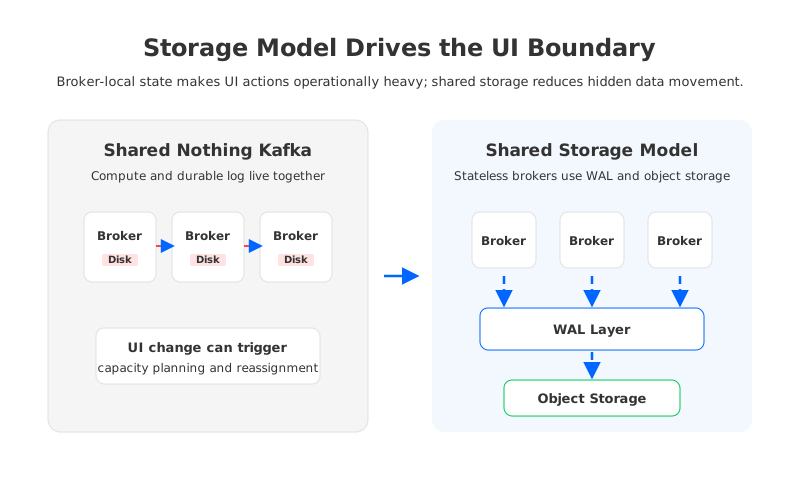
The constraint gets sharper in cloud deployments. Multi-AZ Kafka improves availability, but broker-level replication can create cross-AZ data movement. Broker-local storage requires capacity planning even when workloads are bursty. Tiered storage, as described in the Kafka community's KIP-405 work, moves older log data to remote storage, but hot data and broker responsibility still remain part of the operating model. The UI may be clean; the infrastructure underneath is still stateful.
That statefulness affects the teams using the UI:
- Application teams want speed, especially for topic requests, lag investigation, and safe offset operations.
- Platform teams want repeatability, policy enforcement, and fewer emergency changes.
- Security teams want identity-aware access, audit trails, and least privilege across environments.
- FinOps teams want resource ownership, retention accountability, and visibility into network and storage cost drivers.
A Kafka UI operating model that ignores these roles becomes either too restrictive to be useful or too permissive to be trusted.
3Architecture Options and Trade-offs
The first design choice is whether the UI is an observation surface, a control surface, or a workflow surface. Observation surfaces show topic metadata, consumer lag, broker health, and connector state. Control surfaces allow direct mutation: topic creation, configuration changes, ACL management, offset resets, and connector lifecycle operations. Workflow surfaces sit between the two, accepting requests from application teams and applying policy through automation before changes reach Kafka.
For small clusters, direct control may be acceptable. For shared production platforms, workflow surfaces age better. They let teams keep a friendly UI while routing dangerous changes through templates, approvals, Terraform plans, or platform APIs. The UI becomes the front door, not the source of truth.
The second design choice is where the operating boundary sits. Some organizations give each application team a dedicated cluster or namespace-like convention, reducing blast radius but increasing fragmentation. Others run shared clusters with strong ownership metadata and quotas. Shared clusters are efficient, but they need a stronger operating model because unrelated teams can affect each other through partition count, retention, producer throughput, and consumer behavior.
| Decision area | Platform-owned model | Governed self-service model |
|---|---|---|
| Topic creation | Tickets or infrastructure-as-code changes | Approved templates with owner, retention, partitions, and quota metadata |
| Offset operations | Incident or platform approval | Allowed only for owned groups and non-critical jobs |
| Connector lifecycle | Central team operates connectors | Teams manage connectors inside approved resource limits |
| Security | ACLs changed by platform administrators | Role-based access mapped to ownership and environment |
| Cost control | Periodic manual reviews | Retention, partition count, and throughput tied to owners from creation |
The table is intentionally not a feature comparison. It is a responsibility comparison. A UI feature is only production-ready when the organization can say who is allowed to use it, what policy constrains it, how it is audited, and how to recover when it is used incorrectly.
4Evaluation Checklist for Platform Teams
A practical evaluation starts with compatibility. Kafka UI tools usually depend on standard Kafka APIs, AdminClient behavior, ACL semantics, consumer group metadata, and sometimes Kafka Connect or schema registry integrations. Before choosing an operating model, run the UI against the same authentication mode, network path, client versions, and Kafka-compatible distribution used in production. A demo connected to a local cluster tells you very little about how the tool behaves under enterprise identity and multi-environment constraints.
The second check is change safety. Topic creation, config edits, ACL updates, and offset resets should be treated as production changes, even when the UI makes them feel lightweight. The operating model should answer uncomfortable questions: Can a user create a topic with unbounded retention? Can they reset offsets for a group they do not own? Can they inspect records that contain regulated data?
The third check is cost visibility. Kafka UI decisions often look operational, but many of them are financial. Retention controls storage growth. Partition counts affect file handles, memory, metadata, and balancing work. Multi-AZ traffic patterns affect cloud network charges. Connector retries can amplify downstream load. If the UI does not attach ownership and resource policy to these actions, FinOps will discover the result later in the bill instead of during the request.
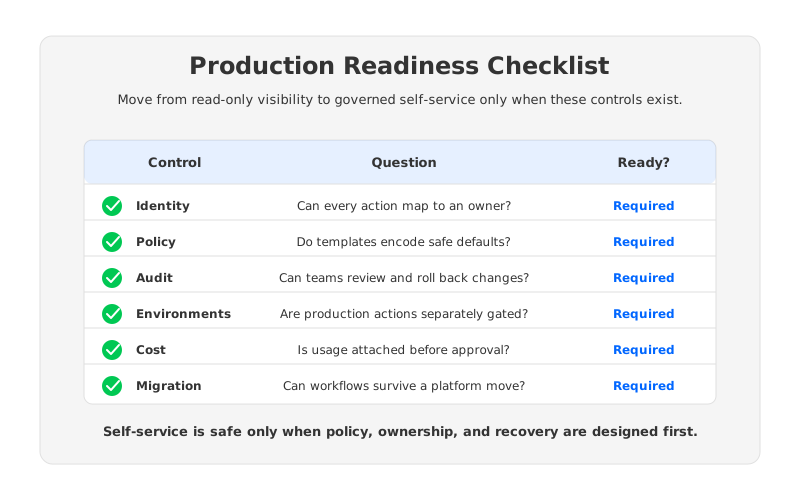
Use this checklist before moving from read-only access to governed self-service:
- Identity and ownership. Every user action maps to a human or service identity, and every topic, group, connector, and ACL has an owner.
- Policy templates. Common topic classes have approved defaults for retention, cleanup policy, partitions, replication expectations, and quota behavior.
- Audit and rollback. Mutating actions are logged, reviewable, and reversible through a documented path.
- Environment separation. Development self-service does not imply production self-service. Promotion across environments follows a repeatable workflow.
- Cost attribution. Resource-heavy decisions are tied to owners before they are applied, not after costs appear.
- Migration readiness. The UI model does not depend on vendor-specific APIs unless the team accepts that lock-in explicitly.
The final item is easy to underestimate. If the UI model depends on proprietary behaviors for basic Kafka administration, a later migration will involve more than moving producers and consumers. The team will also need to rebuild the daily operating surface.
5How AutoMQ Changes the Operating Model
The neutral evaluation above points to a broader infrastructure requirement: the safer the underlying Kafka-compatible platform is to scale, rebalance, and recover, the more self-service the organization can allow. This is where AutoMQ fits into the discussion. AutoMQ is a Kafka-compatible, cloud-native streaming platform that keeps Kafka protocol compatibility while replacing the traditional broker-local storage model with a shared storage architecture.
In AutoMQ, brokers are designed to be stateless relative to durable log storage. Data is persisted through a WAL layer and object storage, while brokers focus on serving compute and protocol responsibilities. That separation changes the operating model behind the UI. Topic and workload growth still need policy, but scaling compute no longer carries the same broker-local data movement assumption. Capacity can be adjusted closer to demand, and platform teams can reduce the amount of manual balancing work that traditionally sits behind UI-driven requests.
The benefit is not that a UI button becomes harmless. Production changes still need guardrails. The benefit is that the infrastructure has fewer hidden stateful consequences when the platform team approves a change. Shared storage, stateless brokers, continuous balancing, and object-storage-backed durability move the platform closer to an API-driven operating model where automation can enforce policy and infrastructure can adapt without a long reassignment project.
This matters for developer experience. A governed self-service model works only when the platform can respond quickly enough that teams stop bypassing it. AutoMQ's Kafka compatibility also matters here: existing Kafka clients, ecosystem tools, and Kafka UI integrations can remain part of the operating surface, while the storage and elasticity model changes underneath.
AutoMQ's BYOC and software deployment models also affect governance boundaries. Many platform teams want managed operations but need data to stay inside their own cloud account, VPC, or virtual network. A customer-controlled deployment boundary allows the UI, network access, IAM model, audit process, and cost attribution model to align with the organization's cloud controls instead of forcing every team through an external shared environment.
6A Practical Rollout Pattern
Start with read-only visibility for application teams. Give them topic metadata, consumer lag, connector status, and basic health views, but keep mutation behind platform workflows. This reduces diagnostic tickets without changing production risk and shows which operations deserve self-service later.
The next step is template-driven creation. Instead of asking users to choose every topic setting from scratch, offer approved topic classes: short-lived operational events, durable business events, compacted reference streams, and high-throughput ingestion topics. Each template should encode retention, cleanup policy, partition guidance, quota expectations, and ownership requirements.
Offset resets should come later. They are useful, but they can create silent reprocessing or data loss from an application perspective. Limit them to owned consumer groups, non-critical environments, or explicit incident workflows until audit and rollback habits are strong.
A mature model ends up looking like this:
| Maturity stage | UI role | Platform responsibility |
|---|---|---|
| Stage 1 | Read-only observability | Publish ownership metadata and baseline dashboards |
| Stage 2 | Request intake | Convert common tickets into templates and approval flows |
| Stage 3 | Governed changes | Enforce policy automatically and record every mutation |
| Stage 4 | Platform automation | Use APIs, Terraform, and monitoring to keep UI actions consistent with source-of-truth workflows |
The point is not to make every team a Kafka administrator. The point is to remove platform bottlenecks without losing the discipline that keeps Kafka reliable.
7Conclusion
The search for a Kafka UI operating model usually starts with a tool, but the durable answer is a contract between teams. Application teams need enough visibility and autonomy to move quickly. Platform teams need enough control to protect reliability, cost, and security. The architecture underneath decides how painful that contract is to operate.
If broker-local storage, manual reassignment, and capacity pre-planning dominate your Kafka operations, keep the UI conservative and invest in workflow automation first. If your Kafka-compatible platform can separate compute from durable storage, scale elastically, and preserve ecosystem compatibility, governed self-service becomes more realistic.
To see how AutoMQ approaches Kafka compatibility, shared storage, and cloud-native operations, explore the AutoMQ demo and technical docs: Book an AutoMQ demo.
8References
- Apache Kafka documentation: https://kafka.apache.org/documentation/
- Apache Kafka KIP-405: https://cwiki.apache.org/confluence/display/KAFKA/KIP-405%3A+Kafka+Tiered+Storage
- Apache Kafka KIP-1150: https://cwiki.apache.org/confluence/display/KAFKA/KIP-1150%3A+Diskless+Topics
- AutoMQ architecture overview: https://docs.automq.com/automq/architecture/overview?utm_source=blog&utm_medium=reference&utm_campaign=aivk-0097
- AutoMQ Kafka compatibility: https://docs.automq.com/automq/what-is-automq/compatibility-with-apache-kafka?utm_source=blog&utm_medium=reference&utm_campaign=aivk-0097
- AutoMQ cross-AZ traffic guidance: https://docs.automq.com/automq-cloud/best-practice/save-cross-az-traffic-costs-with-automq?utm_source=blog&utm_medium=reference&utm_campaign=aivk-0097
9FAQ
9.1What is a Kafka UI operating model?
A Kafka UI operating model defines who can use the UI, what they can view or change, which policies constrain those actions, how changes are audited, and how platform teams recover from mistakes. It is a governance and workflow model, not only a UI selection exercise.
9.2Should application teams be allowed to create Kafka topics from a UI?
They can, but only through governed self-service. Topic creation should require ownership metadata, approved templates, retention limits, partition guidance, environment boundaries, and audit logs. Direct unrestricted topic creation usually creates reliability and cost problems later.
9.3Is read-only Kafka UI access enough?
Read-only access is a good first stage because it reduces diagnostic tickets without adding mutation risk. It is rarely the final stage for a mature platform because teams eventually need safe ways to request or perform routine changes.
9.4How does cloud-native Kafka affect the UI operating model?
Cloud-native Kafka-compatible platforms can reduce the operational cost behind UI-driven requests by separating compute from durable storage and improving elasticity. The UI still needs policy, but the infrastructure is less tied to broker-local disk movement and manual capacity planning.
9.5Where should AutoMQ appear in a Kafka UI evaluation?
AutoMQ should be evaluated after the team defines its required operating model. If the target model needs Kafka compatibility, customer-controlled deployment boundaries, elastic scaling, and reduced broker-local storage operations, AutoMQ is relevant as the infrastructure layer beneath the UI and automation workflows.


