
Table of Contents
Table of Contents
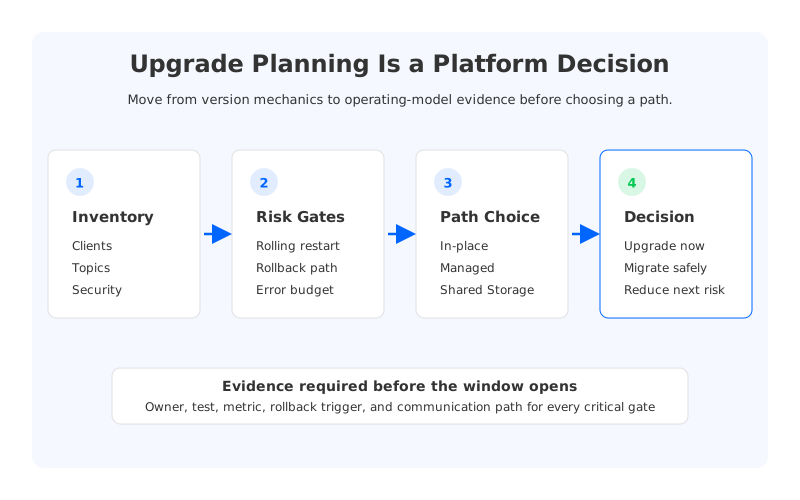
Kafka upgrade planning looks like a version-management problem until the first production cluster enters the calendar. Then the work expands. Platform teams have to line up client compatibility, broker configuration changes, rolling restarts, controller behavior, security policies, observability, downstream consumers, and rollback criteria.
That is why teams search for kafka upgrade planning instead of only reading release notes. They are trying to answer a broader question: how do we change a production streaming platform without turning every application team into a participant in the maintenance window? A careful upgrade plan protects the current system, but it should also ask whether the current operating model is still the right one.
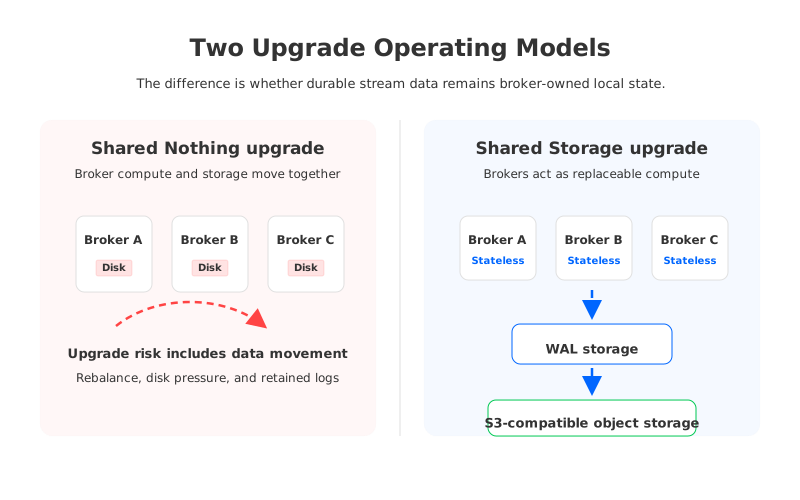
Traditional Apache Kafka is powerful, familiar, and well understood. It also ties durable partition data to broker-local storage. That storage model shapes how upgrades feel in practice: brokers are not interchangeable compute units, partition placement matters, rebalancing can move a lot of data, and capacity headroom has to be reserved before the first restart.
1Why Kafka upgrade planning becomes more than a version change
Apache Kafka's official upgrade guidance focuses on the sequence that keeps a cluster compatible while brokers and clients move forward. Operators usually plan a rolling broker upgrade, review inter-broker protocol compatibility, validate client versions, and avoid enabling features before the cluster is ready. Those mechanics matter because ignoring them is how routine maintenance becomes an incident.
The harder part is that a platform team rarely upgrades a clean, isolated Kafka cluster. Production clusters carry years of accumulated decisions: topic counts, partition sizing, retention policies, log compaction, ACLs, quotas, Connect workers, stream processors, schema dependencies, alert thresholds, and custom operational scripts. Every one of those can be fine during steady state and still become relevant during a rolling change.
Upgrade planning therefore has two layers:
- Release mechanics. Can the cluster move from the current version to the target version without breaking protocol compatibility, metadata behavior, or client expectations?
- Operational envelope. Can the team run the upgrade while preserving error budgets, keeping enough capacity, and retaining a credible rollback path?
- Architecture fit. Does the upgrade only patch the current estate, or is it the moment to reduce the recurring cost of broker-local storage, rebalancing, and manual capacity work?
The third layer is easy to skip because it sounds bigger than the task. When every upgrade requires weeks of coordination, the cluster is telling you something about the platform, not only the version.
2Inventory the contracts before touching brokers
Good Kafka upgrade planning starts with contracts, not commands. The broker version is visible, but application teams depend on behavior: producer acknowledgments, idempotent producer settings, transactional producer behavior, consumer group rebalancing, offset commits, compaction semantics, retention guarantees, admin APIs, authentication, authorization, and monitoring fields.
Start with a concrete inventory. It does not need to be elegant, but it has to be complete enough that each owner can say what evidence proves readiness.
| Inventory area | Questions to answer | Evidence to collect |
|---|---|---|
| Clients and SDKs | Which producer, consumer, admin, and stream-processing clients connect to the cluster? | Client versions, feature usage, connection properties, retry and timeout settings |
| Topics and partitions | Which topics carry critical workloads, long retention, compaction, or high write rate? | Topic configs, partition counts, retained bytes, producer throughput, consumer lag history |
| Security and governance | Which identities, ACLs, certificates, network paths, and audit rules must keep working? | ACL export, cert expiry, IAM or network policies, audit requirements |
| Operations | Which dashboards, alerts, automation scripts, and incident runbooks assume current behavior? | Metric names, alert thresholds, upgrade runbook, rollback runbook |
| Ecosystem services | Which connectors, stream processors, schema systems, and batch jobs depend on Kafka? | Connector configs, checkpoint behavior, schema compatibility, downstream owner sign-off |
This table usually reveals the real shape of the work. A small cluster can have a large upgrade surface if it is the integration point for many teams. A larger cluster can be easier when ownership is clear, clients are standardized, and automation has been tested under failure.
3Separate upgrade risk from architecture risk
An upgrade can fail for narrow reasons: a misread configuration, an incompatible client, a certificate issue, or a rolling restart that runs out of headroom. Those problems deserve disciplined runbooks and staging tests. They do not necessarily mean the architecture is wrong.
Architecture risk looks different. It appears when the same problems return across upgrades, scaling events, broker replacements, and migration projects. If the team repeatedly pauses other maintenance because rebalancing may compete with production traffic, that is not a release-note issue. If every broker restart requires extra discussion about disk pressure, partition placement, and retained data, the upgrade is exposing the cost of a Shared Nothing architecture.
The distinction matters because the remedies are different.
| Risk pattern | Treat as upgrade planning | Treat as architecture evaluation |
|---|---|---|
| A small set of outdated clients need validation | Yes | Not by itself |
| Rolling restart order and feature flags need care | Yes | Not by itself |
| Capacity headroom is always tight because storage and compute scale together | Partly | Yes |
| Rebalancing or broker replacement regularly consumes maintenance windows | Partly | Yes |
| Retention growth forces broker sizing far ahead of compute demand | Partly | Yes |
| Application teams cannot tolerate any endpoint or offset ambiguity | Yes | Yes, especially during migration |
This is where teams often make the plan too small. They prepare the safest possible in-place upgrade, succeed, and then repeat the same operational pattern later.
4Choose the upgrade path deliberately
Most platform teams compare four paths once they see the full surface area. The right choice depends on workload shape, staffing, compliance boundaries, and tolerance for architectural change.
The first path is an in-place Kafka upgrade. This is the natural answer when the current platform is healthy, the upgrade goal is version currency, and the team can preserve enough spare capacity during rolling restarts.
The second path is a managed Kafka service. This can be useful when the platform team wants a stronger service boundary for broker maintenance, patching, and infrastructure lifecycle. It should still be evaluated with real workload behavior. Managed operations do not automatically remove every Kafka-shaped concern around retention, partition count, network paths, client compatibility, and migration cutover.
The third path is Kafka with Tiered Storage. Tiered Storage can reduce pressure from historical retention by moving older log segments to remote storage. It is less complete when the pain comes from active local storage, partition movement, and brokers still owning the hot part of the log.
The fourth path is a Kafka-compatible Shared Storage architecture. This is a bigger architectural change, but it targets a different root cause: durable stream data should not have to live as broker-owned local state. If brokers become stateless compute units and durable data lives in shared object storage with a WAL path for write durability, upgrade and scaling planning become less entangled with retained data movement.
5Where AutoMQ fits in the evaluation
AutoMQ belongs in the fourth category. It is a Kafka-compatible streaming platform that keeps Kafka protocol and ecosystem semantics while replacing broker-local log storage with S3Stream, WAL storage, and S3-compatible object storage. That identity matters: the evaluation is not "leave Kafka behind." The more useful question is whether the team can keep Kafka contracts while changing the storage model that makes upgrades, scaling, and rebalancing heavy.
The architectural difference changes the upgrade conversation in three ways. Stateless brokers reduce durable partition data tied to any one broker. Shared Storage architecture makes partition reassignment more about metadata, leadership, and a small amount of unflushed WAL data than copying retained logs between broker disks. Object storage becomes the primary data layer, so retention and compute capacity can be reasoned about more independently.
This does not make evaluation optional. A production team still needs to test client behavior, security configuration, topic features, connectors, stream processors, observability, and failure recovery. Kafka compatibility should be proven against the estate you actually run.
AutoMQ Linking is especially relevant when an upgrade plan becomes a migration plan. It is designed to synchronize Kafka data and consumer progress into AutoMQ while preserving offset consistency for migration scenarios. That can reduce a common source of cutover risk: application owners care where consumers resume and how much duplicate or missed processing is possible.
6Build a production readiness checklist
The readiness checklist should be written as a set of gates, not a set of hopes. Each gate needs an owner, a test, and a rollback condition. If a row cannot be assigned to a person or team, it is not ready.
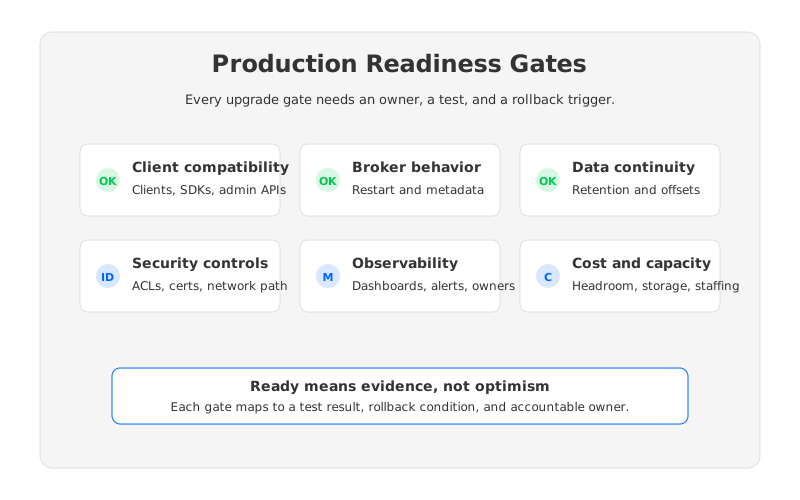
Use these gates as a starting point:
| Gate | What to prove | Rollback trigger |
|---|---|---|
| Client compatibility | Critical producers, consumers, admin clients, and processors work against the target version or target platform. | Error rate, retry behavior, or consumer lag exceeds the agreed threshold. |
| Broker and metadata behavior | Rolling restart, controller behavior, topic operations, and partition leadership behave as expected. | Leadership churn, ISR instability, or metadata errors persist after the observation window. |
| Data and offset continuity | Retained data, compacted topics, and consumer progress survive the upgrade or migration path. | Data validation fails or consumers cannot resume from expected positions. |
| Security and network controls | ACLs, certificates, identity mapping, private networking, and audit trails remain valid. | A critical application loses authorized access or traffic takes an unapproved path. |
| Observability | Dashboards and alerts distinguish normal upgrade noise from real service degradation. | Operators cannot explain production symptoms during the change. |
| Cost and capacity | Spare capacity, storage growth, cross-zone traffic, and operational staffing are visible. | The upgrade requires unplanned capacity or creates unacceptable sustained cost. |
The last row is often the most revealing. Kafka upgrade planning is not free even when software licenses are free. Spare brokers, retained data, network movement, staging environments, staffing, and delayed feature work all belong in the cost.
7A decision table for platform teams
The cleanest decision is the one that names the tradeoff directly. Do not hide a migration inside the word "upgrade," and do not hide an architecture redesign inside the word "maintenance."
| Situation | Better next step | Why |
|---|---|---|
| The cluster is healthy and version drift is the main issue | Plan an in-place upgrade | The lowest-risk path is to keep architecture stable and improve release hygiene. |
| The team lacks bandwidth for broker operations | Compare managed Kafka options | Operational offload may be more valuable than changing storage architecture. |
| Long retention is the main cost or capacity driver | Evaluate Tiered Storage | Remote historical storage can help without requiring a full platform change. |
| Scaling, rebalancing, broker replacement, and upgrades all feel heavy | Evaluate Shared Storage architecture | The recurring pain points point to broker-local durable state, not only process gaps. |
| The upgrade window is also a consolidation or cloud migration window | Evaluate AutoMQ alongside migration tooling | Kafka-compatible shared storage plus offset-aware migration can reduce the long-term operating burden. |
Notice the order. AutoMQ should enter after the team has separated release mechanics from architecture risk. If the problem is only a stale version, an in-place upgrade may be enough. If the upgrade exposes deeper coupling between compute, storage, and operations, testing a Kafka-compatible Shared Storage architecture becomes reasonable.
8From one upgrade plan to a platform operating model
The best upgrade plans leave behind a stronger platform. They standardize client compatibility evidence, make rollback criteria explicit, clean up unused topics, tighten security ownership, and remove dashboard ambiguity. Even when the team stays on traditional Kafka, that work pays back.
But the plan should also ask what the next upgrade will feel like. If every version change forces the same storage, rebalancing, and capacity conversations, the platform is asking for architectural attention. A version upgrade keeps the estate current. An architecture decision changes how much work the next upgrade requires.
If your Kafka upgrade plan has started to look like a recurring capacity project, evaluate AutoMQ as part of the architecture track, not as a last-minute replacement. Start with the same workload, clients, failure scenarios, and rollback expectations. The useful question is not whether a different platform sounds cleaner on paper; it is whether it makes the next upgrade less dependent on moving durable state around the cluster. You can begin with the AutoMQ documentation and build a proof of concept around your hardest upgrade gate.
9References
- Apache Kafka documentation, especially the upgrade and compatibility guidance: https://kafka.apache.org/documentation/#upgrade
- AutoMQ architecture overview: https://docs.automq.com/automq/architecture/overview?utm_source=blog&utm_medium=reference&utm_campaign=kafka-upgrade-planning-platform-teams
- AutoMQ Kafka compatibility documentation: https://docs.automq.com/automq/architecture/technical-advantage/native-compatible-with-apache-kafka?utm_source=blog&utm_medium=reference&utm_campaign=kafka-upgrade-planning-platform-teams
- AutoMQ partition reassignment documentation: https://docs.automq.com/automq/architecture/technical-advantage/partition-reassignment-in-seconds?utm_source=blog&utm_medium=reference&utm_campaign=kafka-upgrade-planning-platform-teams
- AutoMQ migration guidance: https://docs.automq.com/automq/migration/migrating-from-apache-kafka-to-automq?utm_source=blog&utm_medium=reference&utm_campaign=kafka-upgrade-planning-platform-teams
10FAQ
10.1Is Kafka upgrade planning mainly about broker versions?
No. Broker versions are only one part of the plan. A production upgrade also has to validate client behavior, topic features, security controls, observability, capacity headroom, downstream services, and rollback criteria.
10.2When should a Kafka upgrade become an architecture evaluation?
Treat it as an architecture evaluation when the same problems appear across upgrades, scaling events, broker replacements, and rebalancing work. Repeated storage movement, tight capacity coupling, and long coordination windows are signs that the operating model deserves review.
10.3Does Tiered Storage solve Kafka upgrade planning risk?
Tiered Storage can reduce local retention pressure by moving older data to remote storage. It does not fully remove the active local storage tier or every partition-movement concern, so it should be evaluated against the specific upgrade and scaling risks your team sees.
10.4Where does AutoMQ fit in a Kafka upgrade strategy?
AutoMQ fits when the team wants Kafka compatibility but also wants to reduce the operational coupling created by broker-local durable storage. It is most relevant when upgrade planning overlaps with scaling, migration, retention growth, or cloud architecture redesign.
10.5What should be tested before moving from Apache Kafka to AutoMQ?
Test the real estate: producers, consumers, admin clients, connectors, stream processors, topic configurations, ACLs, observability, failure recovery, data continuity, and offset behavior. Compatibility is a production property, so it should be proven with the workloads that matter.


