
Table of Contents
Table of Contents
A Helm install can finish cleanly while an Apache Kafka cluster is already carrying a future incident. The pods are Running, clients can produce and consume, and the dashboard is green. Then a node drain meets a zone-bound volume, a PodDisruptionBudget blocks the eviction, or a namespace quota prevents the replacement pod from creating its PersistentVolumeClaim.
That gap separates deployment from stability. A chart packages Kubernetes objects, but it does not decide whether storage follows a pod, brokers span failure domains, or an upgrade has a reversible path. Stability comes from the scheduler, storage layer, resource policy, and Kafka's replication and recovery behavior.
The useful question after helm install is therefore not “Is Kafka running?” It is “Can this cluster tolerate a planned disruption, a storage event, and a version change without turning a routine operation into a data-plane incident?” The checklist below is built around that question.
1A chart deploys Kafka; it does not operate it
Helm can render a StatefulSet, Services, configuration, and volume claims. An operator can add reconciliation and lifecycle automation. Those tools are useful, but they do not remove the decisions that determine day-two behavior. The platform team still owns the relationship between a broker pod, its volume, its node, its zone, and the Kafka data that the broker serves.
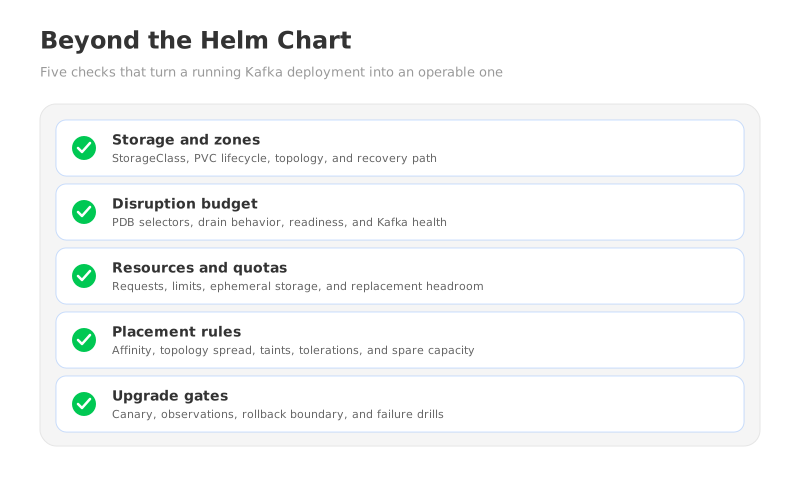
Start the review with five questions:
- Where does durable data live? Identify the volume type, binding mode, topology, reclaim behavior, expansion path, and recovery procedure for every PersistentVolumeClaim (PVC).
- What can be disrupted together? Map broker pods, controller voters, node pools, zones, and maintenance actions to the availability budget the Kafka cluster can tolerate.
- What can be scheduled? Check CPU, memory, ephemeral storage, PVC capacity, quotas, taints, tolerations, and the actual headroom left on eligible nodes.
- What moves during a failure? Separate a process restart, a volume reattach, Kafka replica recovery, and partition reassignment. They are different operations with different timelines.
- How is an upgrade reversed? Define the image, chart, operator, Container Storage Interface (CSI) driver, and Kubernetes changes that can be rolled back, and the evidence required before proceeding.
2Storage classes, PVCs, and zone placement
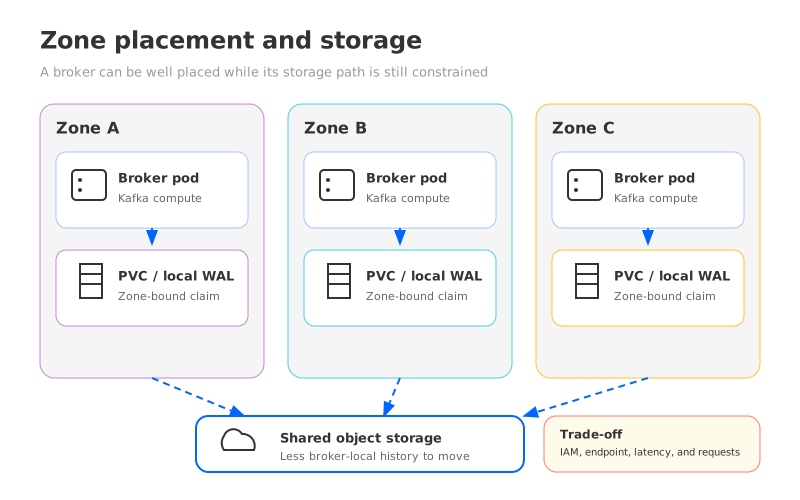
Storage is where a stateful Kafka deployment can look portable while remaining tied to a failure domain. A PVC expresses the workload's request; its StorageClass determines provisioning, backend, reclaim policy, and topology. Review the Kubernetes StorageClass documentation and record the class used by every production broker.
Topology matters when a volume is available only in the zone where it was provisioned. For a topology-constrained backend, check whether the class uses WaitForFirstConsumer, which delays volume provisioning until Kubernetes can consider the pod's placement. Then test the complete sequence: a broker pod is rescheduled, its claim is attached, the container starts, and Kafka recovers. A scheduler rule that looks correct on paper is not enough if the volume cannot attach to the node selected by that rule.
Zone placement is the other half of the storage decision. Spread brokers and controller voters across the failure domains that your availability design assumes. Use topology spread constraints or affinity rules deliberately, and validate the result by inspecting the actual node labels and pod placement. A rule that requires a label no node has will leave a replacement Pending. A preferred rule may be ignored when capacity is scarce. Both outcomes are valid Kubernetes behavior, so both belong in the drill.
For this layer, record evidence alongside configuration:
| Check | Evidence to collect | Failure it prevents |
|---|---|---|
| StorageClass choice | Provisioner, topology, binding mode, reclaim behavior, and expansion support | A replacement pod receives an unsuitable or unattachable volume |
| PVC lifecycle | Claim-to-volume mapping, attach events, resize procedure, and alert thresholds | Disk pressure becomes a recovery incident |
| Zone spread | Pod topology, node labels, anti-affinity or spread rules, and capacity per zone | A node or zone event removes too many Kafka roles at once |
| Recovery path | A tested pod restart and volume reattach with Kafka health checks | Kubernetes reports recovery before Kafka has recovered |
Shared object storage changes this section rather than removing it. A Shared Storage architecture separates durable stream data from broker compute, so replacing a broker need not move its entire local history. It also adds dependencies: object-storage permissions, private routes, request behavior, network capacity, and the selected WAL (Write-Ahead Log) path.
3PDBs are a disruption budget, not a Kafka availability plan
A PodDisruptionBudget (PDB) limits voluntary disruptions such as an eviction during node maintenance. It does not turn a failed node, an unavailable volume, or a process crash into a graceful event. The Kubernetes disruption documentation makes that boundary explicit, and Kafka operators need to carry it into their runbooks.
Do not choose a PDB only because it looks protective. Requiring every broker to remain available can block a node drain; allowing too many pods to leave can remove the redundancy Kafka needs. Set the value from broker and controller layout, replication policy, and maintenance action.
Review the selector first. If it matches too many workloads, a PDB can protect unrelated pods and make the result hard to reason about. If it matches too few, the broker you intended to protect can be evicted without the expected guardrail. Then test an actual eviction with the same drain mechanism used by the platform team. Observe both sides of the event: the Kubernetes eviction decision and Kafka's leader, replica, controller, and consumer-lag signals.
4Quotas, limits, and placement rules
Resource requests and limits are stability controls for brokers, not housekeeping fields. Requests influence scheduling. Limits can shape CPU throttling, memory termination, and the way a noisy neighbor affects the broker. Include ephemeral storage when it is part of the broker's write path or temporary workload. The Kubernetes resource management guide explains the container-level mechanics; the production review must connect them to Kafka symptoms such as request latency, failed recovery, or consumer lag.
Use production-shaped measurements to set requests. A small request can place brokers on a node that cannot sustain recovery traffic. A tight limit can make compaction or catch-up look like a memory leak; a generous value can overstate failure capacity. Set a predictable failure mode with headroom for maintenance.
Namespace quotas are a common source of upgrade surprises. The quota may cover CPU, memory, object count, PVC count, or requested storage. It can also apply to workloads created by an operator or an upgrade job, not only to the broker StatefulSet. Read the Kubernetes ResourceQuota documentation and verify that a scale-out or replacement can create every object it needs. A cluster can have free node capacity and still fail because the namespace has reached its PVC or resource quota.
Placement rules need the same operational review. Dedicated nodes, taints, and tolerations can protect brokers from unrelated workloads. Required node affinity can also make a failed broker impossible to reschedule when the dedicated pool is full. The Kubernetes node assignment guide and topology spread documentation describe the primitives; your checklist should record which constraints are required, which are preferred, and what capacity remains when one zone or node pool is unavailable.
5Upgrades, drills, and a checklist you can actually check
An upgrade changes more than a container image. The chart or operator may alter probes, Services, security context, volume templates, or disruption behavior. The Kafka version may change broker behavior, metadata handling, or client compatibility. The Kubernetes or CSI version may change scheduling, eviction, or volume attachment. Treat the combination as a change to the operating system of the data plane.
Before production, pin exact inputs and rehearse in a production-shaped environment: broker restart, node drain, volume reattach, and a client workload that observes lag. Use Kafka upgrade guidance for the version path, and define rollback by healthy leadership, replica state, consumer progress, and storage access—not merely restarted pods.
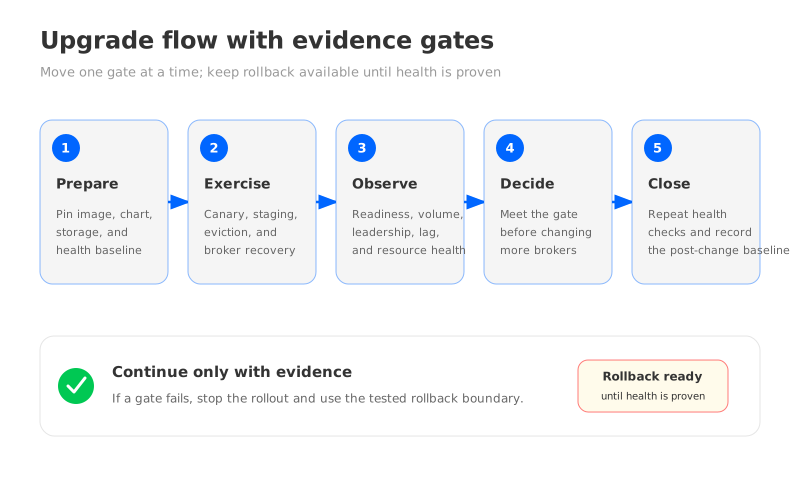
Use a gated flow so that an operator can stop after each meaningful observation:
- Prepare: Pin the image, chart, operator, storage class, and Kubernetes change. Capture the current placement, PVC mapping, Kafka health, and consumer lag.
- Exercise: Apply the change to a canary or staging cluster with the same zone, storage, quota, and affinity rules. Perform a planned eviction and a broker recovery.
- Observe: Check pod readiness, volume events, broker leadership, replication health, request errors, consumer lag, object-storage access if used, and resource pressure.
- Decide: Continue only when the evidence meets the runbook gate. If it does not, stop and use the tested rollback path before more brokers are changed.
- Close: Repeat the checks after the change, including a fresh node-drain test and a review of alerts, quotas, and capacity headroom.
6What shared object storage changes
These controls apply to any Kafka deployment on Kubernetes. Storage architecture determines how much state moves during a broker lifecycle event. In a broker-local design, PVC size, disk fullness, replica recovery, and partition movement follow the owning broker. In Shared Storage, durable stream data sits outside that lifecycle, so compute replacement can follow a different path.
That is the point at which a Kafka-compatible shared-storage platform such as AutoMQ becomes relevant. AutoMQ replaces Kafka's storage layer with S3Stream, uses object storage as the primary data store, and uses a WAL layer for durable writes and recovery. Its brokers are designed as stateless compute, which can reduce the amount of historical data tied to a broker during replacement or capacity changes. See the AutoMQ architecture overview and stateless broker documentation for the implementation boundary.
The trade-off is operationally concrete. The team may spend less effort sizing broker-local history and moving it during a compute event, but it must validate object-storage access, workload identity, private networking, request limits, monitoring, and the selected WAL type. AutoMQ's S3Stream documentation describes a write path that durably writes to WAL before acknowledging the client and then uploads data to object storage. That means a storage review should cover both the WAL failure domain and the object-storage failure domain, not treat “the cloud bucket” as an invisible backend.
Kubernetes requirements can also change with the product and deployment mode. For example, the linked AutoMQ Kubernetes deployment documentation calls for dedicated cluster and compute capacity for AutoMQ BYOC deployments and documents the supported scheduling fields. Treat those requirements as release-specific inputs to the review. A shared-storage design reduces one class of coupling; it does not excuse weak node isolation, missing quotas, or an untested upgrade path.
Choose based on the failing layer. Shared storage may help when broker-local storage drives recovery or scaling work, but it will not fix an undersized node pool, an incorrect PDB, or missing volume topology. Keep both layers in the checklist.
7Final production checklist
Use the following as the approval gate for a production Kafka deployment on Kubernetes:
- Storage: The StorageClass, provisioner, topology, binding mode, reclaim behavior, expansion path, and alert thresholds are recorded and tested.
- Claims: Every broker's PVC mapping is known, and the team has rehearsed restart, attach, resize, and recovery procedures.
- Zones: Brokers and controller voters are distributed across intended failure domains, with enough eligible capacity to replace a pod after a zone or node event.
- Disruption: PDB selectors match the intended pods, drain behavior is tested, and the budget is aligned with Kafka replication and maintenance policy.
- Resources: CPU, memory, ephemeral storage, network, and disk headroom are measured under production-shaped load. Requests, limits, and quotas allow replacement and upgrade actions.
- Placement: Affinity, anti-affinity, topology spread, taints, and tolerations are documented as required or preferred, with a test for the constrained case.
- Upgrade: Image, chart, operator, Kubernetes, CSI, and storage changes are pinned. A canary, observation gate, and rollback boundary exist.
- Shared storage: If used, object-storage identity, endpoint access, request behavior, monitoring, WAL selection, and failure drills are part of the same runbook.
A Helm chart is the starting line because it creates a repeatable deployment. Stability begins when the team can explain what happens to storage, placement, disruption, resources, and Kafka health during the first maintenance event. If you want to evaluate a Kafka-compatible shared-storage design against this checklist, start with the AutoMQ GitHub repository and test the failure paths that matter to your cluster.
8References
- Apache Kafka documentation: Replication
- Apache Kafka documentation: Upgrading
- Kubernetes documentation: StorageClasses
- Kubernetes documentation: Persistent Volumes
- Kubernetes documentation: Pod disruptions
- Kubernetes documentation: Resource management for Pods and Containers
- Kubernetes documentation: Resource Quotas
- Kubernetes documentation: Assigning Pods to Nodes
- Kubernetes documentation: Topology spread constraints
- AutoMQ architecture overview
- AutoMQ S3Stream shared streaming storage
- AutoMQ Kubernetes deployment overview
9FAQ
9.1Is a Helm chart enough for production Kafka on Kubernetes?
No. A chart can package deployment objects, but production stability also depends on storage topology, PVC lifecycle, zone placement, disruption budgets, resource policy, scheduling constraints, and upgrade recovery. Those behaviors need to be tested under maintenance and failure conditions.
9.2What should I check in a Kafka StorageClass?
Check the provisioner, volume topology, binding mode, reclaim behavior, expansion support, performance characteristics, and failure-domain assumptions. Then verify that a broker can be rescheduled, reattach its claim, and recover Kafka state within the runbook's expected boundary.
9.3Do PDBs protect Kafka from node failure?
PDBs control voluntary disruptions such as planned evictions. They do not prevent involuntary disruptions such as a failed node or an unavailable volume. Kafka replication, readiness checks, capacity headroom, and recovery procedures must cover those events.
9.4Does shared object storage remove Kubernetes stability work?
No. It can reduce the amount of durable history coupled to a broker pod, but it adds checks for object-storage identity, network access, request behavior, monitoring, and the WAL or caching layer. The correct checklist changes with the storage architecture.
9.5When should a platform team evaluate AutoMQ?
Evaluate it when broker-local storage is driving long recovery, partition movement, or capacity changes, and the team wants to keep Kafka-facing clients and semantics. Validate compatibility, object-storage behavior, WAL choices, Kubernetes placement, resource policies, and rollback paths with a production-shaped workload.


