
Table of Contents
Table of Contents
A lakehouse backfill window sounds like a scheduling problem until it collides with a Kafka cluster that is already serving production traffic. The data team needs to replay hours or days of events into an Iceberg, Delta, or similar table layer. The platform team needs to keep producers and consumers healthy. Finance wants to know why network and storage lines moved during an operation that was supposed to be temporary. The hard part is not starting the replay; it is proving that replay can finish inside a bounded window without turning recovery into guesswork.
The search phrase lakehouse backfill window kafka usually comes from that exact pressure. Someone already has a streaming-to-table pipeline. They are asking how to size a recovery window, replay historical offsets, protect live traffic, and avoid paying for idle capacity between backfill runs.
1Why Backfill Windows Become Platform Decisions
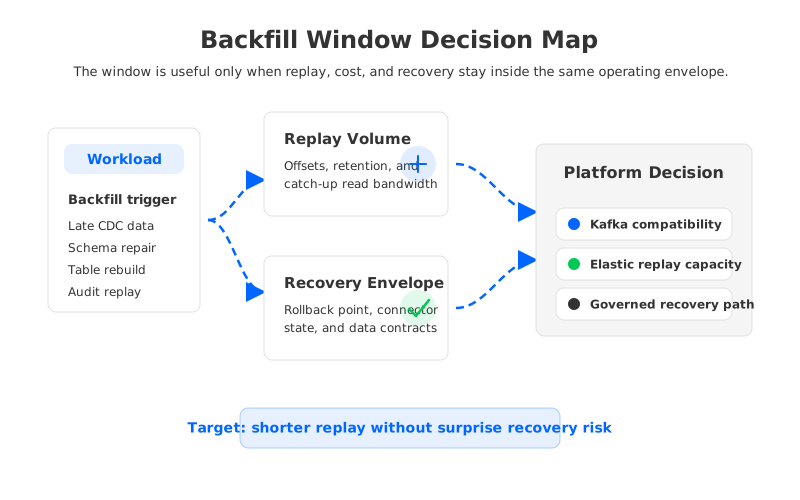
Backfill begins as a data correctness task. A CDC connector emitted late records, a table schema changed, or downstream analysts need a derived table rebuilt from an earlier offset. Kafka is the system of record for the replay path, and the lakehouse table is the target that must converge to a trusted state.
The platform decision appears when the window is shorter than the natural replay time of the pipeline. If the topic retains enough data and the consumer group can read fast enough, the operation is routine. When the replay competes with live ingestion, broker disk, network replication, connector tasks, and table commit throughput, the same operation becomes a capacity event. The team is no longer asking, "Can we replay?" It is asking, "What else breaks while we replay?"
Four variables drive most backfill plans:
- Replay span: the offset or timestamp range that must be reprocessed, including whether the stream contains compacted, tombstoned, or transformed data.
- Read amplification: the number of consumers, connectors, and validation jobs that read the same historical records during the window.
- Table commit behavior: the way files, snapshots, checkpoints, and schema evolution behave while the target table catches up.
- Recovery boundary: the exact point where the team can stop, roll back, or retry without corrupting the table or losing consumption progress.
Treating these variables as a platform decision is not overengineering. It prevents a replay plan from succeeding in a test environment and failing during the production incident where it matters.
2The Lakehouse Freshness Constraint Behind the Workload
Lakehouse pipelines are sensitive to freshness because they sit between two time models. Kafka topics expose ordered records, offsets, consumer progress, retention, and client-visible lag. Table formats expose snapshots, files, partition evolution, and query-visible freshness. A backfill window has to coordinate both models, even when different teams own the stream and the table.
That coordination is where many plans become fragile. A Kafka consumer can reset offsets and read from an earlier point, but the table target may already contain files written by a failed attempt. A connector can restart from a checkpoint, but the table catalog may expose a partial snapshot if commit semantics are unclear. Adding consumers does not help if file generation, object storage requests, or metadata commits become the bottleneck.
The right unit of planning is therefore not only "records per second." It is a combined freshness budget:
| Planning question | Why it matters during backfill |
|---|---|
| How much historical data must be replayed? | Defines retention, read bandwidth, and table write volume. |
| How much live traffic continues during replay? | Determines whether backfill steals capacity from production consumers. |
| What table state is safe to expose? | Controls reader impact, rollback design, and auditability. |
| Which checkpoints are authoritative? | Prevents offset progress and table commits from drifting apart. |
| What happens if the window misses? | Forces a decision between pause, retry, scale out, or rollback. |
The last row separates a maintenance task from an operational process. A backfill that misses its window with a rehearsed rollback path is inconvenient. A backfill that leaves operators debating which state is real is an incident.
3Where Traditional Kafka Architecture Adds Pressure
Kafka's original storage model binds partitions to brokers that own local log data. This shared nothing design is one reason Kafka became such a durable and widely adopted streaming system. It also means that storage placement, compute capacity, and recovery behavior are tied together more tightly than many lakehouse workloads want.
During normal traffic, that coupling can be manageable. During backfill, it becomes more visible. Historical reads hit broker storage paths that may also serve live consumers. Replication continues while replay increases disk and network pressure. Adding brokers can help, but it may trigger partition movement or reassignment planning before the extra capacity is useful. Expanding the cluster for a short replay window is not the same as scaling an ordinary stateless service.
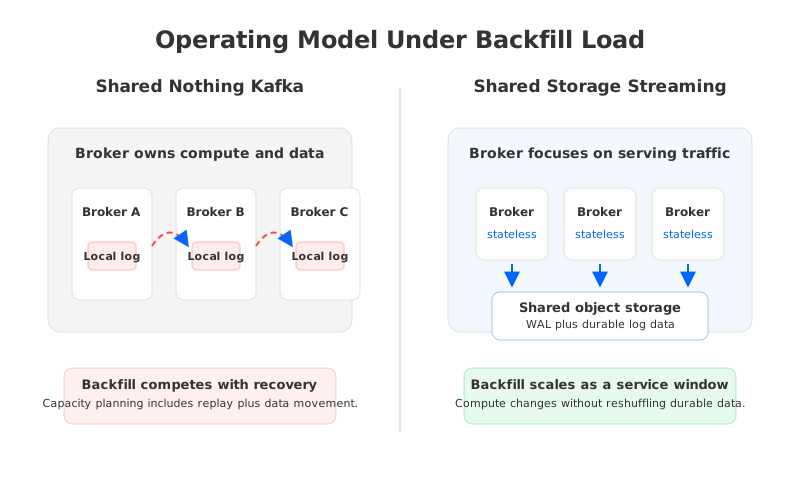
Cloud infrastructure adds another dimension. Broker-local replicas are often placed across availability zones for durability. That improves resilience, but the data movement can show up as inter-zone traffic, replication overhead, or extra reads when consumers are not aligned with data locality. For backfill-heavy lakehouse workloads, replay, durability, and recovery draw from the same broker-centered resource pool.
This is where tiered storage can be misunderstood. Tiering older Kafka log segments to object storage can reduce local disk pressure for retained history. But tiered storage does not automatically make brokers stateless. The broker still coordinates ownership, serves reads, handles live writes, and participates in the cluster's operating model. Reducing disk pressure is helpful; decoupling replay capacity from durable data placement changes the model more deeply.
4Stream-to-Table Architecture Options
Most teams end up with one of three stream-to-table patterns. The names vary by implementation, but the trade-offs are stable enough to evaluate before choosing a product or connector.
The first pattern is connector-led ingestion. Kafka Connect, Flink, Spark Structured Streaming, or a managed connector reads from Kafka and writes table files. This keeps the stream platform and table platform loosely coupled, while placing responsibility on connector sizing, checkpoint strategy, file compaction, and schema governance.
The second pattern is lakehouse-native ingestion from object storage. Events land in an object store or staging area, and table jobs ingest from there. This can work well when batch and streaming teams share the same storage layer, but it may weaken the operational guarantees Kafka users expect around offsets, consumer groups, and replay semantics.
The third pattern is a Kafka-compatible stream storage system that writes table-ready data as part of the streaming platform's operating model. This is attractive when Kafka clients, topics, and consumer semantics must remain familiar while the gap between stream retention and table ingestion shrinks.
No pattern wins in every environment. A team with mature Flink operations may prefer connector-led control. A team with hundreds of Kafka clients may put compatibility first, then evaluate how much the storage layer can change without forcing application rewrites.
5Evaluation Checklist for Platform Teams
A useful backfill checklist is tied to failure modes that operators can observe and act on. If a checklist item cannot produce a metric, owner, or rollback action, it is probably a discussion topic rather than a readiness gate.
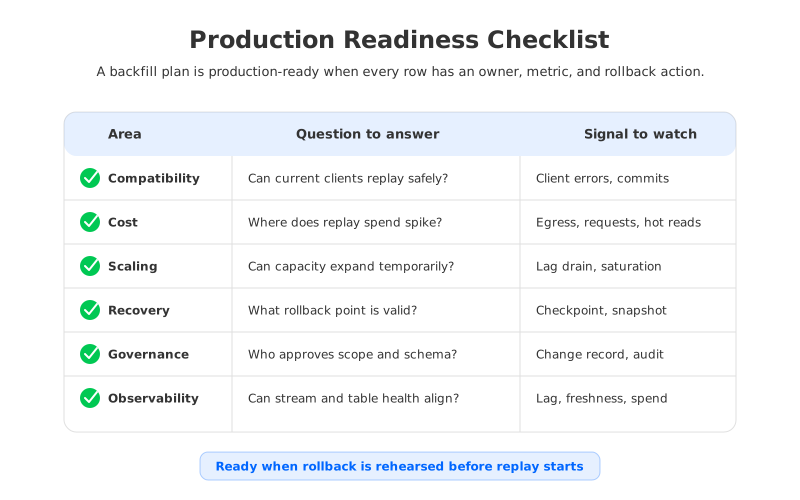
Start with compatibility. Backfill is the wrong time to discover that a Kafka client, offset reset command, ACL policy, transaction setting, or consumer group behavior works differently than expected. Existing producers and consumers should continue to use standard Kafka protocols and tools, and any exception should be written down before the window opens.
Cost comes next because replay changes traffic shape. Live ingestion might be steady, but catch-up reads are bursty. A historical replay can create more read pressure than a normal business day if validation jobs, table writers, and consumers read the same range. In cloud deployments, that pressure may surface as storage requests, inter-zone transfer, compute overprovisioning, or temporary connector capacity.
Scaling should be evaluated as a temporary operating mode. A platform that can add capacity only after moving durable data may not help a short backfill window. Fast compute expansion still needs sink throughput, table commit capacity, and observability to prove the extra capacity is useful.
Recovery deserves the most discipline. The plan should name the offset range, table snapshot, connector checkpoint, schema version, validation query, and rollback path. A team that can reset a consumer but cannot revert the table target has defined half of recovery.
Governance and observability close the loop. Backfill often crosses ownership boundaries: application teams own data contracts, platform teams own Kafka, analytics teams own table consumers, and security teams own access policy. Approval, audit trails, and monitoring keep an emergency replay from becoming an unreviewed production change.
6How AutoMQ Changes the Operating Model
If the core pressure comes from broker-local storage doing too many jobs at once, the architectural direction is clear: keep Kafka compatibility for applications, but move durable log storage into a shared storage layer so brokers can behave more like stateless serving nodes. AutoMQ fits into that category as a Kafka-compatible streaming platform built around shared storage.
The practical effect is easiest to see through the backfill window. In a shared storage architecture, durable data does not have to be reshuffled across broker disks before compute capacity becomes useful. Brokers focus on serving produce and consume traffic, while the storage layer provides the durable foundation for retained stream data. The planning question changes from "How do we move enough data to make room for replay?" to "How much serving capacity do we need during this replay window?"
AutoMQ's documentation describes Apache Kafka compatibility, shared storage, stateless brokers, S3Stream storage, WAL options, and cross-zone traffic reduction. For lakehouse-oriented teams, the relevant point is not a feature checklist. Replay, elasticity, and storage durability can be reasoned about separately, which makes a backfill runbook easier to write.
AutoMQ Table Topic adds another angle for teams trying to shorten the path from stream data to lakehouse tables. The feature is designed for real-time data lake ingestion with Kafka compatibility and Iceberg-oriented table integration. It does not remove the need for schema governance or validation queries, but it can reduce the moving parts between stream ingestion and table freshness.
The product decision still belongs after the neutral evaluation. If a team already has a stable connector estate, the first step may be improving runbooks and observability. If the bottleneck is broker-local data movement, cross-zone traffic, or replay capacity that cannot scale temporarily, shared storage becomes more compelling.
7A Practical Runbook Shape
A production runbook should be short enough to execute under pressure and detailed enough to settle arguments before the window starts. A practical version has five phases.
Phase one defines the replay contract: topic, partitions, offset or timestamp range, target table, schema version, row-count expectation, and validation queries. Phase two prepares capacity: broker or serving capacity, connector tasks, object storage limits, table commit settings, and dashboards. Phase three freezes governance inputs: approval, owner, rollback authority, and communication channels. Phase four executes replay while tracking lag drain rate, live traffic health, table freshness, and cost signals. Phase five validates the target table, records the final offset and snapshot, then scales temporary capacity back down.
That sequence keeps recovery attached to every step. A team should not start replay until it knows what table snapshot can be abandoned. It should not scale capacity until it knows which metric proves the capacity is helping. It should not declare success until the stream offset and table state agree.
Here is a concise readiness scorecard:
| Gate | Pass condition |
|---|---|
| Replay scope | Offset range and target table state are explicit. |
| Capacity | Lag drain target is modeled and observable. |
| Cost | Expected spike lines are named before execution. |
| Recovery | Rollback point is tested or rehearsed. |
| Governance | Schema, retention, and table exposure are approved. |
| Closure | Final offset, snapshot, and validation result are recorded. |
The scorecard is intentionally plain. Backfill failures are rarely caused by a lack of architecture vocabulary. They are caused by an unstated assumption that becomes visible too late.
8Closing the Window Without Guesswork
The real goal of a lakehouse backfill window is not maximum replay speed. It is controlled convergence: the table catches up, live traffic stays healthy, cost spikes are understood, and recovery remains boring. Kafka-compatible infrastructure can support that goal when platform teams evaluate replay, storage, network, table commits, and rollback as one operating model.
For teams evaluating whether shared storage can simplify that model, AutoMQ's architecture and Table Topic documentation are a useful next stop. Start with the technical docs, map them against your replay runbook, and test the question that matters most: can your platform scale the backfill window without turning data placement into the bottleneck? You can begin from the AutoMQ site here: explore AutoMQ for Kafka-compatible lakehouse streaming.
9References
- Apache Kafka Documentation
- Apache Kafka Tiered Storage Operations
- Apache Kafka Consumer Configurations
- Apache Kafka Kafka Connect
- AWS Amazon S3 Pricing
- AutoMQ Architecture Overview
- AutoMQ S3Stream Shared Streaming Storage
- AutoMQ Compatibility with Apache Kafka
- AutoMQ Difference with Tiered Storage
- AutoMQ Table Topic Overview
- AutoMQ Cross-Zone Traffic Overview
- AutoMQ Migration Overview
10FAQ
10.1What is a lakehouse backfill window in Kafka?
A lakehouse backfill window is a bounded period where a team replays Kafka records into a lakehouse table to repair, rebuild, validate, or catch up table state. The window includes stream replay, connector or processing capacity, table commits, validation, and rollback planning.
10.2How do I choose the right backfill window size?
Start with the replay range, retained data volume, expected lag drain rate, and table write throughput. Then add live traffic impact, validation time, and recovery time. A window that ignores rollback and validation is too optimistic, even if the raw replay speed looks sufficient.
10.3Does Kafka tiered storage solve lakehouse backfill pressure?
Tiered storage can reduce pressure on broker-local disks for older retained data, but it does not automatically make the broker stateless or remove every operational coupling. For backfill planning, compare the full operating model: read path, data placement, scaling behavior, recovery, and cost during bursty replay.
10.4Where does AutoMQ fit in a backfill architecture?
AutoMQ fits when teams want Kafka-compatible clients and operations while using shared storage to decouple durable data from broker-local disks. That model can make temporary replay capacity and recovery planning easier to reason about, especially for cloud lakehouse workloads.
10.5What should be monitored during a production backfill?
Monitor consumer lag, lag drain rate, producer and consumer errors, broker saturation, connector task health, table commit latency, table freshness, object storage behavior, and cloud cost signals. The metrics should show both stream health and table health, not one side of the pipeline only.


