
Table of Contents
Table of Contents
Managed Kafka changes who patches brokers, replaces failed nodes, and operates the control plane. It does not remove the need to understand whether applications are producing safely, consumers are falling behind, storage is becoming a bottleneck, or network and cloud charges are drifting away from forecast. For SREs and platform engineers, the most dangerous managed Kafka dashboard is the one that says the cluster is healthy while the business workflow is already late.
Kafka is a distributed log, not a generic queue hidden behind an uptime number. Its reliability depends on client behavior, partition placement, request latency, replication or storage durability, consumer group coordination, and downstream processing capacity. A provider can expose a healthy service endpoint while a specific topic has a hot partition, a consumer group is stuck in rebalance loops, or a retention decision is turning into a cloud storage bill.
Good managed Kafka observability therefore has two jobs: verify the managed service boundary, and preserve Kafka semantics from producer to consumer. The practical question is not "does the provider have monitoring?" It is what your teams still need to own, export, alert on, and correlate with application SLOs.
1What Managed Kafka Observability Must Cover
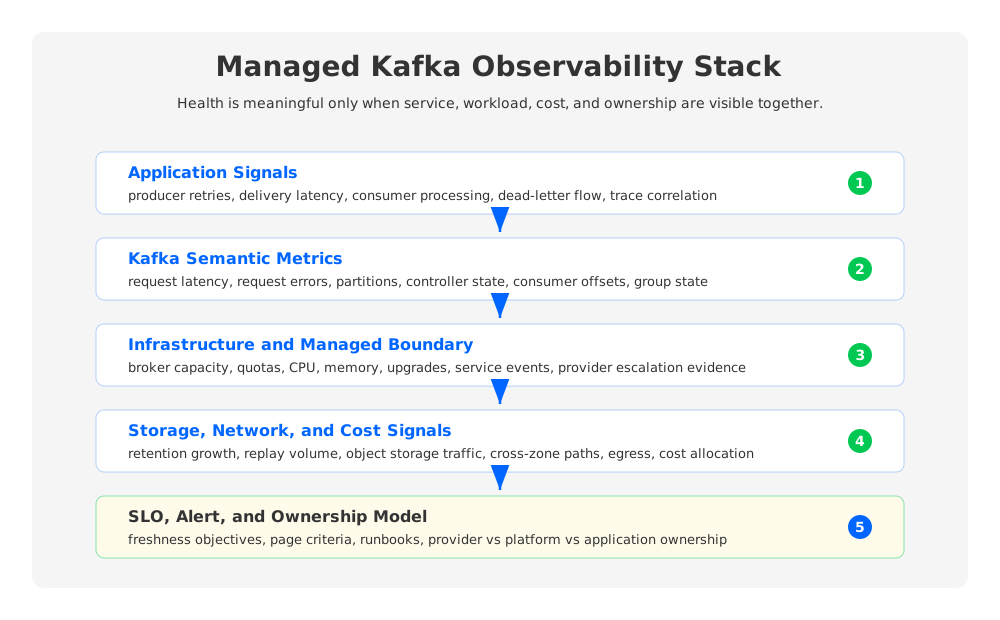
The first mistake is treating managed Kafka monitoring as broker monitoring only. Broker health matters, but production observability has to cover Kafka workload semantics, platform infrastructure, storage and network paths, and cost behavior. If any layer is missing, every team can claim that its local dashboard looks normal.
For an enterprise Kafka estate, the core observability model should include:
| Layer | What to track | Why it matters |
|---|---|---|
| Kafka semantics | Produce/fetch request rates, request latency, error rates, partition health, consumer offsets, consumer group state, rebalances | Shows whether Kafka is preserving the behavior applications depend on. |
| Application path | Producer retries, delivery latency, consumer processing latency, dead-letter rates, downstream failures | Separates Kafka saturation from application backpressure. |
| Infrastructure | CPU, memory, JVM behavior, disk or storage pressure, broker count, node replacement, quota usage | Explains capacity and noisy-neighbor symptoms. |
| Storage and network | Retention growth, cold reads, replication or object storage traffic, cross-zone or egress traffic | Connects performance symptoms to architectural and cost drivers. |
| SLO and incident workflow | Availability, freshness, durability assumptions, alert severity, runbook ownership | Turns raw telemetry into operational decisions. |
This is also where managed service responsibility becomes explicit. The provider may own broker replacement and service-side upgrades. Your team still owns topic design, client settings, consumer throughput, schema compatibility, network reachability, alert routing, business SLOs, and cloud-account integration in BYOC or private-cloud deployments.
2Kafka Workload Metrics: Start With Semantics
Kafka's monitoring documentation exposes a large JMX surface, and not every metric deserves a page. Start with a semantic checklist: can producers write, can consumers read, are partitions available, is leadership stable, and are requests completing inside the latency envelope needed by the workload?
At the broker and controller level, teams commonly watch controller activity, offline partitions, under-replicated partitions, unclean leader elections, request rates, request latency, request errors, request queue time, network processor idle time, and partition counts. Apache Kafka documents metrics such as ActiveControllerCount and UnderReplicatedPartitions; Confluent's JMX monitoring guidance calls out ActiveControllerCount, OfflinePartitionsCount, and UncleanLeaderElectionsPerSec as minimum alert candidates. These metrics are not the whole platform, but they are excellent failure detectors because they speak Kafka's language.
Consumer lag deserves its own treatment because it is often the first user-visible symptom. Confluent defines consumer lag as the offset distance between the latest produced message in a partition and the last consumed message. That definition is useful, but it can mislead when used alone. Pair lag with ingestion rate, consumer processing rate, group membership changes, and time-to-drain estimates.
A practical managed Kafka monitoring dashboard should include at least these workload views:
- Producer view: produce request rate, produce latency percentiles, error types, retry behavior, throttling, and message size trends.
- Broker view: request latency, queue time, request errors, partition distribution, controller state, broker availability, and network thread saturation.
- Consumer view: committed offsets, end offsets, offset lag, consumer processing latency, rebalance activity, and group state.
- Topic view: partitions, traffic by topic and partition, retention growth, compaction effects, and unusually hot partitions.
- Client view: client-side delivery reports, timeouts, retry storms, connection churn, and application logs around backpressure.
Client-side metrics matter because managed Kafka providers can observe the cluster, but they cannot fully infer application intent. A producer timeout may be caused by a broker issue, a mis-sized batch, a network path, a quota, DNS or TLS, or a downstream transaction that keeps the producer thread blocked.
3Logs and Traces: The Missing Context Around Metrics
Metrics tell you that something changed. Logs and traces help explain why. In managed Kafka, log access varies by provider and deployment model, so platform teams should define a minimum evidence set before an incident happens: broker or service events, audit logs, client logs, connector logs, consumer group changes, authentication failures, quota events, and control-plane operations.
OpenTelemetry is especially useful at the application boundary. Its Kafka semantic conventions define Kafka-specific attributes on top of general messaging conventions, including the requirement that messaging.system be set to kafka for Kafka spans. That consistency helps traces show whether latency is spent before produce, inside produce, waiting for consumption, or inside downstream processing.
Logs should be treated as searchable incident artifacts, not as a dumping ground. The most useful managed Kafka log strategy keeps a few streams separate:
- Application producer and consumer logs with client ID, topic, partition when available, error class, retry state, and correlation ID.
- Platform control logs for cluster changes, broker replacements, upgrades, ACL changes, quota changes, and network policy changes.
- Security and audit logs for authentication failures, authorization denials, certificate expiry, secret rotation, and unexpected principals.
- Connector and stream processing logs for task restarts, offset commit failures, schema errors, sink write failures, and replay decisions.
For regulated environments, BYOC and private-cloud deployments add another requirement: logs must land in the customer's monitoring and retention systems without exposing unnecessary data to the vendor. The design should document which logs remain in the customer account, which metadata is visible to the managed service, and which audit trail is authoritative.
4Infrastructure, Storage, and Network Signals
Managed Kafka reduces infrastructure work, but it does not eliminate infrastructure physics. Kafka still moves bytes through network interfaces, retains data somewhere, coordinates consumers, handles metadata, and serves reads from hot or cold paths. The provider may abstract the servers, but SREs still need signals that explain saturation.
Traditional Kafka clusters often require disk-centric dashboards: disk utilization, log directory health, page cache pressure, broker storage growth, and replica movement. Cloud managed Kafka adds provider-specific dimensions such as instance class, partition quotas, throughput units, capacity units, storage autoscaling behavior, cross-zone traffic, and private connectivity limits.
Storage and network signals connect reliability to cost. Long retention increases stored bytes. Large fan-out increases outbound bytes. Cross-zone clients can create avoidable traffic. Replays and backfills can produce cold-read spikes. Compaction-heavy topics may shift load into background work. These patterns should be visible before the invoice becomes the first alert.
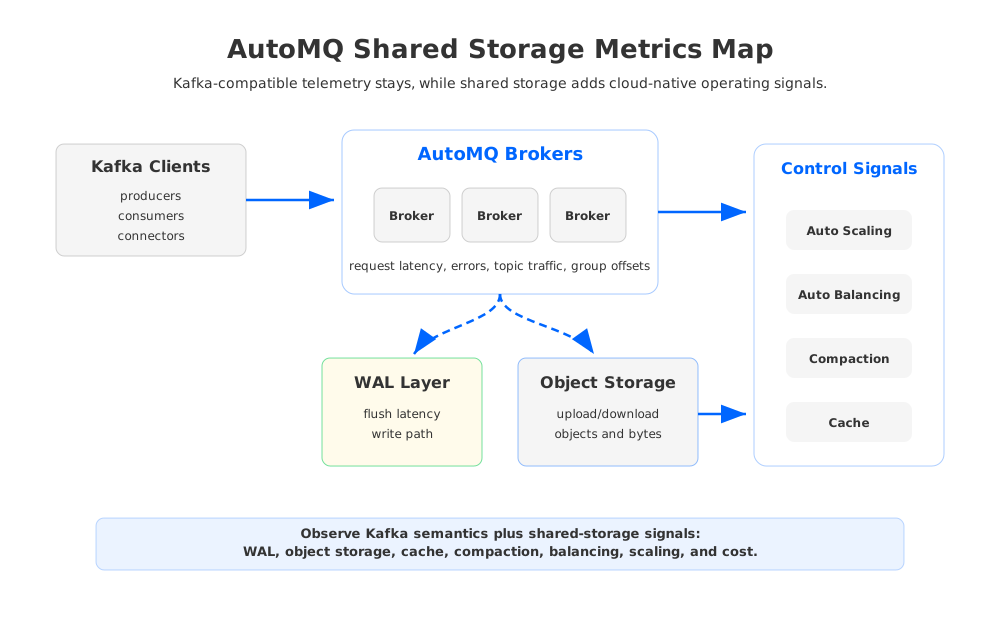
For teams evaluating Kafka-compatible alternatives, architecture changes the observability surface. AutoMQ, for example, keeps Kafka protocol compatibility while replacing broker-local log storage with object-storage-backed shared storage. Its public documentation describes a WAL layer and object storage as parts of S3Stream, with WAL absorbing low-latency persistence and object storage acting as the durable repository. Operators still watch Kafka-compatible request, topic, and consumer-group metrics, but they also gain cloud-native storage dimensions such as WAL behavior, object storage traffic, cache effectiveness, compaction bandwidth, and Auto Balancing or Auto Scaling delay.
5Alerts: Page on User Impact, Ticket on Risk
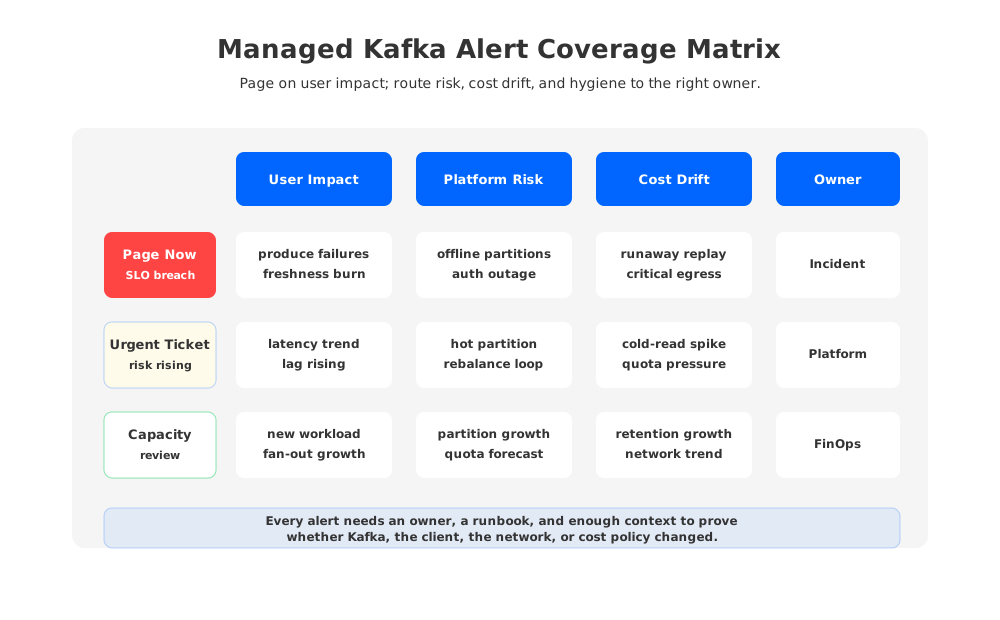
Kafka alerting fails when every metric threshold becomes a page. It also fails when pages are delayed until the service is down. The right model separates immediate user impact, fast-moving risk, and slow operational drift.
Prometheus alerting rules support expressions and durations before firing; Grafana Alerting can evaluate metrics and logs from multiple data sources and route notifications. Those mechanics are powerful, but Kafka alert quality depends on the SLO design above them. A high-priority alert should mean producers cannot commit records, consumers cannot meet freshness objectives, or the platform is approaching data-loss, availability, or severe cost risk.
Use severity tiers deliberately:
| Alert class | Example signal | Typical response |
|---|---|---|
| Page now | Offline partitions, sustained produce failures on critical topics, consumer freshness SLO burn, authentication failure affecting a production principal | Wake the owning team and start the incident runbook. |
| Urgent ticket | Rising request latency, repeated rebalances, hot partition, broker or quota saturation, cold-read surge during replay | Investigate during working hours or within an agreed operational window. |
| Capacity review | Retention growth, partition count growth, storage forecast drift, cross-zone traffic trend, object storage request growth | Feed capacity planning, FinOps review, and architecture changes. |
| Hygiene alert | Missing metrics, stale dashboard data, expired certificates approaching, disabled log export | Fix observability before the next incident. |
The alert matrix should also encode ownership. A consumer lag alert with no owning service is noise. A broker saturation alert with no provider escalation path is a dead end. For managed Kafka, every alert should say whether the first action belongs to the provider, platform team, application team, network team, or a shared incident channel.
6Cost Signals Belong in the Observability Stack
Many Kafka teams treat cost as a monthly reporting problem. That is too slow for managed Kafka. Streaming workloads can change cost shape quickly when retention policies change, a new consumer group multiplies read traffic, a backfill pulls historical data, or a client moves across zones or regions.
Cost observability should track leading indicators, not only invoices. Useful signals include retained bytes by topic, retention changes, ingress and egress volume, replay volume, cold-read volume, connector throughput, partition growth, reserved capacity utilization, and storage object growth for object-storage-backed systems. When a provider charges by throughput unit, capacity unit, cluster size, storage, networking, or API requests, dashboards should map technical signals to those cost drivers.
This matters for architecture decisions. A workload with predictable low-latency traffic may justify dedicated capacity. A workload with long retention and periodic replay may be more sensitive to storage economics and cold-read behavior. A BYOC deployment may shift spend into the customer's cloud account, making cloud-native tags, account-level cost allocation, Prometheus labels, and dashboard ownership part of the platform contract.
For AutoMQ-style shared storage, cost signals should be observed alongside performance signals. Object storage upload and download volume, stream object counts, network usage, cache behavior, compaction-related bandwidth, and Auto Scaling or Self-Balancing activity help explain whether a cost change is caused by healthy workload growth, inefficient replay, poor client locality, or background storage work.
7BYOC and Private Cloud: Draw the Responsibility Boundary
BYOC managed Kafka is attractive because data and infrastructure can remain in the customer's cloud account or private environment. Observability has to match that boundary. The customer may need metrics in Prometheus, logs in a SIEM or log lake, alerts in an incident platform, and cloud cost signals in FinOps tooling. The provider may still need enough metadata to operate the control plane, diagnose failures, and support upgrades.
Before production, teams should agree on five integration points:
- Metrics export: what is exposed through JMX, Prometheus, OTLP, cloud monitoring APIs, or vendor APIs.
- Log export: which logs are available, where they land, how long they are retained, and how sensitive fields are handled.
- Alert ownership: which alerts page the customer, which alerts page the provider, and which alerts create shared incidents.
- Auditability: how cluster changes, access changes, network changes, and support actions are recorded.
- Cost attribution: how Kafka topics, applications, environments, accounts, or business units are mapped to cloud cost signals.
The best managed Kafka observability design is boring in the right way. Dashboards are predictable. Alerts have owners. Logs have correlation IDs. Cost signals explain invoices before month end. Most importantly, dashboards reflect Kafka semantics, not only service health.
8A Practical Dashboard Checklist
For production managed Kafka, start with a small set of dashboards that each answer a specific operational question:
- Service health: Are the managed cluster and Kafka data plane available for critical operations?
- Producer health: Are important producers committing records within latency and error budgets?
- Consumer freshness: Are critical consumer groups meeting lag and time-to-process objectives?
- Topic and partition balance: Are hot partitions, partition growth, or skew creating risk?
- Storage and retention: Are retained bytes, compaction, replay, or object storage paths behaving as expected?
- Network and connectivity: Are private links, cross-zone paths, egress, TLS, DNS, and quotas healthy?
- Cost and capacity: Are the technical drivers of spend within forecast?
- Observability health: Are metrics, logs, traces, and alerts themselves flowing?
Managed Kafka is valuable because it lets teams spend less time nursing brokers. It does not remove the need for disciplined observability. The winning pattern is to let the provider manage what it owns while your platform team preserves the Kafka signals that define application correctness, customer freshness, and economic control.
9References
- Apache Kafka Operations: Monitoring
- Confluent Documentation: Monitoring Kafka with JMX
- Confluent Documentation: Monitor Consumer Lag
- Prometheus JMX Exporter
- Prometheus Documentation: Alerting Rules
- Grafana Documentation: Grafana Alerting
- OpenTelemetry Semantic Conventions for Kafka
- AutoMQ Documentation: Observability Overview
- AutoMQ Documentation: Prometheus Metrics
- AutoMQ Documentation: S3Stream Overview
- AutoMQ Documentation: WAL Storage
10FAQ
10.1Is managed Kafka observability still necessary if the provider operates the cluster?
Yes. The provider may operate brokers and the control plane, but application correctness still depends on producer behavior, consumer lag, topic design, quotas, networking, downstream systems, and SLO ownership. Managed Kafka reduces infrastructure toil; it does not replace workload observability.
10.2What are the most important Kafka metrics to alert on first?
Start with signals tied to user impact and data safety: offline partitions, controller instability, unclean leader elections, sustained produce or fetch errors, request latency for critical topics, consumer freshness SLO violations, and authentication or authorization failures for production clients. Add capacity and cost alerts as tickets rather than pages.
10.3How should teams monitor consumer lag?
Track lag by consumer group, topic, and partition, then correlate it with ingestion rate, consumer processing rate, rebalance activity, and downstream latency. Offset lag alone is not enough because a group can be intentionally paused, blocked by a downstream dependency, or draining normally after a planned backfill.
10.4What changes in BYOC managed Kafka observability?
BYOC adds integration responsibility. Metrics, logs, alerts, audit trails, and cloud cost allocation often need to land in the customer's own account and tooling. The provider and customer should agree on which signals are exported, who owns each alert, and what evidence is shared during incidents.
10.5How does AutoMQ change the observability model?
AutoMQ remains Kafka-compatible, so Kafka request, topic, and consumer-group signals remain important. Its shared-storage architecture adds dimensions around WAL behavior, object storage upload and download, cache, compaction, network bandwidth, Auto Balancing, and Auto Scaling. These signals help operators connect Kafka semantics with cloud storage performance and cost.


