
Table of Contents
Table of Contents
Managed Kafka security reviews often start with a familiar question: "Is the service compliant?" That question is too broad to be useful. Kafka is not a single SaaS API. It is a distributed data plane that accepts events from applications, stores records for replay, exposes consumer offsets, runs administrative APIs, and often connects to databases, warehouses, observability systems, and customer-facing services. A certificate logo on a vendor page may help procurement, but it does not prove that your specific Kafka workload has the right identity model, network boundary, encryption path, audit trail, and support access control.
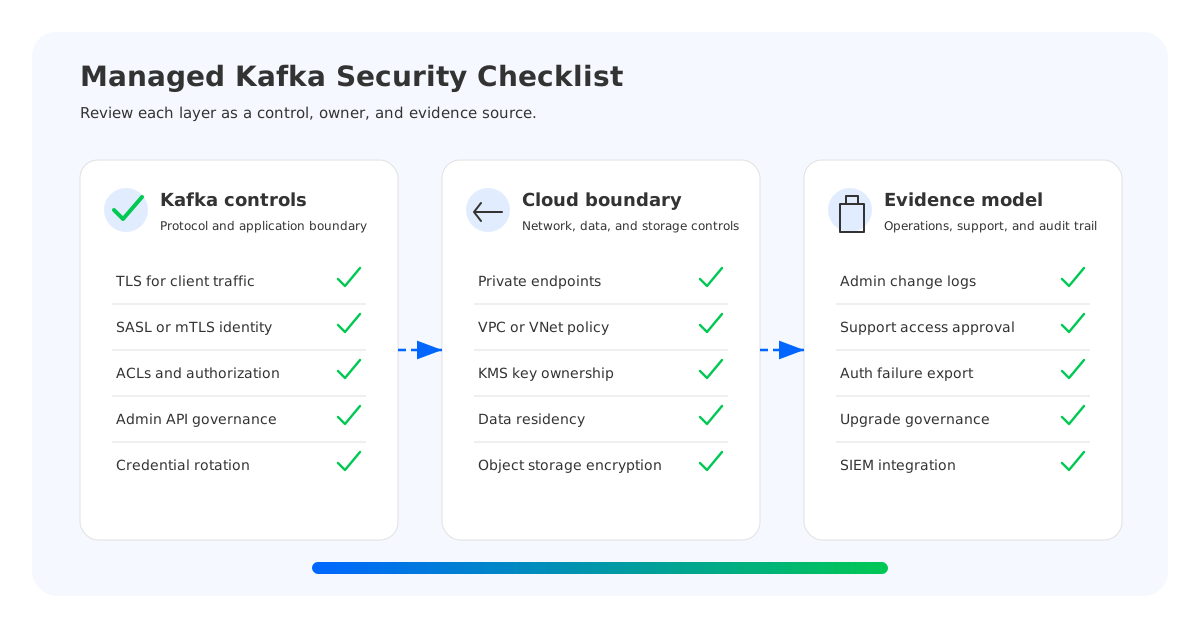
For enterprise architects, security teams, compliance teams, and CISO offices, the more useful question is: "Can we map every Kafka security responsibility to a named owner, a technical control, and reviewable evidence?" That framing turns managed Kafka compliance from a vendor claim into an engineering checklist.
The checklist below is designed for managed Kafka, private Kafka, and BYOC Kafka evaluations. It assumes readers already understand Kafka basics and want to inspect the parts that matter in production: protocol security, network isolation, data protection, operational access, audit evidence, vendor metadata exposure, support boundaries, and governance for upgrades and permissions.
1The Security Layers of Managed Kafka
Apache Kafka's own security model gives the right starting point. Kafka supports encryption over TLS, client authentication through TLS or SASL mechanisms, authorization through ACLs, and administrative controls around brokers, topics, consumer groups, and cluster operations. Managed Kafka providers then add cloud networking, identity integration, encryption key management, audit logging, compliance programs, support workflows, and operational automation.
Those layers should be reviewed separately because they fail in different ways. A service can support TLS but still expose brokers over public networking. A provider can offer private connectivity while leaving weak client credential rotation. A cluster can encrypt data at rest while leaking sensitive topic names, consumer group IDs, or support logs into a vendor-controlled plane. A BYOC model can keep customer data in the customer's cloud account while still requiring careful IAM design for maintenance automation.
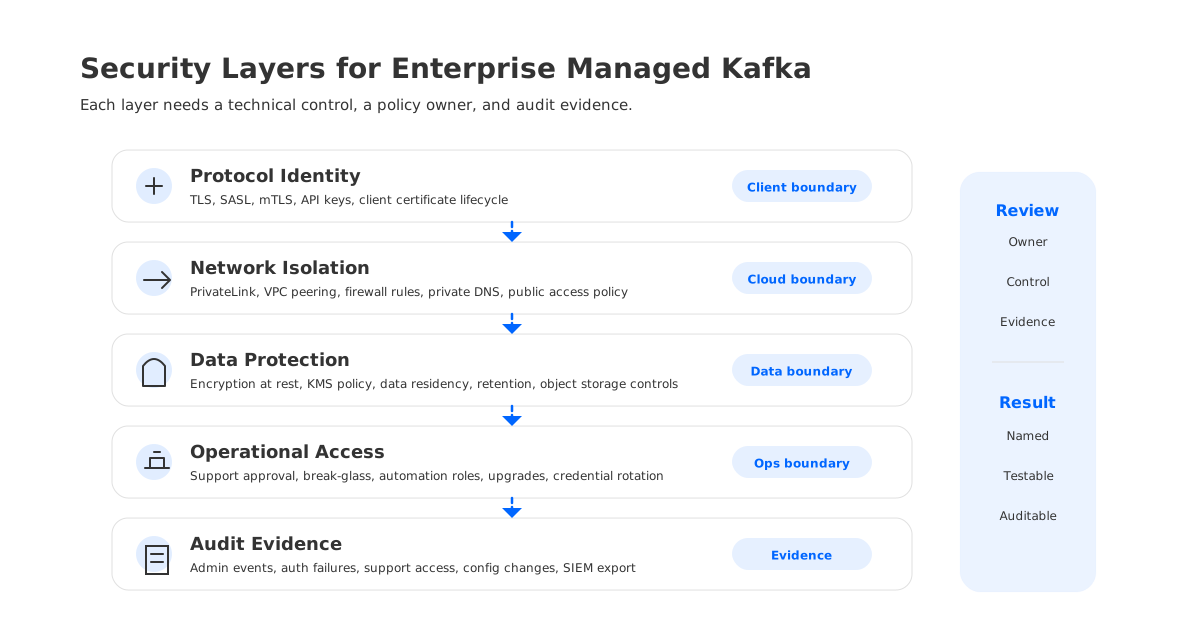
The practical security model has five layers:
| Layer | What to evaluate | Evidence to request |
|---|---|---|
| Protocol | TLS, SASL, mTLS, ACLs, authorization, admin API controls | Supported mechanisms, cipher policy, ACL model, client examples |
| Network | Private endpoints, VPC/VNet peering, firewall rules, public access controls | Network diagrams, endpoint policy, allowed CIDR model |
| Data | Encryption at rest, key ownership, data residency, retention, backups | KMS policy, storage location, encryption defaults |
| Operations | Provider access, break-glass, support sessions, upgrades, credential rotation | Runbooks, approval workflow, change logs |
| Audit | Admin events, auth failures, config changes, support access, exported logs | Audit log schema, retention, export path, SIEM integration |
This is where many managed Kafka security reviews become uncomfortable in a productive way. If the provider says "fully managed," ask which layer is fully managed and which evidence is available to the customer. If the provider says "private," ask whether only broker connectivity is private or whether metrics, logs, control plane traffic, connectors, schema services, and support tools follow the same boundary.
2Identity, Encryption, and Authorization
Kafka security begins at the protocol boundary. Enterprise teams should confirm how producers, consumers, connectors, stream processors, and administrators authenticate to the cluster. Common options include TLS client certificates, SASL/SCRAM, SASL/OAUTHBEARER, cloud IAM integration, and service-specific API keys. Whatever the provider supports, the review must cover credential issuance, rotation, revocation, and blast radius.
Encryption in transit is the next baseline. TLS should protect client-to-broker traffic, and teams should verify whether internal service traffic is also encrypted where applicable. For regulated workloads, "TLS supported" is not enough; check TLS versions, certificate ownership, expiration monitoring, and hostname verification.
Authorization is where Kafka-specific risk appears. Kafka ACLs are fine-grained, but poor topic naming and broad wildcard permissions can quietly undermine them. A platform team may grant a connector broad read and write access during a migration and never remove it. A data engineering team may use shared credentials across environments. An incident responder may need emergency admin access, but the access path may not be captured in an audit trail.
Security teams should ask these questions before approving production:
- Can application teams use separate principals for producers, consumers, connectors, and administrators?
- Are ACLs or role bindings scoped by topic, consumer group, transactional ID, and cluster operation?
- Can credentials be rotated without a planned outage?
- Are failed authentication and denied authorization events visible to the customer?
- Are admin API calls, topic changes, ACL changes, and configuration edits logged?
- Are client libraries and security mechanisms compatible with existing Kafka clients, Kafka Connect, and Kafka Streams deployments?
Compatibility matters because "managed Kafka security" can mean a Kafka-compatible endpoint with provider-specific identity semantics. That may be acceptable, but it must be explicit because changed authentication, authorization, or admin API behavior can turn a platform migration into a security project.
3Network Isolation and Private Connectivity
Network controls decide whether Kafka becomes an internal platform dependency or a broad internet-facing risk. For enterprise managed Kafka, private connectivity should be evaluated as a data-plane control, not only a convenience feature. AWS PrivateLink, Azure Private Link, VPC peering, VNet integration, firewall rules, and private DNS all change who can reach brokers and how traffic moves through the cloud.
The main review question is simple: can every Kafka path be made private where the workload requires it? The answer may be different for brokers, bootstrap endpoints, schema registry, connectors, management APIs, metrics exporters, support tooling, and object storage access. Security teams should draw the paths rather than accept a single "private networking supported" statement.
A strong network review usually separates four boundaries:
- Client boundary: where producers, consumers, and stream processors connect from, including Kubernetes clusters, VMs, serverless functions, and data platforms.
- Broker boundary: whether Kafka brokers expose private endpoints only, and whether public access can be disabled.
- Control boundary: how administrators access the provider console, APIs, and automation.
- Dependency boundary: how the cluster reaches storage, key management, metrics, logs, connectors, and support services.
This distinction matters for managed connectors and data integration features. A connector that reaches a private database may require network egress, service credentials, and secret handling that differ from the broker path. If the provider operates the connector runtime, the compliance team needs to know whether data, logs, connection strings, or errors can enter a vendor environment.
Private connectivity also affects incident response. If a VPC route, firewall policy, or private endpoint fails, who can inspect it? Is the failure visible in provider metrics? Does support need temporary customer-cloud access? These are reasons to document the responsibility boundary before production.
4Data Residency, Logs, Metadata, and Vendor Access
Kafka topics can contain regulated data, but Kafka metadata can also be sensitive. Topic names may reveal customer identifiers, product launches, payment flows, fraud models, or internal system names. Consumer group IDs can expose application topology. Error logs can contain keys, headers, stack traces, or failed payload fragments. Metrics can reveal traffic patterns tied to business events.
Compliance reviews should examine data and metadata together: where records are stored, which region or cloud account holds durable data, who controls keys, how long logs are retained, whether support can view operational metadata, and whether audit exports can reach the customer's SIEM.
For encryption at rest, ask whether the service uses provider-managed keys, customer-managed keys, or the customer's cloud KMS. Customer-managed keys improve control but add duties around rotation, revocation impact, break-glass access, and recovery. For retention, confirm whether deleted topics, compacted logs, backups, snapshots, and object storage segments follow the same policy.
Vendor access is the part that often hides in support language. The review should ask:
- What customer data, topic metadata, metrics, logs, and configuration fields can vendor personnel access?
- Is access normally disabled and granted only through approval, or is it always available to operations staff?
- Are support sessions time-bound, ticket-bound, and logged?
- Can customers review evidence of provider access?
- Are automated maintenance roles separate from human support roles?
- Can sensitive logs be redacted, disabled, or exported only to customer-controlled destinations?
Managed Kafka reduces operational work, but it does not remove accountability. Compliance teams still need a record of who changed what, who accessed what, and which environment boundary contained the data.
5BYOC Kafka and Private Cloud Options
BYOC Kafka changes the security conversation because the cluster runs inside the customer's cloud account, VPC, subscription, or project. Instead of sending the data plane to a vendor-operated SaaS environment, the customer keeps the infrastructure boundary closer to existing cloud governance for data residency, network policy, key management, logging, and compliance evidence.
It is still not a free pass. The provider or automation plane may need deployment permissions, upgrade permissions, monitoring access, or limited maintenance roles. The customer must review IAM policies, role assumption paths, templates, bucket policies, KMS keys, security groups, and log export destinations.
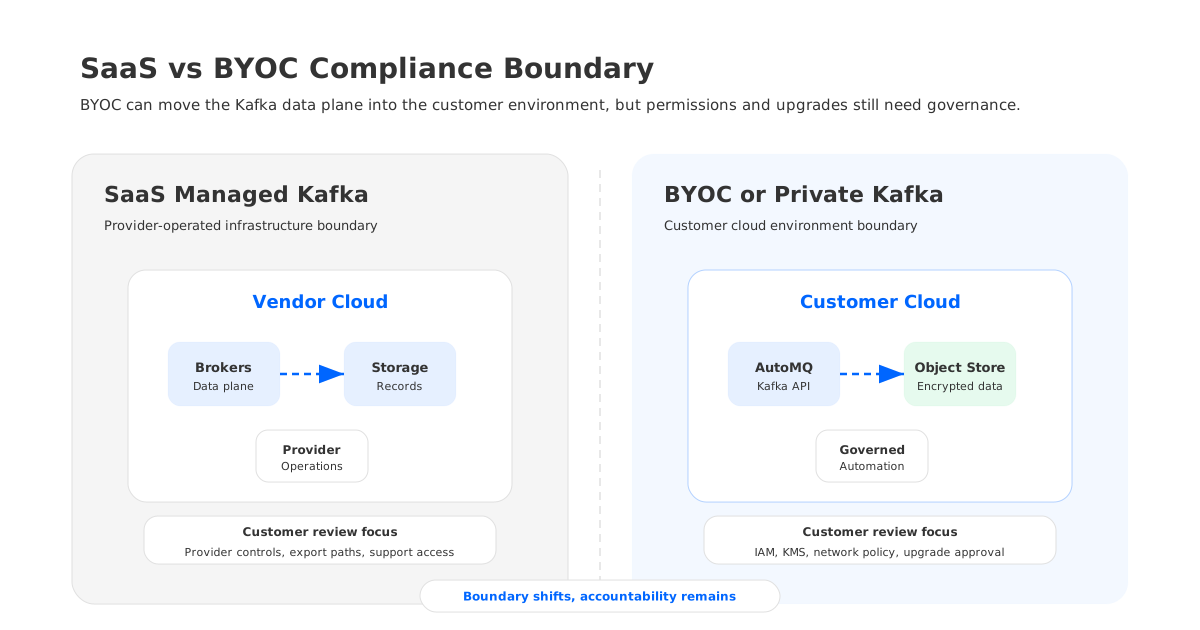
The most useful BYOC review asks what changes and what remains:
| Control area | SaaS-style managed Kafka | BYOC or private Kafka |
|---|---|---|
| Data location | Often in provider-controlled infrastructure | Typically in customer-controlled cloud environment |
| Network policy | Provider-defined options plus private connectivity | Customer VPC/VNet policies become primary controls |
| Storage encryption | Provider defaults or customer-managed key options | Customer cloud KMS and bucket policies may apply directly |
| Observability | Provider console plus export paths | Customer can often route metrics and logs through existing tooling |
| Operations access | Vendor operations boundary is central | Automation roles and support approvals must be tightly governed |
| Compliance evidence | Provider attestations plus service logs | Provider evidence plus customer cloud audit logs |
AutoMQ fits this category as a Kafka-compatible, object-storage-backed streaming platform that can be deployed in a customer's cloud environment. The relevant point is architectural, not a generic promise of compliance: durable stream data can live in customer-managed object storage, broker access can align with customer networking controls, and SASL, TLS, ACL-style authorization, cloud KMS encryption, and metrics or log boundaries can be reviewed against the customer's own environment.
That architecture can help teams keep managed operations without moving the Kafka data plane fully into a vendor-owned SaaS boundary. It also shifts work back to the enterprise team: IAM design, KMS policy, upgrade approvals, observability export, and support access rules still need owners.
6Operational Access and Audit Evidence
The hardest part of managed Kafka compliance is not usually TLS or encryption. It is evidence. Security teams need to prove that controls were enforced over time, not only described during vendor selection.
For operational access, require a written model for human, machine, and emergency access. Human access includes support engineers, customer administrators, and platform operators. Machine access includes deployment automation, monitoring agents, log collectors, backup services, and key workflows. Emergency access covers break-glass procedures during outages, incidents, and critical upgrades.
The audit trail should capture at least these events:
- Authentication failures and suspicious client behavior.
- Authorization denials for topics, groups, transactions, and admin operations.
- Topic creation, deletion, configuration changes, and retention changes.
- ACL or role binding changes.
- Broker, cluster, connector, schema, and networking configuration changes.
- Key rotation, certificate rotation, and credential revocation.
- Provider support access, maintenance windows, and emergency actions.
Audit retention should match the organization's compliance program. If the service stores audit data briefly, export becomes mandatory. If logs can include sensitive payload fragments or headers, define redaction rules and route logs into controlled destinations.
For enterprise teams, a clean checklist is often more valuable than a long vendor questionnaire:
- Define the data classification for each topic family.
- Map topic families to required encryption, key ownership, retention, and residency controls.
- Create principals per application, connector, and admin function.
- Enforce least-privilege authorization and review wildcard permissions.
- Require private networking for regulated workloads.
- Export audit logs, auth failures, metrics, and configuration changes into the enterprise SIEM.
- Document provider support access, approval workflow, and evidence retention.
- Test credential rotation, certificate renewal, and emergency access before production.
- Review connector runtime access separately from broker access.
- Re-run the review after upgrades, region moves, new integrations, and major workload changes.
7How to Evaluate a Managed Kafka Provider
The best vendor security reviews are specific. Instead of asking "Are you compliant with our requirements?", ask evidence-producing questions that security, platform, and procurement teams can all understand.
Use these questions in an RFP, architecture review, or pre-production approval:
| Review area | Security question |
|---|---|
| Protocol | Which Kafka security mechanisms are supported for clients and administrators? |
| Authorization | Can we enforce least privilege across topics, consumer groups, transactions, and admin APIs? |
| Network | Can all required data-plane and control-plane paths be private? |
| Data | Where are records, replicas, backups, logs, and metadata stored? |
| Keys | Can we use customer-managed keys, and what happens if a key is disabled? |
| Logs | Which audit events are visible to us, and how are they exported? |
| Support | What can vendor support access, under what approval, and where is it logged? |
| BYOC | Which roles and permissions are required in our cloud account? |
| Upgrades | Who approves upgrades, and what evidence is retained after maintenance? |
| Exit | How do we export data, delete data, and verify deletion when leaving the service? |
Managed Kafka security is strongest when the provider can answer these questions without forcing customers to infer details from marketing pages. For SaaS services, the center of gravity is vendor controls plus customer configuration. For BYOC and private deployments, it shifts toward customer cloud controls plus provider automation governance. The right answer depends on data classification, cloud strategy, regulatory scope, and operational maturity.
8References
- Apache Kafka Documentation: Security
- Confluent Cloud Security Overview
- Confluent Cloud Networking Overview
- Amazon MSK Security
- Azure Event Hubs Network Security
- Azure Event Hubs Private Link
- Azure Event Hubs Authentication and Authorization
- AutoMQ Cloud Overview
- AutoMQ Data Encryption at Rest
- AutoMQ SASL Authentication
9FAQ
9.1What is managed Kafka security?
Managed Kafka security protects Kafka clients, brokers, data, metadata, operations, and audit evidence. It combines Kafka-native controls such as TLS, SASL, and ACLs with cloud controls such as private networking, encryption keys, IAM, logging, and support access.
9.2Is BYOC Kafka automatically compliant?
No. BYOC Kafka can improve data control because infrastructure, networking, storage, and logs remain closer to the customer's cloud account. It still requires governance for IAM, provider automation, upgrades, support access, key management, and audit exports.
9.3What should security teams ask first when evaluating managed Kafka?
Start with data classification and responsibility boundaries: which topics contain sensitive data, where records and metadata are stored, who can access them, how access is logged, and which controls are owned by the provider versus the customer.
9.4Do Kafka ACLs replace cloud IAM?
No. Kafka ACLs or role bindings control Kafka operations such as topic reads, writes, group access, and administration. Cloud IAM controls infrastructure, networking, storage, keys, logs, and automation. Enterprise environments usually need both.
9.5How does AutoMQ fit a managed Kafka compliance review?
AutoMQ can be evaluated as a Kafka-compatible BYOC or customer-environment option where durable data uses customer-managed object storage and security controls can align with the customer's cloud boundary. Teams should still review IAM roles, KMS policies, network paths, observability exports, support access, and upgrade governance before production.


