
Table of Contents
Table of Contents
Managed Pulsar pricing usually becomes urgent at an awkward moment: the architecture shortlist is already small, the renewal date is visible, and finance wants a number that engineering can defend. A pricing page alone rarely answers that question. Apache Pulsar and Apache Kafka expose different operational shapes, and managed services add another layer of packaging on top. If you compare one line item from StreamNative, Confluent, Amazon MSK, or AutoMQ without normalizing the workload first, you are comparing packaging decisions rather than streaming cost.
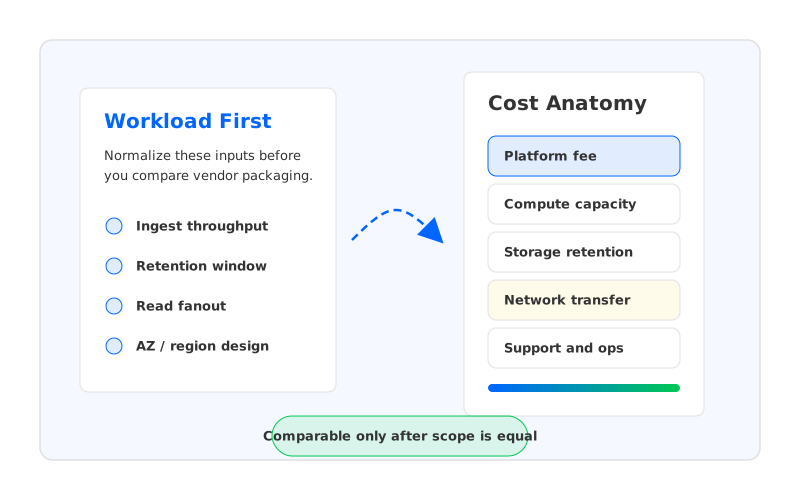
That is why a fair evaluation starts with the workload. Write throughput, read fanout, retention, availability design, cloud region, support expectations, and migration effort all change the bill. In Pulsar, the broker and storage responsibilities are split across Pulsar brokers and Apache BookKeeper bookies. In Kafka, the classic model ties broker compute and durable local storage more tightly, although newer Kafka-compatible systems can move durable data into shared object storage. The commercial question is not "Which product has the lowest headline price?" It is "Which pricing model maps cleanly to the workload we actually run?"
1Why Managed Pulsar Pricing Is Workload-Dependent
Pulsar's architecture gives buyers a useful mental model for cost analysis. The official Apache Pulsar architecture describes brokers as serving topics and bookies as the storage nodes for ledgers, with metadata services coordinating cluster metadata. That separation can be valuable, but it also means the managed-service price may bundle or expose more than one infrastructure layer. The buyer has to understand which layer is charged directly, which layer is hidden inside a platform fee, and which layer still appears on the cloud bill.
Managed Pulsar offerings can be sold in different ways. Some public pricing pages give plan-level packaging and direct you to contact sales for production-scale usage. Others expose usage dimensions through a calculator or a cloud marketplace. Neither model is wrong; they are built for different buying motions. A contact-sales model can work well for enterprise commitments, while transparent usage meters help teams run quick what-if analysis before a procurement cycle starts.
For pricing purposes, the workload has five variables that matter more than the service name:
- Ingest rate: sustained write throughput drives broker CPU, storage writes, replication traffic, and in many platforms a capacity or unit-based charge.
- Read fanout: one consumer group is not the same as 10. Fanout changes outbound bandwidth, broker load, cache pressure, and sometimes network egress.
- Retention period: 24 hours and 30 days are different storage businesses. Long retention makes storage class, tiering, and compaction behavior central to TCO.
- Availability topology: multi-AZ or multi-region designs introduce replication, cross-zone data transfer, and recovery requirements.
- Operations boundary: "managed" may mean provider-operated control plane, provider-operated infrastructure, customer-owned cloud account, or some combination of those.
This is where pricing comparisons often go sideways. A team may compare a managed Pulsar quote against an MSK cluster hourly price, then discover that storage, cross-AZ transfer, support, and operations were scoped differently. The model looked precise, but the scope was not the same.
2Cost Components To Compare
The safest way to compare managed Pulsar pricing with managed Kafka pricing is to decompose the bill into cost layers. The exact meters differ by provider, but the categories are stable enough to make the evaluation repeatable.
| Cost layer | What to ask | Why it changes the result |
|---|---|---|
| Platform fee | Is there a cluster fee, capacity unit, minimum commitment, or support tier? | A low infrastructure bill can still carry a meaningful platform charge. |
| Compute | Are brokers, bookies, Kafka brokers, or serverless capacity units billed separately? | Throughput-heavy workloads often hit CPU or network before storage. |
| Storage | Is retention priced as local disk, object storage, tiered storage, or included capacity? | Long retention can dominate the bill even when ingest is moderate. |
| Network | Who pays for cross-AZ replication, inter-region traffic, and consumer egress? | Cloud data transfer is easy to omit and painful to explain later. |
| Operations | Who handles upgrades, scaling, incident response, and capacity planning? | Managed services reduce work, but the boundary varies by deployment model. |
| Migration | How much client, connector, schema, and application work is required? | A lower run-rate may not justify a high switching cost. |
The table is intentionally provider-neutral. StreamNative Cloud is built around Pulsar. Confluent Cloud is built around Kafka. Amazon MSK runs Kafka on AWS-managed infrastructure. AutoMQ is a Kafka-compatible cloud-native streaming system that uses object storage as the durable storage layer and can be deployed in BYOC-style environments. Each option can be reasonable, but each puts the buyer's money in a different place.
Network cost deserves special attention because it is often missing from early spreadsheets. AWS documents data transfer pricing separately from MSK pricing, and cross-AZ or internet egress rules depend on region and traffic path. A pricing model without network assumptions is incomplete.
3Managed Pulsar Vs Managed Kafka Pricing Model
Pulsar and Kafka are sometimes compared as if they were equivalent managed queues with different logos. That framing hides the architectural differences that show up in pricing. Pulsar stores messages in BookKeeper ledgers, while brokers handle serving and routing. Kafka's traditional architecture stores partition logs on broker-local disks and replicates those logs between brokers for durability and availability. A managed provider can abstract away those mechanics, but the resource demand still comes from somewhere.
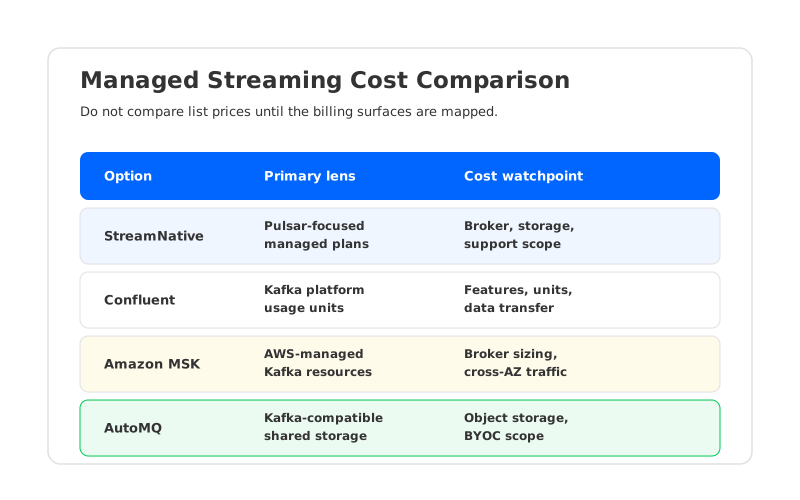
The practical comparison is less about open source project identity and more about billing surface.
| Option | Common pricing surface | Watch closely | Best-fit evaluation question |
|---|---|---|---|
| StreamNative / managed Pulsar | Pulsar-focused managed plans, enterprise quotes, cloud deployment options | How broker, storage, support, and cloud infrastructure are packaged | Does Pulsar's architecture and ecosystem fit the workload enough to justify adoption work? |
| Confluent Cloud | Kafka service units, throughput, storage, networking, connectors, and feature tiers | How usage units map to sustained throughput, retention, and enterprise features | Is the broader Confluent platform worth the premium for this team? |
| Amazon MSK | AWS-managed Kafka cluster resources, storage, and related AWS data transfer | Broker sizing, storage growth, cross-AZ traffic, and operational ownership | Do we want Kafka on AWS with familiar cloud primitives and more self-managed tuning? |
| AutoMQ | Kafka-compatible deployment with shared object storage and BYOC-oriented cost structure | Object storage, compute, cloud networking, and support assumptions | Can we keep Kafka compatibility while changing the storage economics? |
The strongest comparison is not a single "winner" row. It is a scenario table where each provider prices the same ingest rate, retention, read fanout, availability target, and region. When a provider cannot publish a number without a sales conversation, mark the field as quote-based rather than filling in guesses. A blank cell is better than a fake number wearing a decimal point.
4How To Build A Fair Cost Scenario
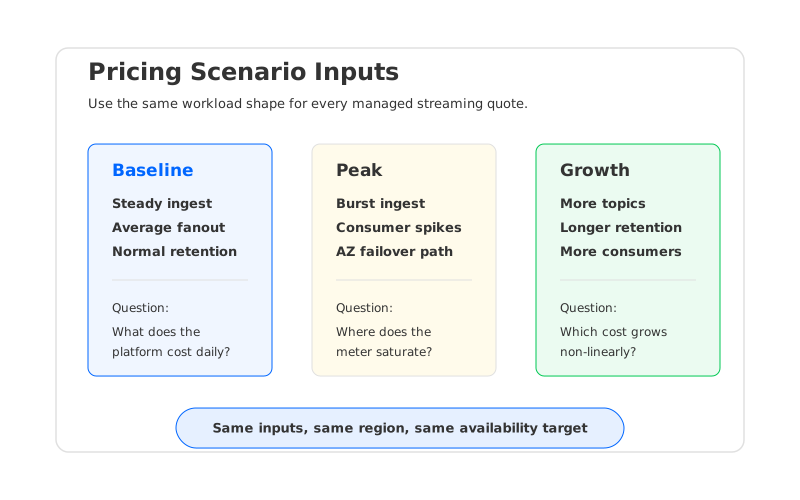
A fair cost scenario starts with production behavior, not a vendor calculator. If you already operate Kafka or Pulsar, pull 7 to 30 days of metrics. If you are planning a new platform, create three cases: baseline, peak, and growth. The point is to stop a pricing conversation from being driven by the most convenient benchmark.
Use the same inputs for every provider:
- Throughput: sustained ingest in MB/s or MiB/s, peak ingest, average message size, and expected compression ratio.
- Reads: number of consumer groups, average read throughput per group, and whether consumers read from the same region.
- Retention: hot retention, long-term retention, compaction requirements, and expected storage growth.
- Availability: number of AZs, replication strategy, recovery-time expectations, and whether multi-region disaster recovery is required.
- Operational scope: who owns upgrades, scaling, security patches, incident response, and on-call escalation.
- Commercial scope: support tier, minimum commitment, marketplace fees, and contract term.
The scenario should also separate one-time migration cost from steady-state run-rate. This matters most when comparing Pulsar and Kafka ecosystems. A team standardized on Kafka clients, Kafka Connect, Kafka Streams, and Kafka-compatible monitoring may assign a high cost to moving to Pulsar APIs and operational patterns. Another team committed to Pulsar's multi-tenant topic model and BookKeeper storage may see managed Pulsar as the lower-risk path. Pricing without migration context produces a number, but not a decision.
For cloud resource estimates, keep the math visible. A storage estimate starts with daily ingest volume, multiplies by retention days, then applies replication or storage-system assumptions. A network estimate starts with producer traffic, replication traffic, consumer fanout, and cross-zone or cross-region paths. Do not mix decimal MB and binary MiB in the same worksheet.
5Where AutoMQ Fits In The Comparison
Once the workload model is clear, a different question appears: can the team keep Kafka compatibility while changing the cost structure underneath Kafka? That is where AutoMQ belongs in the comparison. AutoMQ is a Kafka-compatible cloud-native streaming platform that moves durable log storage to object storage and makes brokers more stateless, so existing Kafka clients and ecosystem tools can remain relevant while the storage layer changes.
This is not the same decision as adopting Pulsar. Pulsar may be attractive because of its broker-storage separation, multi-tenancy features, and ecosystem choices. AutoMQ is attractive when the organization wants Kafka semantics and tooling but does not want traditional Kafka's broker-local disk model to dictate scaling, retention, and recovery economics. Both arguments are architectural; the pricing spreadsheet should reflect that instead of treating every option as a generic "streaming cluster."
The BYOC angle also changes procurement. In a customer-owned cloud environment, the buyer can often see the underlying compute, object storage, and network charges directly. That transparency helps FinOps teams tie the bill back to workload inputs instead of a black-box service charge. It also puts more responsibility on the evaluation team: the model must include cloud resources, provider support, and operational boundaries.
AutoMQ should enter the shortlist when three conditions are true:
- The organization already runs Kafka workloads or wants Kafka-compatible clients, connectors, and tooling.
- The cost problem is tied to retention, replication, over-provisioned brokers, or slow data movement during scaling and recovery.
- The team wants cloud-native storage economics without turning the migration into a full application rewrite.
That is a narrower claim than "Kafka costs less than Pulsar" or "Pulsar costs less than Kafka." It is also more useful. Pricing decisions become defensible when they tie an architecture to a workload pattern.
6Pricing Checklist
Before accepting a managed Pulsar or managed Kafka quote, force every option through the same checklist. The exercise catches expensive surprises.
| Checklist item | Pass condition |
|---|---|
| Workload inputs | Baseline, peak, and growth scenarios use the same ingest, retention, fanout, and region assumptions. |
| Service scope | The quote states what is managed by the provider and what remains with your team. |
| Cloud resources | Compute, storage, and network costs are either included or explicitly modeled. |
| Data transfer | Cross-AZ, cross-region, internet egress, and consumer egress paths are named. |
| Feature parity | Required connectors, schema registry, security controls, observability, and compliance needs are priced. |
| Migration cost | Client changes, connector changes, topic migration, testing, and rollback planning are included. |
| Support model | Support tier, response expectations, and production escalation paths are clear. |
The final decision should read like an engineering memo, not a shopping cart. "Provider A costs less" is not enough. A better conclusion is: "For 80 MB/s sustained ingest, 7-day retention, 3 consumer groups, and 3-AZ deployment in us-east-1, this option has the lowest modeled run-rate, while this other option has lower migration risk." That kind of sentence survives review because it names the assumptions.
If you are comparing managed Pulsar pricing with Kafka-compatible alternatives, build the scenario first, then ask vendors to price the same shape. AutoMQ's pricing page can help teams model a Kafka-compatible path based on object storage and BYOC assumptions, but the useful output is still your workload worksheet. The moment the spreadsheet reflects your traffic instead of a vendor's default example, the pricing conversation becomes much less slippery.
7FAQ
7.1Is managed Pulsar pricing public?
Some managed Pulsar vendors publish plan information, while production-scale enterprise pricing may require a sales conversation. StreamNative's pricing page is the right starting point for StreamNative Cloud, but buyers should verify current packaging and cloud deployment assumptions before using any number in a budget.
7.2Is Pulsar less expensive than Kafka?
It depends on workload shape and migration context. Pulsar's broker and storage separation can be economically attractive for some patterns, while Kafka-compatible options may reduce migration cost for teams already invested in Kafka clients, connectors, and tooling. Compare the same throughput, retention, fanout, and availability scenario before drawing a conclusion.
7.3How should I compare StreamNative and Confluent pricing?
Normalize the workload first, then map each provider's pricing surface to that workload. StreamNative is Pulsar-oriented, while Confluent Cloud is Kafka-oriented and includes a broader Kafka data-streaming platform. The comparison should include platform fees, storage, network, support, enterprise features, and migration effort.
7.4Where does Amazon MSK fit in a pricing comparison?
Amazon MSK is often evaluated by teams that want Kafka on AWS-managed infrastructure with direct AWS billing for related resources. The MSK pricing page is only part of the model; AWS data transfer, storage, broker sizing, monitoring, and operational work also affect the total cost.
7.5When should AutoMQ be considered?
Consider AutoMQ when you want Kafka compatibility but need a different storage and scaling cost profile. It is most relevant when retention, replication traffic, broker over-provisioning, or migration risk make traditional Kafka economics hard to justify.
7.6What is the most common pricing mistake?
The most common mistake is comparing provider list prices without modeling read fanout and network traffic. A streaming platform with modest ingest can still become expensive when many consumers read across zones or regions.


