
Table of Contents
Table of Contents
The search for mcp kafka operations usually starts after a team has seen enough dashboards to know the problem is not another dashboard. A consumer group is lagging, partitions are uneven, a broker is near disk pressure, or an AI application needs fresher event context. The tempting answer is to put an assistant between the operator and the Kafka estate: ask a question, let the assistant inspect the cluster, and receive a suggested fix.
That idea is useful. It is also dangerous when the assistant crosses from observation into production change. Kafka operations are full of actions that look small from an API surface but large from an impact surface: increasing partitions, changing retention, moving replicas, resetting offsets, altering ACLs, or restarting clients at the wrong point in a migration. A good MCP design does not make those actions casual. It makes intent easier to express while keeping authority, reversibility, and evidence inside the platform.
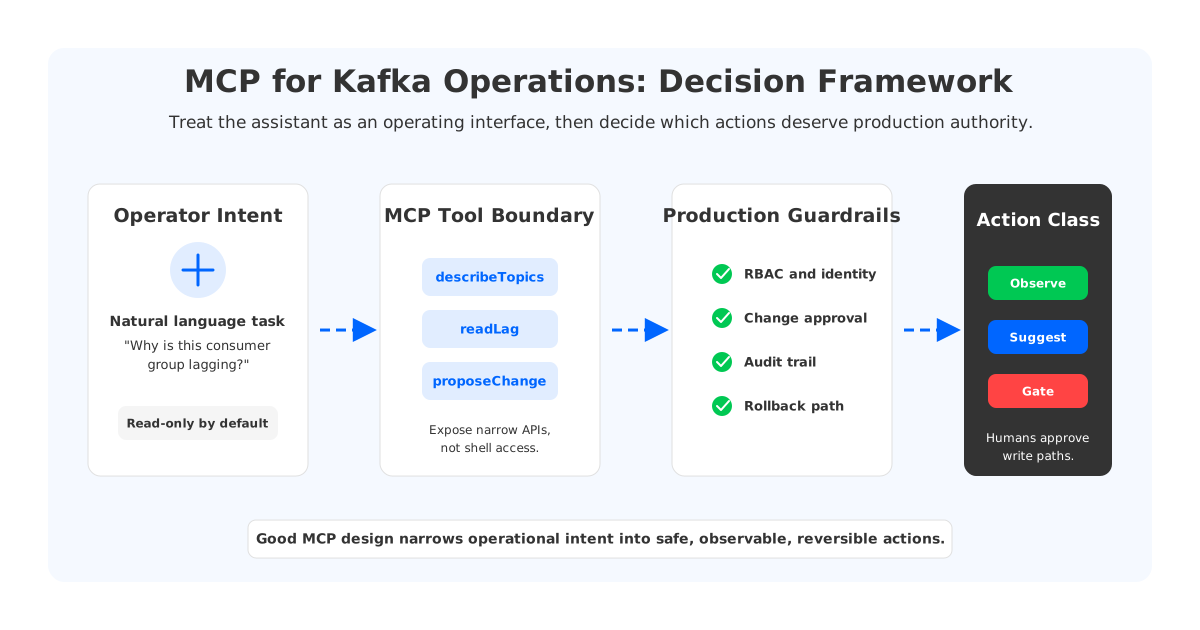
The right framing is not "Should AI operate Kafka?" The better question is: which operational decisions can safely become tool calls, which should remain human-approved proposals, and which are better solved by changing the Kafka architecture itself?
1Why MCP Matters for Kafka Operations
The Model Context Protocol gives assistants a standard way to discover and call external tools. In an operations setting, that means an assistant can stop being a chat box that guesses from pasted logs and become a controlled interface over real systems: metrics, runbooks, topic metadata, consumer group state, incident notes, deployment history, and ticket context. For Kafka teams, that is attractive because much of the work is correlation rather than raw command execution.
Consider a lag incident. The operator may need to compare consumer lag, partition distribution, broker throughput, fetch latency, recent deploys, schema changes, and whether a reassignment is active. None of those checks requires creative authority. They require reliable retrieval and careful synthesis. An MCP server can expose narrow tools such as describe_topics, read_consumer_lag, list_recent_rebalances, and fetch_runbook_section, then let the assistant assemble a coherent diagnosis.
The promise is strongest in these read-heavy workflows:
- Incident triage. The assistant can gather evidence across metrics, logs, Kafka admin APIs, and deployment metadata, then explain likely causes with links back to raw evidence.
- Runbook navigation. Instead of asking an SRE to remember the right document, the assistant can retrieve the current runbook section for lag, under-replicated partitions, authentication failures, or disk pressure.
- Change preparation. The assistant can draft a proposed partition increase, retention adjustment, quota change, or migration step while attaching expected impact and rollback notes.
- Developer support. Application teams can ask why a producer sees authorization errors or why a consumer group is reprocessing messages without being handed direct cluster-admin access.
That boundary is important. Reading cluster state and preparing a recommendation is different from executing a write against production. The first reduces toil. The second changes the system.
2The Production Constraint Behind the Search
Kafka's operational surface is stateful. A topic is not only metadata; it is partitions, leaders, replicas, offsets, log segments, retention rules, access controls, client behavior, and monitoring assumptions. A consumer group is not only a name; it is committed progress, rebalancing behavior, downstream idempotency, and sometimes business correctness. An assistant that treats Kafka as a generic API target will miss that coupling.
Traditional Kafka makes this coupling sharper because durable data is owned by brokers. Brokers store partition replicas on local or attached disks, and replication keeps broker-owned copies in sync. That model is proven and widely understood, but operational changes often involve moving data or changing where state lives. Partition reassignment, broker replacement, disk expansion, and scaling are not lightweight metadata edits.
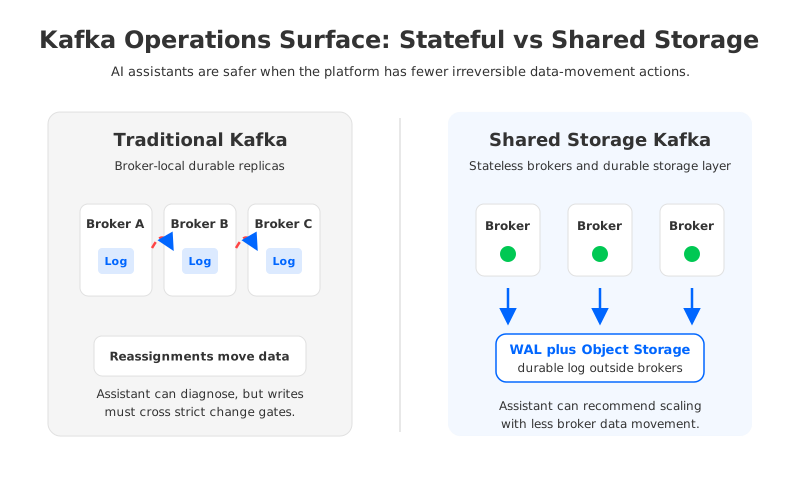
This is why the first production rule for AI-assisted Kafka operations should be boring: expose read tools before write tools. An assistant can safely explain that a partition is under-replicated, leaders are skewed, or a consumer group is lagging behind one hot partition. It should not automatically reassign replicas, reset offsets, or change retention because it found a plausible pattern.
The second rule is to separate diagnosis from authority. Diagnosis can be conversational. Authority should remain structured. A production workflow should know who requested the change, which cluster and topic are affected, which evidence was used, what blast radius is expected, and how rollback works. This does not make AI useless; it gives the assistant a professional operating lane.
3A Practical MCP Architecture for Kafka Teams
An MCP server for Kafka operations should look less like an unrestricted terminal and more like a carefully designed platform API. The assistant should call named tools with typed inputs, bounded outputs, and explicit authorization. The tools should expose the operational vocabulary your team already trusts: topics, partitions, consumer groups, ACLs, quotas, connectors, schemas, incidents, and deployment events.
A useful architecture has four layers:
| Layer | What it exposes | Production stance |
|---|---|---|
| Context retrieval | Runbooks, service ownership, architecture docs, incident history | Broad access is useful, but sensitive data should be filtered. |
| Read-only Kafka state | Topic configs, consumer lag, partition leadership, broker health | Safe default for assistants and application teams. |
| Proposal generation | Suggested commands, pull requests, change tickets, impact notes | Assistant drafts; humans and policy engines review. |
| Write execution | Topic changes, ACL updates, offset resets, reassignments, restarts | Restricted, auditable, and usually outside direct assistant control. |
The table hides a hard design choice: the assistant does not need the most powerful interface to be useful. In many teams, the highest-value tool is not execute_admin_command; it is explain_current_state. That tool can join Kafka metadata with observability data and runbook knowledge, then produce a diagnosis an SRE can verify quickly.
Typed tools also reduce prompt-injection risk. If a tool accepts only a cluster ID, a consumer group, a topic name, and a time range, the assistant cannot turn a pasted log line into arbitrary shell execution. The platform still needs authentication, authorization, audit logging, rate limits, and tenant boundaries, but narrow tools reduce the number of ways a model can be tricked into doing the wrong thing.
4Where AI Helps and Where It Should Stop
AI assistants are good at compressing context. Kafka incidents often spread across several systems: the broker metrics live in Prometheus, deployment history in CI/CD, ownership in a service catalog, runbooks in documentation, and the actual topic state behind Kafka admin APIs. An assistant can bring those pieces together faster than a human jumping across tabs.
But compression is not correctness. The assistant can miss a business invariant that is not in the metrics. It can recommend an offset reset without knowing whether the downstream sink is idempotent, or suggest increasing partitions without catching that the application relies on key ordering. It can interpret a transient rebalance as the root cause when the real issue is a slow database sink.
For production Kafka, assistant actions should be classified by reversibility and blast radius:
- Low-risk observation: reading lag, listing topic configs, summarizing broker metrics, retrieving runbooks, and explaining errors. These are natural MCP tool calls.
- Medium-risk preparation: drafting ACL changes, generating a partition expansion plan, creating a migration checklist, or opening a change request. These should be proposals with evidence.
- High-risk execution: resetting offsets, deleting topics, changing retention on critical streams, moving replicas, or performing cutover. These need approval, staged rollout, and rollback.
This classification also helps platform teams avoid a common trap: using AI to automate around an architecture that remains hard to operate. If every useful recommendation ends with "move data across brokers for hours," the assistant is revealing an architectural constraint.
5Architecture Choices Still Matter
MCP can improve the interface to Kafka operations, but it cannot erase the operating model underneath. A stateful broker architecture gives the assistant a large surface of slow, coupled actions. A cloud-native Kafka-compatible architecture with shared storage changes that surface by separating durable data from broker-local disks.
This is where a neutral evaluation should include more than tool quality. Ask what the assistant is operating:
| Question | Why it matters for AI-assisted operations |
|---|---|
| Where does durable log data live? | Broker-local storage makes scaling and replacement more stateful. |
| Which actions move data? | AI-generated plans become riskier when routine operations trigger large data movement. |
| Can the system expose safe read APIs? | Assistants need evidence without broad admin power. |
| Are changes reversible? | A useful recommendation needs a rollback path, not only a command. |
| Can application clients keep Kafka semantics? | Operations tooling should not force an application rewrite. |
AutoMQ fits into this discussion as one Kafka-compatible, shared-storage option rather than as a shortcut around operational discipline. Its public documentation describes an architecture that keeps Kafka protocol compatibility while replacing Kafka's broker-local log storage with S3Stream, a WAL layer, and object storage. The practical effect for platform teams is that brokers become more stateless, retained data is not owned by one broker's local disk, and scaling or replacement can focus less on moving durable log segments between machines.
That does not make an AI assistant free to operate the cluster without guardrails. It changes the kinds of guardrails that matter. If fewer routine actions require broker-to-broker data movement, an assistant can help with capacity reasoning, topic inventory, migration planning, and diagnosis while the platform handles authorization and execution. For BYOC or customer-controlled deployments, the assistant, control plane, and Kafka data plane should be mapped explicitly before production integration.
6Production Readiness Checklist
The easiest way to make MCP unsafe is to start with demos and backfill governance later. Kafka teams should do the reverse. Define the allowed actions first, then connect the assistant to tools.
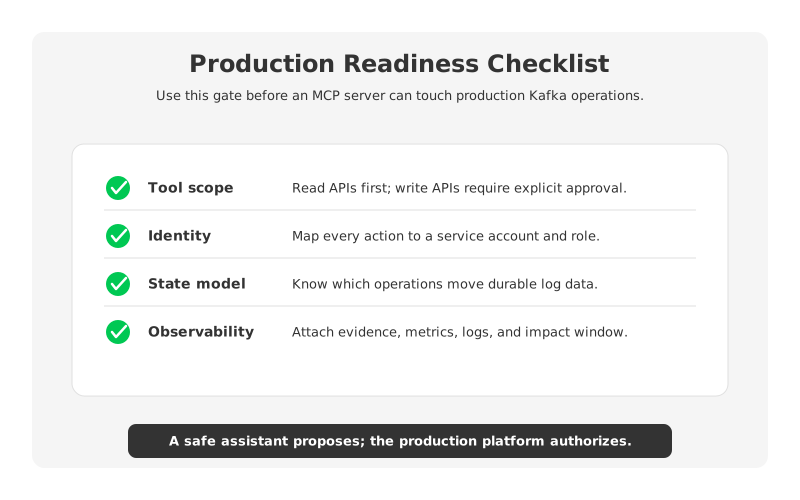
Use this checklist before an MCP server touches a production Kafka environment:
| Gate | Minimum expectation |
|---|---|
| Tool scope | Start with read-only tools. Add write tools only after approval workflows exist. |
| Identity | Every tool call maps to a service account, role, user, and tenant boundary. |
| Evidence | Recommendations include metrics, logs, configs, and time windows used for reasoning. |
| Change path | Writes become tickets, pull requests, or platform changes, not hidden chat actions. |
| Rollback | High-risk changes include rollback steps and expected data correctness impact. |
| Audit | Store prompt, tool inputs, tool outputs, decision, approver, and result. |
| Testing | Validate on staging clusters with production-like topic, ACL, and consumer behavior. |
The testing gate is where many assistant designs become real. A staging cluster with one happy-path topic proves little. A credible test should include hot partitions, slow consumers, rebalances, ACL failures, schema errors, quota pressure, retention edge cases, and a migration or failover drill. Judge the assistant on evidence and bounded proposals, not confidence.
7Decision Table: What Should You Build?
Different teams need different levels of AI integration. A small platform team with mature runbooks may get most of the value from a read-only assistant. A larger organization may want drafted tickets and pull requests. A team already struggling with broker-local storage should not expect an assistant to make data movement painless.
| Current situation | Sensible next step |
|---|---|
| Operators spend time gathering evidence across tools | Build read-only MCP tools for metrics, topic state, runbooks, and incidents. |
| Application teams ask repetitive Kafka support questions | Expose scoped diagnostic tools with tenant-aware access. |
| SREs manually draft the same safe changes | Let the assistant create reviewed change proposals with evidence. |
| Incidents involve offset resets, retention changes, or reassignment | Keep execution behind human approval and rehearsed rollback. |
| Scaling and recovery are dominated by broker-local data movement | Evaluate Kafka-compatible shared storage alongside assistant tooling. |
For many teams, the best first release is intentionally modest: a read-only Kafka operations assistant that explains state, cites evidence, and drafts a change request. That is enough to reduce cognitive load while preserving the control path production systems deserve. The next step is to measure which recurring recommendations point to missing platform APIs, missing runbooks, or an architecture that is too stateful for the elasticity the business expects.
If your team is evaluating Kafka operations for AI data pipelines, use MCP as an interface pattern and architecture review as the foundation. The assistant can make the operating surface easier to see. It cannot make a risky operating surface disappear. For teams that want Kafka compatibility while reducing broker-local storage operations, the AutoMQ architecture overview is a practical place to compare shared storage behavior against your current runbooks.
8References
- Model Context Protocol: Tools
- Apache Kafka Documentation
- Apache Kafka Consumer Configs
- Apache Kafka Operations
- AutoMQ Architecture Overview
- AutoMQ Compatibility with Apache Kafka
9FAQ
9.1What is MCP for Kafka operations?
MCP for Kafka operations means using the Model Context Protocol to expose controlled tools that an AI assistant can call for Kafka-related work. Those tools might read topic metadata, consumer lag, broker health, runbooks, incident history, or deployment events. The safest first use case is read-only diagnosis and proposal generation, not direct production writes.
9.2Should an AI assistant be allowed to change Kafka topics?
Usually not as a first step. Topic changes can affect ordering, retention, cost, compatibility, and downstream correctness. A safer model is for the assistant to draft the proposed change with evidence, expected impact, and rollback notes, then route it through the same approval and audit path used by human operators.
9.3Which Kafka operations are safest for AI assistance?
Read-only operations are the safest: describing topics, summarizing consumer group lag, checking broker health, finding relevant runbooks, and correlating incidents with deployment events. Medium-risk tasks such as drafting ACL changes or partition expansion plans can be useful when they produce proposals rather than execute commands.
9.4How does shared storage change AI-assisted Kafka operations?
Shared storage moves durable log data away from broker-local disks, so broker scaling and replacement can involve less durable data movement. That can make operational recommendations easier to evaluate, but it does not remove the need for identity, approval, observability, and rollback controls. It changes the platform surface; it does not eliminate governance.
9.5Where does AutoMQ fit in this evaluation?
AutoMQ is a Kafka-compatible streaming platform that uses shared storage and more stateless brokers while preserving Kafka protocol compatibility. It is worth evaluating when a team wants AI-assisted operations, cloud-native scaling, and Kafka client compatibility, but recurring operational pain comes from broker-local storage, reassignment, or cloud data movement rather than from the user interface alone.


