
Table of Contents
Table of Contents
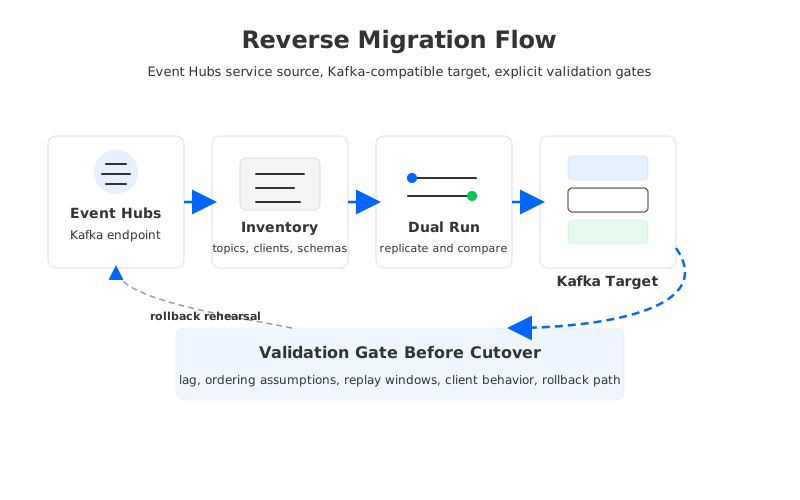
Moving from Azure Event Hubs' Kafka endpoint back to Apache Kafka is not a normal Kafka-to-Kafka migration. The source speaks enough Kafka protocol for many producers and consumers, but it is still an Event Hubs service, with Event Hubs partitions, quotas, retention behavior, Capture, networking, and management boundaries behind the endpoint. Treating it as a regular broker cluster is how teams end up with offset surprises, connector gaps, delayed cutovers, and rollback plans that exist only on paper.
A platform team starts with Event Hubs because the Azure-managed service is easy to provision, integrates with Azure identity and monitoring, and lets many Kafka clients connect by changing configuration. Then the workload grows into places where full Kafka platform behavior matters: Kafka Connect plugin control, Kafka Streams state stores, AdminClient workflows, long retention, exact topic-level governance, more predictable cost architecture, or portability across cloud environments.
AutoMQ belongs in that third category: it keeps Kafka clients and ecosystem tools relevant while moving durable stream storage to object storage and making brokers much less stateful. That architecture is worth considering when the reason for leaving Event Hubs is not "we want more servers to manage," but "we need Kafka semantics with cloud-native cost and scaling behavior."
1Why Teams Move Off the Kafka Endpoint Model
The Kafka endpoint for Event Hubs solves a narrow and valuable problem: Kafka applications can connect to Event Hubs through Kafka protocol support, often without application code changes. Microsoft positions the developer workflow around updating client configuration, enabling Kafka on a Standard tier or higher namespace, and using Kafka tools and libraries for producers, consumers, and some integrations.
That is useful for ingestion and basic pub-sub workloads. It is less complete when the team expects Event Hubs to behave like a Kafka cluster operationally. Kafka is not just a wire protocol; it is a set of contracts around topics, partitions, offsets, consumer groups, admin APIs, replication, log retention, ecosystem components, and tooling. The farther your workload reaches into that surface, the more important it becomes to validate behavior instead of assuming equivalence.
Common reverse migration triggers include:
- Kafka Connect control. You need custom connectors, SMTs, plugin lifecycle control, exact error handling, or connector operations that are easier against a Kafka-native target.
- Kafka Streams semantics. You depend on changelog topics, repartition topics, state restore behavior, timestamp handling, and predictable internal topic management.
- AdminClient and platform automation. Your platform creates topics, adjusts configurations, inspects metadata, and applies governance through Kafka-native APIs.
- Long retention and replay. The workload needs retained history as an operational control surface, not a short buffer with an archive side path.
- Cost control. Event Hubs pricing and capacity units are convenient, but teams with sustained high throughput, many consumer groups, or long replay windows often want a storage-led cost model.
This does not mean Event Hubs was the wrong first choice. It means the workload matured from "Kafka client compatibility" to "Kafka platform compatibility."
2What Makes Event Hubs-to-Kafka Different
In a Kafka-to-Kafka migration, the source and target share a similar mental model. Topics contain partitions. Consumers commit offsets. Replication tools can often preserve topic names and record order within partitions. You still need testing, but the vocabulary maps cleanly.
Event Hubs introduces translation boundaries. An Event Hub is partitioned and can be consumed with Kafka clients, but it is managed as an Azure Event Hubs resource. Consumer groups exist in the Event Hubs model, and Microsoft documents quotas such as receiver and consumer group constraints. Capture can write events to Azure Blob Storage or Azure Data Lake Storage, but those files are Avro or, in portal no-code scenarios, Parquet for downstream analytics. Capture is a strong archive and batch integration feature; it is not a drop-in Kafka log replica with Kafka offsets.
That difference changes migration design in three ways.
First, do not assume offsets are portable. Kafka offsets are positions in a partition log. Event Hubs exposes offset-like positions through Kafka clients, but a target Kafka cluster creates its own offsets as data is written. If you copy consumer group names without a position strategy, consumers may start from the wrong place.
Second, do not assume management APIs cover every operational habit you use in Kafka. Topic creation, partition counts, retention controls, ACLs, client configuration, and quota behavior should be inventoried from the Event Hubs side and mapped to the target platform explicitly.
Third, do not make ordering promises wider than the partition boundary. Kafka preserves order within a partition. A migration can preserve or validate that property only if partition mapping, producer keys, replication ordering, and cutover timing are engineered for it. Cross-partition ordering is still an application-level concern.
3Build the Inventory Before Choosing the Tool
The best migration plan starts with a boring spreadsheet. The point is risk discovery. Before choosing MirrorMaker 2, custom consumers, Connect, a vendor migration tool, or a dual-write pattern, collect the facts that determine whether those tools can be used safely.
Inventory each Event Hub as a Kafka topic candidate:
| Area | What to collect | Why it matters |
|---|---|---|
| Event hubs and partitions | Names, partition counts, retention, throughput patterns | Determines target topics, partition mapping, and parallelism. |
| Producers | Client libraries, keys, compression, retries, idempotency assumptions | Determines ordering and duplicate tolerance during dual run. |
| Consumers | Group names, commit behavior, lag tolerance, replay policy | Determines position strategy and cutover window. |
| Schemas | Registry, serialization format, compatibility rules | Determines whether consumers can read replicated records unchanged. |
| Capture | Destination, format, window size, archive completeness | Determines whether archived data can help backfill, not replace streaming replication. |
| Networking | Public endpoint, Private Endpoint, DNS, firewall rules, VNet links | Determines client cutover and rollback routing. |
The network row deserves special attention on Azure. If clients use Private Endpoint or private DNS for the Event Hubs namespace, the target Kafka endpoint needs equal care. DNS cutover is clean only when names, certificates, advertised listeners, and trust stores line up.
4Design Topic and Partition Mapping
Default to one Event Hub per Kafka topic with the same partition count unless there is a clear reason to change it. Keeping partition count aligned reduces ordering risk for keyed workloads and makes validation easier. Changing partition count during migration should be treated as a separate architecture decision because key-to-partition mapping changes.
If you do change partition counts, document the tradeoff:
- Existing key affinity may move to a different partition.
- Consumer parallelism and lag behavior will change.
- Replay comparison becomes more complex because source and target partitions no longer align.
- Ordering can still be preserved per key only if the routing logic is deterministic and verified.
Retention needs the same discipline. Event Hubs retention and Capture are not the same as a Kafka topic with long log retention. Capture writes completed files independently per partition at configured time or size windows. That can help analytics and backfill, but a Kafka consumer cannot treat those files as committed offsets in a target Kafka topic. If the target requires long replay, provision retention in the Kafka-compatible platform and validate reads from older segments.
This is where architecture choice matters. Traditional Kafka on Azure often puts long retention pressure on broker disks or attached block storage. A shared-storage Kafka-compatible target such as AutoMQ changes the discussion because object storage becomes the durable layer and brokers scale as compute.
5Choose a Consumer Position Strategy
The most sensitive part of an Event Hubs Kafka to Kafka migration is consumer position. A team can tolerate a short producer pause more often than it can tolerate silent duplicate billing events, missed fraud signals, or reprocessed operational commands.
There are four practical strategies.
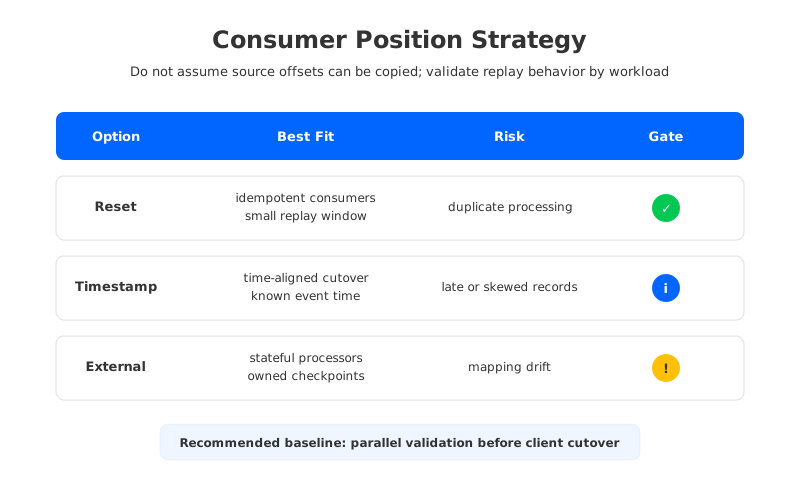
Reset and replay works when consumers are idempotent and the replay window is small. You replicate data to the target, start consumers from an agreed timestamp or earliest retained point, and let application deduplication absorb duplicates.
Timestamp-based seek works when event time is reliable and the target Kafka records preserve timestamps. The team defines a cutover time, verifies source and target coverage, then starts consumers near the matching timestamp. This is a strategy to test, not a magic offset mapping.
External checkpoint mapping works when the application owns durable processing checkpoints outside Kafka offsets, such as a database watermark, workflow state, or stream processing checkpoint. In that model, Kafka offsets are transport progress, while business progress lives elsewhere.
Parallel validation should be the default gate even if you choose another primary strategy. Run source and target consumers side by side, compare record counts, key coverage, aggregates, schema compatibility, and application outputs over a representative window. Cutover should be authorized by observed behavior, not by successful connection tests.
6Replication and Dual Run Patterns
There is no universal tool choice because the source is Event Hubs with a Kafka endpoint. Start by testing whether Kafka-native replication tools can consume from the Event Hubs Kafka endpoint and produce to your target with the headers, timestamps, compression, authentication, and throughput you need. MirrorMaker 2 can be useful, but the reverse path must be validated against your client configuration and service limits.
For some teams, a custom bridge is cleaner. A consumer reads from Event Hubs, writes to Kafka, and records operational checkpoints in an external store. That gives precise control over retries, dead-letter behavior, metrics, and business-level verification.
Dual run has two purposes. The first is data movement. The second is confidence. During dual run, track:
- input rate and target write rate by partition;
- end-to-end lag between Event Hubs and Kafka;
- record counts by key range or business dimension;
- serialization errors and schema mismatches;
- target consumer behavior under replay;
- target broker, storage, and network saturation;
- rollback time from target clients back to Event Hubs.
Do not declare dual run complete after a quiet hour. Exercise peak traffic, consumer restarts, deployment rollbacks, and forced target broker or node replacement. Migration risk hides in recovery paths.
7Cut Over Clients Without Losing the Exit Door
Client cutover should be staged by blast radius. Start with a non-critical consumer group, then a read-only analytics workload, then a subset of producers, then higher-value consumers. Keep the Event Hubs path alive until rollback has been rehearsed with current configs and current credentials.
The client configuration changes are usually broader than the bootstrap server string. Event Hubs Kafka clients often use SASL_SSL settings and Event Hubs-specific connection strings or Microsoft Entra authentication patterns. A Kafka target may use different SASL mechanisms, certificates, ACLs, DNS names, listener ports, and client defaults.
Use a cutover checklist:
- Freeze topic and partition changes during the cutover window.
- Confirm replication lag is inside the agreed threshold.
- Confirm target consumers can start from the chosen position strategy.
- Switch a small client cohort by deployment ring.
- Watch target lag, error rate, duplicate indicators, and downstream SLAs.
- Keep source consumers paused rather than deleted until rollback expires.
- Record the exact rollback command sequence and owner.
Rollback is not failure. It is a control.
8AutoMQ as an Azure Kafka-Compatible Target
If the migration goal is full Kafka semantics on Azure, the target does not have to be a traditional broker-local disk cluster. AutoMQ is relevant because it keeps Kafka protocol compatibility while using a shared-storage architecture. In an Azure deployment, the practical properties are customer-controlled data plane, private networking, object storage retention, stateless broker scaling, and continued use of Kafka clients, Connect, Streams, and AdminClient workflows.
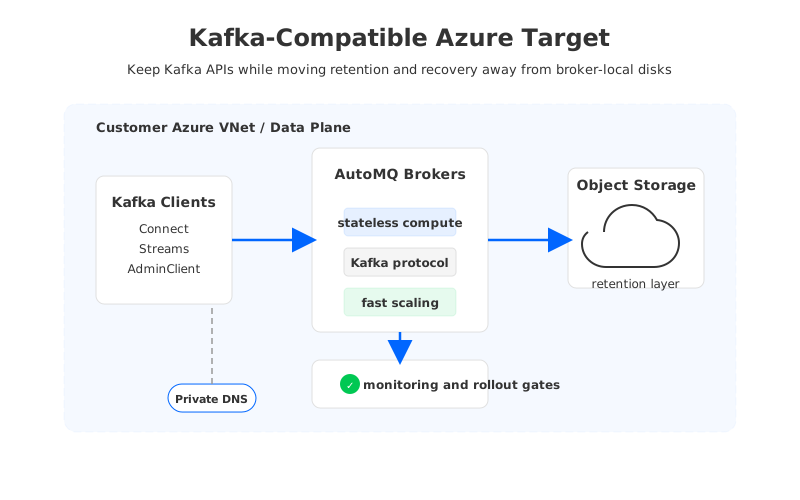
Many teams leave Event Hubs for platform control, not operational nostalgia. A disk-heavy Kafka cluster can restore Kafka APIs, but it also brings broker capacity planning, partition reassignment, volume management, and retained-log cost pressure. AutoMQ's architecture moves durable log data into cloud object storage and makes broker replacement and scaling less dependent on copying retained data between brokers.
The evaluation should stay technical:
- Can the target support the Kafka APIs, client versions, and ecosystem tools your workload uses?
- Can it run inside the Azure networking and data-control model your security team requires?
- Does long retention change storage cost predictably rather than inflating broker disks?
- Can scaling and recovery be rehearsed without large data movement?
- Can the migration path preserve your application contracts, not merely your topic names?
When those answers are positive, the reverse migration becomes more than an exit from Event Hubs. It becomes a chance to choose the Kafka architecture you wanted after learning what the workload actually needs.
9Migration Rehearsal Checklist
Before production cutover, run a rehearsal that produces evidence. Use production-like partitions, representative message sizes, real schemas, production authentication patterns, and a rollback drill.
Minimum evidence includes:
- Source inventory and target topic mapping signed off by service owners.
- Replication results for throughput, lag, headers, timestamps, keys, and schema compatibility.
- Consumer position decision with duplicate, gap, and replay handling documented.
- Networking plan for bootstrap endpoints, private DNS, firewall rules, and certificate trust.
- Target soak test under peak write and read fan-out.
- Rollback drill with measured recovery time.
This is not a standard Kafka-to-Kafka migration. If the team validates translation boundaries, avoids pretending offsets are portable, and cuts over by workload risk, the move from Event Hubs Kafka endpoint to Kafka can be controlled. If the target is also designed for cloud storage and elastic compute, the migration can solve the original pain instead of recreating it under a different endpoint.
10References
- Apache Kafka developer guide for Azure Event Hubs
- Azure Event Hubs Capture overview
- Azure Event Hubs quotas and limits
- Restrict Event Hubs namespace access through Private Endpoint
- Apache Kafka documentation
- AutoMQ architecture overview
- AutoMQ stateless broker documentation
- AutoMQ object storage configuration
- Deploy AutoMQ to Azure AKS
11FAQ
11.1Can I copy Event Hubs Kafka offsets directly into Apache Kafka?
Do not assume that. Treat offsets as source-specific positions and design a consumer position strategy. Common approaches include replay from a controlled point, timestamp-based seek, external business checkpoints, and parallel validation.
11.2Is Event Hubs Capture enough to migrate to Kafka?
Capture is useful for archive, analytics, and backfill planning because it writes Event Hubs data to Azure storage. It is not a live Kafka log replica with Kafka consumer group offsets, so most production migrations still need streaming replication or dual run.
11.3Should I keep the same partition count?
Keeping the same partition count is the safest default for keyed workloads because it reduces ordering and validation risk. Changing partition count can be valid, but it should be tested as a separate routing decision.
11.4When should a team move from Event Hubs Kafka endpoint to Kafka?
Consider migration when the workload needs deeper Kafka ecosystem behavior, Kafka Connect control, Kafka Streams state handling, AdminClient automation, long retention, or a Kafka-native cost and governance model.
11.5Where does AutoMQ fit in this migration?
AutoMQ can be evaluated as a Kafka-compatible target on Azure when teams want Kafka APIs and ecosystem compatibility without rebuilding a broker-local disk architecture. Its shared-storage model is especially relevant for long retention, stateless scaling, and data-plane control.


