
Table of Contents
Table of Contents
Migrating Apache Kafka to Azure Event Hubs is attractive when the current Kafka estate feels heavier than the business problem it serves. If the workload mostly ingests telemetry, application events, audit logs, or simple producer-consumer streams into Azure services, Event Hubs can reduce broker operations and align the pipeline with the rest of the Azure control plane. That is a real benefit, not a footnote.
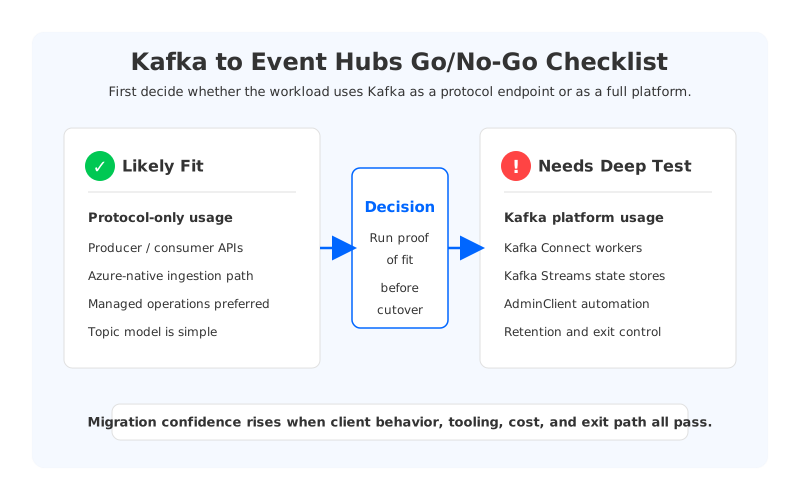
The harder question is whether the application is using Kafka as a protocol endpoint or as a platform. Those sound similar in planning meetings. They behave very differently during cutover.
A protocol-only workload sends records, consumes records, commits offsets, and treats the broker as a managed event ingress layer. A platform-dependent workload relies on Kafka Connect, Kafka Streams, AdminClient automation, ACL models, topic-level operations, retention behavior, ecosystem tooling, and rollback assumptions built around Kafka itself. Event Hubs exposes a Kafka-compatible endpoint, but compatibility should be treated as a migration hypothesis to test, not as semantic parity to assume.
1Why Azure Teams Consider Event Hubs for Kafka Workloads
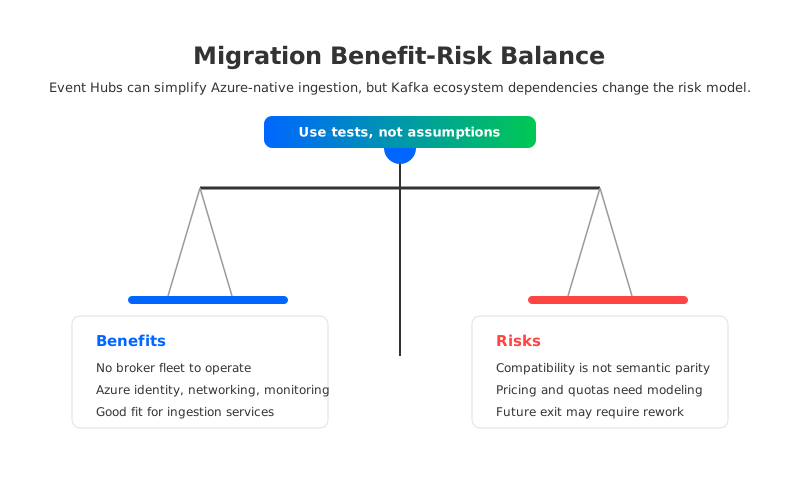
Event Hubs is often evaluated because it removes the visible broker layer from the operating model. There is no Kafka broker fleet to size, patch, rebalance, or recover. Azure teams can provision namespaces, event hubs, networking, identity integration, and monitoring through familiar Azure workflows. For platform teams already standardizing on Azure Monitor, Private Link, managed identities, and infrastructure-as-code pipelines, that consolidation matters.
The Kafka endpoint adds another practical advantage: some Kafka clients can connect to Event Hubs without a total application rewrite. Microsoft documents Event Hubs for Apache Kafka as an endpoint that supports Kafka producer and consumer applications by changing bootstrap server and security settings. That makes the migration path materially different from moving to an unrelated messaging API.
Typical benefits include:
- Less responsibility for broker-level infrastructure operations.
- Cleaner integration with Azure-native ingestion and analytics services.
- A managed scaling model that can be easier for centralized cloud teams to govern.
- A possible reduction in Kafka operational toil for workloads that do not need deep Kafka internals.
- Simpler procurement and cloud cost attribution when the organization wants more spend inside Azure.
These benefits are strongest when the Kafka workload is near the edge of the data platform: application events, telemetry, notifications, operational logs, or basic fan-in/fan-out streams. They are weaker when Kafka is the backbone for stateful stream processing, multi-cluster replication, schema-driven integration, custom governance, or long-retention replay.
That distinction should shape the migration strategy. A small producer-consumer service can often be tested with client configuration changes and load validation. A data platform with Connect, Streams, consumer lag automation, topic provisioning scripts, and strict replay windows needs a broader compatibility program.
2The Core Decision: Endpoint Migration or Platform Migration?
Many failed migration plans start with a shallow inventory: count topics, count producers, count consumers, estimate throughput. That inventory is necessary, but it is not sufficient. A Kafka to Event Hubs migration needs a dependency map that explains what every workload expects from Kafka.
Ask four questions before building the plan.
| Question | Why it matters | Migration implication |
|---|---|---|
| Do applications only use producer and consumer APIs? | Event Hubs is strongest as a managed Kafka endpoint for common client flows. | Candidate for pilot migration. |
| Do teams run Kafka Connect workers? | Connect behavior depends on connector configuration, worker operations, offsets, and sink/source semantics. | Test connectors individually. |
| Do applications use Kafka Streams? | Streams applications rely on state stores, changelog topics, repartition topics, and processing guarantees. | Treat as platform migration, not endpoint swap. |
| Do automation scripts use AdminClient? | Topic creation, config changes, ACL assumptions, and cluster metadata behavior may differ. | Validate every administrative operation. |
The goal is not to prove Event Hubs wrong. The goal is to avoid discovering too late that a service used Kafka in a way nobody listed during assessment.
A practical classification is simple: if losing broker-level visibility, topic-level control, or Kafka ecosystem behavior would not change the application design, Event Hubs deserves serious consideration. If those behaviors are part of the application contract, you are migrating a platform dependency, not only a wire protocol.
3Compatibility Checks Before Cutover
Start compatibility testing with the client libraries that are actually in production. Do not rely only on a sample producer and consumer unless the production estate is that simple. Use the same client versions, serialization libraries, authentication patterns, batching configuration, timeout settings, retry behavior, and compression choices that production uses today.
For each workload, run a compatibility matrix:
- Producer behavior: batching, idempotence assumptions, retries, compression, message size, headers, partitioning, and error handling.
- Consumer behavior: offset commits, rebalance handling, lag monitoring, consumer group naming, long processing intervals, and retry loops.
- Topic behavior: partition counts, retention expectations, compaction assumptions, naming conventions, and provisioning workflow.
- Security behavior: SASL_SSL configuration, identity integration, network boundary, Private Link, and secret rotation.
- Observability behavior: metrics, alerting thresholds, lag calculation, request latency, and application logs.
- Failure behavior: throttling, namespace capacity pressure, region impairment, client reconnects, and rollback.
Microsoft's migration guidance for existing Kafka workloads recommends changing connection configuration and validating client behavior against Event Hubs. That guidance is a starting point. Production teams should extend it into application-specific tests because Kafka usage varies widely by organization.
A strong pilot should replay realistic traffic, not synthetic happy-path messages. Include peak throughput, large messages, bursts, slow consumers, failed downstream sinks, and temporary network interruption. If the current Kafka cluster serves both operational telemetry and revenue-critical event processing, test those classes separately. They often have different tolerance for latency, loss, throttling, replay, and operational intervention.
4Kafka Connect, Streams, and AdminClient Are the Real Tripwires
Kafka Connect is usually where the word "migration" becomes concrete. A connector estate may include JDBC sources, Debezium CDC, object storage sinks, Elasticsearch or OpenSearch sinks, custom connectors, schema registry integration, dead-letter routing, and operational playbooks. The question is not whether a connector can theoretically write to a Kafka endpoint. The question is whether the whole connector lifecycle works with your throughput, retry, offset, schema, and recovery expectations.
Kafka Streams introduces an even deeper dependency. Streams applications use Kafka topics as durable state infrastructure: input topics, output topics, repartition topics, changelog topics, and state restoration during restart. If an application depends on exactly-once configurations, state restore performance, or strict semantics around internal topics, it needs a dedicated proof-of-concept before any migration commitment.
AdminClient automation is easier to miss because it runs in deployment pipelines, not always in application code. Teams may create topics dynamically, alter topic configs, inspect partition metadata, enforce naming policy, adjust retention, or drive governance workflows through Kafka APIs. If those workflows break, the migration may appear successful until the next release, incident, or data retention change.
For platform workloads, the migration checklist should include:
- Run connector-by-connector tests with real connector configurations.
- Run Kafka Streams applications through restart, rebalance, state restore, and failure scenarios.
- Validate every AdminClient operation used by CI/CD, SRE tooling, and platform governance.
- Confirm observability parity for lag, throughput, throttling, errors, and service health.
- Prove rollback from Event Hubs back to Kafka or to another Kafka-compatible target.
This is where teams often realize the target architecture decision has two valid branches. Event Hubs can be the right path for Azure-native ingestion. A Kafka-compatible platform can be the better path when Kafka semantics themselves are part of the system design.
5Cost and Quotas: Model the Workload, Not the Product Name
Cost evaluation should happen before migration, not after the first capacity surprise. Event Hubs pricing and quotas depend on tier, capacity model, ingress, egress, throughput units or capacity units, retention, capture, networking, and operational requirements. Kafka cost depends on brokers, disks, replication, cross-zone traffic, operations, and over-provisioning. These are different cost shapes, so a superficial "managed service versus cluster" comparison can mislead.
Model at least six dimensions:
- Sustained ingress and egress throughput during normal and peak periods.
- Number of consumer groups and read fan-out behavior.
- Retention period and replay expectations.
- Message size distribution and burstiness.
- Network path, including private connectivity and cross-region or cross-service movement.
- Operational cost, including on-call load, upgrades, capacity planning, and incident response.
Event Hubs may be cost-effective for workloads that match its managed ingestion model and stay within predictable capacity boundaries. It may become less straightforward when a team needs high fan-out, long replay windows, many independent consumers, complex private networking, or strict platform-level control. The right answer is workload-specific.
Do not model only today's traffic. A migration often changes the internal economics of experimentation. Once teams see an easier Azure-native event ingress path, more applications may publish into it. That is good for platform adoption, but it can also increase throughput, retention, and consumer fan-out faster than the original business case assumed.
6Exit Risks: The Part Teams Prefer to Postpone
Exit risk is not vendor paranoia. It is architecture hygiene.
A Kafka cluster is not portable by magic, but the Kafka ecosystem gives teams a familiar operating model: clients, topics, offsets, Connect, Streams, MirrorMaker-style replication, and a broad tooling market. When a workload moves to Event Hubs, some of those assumptions may become Azure-specific, especially around provisioning, identity, monitoring, capacity planning, and operational response. That may be acceptable. It should be explicit.
The exit plan should answer practical questions:
- If the team later needs to move back to Kafka, which applications need code or configuration changes?
- Can data be replicated out with acceptable lag and cost?
- Are offsets, schemas, and consumer group assumptions transferable enough for rollback?
- Which operational dashboards and alerts would need rebuilding?
- What happens if a future workload needs Kafka Streams, Connect behavior, or topic administration that the target does not support the same way?
Exit risk is highest when a migration is framed as a cost or operations cleanup but silently changes the platform contract. If the organization chooses Event Hubs because it wants Azure-native event ingestion, that is a coherent decision. If it chooses Event Hubs while expecting full Kafka platform behavior, the decision needs stronger evidence.
7Where AutoMQ Fits When Kafka Semantics Still Matter
Some Azure teams reach this point and conclude that Event Hubs is still right. Others conclude that they want less Kafka infrastructure work without giving up Kafka as a platform. That is where Kafka-compatible shared-storage systems enter the evaluation.
AutoMQ is one example of this architecture category: it keeps Kafka protocol compatibility while moving durable storage away from broker-local disks and into cloud object storage. On Azure, that model is relevant for teams that want a BYOC-style deployment path, control over their cloud boundary, and a more reversible migration than switching to a different eventing service model.
The key point is not that every Event Hubs candidate should use AutoMQ. The more precise point is this: if the workload depends on Kafka platform semantics, a Kafka-compatible target can preserve more of the existing application contract while still reducing some of the operational pain associated with traditional broker-local storage. Stateless brokers and object-storage-backed durability can make scaling, recovery, and storage growth less tied to large data movement between broker disks.
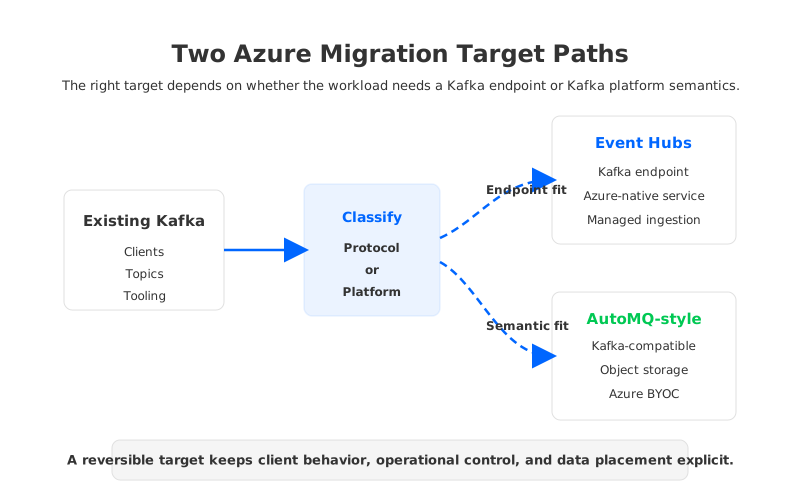
For decision makers, this creates a cleaner target map:
| Workload profile | Strong candidate target |
|---|---|
| Azure-native telemetry or event ingestion with common producer-consumer flows | Event Hubs Kafka endpoint |
| Kafka ecosystem workloads with Connect, Streams, AdminClient, and replay dependencies | Kafka-compatible platform such as AutoMQ |
| Teams prioritizing maximum infrastructure control and custom operations | Self-managed Kafka or Kubernetes-based Kafka |
| Teams prioritizing managed operations but not Azure-only architecture | Managed Kafka service or BYOC Kafka-compatible platform |
This framing keeps the evaluation neutral. Event Hubs solves a real problem for Azure teams. AutoMQ solves a different problem: keeping Kafka semantics while changing the storage and operations model. Confusing those two problems is where migrations become expensive.
8A Practical Go/No-Go Checklist
Before approving a Kafka to Event Hubs migration, require evidence across four layers.
The application layer should show that producers and consumers behave correctly under realistic load, failure, retry, and rebalance conditions. The platform layer should prove that Connect, Streams, AdminClient, schema workflows, topic operations, and monitoring either work or are not needed. The cost layer should model throughput, fan-out, retention, networking, and operational responsibility. The exit layer should document rollback or forward-migration options.
A simple go/no-go rule works well:
- Go when the workload is mostly protocol-level, Azure-native integration is valuable, capacity is predictable, and the exit plan is acceptable.
- Hold when the workload depends on Kafka platform behavior that has not been proven on Event Hubs.
- Reconsider the target when Kafka semantics, ecosystem tooling, long replay, or operational reversibility are central requirements.
Migration is not only about removing brokers. It is about preserving the guarantees that applications already rely on while changing the operational model. Event Hubs can be an excellent Azure-native ingestion target when those guarantees line up. When they do not, choose a Kafka-compatible target deliberately rather than discovering the mismatch during cutover.
9References
- Microsoft Learn: Azure Event Hubs for Apache Kafka overview
- Microsoft Learn: Migrate existing Kafka workloads to Event Hubs
- Microsoft Learn: Azure Event Hubs quotas and limits
- Azure: Event Hubs pricing
- Apache Kafka Documentation: Kafka Connect
- Apache Kafka Documentation: Kafka Streams
- AutoMQ Documentation: Compatibility with Apache Kafka
- AutoMQ Documentation: Architecture overview
10FAQ
10.1Is Azure Event Hubs a full replacement for Apache Kafka?
Event Hubs can replace Kafka for some workloads, especially producer-consumer ingestion patterns that use the Kafka protocol endpoint and benefit from Azure-native managed operations. It should not be assumed to replace every Kafka platform dependency. Kafka Connect, Kafka Streams, AdminClient automation, topic operations, retention assumptions, and observability workflows need explicit testing.
10.2What is the biggest risk when migrating Kafka to Event Hubs?
The biggest risk is mistaking protocol compatibility for complete workload compatibility. A basic producer and consumer test may pass while connector operations, stream processing state, administrative workflows, replay expectations, or exit plans remain untested.
10.3When should a team choose Event Hubs for Kafka workloads?
Event Hubs is a strong candidate when the workload is Azure-native, primarily ingestion-oriented, operational simplicity is a major goal, and the application uses common Kafka producer and consumer flows. It is less straightforward when Kafka itself is a core data platform dependency.
10.4How should Kafka Connect be tested before migration?
Test each connector with its production configuration, expected throughput, failure behavior, offset handling, schema integration, retry settings, and recovery process. Do not assume all connectors behave the same because they use a Kafka endpoint.
10.5Where does AutoMQ fit in this decision?
AutoMQ fits when a team wants to keep Kafka-compatible clients and ecosystem semantics while changing the storage and operations model. For Azure teams, an object-storage-backed BYOC deployment can provide a more controllable path when Event Hubs would require too much platform-level compromise.


