
Table of Contents
Table of Contents
Teams searching for confluent alternatives are usually not starting from a blank page. They already know why managed Kafka is attractive: fewer brokers to patch, a mature Kafka ecosystem, integrated security controls, connectors, and a commercial service boundary that can absorb operational work. The question appears when that boundary starts to feel too broad, too expensive, too restrictive, or too hard to explain to security and finance teams.
That is a different problem from "which vendor is better." Confluent Cloud can be the right platform for many organizations, especially when the priority is a broad managed data streaming service. Exit planning is not a verdict on Confluent. It is an engineering discipline for teams that need to prove whether another Kafka-compatible operating model can preserve application behavior while changing cost ownership, data-plane control, or infrastructure architecture.
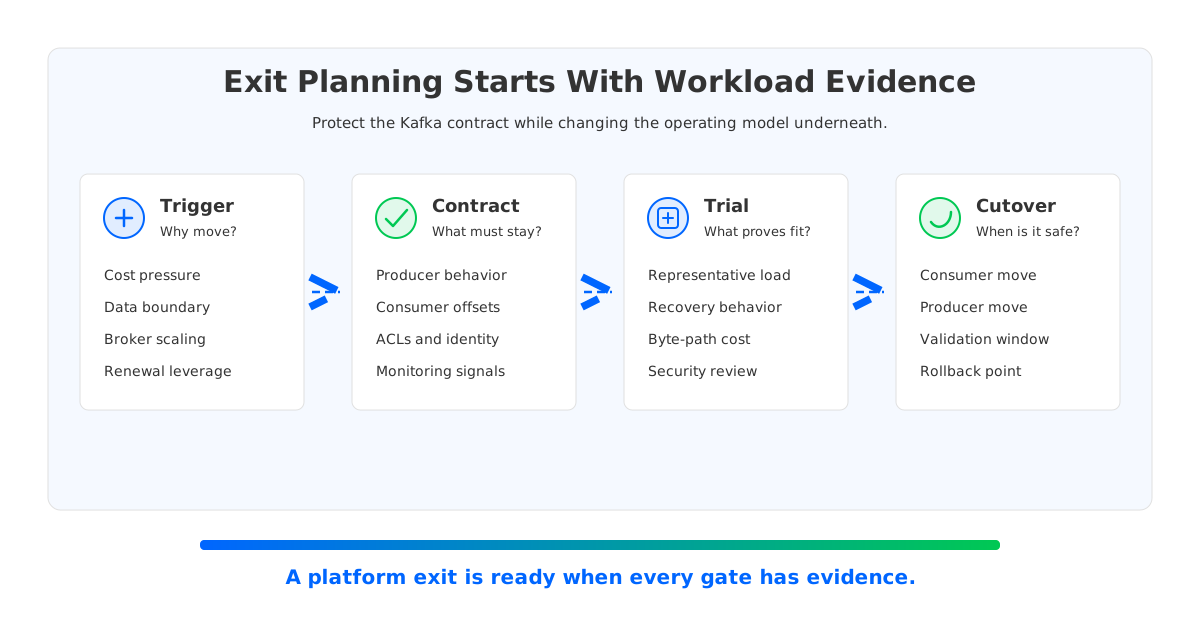
The worksheet below treats an exit as a staged technical decision. It starts with the contracts that must not change, then moves into cloud cost shape, migration mechanics, rollback boundaries, and production ownership. If the team cannot fill out the worksheet for one representative workload, it is not ready to move that workload.
1Why Teams Search for confluent alternatives
The search phrase sounds commercial, but the underlying intent is operational. A platform owner may be trying to reduce recurring streaming cost. A cloud architect may need the data plane to stay inside a specific account, VPC, or private environment. An SRE team may want broker scaling and recovery to involve less partition movement. A procurement team may want credible leverage before renewal. These are all reasonable triggers, but they lead to different technical answers.
The first mistake is treating all alternatives as the same category. Self-managed Apache Kafka, Amazon MSK, a managed Kafka service, and a Kafka-compatible shared-storage system all expose familiar streaming concepts, but they divide responsibility in very different ways. The application team sees producers, consumers, topics, offsets, consumer groups, ACLs, and monitoring. The platform team sees storage lifecycle, cross-zone traffic, broker replacement, upgrades, incident response, and audit boundaries.
Exit planning works only when those two views are separated. The Kafka contract should be protected as much as possible because it is where application risk lives. The platform substrate is where the team may intentionally change the design. If the existing pain comes from cost allocation, cloud networking, storage scaling, or data-plane ownership, the evaluation has to focus there instead of becoming a generic feature checklist.
2Step 1: Freeze the Kafka Contract Before Comparing Platforms
A migration worksheet starts with a boring but powerful exercise: write down the Kafka behavior that applications already rely on. This includes client versions, producer retry settings, idempotence, transactions, ordering assumptions, consumer group behavior, offset commit patterns, ACLs, quotas, schema workflows, and alerting conventions. Many exit projects fail because the team compares platform dashboards before it validates the application contract.
Apache Kafka documentation defines a large surface area across clients, operations, security, and broker behavior. A practical migration does not need to exercise every feature equally, but it does need to test the parts your workloads actually use. For example, a payments pipeline using idempotent producers and strict consumer lag alarms has a different risk profile from a clickstream topic with loose replay tolerance. A connector-heavy estate adds another layer because the connector runtime, schema handling, and error topics can become part of the contract.
Use this worksheet table before naming any replacement path:
| Contract area | Evidence to collect | Exit-planning question |
|---|---|---|
| Producers | Client libraries, retries, idempotence, compression, transactions, batching | Can the destination platform preserve write behavior under normal load and retry storms? |
| Consumers | Group assignment, offset commits, lag alerts, reset policy, replay windows | Can consumers resume predictably after cutover and rollback? |
| Security | ACLs, authentication, private connectivity, audit expectations | Which identities and network paths must remain recognizable to security teams? |
| Operations | Dashboards, SLOs, incident runbooks, quota policies, topic automation | Which operational signals must survive the move without retraining every on-call engineer? |
This table does not decide the destination. It prevents the destination from deciding the application contract for you. Once the contract is explicit, alternatives become easier to evaluate because each option must answer the same workload-specific questions.
3Step 2: Separate Service Convenience From Data-Plane Control
Managed services are valuable because they remove work. That value should be acknowledged, not waved away. The trade-off is that the service boundary also determines where data lives, which control plane manages infrastructure, which networking pattern is available, and how much customization the customer can make. For many teams that is a good trade. For others, the boundary becomes the reason to evaluate a different model.
The worksheet should capture three boundaries. The control plane boundary answers who provisions clusters, upgrades software, and exposes management APIs. The data plane boundary answers where brokers, stream data, metrics, and logs live. The network boundary answers how producers, consumers, replication, private endpoints, and migration paths cross cloud accounts, VPCs, zones, or regions. A platform can look appealing at the control plane layer while still creating concerns at the data plane layer.
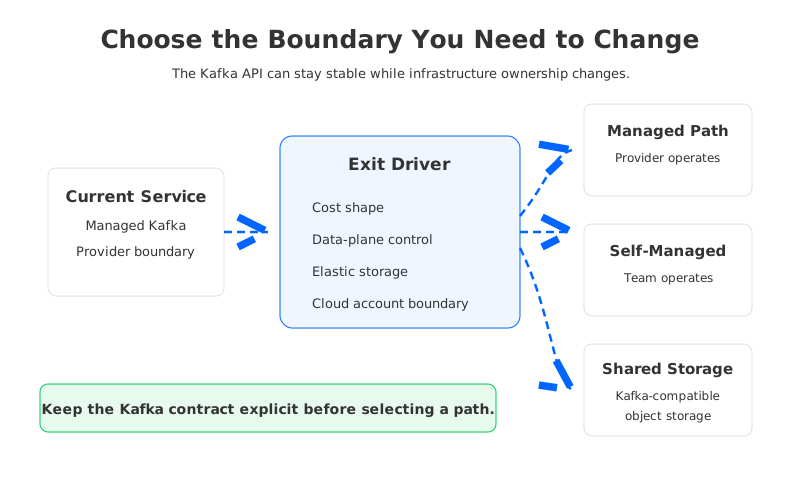
This is where "Confluent alternative" becomes too vague. A team may want less operational work but still want customer-controlled infrastructure, which points toward BYOC or private deployment models. Another team may want cloud-provider-native procurement and accept the MSK operating model. A third team may have enough Kafka expertise to run Apache Kafka directly. A fourth team may want Kafka-compatible APIs but a storage architecture that is less tied to broker-local disks.
The right worksheet answer is workload-specific. A regulated data set may prioritize data-plane locality over managed-service convenience. A high-throughput analytics stream may prioritize network cost and elastic storage. A small internal topic estate may prioritize simplicity and accept a managed service boundary. Exit planning becomes useful when it makes these differences visible instead of forcing every workload into one destination.
4Step 3: Model Cost by Byte Path, Not by Cluster Name
Kafka cost analysis gets misleading when it starts with cluster price alone. Streaming platforms create cost through multiple byte paths: producer ingress, broker replication, consumer egress, cross-zone movement, private connectivity, retained storage, request volume, backfill, observability, and operational labor. A lower headline service price can still lose if migration, network, or storage paths are poorly understood.
The worksheet should model steady state and abnormal state separately. Steady state covers the normal write rate, read fan-out, retention period, and expected durability path. Abnormal state covers broker replacement, partition reassignment, consumer replay, failover, backfill, and migration synchronization. Platform owners often understand steady-state throughput, but the unexpected bill usually arrives during recovery, rebalancing, or growth.
AWS documentation for MSK and EC2 networking is useful here because it reminds teams that availability architecture and network placement are inseparable in the cloud. Multi-AZ designs are standard for resilience, but cross-zone data movement, private connectivity, and replication paths still need explicit cost modeling. The point is not that one service always costs more. The point is that the cost model should follow the bytes.
For each representative workload, fill in these fields:
- Write rate and read fan-out, measured separately. Read amplification can dominate a topic even when producer throughput looks modest.
- Retention and replay window. Long retention changes the importance of storage architecture and backfill behavior.
- Zone and region paths. Mark which bytes cross availability zones, VPC boundaries, account boundaries, or regions.
- Recovery events. Estimate what happens during broker replacement, partition movement, consumer catch-up, and migration validation.
- Human operating cost. Include the time spent on upgrades, incident response, capacity planning, and governance review.
This worksheet usually changes the conversation. Instead of asking whether one platform is "lower cost," the team can ask which platform aligns cost with the workload's dominant driver. For a retention-heavy stream, storage architecture may matter most. For a fan-out-heavy stream, read paths matter. For a regulated workload, the cost of control and auditability may matter more than raw infrastructure spend.
5Step 4: Treat Migration as a Rehearsed Cutover, Not a Copy Job
Moving Kafka workloads is not only about copying topic data. A production exit must preserve the relationship between producers, consumers, offsets, schemas, access policies, observability, and rollback. Tools such as MirrorMaker-style replication or managed replication services can help move data, but they do not automatically define the cutover policy. The policy is where most migration risk hides.
The worksheet should force a decision on four moments. When does the destination become eligible for validation? When do consumers start reading from it? When do producers stop writing to the source? What event makes rollback unsafe? A team that cannot answer the fourth question is still in discovery, no matter how much data has been replicated.
The safest exit plans use small workload batches and explicit acceptance criteria. A good pilot topic is important enough to reveal real issues but not so critical that every mistake becomes a company incident. The team should rehearse offset validation, duplicate handling, lag behavior, failback, and monitoring before the executive steering meeting asks for a date.
Here is the practical test: if the migration runbook cannot be executed on a quiet Tuesday afternoon by the normal platform team, it is not yet a runbook. It is a project document. The difference matters because the destination platform will eventually have to be operated during incidents, not only during a planned proof of concept.
6Step 5: Where AutoMQ Fits the Worksheet
After the worksheet has exposed the application contract, byte paths, and data-plane boundary, AutoMQ becomes relevant as one architectural option rather than a generic replacement name. AutoMQ is a Kafka-compatible cloud-native streaming system that uses Shared Storage architecture. It keeps Kafka-compatible APIs for applications while placing durable stream data in S3-compatible object storage through S3Stream, with WAL storage protecting the write path.
That design is worth testing when the exit trigger is architectural. If broker-attached storage makes scaling and recovery heavy, separating compute from durable storage can change the operating model. If cross-zone replication traffic is a major concern, AutoMQ's zero cross-AZ traffic design is relevant to cost modeling. If governance requires more control over where the data plane runs, AutoMQ BYOC or private software deployment can be evaluated against that boundary.
The worksheet should still hold AutoMQ to the same standard as any other option. Test client compatibility, consumer behavior, transactional workloads if you use them, observability integration, failure recovery, migration rollback, and cost under realistic write and read fan-out. The advantage of a worksheet is that it avoids product theater. A shared-storage architecture either removes the specific constraints your team has identified, or it does not.
7Exit Readiness Checklist
Use this checklist when the team is close to a decision. It is deliberately short because long checklists tend to become paperwork. Each item should have evidence, not optimism.
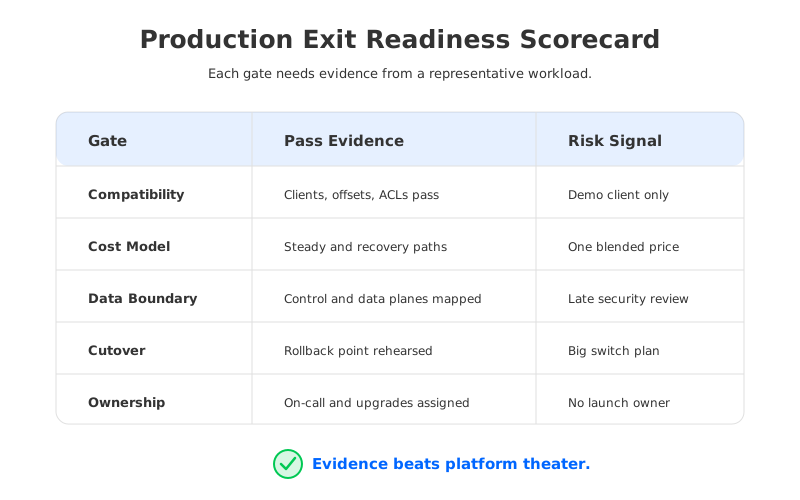
| Readiness gate | Pass condition | Failure signal |
|---|---|---|
| Contract rehearsal | Representative producers, consumers, ACLs, offsets, and monitoring pass under normal and failure conditions. | The test uses a toy client and assumes real applications will behave the same. |
| Cost model | Steady-state and recovery byte paths are modeled separately. | The business case uses one blended price and ignores network or backfill paths. |
| Data boundary | Control plane, data plane, logs, metrics, and backups are documented. | Security review starts after destination selection. |
| Cutover runbook | Consumer move, producer move, validation, freeze window, and rollback point are rehearsed. | The plan depends on a single big switch with unclear duplicate handling. |
| Ownership | On-call, upgrades, capacity, incident response, and vendor escalation are assigned. | Everyone assumes someone else owns the destination after launch. |
The checklist also creates a graceful way to say no. If a workload fails the contract rehearsal, keep it where it is. If a workload passes compatibility but fails cost modeling, adjust architecture before migration. If governance blocks the data boundary, the destination is not ready for that workload. Exit planning is successful when it prevents a bad move as much as when it enables a sound one.
8Closing the Loop
The phrase confluent alternatives can lead to shallow vendor comparisons, but serious teams need a migration worksheet. Confluent Cloud, Amazon MSK, self-managed Apache Kafka, and Kafka-compatible shared-storage systems represent different ways to split responsibility across applications, platform engineering, cloud infrastructure, and vendors. The durable decision is not which logo appears on the platform diagram. It is whether the chosen operating model protects the Kafka contract while fixing the constraint that triggered the search.
If your team is evaluating alternatives because broker storage, cross-zone traffic, or data-plane ownership has become the constraint, test those constraints directly. Start with the AutoMQ Cloud Console and run one representative workload through your own contract, cost, cutover, and governance worksheet.
9References
- Apache Kafka documentation
- Apache Kafka Tiered Storage documentation
- Apache Kafka producer configuration
- Apache Kafka authorization and ACLs
- AWS documentation: Best practices for Amazon MSK Standard brokers
- AWS documentation: Amazon MSK Replicator
- AutoMQ documentation: Compatibility with Apache Kafka
- AutoMQ documentation: S3Stream Shared Streaming Storage
- AutoMQ documentation: WAL storage
- AutoMQ documentation: Inter-zone traffic overview
10FAQ
10.1What does Confluent Cloud exit planning mean?
It means preparing a workload-level migration plan before changing platforms. The plan should document Kafka compatibility requirements, data-plane boundaries, cost drivers, cutover mechanics, rollback points, and ownership after launch.
10.2Are Confluent alternatives always lower cost?
No. Cost depends on throughput, read fan-out, retention, storage architecture, network paths, private connectivity, recovery behavior, and people time. A credible comparison models those drivers separately instead of relying on one blended price.
10.3Is self-managed Kafka the main alternative to Confluent Cloud?
Not necessarily. Options include self-managed Apache Kafka, Amazon MSK, other managed Kafka services, BYOC models, private deployments, and Kafka-compatible systems with different storage architectures. The right path depends on the workload and governance model.
10.4Where does AutoMQ fit in this evaluation?
AutoMQ fits when a team wants Kafka-compatible APIs with a cloud-native Shared Storage architecture, object-storage-backed durability, stateless broker operation for durable data ownership, and deployment models that can keep the data plane closer to customer-controlled infrastructure.
10.5What should be tested first in a migration proof of concept?
Start with one representative workload and test producer behavior, consumer offsets, lag, ACLs, monitoring, recovery, rollback, and cost under realistic write and read fan-out. A platform demo is less useful than a rehearsed workload migration.


