
Table of Contents
Table of Contents
MirrorMaker 2 usually enters the conversation when a Kafka team has already accepted one hard truth: moving topics between clusters is not the same as moving a stateless service. The data can be copied, but the migration is only safe when offsets, consumer behavior, producer cutover, rollback, security metadata, and operational ownership all line up at the same time. That is where many "Kafka replication tools" searches really come from. The team is not rejecting MirrorMaker 2 in principle; it is trying to understand whether a Connect-based replication job is enough for the risk profile in front of them.
That distinction matters. MirrorMaker 2 is a legitimate Apache Kafka tool, and for many self-managed replication jobs it remains the most portable option. The problem starts when the project is described as "replication" but actually behaves like a production migration, disaster recovery drill, or platform consolidation. In those cases, the tool has to help with more than bytes on the target cluster. It has to reduce the number of things humans must coordinate during the cutover window.
1Where MirrorMaker 2 works well
MirrorMaker 2 is built on Kafka Connect, which is both its strength and its tradeoff. It uses source, checkpoint, and heartbeat connector behavior to replicate records, emit connectivity signals, and produce offset checkpoint information. In Apache Kafka's own documentation, consumer group offset sync is configurable and writes translated offsets to the target cluster only when no active consumers in that group are connected there. Topic config sync is also configurable. Those details are useful because they make MM2 flexible, but they also mean the operator has to understand the moving parts instead of treating it as a black-box migration switch.
MM2 tends to fit well when the team wants open Kafka tooling and has the operational muscle to run it carefully:
- Self-managed Kafka to self-managed Kafka replication. MM2 is portable across standard Kafka deployments, which makes it attractive when neither side is tied to a specific vendor control plane.
- Ongoing asynchronous replication where lag is acceptable. If the business goal is to maintain a secondary copy and the failover process is rehearsed, MM2 can be a practical base.
- Custom routing, filtering, and naming policies. Because MM2 sits in the Kafka Connect world, teams can tune topic filters, group filters, replication policy, security settings, and deployment topology.
- Migration projects with strong internal Kafka expertise. When the team can reason about offset translation, internal topics, Connect worker capacity, and recovery procedures, MM2 gives them room to build the exact workflow they need.
The common mistake is not choosing MM2. The mistake is choosing it because "it replicates Kafka" and then discovering late that the project depends on consumer offsets, producer ordering, security metadata, application restart behavior, and rollback semantics. At that point, the issue is no longer whether MM2 can move data. The issue is how much of the migration control plane you want to assemble around it.
2Where migration projects need more than replication
Most Kafka migrations fail slowly before they fail loudly. Replication lag rises during a load spike. A consumer group is still active on the target, so offset sync behavior does not match the mental model. A team keeps source and target producers paused longer than expected because nobody wants dual writes to create ordering surprises. The runbook may still work, but every extra manual condition increases the chance that the cutover becomes a weekend event instead of a controlled operation.
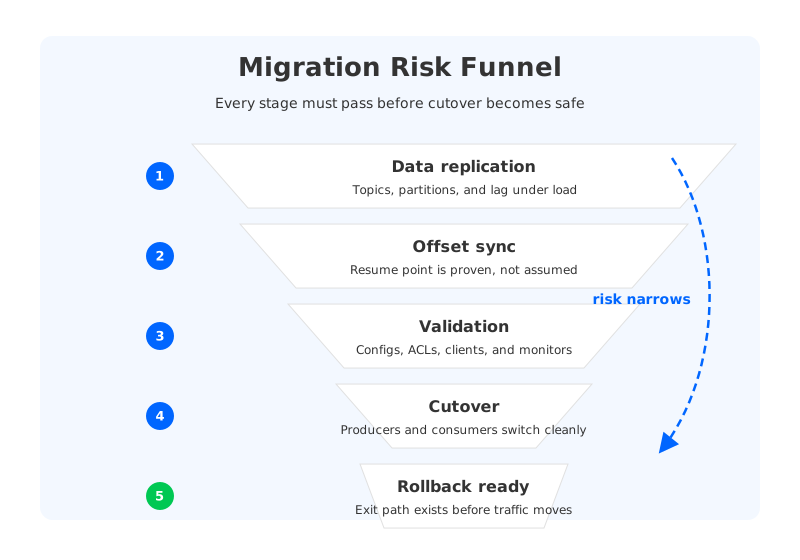
There are five places where "copy the data" stops being enough. First, the target topic has to contain the right records with the right partitioning assumptions. Second, consumer positions have to map correctly enough for the application to resume without replaying too much or skipping data. Third, topic configuration, ACLs, and client connectivity must match the intended target behavior. Fourth, producers need a cutover path that avoids split-brain writes. Fifth, rollback has to be designed before the first client points at the new cluster.
That is why the right question is not "what replaces MirrorMaker 2?" A better question is: what risk are you trying to remove from the migration?
| Migration concern | Why it matters | What to verify before choosing a tool |
|---|---|---|
| Offset behavior | Consumers rarely tolerate vague resume points during a production cutover. | Whether offsets are preserved, translated, periodically synced, or manually reset. |
| Topic and metadata sync | A topic can replicate successfully and still behave differently on the target. | Topic configs, ACLs, replication factor assumptions, quotas, and unsupported settings. |
| Cutover path | Producer switching is often riskier than bulk data copy. | Whether the tool includes proxying, promote/failover steps, or only replication. |
| Rollback | A migration without rollback is a one-way deployment. | Whether writes can be reconciled if the target must be abandoned. |
| Operational ownership | A replication system becomes part of the production path during migration. | Who runs it, scales it, monitors it, upgrades it, and debugs it under pressure. |
The table looks simple because the failure modes are familiar. The hard part is that a migration needs all of them to be acceptable at the same time. A tool can be excellent for disaster recovery and still be awkward for cluster consolidation. Another can make a cloud-to-cloud migration easier but be unavailable outside that provider's service boundary.
3Evaluation criteria for Kafka replication tools
Start with topology, not product names. A one-time migration into a new Kafka platform has different requirements from active-passive disaster recovery, active-active regional data sharing, or gradual application-by-application consolidation. If the source and target clusters live in the same vendor ecosystem, a managed replication feature may remove operational work. If the migration crosses vendors or includes self-managed Kafka, portability becomes more valuable than control-plane convenience.
The second criterion is offset fidelity. MM2 uses offset translation and checkpointing; managed services may copy or translate consumer group offsets under their own constraints; migration-oriented linking tools may preserve offsets byte-for-byte for supported paths. These are not interchangeable behaviors. For stateless consumers that can replay safely, approximate resume behavior may be fine. For Flink jobs, Kafka Streams applications, or stateful processors that carry their own position assumptions, offset semantics can define the whole migration design.
The third criterion is metadata completeness. AWS MSK Replicator documentation, for example, describes metadata as including topic configuration, ACLs, and consumer group offsets, while also noting that data replication is prioritized over metadata replication. Confluent Cluster Linking has its own mirror topic and consumer offset sync model. Apache MM2 has configurable topic config and group offset behavior. The practical takeaway is that "supports metadata sync" is not precise enough; you need to know which metadata, when it syncs, and what happens when the target has active clients.
Finally, consider failure behavior. Replication tools are judged during the boring steady state, but migration tools earn trust during the uncomfortable moment when lag is close to zero, producers are about to switch, and the rollback decision still has to be reversible. A good evaluation should include a rehearsed failure: stop a connector, break target credentials, create lag, cut over a non-critical consumer group, and prove that the team knows where the source of truth is.
4MirrorMaker 2 alternatives compared
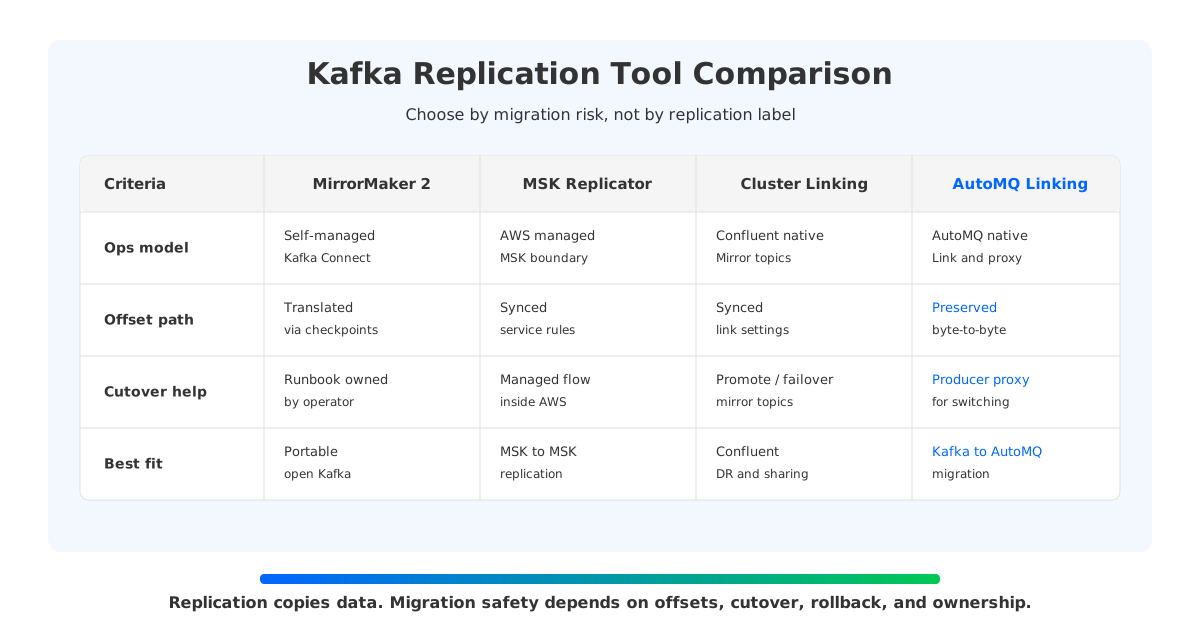
The main alternatives are not all trying to solve the same problem. That is why a flat "best alternative" list is usually misleading. A better comparison separates open replication, managed service replication, vendor-native cluster linking, and migration-oriented linking.
| Option | Strong fit | Boundaries to check |
|---|---|---|
| Apache MirrorMaker 2 | Portable Kafka-to-Kafka replication, custom self-managed workflows, open tooling. | Requires Kafka Connect operations, careful offset/checkpoint configuration, cutover and rollback runbooks. |
| Amazon MSK Replicator | Managed replication between MSK clusters, especially when the estate is already on AWS. | AWS service boundaries, supported regions/topologies, metadata timing, and source/target compatibility. |
| Confluent Cluster Linking | Confluent-native data sharing, migration, and DR patterns using mirror topics. | Licensing, Confluent deployment requirements, mirror topic behavior, offset sync setup, and client failover process. |
| AutoMQ Kafka Linking | Migration into AutoMQ where offset consistency and cutover safety are central goals. | Source compatibility, authentication mode support, and whether the migration target is AutoMQ. |
| Custom dual-write or application-level bridge | Narrow workloads where the application owns ordering, idempotency, and replay logic. | High application complexity; difficult to generalize across many topics and consumer groups. |
This framing keeps MM2 in its proper place. It is not a broken tool. It is an open, flexible replication framework that asks the operator to own more of the migration system. MSK Replicator and Confluent Cluster Linking move more responsibility into a vendor platform, which can be exactly right when the topology matches that platform. AutoMQ Kafka Linking is narrower in target scope but more explicit about migration mechanics: it is designed for moving Kafka workloads into AutoMQ, not as a generic multi-vendor replication fabric for every topology.
5Where AutoMQ Linking fits
AutoMQ Kafka Linking is relevant when the project is not merely "keep another cluster warm" but "move production workloads into AutoMQ with fewer cutover surprises." The official AutoMQ Cloud migration documentation describes Kafka Linking as a data synchronization and proxy task from an external Apache Kafka cluster to an AutoMQ Kafka instance. It also states that Kafka Linking supports byte-to-byte copy, synchronized consumption progress, and a producer proxy path for non-stop migration. Those claims are migration-specific, which is exactly why they belong in this comparison.
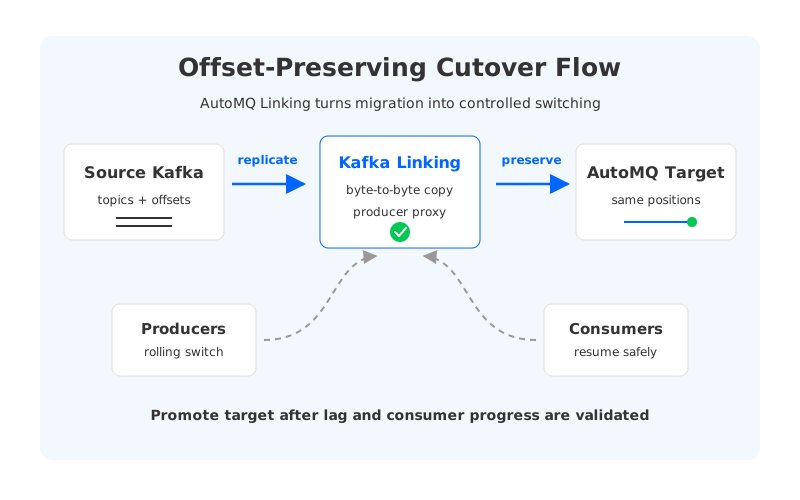
The offset-preserving part is the most important architectural difference. MM2 republishes records through a Connect pipeline, so target offsets can differ and must be translated through checkpointing. AutoMQ's documented Kafka Linking path is designed to keep message offset information unchanged during synchronization into AutoMQ. For workloads that store or reason about offsets outside a normal Kafka consumer group, that can remove a whole class of migration work.
The producer proxy path addresses a different risk. Traditional migration runbooks often require teams to pause producers, wait for replication lag to drain, switch client bootstrap servers, and hope the source remains quiet. AutoMQ's migration model adds a proxy path so producer traffic can be controlled during the switching process. This does not remove the need for testing; it changes the shape of the test. Instead of building every cutover guardrail around MM2, the team validates the linking path, consumer progress sync, and client switching behavior against the target AutoMQ environment.
AutoMQ is also not the answer to every MM2 use case. If your target is another self-managed Kafka cluster and you need a fully open-source replication setup, MM2 is still the natural starting point. If your DR plan stays entirely inside Confluent or AWS MSK, the native service may fit the control plane better. AutoMQ enters when the migration goal is to keep Kafka compatibility while changing the storage and operations model underneath: object-storage-backed persistence, stateless broker behavior, and a migration path built around offset consistency.
For teams already evaluating a Kafka replacement, that is the strategic point. A replication tool can help you move from one Kafka cluster to another. A migration-oriented platform should also reduce the reasons you keep doing painful cluster moves in the first place: broker disk pressure, rebalancing windows, over-provisioned storage, and operational work that comes from binding durable data to individual broker disks.
6Decision table
Use this table as a first-pass filter, then validate with a proof of concept. The POC should include at least one stateful consumer, one topic with non-default configuration, one security policy, one lag spike, and one rollback rehearsal. A clean demo path is useful, but the uncomfortable path is the one that tells you whether the tool belongs in production.
| If your main goal is... | Start with... | Why |
|---|---|---|
| Open Kafka-to-Kafka replication across self-managed clusters | MirrorMaker 2 | It is portable, configurable, and not tied to a vendor control plane. |
| MSK-to-MSK migration or DR inside AWS | MSK Replicator | It reduces the need to operate the replication layer yourself. |
| Confluent-to-Confluent migration, sharing, or DR | Confluent Cluster Linking | It is designed around Confluent mirror topics and platform workflows. |
| Migration from Kafka/MSK/Confluent Platform into AutoMQ | AutoMQ Kafka Linking | It targets offset-preserving migration and safer producer cutover into AutoMQ. |
| A few application-owned streams with custom semantics | Application-level bridge | It can work when the application already owns deduplication and ordering. |
The strongest migration plans are boring on purpose. They define what gets replicated, what gets translated, what gets preserved, what gets manually verified, and what happens if the target is rejected. MM2 can be part of that plan. So can MSK Replicator, Confluent Cluster Linking, or AutoMQ Kafka Linking. The safer choice is the one whose boundaries match your topology before the cutover starts.
7Sources
- Apache Kafka MirrorMaker configuration docs
- Apache Kafka geo-replication documentation
- Amazon MSK Replicator metadata and ACL replication
- Amazon MSK Replicator consumer group offset synchronization
- Confluent Cloud Cluster Linking configuration
- Confluent Cluster Linking mirror topics
- AutoMQ Kafka Linking migration overview
8FAQ
Is MirrorMaker 2 deprecated or unusable?
No. MirrorMaker 2 is still a valid Apache Kafka replication tool. It is often a good fit when you want open, portable Kafka-to-Kafka replication and can operate Kafka Connect carefully. The concern is not basic usability; it is whether MM2 alone covers the offset, cutover, rollback, and metadata needs of your migration.
What is the biggest difference between MM2 and Cluster Linking?
MM2 is a Kafka Connect-based replication framework. Cluster Linking is a vendor-native linking model, most commonly associated with Confluent deployments, that uses mirror topics and platform-managed workflows. The operational model, licensing, offset sync behavior, and deployment boundary are different, so the right answer depends on where your source and target clusters run.
Does MSK Replicator replace MirrorMaker 2?
It can replace MM2 for some AWS-centered MSK replication and migration scenarios. It is managed by AWS and includes metadata concepts such as topic configurations, ACLs, and consumer group offsets, but you still need to verify supported regions, cluster types, authentication, topology, and offset behavior for your exact case.
When should I consider AutoMQ Kafka Linking instead of MM2?
Consider AutoMQ Kafka Linking when the target platform is AutoMQ and the migration requires stronger cutover support than a generic replication job provides. Its documented focus is byte-to-byte copy, synchronized consumption progress, and producer proxying during migration into AutoMQ.
Can any tool guarantee zero-risk Kafka migration?
No. A safer tool reduces specific failure modes, but production migration still needs testing, observability, rollback design, and application coordination. Treat "zero downtime" as a migration objective that must be proven under your workload, not as a phrase that removes the need for a rehearsal.


